-
02-课程发布
一、业务描述
教学机构可以对通过审核的课程进行发布操作,此时后台会为该课程生成一个html页面发送到cdn上方便用户访问
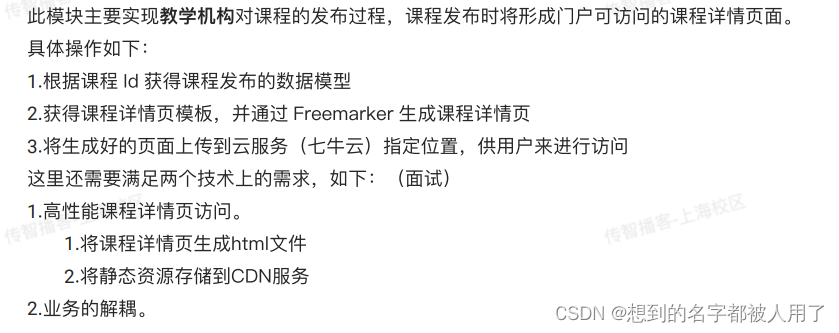
二、数据模型
课程基础信息表

课程发布表
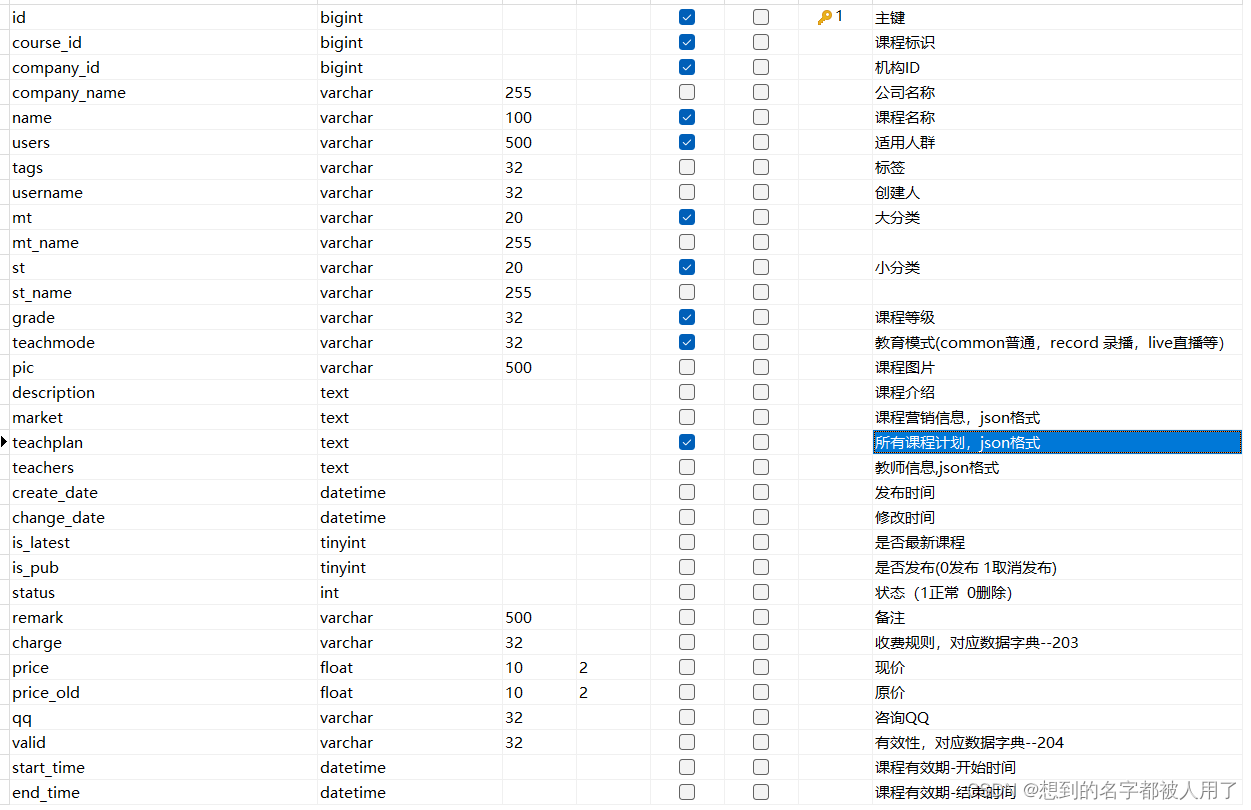
课程发布消息表

三、业务流程
由于页面的生成以及上传是一个较为费时的操作,故我们采用消息中间件来处理该业务,改善我们的用户体验
(一)消息中间件如何保证数据一致性?
消息中间件的可靠性我们从三个方面下手:生产者、中间件、消费者,接下来我给大家逐一讲解它们保证可靠性的手段
-
生产者:通过失败重试机制来保证每一条消息一定发送到mq,当生产者发送消息到mq时,若成功达交换机,则mq会返回给它一个ack,生产者收到ack后会修改coursePubMsg状态为已发送。若未成功到达交换机收到nack,不做处理。我们再设置定时任务,发送那些状态为未发送的消息,若多次发送均未成功,则将该消息记录到日志中不再发送,等待人工处理。
若消息未能成功到达rabbitMQ则会触发spring提供的重试机制,若超过指定次数仍然未到达mq,触发生产者的回调函数,我们在该回调函数中将该消息记录到日志中,等待人工干预。 -
消费者:我们采取springboot中自带的自动确认模式(没报异常就发ack,报异常就reject),当抛出异常后也会触发springboot的重试机制(配置文件开启),此时属于本地重试,不会将该消息重新发回给mq,当超过指定次数仍然报异常则将该消息发送到指定队列(通过rabbitmq提供的MessageReCoverer实现),我们再对这个队列上的消息进行特殊处理即可
-
mq:开启消息持久化即可。
(二)如何保证消息幂等性
保证幂等性的做法一般有4种:数据表字段、redis、数据表、分布式锁。 此项目采用数据表字段的方式保证幂等性,若coursePub的isPub为1说明已经消费过,0说明未消费。
(三)流程图

(四)配置及代码
消费端重试机制

生产者重试机制
spring.rabbitmq.template.retry.enabled=true spring.rabbitmq.template.retry.initial-interval=1000ms spring.rabbitmq.template.retry.max-attempts=10 spring.rabbitmq.template.retry.max-interval=10000ms spring.rabbitmq.template.retry.multiplier=2- 1
- 2
- 3
- 4
- 5
MessageRecover
@Bean public DirectExchange errorMessageExchange() { return new DirectExchange(errorExchangeName); } @Bean public Queue errorQueue() { return new Queue(errorqueueName, true); } @Bean public Binding errorBinding(Queue errorQueue, DirectExchange errorMessageExchange) { return BindingBuilder.bind(errorQueue).to(errorMessageExchange).with(errorroutingkey); } @Bean public MessageRecoverer republishMessageRecoverer(RabbitTemplate rabbitTemplate) { return new RepublishMessageRecoverer(rabbitTemplate, errorExchangeName, errorroutingkey); }- 1
- 2
- 3
- 4
- 5
- 6
- 7
- 8
- 9
- 10
- 11
- 12
- 13
- 14
- 15
- 16
- 17
- 18
- 19
生产者业务代码
/** * 1.校验业务参数 * courseBase * 验证companyId * 验证审核状态(只能为未提交或被拒绝) * courseMarket * 判断是否存在,根据courseId * teachPlan * 获取树形结构,根据courseId和companyId * courseTeacher * 获取该课的教师列表 * 2.根据courseId和companyId查询coursePub记录 * 存在: * 使用查询到的coursePub, * 查询courseMarket、courseTeacher、teacherPlan * 向system-service发送st、mt,返回stName、mtName * 使用上面的对象修改coursePub的属性,更新coursePub记录 * 不存在: * 创建新的coursePub对象, * 查询courseMarket、courseTeacher、teacherPlan * 向system-service发送st、mt,返回stName、mtName * 使用上面的对象初始化coursePub的属性,插入coursePub记录 * 3.根据主键回传,查询coursePub * 4.封装coursePubMsg信息,保存到数据库中 * 5.向coursePubConsumer发送消息,让其 * * * * @param courseId * @param companyId */ @Transactional @Override public void publish(Long courseId, Long companyId) { //1.校验业务参数 // courseBase // 验证companyId // 验证审核状态(只能为未提交或被拒绝) // courseMarket // 判断是否存在,根据courseId // teachPlan // 获取树形结构,根据courseId和companyId // courseTeacher // 获取该课的教师列表 //2.根据courseId和companyId查询coursePub记录 // 存在: // 使用查询到的coursePub, // 查询courseMarket、courseTeacher、teacherPlan // 向system-service发送st、mt,返回stName、mtName // 使用上面的对象修改coursePub的属性,更新coursePub记录 // 不存在: // 创建新的coursePub对象, // 查询courseMarket、courseTeacher、teacherPlan // 向system-service发送st、mt,返回stName、mtName // 使用上面的对象初始化coursePub的属性,插入coursePub记录 //3.根据主键回传,查询coursePub CoursePubDTO coursePubDTO = courseBaseService.pubClass(courseId, companyId, true); //4.封装coursePubMsg信息,保存到数据库中 CoursePubMsg coursePubMsg = new CoursePubMsg(); coursePubMsg.setCourseId(courseId); coursePubMsg.setPubId(coursePubDTO.getId()); coursePubMsg.setCompanyId(companyId); coursePubMsg.setPubName(coursePubDTO.getName()); coursePubMsg.setPubStatus(CoursePubMsg.UNSENT); boolean save = coursePubMsgService.save(coursePubMsg); if(!save){ ExceptionCast.cast(ContentErrorCode.E_120206); } CorrelationData correlationData = new CorrelationData(); correlationData.setId(coursePubDTO.getId().toString()); //添加comfireCallback 保证发送方的消息可靠性 correlationData.getFuture().addCallback( comfire->{ System.out.println("消息到达rabbitmq"); //消息成功到达交换机 if(comfire.isAck()){ //修改coursePubMsg和courseBase的状态 changePublishStatus(coursePubDTO.getId(),coursePubDTO.getCourseId()); } }, throwable ->{ log.error("课程发布消息未能到达交换机,原因:{}",throwable.getMessage()); } ); String json = JsonUtil.objectTojson(coursePubMsg); rabbitTemplate.convertAndSend(exchange,routingkey,json,correlationData); } /** * 1.根据pubId和发送状态获取coursePubMsg记录 * 若不存在说明已经被修改过,直接返回 * 2.根据courseId修改courseBase的状态为已经发布 * 3.修改coursePubMsg的发送状态 * @param pubId */ @Transactional public void changePublishStatus(Long pubId,Long courseId){ //1.根据pubId和发送状态获取coursePubMsg记录 // 若不存在说明已经被修改过,直接返回 CoursePubMsg msg = coursePubMsgService.lambdaQuery().eq(CoursePubMsg::getPubId, pubId).eq(CoursePubMsg::getPubStatus, CoursePubMsg.UNSENT).one(); if(ObjectUtils.isEmpty(msg)){ log.info("修改消息数据已经处理,无需操作,CoursPubId:{}",pubId); return ; } //2.根据courseId修改courseBase的状态为已经发布 boolean update = courseBaseService.lambdaUpdate().set(CourseBase::getAuditStatus, CourseAuditEnum.AUDIT_PUBLISHED_STATUS.getCode()).eq(CourseBase::getId, courseId).update(); if(!update){ log.error("修改课程审核状态为发布失败,id:{}",courseId); return ; } //3.修改coursePubMsg的发送状态 boolean updateMsg = coursePubMsgService.lambdaUpdate().set(CoursePubMsg::getPubStatus, CoursePubMsg.SEND).eq(CoursePubMsg::getPubId, pubId).update(); if(!updateMsg){ log.error("修改发布消息状态为已发送失败,id:{}",pubId); ExceptionCast.cast(ContentErrorCode.E_120205); } } @Override public void resendMsg(CoursePubMsg coursePubMsg) { Long courseId = coursePubMsg.getCourseId(); Long companyId = coursePubMsg.getCompanyId(); CoursePubDTO coursePubDTO = courseBaseService.pubClass(courseId, companyId, true); CorrelationData correlationData = new CorrelationData(); correlationData.setId(coursePubDTO.getId().toString()); //添加comfireCallback 保证发送方的消息可靠性 correlationData.getFuture().addCallback( comfire->{ System.out.println("消息到达rabbitmq"); //消息成功到达交换机 if(comfire.isAck()){ //修改coursePubMsg和courseBase的状态 changePublishStatus(coursePubDTO.getId(),coursePubDTO.getCourseId()); } }, throwable ->{ log.error("课程发布消息未能到达交换机,原因:{}",throwable.getMessage()); } ); String json = JsonUtil.objectTojson(coursePubMsg); rabbitTemplate.convertAndSend(exchange,routingkey,json,correlationData); }- 1
- 2
- 3
- 4
- 5
- 6
- 7
- 8
- 9
- 10
- 11
- 12
- 13
- 14
- 15
- 16
- 17
- 18
- 19
- 20
- 21
- 22
- 23
- 24
- 25
- 26
- 27
- 28
- 29
- 30
- 31
- 32
- 33
- 34
- 35
- 36
- 37
- 38
- 39
- 40
- 41
- 42
- 43
- 44
- 45
- 46
- 47
- 48
- 49
- 50
- 51
- 52
- 53
- 54
- 55
- 56
- 57
- 58
- 59
- 60
- 61
- 62
- 63
- 64
- 65
- 66
- 67
- 68
- 69
- 70
- 71
- 72
- 73
- 74
- 75
- 76
- 77
- 78
- 79
- 80
- 81
- 82
- 83
- 84
- 85
- 86
- 87
- 88
- 89
- 90
- 91
- 92
- 93
- 94
- 95
- 96
- 97
- 98
- 99
- 100
- 101
- 102
- 103
- 104
- 105
- 106
- 107
- 108
- 109
- 110
- 111
- 112
- 113
- 114
- 115
- 116
- 117
- 118
- 119
- 120
- 121
- 122
- 123
- 124
- 125
- 126
- 127
- 128
- 129
- 130
- 131
- 132
- 133
- 134
- 135
- 136
- 137
- 138
- 139
- 140
- 141
- 142
- 143
- 144
- 145
- 146
- 147
- 148
- 149
- 150
- 151
- 152
消费者业务代码
/** * 1.消息幂等性判断 * 通过coursePub的isPub字段判断该消息是否被消费 * 2.根据coursePubDto生成数据模型,生成页面 * 3.修改coursePub状态 * 4.将页面上传到七牛云 * 参数:accessKey,secretKey、resourceKey、html内容 * @param coursePubMsg */ @Override public void publishPage(CoursePubMsg coursePubMsg) { Long courseId = coursePubMsg.getCourseId(); Long companyId = coursePubMsg.getCompanyId(); //1.消息幂等性判断 // 通过coursePub的isPub字段判断该消息是否被消费 CoursePub coursePub = this.lambdaQuery().eq(CoursePub::getCourseId, courseId).eq(CoursePub::getCompanyId, companyId).eq(CoursePub::getIsPub, 0).one(); if(ObjectUtils.isEmpty(coursePub)){ log.info("该coursePubMsg已经被消费过,id {}",coursePubMsg.getPubId()); return ; } //2.根据coursePubDto生成数据模型 CoursePubDTO coursePubDTO = CoursePubConvert.INSTANCE.entity2dto(coursePub); Map- 1
- 2
- 3
- 4
- 5
- 6
- 7
- 8
- 9
- 10
- 11
- 12
- 13
- 14
- 15
- 16
- 17
- 18
- 19
- 20
- 21
- 22
- 23
- 24
- 25
- 26
- 27
- 28
- 29
- 30
- 31
- 32
- 33
- 34
- 35
- 36
- 37
- 38
- 39
- 40
- 41
- 42
- 43
- 44
- 45
- 46
- 47
- 48
- 49
-
-
相关阅读:
【网络原理】应用层协议概述
JS:给数字添加千分位符(每3位数用逗号隔开)
【OpenCV学习】第2课:矩阵的掩膜操作(提高对比度)
基于深度学习的小学语文“输出驱动”教学研究课题方案
浅谈-动态路由之OSPF的理解
在线 sha1 加密
常用类15:Math类
揭秘 .NET 中的 TimerQueue(上)
QT 简易计算器
JColorChooser 和JFileChooser
- 原文地址:https://blog.csdn.net/qq_42861526/article/details/126022817

- 最新文章
-
沪漂五周年了:我越来越迷茫了
Agentic Skill Routing 实战:别再把所有 Skill 塞进 AI Agent 上下文
MySQL-Seconds_behind_master的精度误差
[MAF预定义ChatClient中间件-03]CachingChatClient——利用缓存省钱省时间
AI的至暗历史:从万众期待到被政府撤资,AI的两次死亡徘徊
Agent OS :五种驯服不确定性的范式
PortSwigger SQL注入LAB11
数据库即时编译JIT
[Begin]AI Learn Data Day 0
深度学习进阶(二十七)现代 LLM 的核心架构设计其二:SwiGLU