-
Unity简单实现对话功能
提示:以下是本篇文章正文内容简单说明
主要使用TextAsset组件
TextAsse相关使用
- 描述
- 文本文件资源。
- 您可以将项目中的原始文本文件用作资源,通过此类获取其 内容。此外,如果要从二进制文件访问数据,可将这种文件作为原始字节数组进行访问。请参阅 Text Asset 手册页,了解有关将文本和二进制文件作为文本资源导入项目的更多详细信息。
说明:可以使用的格式

- 变量
变量 作用 bytes 文本资源的原始字节。(只读) text 字符串形式的 .txt 文件的文本内容。(只读) - 构造函数
函数名 作用 TextAsset 使用指定文本内容创建一个新 TextAsset。此构造函数创建 TextAsset,它与纯文本文件不同。当使用 AssetDatabase 类保存到磁盘时,应使用 .asset 扩展名保存 TextAsset。 - 公共函数
函数名 作用 ToString 返回 TextAsset 的内容。 - 继承的成员
- 变量
变量 作用 hideFlags 该对象应该隐藏、随场景一起保存还是由用户修改? name 对象的名称。 - 公共函数
公共函数 作用 GetInstanceID 返回对象的实例 ID。 - 静态函数
函数名 作用 Destroy 移除 GameObject、组件或资源。 DestroyImmediate 立即销毁对象 /obj/。强烈建议您改用 Destroy。 DontDestroyOnLoad 在加载新的 Scene 时,请勿销毁 Object。 FindObjectOfType 返回第一个类型为 type 的已加载的激活对象。 FindObjectsOfType 返回所有类型为 type 的已加载的激活对象的列表。 Instantiate 克隆 original 对象并返回克隆对象。 协程的相关使用
MonoBehaviour.StartCoroutine
public Coroutine StartCoroutine (IEnumerator routine);- 描述
- 启动协程。
- 可以使用 yield 语句,随时暂停协程的执行。使用 yield 语句时,协程会暂停执行,并在下一帧自动恢复。请参阅协程文档以了解更多详细信息。
- 协程非常适合用于在若干帧中对行为建模。StartCoroutine 方法在第一个 yield 返回时返回,不过可以生成结果,这会等到协程完成执行。即使多个协程在同一帧中完成,也不能保证它们按照与启动相同的顺序结束。
- 生成的任何类型(包括 null)都会导致执行在后面的帧返回,除非协程已停止或完成。
注意:可以使用 MonoBehaviour.StopCoroutine 和 MonoBehaviour.StopAllCoroutines 停止协程。销毁 MonoBehaviour 时,或是如果 MonoBehaviour 所附加到的 GameObject 已禁用,也会停止协程。 禁用 MonoBehaviour 时,不会停止协程。
相关素材
因为相关素材需要9.99$,这里就直接分享Github链接了
GitHub链接:点击跳转到GitHub下载素材
UI相关创建


创建TextAsset支持的格式对话文本
如:
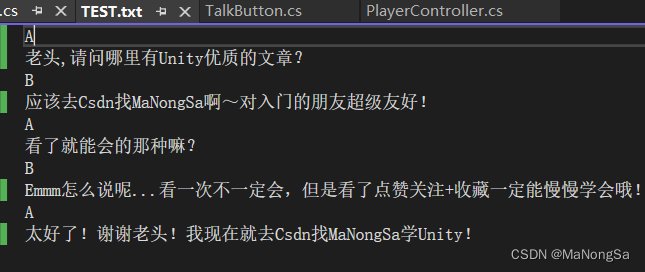
1、 创建Dialogue脚本,按下R进行简单对话
using System.Collections.Generic; using UnityEngine; using UnityEngine.UI; public class Dialogue : MonoBehaviour { public Image image; public Text text; public TextAsset textAsset; public int index; private Liststrings = new List (); private void Awake() { DialogueS(textAsset); index = 0; } private void OnEnable() { text.text = strings[index]; index++; } private void Update() { if (Input.GetKeyDown(KeyCode.R) && strings.Count == index) { gameObject.SetActive(false); index = 0; return; } if(Input.GetKeyDown(KeyCode.R)) { text.text = strings[index]; index++; } } private void DialogueS(TextAsset textAsset) { strings.Clear(); index = 0; var textList=textAsset.text.Split('\n'); for (int i = 0; i < textList.Length; i++) { strings.Add(textList[i]); } } } - 1
- 2
- 3
- 4
- 5
- 6
- 7
- 8
- 9
- 10
- 11
- 12
- 13
- 14
- 15
- 16
- 17
- 18
- 19
- 20
- 21
- 22
- 23
- 24
- 25
- 26
- 27
- 28
- 29
- 30
- 31
- 32
- 33
- 34
- 35
- 36
- 37
- 38
- 39
- 40
- 41
- 42
- 43
- 44
- 45
- 46
- 47
- 48
- 49
- 50
- 51
- 52
- 53
- 54
- 55
效果如下:

2、 通过协程使文章文本逐渐显示、快速显示、图片切换以及跳过。
using System.Collections; using System.Collections.Generic; using UnityEngine; using UnityEngine.UI; public class Dialogue : MonoBehaviour { public Image image; public Text text; public TextAsset textAsset; public GameObject DialogueObj; public int index; public float showTextTimer; private bool isOnClickR; private bool isWhetherFast; public Sprite A_Img, B_Img; private Liststrings = new List (); private void Awake() { DialogueS(textAsset); } private void OnEnable() { text.text = strings[index]; index++; isOnClickR = true; } private void Update() { if (Input.GetKeyDown(KeyCode.R) && strings.Count == index) { gameObject.SetActive(false); index = 0; return; } //if(Input.GetKeyDown(KeyCode.R) && isOnClickR) //{ // //text.text = strings[index]; // //index++; // StartCoroutine(GraduallyRevealed()); //} if (Input.GetKeyDown(KeyCode.R)) { if (isOnClickR && !isWhetherFast) { StartCoroutine(GraduallyRevealed()); } else if (!isOnClickR) { isWhetherFast = !isWhetherFast; } } } private void DialogueS(TextAsset textAsset) { strings.Clear(); index = 0; var textList=textAsset.text.Split('\n'); for (int i = 0; i < textList.Length; i++) { strings.Add(textList[i]); } } IEnumerator GraduallyRevealed() { text.text = ""; isOnClickR = false; switch (strings[index]) { case "A": image.sprite = A_Img; break; case "B": image.sprite = B_Img; break; } //for (int i = 0; i < strings[index].Length; i++) //{ // text.text += strings[index][i]; // yield return new WaitForSeconds(showText); //} int letter = 0; while (!isWhetherFast && letter < strings[index].Length-1) { text.text += strings[index][letter]; letter++; yield return new WaitForSeconds(showTextTimer); } text.text = strings[index]; isOnClickR = true ; isWhetherFast = false; index++; } public void SkipDialogue() { text.text = ""; index = 0; isWhetherFast = false; isOnClickR = false; StopAllCoroutines(); DialogueObj.SetActive(false); } } - 1
- 2
- 3
- 4
- 5
- 6
- 7
- 8
- 9
- 10
- 11
- 12
- 13
- 14
- 15
- 16
- 17
- 18
- 19
- 20
- 21
- 22
- 23
- 24
- 25
- 26
- 27
- 28
- 29
- 30
- 31
- 32
- 33
- 34
- 35
- 36
- 37
- 38
- 39
- 40
- 41
- 42
- 43
- 44
- 45
- 46
- 47
- 48
- 49
- 50
- 51
- 52
- 53
- 54
- 55
- 56
- 57
- 58
- 59
- 60
- 61
- 62
- 63
- 64
- 65
- 66
- 67
- 68
- 69
- 70
- 71
- 72
- 73
- 74
- 75
- 76
- 77
- 78
- 79
- 80
- 81
- 82
- 83
- 84
- 85
- 86
- 87
- 88
- 89
- 90
- 91
- 92
- 93
- 94
- 95
- 96
- 97
- 98
- 99
- 100
- 101
- 102
- 103
- 104
- 105
- 106
- 107
- 108
- 109
- 110
- 111
- 112
- 113
- 114
- 115
- 116
- 117
- 118
- 119
- 120
- 121
- 122
- 123
效果如下:

-
相关阅读:
java乡镇卫生院信息管理计算机毕业设计源码
Python 竟然可以绘制3D图像!
Android耗电量测试
狂神说笔记 快速入门Nginx
剑指offer全集系列Java版本(2)
【02】Hadoop入门
ElementUl-布局+分页+表格+导航栏
你的开发套件已到货「GitHub 热点速览」
Oracle之RMAN联机和脱机备份(二)
【链表习题集1】整体和局部反转链表&同频和快慢指针&合并链表
- 原文地址:https://blog.csdn.net/m0_61490399/article/details/126017144