-
jar文件 反编译(IDEA环境)
说明
想要对一些 jar 文件进行反编译,由于现在 IDEA 使用的人比较多,比较方便的方法是,可以使用 IDEA 中的插件进行反编译。
IDEA 插件
可以使用 IDEA 中的 "Java Bytecode Decompiler",该插件一般都内置了,可以直接使用。找到该插件的位置。
-
Java Bytecode Decompiler 位置:D:\DevTools\JetBrains\IntelliJ IDEA 2021.1\plugins\java-decompiler\lib\java-decompiler.jar
-
要反编译的jar包位置:F:\javadecom\helloworld.jar
-
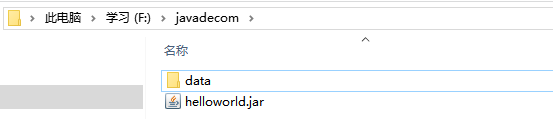
打开控制台,进入到要反编译的 jar 包的目录中,反编译命令:
java -cp "D:/DevTools/JetBrains/IntelliJ IDEA 2021.1/plugins/java-decompiler/lib/java-decompiler.jar" org.jetbrains.java.decompiler.main.decompiler.ConsoleDecompiler -dgs=true F:/javadecom/helloworld.jar data
说明
-
org.jetbrains.java.decompiler.main.decompiler.ConsoleDecompiler:是插件的启动类。
-
data:是在要反编译的 jar 包路径下的一个文件夹,需要提前创建好,反编译后的结果会放在该文件夹中。
执行命令,此时出现一个错误,如下图所示:
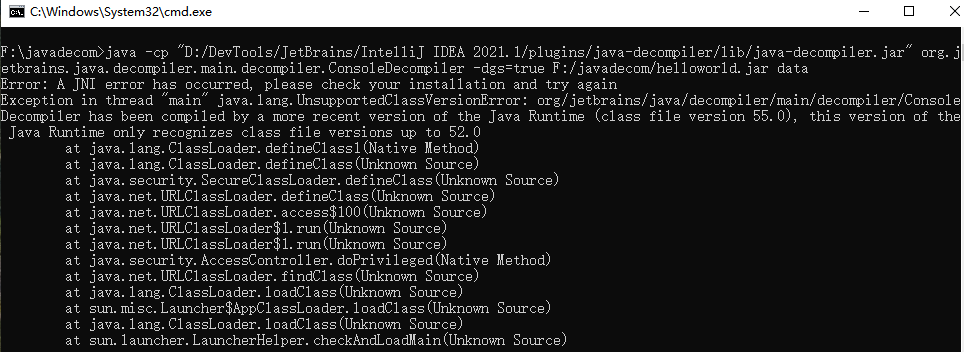
错误详细信息:
- F:\javadecom>java -cp "D:/DevTools/JetBrains/IntelliJ IDEA 2021.1/plugins/java-decompiler/lib/java-decompiler.jar" org.jetbrains.java.decompiler.main.decompiler.ConsoleDecompiler -dgs=true F:/javadecom/helloworld.jar data
- Error: A JNI error has occurred, please check your installation and try again
- Exception in thread "main" java.lang.UnsupportedClassVersionError: org/jetbrains/java/decompiler/main/decompiler/ConsoleDecompiler has been compiled by a more recent version of the Java Runtime (class file version 55.0), this version of the Java Runtime only recognizes class file versions up to 52.0
- at java.lang.ClassLoader.defineClass1(Native Method)
- at java.lang.ClassLoader.defineClass(Unknown Source)
- at java.security.SecureClassLoader.defineClass(Unknown Source)
- at java.net.URLClassLoader.defineClass(Unknown Source)
- at java.net.URLClassLoader.access$100(Unknown Source)
- at java.net.URLClassLoader$1.run(Unknown Source)
- at java.net.URLClassLoader$1.run(Unknown Source)
- at java.security.AccessController.doPrivileged(Native Method)
- at java.net.URLClassLoader.findClass(Unknown Source)
- at java.lang.ClassLoader.loadClass(Unknown Source)
- at sun.misc.Launcher$AppClassLoader.loadClass(Unknown Source)
- at java.lang.ClassLoader.loadClass(Unknown Source)
- at sun.launcher.LauncherHelper.checkAndLoadMain(Unknown Source)
意思是 JDK11 编译的代码,无法使用 JDK8 反编译。
此时需要下载一个 JDK11,下载好后,可以指定使用 JDK11 进行反编译。
- JDK11 位置:D:\DevTools\Java\jdk-11.0.12\bin\java.exe
指定使用 JDK11 反编译命令:
D:/DevTools/Java/jdk-11.0.12/bin/java.exe -cp "D:/DevTools/JetBrains/IntelliJ IDEA 2021.1/plugins/java-decompiler/lib/java-decompiler.jar" org.jetbrains.java.decompiler.main.decompiler.ConsoleDecompiler -dgs=true F:/javadecom/helloworld.jar data
反编译完成后,会在 data 目录中生成 jar 反编译的文件。
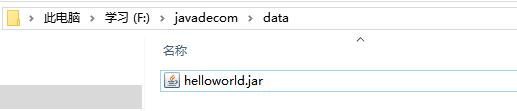
将该文件解压出来,就是反编译的代码。
-
-
相关阅读:
Tomcat的安装与Maven依赖Servlet的使用
Java:设计模式之结构型-装饰者模式(decorator pattern)
返回Series或DataFrame中指定列中指定数量的最小值nsmallest()函数
区块链概念集合
BERT源码实现与解读(Pytorch)
2022 年最新【Java 经典面试 800 题】面试必备,查漏补缺;多线程 +spring+JVM 调优 + 分布式 +redis+ 算法
技术干货| 如何运用 MongoDB 部分索引优化性能问题?
[附源码]计算机毕业设计springboot基于SpringBoot的演唱会购票系统论文2022
使用Git把项目上传到Gitee的详细步骤
对一个即将上线的网站,如何做一个较完整的Web应用/网站测试?
- 原文地址:https://blog.csdn.net/xsq123/article/details/125996990