-
Springboot @Profile使用详解
简介
@Profile这个注解主要是和spring.profile.active这个配置结合使用的,让我们的配置文件使用的更加灵活,比如原来我们写:spring.profile.active=dev,那么整个项目都会使用application-dev.properites下的配置文件,但是如果我们在类或者方法上加上@Profile("dev, prod, xxxx")注解,这样就比较灵活了,比如在一个bean上加上@Profile("prod"),那么这个bean只会在 spring.profile.active=prod的时候才被实例化,以此类推
在项目中,有时我们需要能根据当前环境,动态的激活和切换一系列组件,这个借助 Spring 提供的 @Profile 注解即可实现,下面通过样例进行演示。
@Profile 注解的作用是指定组件在哪个环境的情况下才能被注册到容器中,若不指定,任何环境下都能注册这个组件。
- 加了@Profile 注解的 bean,只有这个环境被激活的时候才能注册到容器中。默认是 default 环境。
- 若 @Profile 注解写在配置类上,只有在指定的环境的时候,整个配置类里面的所有配置才能开始生效。
演示
根据当前环境的不同(dev 或 prod),自动实例化对应的 DataSource
- @Configuration
- @PropertySource(value = {"classpath:/dbconfig.properties"})
- public class ProfileBeanConfig implements EmbeddedValueResolverAware {
- //数据库连接用户名
- @Value(value = "${jdbc.username}")
- private String username;
- //数据库连接密码
- private String password;
- //开发环境数据源
- @Bean(value = "dataSourceDev")
- @Profile(value = "dev")
- public DataSource dataSourceDev(@Value("${jdbc.driverClass}") String driverClass)
- throws PropertyVetoException {
- ComboPooledDataSource comboPooledDataSource = new ComboPooledDataSource();
- comboPooledDataSource.setUser(this.username);
- comboPooledDataSource.setPassword(this.password);
- comboPooledDataSource.setDriverClass(driverClass);
- comboPooledDataSource.setJdbcUrl("jdbc:mysql://localhost:3306/dev");
- return comboPooledDataSource;
- }
- //生产环境数据源
- @Bean(value = "dataSourceProduction")
- @Profile("prod")
- public DataSource dataSourceProduction(@Value("${jdbc.driverClass}") String driverClass)
- throws PropertyVetoException {
- ComboPooledDataSource comboPooledDataSource = new ComboPooledDataSource();
- comboPooledDataSource.setUser(this.username);
- comboPooledDataSource.setPassword(this.password);
- comboPooledDataSource.setDriverClass(driverClass);
- comboPooledDataSource.setJdbcUrl("jdbc:mysql://localhost:3306/production");
- return comboPooledDataSource;
- }
- }
有时候我们会有这样的一个需求,在生产环境或者开发环境我们所看到的功能是不同的,这便需要我们根据配置项来激活不同的功能。
比如一些接口在开发环境中无法调用,那么在开发环境中就需要 mock 数据。因此我们可以写一个 mock 数据接口类,专门供开发环境使用。而生产环境则使用真实的接口调用类,二者通过 @Profile 注解来自动激活生效。
首先我们先定义一个 Service 的接口:
- public interface ProductService {
- String getProductInfo(Long id);
- }
接着我们创建两个实现类,分别对应开发环境和生产环境:
- @Service
- @Profile("dev")
- public class MockProductServiceImpl implements ProductService {
- @Override
- public String getProductInfo(Long id) {
- return "这是开发环境数据:" + id;
- }
- }
- @Service
- @Profile("prod")
- public class ProductServiceImpl implements ProductService {
- @Override
- public String getProductInfo(Long id) {
- //return productResource.getProductInfo(id);
- return "这是生产环境数据:" + id;
- }
- }
最后创建一个 Controller 调用 Service 接口:
- @RestController
- public class TestController {
- @Autowired
- private ProductService productService;
- @GetMapping("/hello")
- public String hello(@RequestParam("id") Long id) {
- return productService.getProductInfo(id);
- }
- }
开始测试,首先我们编辑 application.properties 文件
spring.profiles.active=dev访问 Controller 接口可以看到调用的是 MockProductServiceImpl 这个 Servcie:
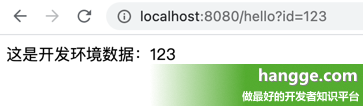
spring.profiles.active=prod访问 Controller 接口可以看到调用的是 ProductServiceImpl 这个 Servcie:

-
相关阅读:
苹果系统_安装matplotlib_&_pygame,以pycharm导入模块
Xinetd服务介绍
CF33b-B. String Problem
奶爸级教学---webpack详细教学
AJAX 入门笔记
web前端设计与开发期末作品_期末大作业-疫情
Activiti 7 源码学习
学C++要不要先学C语言?
力扣题目学习笔记(OC + Swift)
GLSL (2)数据类型
- 原文地址:https://blog.csdn.net/Maxiao1204/article/details/125902101
