• SSL证书部署


    当我们申请完SSL证书后,还需要对nginx进行相关配置,才可以转为安全连接。
    下载证书文件到服务器

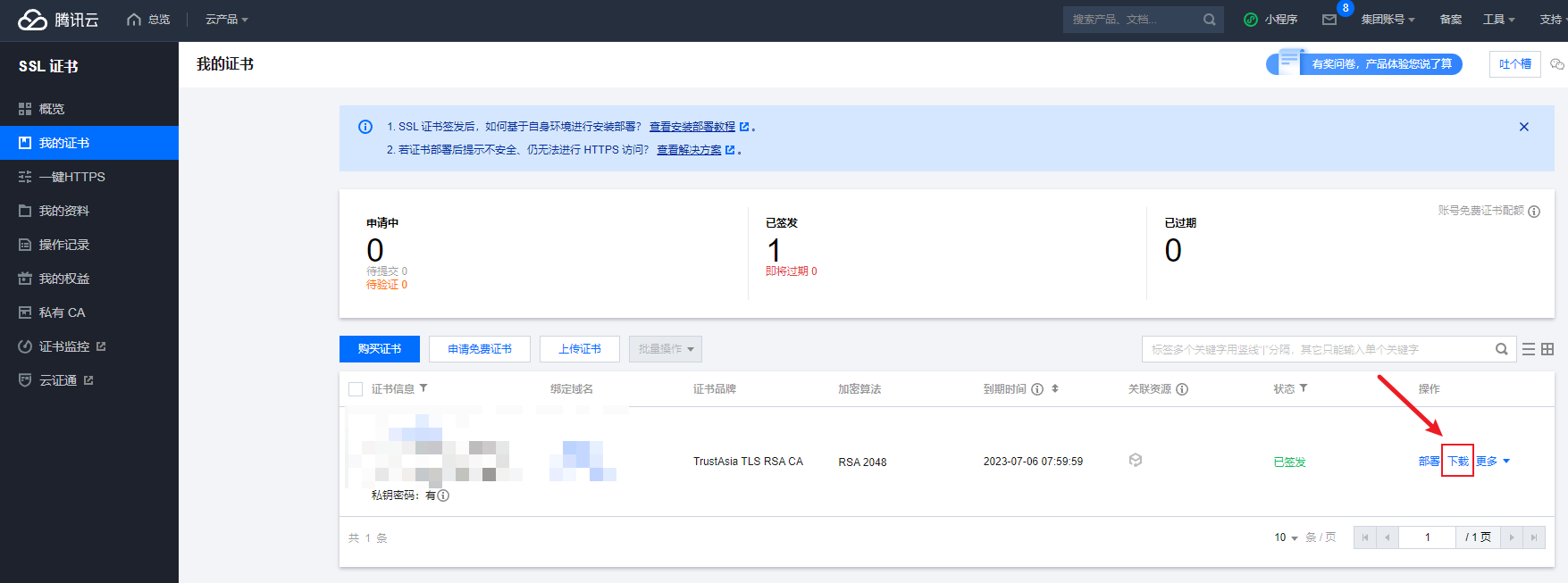
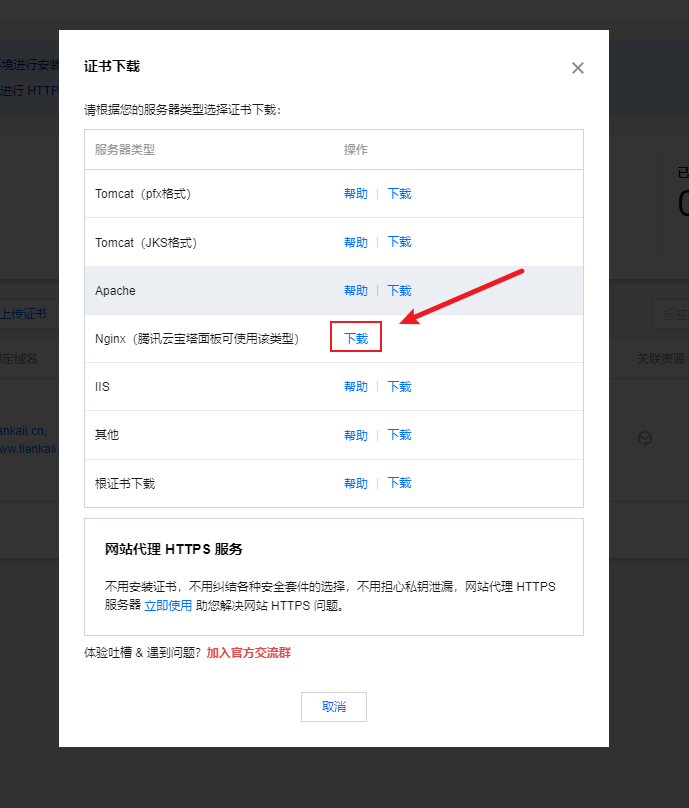
    1. 首先,进入服务器控制台,下载证书到本地。

    ![image.png](https://img-blog.csdnimg.cn/img_convert/920be43a932d4224c7205550eec92239.png#clientId=ud0ca9c0e-c348-4&crop=0&crop=0&crop=1&crop=1&from=paste&height=653&id=uf7b16ae7&margin=[object Object]&name=image.png&originHeight=653&originWidth=1755&originalType=binary&ratio=1&rotation=0&showTitle=false&size=77083&status=done&style=shadow&taskId=ub9c83b1f-921d-459b-93e1-ed300e0188d&title=&width=1755)
    ![image.png](https://img-blog.csdnimg.cn/img_convert/cadf3c7f55866c1f2511ce0ca546faae.png#clientId=ud0ca9c0e-c348-4&crop=0&crop=0&crop=1&crop=1&from=paste&height=436&id=u68f60a67&margin=[object Object]&name=image.png&originHeight=808&originWidth=689&originalType=binary&ratio=1&rotation=0&showTitle=false&size=49967&status=done&style=shadow&taskId=u7d711b29-ea4a-4b4f-9597-1a61cd72c9f&title=&width=372)
    上述截图操作后,我们可以下载证书到本地了。
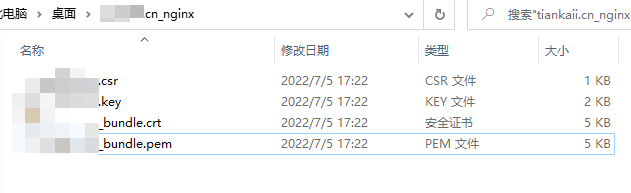
    解压后如图:
    ![image.png](https://img-blog.csdnimg.cn/img_convert/cddafa2a49e6928cfd21f872533eab18.png#clientId=ud0ca9c0e-c348-4&crop=0&crop=0&crop=1&crop=1&from=paste&height=193&id=uc2957425&margin=[object Object]&name=image.png&originHeight=193&originWidth=631&originalType=binary&ratio=1&rotation=0&showTitle=false&size=14259&status=done&style=shadow&taskId=ue4942528-259b-4043-b01f-41c32823eec&title=&width=631)
    其中:
    .key结尾的文件为密钥文件。
    .pem结尾的文件为证书文件。
    我们需要把这两个文件上传到服务器上。

    1. 上传本地证书到服务器指定目录

    我这里上传到/usr/local/nginx/cert/目录下。
    上传后如图:

    ![image.png](https://img-blog.csdnimg.cn/img_convert/c1dcda6f1918b76cd4cdfcf8725a8dc9.png#clientId=ud0ca9c0e-c348-4&crop=0&crop=0&crop=1&crop=1&from=paste&height=38&id=u13b89c33&margin=[object Object]&name=image.png&originHeight=38&originWidth=341&originalType=binary&ratio=1&rotation=0&showTitle=false&size=3787&status=done&style=shadow&taskId=u7574af12-50b2-48ba-a9e7-9bfa40409a9&title=&width=341)
    里面包含了我们的密钥文件证书文件
    好了。这样我们就上传证书到服务器了。

    配置nginx.conf

    我们还需要配置nginx.conf文件来使证书文件生效。
    添加server模块。
    在配置文件中添加模块server模块。
    一般,默认的配置文件是有这些内容的,只不过被注释掉了。我们放开就好。
    但是,也要改些东西。下面已经给出提示。

    server {
            listen       443 ssl;
            server_name  localhost;
            # 后面的路径是你上一步上传文件的绝对路径。
            # 不写绝对路径会报错
            ssl_certificate      /usr/local/nginx/cert/xxxxxxxx_bundle.pem;
            ssl_certificate_key  /usr/local/nginx/cert/xxxxxxxx.key;
    
            ssl_session_cache    shared:SSL:1m;
            ssl_session_timeout  5m;
    
            ssl_ciphers  HIGH:!aNULL:!MD5;
            ssl_prefer_server_ciphers  on;
    
            location / {
                root   html;
                index  index.html index.htm;
            }
        }
    
    • 1
    • 2
    • 3
    • 4
    • 5
    • 6
    • 7
    • 8
    • 9
    • 10
    • 11
    • 12
    • 13
    • 14
    • 15
    • 16
    • 17
    • 18
    • 19

    nginx添加ssl模块

    1. 查看我们目前安装了哪些模块
    /usr/local/ngxin/sbin/nginx -V
    
    • 1

    展示信息:

    nginx version: nginx/1.12.2
    built by gcc 4.8.5 20150623 (Red Hat 4.8.5-44) (GCC) 
    configure arguments:
    
    • 1
    • 2
    • 3

    configure arguments后为我们安装的模块。可以看到没有安装ssl模块。
    如果你含有ngx_http_ssl_module,那么你可以跳过添加模块这个步骤。

    1. 进入nginx的安装目录

    注意:不是/usr/local/nginx/
    我的安装目录是:/usr/local/nginx-1.20.2
    里面含有configure文件。

    ![image.png](https://img-blog.csdnimg.cn/img_convert/3a67918ffa43dd65b6b4e5e2f9216ce2.png#clientId=ud0ca9c0e-c348-4&crop=0&crop=0&crop=1&crop=1&from=paste&height=42&id=u3a556d7f&margin=[object Object]&name=image.png&originHeight=42&originWidth=822&originalType=binary&ratio=1&rotation=0&showTitle=false&size=9186&status=done&style=shadow&taskId=ucafb2ed0-6e93-4760-9814-966ec8dd558&title=&width=822)
    在安装目录下依次输入:

    • ./configure --prefix=/usr/local/nginx
    • ./configure --with-http_ssl_module
    • make
    • make install
    1. 备份nginx。然后将编译好的nginx替换原来的nginx。
    • cp /usr/local/nginx/sbin/nginx /usr/local/nginx/sbin/nginx.bak
    • cp ./objs/nginx /usr/local/nginx/sbin/

    重启nginx并测试

    重启:

    • /usr/local/nginx/sbin/nginx -s reload

    测试:
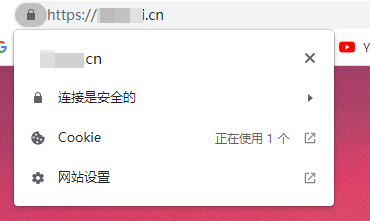
    游览器输入https://域名
    ![image.png](https://img-blog.csdnimg.cn/img_convert/1c13d92f4268580e8b54d1b5e1486784.png#clientId=ud0ca9c0e-c348-4&crop=0&crop=0&crop=1&crop=1&from=paste&height=221&id=u63b81f78&margin=[object Object]&name=image.png&originHeight=221&originWidth=370&originalType=binary&ratio=1&rotation=0&showTitle=false&size=31819&status=done&style=shadow&taskId=u305a2b6c-8d6e-4477-aefa-38faefc4d96&title=&width=370)
    连接是安全的,成功。

  • 相关阅读:
    八大排序 (上)
    多线程导入excel
    vue3 element plus表格导出为excel自定义表头
    ROBOGUIDE教程:三维模型创建功能介绍与操作方法
    winform 获取指定的form
    比较分析线程池中execute与submit方法的差异
    论微软过程
    RabbitMQ安装(Mac版本)
    elasticsearch面试必考(亲身经历的问题)
    ModaHub魔搭社区专访百度智能云李莅:以后所有的数据库它都会原生地支持用向量?
  • 原文地址:https://blog.csdn.net/qq_38499019/article/details/125628186