-
手把手教会:XML建模
上期回顾:XML文件的解析操作_小阿飞_的博客-CSDN博客
XML是比较常用的配置文件,但上期文章中解析XML文件的代码不可能每次在需要用到的时又重新编写一遍,本期所讲的建模(OOP思想)就是一个很好的解决方式(将解析XML文件的代码变成对象型数据)
本期精彩😜(从第一步到最后一步手把手教会)👇
目录
XML建模步骤
1、环境的搭建
(1) 选择一个工作空间后点击Launch

(2.1) 点击首选项

(2.2) 进入工作空间将编码格式设置为UTF-8

(2.3) 将JSP的编码格式也设置为UTF-8

(3.1) 新建动态项目(项目名称可全小写)

(3.2) 配置tomcat环境

选择你电脑上tomcat服务器的文件路径
 (3.3) 配置JDK


选择你电脑上JDK的文件路径,一般放于C盘👇


最后你可以在这里面将字体设置为自己想要的大小和格式


(4) 生成XML配置文件

2、导入相关jar包
- 要导入的jar包
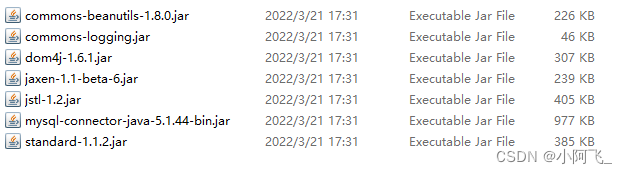
- 在项目中build path后

3、 建立相关的包及MVC的配置文件
包名规范:com/org.公司名.项目名.模块名
- com.xyf.mvc.framework:框架包
- resources源码包下的文件:放自定义MVC的配置文件config.xml
- config.xml代码展示👇(编写后续包、类、代码的依据!)
- <?xml version="1.0" encoding="UTF-8"?>
- <!DOCTYPE config>
- <config>
- <action type="org.lisen.mvc.action.StudentAction" path="/studentAction">
- <forward path="/students/studentList.jsp" redirect="false" name="students"/>
- </action>
- </config>
4、 通过config.xml格式建立相关的模型类
类名规范:首字母大写的驼峰命名法
模型类命名:
- ConfigModel:Config节点模型
- ActionModel:Action节点模型
- ForwardModel:Farword节点模型
5、自定义异常
异常类命名+代码编写(关键是异常名称)
- ActionDuplicateDefinitionException:Action元素中存在重复定义异常
- public class ActionDuplicateDefinitionException extends RuntimeException {
- public ActionDuplicateDefinitionException() {
- super();
- }
- public ActionDuplicateDefinitionException(String msg) {
- super(msg);
- }
- public ActionDuplicateDefinitionException(String msg, Throwable c) {
- super(msg, c);
- }
- }
- ActionNotFoundException:
- public class ActionNotFoundException extends RuntimeException {
- public ActionNotFoundException() {
- super();
- }
- public ActionNotFoundException(String msg) {
- super(msg);
- }
- public ActionNotFoundException(String msg, Throwable c) {
- super(msg, c);
- }
- }
- ForwardDuplicateDefinitionException:Forward元素中存在重复定义异常
- public class ForwardDuplicateDefinitionException extends RuntimeException {
- public ForwardDuplicateDefinitionException() {
- super();
- }
- public ForwardDuplicateDefinitionException(String msg) {
- super(msg);
- }
- public ForwardDuplicateDefinitionException(String msg, Throwable c) {
- super(msg, c);
- }
- }
- ForwardNotFoundException:
- public class ForwardNotFoundException extends RuntimeException {
- public ForwardNotFoundException() {
- super();
- }
- public ForwardNotFoundException(String msg) {
- super(msg);
- }
- public ForwardNotFoundException(String msg, Throwable c) {
- super(msg, c);
- }
- }
5、观察MVC的配置文件config.xml来编写代码
观察config.xml可知👇
- 一个config节点下可以有多个action节点
- action节点中具有type和path两个属性
- action节点中有forward节点
- forward节点具有三个属性......
6、模型类代码编写
根节点ConfigModel类
- public class ConfigModel {
- // 一个config节点下可以有多个action节点
- // 放key==path和value==ActionModel类/对象:通过根节点找到action
- // 初始化:new HashMap<>()
- private Map<String, ActionModel> actionMap=new HashMap<>();
- /**
- * 将path放入key,保持path不重复
- * 遍历ActionModel对象,通过ActionModel对象获取path属性
- * @param 传入ActionModel这个类/对象
- */
- public void put(ActionModel action) {
- if(actionMap.containsKey(action.getPath())) {
- throw new ActionDuplicateDefinitionException("Action path= "+action.getPath()+" Duplicate definition");
- }
- actionMap.put(action.getPath(), action);
- }
- /**
- * 找path
- * @param 传入path
- * @return 找不到path则抛出异常,找到就返回path
- */
- public ActionModel find(String path) {
- if(!actionMap.containsKey(path)) {
- throw new ActionNotFoundException("Action path ="+path+" not found");
- }
- return actionMap.get(path);
- }
- }
ActionModel类
- public class ActionModel {
- // 有两个节点
- private String type;
- private String path;
- // 包含元素forward:通过action找到forward
- private Map<String, ForwardModel> forwardMap =new HashMap<>();
- // 将name放入key,保持name不重复
- public void put(ForwardModel forward) {
- if(forwardMap.containsKey(forward.getName())) {
- throw new ForwardDuplicateDefinitionException("forward name = "+forward.getName()+" DuplicateDefinition");
- }
- forwardMap.put(forward.getName(), forward);
- }
- // 找name
- public ForwardModel find(String name) {
- if(!forwardMap.containsKey(name)) {
- throw new ForwardNotFoundException("forward name ="+name+" not found");
- }
- return forwardMap.get(name);
- }
- public String getType() {
- return type;
- }
- public void setType(String type) {
- this.type = type;
- }
- public String getPath() {
- return path;
- }
- public void setPath(String path) {
- this.path = path;
- }
- @Override
- public String toString() {
- return "ActionModel [type=" + type + ", path=" + path + ", forwardMap=" + forwardMap + "]";
- }
- }
ForwardModel类
- public class ForwardModel extends RuntimeException{
- //三个属性
- private String name;
- private String path;
- private boolean redirect;
- public String getName() {
- return name;
- }
- public void setName(String name) {
- this.name = name;
- }
- public String getPath() {
- return path;
- }
- public void setPath(String path) {
- this.path = path;
- }
- public boolean isRedirect() {
- return redirect;
- }
- public void setRedirect(boolean redirect) {
- this.redirect = redirect;
- }
- //将redirect中的字符串转成boolean类型的方法
- public void setRedirect(String redirect) {
- //this=当前类
- this.redirect =Boolean.valueOf(redirect);
- }
- @Override
- public String toString() {
- return "ForwardModel [name=" + name + ", path=" + path + ", redirect=" + redirect + "]";
- }
- }
7、工厂类ConfigModelFactory编写
编写工厂类ConfigModelFactory的目的是在这个类中使用单例模式,并且只对XML文件中的内容读取一次,读取后放入上一步编写好了的模型对象中
- /**
- * 单例工厂类
- * 让解析XML的代码只执行一次
- */
- @SuppressWarnings("unchecked")
- public final class ConfigModelFactory {
- //单例模式
- private ConfigModelFactory() {}
- //根节点模型
- private static ConfigModel config = new ConfigModel();
- //只读取一次config中的数据,并填充到模型中
- static {
- try {
- //读
- InputStream is=XmlReader.class.getResourceAsStream("/config.xml");
- SAXReader reader=new SAXReader();
- Document doc = reader.read(is);
- //通过根元素获得根元素下的节点action(xml中的数结构!)
- Element rootElement = doc.getRootElement();
- List<Element> actions = rootElement.selectNodes("action");
- for (Element e : actions) {
- String path = e.attributeValue("path");
- String type = e.attributeValue("type");
- //放入模型
- ActionModel action=new ActionModel();
- action.setPath(path);
- action.setType(type);
- //通过action元素获得actions下面的节点forward
- List<Element> forward1 = e.selectNodes("forward");
- for (Element f : forward1) {
- String name = f.attributeValue("name");
- String fPath = f.attributeValue("path");
- String redirect = f.attributeValue("redirect");
- //放入模型
- ForwardModel forward=new ForwardModel();
- forward.setName(name);
- forward.setPath(fPath);
- forward.setRedirect(redirect);
- //将forward放入action
- action.put(forward);
- }
- //循环完成后将action放入根节点
- config.put(action);
- }
- } catch (DocumentException e) {
- e.printStackTrace();
- }
- }
- public static ConfigModel getConfig() {
- return config;
- }
- //测试
- public static void main(String[] args) {
- ConfigModel config = ConfigModelFactory.getConfig();
- //通过action中的path(xml中有/)找action
- ActionModel action = config.find("/studentAction");
- System.out.println(action);
- //通过forward中的name找forward,xml中无/
- ForwardModel forward = action.find("students");
- System.out.println(forward);
- }
- }
小结:到这里对config.xml文件的建模操作已经完成了,但还存在一些小bug,比如如果在config.xml的path中没有传入“/”,也会成功建模,这显然是不对的,所以敬请期待下期文章(●'◡'●)
-
相关阅读:
2022.08.03_每日一题
Android签名查看
R语言使用plot函数可视化数据散点图,使用log函数对X轴数据和Y轴数据进行对数变换后再进行可视化(log(x),log(y))
select in ()的时候,MySQL会自动按主键自增排序,要是按IN中给定的顺序来取,如何实现呢?
spring源码理解
flink 8081 web页面无法被局域网内其他机器访问
大语言模型底层架构丨带你认识Transformer
Microsoft Excel 101 简介
Javascript知识【案例:表格隔行换色】
流式响应Web小工具实践
- 原文地址:https://blog.csdn.net/yifei_345678/article/details/125607662