-
超十万字_超详细SSM整合实践_手动实现权限管理
SSM整合_基础配置
SSM框架中包含Spring,SpringMVC,Mybatis。而Spring与SpringMVC都是Spring Framework的模块,无需整合。只需将Mybatis与Spring整合即可。- 1
一、整合关注点
1、Spring在web项目中的应用。 在web项目启动时,读取applicationContext.xml配置文件,创建IOC容器。 2、使用连接池作为数据源。 直连数据源或Spring中的数据源(DriverManagerDataSource),连接效率太低。使用阿里旗下的德鲁伊连接池(druid)作为连接数据源。 3、Mybatis与Spring的结合。 通过Spring的IOC容器管理SqlSessionFactory、mapper接口的代理对象。- 1
- 2
- 3
- 4
- 5
- 6
- 7
- 8
二、导入依赖
2.1 Spring依赖
<!-- spring核心包--> <dependency> <groupId>org.springframework</groupId> <artifactId>spring-core</artifactId> <version>4.3.18.RELEASE</version> </dependency> <!-- springbean包 --> <dependency> <groupId>org.springframework</groupId> <artifactId>spring-beans</artifactId> <version>4.3.18.RELEASE</version> </dependency> <!-- springcontext包 --> <dependency> <groupId>org.springframework</groupId> <artifactId>spring-context</artifactId> <version>4.3.18.RELEASE</version> </dependency> <!-- spring表达式包 --> <dependency> <groupId>org.springframework</groupId> <artifactId>spring-expression</artifactId> <version>4.3.18.RELEASE</version> </dependency> <!-- springAOP包 --> <dependency> <groupId>org.springframework</groupId> <artifactId>spring-aop</artifactId> <version>4.3.18.RELEASE</version> </dependency> <!-- springAspects包 --> <dependency> <groupId>org.springframework</groupId> <artifactId>spring-aspects</artifactId> <version>4.3.18.RELEASE</version> </dependency> <!-- springJDBC包 --> <dependency> <groupId>org.springframework</groupId> <artifactId>spring-jdbc</artifactId> <version>4.3.18.RELEASE</version> </dependency> <!-- spring事务包 --> <dependency> <groupId>org.springframework</groupId> <artifactId>spring-tx</artifactId> <version>4.3.18.RELEASE</version> </dependency> <!-- spring对web的支持 --> <dependency> <groupId>org.springframework</groupId> <artifactId>spring-web</artifactId> <version>4.3.18.RELEASE</version> </dependency> <!-- springwebMVC --> <dependency> <groupId>org.springframework</groupId> <artifactId>spring-webmvc</artifactId> <version>4.3.18.RELEASE</version> </dependency>- 1
- 2
- 3
- 4
- 5
- 6
- 7
- 8
- 9
- 10
- 11
- 12
- 13
- 14
- 15
- 16
- 17
- 18
- 19
- 20
- 21
- 22
- 23
- 24
- 25
- 26
- 27
- 28
- 29
- 30
- 31
- 32
- 33
- 34
- 35
- 36
- 37
- 38
- 39
- 40
- 41
- 42
- 43
- 44
- 45
- 46
- 47
- 48
- 49
- 50
- 51
- 52
- 53
- 54
- 55
- 56
- 57
- 58
- 59
- 60
2.2 Mybatis依赖
<!-- mybatis --> <dependency> <groupId>org.mybatis</groupId> <artifactId>mybatis</artifactId> <version>3.4.6</version> </dependency> <!-- mybatis的分页助手--> <dependency> <groupId>com.github.pagehelper</groupId> <artifactId>pagehelper</artifactId> <version>5.1.2</version> </dependency>- 1
- 2
- 3
- 4
- 5
- 6
- 7
- 8
- 9
- 10
- 11
- 12
2.3 Mybatis与Spring整合依赖
<!--Mybatis与Spring整合包--> <!-- 历程: SSH: Spring Struts2 Hibernate 与Hibernate/ibatis的整合包由Spring提供,spring-orm SSM: Spring SpringMVC Mybatis 与Mybatis的整合包由Mybatis提供,mybatis-spring --> <dependency> <groupId>org.mybatis</groupId> <artifactId>mybatis-spring</artifactId> <version>1.3.2</version> </dependency>- 1
- 2
- 3
- 4
- 5
- 6
- 7
- 8
- 9
- 10
- 11
- 12
- 13
2.4 连接池与数据库驱动依赖
<!-- oracle驱动--> <dependency> <groupId>com.oracle</groupId> <artifactId>ojdbc6</artifactId> <version>11.2.0</version> </dependency> <!-- mysql驱动 --> <dependency> <groupId>mysql</groupId> <artifactId>mysql-connector-java</artifactId> <version>5.1.49</version> </dependency> <!--连接池:德鲁伊数据源--> <dependency> <groupId>com.alibaba</groupId> <artifactId>druid</artifactId> <version>1.1.10</version> </dependency>- 1
- 2
- 3
- 4
- 5
- 6
- 7
- 8
- 9
- 10
- 11
- 12
- 13
- 14
- 15
- 16
- 17
- 18
2.5 JavaWeb环境依赖
<!-- servlet-api --> <dependency> <groupId>javax.servlet</groupId> <artifactId>javax.servlet-api</artifactId> <version>3.1.0</version> <scope>provided</scope> </dependency> <!-- jsp-api --> <dependency> <groupId>javax.servlet.jsp</groupId> <artifactId>jsp-api</artifactId> <version>2.1</version> <scope>provided</scope> </dependency> <!-- jstl --> <dependency> <groupId>javax.servlet</groupId> <artifactId>jstl</artifactId> <version>1.2</version> </dependency>- 1
- 2
- 3
- 4
- 5
- 6
- 7
- 8
- 9
- 10
- 11
- 12
- 13
- 14
- 15
- 16
- 17
- 18
- 19
- 20
2.6 可选插件依赖
<!-- 上传组件包 --> <dependency> <groupId>commons-fileupload</groupId> <artifactId>commons-fileupload</artifactId> <version>1.3.1</version> </dependency> <!-- jackson --> <dependency> <groupId>com.fasterxml.jackson.core</groupId> <artifactId>jackson-core</artifactId> <version>2.9.5</version> </dependency> <dependency> <groupId>com.fasterxml.jackson.core</groupId> <artifactId>jackson-databind</artifactId> <version>2.9.5</version> </dependency> <dependency> <groupId>com.fasterxml.jackson.core</groupId> <artifactId>jackson-annotations</artifactId> <version>2.9.5</version> </dependency> <!-- hibernate的验证框架--> <dependency> <groupId>org.hibernate</groupId> <artifactId>hibernate-validator</artifactId> <version>5.4.1.Final</version> </dependency> <!-- log4j --> <dependency> <groupId>log4j</groupId> <artifactId>log4j</artifactId> <version>1.2.17</version> </dependency> <!-- junit--> <dependency> <groupId>junit</groupId> <artifactId>junit</artifactId> <version>4.12</version> <scope>test</scope> </dependency>- 1
- 2
- 3
- 4
- 5
- 6
- 7
- 8
- 9
- 10
- 11
- 12
- 13
- 14
- 15
- 16
- 17
- 18
- 19
- 20
- 21
- 22
- 23
- 24
- 25
- 26
- 27
- 28
- 29
- 30
- 31
- 32
- 33
- 34
- 35
- 36
- 37
- 38
- 39
- 40
- 41
三、目录结构

src/main/java目录下建立Java软件包结构。 src/main/resources目录下存放各种配置文件和资源文件。 webapp目录下存放web项目静态资源和WEB-INF目录,其中jsp页面都存放在WEB-INF下。- 1
- 2
- 3
- 4
- 5
四、配置文件
4.1 web.xml
<?xml version="1.0" encoding="UTF-8"?> <web-app xmlns="http://xmlns.jcp.org/xml/ns/javaee" xmlns:xsi="http://www.w3.org/2001/XMLSchema-instance" xsi:schemaLocation="http://xmlns.jcp.org/xml/ns/javaee http://xmlns.jcp.org/xml/ns/javaee/web-app_4_0.xsd" version="4.0"> </web-app>- 1
- 2
- 3
- 4
- 5
- 6
- 7
4.1.1 字符编码过滤器
采用Spring中提供的字符编码过滤器CharacterEncodingFilter。- 1
<!--字符编码过滤器--> <filter> <filter-name>CharacterEncodingFilter</filter-name> <filter-class>org.springframework.web.filter.CharacterEncodingFilter</filter-class> <init-param> <param-name>encoding</param-name> <param-value>utf-8</param-value> </init-param> </filter> <filter-mapping> <filter-name>CharacterEncodingFilter</filter-name> <url-pattern>/*</url-pattern> </filter-mapping>- 1
- 2
- 3
- 4
- 5
- 6
- 7
- 8
- 9
- 10
- 11
- 12
- 13
4.1.2 IOC容器的监听器
在web项目启动时,上下文对象ServletContext对象初始化后,读取Spring的配置文件并创建IOC容器对象,最后将其放入到上下文作用域中。 采用Spring中提供的ContextLoaderListener监听器。- 1
- 2
- 3
<!-- 上下对象的初始化参数 --> <context-param> <param-name>contextConfigLocation</param-name> <!-- 使用通配符*加载多个配置文件 --> <param-value>classpath:applicationContext*.xml</param-value> </context-param> <!-- springIOC容器 --> <listener> <listener-class>org.springframework.web.context.ContextLoaderListener</listener-class> </listener>- 1
- 2
- 3
- 4
- 5
- 6
- 7
- 8
- 9
- 10
4.1.3 前端控制器
<!-- 配置前端控制器 --> <servlet> <servlet-name>springmvc</servlet-name> <servlet-class>org.springframework.web.servlet.DispatcherServlet</servlet-class> <init-param> <param-name>contextConfigLocation</param-name> <param-value>classpath:springmvc.xml</param-value> </init-param> <load-on-startup>1</load-on-startup> </servlet> <servlet-mapping> <servlet-name>springmvc</servlet-name> <url-pattern>/</url-pattern> </servlet-mapping>- 1
- 2
- 3
- 4
- 5
- 6
- 7
- 8
- 9
- 10
- 11
- 12
- 13
- 14
4.1.4 欢迎页面
<welcome-file-list> <welcome-file>/WEB-INF/views/index.jsp</welcome-file> </welcome-file-list>- 1
- 2
- 3
4.1.5 其他配置
<!-- 通过隐藏域传参解决form表单的PUT与DELETE方式的请求 --> <filter> <filter-name>HiddenHttpMethodFilter</filter-name> <filter-class>org.springframework.web.filter.HiddenHttpMethodFilter</filter-class> </filter> <filter-mapping> <filter-name>HiddenHttpMethodFilter</filter-name> <url-pattern>/*</url-pattern> </filter-mapping> <!-- 解决put请求传递参数的问题--> <filter> <filter-name>HttpPutFormContentFilter</filter-name> <filter-class>org.springframework.web.filter.HttpPutFormContentFilter</filter-class> </filter> <filter-mapping> <filter-name>HttpPutFormContentFilter</filter-name> <url-pattern>/*</url-pattern> </filter-mapping>- 1
- 2
- 3
- 4
- 5
- 6
- 7
- 8
- 9
- 10
- 11
- 12
- 13
- 14
- 15
- 16
- 17
- 18
- 19
4.2 Mybatis配置文件
以前在mybatis-config.xml中需要加载资源、全局参数、类型别名、分页插件、连接数据库环境、加载映射文件等配置。但与Spring整合后,加载资源、连接数据库环境必须移入Spring中配置,加载映射文件建议移入Spring中(可使用通配符),其他的两者都可。如果将所有内容移入Spring中配置,那么此文件可消失。
<?xml version="1.0" encoding="UTF-8"?> <!DOCTYPE configuration PUBLIC "-//mybatis.org//DTD Config 3.0//EN" "http://mybatis.org/dtd/mybatis-3-config.dtd"> <configuration> <!--加载外部资源文件:移入Spring的配置中(废除)--> <!--<properties resource="db.properties"></properties>--> <!--全局参数:可以移入Spring的配置--> <settings> <!--开启下滑线转驼峰--> <setting name="mapUnderscoreToCamelCase" value="true"/> <!--开启mybatis SQL日志,SSM整合之后没有日志输出,需要单独配置--> <setting name="logImpl" value="org.apache.ibatis.logging.stdout.StdOutImpl"/> </settings> <!--类型别名:可以移入Spring的配置--> <!--<typeAliases> <package name="com.newcapec.entity"/> </typeAliases>--> <!--插件:可以移入Spring的配置--> <plugins> <plugin interceptor="com.github.pagehelper.PageInterceptor"> <property name="reasonable" value="true"/> </plugin> </plugins> <!--环境:移入Spring的配置中(废除:使用第三方的数据源对象)--> <!--<environments default="mysql"> <environment id="mysql"> <transactionManager type="JDBC"></transactionManager> <dataSource type="POOLED"> <property name="driver" value="${jdbc.mysql.driver}"/> <property name="url" value="${jdbc.mysql.url}"/> <property name="username" value="${jdbc.mysql.username}"/> <property name="password" value="${jdbc.mysql.password}"/> </dataSource> </environment> </environments>--> <!-- 加载映射文件:移入Spring的配置中(废除:Spring中可批量加载mapper文件) --> <!--<mappers> <mapper resource="mapper/EmpMapper.xml"/> </mappers>--> </configuration>- 1
- 2
- 3
- 4
- 5
- 6
- 7
- 8
- 9
- 10
- 11
- 12
- 13
- 14
- 15
- 16
- 17
- 18
- 19
- 20
- 21
- 22
- 23
- 24
- 25
- 26
- 27
- 28
- 29
- 30
- 31
- 32
- 33
- 34
- 35
- 36
- 37
- 38
- 39
- 40
- 41
- 42
- 43
- 44
- 45
- 46
db.properties:
#mysql jdbc.mysql.driver=com.mysql.jdbc.Driver jdbc.mysql.url=jdbc:mysql://localhost:3306/ssm?characterEncoding=utf8&useSSL=false jdbc.mysql.username=root jdbc.mysql.password=root #oracle jdbc.oracle.driver=oracle.jdbc.driver.OracleDriver jdbc.oracle.url=jdbc:oracle:thin:@localhost:1521:orcl jdbc.oracle.username=system jdbc.oracle.password=123456- 1
- 2
- 3
- 4
- 5
- 6
- 7
- 8
- 9
- 10
- 11
log4j.properties:
#井号表示注释,配置内容为键值对格式,每行只能有一个键值对,键值对之间以=连接 #指定logger #设定log4j的日志级别和输出的目的地 #INFO日志级别 ,Console和logfile输出的目的地 #等级 OFF,ERROR,WARN,INFO,DEBUG,TRACE,ALL log4j.rootLogger=DEBUG,Console #指定appender #设定Logger的Console,其中Console为自定义名称,类型为控制台输出 log4j.appender.Console=org.apache.log4j.ConsoleAppender #设定Logger的logfile,其中logfile为自定义名称,类型为文件 #org.apache.log4j.FileAppender文件 #org.apache.log4j.RollingFileAppender文件大小到达指定尺寸后产生一个新的文件 #org.apache.log4j.DailyRollingFileAppender每天产生一个日志文件 log4j.appender.logfile=org.apache.log4j.RollingFileAppender #设定文件的输出路径 log4j.appender.logfile.File=d:/log/test.log #设定文件最大尺寸 单位可以使KB,MB,GB log4j.appender.logfile.MaxFileSize=2048KB #输出格式 #设定appender布局Layout # %d 输出日志的日期和时间,指定格式:%d{yyyy-MM-dd HH:mm:ss SSS} # %p 输出的日志级别 # %c 输出所属类的全类名 # %M 方法名 # %m 输出代码中指定消息 # %n 一个换行符 log4j.appender.Console.layout=org.apache.log4j.PatternLayout log4j.appender.Console.layout.ConversionPattern=%d %p %c.%M() --%m%n log4j.appender.logfile.layout=org.apache.log4j.PatternLayout log4j.appender.logfile.layout.ConversionPattern=%d %p %c.%M() --%m%n- 1
- 2
- 3
- 4
- 5
- 6
- 7
- 8
- 9
- 10
- 11
- 12
- 13
- 14
- 15
- 16
- 17
- 18
- 19
- 20
- 21
- 22
- 23
- 24
- 25
- 26
- 27
- 28
- 29
- 30
- 31
- 32
- 33
4.3 Spring配置文件
因Spring中配置过多,可将Spring分成多个文件来进行分别配置。 在web.xml中通过通配符一起加载即可(classpath:spring/applicationContext*.xml)。- 1
- 2
- 3
<?xml version="1.0" encoding="UTF-8"?> <beans xmlns="http://www.springframework.org/schema/beans" xmlns:xsi="http://www.w3.org/2001/XMLSchema-instance" xmlns:util="http://www.springframework.org/schema/util" xmlns:p="http://www.springframework.org/schema/p" xmlns:context="http://www.springframework.org/schema/context" xmlns:aop="http://www.springframework.org/schema/aop" xmlns:tx="http://www.springframework.org/schema/tx" xsi:schemaLocation="http://www.springframework.org/schema/beans http://www.springframework.org/schema/beans/spring-beans.xsd http://www.springframework.org/schema/util http://www.springframework.org/schema/util/spring-util.xsd http://www.springframework.org/schema/context http://www.springframework.org/schema/context/spring-context.xsd http://www.springframework.org/schema/aop http://www.springframework.org/schema/aop/spring-aop.xsd http://www.springframework.org/schema/tx http://www.springframework.org/schema/tx/spring-tx.xsd"> </beans>- 1
- 2
- 3
- 4
- 5
- 6
- 7
- 8
- 9
- 10
- 11
- 12
- 13
- 14
- 15
- 16
- 17
- 18
- 19
- 20
- 21
4.3.1 applicationContext.xml
- 注解扫描:
配置:基础包为公共包(com.newcapec),并过滤掉@Controller注解。 思路:Spring与SpringMVC分开扫描各自的内容,SpingMVC扫描表现层的类(Controller),而Spring扫描其他。- 1
- 2
- 3
<!--组件扫描(开启组件)--> <context:component-scan base-package="com.newcapec"> <!--过滤Controller注解,在SpringMVC扫描--> <context:exclude-filter type="annotation" expression="org.springframework.stereotype.Controller"/> </context:component-scan>- 1
- 2
- 3
- 4
- 5
- 数据源:
配置:读取db.properties文件,数据源对象采用阿里旗下的德鲁伊连接池,并配置连接数据库的基础信息和连接池的关键信息。- 1
<!-- 引入外部资源文件--> <context:property-placeholder location="classpath:db.properties"/> <!-- 数据源的配置:德鲁伊连接池--> <bean id="dataSource" class="com.alibaba.druid.pool.DruidDataSource"> <!-- 基础配置 --> <property name="driverClassName" value="${jdbc.mysql.driver}"/> <property name="url" value="${jdbc.mysql.url}"/> <property name="username" value="${jdbc.mysql.username}"/> <property name="password" value="${jdbc.mysql.password}"/> <!-- 关键配置 --> <!-- 初始化时建立物理连接的个数。初始化发生在显示调用init方法,或者第一次getConnection时 --> <property name="initialSize" value="${druid.initialSize}" /> <!-- 最小连接池数量 --> <property name="minIdle" value="${druid.minIdle}" /> <!-- 最大连接池数量 --> <property name="maxActive" value="${druid.maxActive}" /> <!-- 配置获取连接等待超时的时间 --> <property name="maxWait" value="${druid.maxWait}" /> </bean>- 1
- 2
- 3
- 4
- 5
- 6
- 7
- 8
- 9
- 10
- 11
- 12
- 13
- 14
- 15
- 16
- 17
- 18
- 19
- 20
#mysql jdbc.mysql.driver=com.mysql.jdbc.Driver jdbc.mysql.url=jdbc:mysql://localhost:3306/ssm?characterEncoding=utf8&useSSL=false jdbc.mysql.username=root jdbc.mysql.password=root #oracle jdbc.oracle.driver=oracle.jdbc.driver.OracleDriver jdbc.oracle.url=jdbc:oracle:thin:@localhost:1521:orcl jdbc.oracle.username=system jdbc.oracle.password=123456 #druid druid.initialSize=5 druid.minIdle=5 druid.maxActive=15 druid.maxWait=10000- 1
- 2
- 3
- 4
- 5
- 6
- 7
- 8
- 9
- 10
- 11
- 12
- 13
- 14
- 15
- 16
- 17
- Mybatis
配置:SqlSessionFactory对象bean和mapper接口的代理对象bean。 思路: 1、SqlSessionFactory的最佳使用范围是整个应用运行期间,一旦创建后可以重复使用,通常以单例模式管理。通过mybatis-spring整合包中的SqlSessionFactoryBean来创建一个单例的SqlSessionFactory。 2、SqlSessionFactoryBean的属性必须配置数据源,可选配加载Mybatis的全局配置文件(如果部分内容仍然留在其中),加载mapper映射文件(建议在此配置,可使用统配符批量加载),类型别名,插件等信息。 3、Mybatis中的mapper代理对象可针对每个接口通过MapperFactoryBean来进行单独配置,仅需告知Dao接口的全限定名即可。缺点:中大型项目中Dao接口过多时,配置量过大,不建议使用。 4、通过MapperScannerConfigurer配置mapper代理扫描器可批量配置mapper代理对象,仅需告知Dao接口的存放包名和SqlSessionFactory即可。- 1
- 2
- 3
- 4
- 5
- 6
- 7
- 8
- 9
- 10
<!--mybatis的配置: SqlSessionFactory factory = new SqlSessionFactoryBuilder().build(读取配置文件) SqlSession sqlSession = factory.openSession(); StudentDao dao = sqlSession.getMapper(StudentDao.class) --> <!--SqlSessionFactory对象--> <bean id="sqlSessionFactory" class="org.mybatis.spring.SqlSessionFactoryBean"> <!--数据源对象--> <property name="dataSource" ref="dataSource"/> <!--加载mybatis的全局配置文件--> <property name="configLocation" value="classpath:mybatis-config.xml"/> <!--加载mapper文件: 支持通配符批量加载,而且可以指定任何目录--> <property name="mapperLocations" value="classpath:mapper/*Mapper.xml"/> <!--类型别名--> <!--<property name="typeAliasesPackage" value="com.newcapec.entity"/>--> <!--插件--> <!--<property name="plugins"> <array> <bean class="com.github.pagehelper.PageInterceptor"> <property name="properties" value="reasonable=true"/> </bean> </array> </property>--> <!--全局参数--> <!--<property name="configuration"> <bean class="org.apache.ibatis.session.Configuration"> <property name="mapUnderscoreToCamelCase" value="true"/> <property name="logImpl" value="org.apache.ibatis.logging.stdout.StdOutImpl"/> </bean> </property>--> </bean>- 1
- 2
- 3
- 4
- 5
- 6
- 7
- 8
- 9
- 10
- 11
- 12
- 13
- 14
- 15
- 16
- 17
- 18
- 19
- 20
- 21
- 22
- 23
- 24
- 25
- 26
- 27
- 28
- 29
- 30
- 31
- 32
- 33
- 34
- 35
- 36
<!--配置mapper代理对象@Mapper--> <bean id="empDao" class="org.mybatis.spring.mapper.MapperFactoryBean"> <!--代理对象实现的接口的全限定名--> <property name="mapperInterface" value="com.newcapec.dao.EmpDao"/> <property name="sqlSessionFactory" ref="sqlSessionFactory"/> </bean> <bean id="deptDao" class="org.mybatis.spring.mapper.MapperFactoryBean"> <property name="mapperInterface" value="com.newcapec.dao.DeptDao"/> <property name="sqlSessionFactory" ref="sqlSessionFactory"/> </bean>- 1
- 2
- 3
- 4
- 5
- 6
- 7
- 8
- 9
- 10
<!--配置mapper代理扫描器@MapperScan--> <!-- 作用: 1.扫描dao接口所有的包 2.为所有扫描到dao接口创建mapper代理对象 3.将所有的mapper代理对象放入IOC容器 --> <bean class="org.mybatis.spring.mapper.MapperScannerConfigurer"> <!--扫描dao基础包: 多个包可使用逗号分隔--> <property name="basePackage" value="com.newcapec.dao"/> <!--注入SqlSessionFactory对象--> <!--<property name="sqlSessionFactory" ref="sqlSessionFactory"/>--> <property name="sqlSessionFactoryBeanName" value="sqlSessionFactory"/> </bean>- 1
- 2
- 3
- 4
- 5
- 6
- 7
- 8
- 9
- 10
- 11
- 12
- 13
- 14
mapper文件模板:
<?xml version="1.0" encoding="UTF-8" ?> <!DOCTYPE mapper PUBLIC "-//mybatis.org//DTD Mapper 3.0//EN" "http://mybatis.org/dtd/mybatis-3-mapper.dtd"> <mapper namespace=""> </mapper>- 1
- 2
- 3
- 4
- 5
- 6
- 7
4.3.2 applicationContext-tx.xml
- 事务管理配置文件
配置:事务管理器对象,事务,事务属性,事务切入点。 思路: 1、事务相关配置放在此文件中,与其他配置分离,减少配置文件臃肿的情况,便于后期维护。 2、持久层使用Mybatis框架,事务管理器采用JDBC的事务管理器即可(DataSourceTransactionManager),并注入数据源对象。 3、事务属性根据不同的需求选择更佳合理的配置。 4、事务切入点将事务通过AOP的方式应用在指定的切点表达式中。- 1
- 2
- 3
- 4
- 5
- 6
- 7
- 8
- 9
- 10
<!-- 事务管理器--> <bean id="transactionManager" class="org.springframework.jdbc.datasource.DataSourceTransactionManager"> <!-- 注入数据源--> <property name="dataSource" ref="dataSource"/> </bean> <!-- 事务--> <tx:advice id="txAdvice" transaction-manager="transactionManager"> <!-- 配置事务属性--> <tx:attributes> <tx:method name="add*" isolation="READ_COMMITTED" rollback-for="java.lang.Exception"/> <tx:method name="edit*" isolation="READ_COMMITTED" rollback-for="java.lang.Exception"/> <tx:method name="remove*" isolation="READ_COMMITTED" rollback-for="java.lang.Exception"/> <tx:method name="find*" propagation="SUPPORTS" read-only="true"/> <tx:method name="query*" propagation="SUPPORTS" read-only="true"/> <tx:method name="get*" propagation="SUPPORTS" read-only="true"/> <!-- 事务属性应用于方法的名称,*表示所有方法--> <tx:method name="*"/> </tx:attributes> </tx:advice> <!-- 事务切入点--> <aop:config> <aop:pointcut id="exp" expression="execution(* com.newcapec.service..*Impl.*(..))"/> <!-- 将切点表达式与事务建立联系--> <aop:advisor advice-ref="txAdvice" pointcut-ref="exp"/> </aop:config>- 1
- 2
- 3
- 4
- 5
- 6
- 7
- 8
- 9
- 10
- 11
- 12
- 13
- 14
- 15
- 16
- 17
- 18
- 19
- 20
- 21
- 22
- 23
- 24
- 25
- 26
- 27
4.4 SpringMVC配置文件
<?xml version="1.0" encoding="UTF-8"?> <beans xmlns="http://www.springframework.org/schema/beans" xmlns:xsi="http://www.w3.org/2001/XMLSchema-instance" xmlns:util="http://www.springframework.org/schema/util" xmlns:p="http://www.springframework.org/schema/p" xmlns:context="http://www.springframework.org/schema/context" xmlns:mvc="http://www.springframework.org/schema/mvc" xsi:schemaLocation="http://www.springframework.org/schema/beans http://www.springframework.org/schema/beans/spring-beans.xsd http://www.springframework.org/schema/util http://www.springframework.org/schema/util/spring-util.xsd http://www.springframework.org/schema/context http://www.springframework.org/schema/context/spring-context.xsd http://www.springframework.org/schema/mvc http://www.springframework.org/schema/mvc/spring-mvc.xsd"> </beans>- 1
- 2
- 3
- 4
- 5
- 6
- 7
- 8
- 9
- 10
- 11
- 12
- 13
- 14
- 15
- 16
- 17
- 18
- 注解扫描
配置:基础包为表现层的软件包。 思路:SpingMVC仅负责扫描表现层的类(Controller)。 解析: SpingMVC中的注解扫描也是将扫描到的对象放入到IOC容器中。当web项目启动后首先配置的是Spring容器的初始化,然后是SpringMVC的前端控制器(DispatchServlet),当配置完DispatchServlet后会在Spring容器中创建一个新的容器。其实这是两个容器,Spring作为父容器,SpringMVC作为子容器(如下图),SpringMVC子容器中的对象是可以访问Spring父容器中的对象,但父容器中的对象无法访问子容器中的对象。 通常在Service中注入Dao,接着在Controller里注入Service,这就意味这作为SpringMVC的子容器是可以访问父容器Spring对象的,如果把Controller注入到Service中肯定是不行的。假设将Dao,Serive,Controller都放入同一个容器中,那么对象之间的依赖注入是没有问题了,但必须都在SpringMVC的子容器(在SpringMVC中扫描全部)。如果Dao,Serive,Controller都放在Spring的父容器中(在Spring中扫描全部),而这时的SpringMVC容器中没有Controller对象,所以加载处理器适配器的时候就会找不到映射的Controller对象,因此在页面上就会出现404的错误。- 1
- 2
- 3
- 4
- 5
- 6
- 7
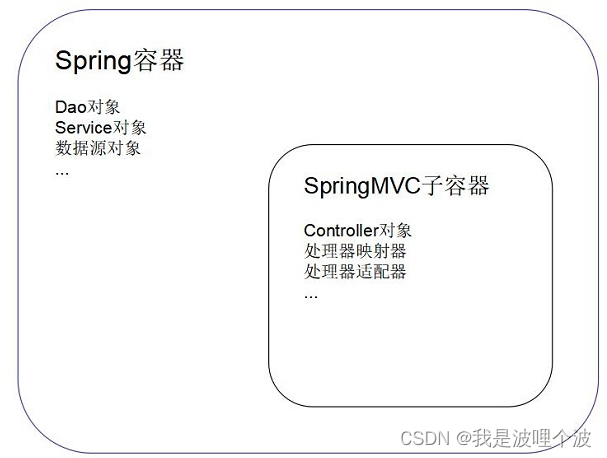
<context:component-scan base-package="com.newcapec.controller"/>- 1
- 注解驱动
<mvc:annotation-driven conversion-service="conversionService"/>- 1
- 视图解析器
<!--视图解析器--> <bean class="org.springframework.web.servlet.view.InternalResourceViewResolver"> <property name="prefix" value="/WEB-INF/views/"/> <property name="suffix" value=".jsp"/> </bean>- 1
- 2
- 3
- 4
- 5
- 格式化与类型转换服务
<bean id="conversionService" class="org.springframework.format.support.FormattingConversionServiceFactoryBean"> <property name="converters"> <set> <bean class="com.newcapec.util.DateConverter"/> </set> </property> </bean>- 1
- 2
- 3
- 4
- 5
- 6
- 7
- 静态资源处理
<mvc:default-servlet-handler/> <mvc:resources mapping="/static/**" location="/WEB-INF/static/"/>- 1
- 2
- 其他配置
<!-- 文件上传解析器--> <bean id="multipartResolver" class="org.springframework.web.multipart.commons.CommonsMultipartResolver"> <!-- 设置上传文件大小,单位为字节,大小为100MB --> <property name="maxUploadSize" value="104857600"/> <!-- 设置上传的字符编码--> <property name="defaultEncoding" value="utf-8"/> <!-- 设置缓存大小,大小为10KB--> <property name="maxInMemorySize" value="10240"/> </bean> <!-- 配置拦截器 --> <mvc:interceptors> <mvc:interceptor> <mvc:mapping path="/**"/> <!-- 排除不拦截路径--> <mvc:exclude-mapping path="/login"/> <bean class="com.newcapec.intercepor.LoginInterceptor"/> </mvc:interceptor> </mvc:interceptors> <!-- 完整拦截器配置 --> <mvc:interceptors> <mvc:interceptor> <mvc:mapping path="/**"/> <!--动态页面跳转请求和静态资源映射请求--> <mvc:exclude-mapping path="/page/**"/> <mvc:exclude-mapping path="/static/**"/> <mvc:exclude-mapping path="/auth/login"/> <bean class="com.newcapec.interceptor.LoginInterceptor"/> </mvc:interceptor> <mvc:interceptor> <mvc:mapping path="/**"/> <mvc:exclude-mapping path="/page/login"/> <mvc:exclude-mapping path="/page/index"/> <mvc:exclude-mapping path="/static/**"/> <mvc:exclude-mapping path="/auth/**"/> <mvc:exclude-mapping path="/permission/findMenu"/> <bean class="com.newcapec.interceptor.PermissionInterceptor"/> </mvc:interceptor> </mvc:interceptors>- 1
- 2
- 3
- 4
- 5
- 6
- 7
- 8
- 9
- 10
- 11
- 12
- 13
- 14
- 15
- 16
- 17
- 18
- 19
- 20
- 21
- 22
- 23
- 24
- 25
- 26
- 27
- 28
- 29
- 30
- 31
- 32
- 33
- 34
- 35
- 36
- 37
- 38
- 39
- 40
SSM整合_同步案例
该案例仅仅作为验证配置是否正确,后期所有的案例和项目,全部采用异步实现。- 1
一、表结构
-- 学生表 CREATE TABLE `student` ( `id` int(11) NOT NULL AUTO_INCREMENT, `name` varchar(20) DEFAULT NULL, `gender` varchar(20) DEFAULT NULL, `major` varchar(20) DEFAULT NULL, PRIMARY KEY (`id`) ) ENGINE=InnoDB AUTO_INCREMENT=1 DEFAULT CHARSET=utf8; -- 数据 INSERT INTO `student` VALUES (1, '小明', '1', '软件工程'); INSERT INTO `student` VALUES (2, '小红', '0', '网络工程'); INSERT INTO `student` VALUES (3, '小黑', '1', '信息安全'); INSERT INTO `student` VALUES (4, '小白', '0', '网络工程'); INSERT INTO `student` VALUES (5, '张三', '1', '软件工程'); INSERT INTO `student` VALUES (6, '李四', '0', '艺术设计'); INSERT INTO `student` VALUES (7, '王五', '1', '游戏设计'); INSERT INTO `student` VALUES (8, '马六', '1', '移动互联网');- 1
- 2
- 3
- 4
- 5
- 6
- 7
- 8
- 9
- 10
- 11
- 12
- 13
- 14
- 15
- 16
- 17
- 18
二、实体类
实体类所在的包名为entity/domain。表名作为实体类名称,表中的字段作为实体类中的成员变量名称。 注:根据实际的命名规范命名。- 1
- 2
- 3
/** * 学生实体类 */ public class Student { private Integer id; private String name; private String gender; private String major; public Integer getId() { return id; } public void setId(Integer id) { this.id = id; } public String getName() { return name; } public void setName(String name) { this.name = name; } public String getGender() { return gender; } public void setGender(String gender) { this.gender = gender; } public String getMajor() { return major; } public void setMajor(String major) { this.major = major; } }- 1
- 2
- 3
- 4
- 5
- 6
- 7
- 8
- 9
- 10
- 11
- 12
- 13
- 14
- 15
- 16
- 17
- 18
- 19
- 20
- 21
- 22
- 23
- 24
- 25
- 26
- 27
- 28
- 29
- 30
- 31
- 32
- 33
- 34
- 35
- 36
- 37
- 38
- 39
- 40
- 41
- 42
三、持久层
持久层包名为dao。持久层接口名称命名规范:实体类名+Dao。 持久层中方法命名规范: insert新增 update修改 delete单删 deleteBatch批量删除 select批量查询 selectById单查 注:企业中都有一套命名规范,不绝对。- 1
- 2
- 3
- 4
- 5
- 6
- 7
- 8
- 9
- 10
- 11
3.1 接口
public interface StudentDao { /* * 新增学生的方法 * @param student 新增学生的数据 */ void insert(Student student); /* * 修改学生的方法 * @param student 修改学生的数据 */ void update(Student student); /* * 根据id单个删除的方法 * @param id 删除学生的id */ void delete(Integer id); /* * 根据id批量删除的方法 * @param ids 删除学生的id */ void deleteBatch(Integer[] ids); /* * 批量查询学生的方法 * @param student 包含查询学生的条件数据的实体 * @return List<Student> 查询到的学生数据 */ List<Student> select(Student student); /* * 根据id查询学生的方法 * @param id 学生id * @return Student 查询到的学生数据 */ Student selectById(Integer id); }- 1
- 2
- 3
- 4
- 5
- 6
- 7
- 8
- 9
- 10
- 11
- 12
- 13
- 14
- 15
- 16
- 17
- 18
- 19
- 20
- 21
- 22
- 23
- 24
- 25
- 26
- 27
- 28
- 29
- 30
- 31
- 32
- 33
- 34
- 35
- 36
- 37
- 38
- 39
- 40
3.2 Mapper文件
<?xml version="1.0" encoding="UTF-8" ?> <!DOCTYPE mapper PUBLIC "-//mybatis.org//DTD Mapper 3.0//EN" "http://mybatis.org/dtd/mybatis-3-mapper.dtd"> <!--Mapper代理开发要求1:namespace和接口的全限定路径名保持一致--> <mapper namespace="com.newcapec.dao.StudentDao"> <!--Mapper代理开发要求2:标签的id值和接口中的方法名保持一致--> <!--Mapper代理开发要求3:标签的parameterType值和接口中的方法参数保持一致--> <!--Mapper代理开发要求4:标签的resultType值和接口中的方法返回值保持一致--> <insert id="insert" parameterType="com.newcapec.entity.Student" useGeneratedKeys="true" keyProperty="id"> insert into student(name, gender, major) values (#{name}, #{gender}, #{major}) </insert> <update id="update" parameterType="com.newcapec.entity.Student"> update student <set> <if test="name != null"> name = #{name}, </if> <if test="gender != null"> gender = #{gender}, </if> <if test="major != null"> major = #{major} </if> </set> where id = #{id} </update> <delete id="delete" parameterType="java.lang.Integer"> delete from student where id = #{id} </delete> <delete id="deleteBatch" parameterType="java.lang.Integer"> delete from student where id in <foreach collection="array" open="(" close=")" separator="," item="id"> #{id} </foreach> </delete> <select id="select" parameterType="com.newcapec.entity.Student" resultType="com.newcapec.entity.Student"> select id, name, gender, major from student <where> <if test="name != null and name != ''"> name like concat('%', #{name}, '%') </if> <if test="gender != null and gender != ''"> gender = #{gender} </if> <if test="major != null and major != ''"> major like concat('%', #{major}, '%') </if> </where> </select> <select id="selectById" parameterType="java.lang.Integer" resultType="com.newcapec.entity.Student"> select id, name, gender, major from student where id = #{id} </select> </mapper>- 1
- 2
- 3
- 4
- 5
- 6
- 7
- 8
- 9
- 10
- 11
- 12
- 13
- 14
- 15
- 16
- 17
- 18
- 19
- 20
- 21
- 22
- 23
- 24
- 25
- 26
- 27
- 28
- 29
- 30
- 31
- 32
- 33
- 34
- 35
- 36
- 37
- 38
- 39
- 40
- 41
- 42
- 43
- 44
- 45
- 46
- 47
- 48
- 49
- 50
- 51
- 52
- 53
- 54
- 55
- 56
- 57
- 58
- 59
- 60
- 61
- 62
- 63
- 64
四、业务层
业务层包名为service。业务层接口名称命名规范:实体类+Service。 业务层中方法命名规范: add新增 edit编辑 remove删除 remove批量删除 find批量查询 findById单条查询 service层命名和dao层命名进行区分: 1、后期业务越来越复杂,通过方法名便于区分。 2、对标Spring事务的配置。- 1
- 2
- 3
- 4
- 5
- 6
- 7
- 8
- 9
- 10
- 11
- 12
- 13
4.1 接口
public interface StudentService { void add(Student student); void edit(Student student); void remove(Integer id); void removeBatch(Integer[] ids); List<Student> find(Student student); PageInfo findPage(Integer pageNum, Integer pageSize, Student student); Student findById(Integer id); }- 1
- 2
- 3
- 4
- 5
- 6
- 7
- 8
- 9
- 10
- 11
- 12
- 13
- 14
- 15
- 16
4.2 实现类
@Service public class StudentServiceImpl implements StudentService { @Autowired private StudentDao studentDao; @Override public void add(Student student) { studentDao.insert(student); } @Override public void edit(Student student) { studentDao.update(student); } @Override public void remove(Integer id) { studentDao.delete(id); } @Override public void removeBatch(Integer[] ids) { studentDao.deleteBatch(ids); } @Override public List<Student> find(Student student) { return studentDao.select(student); } @Override public PageInfo findPage(Integer pageNum, Integer pageSize, Student student) { //分页业务实现 PageHelper.startPage(pageNum, pageSize); List<Student> list = studentDao.select(student); PageInfo<Student> pageInfo = new PageInfo<>(list); return pageInfo; } @Override public Student findById(Integer id) { return studentDao.selectById(id); } }- 1
- 2
- 3
- 4
- 5
- 6
- 7
- 8
- 9
- 10
- 11
- 12
- 13
- 14
- 15
- 16
- 17
- 18
- 19
- 20
- 21
- 22
- 23
- 24
- 25
- 26
- 27
- 28
- 29
- 30
- 31
- 32
- 33
- 34
- 35
- 36
- 37
- 38
- 39
- 40
- 41
- 42
- 43
- 44
- 45
- 46
- 47
- 48
五、web层
web层包名为controller。类的命名规范:实体类名+Controller。 同步请求处理:对HTTP限制GET(查询和删除)和POST(新增和修改)。- 1
- 2
- 3
@Controller @RequestMapping("/student") public class StudentController { @Autowired private StudentService studentService; /* * 新增 */ @PostMapping("/add") public String add(Student student) { studentService.add(student); return "redirect:/student/find"; } /* * 修改 */ @PostMapping("/edit") public String edit(Student student) { studentService.edit(student); return "redirect:/student/find"; } /* * 删除 */ @GetMapping("/remove/{id}") public String remove(@PathVariable Integer id) { studentService.remove(id); return "redirect:/student/find"; } /* * 批量删除 */ @GetMapping("/remove") public String removeBatch(Integer[] ids) { studentService.removeBatch(ids); return "redirect:/student/find"; } /* * 单条查询 */ @GetMapping("/find/{id}") public String findById(@PathVariable Integer id, Model model) { Student student = studentService.findById(id); model.addAttribute("student", student); //跳转修改学生的视图 return "stu/edit"; } /* * 分页查询 * @param pageNum 页码 * @param pageSize 每页条目数 * @param student 包含查询条件的实体 * @param model 用来向request域存储数据的ui * @return java.lang.String 跳转学生列表页的视图 * * 接收到的请求没有pageNum,默认值1 * 接收到的请求没有pageSize,默认值5 */ @GetMapping("/find") public String findPage(@RequestParam(value = "pageNum", required = false, defaultValue = "1") Integer pageNum, @RequestParam(value = "pageSize", required = false, defaultValue = "5") Integer pageSize, Student student, Model model) { PageInfo pageInfo = studentService.findPage(pageNum, pageSize, student); model.addAttribute("pageInfo", pageInfo); return "stu/list"; } }- 1
- 2
- 3
- 4
- 5
- 6
- 7
- 8
- 9
- 10
- 11
- 12
- 13
- 14
- 15
- 16
- 17
- 18
- 19
- 20
- 21
- 22
- 23
- 24
- 25
- 26
- 27
- 28
- 29
- 30
- 31
- 32
- 33
- 34
- 35
- 36
- 37
- 38
- 39
- 40
- 41
- 42
- 43
- 44
- 45
- 46
- 47
- 48
- 49
- 50
- 51
- 52
- 53
- 54
- 55
- 56
- 57
- 58
- 59
- 60
- 61
- 62
- 63
- 64
- 65
- 66
- 67
- 68
- 69
- 70
- 71
- 72
- 73
- 74
六、前端页面实现
6.1 首页
<%@ page contentType="text/html;charset=UTF-8" language="java" %> <html> <head> <base href="${pageContext.request.contextPath}/"> <title>Title</title> </head> <body> <div style="text-align: center"> <h1>这里是首页</h1> <a href="student/find">学生信息管理</a> </div> </body> </html>- 1
- 2
- 3
- 4
- 5
- 6
- 7
- 8
- 9
- 10
- 11
- 12
- 13
6.2 学生列表页
<%@ taglib prefix="c" uri="http://java.sun.com/jsp/jstl/core" %> <%@ page contentType="text/html;charset=UTF-8" language="java" %> <html> <head> <base href="${pageContext.request.contextPath}/"> <title>Title</title> <style> .container { width: 600px; margin: auto; } .container > h1 { text-align: center; } table { width: 100%; border-collapse: collapse; } table, td, th { border: 1px solid black; } tr { height: 36px; } tr td:nth-child(1) { text-align: center; } .pager { text-align: center; padding: 10px 0; } </style> </head> <body> <div class="container"> <h1>学生数据列表</h1> <p> <%--无法直接访问WEB-INF下面的资源,需要通过Controller中转--%> <%--<a href="WEB-INF/views/stu/add.jsp">新增学生</a>--%> <a href="page/stu/add">新增学生</a>   <a href="javascript:removeBatch();">批量删除</a> </p> <%--借助form表单实现同步批量删除--%> <form action="student/remove" method="GET" id="removeForm"> <table> <thead> <tr> <th><input type="checkbox"></th> <th>学生姓名</th> <th>学生性别</th> <th>院系/专业</th> <th>操作</th> </tr> </thead> <tbody> <c:forEach items="${pageInfo.list}" var="student"> <tr> <td><input type="checkbox" name="ids" value="${student.id}"></td> <td>${student.name}</td> <td>${student.gender == '1'?'男':'女'}</td> <td>${student.major}</td> <td> <a href="student/find/${student.id}">修改</a>   <a href="student/remove/${student.id}" οnclick="return confirm('确定要删除该条数据吗?')">删除</a> </td> </tr> </c:forEach> </tbody> </table> </form> <div class="pager"> 当前页/总页数: ${pageInfo.pageNum}/${pageInfo.pages} <c:if test="${pageInfo.hasPreviousPage}"> <a href="student/find?pageNum=${pageInfo.prePage}">上一页</a> </c:if> <c:forEach begin="1" end="${pageInfo.pages}" var="p"> <c:if test="${pageInfo.pageNum != p}"> <a href="student/find?pageNum=${p}">【${p}】</a> </c:if> <c:if test="${pageInfo.pageNum == p}"> 【${p}】 </c:if> </c:forEach> <c:if test="${pageInfo.hasNextPage}"> <a href="student/find?pageNum=${pageInfo.nextPage}">下一页</a> </c:if> </div> </div> <script type="text/javascript" src="static/js/jquery-3.3.1.min.js"></script> <script type="text/javascript"> function removeBatch() { console.log($) if ($(":checkbox:checked").length > 0) { if (confirm("确定要删除数据吗?")) { $("#removeForm").get(0).submit(); } } else { alert("请选择要删除的学生!") } } </script> </body> </html>- 1
- 2
- 3
- 4
- 5
- 6
- 7
- 8
- 9
- 10
- 11
- 12
- 13
- 14
- 15
- 16
- 17
- 18
- 19
- 20
- 21
- 22
- 23
- 24
- 25
- 26
- 27
- 28
- 29
- 30
- 31
- 32
- 33
- 34
- 35
- 36
- 37
- 38
- 39
- 40
- 41
- 42
- 43
- 44
- 45
- 46
- 47
- 48
- 49
- 50
- 51
- 52
- 53
- 54
- 55
- 56
- 57
- 58
- 59
- 60
- 61
- 62
- 63
- 64
- 65
- 66
- 67
- 68
- 69
- 70
- 71
- 72
- 73
- 74
- 75
- 76
- 77
- 78
- 79
- 80
- 81
- 82
- 83
- 84
- 85
- 86
- 87
- 88
- 89
- 90
- 91
- 92
- 93
- 94
- 95
- 96
- 97
- 98
- 99
- 100
- 101
- 102
- 103
- 104
- 105
- 106
- 107
- 108
- 109
- 110
- 111
- 112
SystemController.java:
/** * 用来实现页面跳转的处理器 */ @Controller @RequestMapping("/page") public class SystemController { @GetMapping("/stu/add") public String stuAdd() { return "stu/add"; } }- 1
- 2
- 3
- 4
- 5
- 6
- 7
- 8
- 9
- 10
- 11
- 12
6.3 新增页面
<%@ page contentType="text/html;charset=UTF-8" language="java" %> <html> <head> <base href="${pageContext.request.contextPath}/"> <title>Title</title> <style> .container { width: 600px; margin: auto; } .container > h1 { text-align: center; } </style> </head> <body> <div class="container"> <h1>新增学生页面</h1> <form action="student/add" method="POST"> <p> <label for="name">学生姓名:</label> <input type="text" name="name" id="name" placeholder="请输入学生姓名"> </p> <p> <label>学生性别:</label> <input type="radio" name="gender" value="1"> 男 <input type="radio" name="gender" value="0"> 女 </p> <p> <label for="major">院系/专业:</label> <input type="text" name="major" id="major" placeholder="请输入院系/专业"> </p> <p> <button type="submit">新增</button> <button type="reset">重置</button> </p> </form> </div> </body> </html>- 1
- 2
- 3
- 4
- 5
- 6
- 7
- 8
- 9
- 10
- 11
- 12
- 13
- 14
- 15
- 16
- 17
- 18
- 19
- 20
- 21
- 22
- 23
- 24
- 25
- 26
- 27
- 28
- 29
- 30
- 31
- 32
- 33
- 34
- 35
- 36
- 37
- 38
- 39
- 40
- 41
- 42
- 43
6.4 修改页面
<%@ taglib prefix="c" uri="http://java.sun.com/jsp/jstl/core" %> <%@ page contentType="text/html;charset=UTF-8" language="java" %> <html> <head> <base href="${pageContext.request.contextPath}/"> <title>Title</title> <style> .container { width: 600px; margin: auto; } .container > h1 { text-align: center; } </style> </head> <body> <div class="container"> <h1>修改学生页面</h1> <form action="student/edit" method="POST"> <input type="hidden" name="id" value="${student.id}"> <p> <label for="name">学生姓名:</label> <input type="text" name="name" id="name" placeholder="请输入学生姓名" value="${student.name}"> </p> <p> <label>学生性别:</label> <input type="radio" name="gender" value="1" <c:if test="${student.gender == '1'}">checked</c:if>> 男 <input type="radio" name="gender" value="0" <c:if test="${student.gender == '0'}">checked</c:if>> 女 </p> <p> <label for="major">院系/专业:</label> <input type="text" name="major" id="major" placeholder="请输入院系/专业" value="${student.major}"> </p> <p> <button type="submit">确定修改</button> <button type="reset">重置</button> </p> </form> </div> </body> </html>- 1
- 2
- 3
- 4
- 5
- 6
- 7
- 8
- 9
- 10
- 11
- 12
- 13
- 14
- 15
- 16
- 17
- 18
- 19
- 20
- 21
- 22
- 23
- 24
- 25
- 26
- 27
- 28
- 29
- 30
- 31
- 32
- 33
- 34
- 35
- 36
- 37
- 38
- 39
- 40
- 41
- 42
- 43
- 44
- 45
SSM整合_异步案例
一、表结构
-- ---------------------------- -- 权限表 -- ---------------------------- DROP TABLE IF EXISTS `t_sys_permission`; CREATE TABLE `t_sys_permission` ( `id` int(11) NOT NULL AUTO_INCREMENT COMMENT 'id', `name` varchar(50) CHARACTER SET utf8 COLLATE utf8_general_ci NOT NULL COMMENT '权限名称', `type` char(1) CHARACTER SET utf8 COLLATE utf8_general_ci NULL DEFAULT NULL COMMENT '权限类型:1目录 2菜单 3按钮', `url` varchar(200) CHARACTER SET utf8 COLLATE utf8_general_ci NULL DEFAULT '#' COMMENT '访问地址', `percode` varchar(200) CHARACTER SET utf8 COLLATE utf8_general_ci NULL DEFAULT NULL COMMENT '权限代码', `parent_id` int(11) NULL DEFAULT 0 COMMENT '父节点ID', `sort` int(11) NULL DEFAULT NULL COMMENT '显示顺序', `del` char(1) CHARACTER SET utf8 COLLATE utf8_general_ci NULL DEFAULT '0' COMMENT '是否删除:0正常1删除', PRIMARY KEY (`id`) USING BTREE ) ENGINE = InnoDB AUTO_INCREMENT = 14 CHARACTER SET = utf8 COLLATE = utf8_general_ci COMMENT = '权限信息表' ROW_FORMAT = Dynamic; -- ---------------------------- -- 权限表数据 -- ---------------------------- INSERT INTO `t_sys_permission` VALUES (1, '系统管理', '1', '', 'system', 0, 1, '0'); INSERT INTO `t_sys_permission` VALUES (2, '用户列表', '2', '', 'user', 1, 11, '0'); INSERT INTO `t_sys_permission` VALUES (3, '用户查询', '3', '', 'user:query', 2, 111, '0'); INSERT INTO `t_sys_permission` VALUES (4, '用户新增', '3', '', 'user:add', 2, 112, '0'); INSERT INTO `t_sys_permission` VALUES (5, '用户编辑', '3', '', 'user:edit', 2, 113, '0'); INSERT INTO `t_sys_permission` VALUES (6, '用户删除', '3', '', 'user:remove', 2, 114, '0'); INSERT INTO `t_sys_permission` VALUES (7, '角色列表', '2', '', 'role', 1, 12, '0'); INSERT INTO `t_sys_permission` VALUES (8, '角色查询', '3', '', 'role:query', 7, 121, '0'); INSERT INTO `t_sys_permission` VALUES (9, '角色新增', '3', '', 'role:add', 7, 122, '0'); INSERT INTO `t_sys_permission` VALUES (10, '角色编辑', '3', '', 'role:edit', 7, 123, '0'); INSERT INTO `t_sys_permission` VALUES (11, '角色删除', '3', '', 'role:remove', 7, 124, '0'); INSERT INTO `t_sys_permission` VALUES (12, '权限列表', '2', '', 'permission', 1, 13, '0'); INSERT INTO `t_sys_permission` VALUES (13, '权限查询', '3', '', 'permission:query', 12, 131, '0'); INSERT INTO `t_sys_permission` VALUES (14, '权限新增', '3', '', 'permission:add', 12, 132, '0'); INSERT INTO `t_sys_permission` VALUES (15, '权限编辑', '3', '', 'permission:edit', 12, 133, '0'); INSERT INTO `t_sys_permission` VALUES (16, '权限删除', '3', '', 'permission:remove', 12, 134, '0'); -- ---------------------------- -- 角色表 -- ---------------------------- DROP TABLE IF EXISTS `t_sys_role`; CREATE TABLE `t_sys_role` ( `id` int(11) NOT NULL AUTO_INCREMENT COMMENT 'id', `role_code` varchar(50) CHARACTER SET utf8 COLLATE utf8_general_ci NOT NULL COMMENT '角色编码', `role_name` varchar(50) CHARACTER SET utf8 COLLATE utf8_general_ci NOT NULL COMMENT '角色名称', `description` varchar(100) CHARACTER SET utf8 COLLATE utf8_general_ci NULL DEFAULT NULL COMMENT '描述', `del` char(1) CHARACTER SET utf8 COLLATE utf8_general_ci NULL DEFAULT '0' COMMENT '是否删除:0正常1删除', PRIMARY KEY (`id`) USING BTREE ) ENGINE = InnoDB AUTO_INCREMENT = 3 CHARACTER SET = utf8 COLLATE = utf8_general_ci COMMENT = '角色信息表' ROW_FORMAT = Dynamic; -- ---------------------------- -- 角色表数据 -- ---------------------------- INSERT INTO `t_sys_role` VALUES (1, 'admin', '管理员', '管理员', '0'); INSERT INTO `t_sys_role` VALUES (2, 'user', '普通用户', '普通用户', '0'); -- ---------------------------- -- 角色权限中间表 -- ---------------------------- DROP TABLE IF EXISTS `t_sys_role_permission`; CREATE TABLE `t_sys_role_permission` ( `id` int(11) NOT NULL AUTO_INCREMENT COMMENT '主键', `role_id` int(11) NOT NULL COMMENT '角色ID', `permission_id` int(11) NOT NULL COMMENT '权限ID', PRIMARY KEY (`id`) USING BTREE ) ENGINE = InnoDB AUTO_INCREMENT = 18 CHARACTER SET = utf8 COLLATE = utf8_general_ci COMMENT = '角色和权限关联表' ROW_FORMAT = Dynamic; -- ---------------------------- -- 角色权限中间表数据 -- ---------------------------- INSERT INTO `t_sys_role_permission` VALUES (1, 1, 1); INSERT INTO `t_sys_role_permission` VALUES (2, 1, 2); INSERT INTO `t_sys_role_permission` VALUES (3, 1, 3); INSERT INTO `t_sys_role_permission` VALUES (4, 1, 4); INSERT INTO `t_sys_role_permission` VALUES (5, 1, 5); INSERT INTO `t_sys_role_permission` VALUES (6, 1, 6); INSERT INTO `t_sys_role_permission` VALUES (7, 1, 7); INSERT INTO `t_sys_role_permission` VALUES (8, 1, 8); INSERT INTO `t_sys_role_permission` VALUES (9, 1, 9); INSERT INTO `t_sys_role_permission` VALUES (10, 1, 10); INSERT INTO `t_sys_role_permission` VALUES (11, 1, 11); INSERT INTO `t_sys_role_permission` VALUES (12, 1, 12); INSERT INTO `t_sys_role_permission` VALUES (13, 1, 13); INSERT INTO `t_sys_role_permission` VALUES (14, 2, 1); INSERT INTO `t_sys_role_permission` VALUES (15, 2, 2); INSERT INTO `t_sys_role_permission` VALUES (16, 2, 6); INSERT INTO `t_sys_role_permission` VALUES (17, 2, 10); -- ---------------------------- -- 用户表 -- ---------------------------- DROP TABLE IF EXISTS `t_sys_user`; CREATE TABLE `t_sys_user` ( `id` int(11) NOT NULL AUTO_INCREMENT COMMENT '主键', `username` varchar(20) CHARACTER SET utf8 COLLATE utf8_general_ci NOT NULL COMMENT '登录账号', `mobile` varchar(20) CHARACTER SET utf8 COLLATE utf8_general_ci NULL DEFAULT NULL COMMENT '手机号码', `nickname` varchar(50) CHARACTER SET utf8 COLLATE utf8_general_ci NOT NULL COMMENT '用户昵称', `email` varchar(50) CHARACTER SET utf8 COLLATE utf8_general_ci NULL DEFAULT NULL COMMENT '用户邮箱', `userpwd` varchar(50) CHARACTER SET utf8 COLLATE utf8_general_ci NULL DEFAULT NULL COMMENT '密码', `salt` varchar(50) CHARACTER SET utf8 COLLATE utf8_general_ci NULL DEFAULT 'newedu' COMMENT '加密盐', `status` char(1) CHARACTER SET utf8 COLLATE utf8_general_ci NULL DEFAULT '1' COMMENT '状态:1可用2不可用', `del` char(1) CHARACTER SET utf8 COLLATE utf8_general_ci NULL DEFAULT '0' COMMENT '是否删除:0正常1删除', PRIMARY KEY (`id`) USING BTREE ) ENGINE = InnoDB AUTO_INCREMENT = 3 CHARACTER SET = utf8 COLLATE = utf8_general_ci COMMENT = '用户信息表' ROW_FORMAT = Dynamic; -- ---------------------------- -- 用户表数据 -- ---------------------------- INSERT INTO `t_sys_user` VALUES (1, 'admin', '13612345678', '管理员', 'admin@qq.com', '8f32e9f68d6886d095b230b93e7a2c86', 'newedu', '1', '0'); INSERT INTO `t_sys_user` VALUES (2, 'tom', '12345678901', '汤姆', 'tom@qq.com', '8f32e9f68d6886d095b230b93e7a2c86', 'newedu', '1', '0'); -- ---------------------------- -- 用户角色中间表 -- ---------------------------- DROP TABLE IF EXISTS `t_sys_user_role`; CREATE TABLE `t_sys_user_role` ( `id` int(11) NOT NULL AUTO_INCREMENT COMMENT '主键', `user_id` int(11) NOT NULL COMMENT '用户ID', `role_id` int(11) NOT NULL COMMENT '角色ID', PRIMARY KEY (`id`) USING BTREE ) ENGINE = InnoDB AUTO_INCREMENT = 4 CHARACTER SET = utf8 COLLATE = utf8_general_ci COMMENT = '用户和角色关联表' ROW_FORMAT = Dynamic; -- ---------------------------- -- 用户角色中间表数据 -- ---------------------------- INSERT INTO `t_sys_user_role` VALUES (1, 1, 1); INSERT INTO `t_sys_user_role` VALUES (2, 1, 2); INSERT INTO `t_sys_user_role` VALUES (3, 2, 2);- 1
- 2
- 3
- 4
- 5
- 6
- 7
- 8
- 9
- 10
- 11
- 12
- 13
- 14
- 15
- 16
- 17
- 18
- 19
- 20
- 21
- 22
- 23
- 24
- 25
- 26
- 27
- 28
- 29
- 30
- 31
- 32
- 33
- 34
- 35
- 36
- 37
- 38
- 39
- 40
- 41
- 42
- 43
- 44
- 45
- 46
- 47
- 48
- 49
- 50
- 51
- 52
- 53
- 54
- 55
- 56
- 57
- 58
- 59
- 60
- 61
- 62
- 63
- 64
- 65
- 66
- 67
- 68
- 69
- 70
- 71
- 72
- 73
- 74
- 75
- 76
- 77
- 78
- 79
- 80
- 81
- 82
- 83
- 84
- 85
- 86
- 87
- 88
- 89
- 90
- 91
- 92
- 93
- 94
- 95
- 96
- 97
- 98
- 99
- 100
- 101
- 102
- 103
- 104
- 105
- 106
- 107
- 108
- 109
- 110
- 111
- 112
- 113
- 114
- 115
- 116
- 117
- 118
- 119
- 120
- 121
- 122
- 123
- 124
- 125
- 126
- 127
二、基础封装
2.1 系统编码
package com.newcapec.constant; /* * 系统编码:不是Http协议的响应码,是我们自定义的用来针对某些情况给与的响应码 * 作用:当后台向前端响应的时候,除了响应数据以外,还要响应一些编码,前端通过这些编码可以判断操作是成功,还是失败,以及失败的原因等。 * 比如用户名和密码不是代码错误,只是没有匹配到对应的数据,但是在业务角度来看就是错误,我们可以响应指定的编码来告知前端问题所在。 * */ public enum SystemCode { OK(200, "成功"), USERNAME_EXISTS(401, "用户名已存在"), USERNAME_ERROR(402, "用户名或密码错误"), NO_USER(403, "用户不存在"), NOT_LOGIN(404, "用户未登录"), NO_PERMISSION(405, "权限不足,禁止访问"), ERROR(500, "失败"); int code; String message; SystemCode(int code, String message) { this.code = code; this.message = message; } public int getCode() { return code; } public void setCode(int code) { this.code = code; } public String getMessage() { return message; } public void setMessage(String message) { this.message = message; } }- 1
- 2
- 3
- 4
- 5
- 6
- 7
- 8
- 9
- 10
- 11
- 12
- 13
- 14
- 15
- 16
- 17
- 18
- 19
- 20
- 21
- 22
- 23
- 24
- 25
- 26
- 27
- 28
- 29
- 30
- 31
- 32
- 33
- 34
- 35
- 36
- 37
- 38
- 39
- 40
- 41
2.2 公共常量
package com.newcapec.constant; /** * 公共常量,在系统中尽量避免常量值的出现,造成后期维护困难。 * 比如:之前Controller中定义的pageNum,pageSize都是常量值,如果后续想要变更名称,必须全部修改,不利于维护。 */ public class CommonConstant { /* * 页码名称 */ public static final String PAGE_NUM = "pageNum"; /* * 每页条目数名称 */ public static final String PAGE_SIZE = "pageSize"; /* * 总记录数名称 */ public static final String PAGE_TOTAL = "total"; /* * 每页数据名称 */ public static final String PAGE_LIST = "list"; /* * 页码默认值 */ public static final String PAGE_NUM_DEFAULT = "1"; /* * 每页条目数默认值 */ public static final String PAGE_SIZE_DEFAULT = "10"; /* * 默认密码 */ public static final String PASSWORD_DEFAULT = "123456"; }- 1
- 2
- 3
- 4
- 5
- 6
- 7
- 8
- 9
- 10
- 11
- 12
- 13
- 14
- 15
- 16
- 17
- 18
- 19
- 20
- 21
- 22
- 23
- 24
- 25
- 26
- 27
- 28
- 29
- 30
- 31
- 32
- 33
- 34
- 35
- 36
- 37
2.3 响应格式类
package com.newcapec.utils; import com.newcapec.constant.SystemCode; /** * 响应格式类 * 作用:统一服务端的响应数据格式 */ public class Result<T> { /** * 响应代码 */ private int code; /** * 响应信息 */ private String message; /** * 响应数据 */ private T data; public Result(int code, String message, T data) { this.code = code; this.message = message; this.data = data; } /** * 成功的响应:不传递数据到页面 */ public static Result success() { return new Result(SystemCode.OK.getCode(), SystemCode.OK.getMessage(), null); } /** * 成功的响应:传递数据到页面 */ public static <T> Result success(T data) { return new Result(SystemCode.OK.getCode(), SystemCode.OK.getMessage(), data); } /** * 失败的响应:不传递数据到页面 */ public static Result error() { return new Result(SystemCode.ERROR.getCode(), SystemCode.ERROR.getMessage(), null); } /** * 失败的响应:传递数据到页面 */ public static <T> Result error(T data) { return new Result(SystemCode.ERROR.getCode(), SystemCode.ERROR.getMessage(), data); } /** * 失败的响应:传递数据到页面,并且传递响应码和响应信息 */ public static <T> Result error(int code, String message, T data) { return new Result(code, message, data); } public int getCode() { return code; } public void setCode(int code) { this.code = code; } public String getMessage() { return message; } public void setMessage(String message) { this.message = message; } public T getData() { return data; } public void setData(T data) { this.data = data; } }- 1
- 2
- 3
- 4
- 5
- 6
- 7
- 8
- 9
- 10
- 11
- 12
- 13
- 14
- 15
- 16
- 17
- 18
- 19
- 20
- 21
- 22
- 23
- 24
- 25
- 26
- 27
- 28
- 29
- 30
- 31
- 32
- 33
- 34
- 35
- 36
- 37
- 38
- 39
- 40
- 41
- 42
- 43
- 44
- 45
- 46
- 47
- 48
- 49
- 50
- 51
- 52
- 53
- 54
- 55
- 56
- 57
- 58
- 59
- 60
- 61
- 62
- 63
- 64
- 65
- 66
- 67
- 68
- 69
- 70
- 71
- 72
- 73
- 74
- 75
- 76
- 77
- 78
- 79
- 80
- 81
- 82
- 83
- 84
- 85
- 86
- 87
- 88
2.4 持久层公共接口
package com.newcapec.utils; import java.util.List; /* * 持久层公共接口 */ public interface BaseDao<T> { /* * 新增方法 */ void insert(T entity); /* * 修改方法 */ void update(T entity); /* * 根据id单个删除的方法 */ void delete(Integer id); /* * 根据id批量删除的方法 */ void deleteBatch(Integer[] ids); /* * 批量查询的方法 */ List<T> select(T entity); /* * 根据id查询的方法 */ T selectById(Integer id); }- 1
- 2
- 3
- 4
- 5
- 6
- 7
- 8
- 9
- 10
- 11
- 12
- 13
- 14
- 15
- 16
- 17
- 18
- 19
- 20
- 21
- 22
- 23
- 24
- 25
- 26
- 27
- 28
- 29
- 30
- 31
- 32
- 33
- 34
- 35
- 36
- 37
- 38
2.5 业务层公共接口
package com.newcapec.utils; import java.util.List; import java.util.Map; /* * 业务层公共接口 */ public interface BaseService<T> { void add(T entity); void edit(T entity); void remove(Integer id); void removeBatch(Integer[] ids); List<T> find(T entity); /* * 同步案例中:分页条件查询,我们反馈的是PageInfo对象 * 但是PageHelper建议尽量不要跨层,以便后期维护。 * 比如:后期我们通过Mybatis-plus替换mybatis,那么如果跨层,就需要多个地方更改。 */ Map<String, Object> findPage(Integer pageNum, Integer pageSize, T entity); T findById(Integer id); }- 1
- 2
- 3
- 4
- 5
- 6
- 7
- 8
- 9
- 10
- 11
- 12
- 13
- 14
- 15
- 16
- 17
- 18
- 19
- 20
- 21
- 22
- 23
- 24
- 25
- 26
- 27
- 28
三、系统用户模块
3.1 实体类
package com.newcapec.entity; /** * 系统用户实体类: 用于用户表的基础功能CURD操作的实现 */ public class SysUser { private Integer id; private String username; private String mobile; private String nickname; private String email; private String userpwd; private String salt; private String status; private String del; public Integer getId() { return id; } public void setId(Integer id) { this.id = id; } public String getUsername() { return username; } public void setUsername(String username) { this.username = username; } public String getMobile() { return mobile; } public void setMobile(String mobile) { this.mobile = mobile; } public String getNickname() { return nickname; } public void setNickname(String nickname) { this.nickname = nickname; } public String getEmail() { return email; } public void setEmail(String email) { this.email = email; } public String getUserpwd() { return userpwd; } public void setUserpwd(String userpwd) { this.userpwd = userpwd; } public String getSalt() { return salt; } public void setSalt(String salt) { this.salt = salt; } public String getStatus() { return status; } public void setStatus(String status) { this.status = status; } public String getDel() { return del; } public void setDel(String del) { this.del = del; } }- 1
- 2
- 3
- 4
- 5
- 6
- 7
- 8
- 9
- 10
- 11
- 12
- 13
- 14
- 15
- 16
- 17
- 18
- 19
- 20
- 21
- 22
- 23
- 24
- 25
- 26
- 27
- 28
- 29
- 30
- 31
- 32
- 33
- 34
- 35
- 36
- 37
- 38
- 39
- 40
- 41
- 42
- 43
- 44
- 45
- 46
- 47
- 48
- 49
- 50
- 51
- 52
- 53
- 54
- 55
- 56
- 57
- 58
- 59
- 60
- 61
- 62
- 63
- 64
- 65
- 66
- 67
- 68
- 69
- 70
- 71
- 72
- 73
- 74
- 75
- 76
- 77
- 78
- 79
- 80
- 81
- 82
- 83
- 84
- 85
- 86
- 87
- 88
- 89
3.2 持久层
Dao接口:
package com.newcapec.dao; import com.newcapec.entity.SysUser; import com.newcapec.utils.BaseDao; /* * 继承BaseDao中定义的方法,还可以扩展。 */ public interface SysUserDao extends BaseDao<SysUser> { /* * 根据用户名查询 * 1、注册:用户名查重 * 2、用户登录(精细化提示使用,先判断用户名,再判断密码) */ SysUser selectByUsername(String username); }- 1
- 2
- 3
- 4
- 5
- 6
- 7
- 8
- 9
- 10
- 11
- 12
- 13
- 14
- 15
- 16
- 17
Mapper文件:
<?xml version="1.0" encoding="UTF-8" ?> <!DOCTYPE mapper PUBLIC "-//mybatis.org//DTD Mapper 3.0//EN" "http://mybatis.org/dtd/mybatis-3-mapper.dtd"> <mapper namespace="com.newcapec.dao.SysUserDao"> <insert id="insert" parameterType="com.newcapec.entity.SysUser" useGeneratedKeys="true" keyProperty="id"> insert into t_sys_user(username, mobile, nickname, email, userpwd, salt) values (#{username}, #{mobile}, #{nickname}, #{email}, #{userpwd}, #{salt}) </insert> <update id="update" parameterType="com.newcapec.entity.SysUser"> update t_sys_user <set> <if test="username != null"> username = #{username}, </if> <if test="mobile != null"> mobile = #{mobile}, </if> <if test="nickname != null"> nickname = #{nickname}, </if> <if test="email != null"> email = #{email}, </if> <if test="userpwd != null"> userpwd = #{userpwd}, </if> <if test="salt != null"> salt = #{salt}, </if> <if test="status != null"> status = #{status} </if> </set> where id = #{id} </update> <delete id="delete" parameterType="java.lang.Integer"> update t_sys_user set del = 1 where id = #{id} </delete> <delete id="deleteBatch" parameterType="java.lang.Integer"> update t_sys_user set del = 1 where id in <foreach collection="array" open="(" close=")" separator="," item="id"> #{id} </foreach> </delete> <resultMap id="BaseResultMap" type="com.newcapec.entity.SysUser"> <id column="id" property="id"/> <result column="username" property="username"/> <result column="mobile" property="mobile"/> <result column="nickname" property="nickname"/> <result column="email" property="email"/> <result column="userpwd" property="userpwd"/> <result column="salt" property="salt"/> <result column="status" property="status"/> </resultMap> <select id="select" parameterType="com.newcapec.entity.SysUser" resultMap="BaseResultMap"> select id, username, mobile, nickname, email, userpwd, salt, status from t_sys_user <where> <if test="username != null and username != ''"> username like concat('%',#{username},'%') </if> <if test="nickname != null and nickname != ''"> and nickname like concat('%',#{nickname},'%') </if> and del=0 </where> </select> <select id="selectById" parameterType="java.lang.Integer" resultType="com.newcapec.entity.SysUser"> select id, username, mobile, nickname, email, userpwd, salt, status from t_sys_user where id = #{id} and del=0 </select> <select id="selectByUsername" parameterType="java.lang.String" resultType="com.newcapec.entity.SysUser"> select id, username, mobile, nickname, email, userpwd, salt from t_sys_user where username = #{username} and del=0 </select> </mapper>- 1
- 2
- 3
- 4
- 5
- 6
- 7
- 8
- 9
- 10
- 11
- 12
- 13
- 14
- 15
- 16
- 17
- 18
- 19
- 20
- 21
- 22
- 23
- 24
- 25
- 26
- 27
- 28
- 29
- 30
- 31
- 32
- 33
- 34
- 35
- 36
- 37
- 38
- 39
- 40
- 41
- 42
- 43
- 44
- 45
- 46
- 47
- 48
- 49
- 50
- 51
- 52
- 53
- 54
- 55
- 56
- 57
- 58
- 59
- 60
- 61
- 62
- 63
- 64
- 65
- 66
- 67
- 68
- 69
- 70
- 71
- 72
- 73
- 74
- 75
- 76
- 77
- 78
- 79
- 80
- 81
- 82
- 83
- 84
- 85
3.3 业务层
Service接口:
package com.newcapec.service; import com.newcapec.entity.SysUser; import com.newcapec.utils.BaseService; public interface SysUserService extends BaseService<SysUser> { SysUser findByUsername(String username); }- 1
- 2
- 3
- 4
- 5
- 6
- 7
- 8
- 9
Service接口实现类:
package com.newcapec.service.impl; import com.github.pagehelper.PageHelper; import com.github.pagehelper.PageInfo; import com.newcapec.constant.CommonConstant; import com.newcapec.dao.SysUserDao; import com.newcapec.entity.Student; import com.newcapec.entity.SysUser; import com.newcapec.service.SysUserService; import org.springframework.beans.factory.annotation.Autowired; import org.springframework.stereotype.Service; import java.util.HashMap; import java.util.List; import java.util.Map; @Service public class SysUserServiceImpl implements SysUserService { @Autowired private SysUserDao sysUserDao; @Override public SysUser findByUsername(String username) { return sysUserDao.selectByUsername(username); } @Override public void add(SysUser entity) { SysUser sysUser = findByUsername(entity.getUsername()); //后台校验,保证安全性,防止第三方工具注册(PostMan) if (sysUser == null) { entity.setUserpwd(CommonConstant.PASSWORD_DEFAULT); sysUserDao.insert(entity); } } @Override public void edit(SysUser entity) { SysUser sysUser = findByUsername(entity.getUsername()); if (sysUser != null) { sysUserDao.update(entity); } } @Override public void remove(Integer id) { sysUserDao.delete(id); } @Override public void removeBatch(Integer[] ids) { sysUserDao.deleteBatch(ids); } @Override public List<SysUser> find(SysUser entity) { return sysUserDao.select(entity); } @Override public Map<String, Object> findPage(Integer pageNum, Integer pageSize, SysUser entity) { //分页业务实现 PageHelper.startPage(pageNum, pageSize); List<SysUser> list = sysUserDao.select(entity); PageInfo<SysUser> pageInfo = new PageInfo<>(list); /* * 把前台需要的数据反馈 * 1、当前页面数据(数据列表) * 2、此次查询的总记录数 */ Map<String, Object> pageMap = new HashMap<>(); pageMap.put(CommonConstant.PAGE_LIST, list); pageMap.put(CommonConstant.PAGE_TOTAL, pageInfo.getTotal()); return pageMap; } @Override public SysUser findById(Integer id) { return sysUserDao.selectById(id); } }- 1
- 2
- 3
- 4
- 5
- 6
- 7
- 8
- 9
- 10
- 11
- 12
- 13
- 14
- 15
- 16
- 17
- 18
- 19
- 20
- 21
- 22
- 23
- 24
- 25
- 26
- 27
- 28
- 29
- 30
- 31
- 32
- 33
- 34
- 35
- 36
- 37
- 38
- 39
- 40
- 41
- 42
- 43
- 44
- 45
- 46
- 47
- 48
- 49
- 50
- 51
- 52
- 53
- 54
- 55
- 56
- 57
- 58
- 59
- 60
- 61
- 62
- 63
- 64
- 65
- 66
- 67
- 68
- 69
- 70
- 71
- 72
- 73
- 74
- 75
- 76
- 77
- 78
- 79
- 80
- 81
- 82
- 83
- 84
- 85
- 86
3.4 控制层
package com.newcapec.controller; import com.newcapec.constant.CommonConstant; import com.newcapec.constant.SystemCode; import com.newcapec.entity.SysUser; import com.newcapec.service.SysUserService; import com.newcapec.utils.Result; import org.springframework.beans.factory.annotation.Autowired; import org.springframework.web.bind.annotation.*; @RestController @RequestMapping("/user") public class SysUserController { @Autowired private SysUserService sysUserService; /** * 新增 */ @PostMapping("/add") public Result add(@RequestBody SysUser sysUser) { sysUserService.add(sysUser); return Result.success(); } /** * 编辑 */ @PutMapping("/edit") public Result edit(@RequestBody SysUser sysUser) { sysUserService.edit(sysUser); return Result.success(); } /** * 删除 */ @DeleteMapping("/remove/{id}") public Result remove(@PathVariable Integer id) { sysUserService.remove(id); return Result.success(); } /** * 批量删除 */ @DeleteMapping("/remove") public Result removeBatch(Integer[] ids) { sysUserService.removeBatch(ids); return Result.success(); } /** * 单条查询 */ @GetMapping("/find/{id}") public Result findById(@PathVariable Integer id) { return Result.success(sysUserService.findById(id)); } /** * 分页查询 */ @GetMapping("/find") public Result findPage(@RequestParam(value = CommonConstant.PAGE_NUM, required = false, defaultValue = CommonConstant.PAGE_NUM_DEFAULT) Integer pageNum, @RequestParam(value = CommonConstant.PAGE_SIZE, required = false, defaultValue = CommonConstant.PAGE_SIZE_DEFAULT) Integer pageSize, SysUser sysUser) { return Result.success(sysUserService.findPage(pageNum, pageSize, sysUser)); } /** * 判断用户名是否重复 */ @GetMapping("/findExists/{username}") public Result findUsernameExists(@PathVariable String username) { SysUser sysUser = sysUserService.findByUsername(username); if (sysUser == null) { return Result.success(); } return Result.error(SystemCode.USERNAME_EXISTS.getCode(), SystemCode.USERNAME_EXISTS.getMessage(), null); } }- 1
- 2
- 3
- 4
- 5
- 6
- 7
- 8
- 9
- 10
- 11
- 12
- 13
- 14
- 15
- 16
- 17
- 18
- 19
- 20
- 21
- 22
- 23
- 24
- 25
- 26
- 27
- 28
- 29
- 30
- 31
- 32
- 33
- 34
- 35
- 36
- 37
- 38
- 39
- 40
- 41
- 42
- 43
- 44
- 45
- 46
- 47
- 48
- 49
- 50
- 51
- 52
- 53
- 54
- 55
- 56
- 57
- 58
- 59
- 60
- 61
- 62
- 63
- 64
- 65
- 66
- 67
- 68
- 69
- 70
- 71
- 72
- 73
- 74
- 75
- 76
- 77
- 78
- 79
- 80
- 81
- 82
- 83
3.5 测试
查询全部都是Get请求,可以直接通过浏览器测试。 但是增、删、改,后台程序员测试可以通过Postman。- 1
- 2
- 3
批量查询测试:

单条查询测试(路径参数):

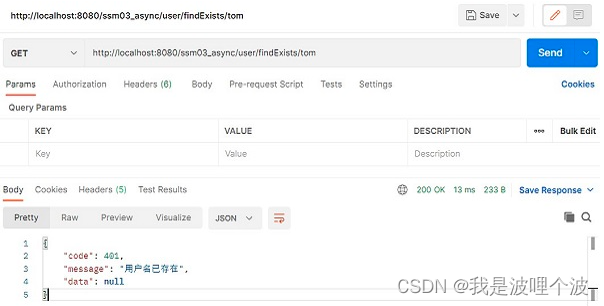
分页查询测试(路径参数拼接):
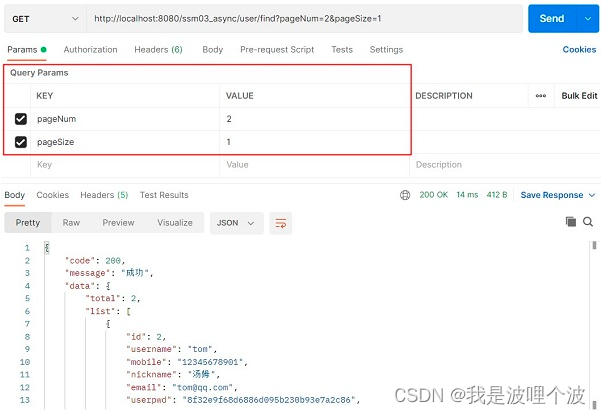
新增测试:

修改测试:
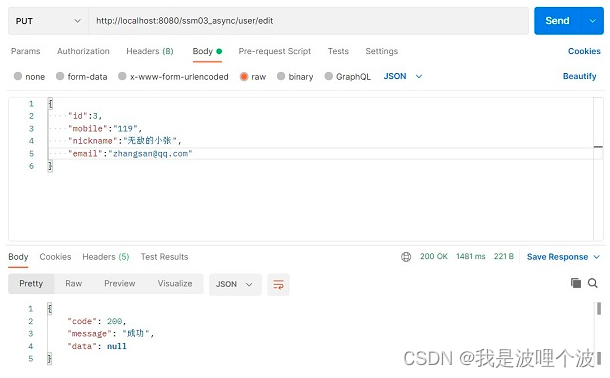
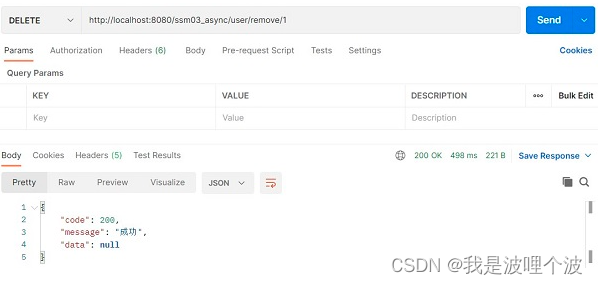
单条删除测试:
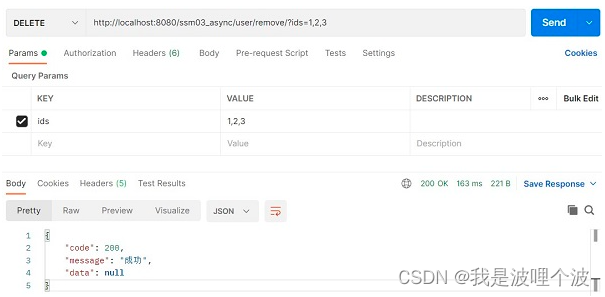
批量删除测试:
3.6 前台页面
3.6.1 首页
基于Layui经典布局改版。 地址:https://www.layuion.com/doc/element/layout.html#admin- 1
- 2
- 3
<%@ page contentType="text/html;charset=UTF-8" language="java" %> <html> <head> <base href="${pageContext.request.contextPath}/"> <title>后台管理系统</title> <!--引入Layui样式文件--> <link rel="stylesheet" href="static/layui/css/layui.css"> </head> <body> <!--引入layui经典布局并改版--> <div class="layui-layout layui-layout-admin"> <!--页面头部--> <div class="layui-header"> <div class="layui-logo layui-hide-xs layui-bg-black">后台管理系统</div> <ul class="layui-nav layui-layout-right"> <li class="layui-nav-item layui-hide layui-show-md-inline-block"> <a href="javascript:;"> <img src="//tva1.sinaimg.cn/crop.0.0.118.118.180/5db11ff4gw1e77d3nqrv8j203b03cweg.jpg" class="layui-nav-img"> 管理员 </a> <dl class="layui-nav-child"> <dd><a href="">个人信息</a></dd> <dd><a href="">系统设置</a></dd> <dd><a href="">退出系统</a></dd> </dl> </li> </ul> </div> <div class="layui-side layui-bg-black"> <div class="layui-side-scroll"> <!-- 左侧导航区域(可配合layui已有的垂直导航) --> <ul class="layui-nav layui-nav-tree" lay-filter="test"> <li class="layui-nav-item layui-nav-itemed"> <a class="" href="javascript:;">系统管理</a> <dl class="layui-nav-child"> <dd><a href="page/sys/user" target="mainFrame">用户列表</a></dd> <dd><a href="page/sys/role" target="mainFrame">角色列表</a></dd> <dd><a href="page/sys/permission" target="mainFrame">权限列表</a></dd> </dl> </li> <li class="layui-nav-item"> <a href="javascript:;">业务管理</a> <dl class="layui-nav-child"> <dd><a href="student/find" target="mainFrame">学生列表</a></dd> <dd><a href="javascript:;">员工列表</a></dd> <dd><a href="javascript:;">部门列表</a></dd> </dl> </li> </ul> </div> </div> <div class="layui-body"> <!-- 内容主体区域 --> <iframe name="mainFrame" frameborder="0" style="width:100%;height: 100%" src="page/welcome"></iframe> </div> <div class="layui-footer"> <!-- 底部固定区域 --> 底部固定区域 </div> </div> <!--引入layui.js文件--> <script type="text/javascript" src="static/layui/layui.js"></script> </body> </html>- 1
- 2
- 3
- 4
- 5
- 6
- 7
- 8
- 9
- 10
- 11
- 12
- 13
- 14
- 15
- 16
- 17
- 18
- 19
- 20
- 21
- 22
- 23
- 24
- 25
- 26
- 27
- 28
- 29
- 30
- 31
- 32
- 33
- 34
- 35
- 36
- 37
- 38
- 39
- 40
- 41
- 42
- 43
- 44
- 45
- 46
- 47
- 48
- 49
- 50
- 51
- 52
- 53
- 54
- 55
- 56
- 57
- 58
- 59
- 60
- 61
- 62
- 63
- 64
- 65
- 66
- 67
- 68
- 69
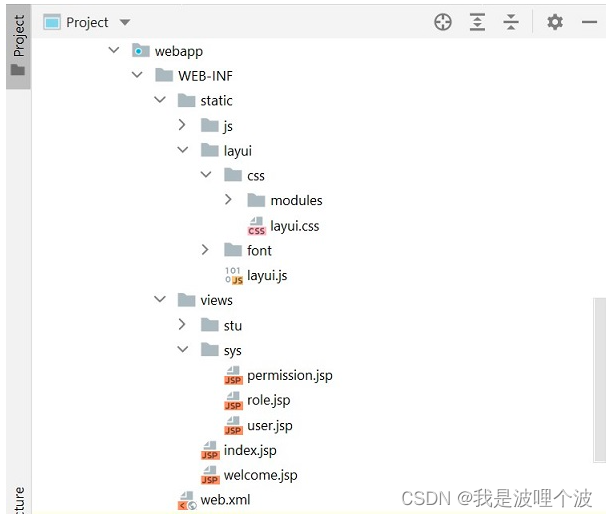
结构:
welcome.jsp:
<%@ page contentType="text/html;charset=UTF-8" language="java" %> <html> <head> <base href="${pageContext.request.contextPath}/"> <title>Title</title> <style> h1 { text-align: center; margin-top: 120px; } </style> </head> <body> <h1>欢迎使用后台管理系统</h1> </body> </html>- 1
- 2
- 3
- 4
- 5
- 6
- 7
- 8
- 9
- 10
- 11
- 12
- 13
- 14
- 15
- 16
SystemController.java:
package com.newcapec.controller; import org.springframework.stereotype.Controller; import org.springframework.web.bind.annotation.GetMapping; import org.springframework.web.bind.annotation.RequestMapping; /** * 用来实现页面跳转的处理器 */ @Controller @RequestMapping("/page") public class SystemController { @GetMapping("/stu/add") public String stuAdd() { return "stu/add"; } @GetMapping("/welcome") public String welcome() { return "welcome"; } @GetMapping("/sys/user") public String sysUser() { return "sys/user"; } @GetMapping("/sys/role") public String sysRole() { return "sys/role"; } @GetMapping("/sys/permission") public String sysPermission() { return "sys/permission"; } @GetMapping("/emp") public String emp() { return "emp/find"; } @GetMapping("/dept") public String dept() { return "dept/find"; } @GetMapping("/index") public String index() { return "index"; } @GetMapping("/login") public String login() { return "login"; } }- 1
- 2
- 3
- 4
- 5
- 6
- 7
- 8
- 9
- 10
- 11
- 12
- 13
- 14
- 15
- 16
- 17
- 18
- 19
- 20
- 21
- 22
- 23
- 24
- 25
- 26
- 27
- 28
- 29
- 30
- 31
- 32
- 33
- 34
- 35
- 36
- 37
- 38
- 39
- 40
- 41
- 42
- 43
- 44
- 45
- 46
- 47
- 48
- 49
- 50
- 51
- 52
- 53
- 54
- 55
- 56
- 57
- 58
3.6.2 用户管理页面
<%@ page contentType="text/html;charset=UTF-8" language="java" %> <html> <head> <base href="${pageContext.request.contextPath}/"> <title>Title</title> <!--引入Layui样式文件--> <link rel="stylesheet" href="static/layui/css/layui.css"> <style> .layui-inline { margin-right: 15px } .layui-fluid { padding-top: 15px; } /*layui数据表格复选框修正*/ .layui-table-view .layui-form-checkbox i { margin-top: 5px; } </style> </head> <body> <div class="layui-fluid"> <!-- 用户列表页头部区域:展示搜索框、搜索按钮、添加按钮、批量删除按钮 --> <blockquote class="layui-elem-quote"> <form class="layui-form" action=""> <div class="layui-inline"> <input type="text" id="username" name="username" placeholder="用户名" class="layui-input"> </div> <div class="layui-inline"> <input type="text" id="nickname" name="nickname" placeholder="昵称" class="layui-input"> </div> <div class="layui-inline"> <a class="layui-btn" id="searchBtn">搜索</a> <a class="layui-btn layui-btn-normal" id="addBtn">添加</a> <a class="layui-btn layui-btn-danger" id="removeBatchBtn">批量删除</a> </div> </form> </blockquote> <!-- 数据表格:展示数据,表格中的内容以及数据都是通过js渲染的 --> <table id="dataTable" lay-filter="dataTable"></table> <!-- 操作数据模板 --> <script type="text/html" id="operateBar"> <a class="layui-btn layui-btn-sm layui-btn-warm" lay-event="edit">编辑</a> <a class="layui-btn layui-btn-sm layui-btn-danger" lay-event="remove">删除</a> </script> <!--dataWindow页面层--> <div id="dataWindow" style="display: none;padding: 10px"> <form id="dataForm" class="layui-form" lay-filter="dataForm"> <!--layui隐藏域存在获取不到值的bug,建议使用下面写法--> <input type="text" name="id" style="display: none"> <div class="layui-form-item"> <label class="layui-form-label">用户名</label> <div class="layui-input-block"> <input type="text" id="dataFormUsername" name="username" required lay-verify="required|usernameVerify" placeholder="请输入用户名" class="layui-input"> </div> </div> <div class="layui-form-item"> <label class="layui-form-label">手机号</label> <div class="layui-input-block"> <input type="text" name="mobile" required lay-verify="required|phone" placeholder="请输入手机号" class="layui-input"> </div> </div> <div class="layui-form-item"> <label class="layui-form-label">昵称</label> <div class="layui-input-block"> <input type="text" name="nickname" required lay-verify="required" placeholder="请输入昵称" class="layui-input"> </div> </div> <div class="layui-form-item"> <label class="layui-form-label">邮箱</label> <div class="layui-input-block"> <input type="text" name="email" required lay-verify="required|email" placeholder="请输入邮箱" class="layui-input"> </div> </div> <div class="layui-form-item"> <label class="layui-form-label">加密盐</label> <div class="layui-input-block"> <input type="text" name="salt" required lay-verify="required" placeholder="请输入加密盐" class="layui-input"> </div> </div> <div class="layui-form-item"> <label class="layui-form-label">用户状态</label> <div class="layui-input-block"> <select name="status" lay-verify="required"> <option value=""></option> <option value="1">正常</option> <option value="2">禁用</option> </select> </div> </div> <!--真正提交数据的按钮,由弹出层的yes回调触发--> <button id="submitBtn" lay-submit lay-filter="submitBtn" style="display: none">立即提交</button> </form> </div> </div> <!--引入layui.js文件--> <script type="text/javascript" src="static/layui/layui.js"></script> <script type="text/javascript"> //加载模块 layui.use(['table', 'form', 'layer'], function () { var table = layui.table, form = layui.form, layer = layui.layer, $ = layui.$; //表格数据渲染 table.render({ //id:设定容器唯一 id。id 是对表格的数据操作方法上是必要的传递条件。 id: 'dataTable', elem: '#dataTable', //height: 312, method: 'get', url: 'user/find', //数据接口 page: true, //开启分页 limit: '10', //每页请求的数据 limits: [10, 20, 30, 40, 50], cols: [[ //表头 {type: 'checkbox', width: 50, fixed: 'left'}, {field: 'id', title: 'ID', minWidth: 50, fixed: 'left', align: 'center'}, {field: 'username', title: '用户名', minWidth: 100, fixed: 'left', align: 'center'}, {field: 'mobile', title: '手机号', align: 'center'}, {field: 'nickname', title: '昵称', align: 'center'}, {field: 'email', title: '邮箱', align: 'center'}, {field: 'salt', title: '加密盐', align: 'center'}, { field: 'status', title: '用户状态', align: 'center', templet: function (d) { return d.status == '1' ? '正常' : '禁用'; } }, {title: '操作', minWidth: 150, fixed: 'right', align: 'center', templet: '#operateBar'}, ]], parseData: function (res) { //res 即为原始返回的数据 return { "code": res.code, //解析接口状态 "msg": res.message, //解析提示文本 "count": res.data.total, //解析数据长度 "data": res.data.list //解析数据列表 }; }, request: { pageName: 'pageNum', //页码的参数名称,默认:page limitName: 'pageSize' //每页数据量的参数名,默认:limit }, response: { //规定成功的状态码,默认:0 statusCode: 200 } }); //条件查询 $("#searchBtn").click(function () { tableReload(); }); $("#addBtn").click(function () { //新增无需传递id值 addOrEdit(); }) var window_index = -1; //默认窗体索引值 function addOrEdit(id) { //页面层 layer.open({ type: 1, title: id ? '修改用户' : '新增用户', content: $('#dataWindow'), area: ['500px', '500px'], //宽高 btn: ['确定', '取消'], yes: function (index) { //如果设定了yes回调,需进行手工关闭 //layer.close(index); window_index = index; //点击确定按钮,提交表单数据 $("#submitBtn").click(); }, end: function () { window_index = -1; //重置窗体索引默认值 //重置表单 $('#dataForm')[0].reset(); $("#dataFormUsername").prop('readonly', ''); $("#dataFormUsername").attr('lay-verify', 'required|usernameVerify'); } }); } //新增表单提交事件 form.on('submit(submitBtn)', function (data) { //当前容器的全部表单字段,名值对形式:{name: value} console.log(data.field) //判断表单的id域是否有值,如果有值,执行修改操作,否则执行新增。 var url = 'user/add', method = 'post'; if (data.field.id) { url = 'user/edit'; method = 'put'; } //console.log(data); $.ajax(url, { type: method, contentType: 'application/json', data: JSON.stringify(data.field), success: function (res) { if (res.code == 200) { //关闭页面层 layer.close(window_index); layer.msg(res.message); tableReload(); } } }) return false; //阻止表单跳转。如果需要表单跳转,去掉这段即可。 }); form.verify({ usernameVerify: function (value) { //value:表单的值、item:表单的DOM对象 if (!new RegExp("^[a-zA-Z0-9_\u4e00-\u9fa5\\s·]+$").test(value)) { return '用户名不能有特殊字符'; } if (/(^\_)|(\__)|(\_+$)/.test(value)) { return '用户名首尾不能出现下划线\'_\''; } if (/^\d+\d+\d$/.test(value)) { return '用户名不能全为数字'; } //校验用户名唯一性 var result = ''; $.ajax('user/findExists/' + value, { async: false, type: 'get', success: function (res) { if (res.code == 401) { result = res.message; } } }) return result; } }); $("#removeBatchBtn").click(function () { //调用批量删除数据的函数 removeBatch(); }); //工具条事件 //注:tool 是工具条事件名,test 是 table 原始容器的属性 lay-filter="对应的值" table.on('tool(dataTable)', function (obj) { var data = obj.data; //获得当前行数据 var layEvent = obj.event; //获得 lay-event 对应的值(也可以是表头的 event 参数对应的值) if (layEvent === 'remove') { //删除 remove(data.id); } else if (layEvent === 'edit') { //编辑 //数据回显 //给表单赋值:dataForm 即 class="layui-form" 所在元素属性 lay-filter="" 对应的值 form.val("dataForm", data); /* * 当用户执行编辑操作时: * 1、用户名为只读 * 2、用户名无需唯一校验 * */ $("#dataFormUsername").prop('readonly', 'readonly'); $("#dataFormUsername").attr('lay-verify', ''); addOrEdit(data.id); } }); //单条删除数据的函数 function remove(id) { layer.confirm('确定要删除吗?', function (index) { //向服务端发送删除指令 $.ajax('user/remove/' + id, { type: 'delete', success: function (res) { if (res.code == 200) { layer.msg(res.message); //重载表格数据 tableReload(); } } }) }); } //单条删除数据的函数 function removeBatch() { var checkStatus = table.checkStatus('dataTable'); //dataTable 即为基础参数 id 对应的值 var data = checkStatus.data; //获取选中行的数据 if (data.length == 0) { layer.msg("请选择要删除的数据!"); } else { layer.confirm('确定要删除吗?', function (index) { var ids = []; data.forEach(function (item) { ids.push(item.id); }) //向服务端发送删除指令 $.ajax('user/remove?ids=' + ids.join(), { type: 'delete', success: function (res) { if (res.code == 200) { layer.msg(res.message); //重载表格数据 tableReload(); } } }) }); } } //重载表格的函数 function tableReload() { table.reload('dataTable', { //结合后面的搜索使用 where: { username: $("#username").val(), nickname: $("#nickname").val() } }) } }); </script> </body> </html>- 1
- 2
- 3
- 4
- 5
- 6
- 7
- 8
- 9
- 10
- 11
- 12
- 13
- 14
- 15
- 16
- 17
- 18
- 19
- 20
- 21
- 22
- 23
- 24
- 25
- 26
- 27
- 28
- 29
- 30
- 31
- 32
- 33
- 34
- 35
- 36
- 37
- 38
- 39
- 40
- 41
- 42
- 43
- 44
- 45
- 46
- 47
- 48
- 49
- 50
- 51
- 52
- 53
- 54
- 55
- 56
- 57
- 58
- 59
- 60
- 61
- 62
- 63
- 64
- 65
- 66
- 67
- 68
- 69
- 70
- 71
- 72
- 73
- 74
- 75
- 76
- 77
- 78
- 79
- 80
- 81
- 82
- 83
- 84
- 85
- 86
- 87
- 88
- 89
- 90
- 91
- 92
- 93
- 94
- 95
- 96
- 97
- 98
- 99
- 100
- 101
- 102
- 103
- 104
- 105
- 106
- 107
- 108
- 109
- 110
- 111
- 112
- 113
- 114
- 115
- 116
- 117
- 118
- 119
- 120
- 121
- 122
- 123
- 124
- 125
- 126
- 127
- 128
- 129
- 130
- 131
- 132
- 133
- 134
- 135
- 136
- 137
- 138
- 139
- 140
- 141
- 142
- 143
- 144
- 145
- 146
- 147
- 148
- 149
- 150
- 151
- 152
- 153
- 154
- 155
- 156
- 157
- 158
- 159
- 160
- 161
- 162
- 163
- 164
- 165
- 166
- 167
- 168
- 169
- 170
- 171
- 172
- 173
- 174
- 175
- 176
- 177
- 178
- 179
- 180
- 181
- 182
- 183
- 184
- 185
- 186
- 187
- 188
- 189
- 190
- 191
- 192
- 193
- 194
- 195
- 196
- 197
- 198
- 199
- 200
- 201
- 202
- 203
- 204
- 205
- 206
- 207
- 208
- 209
- 210
- 211
- 212
- 213
- 214
- 215
- 216
- 217
- 218
- 219
- 220
- 221
- 222
- 223
- 224
- 225
- 226
- 227
- 228
- 229
- 230
- 231
- 232
- 233
- 234
- 235
- 236
- 237
- 238
- 239
- 240
- 241
- 242
- 243
- 244
- 245
- 246
- 247
- 248
- 249
- 250
- 251
- 252
- 253
- 254
- 255
- 256
- 257
- 258
- 259
- 260
- 261
- 262
- 263
- 264
- 265
- 266
- 267
- 268
- 269
- 270
- 271
- 272
- 273
- 274
- 275
- 276
- 277
- 278
- 279
- 280
- 281
- 282
- 283
- 284
- 285
- 286
- 287
- 288
- 289
- 290
- 291
- 292
- 293
- 294
- 295
- 296
- 297
- 298
- 299
- 300
- 301
- 302
- 303
- 304
- 305
- 306
- 307
- 308
- 309
- 310
- 311
- 312
- 313
- 314
- 315
- 316
- 317
- 318
- 319
- 320
- 321
- 322
- 323
- 324
- 325
- 326
- 327
- 328
- 329
- 330
- 331
- 332
- 333
- 334
- 335
- 336
- 337
- 338
- 339
- 340
- 341
- 342
- 343
- 344
- 345
- 346
- 347
- 348
- 349
- 350
- 351
四、系统角色模块
4.1 实体类
package com.newcapec.entity; public class SysRole { private Integer id; private String roleCode; private String roleName; private String description; private String del; public Integer getId() { return id; } public void setId(Integer id) { this.id = id; } public String getRoleCode() { return roleCode; } public void setRoleCode(String roleCode) { this.roleCode = roleCode; } public String getRoleName() { return roleName; } public void setRoleName(String roleName) { this.roleName = roleName; } public String getDescription() { return description; } public void setDescription(String description) { this.description = description; } public String getDel() { return del; } public void setDel(String del) { this.del = del; } }- 1
- 2
- 3
- 4
- 5
- 6
- 7
- 8
- 9
- 10
- 11
- 12
- 13
- 14
- 15
- 16
- 17
- 18
- 19
- 20
- 21
- 22
- 23
- 24
- 25
- 26
- 27
- 28
- 29
- 30
- 31
- 32
- 33
- 34
- 35
- 36
- 37
- 38
- 39
- 40
- 41
- 42
- 43
- 44
- 45
- 46
- 47
- 48
- 49
- 50
4.2 持久层
Dao接口:
package com.newcapec.dao; import com.newcapec.entity.SysRole; import com.newcapec.utils.BaseDao; public interface SysRoleDao extends BaseDao<SysRole> { }- 1
- 2
- 3
- 4
- 5
- 6
- 7
- 8
Mapper文件:
<?xml version="1.0" encoding="UTF-8" ?> <!DOCTYPE mapper PUBLIC "-//mybatis.org//DTD Mapper 3.0//EN" "http://mybatis.org/dtd/mybatis-3-mapper.dtd"> <mapper namespace="com.newcapec.dao.SysRoleDao"> <insert id="insert" parameterType="com.newcapec.entity.SysRole" useGeneratedKeys="true" keyProperty="id"> insert into t_sys_role(role_code, role_name, description) values(#{roleCode}, #{roleName}, #{description}) </insert> <update id="update" parameterType="com.newcapec.entity.SysRole"> update t_sys_role <set> <if test="roleCode != null"> role_code = #{roleCode}, </if> <if test="roleName != null"> role_name = #{roleName}, </if> <if test="description != null"> description = #{description}, </if> </set> where id = #{id} </update> <delete id="delete" parameterType="java.lang.Integer"> update t_sys_role set del=1 where id = #{id} </delete> <delete id="deleteBatch" parameterType="java.lang.Integer"> update t_sys_role set del=1 where id in <foreach collection="array" open="(" close=")" separator="," item="id"> #{id} </foreach> </delete> <resultMap id="BaseResultMap" type="com.newcapec.entity.SysRole"> <id column="id" property="id"/> <result column="role_code" property="roleCode"/> <result column="role_name" property="roleName"/> <result column="description" property="description"/> </resultMap> <select id="select" parameterType="com.newcapec.entity.SysRole" resultMap="BaseResultMap"> select id, role_code, role_name, description from t_sys_role <where> <if test="roleCode != null and roleCode != ''"> role_code like concat('%',#{roleCode},'%') </if> <if test="roleName != null and roleName != ''"> and role_name like concat('%',#{roleName},'%') </if> and del=0 </where> </select> <select id="selectById" parameterType="java.lang.Integer" resultMap="BaseResultMap"> select id, role_code, role_name, description from t_sys_role where id = #{id} and del=0 </select> </mapper>- 1
- 2
- 3
- 4
- 5
- 6
- 7
- 8
- 9
- 10
- 11
- 12
- 13
- 14
- 15
- 16
- 17
- 18
- 19
- 20
- 21
- 22
- 23
- 24
- 25
- 26
- 27
- 28
- 29
- 30
- 31
- 32
- 33
- 34
- 35
- 36
- 37
- 38
- 39
- 40
- 41
- 42
- 43
- 44
- 45
- 46
- 47
- 48
- 49
- 50
- 51
- 52
- 53
- 54
- 55
- 56
- 57
- 58
- 59
- 60
- 61
- 62
- 63
4.3 业务层
Service接口:
package com.newcapec.service; import com.newcapec.entity.SysRole; import com.newcapec.utils.BaseService; public interface SysRoleService extends BaseService<SysRole> { }- 1
- 2
- 3
- 4
- 5
- 6
- 7
Service接口实现类:
package com.newcapec.service.impl; import com.github.pagehelper.PageHelper; import com.github.pagehelper.PageInfo; import com.newcapec.constant.CommonConstant; import com.newcapec.dao.SysRoleDao; import com.newcapec.entity.SysRole; import com.newcapec.service.SysRoleService; import org.springframework.beans.factory.annotation.Autowired; import org.springframework.stereotype.Service; import java.util.HashMap; import java.util.List; import java.util.Map; @Service public class SysRoleServiceImpl implements SysRoleService { @Autowired private SysRoleDao sysRoleDao; @Override public void add(SysRole entity) { sysRoleDao.insert(entity); } @Override public void edit(SysRole entity) { sysRoleDao.update(entity); } @Override public void remove(Integer id) { sysRoleDao.delete(id); } @Override public void removeBatch(Integer[] ids) { sysRoleDao.deleteBatch(ids); } @Override public List<SysRole> find(SysRole entity) { return sysRoleDao.select(entity); } @Override public Map<String, Object> findPage(Integer pageNum, Integer pageSize, SysRole entity) { //分页业务 PageHelper.startPage(pageNum, pageSize); List<SysRole> list = sysRoleDao.select(entity); PageInfo<SysRole> pageInfo = new PageInfo<>(list); //1.当前页面数据(数据列表)2.此次查询的总记录数 Map<String, Object> pageMap = new HashMap<>(); pageMap.put(CommonConstant.PAGE_LIST, list); pageMap.put(CommonConstant.PAGE_TOTAL, pageInfo.getTotal()); return pageMap; } @Override public SysRole findById(Integer id) { return sysRoleDao.selectById(id); } }- 1
- 2
- 3
- 4
- 5
- 6
- 7
- 8
- 9
- 10
- 11
- 12
- 13
- 14
- 15
- 16
- 17
- 18
- 19
- 20
- 21
- 22
- 23
- 24
- 25
- 26
- 27
- 28
- 29
- 30
- 31
- 32
- 33
- 34
- 35
- 36
- 37
- 38
- 39
- 40
- 41
- 42
- 43
- 44
- 45
- 46
- 47
- 48
- 49
- 50
- 51
- 52
- 53
- 54
- 55
- 56
- 57
- 58
- 59
- 60
- 61
- 62
- 63
- 64
4.4 控制层
package com.newcapec.controller; import com.newcapec.constant.CommonConstant; import com.newcapec.entity.SysRole; import com.newcapec.service.SysRoleService; import com.newcapec.utils.Result; import org.springframework.beans.factory.annotation.Autowired; import org.springframework.web.bind.annotation.*; @RestController @RequestMapping("/role") public class SysRoleController { @Autowired private SysRoleService sysRoleService; /** * 新增 */ @PostMapping("/add") public Result add(@RequestBody SysRole sysRole) { sysRoleService.add(sysRole); return Result.success(); } /** * 编辑 */ @PutMapping("/edit") public Result edit(@RequestBody SysRole sysRole) { sysRoleService.edit(sysRole); return Result.success(); } /** * 删除 */ @DeleteMapping("/remove/{id}") public Result remove(@PathVariable Integer id) { sysRoleService.remove(id); return Result.success(); } /** * 批量删除 */ @DeleteMapping("/remove") public Result removeBatch(Integer[] ids) { sysRoleService.removeBatch(ids); return Result.success(); } /** * 单条查询 */ @GetMapping("/find/{id}") public Result findById(@PathVariable Integer id) { return Result.success(sysRoleService.findById(id)); } /** * 分页查询 */ @GetMapping("/findPage") public Result findPage(@RequestParam(value = CommonConstant.PAGE_NUM, required = false, defaultValue = CommonConstant.PAGE_NUM_DEFAULT) Integer pageNum, @RequestParam(value = CommonConstant.PAGE_SIZE, required = false, defaultValue = CommonConstant.PAGE_SIZE_DEFAULT) Integer pageSize, SysRole sysRole) { return Result.success(sysRoleService.findPage(pageNum, pageSize, sysRole)); } /** * 查询 */ @GetMapping("/find") public Result find(SysRole sysRole) { return Result.success(sysRoleService.find(sysRole)); } }- 1
- 2
- 3
- 4
- 5
- 6
- 7
- 8
- 9
- 10
- 11
- 12
- 13
- 14
- 15
- 16
- 17
- 18
- 19
- 20
- 21
- 22
- 23
- 24
- 25
- 26
- 27
- 28
- 29
- 30
- 31
- 32
- 33
- 34
- 35
- 36
- 37
- 38
- 39
- 40
- 41
- 42
- 43
- 44
- 45
- 46
- 47
- 48
- 49
- 50
- 51
- 52
- 53
- 54
- 55
- 56
- 57
- 58
- 59
- 60
- 61
- 62
- 63
- 64
- 65
- 66
- 67
- 68
- 69
- 70
- 71
- 72
- 73
- 74
- 75
- 76
- 77
- 78
4.5 前台页面
<%@ page contentType="text/html;charset=UTF-8" language="java" %> <html> <head> <base href="${pageContext.request.contextPath}/"> <title>Title</title> <link rel="stylesheet" href="static/layui/css/layui.css"> <style> /*layui数据表格复选框修正*/ .layui-table-view .layui-form-checkbox i { margin-top: 5px; } </style> </head> <body> <div style="padding: 10px"> <blockquote class="layui-elem-quote"> <form class="layui-form"> <div class="layui-inline"> <input type="text" id="roleCode" name="roleCode" placeholder="角色编码" class="layui-input"> </div> <div class="layui-inline"> <input type="text" id="roleName" name="roleName" placeholder="角色名称" class="layui-input"> </div> <div class="layui-inline"> <a class="layui-btn searchBtn">搜索</a> <a class="layui-btn layui-btn-normal addBtn">添加</a> <a class="layui-btn layui-btn-danger removeBtn">批量删除</a> </div> </form> </blockquote> <table id="tab" lay-filter="tab"></table> <!--表格中的操作--> <script type="text/html" id="roleBar"> <a class="layui-btn layui-btn-xs layui-btn-warm" lay-event="edit">编辑</a> <a class="layui-btn layui-btn-xs layui-btn-danger" lay-event="remove">删除</a> </script> <!--表单--> <div id="dataWindow" style="display: none;padding: 10px;"> <form id="dataForm" class="layui-form" lay-filter="dataForm"> <input type="text" name="id" style="display: none;"> <div class="layui-form-item"> <label class="layui-form-label">角色编码</label> <div class="layui-input-block"> <input type="text" name="roleCode" lay-verify="required" placeholder="请输入角色编码" class="layui-input"> </div> </div> <div class="layui-form-item"> <label class="layui-form-label">角色名称</label> <div class="layui-input-block"> <input type="text" name="roleName" lay-verify="required" placeholder="请输入角色名称" class="layui-input"> </div> </div> <div class="layui-form-item"> <label class="layui-form-label">描述</label> <div class="layui-input-block"> <input type="text" name="description" lay-verify="required" placeholder="请输入描述" class="layui-input"> </div> </div> <%--<div class="layui-form-item"> <label class="layui-form-label">权限</label> <div class="layui-input-block"> <div id="permissionTree"></div> </div> </div>--%> <button class="submitBtn" lay-submit lay-filter="submitBtn" style="display: none;">立即提交</button> </form> </div> </div> <script type="text/javascript" src="static/layui/layui.js"></script> <script type="text/javascript"> layui.use(['table', 'form', 'layer', 'tree'], function () { var form = layui.form, layer = layui.layer, table = layui.table, tree = layui.tree, $ = layui.$; //异步表格初始化 table.render({ id: 'roleTable', elem: '#tab', //异步请求 method: 'get', url: 'role/findPage', //分页 page: true, limit: 10, limits: [10, 20, 30, 50], //设置表头 cols: [[ {type: 'checkbox', width: 50, fixed: 'left'}, {field: 'id', title: 'ID', minWidth: 50, fixed: 'left', align: 'center'}, {field: 'roleCode', title: '角色编码', minWidth: 100, fixed: 'left', align: 'center'}, {field: 'roleName', title: '角色名称', align: 'center'}, {field: 'description', title: '描述', align: 'center'}, {title: '操作', minWidth: 150, fixed: 'right', align: 'center', templet: '#roleBar'} ]], //res 即为后台响应的数据 parseData: function (res) { return { //解析接口状态 'code': res.code, //解析提示文本 'msg': res.message, //解析数据长度 'count': res.data.total, //解析数据列表 'data': res.data.list }; }, request: { //页码的参数名称,默认:page pageName: 'pageNum', //每页数据量的参数名,默认:limit limitName: 'pageSize' }, response: { //规定成功的状态码,默认:0 statusCode: 200 } }); //条件查询 $('.searchBtn').click(function () { tableReload(); }); //行工具事件 //注:tool 是工具条事件名,test 是 table 原始容器的属性 lay-filter="对应的值" table.on('tool(tab)', function (obj) { //获得当前行数据 var data = obj.data; //获得 lay-event 对应的值(也可以是表头的 event 参数对应的值) var layEvent = obj.event; if (layEvent == 'edit') { //数据回显 form.val("dataForm", data); //点击编辑按钮 addOrEdit(data.id); } else if (layEvent == 'remove') { //点击删除按钮 remove(data.id); } }); //单条删除函数 function remove(id) { layer.confirm('确定要删除吗?', function () { //通过异步请求删除 $.ajax('role/remove/' + id, { type: 'delete', success: function (res) { if (res.code == 200) { layer.msg(res.message); //表格重载 tableReload(); } } }); }); } //批量删除函数 function removeBatch() { //获取表格选中数据状态 var checkStatus = table.checkStatus('roleTable'); //获取选中数据 var checkData = checkStatus.data; if (checkData.length == 0) { layer.msg('请选择要删除的数据'); } else { layer.confirm('确定要删除吗?', function () { var array = []; checkData.forEach(function (item) { array.push(item.id); }); $.ajax('role/remove?ids=' + array.join(), { type: 'delete', success: function (res) { if (res.code == 200) { layer.msg(res.message); //表格重载 tableReload(); } } }); }); } } $('.removeBtn').click(function () { removeBatch(); }) //新增 var window_index = -1; function addOrEdit(id) { layer.open({ type: 1, title: id ? '角色编辑' : '角色新增', content: $('#dataWindow'), btn: ['确定', '取消'], //点击确定按钮事件 yes: function (index) { window_index = index $('.submitBtn').click(); }, //点击弹出层隐藏之后事件 end: function () { window_index = -1; //清空表单 $('#dataForm')[0].reset(); } }); } $('.addBtn').click(function () { addOrEdit(); }); //表单提交时间 form.on('submit(submitBtn)', function (data) { //当前容器的全部表单字段,名值对形式:{name: value} var url = 'role/add'; var method = 'post'; if (data.field.id) { //id参数有数据表示当前操作为编辑,否则为新增 url = 'role/edit'; method = 'put'; } $.ajax(url, { type: method, contentType: 'application/json', data: JSON.stringify(data.field), success: function (res) { if (res.code = 200) { layer.close(window_index); layer.msg(res.message); tableReload(); } } }); //阻止表单跳转。如果需要表单跳转,去掉这段即可。 return false; }); //表格重载 function tableReload() { table.reload('roleTable', { where: { roleCode: $('#roleCode').val(), roleName: $('#roleName').val() } }); } }); </script> </body> </html>- 1
- 2
- 3
- 4
- 5
- 6
- 7
- 8
- 9
- 10
- 11
- 12
- 13
- 14
- 15
- 16
- 17
- 18
- 19
- 20
- 21
- 22
- 23
- 24
- 25
- 26
- 27
- 28
- 29
- 30
- 31
- 32
- 33
- 34
- 35
- 36
- 37
- 38
- 39
- 40
- 41
- 42
- 43
- 44
- 45
- 46
- 47
- 48
- 49
- 50
- 51
- 52
- 53
- 54
- 55
- 56
- 57
- 58
- 59
- 60
- 61
- 62
- 63
- 64
- 65
- 66
- 67
- 68
- 69
- 70
- 71
- 72
- 73
- 74
- 75
- 76
- 77
- 78
- 79
- 80
- 81
- 82
- 83
- 84
- 85
- 86
- 87
- 88
- 89
- 90
- 91
- 92
- 93
- 94
- 95
- 96
- 97
- 98
- 99
- 100
- 101
- 102
- 103
- 104
- 105
- 106
- 107
- 108
- 109
- 110
- 111
- 112
- 113
- 114
- 115
- 116
- 117
- 118
- 119
- 120
- 121
- 122
- 123
- 124
- 125
- 126
- 127
- 128
- 129
- 130
- 131
- 132
- 133
- 134
- 135
- 136
- 137
- 138
- 139
- 140
- 141
- 142
- 143
- 144
- 145
- 146
- 147
- 148
- 149
- 150
- 151
- 152
- 153
- 154
- 155
- 156
- 157
- 158
- 159
- 160
- 161
- 162
- 163
- 164
- 165
- 166
- 167
- 168
- 169
- 170
- 171
- 172
- 173
- 174
- 175
- 176
- 177
- 178
- 179
- 180
- 181
- 182
- 183
- 184
- 185
- 186
- 187
- 188
- 189
- 190
- 191
- 192
- 193
- 194
- 195
- 196
- 197
- 198
- 199
- 200
- 201
- 202
- 203
- 204
- 205
- 206
- 207
- 208
- 209
- 210
- 211
- 212
- 213
- 214
- 215
- 216
- 217
- 218
- 219
- 220
- 221
- 222
- 223
- 224
- 225
- 226
- 227
- 228
- 229
- 230
- 231
- 232
- 233
- 234
- 235
- 236
- 237
- 238
- 239
- 240
- 241
- 242
- 243
- 244
- 245
- 246
- 247
- 248
- 249
- 250
- 251
- 252
- 253
- 254
- 255
- 256
- 257
- 258
- 259
- 260
- 261
- 262
- 263
- 264
- 265
- 266
- 267
五、系统权限模块
5.1 实体类
package com.newcapec.entity; public class SysPermission { private Integer id; private String name; private String type; private String url; private String percode; private Integer parentId; private Integer sort; private String del; public Integer getId() { return id; } public void setId(Integer id) { this.id = id; } public String getName() { return name; } public void setName(String name) { this.name = name; } public String getType() { return type; } public void setType(String type) { this.type = type; } public String getUrl() { return url; } public void setUrl(String url) { this.url = url; } public String getPercode() { return percode; } public void setPercode(String percode) { this.percode = percode; } public Integer getParentId() { return parentId; } public void setParentId(Integer parentId) { this.parentId = parentId; } public Integer getSort() { return sort; } public void setSort(Integer sort) { this.sort = sort; } public String getDel() { return del; } public void setDel(String del) { this.del = del; } }- 1
- 2
- 3
- 4
- 5
- 6
- 7
- 8
- 9
- 10
- 11
- 12
- 13
- 14
- 15
- 16
- 17
- 18
- 19
- 20
- 21
- 22
- 23
- 24
- 25
- 26
- 27
- 28
- 29
- 30
- 31
- 32
- 33
- 34
- 35
- 36
- 37
- 38
- 39
- 40
- 41
- 42
- 43
- 44
- 45
- 46
- 47
- 48
- 49
- 50
- 51
- 52
- 53
- 54
- 55
- 56
- 57
- 58
- 59
- 60
- 61
- 62
- 63
- 64
- 65
- 66
- 67
- 68
- 69
- 70
- 71
- 72
- 73
- 74
- 75
- 76
- 77
- 78
5.2 持久层
Dao接口:
package com.newcapec.dao; import com.newcapec.entity.SysPermission; import com.newcapec.utils.BaseDao; public interface SysPermissionDao extends BaseDao<SysPermission> { }- 1
- 2
- 3
- 4
- 5
- 6
- 7
Mapper文件:
<?xml version="1.0" encoding="UTF-8" ?> <!DOCTYPE mapper PUBLIC "-//mybatis.org//DTD Mapper 3.0//EN" "http://mybatis.org/dtd/mybatis-3-mapper.dtd"> <mapper namespace="com.newcapec.dao.SysPermissionDao"> <insert id="insert" parameterType="com.newcapec.entity.SysPermission" useGeneratedKeys="true" keyProperty="id"> insert into t_sys_permission(name, type, url, percode, parent_id, sort) values(#{name}, #{type}, #{url}, #{percode}, #{parentId}, #{sort}) </insert> <update id="update" parameterType="com.newcapec.entity.SysPermission"> update t_sys_permission <set> <if test="name != null"> name = #{name}, </if> <if test="type != null"> type = #{type}, </if> <if test="url != null"> url = #{url}, </if> <if test="percode != null"> percode = #{percode}, </if> <if test="parentId != null"> parent_id = #{parentId}, </if> <if test="sort != null"> sort = #{sort}, </if> </set> where id = #{id} </update> <delete id="delete" parameterType="java.lang.Integer"> update t_sys_permission set del=1 where id = #{id} </delete> <delete id="deleteBatch" parameterType="java.lang.Integer"> update t_sys_permission set del=1 where id in <foreach collection="array" open="(" close=")" separator="," item="id"> #{id} </foreach> </delete> <resultMap id="BaseResultMap" type="com.newcapec.entity.SysPermission"> <id column="id" property="id"/> <result column="name" property="name"/> <result column="type" property="type"/> <result column="url" property="url"/> <result column="percode" property="percode"/> <result column="parent_id" property="parentId"/> <result column="sort" property="sort"/> </resultMap> <select id="select" parameterType="com.newcapec.entity.SysPermission" resultMap="BaseResultMap"> select id, name, type, url, percode, parent_id, sort from t_sys_permission <where> <if test="name != null and name != ''"> name like concat('%',#{name},'%') </if> <if test="type != null and type != ''"> and type = #{type} </if> and del=0 </where> </select> <select id="selectById" parameterType="java.lang.Integer" resultMap="BaseResultMap"> select id, name, type, url, percode, parent_id, sort from t_sys_permission where id = #{id} and del=0 </select> </mapper>- 1
- 2
- 3
- 4
- 5
- 6
- 7
- 8
- 9
- 10
- 11
- 12
- 13
- 14
- 15
- 16
- 17
- 18
- 19
- 20
- 21
- 22
- 23
- 24
- 25
- 26
- 27
- 28
- 29
- 30
- 31
- 32
- 33
- 34
- 35
- 36
- 37
- 38
- 39
- 40
- 41
- 42
- 43
- 44
- 45
- 46
- 47
- 48
- 49
- 50
- 51
- 52
- 53
- 54
- 55
- 56
- 57
- 58
- 59
- 60
- 61
- 62
- 63
- 64
- 65
- 66
- 67
- 68
- 69
- 70
- 71
- 72
- 73
- 74
5.3 业务层
Service接口:
package com.newcapec.service; import com.newcapec.entity.SysPermission; import com.newcapec.utils.BaseService; public interface SysPermissionService extends BaseService<SysPermission> { }- 1
- 2
- 3
- 4
- 5
- 6
- 7
Service接口实现类:
package com.newcapec.service.impl; import com.github.pagehelper.PageHelper; import com.github.pagehelper.PageInfo; import com.newcapec.constant.CommonConstant; import com.newcapec.dao.SysPermissionDao; import com.newcapec.entity.SysPermission; import com.newcapec.service.SysPermissionService; import org.springframework.beans.factory.annotation.Autowired; import org.springframework.stereotype.Service; import java.util.HashMap; import java.util.List; import java.util.Map; @Service public class SysPermissionServiceImpl implements SysPermissionService { @Autowired private SysPermissionDao sysPermissionDao; @Override public void add(SysPermission entity) { sysPermissionDao.insert(entity); } @Override public void edit(SysPermission entity) { sysPermissionDao.update(entity); } @Override public void remove(Integer id) { sysPermissionDao.delete(id); } @Override public void removeBatch(Integer[] ids) { sysPermissionDao.deleteBatch(ids); } @Override public List<SysPermission> find(SysPermission entity) { return sysPermissionDao.select(entity); } @Override public Map<String, Object> findPage(Integer pageNum, Integer pageSize, SysPermission entity) { //分页业务 PageHelper.startPage(pageNum, pageSize); List<SysPermission> list = sysPermissionDao.select(entity); PageInfo<SysPermission> pageInfo = new PageInfo<>(list); //1.当前页面数据(数据列表)2.此次查询的总记录数 Map<String, Object> pageMap = new HashMap<>(); pageMap.put(CommonConstant.PAGE_LIST, list); pageMap.put(CommonConstant.PAGE_TOTAL, pageInfo.getTotal()); return pageMap; } @Override public SysPermission findById(Integer id) { return sysPermissionDao.selectById(id); } }- 1
- 2
- 3
- 4
- 5
- 6
- 7
- 8
- 9
- 10
- 11
- 12
- 13
- 14
- 15
- 16
- 17
- 18
- 19
- 20
- 21
- 22
- 23
- 24
- 25
- 26
- 27
- 28
- 29
- 30
- 31
- 32
- 33
- 34
- 35
- 36
- 37
- 38
- 39
- 40
- 41
- 42
- 43
- 44
- 45
- 46
- 47
- 48
- 49
- 50
- 51
- 52
- 53
- 54
- 55
- 56
- 57
- 58
- 59
- 60
- 61
- 62
- 63
- 64
- 65
5.4 控制层
package com.newcapec.controller; import com.newcapec.constant.CommonConstant; import com.newcapec.entity.SysPermission; import com.newcapec.service.SysPermissionService; import com.newcapec.utils.Result; import org.springframework.beans.factory.annotation.Autowired; import org.springframework.web.bind.annotation.*; @RestController @RequestMapping("/permission") public class SysPermissionController { @Autowired private SysPermissionService sysPermissionService; /** * 新增 */ @PostMapping("/add") public Result add(@RequestBody SysPermission sysPermission) { sysPermissionService.add(sysPermission); return Result.success(); } /** * 编辑 */ @PutMapping("/edit") public Result edit(@RequestBody SysPermission sysPermission) { sysPermissionService.edit(sysPermission); return Result.success(); } /** * 删除 */ @DeleteMapping("/remove/{id}") public Result remove(@PathVariable Integer id) { sysPermissionService.remove(id); return Result.success(); } /** * 批量删除 */ @DeleteMapping("/remove") public Result removeBatch(Integer[] ids) { sysPermissionService.removeBatch(ids); return Result.success(); } /** * 单条查询 */ @GetMapping("/find/{id}") public Result findById(@PathVariable Integer id) { return Result.success(sysPermissionService.findById(id)); } /** * 分页查询 */ @GetMapping("/findPage") public Result findPage(@RequestParam(value = CommonConstant.PAGE_NUM, required = false, defaultValue = CommonConstant.PAGE_NUM_DEFAULT) Integer pageNum, @RequestParam(value = CommonConstant.PAGE_SIZE, required = false, defaultValue = CommonConstant.PAGE_SIZE_DEFAULT) Integer pageSize, SysPermission sysPermission) { return Result.success(sysPermissionService.findPage(pageNum, pageSize, sysPermission)); } /** * 查询 */ @GetMapping("/find") public Result find(SysPermission sysPermission) { return Result.success(sysPermissionService.find(sysPermission)); } }- 1
- 2
- 3
- 4
- 5
- 6
- 7
- 8
- 9
- 10
- 11
- 12
- 13
- 14
- 15
- 16
- 17
- 18
- 19
- 20
- 21
- 22
- 23
- 24
- 25
- 26
- 27
- 28
- 29
- 30
- 31
- 32
- 33
- 34
- 35
- 36
- 37
- 38
- 39
- 40
- 41
- 42
- 43
- 44
- 45
- 46
- 47
- 48
- 49
- 50
- 51
- 52
- 53
- 54
- 55
- 56
- 57
- 58
- 59
- 60
- 61
- 62
- 63
- 64
- 65
- 66
- 67
- 68
- 69
- 70
- 71
- 72
- 73
- 74
- 75
- 76
- 77
- 78
- 79
- 80
5.5 前台页面
<%@ page contentType="text/html;charset=UTF-8" language="java" %> <html> <head> <base href="${pageContext.request.contextPath}/"> <title>Title</title> <link rel="stylesheet" href="static/layui/css/layui.css"> <style> /*layui数据表格复选框修正*/ .layui-table-view .layui-form-checkbox i { margin-top: 5px; } </style> </head> <body> <div style="padding: 10px"> <blockquote class="layui-elem-quote"> <form class="layui-form"> <div class="layui-inline"> <input type="text" id="name" name="name" placeholder="权限名称" class="layui-input"> </div> <div class="layui-inline"> <select id="type" name="type"> <option value="">权限类型</option> <option value="1">目录</option> <option value="2">菜单</option> <option value="3">按钮</option> </select> </div> <div class="layui-inline"> <a class="layui-btn searchBtn">搜索</a> <a class="layui-btn layui-btn-normal addBtn">添加</a> <a class="layui-btn layui-btn-danger removeBtn">批量删除</a> </div> </form> </blockquote> <table id="tab" lay-filter="tab"></table> <!--表格中的操作--> <script type="text/html" id="permissionBar"> <a class="layui-btn layui-btn-xs layui-btn-warm" lay-event="edit">编辑</a> <a class="layui-btn layui-btn-xs layui-btn-danger" lay-event="remove">删除</a> </script> <!--表单--> <div id="dataWindow" style="display: none;padding: 10px;"> <form id="dataForm" class="layui-form" lay-filter="dataForm"> <input type="text" name="id" style="display: none;"> <div class="layui-form-item"> <label class="layui-form-label">权限名称</label> <div class="layui-input-block"> <input type="text" name="name" lay-verify="required" placeholder="请输入权限名称" class="layui-input"> </div> </div> <div class="layui-form-item"> <label class="layui-form-label">权限类型</label> <div class="layui-input-block"> <select name="type" lay-verify="required"> <option value="">请选择</option> <option value="1">目录</option> <option value="2">菜单</option> <option value="3">按钮</option> </select> </div> </div> <div class="layui-form-item"> <label class="layui-form-label">访问地址</label> <div class="layui-input-block"> <input type="text" name="url" placeholder="请输入访问地址" class="layui-input"> </div> </div> <div class="layui-form-item"> <label class="layui-form-label">权限代码</label> <div class="layui-input-block"> <input type="text" name="percode" placeholder="请输入权限代码" class="layui-input"> </div> </div> <div class="layui-form-item"> <label class="layui-form-label">父节点</label> <div class="layui-input-block"> <input type="text" name="parentId" placeholder="请输入父节点" class="layui-input"/> </div> </div> <div class="layui-form-item"> <label class="layui-form-label">显示顺序</label> <div class="layui-input-block"> <input type="text" name="sort" placeholder="请输入显示顺序" class="layui-input"> </div> </div> <button class="submitBtn" lay-submit lay-filter="submitBtn" style="display: none;">立即提交</button> </form> </div> </div> <script type="text/javascript" src="static/layui/layui.js"></script> <script type="text/javascript"> layui.use(['table', 'form', 'layer'], function () { var form = layui.form, layer = layui.layer, table = layui.table, dropdown = layui.dropdown, tree = layui.tree, $ = layui.$; //异步表格初始化 table.render({ id: 'permissionTable', elem: '#tab', //异步请求 method: 'get', url: 'permission/findPage', //分页 page: true, limit: 10, limits: [10, 20, 30, 50], //设置表头 cols: [[ {type: 'checkbox', width: 50, fixed: 'left'}, {field: 'id', title: 'ID', minWidth: 50, fixed: 'left', align: 'center'}, {field: 'name', title: '权限名称', minWidth: 100, fixed: 'left', align: 'center'}, { field: 'type', title: '权限类型', align: 'center', templet: function (d) { var result = '' switch (d.type) { case '1': result = '目录'; break; case '2': result = '菜单'; break; case '3': result = '按钮'; break; } return result; } }, {field: 'url', title: '访问地址', align: 'center'}, {field: 'percode', title: '权限代码', align: 'center'}, {field: 'parentId', title: '父节点', align: 'center'}, {field: 'sort', title: '显示顺序', align: 'center'}, {title: '操作', minWidth: 150, fixed: 'right', align: 'center', templet: '#permissionBar'} ]], //res 即为后台响应的数据 parseData: function (res) { return { //解析接口状态 'code': res.code, //解析提示文本 'msg': res.message, //解析数据长度 'count': res.data.total, //解析数据列表 'data': res.data.list }; }, request: { //页码的参数名称,默认:page pageName: 'pageNum', //每页数据量的参数名,默认:limit limitName: 'pageSize' }, response: { //规定成功的状态码,默认:0 statusCode: 200 } }); //条件查询 $('.searchBtn').click(function () { tableReload(); }); //行工具事件 //注:tool 是工具条事件名,test 是 table 原始容器的属性 lay-filter="对应的值" table.on('tool(tab)', function (obj) { //获得当前行数据 var data = obj.data; //获得 lay-event 对应的值(也可以是表头的 event 参数对应的值) var layEvent = obj.event; if (layEvent == 'edit') { //数据回显 form.val("dataForm", data); //点击编辑按钮 addOrEdit(data.id); } else if (layEvent == 'remove') { //点击删除按钮 remove(data.id); } }); //单条删除函数 function remove(id) { layer.confirm('确定要删除吗?', function () { //通过异步请求删除 $.ajax('permission/remove/' + id, { type: 'delete', success: function (res) { if (res.code == 200) { layer.msg(res.message); //表格重载 tableReload(); } } }); }); } //批量删除函数 function removeBatch() { //获取表格选中数据状态 var checkStatus = table.checkStatus('permissionTable'); //获取选中数据 var checkData = checkStatus.data; if (checkData.length == 0) { layer.msg('请选择要删除的数据'); } else { layer.confirm('确定要删除吗?', function () { var array = []; checkData.forEach(function (item) { array.push(item.id); }); $.ajax('permission/remove?ids=' + array.join(), { type: 'delete', success: function (res) { if (res.code == 200) { layer.msg(res.message); //表格重载 tableReload(); } } }); }); } } $('.removeBtn').click(function () { removeBatch(); }) //新增 var window_index = -1; function addOrEdit(id) { layer.open({ type: 1, title: id ? '权限编辑' : '权限新增', content: $('#dataWindow'), btn: ['确定', '取消'], //点击确定按钮事件 yes: function (index) { window_index = index $('.submitBtn').click(); }, //点击弹出层隐藏之后事件 end: function () { window_index = -1; //清空表单 $('#dataForm')[0].reset(); } }); } $('.addBtn').click(function () { addOrEdit(); }); //表单提交时间 form.on('submit(submitBtn)', function (data) { //当前容器的全部表单字段,名值对形式:{name: value} var url = 'permission/add'; var method = 'post'; if (data.field.id) { //id参数有数据表示当前操作为编辑,否则为新增 url = 'permission/edit'; method = 'put'; } $.ajax(url, { type: method, contentType: 'application/json', data: JSON.stringify(data.field), success: function (res) { if (res.code = 200) { layer.close(window_index); layer.msg(res.message); tableReload(); } } }); //阻止表单跳转。如果需要表单跳转,去掉这段即可。 return false; }); //表格重载 function tableReload() { table.reload('permissionTable', { where: { name: $('#name').val(), type: $('#type').val() } }); } }); </script> </body> </html>- 1
- 2
- 3
- 4
- 5
- 6
- 7
- 8
- 9
- 10
- 11
- 12
- 13
- 14
- 15
- 16
- 17
- 18
- 19
- 20
- 21
- 22
- 23
- 24
- 25
- 26
- 27
- 28
- 29
- 30
- 31
- 32
- 33
- 34
- 35
- 36
- 37
- 38
- 39
- 40
- 41
- 42
- 43
- 44
- 45
- 46
- 47
- 48
- 49
- 50
- 51
- 52
- 53
- 54
- 55
- 56
- 57
- 58
- 59
- 60
- 61
- 62
- 63
- 64
- 65
- 66
- 67
- 68
- 69
- 70
- 71
- 72
- 73
- 74
- 75
- 76
- 77
- 78
- 79
- 80
- 81
- 82
- 83
- 84
- 85
- 86
- 87
- 88
- 89
- 90
- 91
- 92
- 93
- 94
- 95
- 96
- 97
- 98
- 99
- 100
- 101
- 102
- 103
- 104
- 105
- 106
- 107
- 108
- 109
- 110
- 111
- 112
- 113
- 114
- 115
- 116
- 117
- 118
- 119
- 120
- 121
- 122
- 123
- 124
- 125
- 126
- 127
- 128
- 129
- 130
- 131
- 132
- 133
- 134
- 135
- 136
- 137
- 138
- 139
- 140
- 141
- 142
- 143
- 144
- 145
- 146
- 147
- 148
- 149
- 150
- 151
- 152
- 153
- 154
- 155
- 156
- 157
- 158
- 159
- 160
- 161
- 162
- 163
- 164
- 165
- 166
- 167
- 168
- 169
- 170
- 171
- 172
- 173
- 174
- 175
- 176
- 177
- 178
- 179
- 180
- 181
- 182
- 183
- 184
- 185
- 186
- 187
- 188
- 189
- 190
- 191
- 192
- 193
- 194
- 195
- 196
- 197
- 198
- 199
- 200
- 201
- 202
- 203
- 204
- 205
- 206
- 207
- 208
- 209
- 210
- 211
- 212
- 213
- 214
- 215
- 216
- 217
- 218
- 219
- 220
- 221
- 222
- 223
- 224
- 225
- 226
- 227
- 228
- 229
- 230
- 231
- 232
- 233
- 234
- 235
- 236
- 237
- 238
- 239
- 240
- 241
- 242
- 243
- 244
- 245
- 246
- 247
- 248
- 249
- 250
- 251
- 252
- 253
- 254
- 255
- 256
- 257
- 258
- 259
- 260
- 261
- 262
- 263
- 264
- 265
- 266
- 267
- 268
- 269
- 270
- 271
- 272
- 273
- 274
- 275
- 276
- 277
- 278
- 279
- 280
- 281
- 282
- 283
- 284
- 285
- 286
- 287
- 288
- 289
- 290
- 291
- 292
- 293
- 294
- 295
- 296
- 297
- 298
- 299
- 300
- 301
- 302
- 303
- 304
- 305
- 306
- 307
SSM整合_权限管理
一、权限管理系统分析
1.1 概述
权限管理,一般指根据系统设置的安全规则或者安全策略,用户可以访问而且只能访问自己被授权的资源,不多不少。权限管理几乎出现在任何系统里面,只要有用户和密码的系统。 很多人常将“用户身份认证”、“密码加密”、“系统管理”等概念与权限管理概念混淆。 用户身份认证,根本就不属于权限管理范畴。用户身份认证,是要解决这样的问题:用户告诉系统“我是谁”,系统就问用户凭什么证明你就是“谁”呢?对于采用用户名、密码验证的系统,那么就是出示密码。当用户名和密码匹配,则证明当前用户是谁;对于采用指纹等系统,则出示指纹;对于硬件Key等刷卡系统,则需要刷卡。 密码加密,是隶属用户身份认证领域,不属于权限管理范畴。 系统管理,一般是系统的一个模块。而且该模块一般还含有权限管理子模块。因此,很多人误认为权限管理系统只是系统的一个小小的子模块。系统管理里面的权限管理模块,只是一个操作界面,让企业IT管理员能够设置角色等安全策略。系统背后还有很多权限验证逻辑,这些都并不属于该模块。总体来说,该模块相当于给权限管理模块提供了一些数据。 目前主要是通过用户、角色、资源三方面来进行权限的分配。具体来说,就是赋予用户某个角色,角色能访问及操作不同范围的资源。通过建立角色系统,将用户和资源进行分离,来保证权限分配的实施。 一般指根据系统设置的安全规则或者安全策略,用户可以访问而且只能访问自己被授权的资源。- 1
- 2
- 3
- 4
- 5
- 6
- 7
- 8
- 9
- 10
- 11
1.2 场景举例
企业IT管理员一般都能为系统定义角色,给用户分配角色。这就是最常见的基于角色访问控制。场景举例: 1、给张三赋予“人力资源经理”角色,“人力资源经理”具有“查询员工”、“添加员工”、“修改员工”和“删除员工”权限。此时张三能够进入系统,则可以进行这些操作。 2、去掉李四的“人力资源经理”角色,此时李四就不能够进入系统进行这些操作了。 以上举例,局限于功能访问权限。还有一些更加丰富、更加细腻的权限管理。比如: 1、因为张三是北京分公司的“人力资源经理”,所以他能够也只能够管理北京分公司员工和北京分公司下属的子公司(海淀子公司、朝阳子公司、西城子公司、东城子公司等)的员工。 2、因为王五是海淀子公司的“人力资源经理”,所以他能够也只能够管理海淀子公司的员工。 3、普通审查员审查财务数据的权限是:在零售行业审核最高限额是¥50万,在钢铁行业最高限额是¥1000万;高级审查员不受该限额限制。 4、ATM取款每次取款额不能超过¥5000元,每天取款总额不能超过¥20000元。 这些权限管理和数据(可以统称为资源)直接相关,又称为数据级权限管理、细粒度权限管理或者内容权限管理。- 1
- 2
- 3
- 4
- 5
- 6
- 7
- 8
- 9
- 10
- 11
- 12
- 13
- 14
- 15
- 16
- 17
1.3 分类
从控制力度来看,可以将权限管理分为两大类:
- 功能级权限管理;
- 数据级权限管理。
从控制方向来看,也可以将权限管理分为两大类:
- 从系统获取数据,比如查询订单、查询客户资料;
- 向系统提交数据,比如删除订单、修改客户资料。
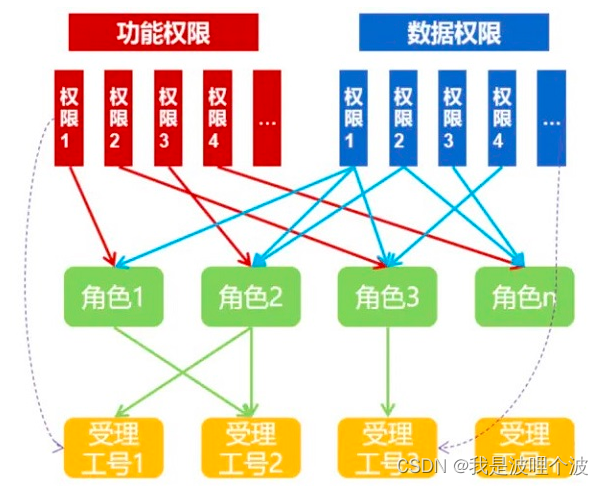
二、权限管理案例
2.1 权限涉及到5张表
用户表,角色表,权限表,用户角色关系表,角色权限关联表。 当用户登录时,根据用户名和密码去用户表中验证信息是否合法,如果合法就获取用户信息,然后根据用户的id去用户角色关系表中去得到相关联的角色id集合,再根据角色id再去角色权限关系表中获取该角色所拥有的权限id集合,然后再根基权限id集合到权限表中获取具体的菜单,展现给当前的登录用户,从而达到不用用户看到不用的菜单权限。- 1
- 2
- 3

表功能介绍
- 用户表: 记录用户的基本信息。
-- ---------------------------- -- 用户表 -- ---------------------------- DROP TABLE IF EXISTS `t_sys_user`; CREATE TABLE `t_sys_user` ( `id` int(11) NOT NULL AUTO_INCREMENT COMMENT '主键', `username` varchar(20) CHARACTER SET utf8 COLLATE utf8_general_ci NOT NULL COMMENT '登录账号', `mobile` varchar(20) CHARACTER SET utf8 COLLATE utf8_general_ci NULL DEFAULT NULL COMMENT '手机号码', `nickname` varchar(50) CHARACTER SET utf8 COLLATE utf8_general_ci NOT NULL COMMENT '用户昵称', `email` varchar(50) CHARACTER SET utf8 COLLATE utf8_general_ci NULL DEFAULT NULL COMMENT '用户邮箱', `userpwd` varchar(50) CHARACTER SET utf8 COLLATE utf8_general_ci NULL DEFAULT NULL COMMENT '密码', `salt` varchar(50) CHARACTER SET utf8 COLLATE utf8_general_ci NULL DEFAULT 'newedu' COMMENT '加密盐', `status` char(1) CHARACTER SET utf8 COLLATE utf8_general_ci NULL DEFAULT '1' COMMENT '状态:1可用2不可用', `del` char(1) CHARACTER SET utf8 COLLATE utf8_general_ci NULL DEFAULT '0' COMMENT '是否删除:0正常1删除', PRIMARY KEY (`id`) USING BTREE ) ENGINE = InnoDB AUTO_INCREMENT = 3 CHARACTER SET = utf8 COLLATE = utf8_general_ci COMMENT = '用户信息表' ROW_FORMAT = Dynamic; -- ---------------------------- -- 用户表数据 -- ---------------------------- INSERT INTO `t_sys_user` VALUES (1, 'admin', '13612345678', '管理员', 'admin@qq.com', '8f32e9f68d6886d095b230b93e7a2c86', 'newedu', '1', '0'); INSERT INTO `t_sys_user` VALUES (2, 'tom', '12345678901', '汤姆', 'tom@qq.com', '8f32e9f68d6886d095b230b93e7a2c86', 'newedu', '1', '0');- 1
- 2
- 3
- 4
- 5
- 6
- 7
- 8
- 9
- 10
- 11
- 12
- 13
- 14
- 15
- 16
- 17
- 18
- 19
- 20
- 21
- 22
- 角色表: 记录角色的基本信息。
-- ---------------------------- -- 角色表 -- ---------------------------- DROP TABLE IF EXISTS `t_sys_role`; CREATE TABLE `t_sys_role` ( `id` int(11) NOT NULL AUTO_INCREMENT COMMENT 'id', `role_code` varchar(50) CHARACTER SET utf8 COLLATE utf8_general_ci NOT NULL COMMENT '角色编码', `role_name` varchar(50) CHARACTER SET utf8 COLLATE utf8_general_ci NOT NULL COMMENT '角色名称', `description` varchar(100) CHARACTER SET utf8 COLLATE utf8_general_ci NULL DEFAULT NULL COMMENT '描述', `del` char(1) CHARACTER SET utf8 COLLATE utf8_general_ci NULL DEFAULT '0' COMMENT '是否删除:0正常1删除', PRIMARY KEY (`id`) USING BTREE ) ENGINE = InnoDB AUTO_INCREMENT = 3 CHARACTER SET = utf8 COLLATE = utf8_general_ci COMMENT = '角色信息表' ROW_FORMAT = Dynamic; -- ---------------------------- -- 角色表数据 -- ---------------------------- INSERT INTO `t_sys_role` VALUES (1, 'admin', '管理员', '管理员', '0'); INSERT INTO `t_sys_role` VALUES (2, 'user', '普通用户', '普通用户', '0'); INSERT INTO `t_sys_role` VALUES (3, 'other', '其他', '其他', '0');- 1
- 2
- 3
- 4
- 5
- 6
- 7
- 8
- 9
- 10
- 11
- 12
- 13
- 14
- 15
- 16
- 17
- 18
- 19
- 权限表: 记录权限的基本信息。
-- ---------------------------- -- 权限表 -- ---------------------------- DROP TABLE IF EXISTS `t_sys_permission`; CREATE TABLE `t_sys_permission` ( `id` int(11) NOT NULL AUTO_INCREMENT COMMENT 'id', `name` varchar(50) CHARACTER SET utf8 COLLATE utf8_general_ci NOT NULL COMMENT '权限名称', `type` char(1) CHARACTER SET utf8 COLLATE utf8_general_ci NULL DEFAULT NULL COMMENT '权限类型:1目录 2菜单 3按钮', `url` varchar(200) CHARACTER SET utf8 COLLATE utf8_general_ci NULL DEFAULT '#' COMMENT '访问地址', `percode` varchar(200) CHARACTER SET utf8 COLLATE utf8_general_ci NULL DEFAULT NULL COMMENT '权限代码', `parent_id` int(11) NULL DEFAULT 0 COMMENT '父节点ID', `sort` int(11) NULL DEFAULT NULL COMMENT '显示顺序', `del` char(1) CHARACTER SET utf8 COLLATE utf8_general_ci NULL DEFAULT '0' COMMENT '是否删除:0正常1删除', PRIMARY KEY (`id`) USING BTREE ) ENGINE = InnoDB AUTO_INCREMENT = 14 CHARACTER SET = utf8 COLLATE = utf8_general_ci COMMENT = '权限信息表' ROW_FORMAT = Dynamic; -- ---------------------------- -- 权限表数据 -- ---------------------------- INSERT INTO `t_sys_permission` VALUES (1, '系统管理', '1', '', 'system', 0, 1, '0'); INSERT INTO `t_sys_permission` VALUES (2, '用户列表', '2', '', 'user', 1, 11, '0'); INSERT INTO `t_sys_permission` VALUES (3, '用户查询', '3', '', 'user:query', 2, 111, '0'); INSERT INTO `t_sys_permission` VALUES (4, '用户新增', '3', '', 'user:add', 2, 112, '0'); INSERT INTO `t_sys_permission` VALUES (5, '用户编辑', '3', '', 'user:edit', 2, 113, '0'); INSERT INTO `t_sys_permission` VALUES (6, '用户删除', '3', '', 'user:remove', 2, 114, '0'); INSERT INTO `t_sys_permission` VALUES (7, '角色列表', '2', '', 'role', 1, 12, '0'); INSERT INTO `t_sys_permission` VALUES (8, '角色查询', '3', '', 'role:query', 7, 121, '0'); INSERT INTO `t_sys_permission` VALUES (9, '角色新增', '3', '', 'role:add', 7, 122, '0'); INSERT INTO `t_sys_permission` VALUES (10, '角色编辑', '3', '', 'role:edit', 7, 123, '0'); INSERT INTO `t_sys_permission` VALUES (11, '角色删除', '3', '', 'role:remove', 7, 124, '0'); INSERT INTO `t_sys_permission` VALUES (12, '权限列表', '2', '', 'permission', 1, 13, '0'); INSERT INTO `t_sys_permission` VALUES (13, '权限查询', '3', '', 'permission:query', 12, 131, '0'); INSERT INTO `t_sys_permission` VALUES (14, '权限新增', '3', '', 'permission:add', 12, 132, '0'); INSERT INTO `t_sys_permission` VALUES (15, '权限编辑', '3', '', 'permission:edit', 12, 133, '0'); INSERT INTO `t_sys_permission` VALUES (16, '权限删除', '3', '', 'permission:remove', 12, 134, '0');- 1
- 2
- 3
- 4
- 5
- 6
- 7
- 8
- 9
- 10
- 11
- 12
- 13
- 14
- 15
- 16
- 17
- 18
- 19
- 20
- 21
- 22
- 23
- 24
- 25
- 26
- 27
- 28
- 29
- 30
- 31
- 32
- 33
- 34
- 35
- 用户角色中间表: 记录用户所拥有的角色。
- 一个用户可以拥有多个角色,一对多关系。
- 一个角色可以包含在多个用户,一对多关系。
- 如果两张表是双向一对多关系,那么他们是多对多关系,并且必然存在一张关系描述表作为中间表。
-- ---------------------------- -- 用户角色中间表 -- ---------------------------- DROP TABLE IF EXISTS `t_sys_user_role`; CREATE TABLE `t_sys_user_role` ( `id` int(11) NOT NULL AUTO_INCREMENT COMMENT '主键', `user_id` int(11) NOT NULL COMMENT '用户ID', `role_id` int(11) NOT NULL COMMENT '角色ID', PRIMARY KEY (`id`) USING BTREE ) ENGINE = InnoDB AUTO_INCREMENT = 4 CHARACTER SET = utf8 COLLATE = utf8_general_ci COMMENT = '用户和角色关联表' ROW_FORMAT = Dynamic; -- ---------------------------- -- 用户角色中间表数据 -- ---------------------------- INSERT INTO `t_sys_user_role` VALUES (1, 1, 1); INSERT INTO `t_sys_user_role` VALUES (2, 1, 2); INSERT INTO `t_sys_user_role` VALUES (3, 2, 2);- 1
- 2
- 3
- 4
- 5
- 6
- 7
- 8
- 9
- 10
- 11
- 12
- 13
- 14
- 15
- 16
- 17
- 角色权限中间表:记录角色所拥有的权限。
- 一个角色可以多个权限,一对多关系。
- 一个权限可以包含在多个角色,一对多关系。
-- ---------------------------- -- 角色权限中间表 -- ---------------------------- DROP TABLE IF EXISTS `t_sys_role_permission`; CREATE TABLE `t_sys_role_permission` ( `id` int(11) NOT NULL AUTO_INCREMENT COMMENT '主键', `role_id` int(11) NOT NULL COMMENT '角色ID', `permission_id` int(11) NOT NULL COMMENT '权限ID', PRIMARY KEY (`id`) USING BTREE ) ENGINE = InnoDB AUTO_INCREMENT = 18 CHARACTER SET = utf8 COLLATE = utf8_general_ci COMMENT = '角色和权限关联表' ROW_FORMAT = Dynamic; -- ---------------------------- -- 角色权限中间表数据 -- ---------------------------- INSERT INTO `t_sys_role_permission` VALUES (1, 1, 1); INSERT INTO `t_sys_role_permission` VALUES (2, 1, 2); INSERT INTO `t_sys_role_permission` VALUES (3, 1, 3); INSERT INTO `t_sys_role_permission` VALUES (4, 1, 4); INSERT INTO `t_sys_role_permission` VALUES (5, 1, 5); INSERT INTO `t_sys_role_permission` VALUES (6, 1, 6); INSERT INTO `t_sys_role_permission` VALUES (7, 1, 7); INSERT INTO `t_sys_role_permission` VALUES (8, 1, 8); INSERT INTO `t_sys_role_permission` VALUES (9, 1, 9); INSERT INTO `t_sys_role_permission` VALUES (10, 1, 10); INSERT INTO `t_sys_role_permission` VALUES (11, 1, 11); INSERT INTO `t_sys_role_permission` VALUES (12, 1, 12); INSERT INTO `t_sys_role_permission` VALUES (13, 1, 13); INSERT INTO `t_sys_role_permission` VALUES (14, 2, 1); INSERT INTO `t_sys_role_permission` VALUES (15, 2, 2); INSERT INTO `t_sys_role_permission` VALUES (16, 2, 6); INSERT INTO `t_sys_role_permission` VALUES (17, 2, 10);- 1
- 2
- 3
- 4
- 5
- 6
- 7
- 8
- 9
- 10
- 11
- 12
- 13
- 14
- 15
- 16
- 17
- 18
- 19
- 20
- 21
- 22
- 23
- 24
- 25
- 26
- 27
- 28
- 29
- 30
- 31
2.2 权限数据中父节点名称展示
将权限表的父节点展示修改名称,能展示当前权限数据的父权限的名称。 实现思路: 1、在权限实体中,添加一个关联属性,属性类型SysPermission,并提供getter和setter方法。 注:仅仅展示父权限名称的话,定义String类型也行。 2、修改SysPermissionMapper.xml的查询SQL,并通过resultMap映射。 3、修改role.jsp页面数据表格的显示内容。- 1
- 2
- 3
- 4
- 5
- 6
- 7
- 8
- 9
SysPermission.java:
package com.newcapec.entity; public class SysPermission { //其他略 /* * 关联属性 */ private SysPermission parent; public SysPermission getParent() { return parent; } public void setParent(SysPermission parent) { this.parent = parent; } }- 1
- 2
- 3
- 4
- 5
- 6
- 7
- 8
- 9
- 10
- 11
- 12
- 13
- 14
- 15
- 16
- 17
- 18
- 19
SysPermissionMapper.xml:
<resultMap id="selectResultMap" type="com.newcapec.entity.SysPermission" extends="BaseResultMap"> <association property="parent" javaType="com.newcapec.entity.SysPermission"> <id property="id" column="parent_id"/> <result property="name" column="parent_name"/> </association> </resultMap> <select id="select" parameterType="com.newcapec.entity.SysPermission" resultMap="selectResultMap"> select a.id, a.name, a.type, a.url, a.percode, a.parent_id, a.sort, b.name parent_name from t_sys_permission a left join t_sys_permission b on a.parent_id = b.id <where> <if test="name != null and name != ''"> a.name like concat('%',#{name},'%') </if> <if test="type != null and type != ''"> and a.type = #{type} </if> and a.del=0 </where> </select>- 1
- 2
- 3
- 4
- 5
- 6
- 7
- 8
- 9
- 10
- 11
- 12
- 13
- 14
- 15
- 16
- 17
- 18
- 19
permission.jsp:
{field: 'parent', title: '父节点', align: 'center', templet:function (d){ return d.parent.name ? d.parent.name : '无' }},- 1
- 2
- 3
2.3 权限数据新增和编辑时关联查询父节点
在新增,编辑页面添加或修改父节点。 实现思路: 1、修改permission.jsp页面,新增和编辑表单中父节点的控件类型,从输入框改为下拉框。 2、在新增和修改操作的时候,加载所有已经存在的节点,这些节点默认作为父节点,动态加载到下拉框中。 3、修改操作,动态加载所有的父节点之后,再去渲染表单。- 1
- 2
- 3
- 4
- 5
- 6
- 7
- 8
permission.jsp:
<div class="layui-form-item"> <label class="layui-form-label">父节点</label> <div class="layui-input-block"> <select id="parentId" name="parentId"></select> </div> </div> <script type="text/javascript"> layui.use(['table', 'form', 'layer'], function () { //其他略 //行工具事件 //注:tool 是工具条事件名,test 是 table 原始容器的属性 lay-filter="对应的值" table.on('tool(tab)', function (obj) { //获得当前行数据 var data = obj.data; //获得 lay-event 对应的值(也可以是表头的 event 参数对应的值) var layEvent = obj.event; if (layEvent == 'edit') { //点击修改按钮的时候,不再立刻数据回显。而是加载完动态数据之后,显示数据 //form.val("dataForm", data); //点击编辑按钮 addOrEdit(data.id); } else if (layEvent == 'remove') { //点击删除按钮 remove(data.id); } }); //新增或修改 var window_index = -1; function addOrEdit(id) { layer.open({ type: 1, title: id ? '权限编辑' : '权限新增', content: $('#dataWindow'), btn: ['确定', '取消'], //点击确定按钮事件 yes: function (index) { window_index = index $('.submitBtn').click(); }, //点击弹出层显示之后事件 success: function(){ //新增和编辑窗体打开后,加载窗体中的动态表单数据 loadParent(function(){ if(id){ $.ajax('permission/find/'+id, { type: 'get', success: function(res){ if(res.code == 200){ form.val('dataForm', res.data); } } }); } }); }, //点击弹出层隐藏之后事件 end: function () { window_index = -1; //清空表单 $('#dataForm')[0].reset(); } }); } //加载父节点数据,follow为回调函数 function loadParent(follow){ $.ajax('permission/find', { type: 'get', success: function(res){ var str = '<option value="0">请选择</option>'; res.data.forEach(function(item){ str += '<option value="' + item.id + '">' + (item.parent.name?item.parent.name:'无') + ':' + item.name + '</option>' }); $('#parentId').html(str); //更新dataForm表单中select组件的渲染 form.render('select', 'dataForm'); //如何保证多个异步请求的执行顺序: 第一个异步执行完成才执行第二异步 /** * 1.同步请求 * $.ajax(url1, { * async: false * }) * $.ajax(url2, { * async: false * }) * 后续代码 * * 2.异步请求嵌套: 在第一异步请求的回调函数中调用第二异步请求 * $.ajax(url1, { * success: function(){ * $.ajax(url2) * } * }) * * 3.Promise */ follow(); } }); } }); </script>- 1
- 2
- 3
- 4
- 5
- 6
- 7
- 8
- 9
- 10
- 11
- 12
- 13
- 14
- 15
- 16
- 17
- 18
- 19
- 20
- 21
- 22
- 23
- 24
- 25
- 26
- 27
- 28
- 29
- 30
- 31
- 32
- 33
- 34
- 35
- 36
- 37
- 38
- 39
- 40
- 41
- 42
- 43
- 44
- 45
- 46
- 47
- 48
- 49
- 50
- 51
- 52
- 53
- 54
- 55
- 56
- 57
- 58
- 59
- 60
- 61
- 62
- 63
- 64
- 65
- 66
- 67
- 68
- 69
- 70
- 71
- 72
- 73
- 74
- 75
- 76
- 77
- 78
- 79
- 80
- 81
- 82
- 83
- 84
- 85
- 86
- 87
- 88
- 89
- 90
- 91
- 92
- 93
- 94
- 95
- 96
- 97
- 98
- 99
- 100
- 101
- 102
- 103
- 104
- 105
- 106
- 107
- 108
2.4 用户新增和编辑时关联角色
2.4.1 后台实现
用户在新增和编辑时,关联操作用户相关的角色。一个用户可以分配多个角色。 实现思路: 1、在SysUser实体类中添加关联属性,属性类型为List<Integer> roleIdList,记录当前用户相关的角色编号列表,并提供对应的getter和setter方法。 2、在SysUserDao接口中添加两个方法。 void insertUserRole(SysUser entity) 新增用户相关角色信息 void deleteUserRole(Integer id) 根据用户删除相关角色 3、在SysUserMapper.xml中定义对应的sql。 4、修改SysUserServiceImpl中,修改add()、edit()的实现,添加关联角色的相关业务。 新增用户之后,判断当前用户的相关角色编号列表是否为空,如果不为空,表示需要对相关角色信息进行新增操作。 修改用户之后,判断当前用户的角色是否为空,如果不为空,删除相关角色编号;再判断用户相关角色是否是空集合,如果集合中有角色编号,表示需要对角色信息进行新增操作。(简单来说:对于用户角色的修改,先全部删除,再新增) 总结: 用户新增时业务: 1.判断用户名是否重复 2.新增用户 3.判断用户是否有相关角色编号信息,如果有新增关系数据 用户编辑时业务: 1.编辑用户 2.判断用户相关角色是否为空,如果不为null,删除相关角色编号 3.再判断用户相关角色是否为空和空集合,如果集合中有角色编号,新增关系数据- 1
- 2
- 3
- 4
- 5
- 6
- 7
- 8
- 9
- 10
- 11
- 12
- 13
- 14
- 15
- 16
- 17
- 18
- 19
- 20
- 21
- 22
- 23
- 24
- 25
SysUser.java:
/** * 系统用户实体类: 用于用户表的基础功能CURD操作的实现 */ public class SysUser { //其他略 /* * 关联属性:记录当前用户相关的角色编号列表 */ private List<Integer> roleIdList; public List<Integer> getRoleIdList() { return roleIdList; } public void setRoleIdList(List<Integer> roleIdList) { this.roleIdList = roleIdList; } }- 1
- 2
- 3
- 4
- 5
- 6
- 7
- 8
- 9
- 10
- 11
- 12
- 13
- 14
- 15
- 16
- 17
- 18
SysUserDao接口:
public interface SysUserDao extends BaseDao<SysUser> { /* * 根据用户名查询 * 1、注册:用户名查重 * 2、用户登录(精细化提示使用,先判断用户名,再判断密码) */ SysUser selectByUsername(String username); /* * 新增用户相关角色信息 */ void insertUserRole(SysUser sysUser); /* * 根据用户编号删除相关角色 */ void deleteUserRole(Integer id); }- 1
- 2
- 3
- 4
- 5
- 6
- 7
- 8
- 9
- 10
- 11
- 12
- 13
- 14
- 15
- 16
- 17
- 18
- 19
SysUserMapper.xml:
<insert id="insertUserRole" parameterType="com.newcapec.entity.SysUser"> insert into t_sys_user_role(user_id, role_id) <foreach collection="roleIdList" open=" values" separator="," item="item"> (#{id}, #{item}) </foreach> </insert> <delete id="deleteUserRole" parameterType="java.lang.Integer"> delete from t_sys_user_role where user_id = #{id} </delete>- 1
- 2
- 3
- 4
- 5
- 6
- 7
- 8
- 9
- 10
SysUserServiceImpl.java:
/** * 用户新增时业务: * 1.判断用户名是否重复 * 2.新增用户 * 3.判断用户是否有相关角色编号信息,如果有新增关系数据 */ @Override public void add(SysUser entity) { SysUser sysUser = findByUsername(entity.getUsername()); //后台校验,保证安全性,防止第三方工具注册(PostMan) if (sysUser == null) { entity.setUserpwd(CommonConstant.PASSWORD_DEFAULT); sysUserDao.insert(entity); //判断当前用户的相关角色列表是否为空,如果不为空,需要对相关角色信息进行新增 //CollectionUtils是Spring提供的,用来判断集合是否为空或空集合的方法 if(!CollectionUtils.isEmpty(entity.getRoleIdList())){ sysUserDao.insertUserRole(entity); } } } /** * 用户编辑时业务 * 1.编辑用户 * 2.判断用户相关角色是否为空,如果不为null,删除相关角色编号 * 3.再判断用户相关角色是否为空和空集合,如果集合中有角色编号,新增关系数据 */ @Override public void edit(SysUser entity) { SysUser sysUser = findByUsername(entity.getUsername()); if (sysUser != null) { sysUserDao.update(entity); //判断当前用户的角色是否为空,如果不为空,删除相关角色编号; if(entity.getRoleIdList() != null){ sysUserDao.deleteUserRole(entity.getId()); //再判断用户相关角色是否是空集合,如果集合中有角色编号,表示需要对角色信息进行新增操作。 if(!CollectionUtils.isEmpty(entity.getRoleIdList())){ sysUserDao.insertUserRole(entity); } } } }- 1
- 2
- 3
- 4
- 5
- 6
- 7
- 8
- 9
- 10
- 11
- 12
- 13
- 14
- 15
- 16
- 17
- 18
- 19
- 20
- 21
- 22
- 23
- 24
- 25
- 26
- 27
- 28
- 29
- 30
- 31
- 32
- 33
- 34
- 35
- 36
- 37
- 38
- 39
- 40
- 41
- 42
2.4.2 前端实现
在前端页面中,新增和修改用户的时候,展示角色复选框。 实现思路: 1、在user.jsp页面的新增和修改弹出框内容中,添加一项角色相关复选框,但是角色数据是动态的,那么复选框是需要动态加载的。 2、在user.jsp中查询所有的角色数据,动态渲染角色数据。 3、如果是修改操作,那么需要在动态渲染完角色数据之后,再去做数据回显。 4、当表单异步提交数据的时候,会把数据转换为json字符串进行提交,那么复选框提交的数据只会保留最后一个值,但是服务器需要的是数组,那么就需要我们手动处理,在提交数据之前,手动获取用户相关角色编号转换为数组进行提交。 5、如果是修改操作,其他数据正常回显,但是用户的角色数据无法回显,因为我们根据id查询用户的时候,没有关联查询角色数据,修改根据id查询用户的sql即可。 6、Layui表单回显的时候,无法把一个数组赋值给表单控件,需要我们手动赋值。 注:layui中的动态表单,必须渲染刷新。- 1
- 2
- 3
- 4
- 5
- 6
- 7
- 8
- 9
- 10
- 11
- 12
- 13
- 14
- 15
- 16
user.jsp:
<form id="dataForm" class="layui-form" lay-filter="dataForm"> <div class="layui-form-item"> <label class="layui-form-label">角色</label> <div class="layui-input-block roleIdList"> <!--动态加载角色复选框--> </div> </div> </form> <script type="text/javascript"> //加载模块 layui.use(['table', 'form', 'layer'], function () { //其他略 //工具条事件 //注:tool 是工具条事件名,test 是 table 原始容器的属性 lay-filter="对应的值" table.on('tool(dataTable)', function (obj) { var data = obj.data; //获得当前行数据 var layEvent = obj.event; //获得 lay-event 对应的值(也可以是表头的 event 参数对应的值) if (layEvent === 'remove') { //删除 remove(data.id); } else if (layEvent === 'edit') { //编辑 //不再这里进行数据回显,因为需要加载完动态角色数据之后才做回显 $("#dataFormUsername").prop('readonly', 'readonly'); $("#dataFormUsername").attr('lay-verify', ''); addOrEdit(data.id); } }); var window_index = -1; //默认窗体索引值 function addOrEdit(id) { //页面层 layer.open({ type: 1, title: id ? '修改用户' : '新增用户', content: $('#dataWindow'), area: ['500px', '500px'], //宽高 btn: ['确定', '取消'], yes: function (index) { //如果设定了yes回调,需进行手工关闭 //layer.close(index); window_index = index; //点击确定按钮,提交表单数据 $("#submitBtn").click(); }, //点击弹出层显示之后事件 success: function(){ //弹出层显示之后,加载所有的角色列表数据 loadRole(function(){ //如果是修改操作,那么去查询用户的数据并回显数据 if(id){ $.ajax('user/find/'+id, { type: 'get', success: function(res){ if(res.code == 200){ //formTest 即 class="layui-form" 所在元素属性 lay-filter="" 对应的值 form.val('dataForm', res.data); //手动为用户相关角色信息赋值 $.each($(':checkbox[name="roleIdList"]'), function(){ this.checked = false; var list = res.data.roleIdList; if(list && list.length > 0){ for(var i in list){ if(list[i] == this.value){ this.checked = true; } } } }); //当用户将要执行编辑操作: //1.用户名为只读 $('#dataFormUsername').prop('readonly', 'readonly'); //2.用户名不能进行唯一校验 $('#dataFormUsername').attr('lay-verify', ''); form.render('checkbox', 'dataForm'); } } }) } }); }, end: function () { window_index = -1; //重置窗体索引默认值 //重置表单 $('#dataForm')[0].reset(); $("#dataFormUsername").prop('readonly', ''); $("#dataFormUsername").attr('lay-verify', 'required|usernameVerify'); } }); } //新增表单提交事件 form.on('submit(submitBtn)', function (data) { //当前容器的全部表单字段,名值对形式:{name: value} console.log(data.field) //判断表单的id域是否有值,如果有值,执行修改操作,否则执行新增。 var url = 'user/add', method = 'post'; if (data.field.id) { url = 'user/edit'; method = 'put'; } //console.log(data); //手动获取用户相关角色编号信息 var array = []; $.each($(':checkbox[name="roleIdList"]:checked'), function(){ array.push(this.value); }); data.field.roleIdList = array; $.ajax(url, { type: method, contentType: 'application/json', data: JSON.stringify(data.field), success: function (res) { if (res.code == 200) { //关闭页面层 layer.close(window_index); layer.msg(res.message); tableReload(); } } }) return false; //阻止表单跳转。如果需要表单跳转,去掉这段即可。 }); //加载所有的角色数据 function loadRole(follow){ $.ajax('role/find', { type: 'get', success: function(res){ var str = ''; res.data.forEach(function(item){ str += '<input type="checkbox" name="roleIdList" title="' + item.roleName + '" lay-skin="primary" value="' + item.id + '">'; }); $('.roleIdList').html(str); form.render('checkbox', 'dataForm'); follow(); } }); } }); </script>- 1
- 2
- 3
- 4
- 5
- 6
- 7
- 8
- 9
- 10
- 11
- 12
- 13
- 14
- 15
- 16
- 17
- 18
- 19
- 20
- 21
- 22
- 23
- 24
- 25
- 26
- 27
- 28
- 29
- 30
- 31
- 32
- 33
- 34
- 35
- 36
- 37
- 38
- 39
- 40
- 41
- 42
- 43
- 44
- 45
- 46
- 47
- 48
- 49
- 50
- 51
- 52
- 53
- 54
- 55
- 56
- 57
- 58
- 59
- 60
- 61
- 62
- 63
- 64
- 65
- 66
- 67
- 68
- 69
- 70
- 71
- 72
- 73
- 74
- 75
- 76
- 77
- 78
- 79
- 80
- 81
- 82
- 83
- 84
- 85
- 86
- 87
- 88
- 89
- 90
- 91
- 92
- 93
- 94
- 95
- 96
- 97
- 98
- 99
- 100
- 101
- 102
- 103
- 104
- 105
- 106
- 107
- 108
- 109
- 110
- 111
- 112
- 113
- 114
- 115
- 116
- 117
- 118
- 119
- 120
- 121
- 122
- 123
- 124
- 125
- 126
- 127
- 128
- 129
- 130
- 131
- 132
- 133
- 134
- 135
- 136
- 137
- 138
- 139
- 140
- 141
- 142
- 143
- 144
- 145
SysUserMapper.xml:
<resultMap id="BaseResultMap" type="com.newcapec.entity.SysUser"> <id column="id" property="id"/> <result column="username" property="username"/> <result column="mobile" property="mobile"/> <result column="nickname" property="nickname"/> <result column="email" property="email"/> <result column="userpwd" property="userpwd"/> <result column="salt" property="salt"/> <result column="status" property="status"/> </resultMap> <resultMap id="SelectByIdResultMap" type="com.newcapec.entity.SysUser" extends="BaseResultMap"> <collection property="roleIdList" ofType="java.lang.Integer"> <constructor> <arg column="role_id"/> </constructor> </collection> </resultMap> <select id="selectById" parameterType="java.lang.Integer" resultMap="SelectByIdResultMap"> select a.id, a.username, a.mobile, a.nickname, a.email, a.userpwd, a.salt, a.status, b.role_id from t_sys_user a left join t_sys_user_role b on a.id = b.user_id where a.id = #{id} and a.del=0 </select>- 1
- 2
- 3
- 4
- 5
- 6
- 7
- 8
- 9
- 10
- 11
- 12
- 13
- 14
- 15
- 16
- 17
- 18
- 19
- 20
- 21
- 22
- 23
2.5 角色新增和编辑时关联权限
2.5.1 后台实现
角色在新增和编辑时,关联操作角色相关的权限。一个角色可以分配多个权限。整体实现思路和2.4类似。 实现思路: 1、在SysRole实体类中添加关联属性,属性类型为List<Integer> permissionIdList,记录当前角色相关的权限编号列表,并提供对应的getter和setter方法。 2、在SysRoleDao接口中添加两个方法。 void insertRolePermission(SysRole entity) 新增角色相关权限信息 void deleteRolePermission(Integer id) 根据角色删除相关权限信息 3、在SysRoleMapper.xml中定义对应的sql。 4、修改根据id查询角色的sql,查询角色信息及角色相关的权限编号列表。 5、修改SysRoleServiceImpl中,修改add()、edit()的实现,添加关联权限的相关业务。 新增角色之后,判断当前角色的相关权限编号列表是否为空,如果不为空,表示需要对相关权限信息进行新增操作。 修改角色之后,判断当前角色的权限列表是否为空,如果不为空,删除相关权限编号;再判断角色相关权限是否是空集合,如果集合中有权限编号,表示需要对权限信息进行新增操作。(简单来说:对于角色权限的修改,先全部删除,再新增)- 1
- 2
- 3
- 4
- 5
- 6
- 7
- 8
- 9
- 10
- 11
- 12
- 13
- 14
- 15
- 16
SysRole.java:
public class SysRole { //其他略 /* * 关联属性:记录当前角色的相关权限编号列表 */ private List<Integer> permissionIdList; public List<Integer> getPermissionIdList() { return permissionIdList; } public void setPermissionIdList(List<Integer> permissionIdList) { this.permissionIdList = permissionIdList; } }- 1
- 2
- 3
- 4
- 5
- 6
- 7
- 8
- 9
- 10
- 11
- 12
- 13
- 14
- 15
- 16
SysRoleDao接口:
public interface SysRoleDao extends BaseDao<SysRole> { /* * 新增角色相关权限信息 */ void insertRolePermission(SysRole sysRole); /* * 根根据角色删除相关权限信息 */ void deleteRolePermission(Integer id); }- 1
- 2
- 3
- 4
- 5
- 6
- 7
- 8
- 9
- 10
- 11
- 12
- 13
SysRoleMapper.xml:
<resultMap id="selectByIdResultMap" type="com.newcapec.entity.SysRole" extends="BaseResultMap"> <collection property="permissionIdList" ofType="java.lang.Integer"> <constructor> <arg column="permission_id"/> </constructor> </collection> </resultMap> <select id="selectById" parameterType="java.lang.Integer" resultMap="selectByIdResultMap"> select a.id, a.role_code, a.role_name, a.description, b.permission_id from t_sys_role a left join t_sys_role_permission b on a.id = b.role_id where a.id = #{id} and a.del=0 </select> <insert id="insertRolePermission" parameterType="com.newcapec.entity.SysRole"> insert into t_sys_role_permission(role_id, permission_id) <foreach collection="permissionIdList" open=" values" separator="," item="item"> (#{id}, #{item}) </foreach> </insert> <delete id="deleteRolePermission" parameterType="java.lang.Integer"> delete from t_sys_role_permission where role_id = #{id} </delete>- 1
- 2
- 3
- 4
- 5
- 6
- 7
- 8
- 9
- 10
- 11
- 12
- 13
- 14
- 15
- 16
- 17
- 18
- 19
- 20
- 21
- 22
- 23
- 24
SysRoleServiceImpl.java:
@Override public void add(SysRole entity) { sysRoleDao.insert(entity); if(!CollectionUtils.isEmpty(entity.getPermissionIdList())){ sysRoleDao.insertRolePermission(entity); } } @Override public void edit(SysRole entity) { sysRoleDao.update(entity); if(entity.getPermissionIdList() != null){ sysRoleDao.deleteRolePermission(entity.getId()); if(!CollectionUtils.isEmpty(entity.getPermissionIdList())){ sysRoleDao.insertRolePermission(entity); } } }- 1
- 2
- 3
- 4
- 5
- 6
- 7
- 8
- 9
- 10
- 11
- 12
- 13
- 14
- 15
- 16
- 17
- 18
2.5.2 前端实现
在前端页面中,新增和修改角色的时候,展示权限树形结构。 注意:角色在整个系统中,也就那么几个,用复选框问题不大。但是权限会很多,如果使用复选框,不太合适。 实现思路: 1、在role.jsp页面的新增和修改弹出框内容中,添加权限一项,但是权限数据是动态的。 2、在role.jsp中查询所有的权限列表数据,以树形结构展示(需要加载layui的tree模块)。 3、如果是修改操作,那么需要在动态渲染完权限树形结构数据之后,再去做数据回显。 4、从后台查询得到的数据不符合layui tree的数据结构,那么我们需要对数据进行处理。 4.1 将后台响应数据转换为layui中tree组件需要的数据结构,layui tree组件需要id、title、spread、children等,但是后台响应数据不包含这些数据。 4.2 将列表结构的数据转换为树形结构数据。 5、把解析得到的树形结构数据渲染到指定的元素。 6、提交表单的时候,需要手动添加角色相关权限编号数据(因为树形结构不是表单控件)。 7、修改操作,表单的数据回显不会回显树形结构,只需要调用树形节点的setChecked即可。 注意:因layui的树形组件的原因,只要选了父节点,那么所有的子节点都会默认勾选,那么我们需要数据过滤,只勾选按钮权限。- 1
- 2
- 3
- 4
- 5
- 6
- 7
- 8
- 9
- 10
- 11
- 12
- 13
- 14
- 15
- 16
- 17
- 18
- 19
- 20
role.jsp:
<div class="layui-form-item"> <label class="layui-form-label">权限</label> <div class="layui-input-block"> <div id="permissionTree"></div> </div> </div> <script type="text/javascript" src="static/js/tool.js"></script> <script type="text/javascript"> layui.use(['table', 'form', 'layer', 'tree'], function () { var form = layui.form, layer = layui.layer, table = layui.table, tree = layui.tree, $ = layui.$; //行工具事件 //注:tool 是工具条事件名,test 是 table 原始容器的属性 lay-filter="对应的值" table.on('tool(tab)', function(obj) { //获得当前行数据 var data = obj.data; //获得 lay-event 对应的值(也可以是表头的 event 参数对应的值) var layEvent = obj.event; if(layEvent == 'edit'){ //点击编辑按钮 addOrEdit(data.id); }else if(layEvent == 'remove'){ //点击删除按钮 remove(data.id); } }); //新增或修改 var window_index = -1; function addOrEdit(id){ layer.open({ type: 1, title: id ? '角色编辑' : '角色新增', content: $('#dataWindow'), btn: ['确定', '取消'], //点击确定按钮事件 yes: function(index){ window_index = index $('.submitBtn').click(); }, //点击弹出层显示之后事件 success: function(){ loadPermission(function(permissions){ if(id){ $.ajax('role/find/'+id, { type: 'get', success: function(res){ if(res.code == 200){ //formTest 即 class="layui-form" 所在元素属性 lay-filter="" 对应的值 form.val('dataForm', res.data); var array = []; //将当前角色所有拥有的权限编号列表过滤,仅保留type=3的权限编号 res.data.permissionIdList.forEach(function(item){ for(var i in permissions){ if(permissions[i].id == item && permissions[i].type == 3){ array.push(item); break; } } }); tree.setChecked('permissionTree', array); } } }) } }); }, //点击弹出层隐藏之后事件 end: function(){ window_index = -1; //清空表单 $('#dataForm')[0].reset(); } }); } //表单提交事件 form.on('submit(submitBtn)', function(data){ //当前容器的全部表单字段,名值对形式:{name: value} var url = 'role/add'; var method = 'post'; if(data.field.id){ //id参数有数据表示当前操作为编辑,否则为新增 url = 'role/edit'; method = 'put'; } //手动添加角色相关权限编号数据 var array = []; var checkData = treeToData(tree.getChecked('permissionTree')); checkData.forEach(function(item){ array.push(item.id); }); data.field.permissionIdList = array; $.ajax(url, { type: method, contentType: 'application/json', data: JSON.stringify(data.field), success: function(res){ if(res.code = 200){ layer.close(window_index); layer.msg(res.message); tableReload(); } } }); //阻止表单跳转。如果需要表单跳转,去掉这段即可。 return false; }); //加载角色列表数据 function loadPermission(follow){ $.ajax('permission/find', { type: 'get', success: function(res){ //1.将数据转换为layui中tree组件需要的数据 res.data.forEach(function(item){ item.title = item.name; item.spread = true; }); //2.将列表数据转换为树形结构数据 var treeData = dataToTree(res.data); //3.树形组件初始化 //树形组件数据加载 tree.render({ id: 'permissionTree', elem: '#permissionTree', showCheckbox: true, showLine: false, data: treeData }); follow(res.data); } }); } }); </script>- 1
- 2
- 3
- 4
- 5
- 6
- 7
- 8
- 9
- 10
- 11
- 12
- 13
- 14
- 15
- 16
- 17
- 18
- 19
- 20
- 21
- 22
- 23
- 24
- 25
- 26
- 27
- 28
- 29
- 30
- 31
- 32
- 33
- 34
- 35
- 36
- 37
- 38
- 39
- 40
- 41
- 42
- 43
- 44
- 45
- 46
- 47
- 48
- 49
- 50
- 51
- 52
- 53
- 54
- 55
- 56
- 57
- 58
- 59
- 60
- 61
- 62
- 63
- 64
- 65
- 66
- 67
- 68
- 69
- 70
- 71
- 72
- 73
- 74
- 75
- 76
- 77
- 78
- 79
- 80
- 81
- 82
- 83
- 84
- 85
- 86
- 87
- 88
- 89
- 90
- 91
- 92
- 93
- 94
- 95
- 96
- 97
- 98
- 99
- 100
- 101
- 102
- 103
- 104
- 105
- 106
- 107
- 108
- 109
- 110
- 111
- 112
- 113
- 114
- 115
- 116
- 117
- 118
- 119
- 120
- 121
- 122
- 123
- 124
- 125
- 126
- 127
- 128
- 129
- 130
- 131
- 132
- 133
- 134
- 135
- 136
- 137
- 138
- 139
- 140
- 141
- 142
- 143
2.6 用户登录
2.6.1 后台实现
1、SysUserDao中已经定义了SysUser selectByUsername(String username)方法,那么我们可以从service开始写。 2、在SysUserService接口中定义UserInfo login(String username,String userpwd); 注意:UserInfo实体类是用于存储用户登录信息的,SysUser是用于用户表的基础功能CURD操作的。 3、在SysUserServiceImpl实现类中实现具体登录业务。 1.根据用户提供用户名(用户标识),到数据库中查询相关记录 2.判断查询到的用户是否为null 3.如果为null,表示当前用户提供的用户名有误 4.如果不为null,根据用户提供的密码(用户凭证)比对数据库中存储的密码 5.如果不一致表示用户提供的密码有误 6.如果一致返回UserInfo对象 4、定义LoginController,登录相关的请求都定义在该控制器中。- 1
- 2
- 3
- 4
- 5
- 6
- 7
- 8
- 9
- 10
- 11
- 12
- 13
- 14
UserInfo实体类:
package com.newcapec.entity; import java.util.List; /** * 用户登录信息对象 */ public class UserInfo { private Integer id; private String username; private String mobile; private String nickname; private String email; private String userpwd; private String salt; private String status; public Integer getId() { return id; } public void setId(Integer id) { this.id = id; } public String getUsername() { return username; } public void setUsername(String username) { this.username = username; } public String getMobile() { return mobile; } public void setMobile(String mobile) { this.mobile = mobile; } public String getNickname() { return nickname; } public void setNickname(String nickname) { this.nickname = nickname; } public String getEmail() { return email; } public void setEmail(String email) { this.email = email; } public String getUserpwd() { return userpwd; } public void setUserpwd(String userpwd) { this.userpwd = userpwd; } public String getSalt() { return salt; } public void setSalt(String salt) { this.salt = salt; } public String getStatus() { return status; } public void setStatus(String status) { this.status = status; } }- 1
- 2
- 3
- 4
- 5
- 6
- 7
- 8
- 9
- 10
- 11
- 12
- 13
- 14
- 15
- 16
- 17
- 18
- 19
- 20
- 21
- 22
- 23
- 24
- 25
- 26
- 27
- 28
- 29
- 30
- 31
- 32
- 33
- 34
- 35
- 36
- 37
- 38
- 39
- 40
- 41
- 42
- 43
- 44
- 45
- 46
- 47
- 48
- 49
- 50
- 51
- 52
- 53
- 54
- 55
- 56
- 57
- 58
- 59
- 60
- 61
- 62
- 63
- 64
- 65
- 66
- 67
- 68
- 69
- 70
- 71
- 72
- 73
- 74
- 75
- 76
- 77
- 78
- 79
- 80
- 81
- 82
SysUserService接口:
public interface SysUserService extends BaseService<SysUser> { SysUser findByUsername(String username); UserInfo login(String username, String userpwd); }- 1
- 2
- 3
- 4
- 5
- 6
SysUserServiceImpl实现类:
/** * 登录 * 1.根据用户提供用户名(用户标识),到数据库中查询相关记录 * 2.判断查询到的用户是否为null * 3.如果为null,表示当前用户提供的用户名有误 * 4.如果不为null,根据用户提供的密码(用户凭证)比对数据库中存储的密码 * 5.如果不一致表示用户提供的密码有误 * 6.如果一致返回UserInfo对象 */ @Override public UserInfo login(String username, String userpwd) { SysUser sysUser = sysUserDao.selectByUsername(username); if(sysUser != null){ if(userpwd.equals(sysUser.getUserpwd())){ UserInfo userInfo = new UserInfo(); //spring中提供了一个工具类BeanUtils,提供属性值复制功能 //copyProperties(源对象, 目标对象) //要求:属性名称保持一致 BeanUtils.copyProperties(sysUser, userInfo); return userInfo; } } return null; }- 1
- 2
- 3
- 4
- 5
- 6
- 7
- 8
- 9
- 10
- 11
- 12
- 13
- 14
- 15
- 16
- 17
- 18
- 19
- 20
- 21
- 22
- 23
- 24
LoginController.java:
package com.newcapec.controller; import com.newcapec.constant.SystemCode; import com.newcapec.entity.UserInfo; import com.newcapec.service.SysUserService; import com.newcapec.utils.Result; import org.springframework.beans.factory.annotation.Autowired; import org.springframework.web.bind.annotation.*; import javax.servlet.http.HttpSession; @RestController @RequestMapping("/auth") public class LoginController { @Autowired private SysUserService sysUserService; /** * 登录接口 * 调用Service中的login方法 * 如果返回值为null,表示用户的用户名或密码错误 * 如果返回值不为null * 1.将用户信息UserInfo对象存放在HttpSession中 * 2.返回登陆成功的结果(可以将用户信息发送到前端) * * 注意: * 登录通常为了密码的安全,采用post请求 */ @PostMapping("/login") public Result login(@RequestBody UserInfo userInfo, HttpSession session) { UserInfo dbUserInfo = sysUserService.login(userInfo.getUsername(), userInfo.getUserpwd()); if (dbUserInfo != null) { session.setAttribute("userInfo", dbUserInfo); return Result.success(dbUserInfo); } return Result.error(SystemCode.USERNAME_ERROR.getCode(), SystemCode.USERNAME_ERROR.getMessage(), null); } /** * 登出接口 */ @GetMapping("/logout") public Result logout(HttpSession session) { session.removeAttribute("userInfo"); session.invalidate(); return Result.success(); } }- 1
- 2
- 3
- 4
- 5
- 6
- 7
- 8
- 9
- 10
- 11
- 12
- 13
- 14
- 15
- 16
- 17
- 18
- 19
- 20
- 21
- 22
- 23
- 24
- 25
- 26
- 27
- 28
- 29
- 30
- 31
- 32
- 33
- 34
- 35
- 36
- 37
- 38
- 39
- 40
- 41
- 42
- 43
- 44
- 45
- 46
- 47
- 48
- 49
- 50
2.6.2 前端实现
实现思路: 1、在views目录下创建login.jsp页面,并引入layui相关css和js文件。 2、正常后台管理系统的首页面,应该是登录页面,那么修改web.xml中的配置。 3、通过HTML/CSS编写静态页面效果。 4、发送异步登录请求。 1.如果用户名和密码正确,跳转到首页。 2.如果用户名或密码有误,则弹框提示。 5、登录之后,跳转首页,动态展示登录用户的昵称。 6、在index.jsp页面的退出系统链接绑定事件,当事件触发的时候,询问确定要退出系统吗? 如果点击确定,那么发送异步请求退出登录,退出之后跳转到登录页面。 注:如果前端页面不是jsp、模版引擎等动态页面,而是静态页面,那么我们可以使用sessionStoreage来实现。- 1
- 2
- 3
- 4
- 5
- 6
- 7
- 8
- 9
- 10
- 11
- 12
- 13
- 14
- 15
- 16
login.jsp:
<%@ page contentType="text/html;charset=UTF-8" language="java" %> <html> <head> <base href="${pageContext.request.contextPath}/"> <title>后台管理系统</title> <link rel="stylesheet" href="static/layui/css/layui.css"> <style type="text/css"> body { margin: 0; padding: 0; height: 100vh; /* flex流式布局 */ display: flex; /*flex-flow: column nowrap;*/ justify-content: center; align-items: center; background-image: url(static/images/login_bg.jpg); } .login-page { width: 450px; background-color: #ffffff; border-radius: 10px; padding: 30px 20px; } .login-header { text-align: center; font-size: 20px; font-weight: bold; } </style> </head> <body> <div class="login-page"> <form class="layui-form"> <div class="layui-form-item"> <div class="login-header">请  登  录</div> </div> <div class="layui-form-item"> <input type="text" name="username" lay-verify="required" placeholder="用户名" class="layui-input"> </div> <div class="layui-form-item"> <input type="password" name="userpwd" lay-verify="required" placeholder="密码" class="layui-input"> </div> <div class="layui-form-item"> <button class="layui-btn layui-btn-fluid" lay-submit lay-filter="submitBtn">登录</button> </div> </form> </div> <script type="text/javascript" src="static/layui/layui.js"></script> <script> layui.use(['form', 'layer'], function () { var form = layui.form, layer = layui.layer, $ = layui.$; //提交登录 form.on('submit(submitBtn)', function (data) { $.ajax('auth/login', { type: 'post', contentType: 'application/json', data: JSON.stringify(data.field), success: function (res) { if (res.code == 200) { //如果前端页面采用纯静态页面,将后台响应回来的用户信息存储在前端缓存中 // sessionStorage.setItem(key, value); 存 // sessionStorage.getItem(key); 取 // sessionStorage.removeItem(key); 删 sessionStorage.setItem('userInfo', JSON.stringify(res.data)); //页面跳转 location.href = 'page/index'; } else { layer.msg(res.message); } } }); return false; }); }); </script> </body> </html>- 1
- 2
- 3
- 4
- 5
- 6
- 7
- 8
- 9
- 10
- 11
- 12
- 13
- 14
- 15
- 16
- 17
- 18
- 19
- 20
- 21
- 22
- 23
- 24
- 25
- 26
- 27
- 28
- 29
- 30
- 31
- 32
- 33
- 34
- 35
- 36
- 37
- 38
- 39
- 40
- 41
- 42
- 43
- 44
- 45
- 46
- 47
- 48
- 49
- 50
- 51
- 52
- 53
- 54
- 55
- 56
- 57
- 58
- 59
- 60
- 61
- 62
- 63
- 64
- 65
- 66
- 67
- 68
- 69
- 70
- 71
- 72
- 73
- 74
- 75
- 76
- 77
- 78
- 79
- 80
- 81
- 82
- 83
- 84
index.jsp:
<%@ page contentType="text/html;charset=UTF-8" language="java" %> <html> <head> <base href="${pageContext.request.contextPath}/"> <title>后台管理系统</title> <!--引入Layui样式文件--> <link rel="stylesheet" href="static/layui/css/layui.css"> </head> <body> <!--引入layui经典布局并改版--> <div class="layui-layout layui-layout-admin"> <!--页面头部--> <div class="layui-header"> <div class="layui-logo layui-hide-xs layui-bg-black">后台管理系统</div> <ul class="layui-nav layui-layout-right"> <li class="layui-nav-item layui-hide layui-show-md-inline-block"> <a href="javascript:;"> <img src="//tva1.sinaimg.cn/crop.0.0.118.118.180/5db11ff4gw1e77d3nqrv8j203b03cweg.jpg" class="layui-nav-img"> <!--动态页面获取登录用户的昵称--> <%--${sessionScope.userInfo==null?'无':sessionScope.userInfo.nickname}--%> <!--静态页面获取登录用户的昵称--> <span class="user-info"></span> </a> <dl class="layui-nav-child"> <dd><a href="">个人信息</a></dd> <dd><a href="">系统设置</a></dd> <dd><a href="javascript:void(0);" class="logoutBtn">退出系统</a></dd> </dl> </li> </ul> </div> <div class="layui-side layui-bg-black"> <div class="layui-side-scroll"> <!-- 左侧导航区域(可配合layui已有的垂直导航) --> <ul class="layui-nav layui-nav-tree" lay-filter="test"> <li class="layui-nav-item layui-nav-itemed"> <a class="" href="javascript:;">系统管理</a> <dl class="layui-nav-child"> <dd><a href="page/sys/user" target="mainFrame">用户列表</a></dd> <dd><a href="page/sys/role" target="mainFrame">角色列表</a></dd> <dd><a href="page/sys/permission" target="mainFrame">权限列表</a></dd> </dl> </li> <li class="layui-nav-item"> <a href="javascript:;">业务管理</a> <dl class="layui-nav-child"> <dd><a href="student/find" target="mainFrame">学生列表</a></dd> <dd><a href="javascript:;">员工列表</a></dd> <dd><a href="javascript:;">部门列表</a></dd> </dl> </li> </ul> </div> </div> <div class="layui-body"> <!-- 内容主体区域 --> <iframe name="mainFrame" frameborder="0" style="width:100%;height: 100%" src="page/welcome"></iframe> </div> <div class="layui-footer"> <!-- 底部固定区域 --> 底部固定区域 </div> </div> <!--引入layui.js文件--> <script type="text/javascript" src="static/layui/layui.js"></script> <script> layui.use(['layer', 'element'], function () { var element = layui.element, layer = layui.layer, $ = layui.$; //获取前端缓存中的数据 var userInfo = JSON.parse(sessionStorage.getItem('userInfo')); if(userInfo && userInfo.nickname){ $('.user-info').html(userInfo.nickname); }else { $('.user-info').html('未登录'); } $('.logoutBtn').click(function () { layer.confirm('确定要退出系统吗?', function () { $.ajax('auth/logout', { type: 'get', success: function (res) { if (res.code == 200) { //清除缓存 sessionStorage.removeItem('userInfo'); location.href = 'page/login'; } } }) }); }); }); </script> </body> </html>- 1
- 2
- 3
- 4
- 5
- 6
- 7
- 8
- 9
- 10
- 11
- 12
- 13
- 14
- 15
- 16
- 17
- 18
- 19
- 20
- 21
- 22
- 23
- 24
- 25
- 26
- 27
- 28
- 29
- 30
- 31
- 32
- 33
- 34
- 35
- 36
- 37
- 38
- 39
- 40
- 41
- 42
- 43
- 44
- 45
- 46
- 47
- 48
- 49
- 50
- 51
- 52
- 53
- 54
- 55
- 56
- 57
- 58
- 59
- 60
- 61
- 62
- 63
- 64
- 65
- 66
- 67
- 68
- 69
- 70
- 71
- 72
- 73
- 74
- 75
- 76
- 77
- 78
- 79
- 80
- 81
- 82
- 83
- 84
- 85
- 86
- 87
- 88
- 89
- 90
- 91
- 92
- 93
- 94
- 95
- 96
- 97
- 98
- 99
- 100
- 101
- 102
2.6.3 身份认证拦截器
实现思路: 1、定义SpringMVC的拦截器LoginInterceptor(实现HandlerInterceptor接口),在拦截器的preHandle方法中进行用户身份认证业务。拦截器所在的包:interceptor。 2、从session域中获取用户登录信息。 1.如果不为null,则放行。 2.如果为null,则拦截。有两种方式: 方式一:页面跳转。通过响应对象重定向到登录页面。但是该方式存在一定的局限性,如果是前后端分离的开发模式,应该是前端控制页面的跳转,而不是后台决定页面的跳转。 方式二:响应json数据,提示未登录。 3、配置拦截器,设置拦截请求和放行请求。 4、在前台页面中,获取异步请求的返回数据,如果不是200,则进行相应的提示。 5、在前台页面中,判断是否登录,如果为登录,跳转到登录页面。 方式一:从session域中获取用户登录信息,如果未登录,则跳转到登录页面。 方式二:从前端缓存中获取用户登录信息,如果没有缓存数据,则跳转到登录页面。- 1
- 2
- 3
- 4
- 5
- 6
- 7
- 8
- 9
- 10
- 11
- 12
- 13
- 14
- 15
- 16
LoginInterceptor.java:
package com.newcapec.interceptor; import com.fasterxml.jackson.databind.ObjectMapper; import com.newcapec.constant.SystemCode; import com.newcapec.utils.Result; import org.springframework.web.servlet.HandlerInterceptor; import org.springframework.web.servlet.ModelAndView; import javax.servlet.http.HttpServletRequest; import javax.servlet.http.HttpServletResponse; import javax.servlet.http.HttpSession; /** * 用户身份认证(用户登录)拦截器 */ public class LoginInterceptor implements HandlerInterceptor { @Override public boolean preHandle(HttpServletRequest httpServletRequest, HttpServletResponse httpServletResponse, Object o) throws Exception { //获取HttpSession对象 HttpSession session = httpServletRequest.getSession(); //从session域中获取用户登录信息 Object userInfo = session.getAttribute("userInfo"); //判断用户登录信息是否存在 if (userInfo == null) { //页面跳转 //httpServletResponse.sendRedirect(httpServletRequest.getContextPath() + "/page/login"); //设置响应内容类型 httpServletResponse.setContentType("application/json;charset=utf-8"); //给用户响应json数据,提示未登录 Result result = Result.error(SystemCode.NOT_LOGIN.getCode(), SystemCode.NOT_LOGIN.getMessage(), null); //手动将自定义响应格式对象转换为json字符串: jackson ObjectMapper objectMapper = new ObjectMapper(); String resultStr = objectMapper.writeValueAsString(result); httpServletResponse.getWriter().write(resultStr); return false; } return true; } @Override public void postHandle(HttpServletRequest httpServletRequest, HttpServletResponse httpServletResponse, Object o, ModelAndView modelAndView) throws Exception { } @Override public void afterCompletion(HttpServletRequest httpServletRequest, HttpServletResponse httpServletResponse, Object o, Exception e) throws Exception { } }- 1
- 2
- 3
- 4
- 5
- 6
- 7
- 8
- 9
- 10
- 11
- 12
- 13
- 14
- 15
- 16
- 17
- 18
- 19
- 20
- 21
- 22
- 23
- 24
- 25
- 26
- 27
- 28
- 29
- 30
- 31
- 32
- 33
- 34
- 35
- 36
- 37
- 38
- 39
- 40
- 41
- 42
- 43
- 44
- 45
- 46
- 47
- 48
springmvc.xml:
<!--配置拦截器--> <mvc:interceptors> <mvc:interceptor> <mvc:mapping path="/**"/> <!--动态页面跳转请求和静态资源映射请求--> <mvc:exclude-mapping path="/page/**"/> <mvc:exclude-mapping path="/static/**"/> <mvc:exclude-mapping path="/auth/login"/> <bean class="com.newcapec.interceptor.LoginInterceptor"/> </mvc:interceptor> </mvc:interceptors>- 1
- 2
- 3
- 4
- 5
- 6
- 7
- 8
- 9
- 10
- 11
index.jsp:
<script> layui.use(['layer', 'element'], function () { var element = layui.element, layer = layui.layer, $ = layui.$; //在当前页面中判断用户是否登录 /*var obj = '${sessionScope.userInfo}'; if(!obj){ location.href = 'page/login'; }*/ //获取前端缓存中的数据 var userInfo = JSON.parse(sessionStorage.getItem('userInfo')); if(!userInfo){ location.href = 'page/login'; }else if(userInfo && userInfo.nickname){ $('.user-info').html(userInfo.nickname); } $('.logoutBtn').click(function () { layer.confirm('确定要退出系统吗?', function () { $.ajax('auth/logout', { type: 'get', success: function (res) { if (res.code == 200) { //清除缓存 sessionStorage.removeItem('userInfo'); location.href = 'page/login'; }else if(res.code == 404){ layer.msg(res.message); } } }) }); }); }); </script>- 1
- 2
- 3
- 4
- 5
- 6
- 7
- 8
- 9
- 10
- 11
- 12
- 13
- 14
- 15
- 16
- 17
- 18
- 19
- 20
- 21
- 22
- 23
- 24
- 25
- 26
- 27
- 28
- 29
- 30
- 31
- 32
- 33
- 34
- 35
- 36
- 37
- 38
sys相关页面:
//在当前页面中判断用户是否登录 var userInfo = sessionStorage.getItem('userInfo'); if(!userInfo){ location.href = 'page/login'; }- 1
- 2
- 3
- 4
- 5
2.6.4 动态菜单的实现
实现思路: 1、权限列表数据和后台菜单数据保持一致,在权限中插入业务管理目录、学生列表/员工列表/部门列表菜单、每个列表下都有一个查询按钮权限。 2、配置测试数据。 配置角色权限数据:admin角色拥有所有的权限、user角色拥有所有的业务管理和用户查询权限。 配置用户角色数据:admin用户拥有管理员、普通用户角色、汤姆拥有普通用户角色。 3、完善员工菜单和部门菜单对应的页面,以及配置页面跳转路径。 在views下面创建emp/find.jsp、dept/find.jsp,页面内容无所谓。 在SystemController配置页面跳转路径。 4、配置权限的访问路径。 5、根据用户id查询所拥有的权限,那么涉及到权限表、角色权限中间表、用户角色中间表三表联查。 1.在SysPermissionDao中定义List<SysPermission> selectByUserId(@Param("userId") Integer userId, @Param("type") String type)方法,该方法是根据用户ID查询当前用户所拥有的权限列表。 如果传递的type为3,则要过滤按钮类型权限,动态菜单使用。 如果传递的type为null,则查询所有的权限类型。权限鉴定使用。 2.在SysPermissionMapper.xml里面定义对应的sql。 3.在SysPermissionService中定义List<SysPermission> findMenu(Integer userId)方法。 4.在SysPermissionServiceImpl中实现具体业务。 5.在SysPermissionController中定义请求映射,从session域中获取当前登录的用户,获取对应的权限菜单。 6、在index.jsp页面发送异步请求,获取当前登录用户的权限,动态生成菜单。- 1
- 2
- 3
- 4
- 5
- 6
- 7
- 8
- 9
- 10
- 11
- 12
- 13
- 14
- 15
- 16
- 17
- 18
- 19
- 20
- 21
- 22
- 23
- 24
SystemController.java:
/** * 用来实现页面跳转的处理器 */ @Controller @RequestMapping("/page") public class SystemController { @GetMapping("/stu/add") public String stuAdd() { return "stu/add"; } @GetMapping("/welcome") public String welcome() { return "welcome"; } @GetMapping("/sys/user") public String sysUser() { return "sys/user"; } @GetMapping("/sys/role") public String sysRole() { return "sys/role"; } @GetMapping("/sys/permission") public String sysPermission() { return "sys/permission"; } @GetMapping("/emp") public String emp() { return "emp/find"; } @GetMapping("/dept") public String dept() { return "dept/find"; } @GetMapping("/index") public String index() { return "index"; } @GetMapping("/login") public String login() { return "login"; } }- 1
- 2
- 3
- 4
- 5
- 6
- 7
- 8
- 9
- 10
- 11
- 12
- 13
- 14
- 15
- 16
- 17
- 18
- 19
- 20
- 21
- 22
- 23
- 24
- 25
- 26
- 27
- 28
- 29
- 30
- 31
- 32
- 33
- 34
- 35
- 36
- 37
- 38
- 39
- 40
- 41
- 42
- 43
- 44
- 45
- 46
- 47
- 48
- 49
- 50
- 51
- 52
index.jsp:
<li class="layui-nav-item"> <a href="javascript:;">业务管理</a> <dl class="layui-nav-child"> <dd><a href="student/find" target="mainFrame">学生列表</a></dd> <dd><a href="page/emp" target="mainFrame">员工列表</a></dd> <dd><a href="page/dept" target="mainFrame">部门列表</a></dd> </dl> </li>- 1
- 2
- 3
- 4
- 5
- 6
- 7
- 8
权限的访问路径:
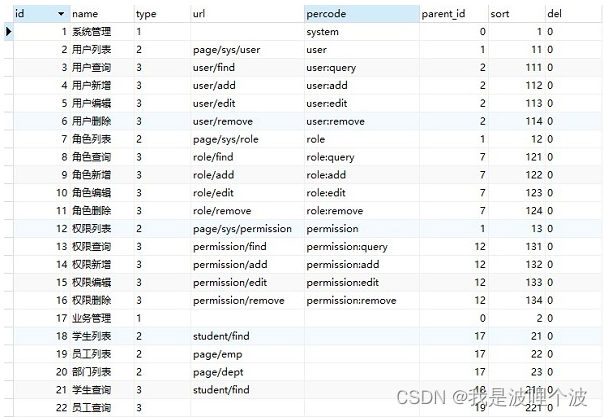
SysPermissionDao.java:
public interface SysPermissionDao extends BaseDao<SysPermission> { /** * 根据用户ID查询当前用户所拥有权限列表 * 参数userId,要查询的用户id * 参数type,菜单的类型。 * 如果传递的type为3,则要过滤按钮类型权限,动态菜单使用 * 如果传递的type为null,则查询所有的权限类型。权限鉴定使用 */ List<SysPermission> selectByUserId(@Param("userId") Integer userId, @Param("type") String type); }- 1
- 2
- 3
- 4
- 5
- 6
- 7
- 8
- 9
- 10
SysPermissionMapper.xml:
<select id="selectByUserId" parameterType="java.util.HashMap" resultMap="BaseResultMap"> select distinct a.id, a.name, a.type, a.url, a.percode, a.parent_id, a.sort from t_sys_permission a join t_sys_role_permission b on a.id = b.permission_id join t_sys_user_role c on b.role_id = c.role_id <where> c.user_id = #{userId} and a.del = 0 <if test="type != null"> and a.type != 3 </if> </where> order by a.sort </select>- 1
- 2
- 3
- 4
- 5
- 6
- 7
- 8
- 9
- 10
- 11
- 12
SysPermissionService.java:
public interface SysPermissionService extends BaseService<SysPermission> { List<SysPermission> findMenu(Integer userId); }- 1
- 2
- 3
SysPermissionServiceImpl.java:
@Override public List<SysPermission> findMenu(Integer userId) { return sysPermissionDao.selectByUserId(userId, "3"); }- 1
- 2
- 3
- 4
SysPermissionController.java:
/** * 查询当前登录用户的菜单 */ @GetMapping("/findMenu") public Result findMenu(HttpSession session){ //从session域中获取当前登录用户 UserInfo userInfo = (UserInfo) session.getAttribute("userInfo"); List<SysPermission> menus = sysPermissionService.findMenu(userInfo.getId()); return Result.success(menus); }- 1
- 2
- 3
- 4
- 5
- 6
- 7
- 8
- 9
- 10
index.jsp:
<!-- 左侧导航区域(可配合layui已有的垂直导航) --> <ul class="layui-nav layui-nav-tree treeMenu" lay-filter="test"> <!-- 菜单数据动态渲染 --> </ul> <script type="text/javascript" src="static/js/tool.js"></script> <script> //初始化当前用户的菜单列表 $.ajax('permission/findMenu', { type: 'get', success: function(res){ if(res.code == 200){ var menus = dataToTree(res.data); console.log('===>菜单数据:', menus); var str = ''; menus.forEach(function(item){ str += '<li class="layui-nav-item layui-nav-itemed">'; str += '<a class="" href="javascript:;">' + item.name + '</a>'; if(item.children && item.children.length > 0){ str += '<dl class="layui-nav-child">'; item.children.forEach(function(item2){ str += '<dd><a href="' + item2.url + '" target="mainFrame">' + item2.name + '</a></dd>'; }); str += '</dl>'; } str += '</li>'; }); $('.treeMenu').html(str); //element.render('nav', 'test'); }else{ layer.msg(res.message); } } }); </script>- 1
- 2
- 3
- 4
- 5
- 6
- 7
- 8
- 9
- 10
- 11
- 12
- 13
- 14
- 15
- 16
- 17
- 18
- 19
- 20
- 21
- 22
- 23
- 24
- 25
- 26
- 27
- 28
- 29
- 30
- 31
- 32
- 33
- 34
- 35
2.7 权限鉴定
动态菜单的实现,仅仅实现了用户登录后所展示的菜单,拥有权限的菜单展示出来,没有权限的菜单不展示。但是如果登录之后,知道其他页面的url,还是可以操作其他的非权限菜单。 比如tom用户,没有操作角色和权限的权限,但是完全可以在地址栏输入地址访问。 http://localhost:8080/ssm/page/sys/permission http://localhost:8080/ssm/page/sys/role 实现思路: 1.在SysPermissionService中定义List<SysPermission> findByUserId(Integer userId)方法,用来查询用户所有的权限列表。 2.在SysPermissionServiceImpl中实现具体业务。 3.在SysUserServiceImpl的login方法中,当用户登录成功之后,查询当前用户所拥有的全部权限,并赋值给userInfo对象。 4.定义PermissionInterceptor权限鉴定拦截器,判断某次请求,当前用户是否有权限访问。 5.配置拦截器。 注意:一定要配置在登录拦截器之后。- 1
- 2
- 3
- 4
- 5
- 6
- 7
- 8
- 9
- 10
- 11
- 12
- 13
SysPermissionService.java:
public interface SysPermissionService extends BaseService<SysPermission> { List<SysPermission> findMenu(Integer userId); List<SysPermission> findByUserId(Integer userId); }- 1
- 2
- 3
- 4
- 5
SysPermissionServiceImpl.java:
@Override public List<SysPermission> findByUserId(Integer userId) { return sysPermissionDao.selectByUserId(userId, null); }- 1
- 2
- 3
- 4
SysUserServiceImpl.java:
@Autowired private SysPermissionService sysPermissionService; @Override public UserInfo login(String username, String userpwd) { SysUser sysUser = sysUserDao.selectByUsername(username); if(sysUser != null){ if(userpwd.equals(sysUser.getUserpwd())){ UserInfo userInfo = new UserInfo(); //spring中提供了一个工具类BeanUtils,提供属性值复制功能 //copyProperties(源对象, 目标对象) //要求:属性名称保持一致 BeanUtils.copyProperties(sysUser, userInfo); //查询当前用户所拥有的全部权限 List<SysPermission> permissionList = sysPermissionService.findByUserId(userInfo.getId()); userInfo.setPermissionList(permissionList); return userInfo; } } return null; }- 1
- 2
- 3
- 4
- 5
- 6
- 7
- 8
- 9
- 10
- 11
- 12
- 13
- 14
- 15
- 16
- 17
- 18
- 19
- 20
- 21
PermissionInterceptor.java:
package com.newcapec.interceptor; import com.fasterxml.jackson.databind.ObjectMapper; import com.newcapec.constant.SystemCode; import com.newcapec.entity.SysPermission; import com.newcapec.entity.UserInfo; import com.newcapec.utils.Result; import org.springframework.web.servlet.HandlerInterceptor; import org.springframework.web.servlet.ModelAndView; import javax.servlet.http.HttpServletRequest; import javax.servlet.http.HttpServletResponse; import javax.servlet.http.HttpSession; import java.util.List; /** * 用户权限鉴定拦截器:判断某次请求,当前用户是否有权限访问 * 通过路径url拦截来鉴定权限 */ public class PermissionInterceptor implements HandlerInterceptor { @Override public boolean preHandle(HttpServletRequest httpServletRequest, HttpServletResponse httpServletResponse, Object o) throws Exception { HttpSession session = httpServletRequest.getSession(); Object obj = session.getAttribute("userInfo"); //判断用户登录信息是否存在 if (obj instanceof UserInfo) { UserInfo userInfo = (UserInfo) obj; //获取当前登录用户的权限列表 List<SysPermission> permissionList = userInfo.getPermissionList(); //获取当前请求路径 String url = httpServletRequest.getServletPath(); System.out.println("此次请求的路径:" + url); //在当前登录用户的权限列表中查询与当前请求路径匹配的数据 //如果查询到表示用户有权限访问 //如果没有查询到表示用户没有权限访问 for (SysPermission sysPermission : permissionList) { System.out.println("权限路径:" + sysPermission.getUrl()); if (url.contains(sysPermission.getUrl()) && !sysPermission.getUrl().equals("")) { return true; } } httpServletResponse.setContentType("application/json;charset=utf-8"); //给用户响应json数据,提示未登录 Result result = Result.error(SystemCode.NO_PERMISSION.getCode(), SystemCode.NO_PERMISSION.getMessage(), null); //手动将自定义响应格式对象转换为json字符串: jackson ObjectMapper objectMapper = new ObjectMapper(); String resultStr = objectMapper.writeValueAsString(result); httpServletResponse.getWriter().write(resultStr); } return false; } @Override public void postHandle(HttpServletRequest httpServletRequest, HttpServletResponse httpServletResponse, Object o, ModelAndView modelAndView) throws Exception { } @Override public void afterCompletion(HttpServletRequest httpServletRequest, HttpServletResponse httpServletResponse, Object o, Exception e) throws Exception { } }- 1
- 2
- 3
- 4
- 5
- 6
- 7
- 8
- 9
- 10
- 11
- 12
- 13
- 14
- 15
- 16
- 17
- 18
- 19
- 20
- 21
- 22
- 23
- 24
- 25
- 26
- 27
- 28
- 29
- 30
- 31
- 32
- 33
- 34
- 35
- 36
- 37
- 38
- 39
- 40
- 41
- 42
- 43
- 44
- 45
- 46
- 47
- 48
- 49
- 50
- 51
- 52
- 53
- 54
- 55
- 56
- 57
- 58
- 59
- 60
- 61
springmvc.xml:
<!--配置拦截器--> <mvc:interceptors> <mvc:interceptor> <mvc:mapping path="/**"/> <!--动态页面跳转请求和静态资源映射请求--> <mvc:exclude-mapping path="/page/**"/> <mvc:exclude-mapping path="/static/**"/> <mvc:exclude-mapping path="/auth/login"/> <bean class="com.newcapec.interceptor.LoginInterceptor"/> </mvc:interceptor> <mvc:interceptor> <mvc:mapping path="/**"/> <mvc:exclude-mapping path="/page/login"/> <mvc:exclude-mapping path="/page/index"/> <mvc:exclude-mapping path="/page/welcome"/> <mvc:exclude-mapping path="/static/**"/> <mvc:exclude-mapping path="/auth/**"/> <mvc:exclude-mapping path="/permission/findMenu"/> <bean class="com.newcapec.interceptor.PermissionInterceptor"/> </mvc:interceptor> </mvc:interceptors>- 1
- 2
- 3
- 4
- 5
- 6
- 7
- 8
- 9
- 10
- 11
- 12
- 13
- 14
- 15
- 16
- 17
- 18
- 19
- 20
- 21
-
相关阅读:
Linux IPC通信
电视机尺寸与观看距离
软磁交流测试系统参考标准
Validation校检正确使用及验证反模式问题
等额本金和等额本息的区别
函数栈帧的创建与销毁(保姆级讲解)
3款免费又好用的 Docker 可视化管理工具
006python-字符串的使用
debug模式启动不了项目,报:Method breakpoints may dramatically slow down debugging
【Python】输入输出与运算符
- 原文地址:https://blog.csdn.net/ligonglanyuan/article/details/125605052

- 最新文章
-
【FHE】我们如何实现同态加密推理(八):SiLU 的密文化——两条路径,和一个 8 字节的开关
SQLcl 中 c/old/new 替换变量为何失效?先定位再替换
不让模型写作文,直接从它脑子里读答案:Jev 决策在 .NET 的两条路线
Halo插件:支持GitHub的图床附件策略
电视投屏界的“一股清流”!SimpleTVCast 6.0.0-beta 抢先体验:无需TV端App,界面大换血!✨
华三VXLAN集中式网关实战指南:Spine多活网关 + 双活接入(M-LAG)
软件更好写之后口碑会更重要
大 O、大 Omega、大 Theta 的区别,O(n) 复杂度是什么意思
Java标签跳转:一个鲜为人知但却很实用的小技巧
多智能体系统论文速读