-
Python爬虫学习——No.01
属性 说明 r.status_code HTTP请求的返回状态,200表示连接成功,404表示失败 r.text HTTP响应内容的字符串形式,即url对应的页面内容 r.encoding 从HTTP header中猜测的响应内容的编码方式 r.apparent_encoding 从内容分析出的响应内容编码方式(备选编码方式) r.content HTTP响应内容的二进制形式 爬取网页的通用框架:
import requests def getHTMLTest(url): try: r = request.get(url, timeout=30) r.raise_for_status()#如果状态码返回不是200,引发HTTPError异常 r.encoding = r.apparent_encoding return r.text except: return "产生异常"- 1
- 2
- 3
- 4
- 5
- 6
- 7
- 8
- 9
- 10
if __name__ == "__main__": url = "http://www/baidu.com" print(getHTMLText(url))- 1
- 2
- 3
HTTP 协议
HTTP,Hypertext Transfer Protocol
超文本传输协议
HTTP是基于“请求与响应”模式的(用户请求、服务器作出响应)、无状态(指第一次请求和第二次请求之间没有相关的联系)的应用层协议(该协议工作在TCP协议之上)。URL格式·:
http://host[:port][path]
host:合法的Internet主机域名或IP地址
port:端口号,缺省端口为80
path: 请求资源的路径

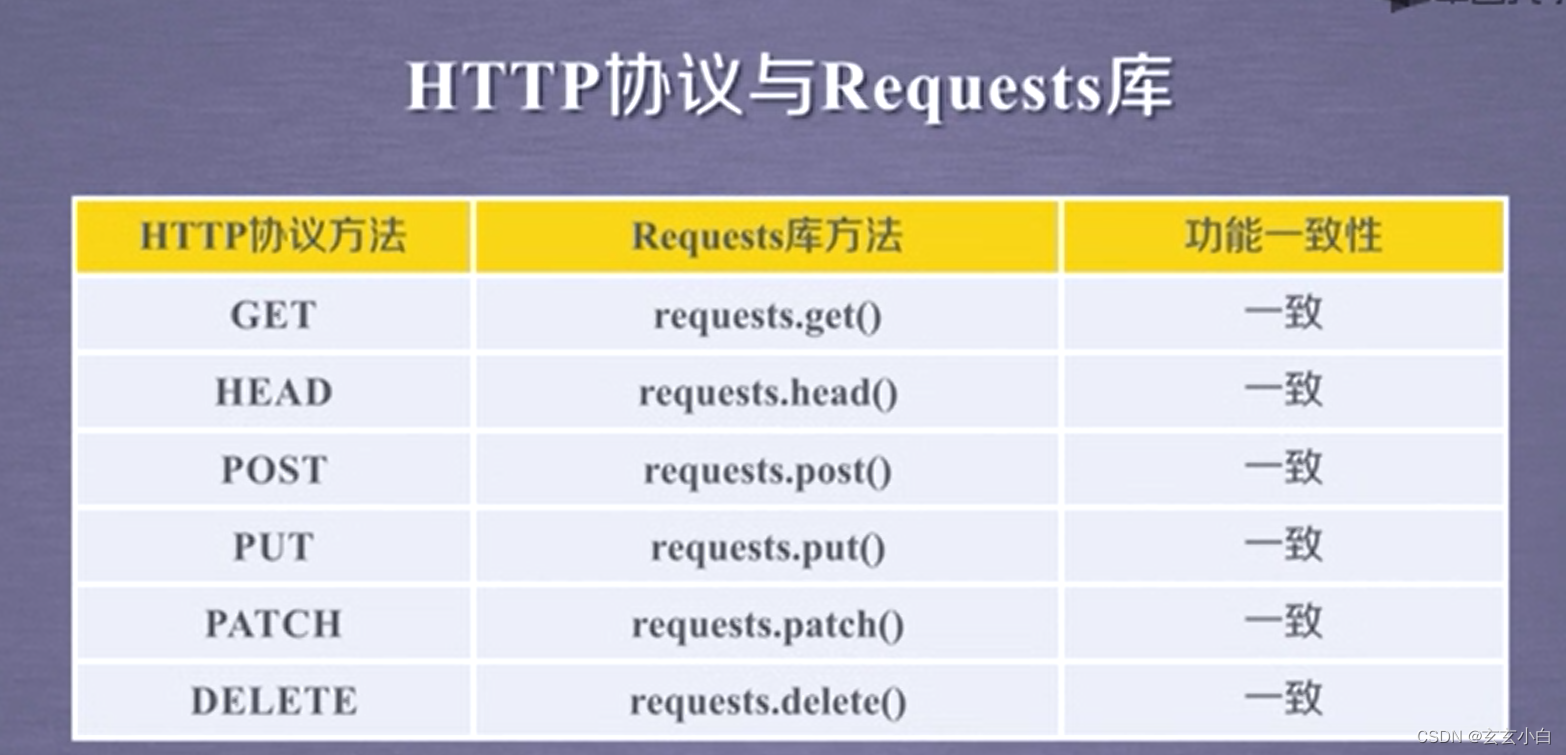
requests.request(method, url, **kwargs)
**kwargs:控制访问的参数,均为可选项(13个控制访问参数)
①params:字典或字节序列,作为参数增加到url中>>>kv = {'key1':'value1', 'key2':'value2'} >>>r = requests.request('GET', 'http://python123.io/ws', param = kv) >>>print(r.url) http://python123.io/ws?key1=value1&key2=value2- 1
- 2
- 3
- 4
②
data: 字典、字节序列或文件对象,作为Request的内容>>>r = requests.request('POST', 'http://python123.io/ws', data = kv) >>>body =主体内容' >>>r = requests.request('POST', 'http://python123.io/ws', data = body)- 1
- 2
- 3
③
json: JSON格式的数据,作为Request的内容>>>r = requests.request('POST', 'http://python123.io/ws', json = kv)- 1
④
headers: 字典,HTTP定制头>>>hd = {'user=agent': 'chrome/10'}//模拟浏览器 >>>r = requests.request('POST', 'http://python123.io/ws', headers = hd)- 1
- 2
⑤
cookies:字典或CookieJar,Request中的cookie
auth: 元组,支持HTTP认证功能
⑥files: 字典类型,传输文件>>>fs = {'file': open('data.xls', 'rb')} >>>r = requests.request('POST', 'HTTP://PYTHON123.IO/WS', files = fs)- 1
- 2
⑦
timeout:设定超时时间,秒为单位>>>r = requests.request('GET', 'http://www.baidu.com', timeout = 10)- 1
⑧
proxies:字典类型,设定访问代理服务器,可以增加登录认证(防止爬虫的逆追踪)>>> pxs = {'http://user:pass@10.10.1:1234' 'https: https://10.10.10.1:4321'} >>> r = requests.request('GET', 'http://www.baidu.com', proxies = pxs)- 1
- 2
- 3
- 4
⑨
allow_redirects: True/False, 默认为True,重定向开关
stream: True/False, 默认为True, 获取内容立即下载开关
verify: True/False, 默认为True, 认证SSL证书开关
cert: 本地SSL证书路径爬虫引发的问题: 骚扰服务器问题、法律问题、隐私泄露
小实例:爬网站
①最基本的:
import requests url = "https://new.qq.com/omn/20220701/20220701A0BJQR00.html" try: r = requests.get(url) r.raise_for_status() r.encoding = r.apparent_encoding print(r.text[:1000]) except: print("fail")- 1
- 2
- 3
- 4
- 5
- 6
- 7
- 8
- 9
②2.0版本
上述代码如发生 失败,不是网络错误,提示有API造成,则是因为网站通过对访问的HTTP的头,来查看你的访问是否是有一个爬虫引起的,而不是浏览器引发产生的HTTP请求,来源审查,禁止了爬虫访问,我们可以模拟浏览器向服务器发送请求:
通过
r.request.headers查看发给网站的request头部有什么内容#假如是下面这个 {'User-Agent': 'python-requests/2.28.0', 'Accept-Encoding': 'gzip, deflate', 'Accept': '*/*', 'Connection': 'keep-alive'}- 1
- 2
我们构造一个键值对:
kv = {’user-agent‘: 'Mozilla/5.0'}#Mozilla/5.0是一个标准的浏览器的身份标识字段- 1
进行修改:
r = requests.get(url, headers = kv)- 1
验证一下:
r.request.headers #输出: {'User-Agent': 'Mozilla/5.0', 'Accept-Encoding': 'gzip, deflate', 'Accept': '*/*', 'Connection': 'keep-alive'}- 1
- 2
- 3
#全代码 import requests url = "https://new.qq.com/omn/20220701/20220701A0BJQR00.html" try: kv = {'user-agent': 'Mozilla/5.0'} r = requests.get(url, headers = kv) r.raise_for_status() r.encoding = r.apparent_encoding print(r.text[1000:2000]) except: print("fail")- 1
- 2
- 3
- 4
- 5
- 6
- 7
- 8
- 9
- 10
- 11
③搜索的关键词提交
百度的关键词接口:
http://www.baidu.com/s?wd=keyword
本质问题是构造url链接首先(导入后 )构造键值对
kv = {'wd': 'python'} #wd 这个名字是根据接口来的 不是自定义- 1
通过
params将键值对添加到url中:r = requests.get("http://www.baidu.com/s", params = kv)- 1
查看我们请求给百度的url是什么:
r.request.url #符合接口 #输出 'http://www.baidu.com/s?wd=Python'- 1
- 2
- 3
不要打印他,返回其长度
len(r.text) #输出: 302829#返回300多k信息- 1
- 2
- 3
#全代码 import requests keyword = "Python" try: kv = {'wd': keyword} r = requests.get("http://www.baidu.com/s", params = kv) print(r.request.url) r.raise_for_status() print(len(r.text)) except: print("fail")- 1
- 2
- 3
- 4
- 5
- 6
- 7
- 8
- 9
- 10
- 11
④网络图片的爬取和存储
图片存放地址文件:
path = "D:\abc.jpg"- 1
get捕获url:
url="http://img0.dili360.com/pic/2020/01/06/5e130172402b79y44941505_t.jpg@!rw9" r = requests.get(url)- 1
- 2
图片是二进制格式·,保存成一个文件:
with open (path, 'wb') as f: #打开了abc.jpg文件,并将其定义为文件标识符f f.write(r.content)#然后将返回的内容写到这个文件中(r.content 表示返回内容的二进制形式) #输出: 69736- 1
- 2
- 3
- 4
- 5
关闭文件
f.close()- 1
最后去D盘可以看到
abc.jpg该文件#全代码 import requests import os url = "http://img0.dili360.com/pic/2020/01/06/5e130172402b79y44941505_t.jpg@!rw9" root = "D://pics//" #定义根目录 path = root + url.split('/')[-1] #以/分割的最后一个部分(就是最后的jpg文件名) try: if not os.path.exists(root): #判断当前根目录是否存在 os.mkdir(root) if not os.path.exists(path): r = requests.get(url) with open(path, 'wb') as f: f.write(r.content) f.close() print("文件保存成功") else: print("文件已存在") except: print("爬取失败")- 1
- 2
- 3
- 4
- 5
- 6
- 7
- 8
- 9
- 10
- 11
- 12
- 13
- 14
- 15
- 16
- 17
- 18
- 19
- 20
④IP归属地查询
借助IP138网站,获取(解析)接口形式:
http:/m.ip138.com/ip.asp?ip=ipaddress(该接口已不适用,仅供举例)import requests url = "http:/m.ip138.com/ip.asp?ip=" r = requests.get(url + '202.204.80.112') r.text[-500:] #文本的最后500个字节- 1
- 2
- 3
- 4
-
相关阅读:
Kubernetes 架构介绍
RPA机器人在电商领域有哪些应用?
Day033 XML
tmux 命令快速入门
运算符优先级
【嵌入式物联网实战项目】涂鸦幻彩灯带SDK商用项目
Google paly个人开发者账号最新政策要求——必须20人连续14天封闭测试
`算法题解` `LuoGu` P4551 最长异或路径
Ubuntu彻底卸载删除cuda12.1
表情包APP小程序制作开发功能有哪些?
- 原文地址:https://blog.csdn.net/m0_55825393/article/details/125508243
