-
vue 修改 el-cascader 面板的样式
首先,自定义
el-cascader的popper-class类名,因为设置的样式需要全局设置才生效,使用自定义的类,可以避免影响到其他页面的效果 :<el-cascader v-model="formData.divisionCode" popper-class="pc-sel-area-cascader" style="width:470px" :options="divisionOptions" placeholder="请选择区域"> </el-cascader>- 1
- 2
如下:

接下来,就可以在这个类名里面进行样式设置了。例如,设置颜色文字选中颜色:
<style lang="less"> .pc-sel-area-cascader { .el-cascader-node.in-active-path, .el-cascader-node.is-active, .el-cascader-node.is-selectable.in-checked-path { color: #4e5ef1; } } </style>- 1
- 2
- 3
- 4
- 5
- 6
- 7
- 8
- 9
但是,在设置整个面板的样式时却遇到了问题,UI 想要的效果是这样的:

现在我的样式是这样的:

F12 里面看到的样式:
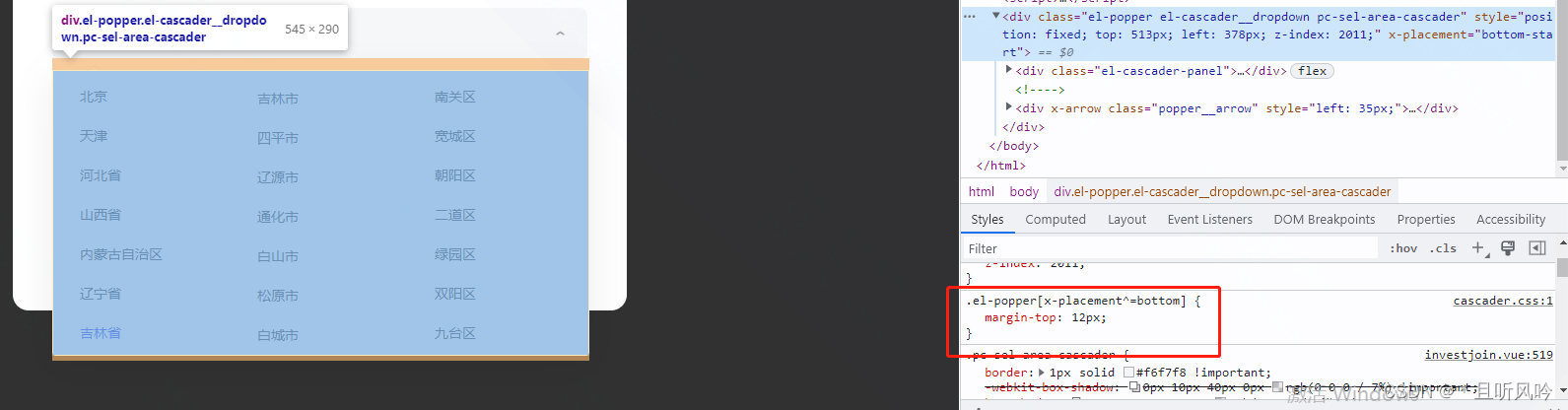
当我尝试设置整个面板:
.el-popper[x-placement^='bottom'] { // 选择器面板与输入框的距离 margin-top: 1px !important; border-radius: 12px !important; }- 1
- 2
- 3
- 4
- 5
本地是生效的,但是部署测试环境以后,并没有起作用。
尝试了很多方法,最后看到官方文档
el-popover样式修改也是通过popper-class绑定自定义类名popperOptions(注意popperOptions需放在样式的根文件中)如下:

又看了一下样式:

因为设置了el-cascader的popper-class="pc-sel-area-cascader",尝试这样设置时:.pc-sel-area-cascader[x-placement^='bottom'] { // 选择器面板与输入框的距离 margin-top: 1px !important; }- 1
- 2
- 3
- 4
它生效了!!!
完整代码:
<template> <el-cascader v-model="formData.divisionCode" popper-class="pc-sel-area-cascader" style="width:470px" :options="divisionOptions" placeholder="请选择区域"> </el-cascader> </template> <style lang="less"> .pc-sel-area-cascader { // 选择面板样式 .el-cascader-panel { width: 543px; } .el-cascader-menu__wrap { // 设置选择器省市区分块面板高度 height: 305px; } .el-cascader-menu { // 省市区分块右边框 border: none; } .el-scrollbar__thumb { // 上下滚动条 display: none; } .el-cascader-node { height: 40px; } .el-cascader-node:hover { // 设置鼠标滑过时文字颜色 color: #4e5ef1; } .el-cascader-node__label { // 设置文字样式 padding: 0 7px; font-size: 14px; font-family: PingFangSC-Regular, PingFang SC; font-weight: 400; } // 文字选中样式及span背景颜色 .el-cascader-node.in-active-path, .el-cascader-node.is-active, .el-cascader-node.is-selectable.in-checked-path { color: #4e5ef1; } .el-icon-check { // 去掉选中小对勾 display: none; } .el-icon-arrow-right { // 选项去掉右侧小图标 display: none; } // 选择器面板边框及圆角设置 border-radius: 12px !important; border: 1px solid #f6f7f8 !important; box-shadow: 0px 10px 40px 0px rgba(0, 0, 0, 0.07) !important; } .pc-sel-area-cascader[x-placement^='bottom'] { // 选择器面板与输入框的距离 margin-top: 1px !important; } .pc-sel-area-cascader[x-placement^='bottom'] .popper__arrow { // 输入框下面小三角形 display: none; } </style>- 1
- 2
- 3
- 4
- 5
- 6
- 7
- 8
- 9
- 10
- 11
- 12
- 13
- 14
- 15
- 16
- 17
- 18
- 19
- 20
- 21
- 22
- 23
- 24
- 25
- 26
- 27
- 28
- 29
- 30
- 31
- 32
- 33
- 34
- 35
- 36
- 37
- 38
- 39
- 40
- 41
- 42
- 43
- 44
- 45
- 46
- 47
- 48
- 49
- 50
- 51
- 52
- 53
- 54
- 55
- 56
- 57
- 58
- 59
- 60
- 61
- 62
- 63
- 64
页面效果:

-
相关阅读:
[激光原理与应用-28]:《激光原理与技术》-14- 激光产生技术 - 激光的主要参数与指标
性能指标>软硬件的性能指标
面向对象编程(高级部分)——final关键字
2022/11/18[指针] 关于指针的初步理解
535. TinyURL 的加密与解密
【单片机】初次实验:Keil51的使用
Redis.conf配置文件说明
找回消失的密钥 --- DFA分析白盒AES算法
科学上网导致Adobe软件运行弹出This non-genuine Adobe app will be disabled soon,尝试解决办法
NewStarCTF2023week2-Unserialize?
- 原文地址:https://blog.csdn.net/HH18700418030/article/details/125507208

- 最新文章
-
沪漂五周年了:我越来越迷茫了
Agentic Skill Routing 实战:别再把所有 Skill 塞进 AI Agent 上下文
MySQL-Seconds_behind_master的精度误差
[MAF预定义ChatClient中间件-03]CachingChatClient——利用缓存省钱省时间
AI的至暗历史:从万众期待到被政府撤资,AI的两次死亡徘徊
Agent OS :五种驯服不确定性的范式
PortSwigger SQL注入LAB11
数据库即时编译JIT
[Begin]AI Learn Data Day 0
深度学习进阶(二十七)现代 LLM 的核心架构设计其二:SwiGLU