-
Java并发编程学习篇8_基于开源的配置中心的轻量动态线程池dynamic-tp实践与源码原理分析
1.前言
在业务中多线程使用场景有很多,但是业务场景又不太相同,业务场景也可能会发生变化,因此线程池参数的合适的设置以及动态的变化调整就成为痛点。针对此系列痛点,参考Java线程池实现原理及其在美团业务中的实践 开源的 dynamic-tp🔥🔥🔥 基于配置中心的轻量级动态可监控线程池 可以配合注册中心如Nacos等动态配置线程池参数完成灵活伸缩,并提空监控、报警通知的功能。
实践练习以及源码原理分析。
2.目录
- 使用
- 整合promethues+grafana可视化监控
- 分析
- core模块核心实现类:DtpRegistry、DtpExecutor、DtpContext类、XxxConverter
- 注册:DtpPostProcessor类
- 刷新:AbstractRefresh类
- 监控:DtpMonitor类
- 报警:AbstaractNotifer
3.使用
使用非常简单,文档:https://dynamictp.cn/
整合源码放在 https://github.com/sichaolong/spring-demo,可以拉下代码,下面简单说下跑起来步骤:
1、首先需要打开nacos,nacos下载自选版本然后按照文档命令行启动: start-up.cmd -m standalone
2、启动nacos成功之后启动项目,然后访问nacos的页面localhost:8848/nacos/index.html页面,配置yml文件
3、日志收集格式设置,按需配置即可。或者整合Prometheus可视化监控(下面是整合步骤)
4、添加钉钉、企业微信等报警提醒,按需配置即可
5、在application.yml文件暴露endpoints端口,然后可以http访问指定url获取实时参数信息
1、首先需要打开nacos,nacos下载自选版本然后按照文档命令行启动: start-up.cmd -m standalone // 需要注意的是项目的nacos相关starter依赖版本最好一致,否则可能跑不起来,如注意版本: // nacos-config-spring-boot-starter 0.2.10 及以下版本对应 springboot 2.3.12.RELEASE及以下版本, 0.2.11-beta及以上版本对应springboot 版本2.4.0及以上版本,具体看官方说明 2、启动nacos成功之后启动项目,然后访问nacos的页面localhost:8848/nacos/index.html页面 // 查看注册服务检验是否注册成功,然后新建配置yml文件,便于修改之后可以动态修改线程池参数 (1) yml文件名称:[应用名称]-[dev|prod|...].yml 保证能从nacos配置中心拉取到即可 (2) yml内容: spring: dynamic: tp: enabled: true enabledBanner: true # 是否开启banner打印,默认true enabledCollect: true # 是否开启监控指标采集,默认false collectorType: jsonlog # 监控数据采集器类型(jsonlog | micrometer),默认logging logPath: /home/logs # 监控日志数据路径,默认 ${user.home}/logs,采集类型非jsonlog不用配置 monitorInterval: 5 # 监控时间间隔(报警判断、指标采集),默认5s nacos: # nacos配置,不配置有默认值(规则appname-dev.yml这样),cloud应用不需要配置 dataId: dynamic-tp-nacos-dev.yml group: DEFAULT_GROUP # apollo: # apollo配置,不配置默认拿apollo配置第一个namespace # namespace: dynamic-tp-demo-dev.yml configType: yml # 配置文件类型,非cloud nacos 和 apollo需配置,其他不用配 # platforms: # 通知报警平台配置 # - platform: wechat # urlKey: 3a700-127-4bd-a798-c53d8b69c # 替换 # receivers: test1,test2 # 接受人企微名称 # - platform: ding # urlKey: f80dad441fcd655438f4a08dcd6a # 替换 # secret: SECb5441fa6f375d5b9d21 # 替换,非sign模式可以没有此值 # receivers: 18888888888 # 钉钉账号手机号 # - platform: lark # urlKey: 0d944ae7-b24a-40 # 替换 # receivers: test1,test2 # 接受人飞书名称/openid tomcatTp: # tomcat webserver线程池配置 corePoolSize: 100 maximumPoolSize: 200 keepAliveTime: 60 jettyTp: # jetty weberver线程池配置 corePoolSize: 100 maximumPoolSize: 200 undertowTp: # undertow webserver线程池配置 corePoolSize: 100 maximumPoolSize: 200 keepAliveTime: 60 hystrixTp: # hystrix 线程池配置 - threadPoolName: hystrix1 corePoolSize: 100 maximumPoolSize: 200 keepAliveTime: 60 dubboTp: # dubbo 线程池配置 - threadPoolName: dubboTp#20880 # 名称规则:dubboTp + "#" + 协议端口 corePoolSize: 100 maximumPoolSize: 200 keepAliveTime: 60 notifyItems: # 报警项,不配置自动会按默认值配置(变更通知、容量报警、活性报警) - type: capacity # 报警项类型,查看源码 NotifyTypeEnum枚举类 enabled: true threshold: 80 # 报警阈值 platforms: [ding,wechat] # 可选配置,不配置默认拿上层platforms配置的所以平台 interval: 120 # 报警间隔(单位:s) rocketMqTp: # rocketmq 线程池配置 - threadPoolName: group1#topic1 # 名称规则:group + "#" + topic corePoolSize: 200 maximumPoolSize: 200 keepAliveTime: 60 executors: # 动态线程池配置,都有默认值,采用默认值的可以不配置该项,减少配置量 - threadPoolName: dtpExecutor1 executorType: common # 线程池类型common、eager:适用于io密集型 corePoolSize: 6 maximumPoolSize: 8 queueCapacity: 200 queueType: VariableLinkedBlockingQueue # 任务队列,查看源码QueueTypeEnum枚举类 rejectedHandlerType: CallerRunsPolicy # 拒绝策略,查看RejectedTypeEnum枚举类 keepAliveTime: 50 allowCoreThreadTimeOut: false # 是否允许核心线程池超时 threadNamePrefix: test # 线程名前缀 waitForTasksToCompleteOnShutdown: false # 参考spring线程池设计,优雅关闭线程池 awaitTerminationSeconds: 5 # 单位(s) preStartAllCoreThreads: false # 是否预热所有核心线程,默认false runTimeout: 200 # 任务执行超时阈值,目前只做告警用,单位(ms) queueTimeout: 100 # 任务在队列等待超时阈值,目前只做告警用,单位(ms) taskWrapperNames: ["ttl"] # 任务包装器名称,集成TaskWrapper接口 notifyItems: # 报警项,不配置自动会按默认值配置(变更通知、容量报警、活性报警、拒绝报警、任务超时报警) - type: capacity # 报警项类型,查看源码 NotifyTypeEnum枚举类 enabled: true threshold: 80 # 报警阈值 platforms: [ding,wechat] # 可选配置,不配置默认拿上层platforms配置的所以平台 interval: 120 # 报警间隔(单位:s) - type: change enabled: true - type: liveness enabled: true threshold: 80 - type: reject enabled: true threshold: 1 - type: run_timeout enabled: true threshold: 1 - type: queue_timeout enabled: true threshold: 1 3、日志收集格式 (1) 可以将上面 yml配置的 collectorType 改为jsonlog ,然后可以查看指定的日志文件,如我的日志位置在:E:\home\logs\dynamictp 日志名称:dynamic-tp-nacos.monitor 日志内容: [{ "poolName":"ioIntensiveExecutor", "corePoolSize":20, "maximumPoolSize":50, "queueType":"TaskQueue", "queueCapacity":2048, "queueSize":0, "fair":false, "queueRemainingCapacity":2048, "activeCount":0, "taskCount":0, "completedTaskCount":0, "largestPoolSize":0, "poolSize":0, "waitTaskCount":0, "rejectCount":0, "rejectHandlerName":"AbortPolicy", "dynamic":true, "runTimeoutCount":0, "queueTimeoutCount":0 }, { "poolName":"dtpExecutor1", "corePoolSize":6, "maximumPoolSize":8, "queueType":"VariableLinkedBlockingQueue", "queueCapacity":200, "queueSize":0, "fair":false, "queueRemainingCapacity":200, "activeCount":0, "taskCount":0, "completedTaskCount":0, "largestPoolSize":0, "poolSize":0, "waitTaskCount":0, "rejectCount":0, "rejectHandlerName":"CallerRunsPolicy", "dynamic":true, "runTimeoutCount":0, "queueTimeoutCount":0 } ] (2) logging :控制台输出 (3) micrometer:需要安装prometheus+grafana做监控,自行测试即可。(下面会详细说) // 下载地址: // https://grafana.com/grafana/download?platform=windows,可视化:http://localhost:3000/ // https://prometheus.io/download/,可视化:http://localhost:9090/graph // 使用参考:https://songjiayang.gitbooks.io/prometheus/content/visualiztion/grafana.html 4、添加钉钉、企业微信等报警提醒,按需配置即可 platforms: # 通知报警平台配置 - platform: wechat urlKey: 3a700-127-4bd-a798-c53d8b69c # 替换 receivers: test1,test2 # 接受人企微名称 - platform: ding urlKey: f80dad441fcd655438f4a08dcd6a # 替换 secret: SECb5441fa6f375d5b9d21 # 替换,非sign模式可以没有此值 receivers: 18888888888 # 钉钉账号手机号 - platform: lark urlKey: 0d944ae7-b24a-40 # 替换 receivers: test1,test2 # 接受人飞书名称/openid 5、在application.yml文件暴露endpoints端口,然后可以http访问指定url获取实时参数信息 // 暴露端口 management: endpoints: enabled-by-default: true # 默认开启所有监控端点信息,如访问:http://localhost:8888/dynamic-tp/actuator web: exposure: include: '*' # 以web方式暴露所有端点 // 可以获得的结果,然后可以根据json格式写个html页面将具体信息展示出来 { "http://localhost:8888/dynamic-tp/actuator":{ "_links":{ "self":{ "href":"http://localhost:8888/dynamic-tp/actuator", "templated":false }, "dynamic-tp":{ "href":"http://localhost:8888/dynamic-tp/actuator/dynamic-tp", "templated":false }, "beans":{ "href":"http://localhost:8888/dynamic-tp/actuator/beans", "templated":false }, "caches-cache":{ "href":"http://localhost:8888/dynamic-tp/actuator/caches/{cache}", "templated":true }, "caches":{ "href":"http://localhost:8888/dynamic-tp/actuator/caches", "templated":false }, "health":{ "href":"http://localhost:8888/dynamic-tp/actuator/health", "templated":false }, "health-path":{ "href":"http://localhost:8888/dynamic-tp/actuator/health/{*path}", "templated":true }, "info":{ "href":"http://localhost:8888/dynamic-tp/actuator/info", "templated":false }, "conditions":{ "href":"http://localhost:8888/dynamic-tp/actuator/conditions", "templated":false }, "shutdown":{ "href":"http://localhost:8888/dynamic-tp/actuator/shutdown", "templated":false }, "configprops":{ "href":"http://localhost:8888/dynamic-tp/actuator/configprops", "templated":false }, "env-toMatch":{ "href":"http://localhost:8888/dynamic-tp/actuator/env/{toMatch}", "templated":true }, "env":{ "href":"http://localhost:8888/dynamic-tp/actuator/env", "templated":false }, "loggers":{ "href":"http://localhost:8888/dynamic-tp/actuator/loggers", "templated":false }, "loggers-name":{ "href":"http://localhost:8888/dynamic-tp/actuator/loggers/{name}", "templated":true }, "heapdump":{ "href":"http://localhost:8888/dynamic-tp/actuator/heapdump", "templated":false }, "threaddump":{ "href":"http://localhost:8888/dynamic-tp/actuator/threaddump", "templated":false }, "metrics-requiredMetricName":{ "href":"http://localhost:8888/dynamic-tp/actuator/metrics/{requiredMetricName}", "templated":true }, "metrics":{ "href":"http://localhost:8888/dynamic-tp/actuator/metrics", "templated":false }, "scheduledtasks":{ "href":"http://localhost:8888/dynamic-tp/actuator/scheduledtasks", "templated":false }, "mappings":{ "href":"http://localhost:8888/dynamic-tp/actuator/mappings", "templated":false } } }, "http://localhost:8888/dynamic-tp/actuator/dynamic-tp":[ { "poolName":"ioIntensiveExecutor", "corePoolSize":20, "maximumPoolSize":50, "queueType":"TaskQueue", "queueCapacity":2048, "queueSize":0, "fair":false, "queueRemainingCapacity":2048, "activeCount":0, "taskCount":0, "completedTaskCount":0, "largestPoolSize":0, "poolSize":0, "waitTaskCount":0, "rejectCount":0, "rejectHandlerName":"AbortPolicy", "dynamic":true, "runTimeoutCount":0, "queueTimeoutCount":0 }, { "poolName":"dtpExecutor1", "corePoolSize":1, "maximumPoolSize":8, "queueType":"VariableLinkedBlockingQueue", "queueCapacity":1024, "queueSize":0, "fair":false, "queueRemainingCapacity":1024, "activeCount":0, "taskCount":0, "completedTaskCount":0, "largestPoolSize":0, "poolSize":0, "waitTaskCount":0, "rejectCount":0, "rejectHandlerName":"AbortPolicy", "dynamic":true, "runTimeoutCount":0, "queueTimeoutCount":0 }, { "poolName":"dtpExecutor2", "corePoolSize":10, "maximumPoolSize":15, "queueType":"SynchronousQueue", "queueCapacity":0, "queueSize":0, "fair":false, "queueRemainingCapacity":0, "activeCount":0, "taskCount":0, "completedTaskCount":0, "largestPoolSize":0, "poolSize":0, "waitTaskCount":0, "rejectCount":0, "rejectHandlerName":"AbortPolicy", "dynamic":true, "runTimeoutCount":0, "queueTimeoutCount":0 }, { "poolName":"commonExecutor", "corePoolSize":1, "maximumPoolSize":1, "queueType":"LinkedBlockingQueue", "queueCapacity":2147483647, "queueSize":0, "fair":false, "queueRemainingCapacity":2147483647, "activeCount":0, "taskCount":0, "completedTaskCount":0, "largestPoolSize":0, "poolSize":0, "waitTaskCount":0, "rejectCount":0, "rejectHandlerName":null, "dynamic":false, "runTimeoutCount":0, "queueTimeoutCount":0 }, { "maxMemory":"1.96 GB", "totalMemory":"126 MB", "freeMemory":"88.93 MB", "usableMemory":"1.93 GB" } ] }- 1
- 2
- 3
- 4
- 5
- 6
- 7
- 8
- 9
- 10
- 11
- 12
- 13
- 14
- 15
- 16
- 17
- 18
- 19
- 20
- 21
- 22
- 23
- 24
- 25
- 26
- 27
- 28
- 29
- 30
- 31
- 32
- 33
- 34
- 35
- 36
- 37
- 38
- 39
- 40
- 41
- 42
- 43
- 44
- 45
- 46
- 47
- 48
- 49
- 50
- 51
- 52
- 53
- 54
- 55
- 56
- 57
- 58
- 59
- 60
- 61
- 62
- 63
- 64
- 65
- 66
- 67
- 68
- 69
- 70
- 71
- 72
- 73
- 74
- 75
- 76
- 77
- 78
- 79
- 80
- 81
- 82
- 83
- 84
- 85
- 86
- 87
- 88
- 89
- 90
- 91
- 92
- 93
- 94
- 95
- 96
- 97
- 98
- 99
- 100
- 101
- 102
- 103
- 104
- 105
- 106
- 107
- 108
- 109
- 110
- 111
- 112
- 113
- 114
- 115
- 116
- 117
- 118
- 119
- 120
- 121
- 122
- 123
- 124
- 125
- 126
- 127
- 128
- 129
- 130
- 131
- 132
- 133
- 134
- 135
- 136
- 137
- 138
- 139
- 140
- 141
- 142
- 143
- 144
- 145
- 146
- 147
- 148
- 149
- 150
- 151
- 152
- 153
- 154
- 155
- 156
- 157
- 158
- 159
- 160
- 161
- 162
- 163
- 164
- 165
- 166
- 167
- 168
- 169
- 170
- 171
- 172
- 173
- 174
- 175
- 176
- 177
- 178
- 179
- 180
- 181
- 182
- 183
- 184
- 185
- 186
- 187
- 188
- 189
- 190
- 191
- 192
- 193
- 194
- 195
- 196
- 197
- 198
- 199
- 200
- 201
- 202
- 203
- 204
- 205
- 206
- 207
- 208
- 209
- 210
- 211
- 212
- 213
- 214
- 215
- 216
- 217
- 218
- 219
- 220
- 221
- 222
- 223
- 224
- 225
- 226
- 227
- 228
- 229
- 230
- 231
- 232
- 233
- 234
- 235
- 236
- 237
- 238
- 239
- 240
- 241
- 242
- 243
- 244
- 245
- 246
- 247
- 248
- 249
- 250
- 251
- 252
- 253
- 254
- 255
- 256
- 257
- 258
- 259
- 260
- 261
- 262
- 263
- 264
- 265
- 266
- 267
- 268
- 269
- 270
- 271
- 272
- 273
- 274
- 275
- 276
- 277
- 278
- 279
- 280
- 281
- 282
- 283
- 284
- 285
- 286
- 287
- 288
- 289
- 290
- 291
- 292
- 293
- 294
- 295
- 296
- 297
- 298
- 299
- 300
- 301
- 302
- 303
- 304
- 305
- 306
- 307
- 308
- 309
- 310
- 311
- 312
- 313
- 314
- 315
- 316
- 317
- 318
- 319
- 320
- 321
- 322
- 323
- 324
- 325
- 326
- 327
- 328
- 329
- 330
- 331
- 332
- 333
- 334
- 335
- 336
- 337
- 338
- 339
- 340
- 341
- 342
- 343
- 344
- 345
- 346
- 347
- 348
- 349
- 350
- 351
- 352
- 353
- 354
- 355
- 356
- 357
- 358
- 359
- 360
- 361
- 362
- 363
- 364
- 365
- 366
- 367
- 368
- 369
- 370
- 371
1、整合prometheus+grafana可视化监控
这里在主要说下整合Prometheus、grafana开启可视化监控大概步骤
(1) 安装 prometheus+grafana // https://grafana.com/grafana/download?platform=windows,安装完可视化:http://localhost:3000/ // https://prometheus.io/download/,可视化:http://localhost:9090/graph // 使用参考:https://songjiayang.gitbooks.io/prometheus/content/visualiztion/grafana.html (2) 参考整合:https://dynamictp.cn/guide/monitor/prometheus_grafana.html (3) 需要修改:E:\服务\prometheus-2.36.2.windows-amd64\prometheus.yml文件,注意需要和自己的应用对应起来 (4) 启动项目,访问 localhost:8888/dynamic-tp/actuator/prometheus 测试能否访问通。整合prometheus,效果在下面展示。 如果报错 【java.lang.NoSuchFieldError: INFO at io.prometheus.client.exporter.common.TextFormat.write004(TextFormat.java:78)】 就是依赖的错误 参考解决:https://stackoverflow.com/questions/68394645/weird-formatting-java-lang-nosuchfielderror-info-error-on-org-springframework,我的springboot是2.3.7,指定 micrometer-registry-prometheus 版本为0.10.x报上述错,然后不在指定让springboot选择合适版本即不在报错 (5) 保证prometheus的status--->target 看到端点up的状态,然后整合grafana- 1
- 2
- 3
- 4
- 5
- 6
- 7
- 8
- 9
- 10
- 11
- 12
- 13
- 14
- 15
- 16
- 17
然后第三步 (3) 需要修改:E:\服务\prometheus-2.36.2.windows-amd64\prometheus.yml文件,注意需要和自己的应用对应起来

# my global config global: scrape_interval: 15s # Set the scrape interval to every 15 seconds. Default is every 1 minute. evaluation_interval: 15s # Evaluate rules every 15 seconds. The default is every 1 minute. # scrape_timeout is set to the global default (10s). # Alertmanager configuration alerting: alertmanagers: - static_configs: - targets: # - alertmanager:9093 # Load rules once and periodically evaluate them according to the global 'evaluation_interval'. rule_files: # - "first_rules.yml" # - "second_rules.yml" # A scrape configuration containing exactly one endpoint to scrape: # Here it's Prometheus itself. scrape_configs: # The job name is added as a label `job=<job_name>` to any timeseries scraped from this config. - job_name: 'prometheus' # Override the global default and scrape targets from this job every 5 seconds. scrape_interval: 5s metrics_path: '/dynamic-tp/actuator/prometheus' static_configs: - targets: ['localhost:8888']- 1
- 2
- 3
- 4
- 5
- 6
- 7
- 8
- 9
- 10
- 11
- 12
- 13
- 14
- 15
- 16
- 17
- 18
- 19
- 20
- 21
- 22
- 23
- 24
- 25
- 26
- 27
- 28
- 29
- 30

然后访问prometheus,至此prometheus和项目配置完毕。

接下来就是配置grafana,主要分为两步。
- 配置数据源:新建一个数据源
- 配置面板:也就是配置面板显示的数据,直接将json文件导入生成面板即可(json文件在example例子中的resource里面),然后就是修改每个面板为上述我们新建的数据源,然后apply保存

效果展示


4.分析
参考:https://juejin.cn/post/7069581808932749348,源码:https://github.com/dromara/dynamic-tp
先把代码拉去下来,然后分析模块作用,主要模块是common、adapter、core、logging模块

一、core模块核心实现类
1、DtpRegistry类
分析源码从
DtpRegistry类开始,这个类主要功能是 注册、获取、刷新 某个动态线程池,某个动态线程池是DtpExecutor类,先看DtpRegistry类属性=== 一个特殊作用的线程池子,主要做notify任务,也就是动态refresh线程池之后如果配置的有platforms需要发送提醒,交给此线程池完成 === private static final ExecutorService NOTIFY_EXECUTOR = ThreadPoolCreator.createCommonWithTtl("dtp-notify"); /** * Maintain all automatically registered and manually registered DtpExecutors. */ === 动态线程池 存放容器Map,key为池子的name === private static final Map<String, DtpExecutor> DTP_REGISTRY = new ConcurrentHashMap<>(); /** * Maintain all automatically registered and manually registered JUC ThreadPoolExecutors. */ === 基本线程池 存放容器Map,key为池子的名字 === private static final Map<String, ExecutorWrapper> COMMON_REGISTRY = new ConcurrentHashMap<>(); private static final Equator EQUATOR = new GetterBaseEquator(); === yml、properties配置文件映射,可以在配置文件指定基本、动态线程池,然后创建出来 === === 该属性在spring启动的时候读取yml文件进行设置 === @Autowired public void setDtpProperties(DtpProperties dtpProperties) { DtpRegistry.dtpProperties = dtpProperties; } private static DtpProperties dtpProperties;- 1
- 2
- 3
- 4
- 5
- 6
- 7
- 8
- 9
- 10
- 11
- 12
- 13
- 14
- 15
- 16
- 17
- 18
- 19
- 20
- 21
- 22
- 23
- 24
- 25
再看其它方法,获取当前存在的线程池名字
=== 拿到所有线程池的名字 === /** * Get all DtpExecutor names. * * @return executor names */ public static List<String> listAllDtpNames() { return Lists.newArrayList(DTP_REGISTRY.keySet()); } /** * Get all JUC ThreadPoolExecutor names. * * @return executor name */ public static List<String> listAllCommonNames() { return Lists.newArrayList(COMMON_REGISTRY.keySet()); } === 注册线程池 === /** * Register a DtpExecutor. * * @param executor the newly created DtpExecutor instance * @param source the source of the call to register method */ public static void registerDtp(DtpExecutor executor, String source) { log.info("DynamicTp register dtpExecutor, source: {}, executor: {}", source, ExecutorConverter.convert(executor)); DTP_REGISTRY.putIfAbsent(executor.getThreadPoolName(), executor); } /** * Register a common ThreadPoolExecutor. * * @param wrapper the newly created ThreadPoolExecutor wrapper instance * @param source the source of the call to register method */ public static void registerCommon(ExecutorWrapper wrapper, String source) { log.info("DynamicTp register commonExecutor, source: {}, name: {}", source, wrapper.getThreadPoolName()); COMMON_REGISTRY.putIfAbsent(wrapper.getThreadPoolName(), wrapper); } === 根据name获取线程池 === public static DtpExecutor getDtpExecutor(String name) {...} public static ExecutorWrapper getCommonExecutor(String name) {...}- 1
- 2
- 3
- 4
- 5
- 6
- 7
- 8
- 9
- 10
- 11
- 12
- 13
- 14
- 15
- 16
- 17
- 18
- 19
- 20
- 21
- 22
- 23
- 24
- 25
- 26
- 27
- 28
- 29
- 30
- 31
- 32
- 33
- 34
- 35
- 36
- 37
- 38
- 39
- 40
- 41
- 42
- 43
- 44
- 45
- 46
- 47
- 48
- 49
- 50
- 51
最后就是核心的动态刷新线程池入口的方法refresh了
===== 当注册中心的配置更新后,就refresh线程池 ===== /** * Refresh while the listening configuration changed. * * @param properties the main properties that maintain by config center */ public static void refresh(DtpProperties properties) { // 判空 if (Objects.isNull(properties) || CollUtil.isEmpty(properties.getExecutors())) { log.warn("DynamicTp refresh, empty threadPoolProperties."); return; } properties.getExecutors().forEach(x -> { if (StringUtils.isBlank(x.getThreadPoolName())) { log.warn("DynamicTp refresh, threadPoolName must not be empty."); return; } val dtpExecutor = DTP_REGISTRY.get(x.getThreadPoolName()); if (Objects.isNull(dtpExecutor)) { log.warn("DynamicTp refresh, cannot find specified dtpExecutor, name: {}.", x.getThreadPoolName()); return; } // 刷新 refresh(dtpExecutor, x); }); } private static void refresh(DtpExecutor executor, ThreadPoolProperties properties) { // 参数不合法校验 if (properties.getCorePoolSize() < 0 || properties.getMaximumPoolSize() <= 0 || properties.getMaximumPoolSize() < properties.getCorePoolSize() || properties.getKeepAliveTime() < 0) { log.error("DynamicTp refresh, invalid parameters exist, properties: {}", properties); return; } // 线程池旧配置 DtpMainProp oldProp = ExecutorConverter.convert(executor); // 真正开始刷新 doRefresh(executor, properties); // 线程池新配置 DtpMainProp newProp = ExecutorConverter.convert(executor); // 打印日志 if (oldProp.equals(newProp)) { log.warn("DynamicTp refresh, main properties of [{}] have not changed.", executor.getThreadPoolName()); return; } // 更新参数 日志打印 List<FieldInfo> diffFields = EQUATOR.getDiffFields(oldProp, newProp); List<String> diffKeys = diffFields.stream().map(FieldInfo::getFieldName).collect(toList()); log.info("DynamicTp refresh, name: [{}], changed keys: {}, corePoolSize: [{}], maxPoolSize: [{}], " + "queueType: [{}], queueCapacity: [{}], keepAliveTime: [{}], rejectedType: [{}], " + "allowsCoreThreadTimeOut: [{}]", executor.getThreadPoolName(), diffKeys, String.format(DynamicTpConst.PROPERTIES_CHANGE_SHOW_STYLE, oldProp.getCorePoolSize(), newProp.getCorePoolSize()), String.format(DynamicTpConst.PROPERTIES_CHANGE_SHOW_STYLE, oldProp.getMaxPoolSize(), newProp.getMaxPoolSize()), String.format(DynamicTpConst.PROPERTIES_CHANGE_SHOW_STYLE, oldProp.getQueueType(), newProp.getQueueType()), String.format(DynamicTpConst.PROPERTIES_CHANGE_SHOW_STYLE, oldProp.getQueueCapacity(), newProp.getQueueCapacity()), String.format("%ss => %ss", oldProp.getKeepAliveTime(), newProp.getKeepAliveTime()), String.format(DynamicTpConst.PROPERTIES_CHANGE_SHOW_STYLE, oldProp.getRejectType(), newProp.getRejectType()), String.format(DynamicTpConst.PROPERTIES_CHANGE_SHOW_STYLE, oldProp.isAllowCoreThreadTimeOut(), newProp.isAllowCoreThreadTimeOut())); val notifyItem = NotifyHelper.getNotifyItem(executor, NotifyTypeEnum.CHANGE); // 平台提醒 boolean ifNotice = CollUtil.isNotEmpty(dtpProperties.getPlatforms()) && Objects.nonNull(notifyItem) && notifyItem.isEnabled(); if (!ifNotice) { return; } // 上下文 DtpContext context = DtpContext.builder() .dtpExecutor(executor) .platforms(dtpProperties.getPlatforms()) .notifyItem(notifyItem) .build(); DtpContextHolder.set(context); // 用于提醒的线程池执行 提醒方法 NOTIFY_EXECUTOR.execute(() -> NotifierHandler.getInstance().sendNotice(oldProp, diffKeys)); }- 1
- 2
- 3
- 4
- 5
- 6
- 7
- 8
- 9
- 10
- 11
- 12
- 13
- 14
- 15
- 16
- 17
- 18
- 19
- 20
- 21
- 22
- 23
- 24
- 25
- 26
- 27
- 28
- 29
- 30
- 31
- 32
- 33
- 34
- 35
- 36
- 37
- 38
- 39
- 40
- 41
- 42
- 43
- 44
- 45
- 46
- 47
- 48
- 49
- 50
- 51
- 52
- 53
- 54
- 55
- 56
- 57
- 58
- 59
- 60
- 61
- 62
- 63
- 64
- 65
- 66
- 67
- 68
- 69
- 70
- 71
- 72
- 73
- 74
- 75
- 76
- 77
- 78
- 79
- 80
- 81
- 82
- 83
- 84
- 85
- 86
- 87
- 88
- 89
真正的刷新方法 doRefresh,内部逻辑就是调用当前线程池的setXxx方法设置新的参数
private static void doRefresh(DtpExecutor dtpExecutor, ThreadPoolProperties properties) { // 调用相应的setXxx方法更新线程池参数。 if (!Objects.equals(dtpExecutor.getCorePoolSize(), properties.getCorePoolSize())) { dtpExecutor.setCorePoolSize(properties.getCorePoolSize()); } if (!Objects.equals(dtpExecutor.getMaximumPoolSize(), properties.getMaximumPoolSize())) { dtpExecutor.setMaximumPoolSize(properties.getMaximumPoolSize()); } if (!Objects.equals(dtpExecutor.getKeepAliveTime(properties.getUnit()), properties.getKeepAliveTime())) { dtpExecutor.setKeepAliveTime(properties.getKeepAliveTime(), properties.getUnit()); } if (!Objects.equals(dtpExecutor.allowsCoreThreadTimeOut(), properties.isAllowCoreThreadTimeOut())) { dtpExecutor.allowCoreThreadTimeOut(properties.isAllowCoreThreadTimeOut()); } // update reject handler if (!Objects.equals(dtpExecutor.getRejectHandlerName(), properties.getRejectedHandlerType())) { dtpExecutor.setRejectedExecutionHandler(RejectHandlerGetter.getProxy(properties.getRejectedHandlerType())); dtpExecutor.setRejectHandlerName(properties.getRejectedHandlerType()); } // update work queue capacity if (!Objects.equals(dtpExecutor.getQueueCapacity(), properties.getQueueCapacity()) && Objects.equals(properties.getQueueType(), VARIABLE_LINKED_BLOCKING_QUEUE.getName())) { val blockingQueue = dtpExecutor.getQueue(); if (blockingQueue instanceof VariableLinkedBlockingQueue) { ((VariableLinkedBlockingQueue<Runnable>)blockingQueue).setCapacity(properties.getQueueCapacity()); } else { log.error("DynamicTp refresh, the blockingqueue capacity cannot be reset, dtpName: {}, queueType {}", dtpExecutor.getThreadPoolName(), dtpExecutor.getQueueName()); } } dtpExecutor.setWaitForTasksToCompleteOnShutdown(properties.isWaitForTasksToCompleteOnShutdown()); dtpExecutor.setAwaitTerminationSeconds(properties.getAwaitTerminationSeconds()); dtpExecutor.setPreStartAllCoreThreads(properties.isPreStartAllCoreThreads()); dtpExecutor.setRunTimeout(properties.getRunTimeout()); dtpExecutor.setQueueTimeout(properties.getQueueTimeout()); List<TaskWrapper> taskWrappers = TaskWrappers.getInstance().getByNames(properties.getTaskWrapperNames()); dtpExecutor.setTaskWrappers(taskWrappers); if (CollUtil.isEmpty(properties.getNotifyItems())) { properties.setNotifyItems(getDefaultNotifyItems()); } // 更新提醒 NotifyHelper.updateNotifyItems(dtpExecutor, dtpProperties, properties); }- 1
- 2
- 3
- 4
- 5
- 6
- 7
- 8
- 9
- 10
- 11
- 12
- 13
- 14
- 15
- 16
- 17
- 18
- 19
- 20
- 21
- 22
- 23
- 24
- 25
- 26
- 27
- 28
- 29
- 30
- 31
- 32
- 33
- 34
- 35
- 36
- 37
- 38
- 39
- 40
- 41
- 42
- 43
- 44
- 45
- 46
- 47
- 48
- 49
- 50
- 51
分析setXxx方法设置新的参数,调用的是ThreadPoolExecutor原生的方法,可以从继承链来看,DtpExecutor 间接实现了Executor接口,也就是可以把DtpExecutor理解为加强版的儿子

如果看过 ThreadPoolExecutor 的源码,大概可以知道它对核心参数基本都有提供 set / get 方法以及一些扩展方法,可以在运行时动态修改、获取相应的值,这些方法有:
public void setCorePoolSize(int corePoolSize); public void setMaximumPoolSize(int maximumPoolSize); public void setKeepAliveTime(long time, TimeUnit unit); public void setThreadFactory(ThreadFactory threadFactory); public void setRejectedExecutionHandler(RejectedExecutionHandler handler); public void allowCoreThreadTimeOut(boolean value); public int getCorePoolSize(); public int getMaximumPoolSize(); public long getKeepAliveTime(TimeUnit unit); public BlockingQueue<Runnable> getQueue(); public RejectedExecutionHandler getRejectedExecutionHandler(); public boolean allowsCoreThreadTimeOut(); protected void beforeExecute(Thread t, Runnable r); protected void afterExecute(Runnable r, Throwable t);- 1
- 2
- 3
- 4
- 5
- 6
- 7
- 8
- 9
- 10
- 11
- 12
- 13
- 14
- 15
- 16
以ThreadPoolExecutor的setCorePoolSize设置核心线程数方法为例,可以看原生方法注释,是支持在程序运行期间修改线程池参数的
/** * Sets the core number of threads. This overrides any value set * in the constructor. If the new value is smaller than the * current value, excess existing threads will be terminated when * they next become idle. If larger, new threads will, if needed, * be started to execute any queued tasks. * * @param corePoolSize the new core size * @throws IllegalArgumentException if {@code corePoolSize < 0} * or {@code corePoolSize} is greater than the {@linkplain * #getMaximumPoolSize() maximum pool size} * @see #getCorePoolSize */ public void setCorePoolSize(int corePoolSize) { if (corePoolSize < 0 || maximumPoolSize < corePoolSize) throw new IllegalArgumentException(); int delta = corePoolSize - this.corePoolSize; this.corePoolSize = corePoolSize; if (workerCountOf(ctl.get()) > corePoolSize) interruptIdleWorkers(); else if (delta > 0) { // We don't really know how many new threads are "needed". // As a heuristic, prestart enough new workers (up to new // core size) to handle the current number of tasks in // queue, but stop if queue becomes empty while doing so. int k = Math.min(delta, workQueue.size()); while (k-- > 0 && addWorker(null, true)) { if (workQueue.isEmpty()) break; } } }- 1
- 2
- 3
- 4
- 5
- 6
- 7
- 8
- 9
- 10
- 11
- 12
- 13
- 14
- 15
- 16
- 17
- 18
- 19
- 20
- 21
- 22
- 23
- 24
- 25
- 26
- 27
- 28
- 29
- 30
- 31
- 32
回过头来看ThreadPoolExecutor的增强版儿子DtpExecutor
2、DtpExecutor类
先看属性,相比比ThreadPoolExecutor增加拓展了下面属性以及几个xxxTimeOut超时时间等
- rejectCount:拒绝数量
- rejectHandlerName:拒绝策略名称
- notifyItems:需要提醒的平台
- preStartAllCoreThreads:线程是否需要提前预热,真正调用的还是ThreadPoolExecutor的对应方法
- …
public class DtpExecutor extends DtpLifecycleSupport { /** * Total reject count. */ private final AtomicInteger rejectCount = new AtomicInteger(0); /** * RejectHandler name. */ private String rejectHandlerName; /** * Notify items, see {@link NotifyTypeEnum}. */ private List<NotifyItem> notifyItems; /** * Task wrappers, do sth enhanced. */ private List<TaskWrapper> taskWrappers = Lists.newArrayList(); /** * If pre start all core threads. */ private boolean preStartAllCoreThreads; /** * Task execute timeout, unit (ms), just for statistics. */ private long runTimeout; /** * Task queue wait timeout, unit (ms), just for statistics. */ private long queueTimeout; /** * Count run timeout tasks. */ private final AtomicInteger runTimeoutCount = new AtomicInteger(); /** * Count queue wait timeout tasks. */ private final AtomicInteger queueTimeoutCount = new AtomicInteger(); ... ... }- 1
- 2
- 3
- 4
- 5
- 6
- 7
- 8
- 9
- 10
- 11
- 12
- 13
- 14
- 15
- 16
- 17
- 18
- 19
- 20
- 21
- 22
- 23
- 24
- 25
- 26
- 27
- 28
- 29
- 30
- 31
- 32
- 33
- 34
- 35
- 36
- 37
- 38
- 39
- 40
- 41
- 42
- 43
- 44
- 45
- 46
- 47
- 48
- 49
- 50
- 51
再看方法,主要的就是execute执行方法以及前、后置增强
@Override public void execute(Runnable command) { if (CollUtil.isNotEmpty(taskWrappers)) { for (TaskWrapper t : taskWrappers) { command = t.wrap(command); } } if (runTimeout > 0 || queueTimeout > 0) { command = new DtpRunnable(command); } super.execute(command); } @Override protected void beforeExecute(Thread t, Runnable r) { if (!(r instanceof DtpRunnable)) { super.beforeExecute(t, r); return; } DtpRunnable runnable = (DtpRunnable) r; long currTime = System.currentTimeMillis(); if (runTimeout > 0) { runnable.setStartTime(currTime); } if (queueTimeout > 0) { long waitTime = currTime - runnable.getSubmitTime(); if (waitTime > queueTimeout) { queueTimeoutCount.incrementAndGet(); Runnable alarmTask = () -> AlarmManager.doAlarm(this, QUEUE_TIMEOUT); AlarmManager.triggerAlarm(this.getThreadPoolName(), QUEUE_TIMEOUT.getValue(), alarmTask); } } super.beforeExecute(t, r); } @Override protected void afterExecute(Runnable r, Throwable t) { if (runTimeout > 0) { DtpRunnable runnable = (DtpRunnable) r; long runTime = System.currentTimeMillis() - runnable.getStartTime(); if (runTime > runTimeout) { runTimeoutCount.incrementAndGet(); Runnable alarmTask = () -> AlarmManager.doAlarm(this, RUN_TIMEOUT); AlarmManager.triggerAlarm(this.getThreadPoolName(), RUN_TIMEOUT.getValue(), alarmTask); } } super.afterExecute(r, t); }- 1
- 2
- 3
- 4
- 5
- 6
- 7
- 8
- 9
- 10
- 11
- 12
- 13
- 14
- 15
- 16
- 17
- 18
- 19
- 20
- 21
- 22
- 23
- 24
- 25
- 26
- 27
- 28
- 29
- 30
- 31
- 32
- 33
- 34
- 35
- 36
- 37
- 38
- 39
- 40
- 41
- 42
- 43
- 44
- 45
- 46
- 47
- 48
- 49
- 50
- 51
- 52
3、DtpContext 类
该类充当dtp的上下文,类似ApplicationContext,将各个逻辑之间相关联

@Builder @Data public class DtpContext { // 增强的线程池儿子 private DtpExecutor dtpExecutor; // 配置的告警通知的平台信列表 private List<NotifyPlatform> platforms; // 具体通知项相关,内部包含需要通知的平台,包含字段 // List<String> platforms : 枚举NotifyPlatformEnum如钉钉、企微、email的,可自行拓展 // boolean enabled : 通知标志 // String type : 通知类型,枚举NotifyTypeEnum如change配置改变、liveness活跃度、reject拒绝、queue_timeout任务队列超时等 // int threshold; // int interval = 120; private NotifyItem notifyItem; // 告警消息,包含 // type // lastAlarmTime // counter private AlarmInfo alarmInfo; // 获取某个平台 public NotifyPlatform getPlatform(String platform) { if (CollUtil.isEmpty(platforms)) { return null; } val map = platforms.stream() .collect(toMap(x -> x.getPlatform().toLowerCase(), Function.identity(), (v1, v2) -> v2)); return map.get(platform.toLowerCase()); } }- 1
- 2
- 3
- 4
- 5
- 6
- 7
- 8
- 9
- 10
- 11
- 12
- 13
- 14
- 15
- 16
- 17
- 18
- 19
- 20
- 21
- 22
- 23
- 24
- 25
- 26
- 27
- 28
- 29
- 30
- 31
- 32
- 33
- 34
- 35
4、XxxConverter
该类主要是进行实体参数转化封装
- ExecutorConverter 将动态线程池 DtpExecutor 中的参数提取出来,然后再次封装进DtpMainProp实体,内部其实还是线程池的几大参数,DtpRegistry注册、刷新的动态线程池前后的时候会调用该转化方法
- MetricsConnverter 将动态线程池 DtpExecutor 、ExecutorWrapper(ThreadPoolExecutor的在封装实体)中的参数提取出来,然后DtpEndpoint、DtpMonitor 类再次封装进ThreadPoolStats实体,访问暴露的Endponit拿到的信息就是ThreadPoolStats,记录监控日志的信息拿到的也是ThreadPoolStats。其中除了线程池核心的几个参数,还有多个总结参数如队列剩余容量,队列个数等,另外ThreadPoolStats extends Metries空类(中文意为指标)

public class ExecutorConverter { private ExecutorConverter() {} public static DtpMainProp convert(DtpExecutor dtpExecutor) { DtpMainProp wrapper = new DtpMainProp(); wrapper.setDtpName(dtpExecutor.getThreadPoolName()); wrapper.setCorePoolSize(dtpExecutor.getCorePoolSize()); wrapper.setMaxPoolSize(dtpExecutor.getMaximumPoolSize()); wrapper.setKeepAliveTime(dtpExecutor.getKeepAliveTime(TimeUnit.SECONDS)); wrapper.setQueueType(dtpExecutor.getQueueName()); wrapper.setQueueCapacity(dtpExecutor.getQueueCapacity()); wrapper.setRejectType(dtpExecutor.getRejectHandlerName()); wrapper.setAllowCoreThreadTimeOut(dtpExecutor.allowsCoreThreadTimeOut()); return wrapper; } }- 1
- 2
- 3
- 4
- 5
- 6
- 7
- 8
- 9
- 10
- 11
- 12
- 13
- 14
- 15
- 16
- 17
注册:DtpPostProcessor类
分析了前面两个核心关键类,接下来分析动态线程池是什么时候注册的呢?什么时候从配置文件读取参数呢?
DtpPostProcessor类决定注册的时机,支持@Bean+ @EnableDynamicTp注解注册动态线程池和通过yml配置文件创建动态线程池。
1.spring容器启动时DtpPostProcessor会去注册在代码中通过@Bean声明的线程池实例 2.afterPropertiesSet方法会拉去配置中心配置的线程池然后实例化- 1
- 2
- 3
背后还是spring的原理,本地还是AOP,在XxxPostProcessor完成增强逻辑,具体的spring原理可以参考往期系列博客:spring源码原理系列博客,DtpPostProcessor 类实现 BeanPostProcessor 接口,会在bean初始化的时候调用postProcessAfterInitialization,
然后根据是否为动态线程池调响应的注册方法registerDtp、registerCommon,注册的动作就是向Map中put元素,key为线程池名字,value为线程池

(1) 注解方式注册线程池原理
/** * BeanPostProcessor that handles all related beans managed by Spring. * * @author: yanhom * @since 1.0.0 **/ @Slf4j public class DtpPostProcessor implements BeanPostProcessor { @Override public Object postProcessAfterInitialization(Object bean, String beanName) throws BeansException { // 只增强线程池相关的类 if (!(bean instanceof ThreadPoolExecutor)) { return bean; } // 实例化 DtpExecutor ,并注册 if (bean instanceof DtpExecutor) { DtpExecutor dtpExecutor = (DtpExecutor) bean; if (bean instanceof EagerDtpExecutor) { ((TaskQueue) dtpExecutor.getQueue()).setExecutor((EagerDtpExecutor) dtpExecutor); } ==== 委托 ==== registerDtp(dtpExecutor); return dtpExecutor; } // 拿到上下文 ApplicationContext applicationContext = ApplicationContextHolder.getInstance(); DynamicTp dynamicTp; // 读取标注@DynamicTp注解的bean,则为动态线程池 try { dynamicTp = applicationContext.findAnnotationOnBean(beanName, DynamicTp.class); if (dynamicTp == null) { return bean; } } catch (NoSuchBeanDefinitionException e) { log.error("There is no bean with the given name {}", beanName, e); return bean; } String poolName = StringUtils.isNotBlank(dynamicTp.value()) ? dynamicTp.value() : beanName; // 剩下的就是普通线程池 ==== 委托 ==== registerCommon(poolName, (ThreadPoolExecutor) bean); return bean; } ===== 动态线程池注册,就是向Map集合put元素 ===== private void registerDtp(DtpExecutor executor) { DtpRegistry.registerDtp(executor, "beanPostProcessor"); } ===== 普通线程池注册,就是向Map集合put元素 ===== private void registerCommon(String poolName, ThreadPoolExecutor executor) { ExecutorWrapper wrapper = new ExecutorWrapper(); wrapper.setThreadPoolName(poolName); wrapper.setExecutor(executor); DtpRegistry.registerCommon(wrapper, "beanPostProcessor"); } }- 1
- 2
- 3
- 4
- 5
- 6
- 7
- 8
- 9
- 10
- 11
- 12
- 13
- 14
- 15
- 16
- 17
- 18
- 19
- 20
- 21
- 22
- 23
- 24
- 25
- 26
- 27
- 28
- 29
- 30
- 31
- 32
- 33
- 34
- 35
- 36
- 37
- 38
- 39
- 40
- 41
- 42
- 43
- 44
- 45
- 46
- 47
- 48
- 49
- 50
- 51
- 52
- 53
- 54
- 55
- 56
- 57
- 58
- 59
- 60
- 61
- 62
(2) yml配置方式注册动态线程池原理
// ImportBeanDefinitionRegistrar 有方法registerBeanDefinitions可以注册BeanDefinition @Slf4j public class DtpBeanDefinitionRegistrar implements ImportBeanDefinitionRegistrar, EnvironmentAware { private Environment environment; @Override public void setEnvironment(Environment environment) { this.environment = environment; } @Override public void registerBeanDefinitions(AnnotationMetadata importingClassMetadata, BeanDefinitionRegistry registry) { // 1、从Environment读取配置信息到DtpProperties DtpProperties dtpProperties = new DtpProperties(); PropertiesBinder.bindDtpProperties(environment, dtpProperties); // 2、拿到配置文件中配置的线程池 val executors = dtpProperties.getExecutors(); if (CollUtil.isEmpty(executors)) { log.warn("DynamicTp registrar, no executors are configured."); return; } // 2、遍历注册线程池 Bean executors.forEach(x -> { Class<?> executorTypeClass = ExecutorType.getClass(x.getExecutorType()); String beanName = x.getThreadPoolName(); Map<String, Object> properties = buildProperties(x); Object[] args = buildArgs(executorTypeClass, x); // 封装的BeanUtil工具类,完成BeanDefinition注册 BeanUtil.registerIfAbsent(registry, beanName, executorTypeClass, properties, args); }); } ... ... }- 1
- 2
- 3
- 4
- 5
- 6
- 7
- 8
- 9
- 10
- 11
- 12
- 13
- 14
- 15
- 16
- 17
- 18
- 19
- 20
- 21
- 22
- 23
- 24
- 25
- 26
- 27
- 28
- 29
- 30
- 31
- 32
- 33
- 34
- 35
- 36
- 37
刷新:AbstractRefresh系列实现类
Refresh接口内含refresh方法,为了支持不同的配置中心,通过系列实现类解决。

每个配置中心的实现类内部,会自动创建static的线程listener监听到配置文件的变动后,解析配置文件,然后通知DtpRegistry去更新线程池配置,完之后发送变更通知到配置的平台至于什么时候监听Nacos配置中心的配置文件,还是需要依靠spring的原理,实现了InitializingBean的类,需要重写afterPropertiesSet,在Bean实例化完成之后会被自动调用,此时完成listener线程的监听Nacos配置中心。以NacosRefresh为例
@Slf4j public class NacosRefresher extends AbstractRefresher implements InitializingBean, Listener { // 1、创建对应的listener线程 private static final ThreadPoolExecutor EXECUTOR = ThreadPoolCreator.createCommonFast("nacos-listener"); // 配置文件的枚举类型如yml,properties.xml,json等,各个注册中心涵盖的方式 private ConfigFileTypeEnum configFileType; @NacosInjected private ConfigService configService; // 封装配置文件实体 @Resource private DtpProperties dtpProperties; @Resource private Environment environment; @Override public void afterPropertiesSet() { DtpProperties.Nacos nacos = dtpProperties.getNacos(); /** Nacos为内部类实体,包含: String dataId; String group; String namespace; **/ // 首先需要拿到application.yml中配置的信息 configFileType = NacosUtil.getConfigType(dtpProperties, ConfigFileTypeEnum.PROPERTIES); String dataId = NacosUtil.deduceDataId(nacos, environment, configFileType); String group = NacosUtil.getGroup(nacos, "DEFAULT_GROUP"); try { // 开始监听,调用的nacos提供的事件方法 configService.addListener(dataId, group, this); log.info("DynamicTp refresher, add listener success, dataId: {}, group: {}", dataId, group); } catch (NacosException e) { log.error("DynamicTp refresher, add listener error, dataId: {}, group: {}", dataId, group, e); } } // 实现Linstener类重写的方法,监听变化的时候就refresh @Override public void receiveConfigInfo(String content) { ============= refresh 入口 =========== refresh(content, configFileType); } }- 1
- 2
- 3
- 4
- 5
- 6
- 7
- 8
- 9
- 10
- 11
- 12
- 13
- 14
- 15
- 16
- 17
- 18
- 19
- 20
- 21
- 22
- 23
- 24
- 25
- 26
- 27
- 28
- 29
- 30
- 31
- 32
- 33
- 34
- 35
- 36
- 37
- 38
- 39
- 40
- 41
- 42
- 43
- 44
- 45
- 46
- 47
- 48
- 49
- 50
- 51
- 52
监控:DtpMonitor类
主要负责三种形式的监控方案,logging、jsonlog、micrometer,以及提供atactor暴露Endpoints来支持http访问动态拿到信息
实现ApplicationRunner类,具体的监控收集信息动作在run方法,委托doCollete遍历调用collete方法收集,最后还是调用的实现类collete方法

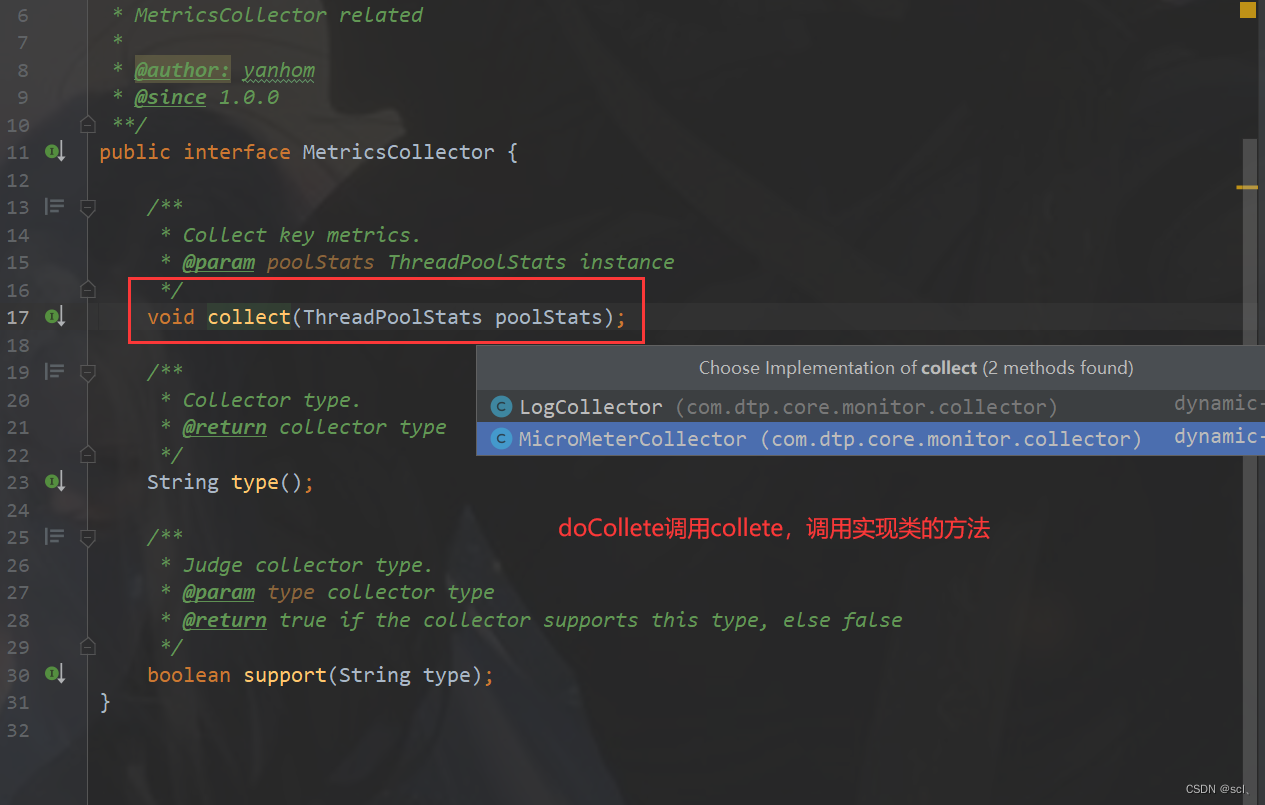
以默认的logging为例,对应的死LogCollector类,该类内很简单,就是直接打印log即可
@Slf4j public class LogCollector extends AbstractCollector { @Override public void collect(ThreadPoolStats threadPoolStats) { String metrics = JSONUtil.toJsonStr(threadPoolStats); if (LogUtil.getMonitorLogger() == null) { log.error("Cannot find monitor logger..."); return; } LogUtil.getMonitorLogger().info("{}", metrics); } @Override public String type() { // 枚举类型 LOGGING, MICROMETER return CollectorTypeEnum.LOGGING.name(); } }- 1
- 2
- 3
- 4
- 5
- 6
- 7
- 8
- 9
- 10
- 11
- 12
- 13
- 14
- 15
- 16
- 17
- 18
- 19
- 20
而提供可视化接口的micrometer就晒微复杂一点,依赖的是package io.micrometer.core.instrument 下的 Micros类
@Slf4j public class MicroMeterCollector extends AbstractCollector { /** * Prefix used for all dtp metric names. */ public static final String DTP_METRIC_NAME_PREFIX = "thread.pool"; public static final String POOL_NAME_TAG = DTP_METRIC_NAME_PREFIX + ".name"; public static final String APP_NAME_TAG = "app.name"; // 各个线程池及其对应的ThreadPoolStats private static final Map<String, ThreadPoolStats> GAUGE_CACHE = new ConcurrentHashMap<>(); @Override public void collect(ThreadPoolStats threadPoolStats) { // metrics must be held with a strong reference, even though it is never referenced within this class // 记录旧的 ThreadPoolStats oldStats = GAUGE_CACHE.get(threadPoolStats.getPoolName()); // 更新 if (Objects.isNull(oldStats)) { GAUGE_CACHE.put(threadPoolStats.getPoolName(), threadPoolStats); } else { BeanUtil.copyProperties(threadPoolStats, oldStats); } // 通知 gauge(GAUGE_CACHE.get(threadPoolStats.getPoolName())); } @Override public String type() { return CollectorTypeEnum.MICROMETER.name(); } public void gauge(ThreadPoolStats poolStats) { Iterable<Tag> tags = Lists.newArrayList( Tag.of(POOL_NAME_TAG, poolStats.getPoolName()), Tag.of(APP_NAME_TAG, CommonUtil.getAppName())); Metrics.gauge(metricName("core.size"), tags, poolStats, ThreadPoolStats::getCorePoolSize); Metrics.gauge(metricName("maximum.size"), tags, poolStats, ThreadPoolStats::getMaximumPoolSize); Metrics.gauge(metricName("current.size"), tags, poolStats, ThreadPoolStats::getPoolSize); Metrics.gauge(metricName("largest.size"), tags, poolStats, ThreadPoolStats::getLargestPoolSize); Metrics.gauge(metricName("active.count"), tags, poolStats, ThreadPoolStats::getActiveCount); Metrics.gauge(metricName("task.count"), tags, poolStats, ThreadPoolStats::getTaskCount); Metrics.gauge(metricName("completed.task.count"), tags, poolStats, ThreadPoolStats::getCompletedTaskCount); Metrics.gauge(metricName("wait.task.count"), tags, poolStats, ThreadPoolStats::getWaitTaskCount); Metrics.gauge(metricName("queue.size"), tags, poolStats, ThreadPoolStats::getQueueSize); Metrics.gauge(metricName("queue.capacity"), tags, poolStats, ThreadPoolStats::getQueueCapacity); Metrics.gauge(metricName("queue.remaining.capacity"), tags, poolStats, ThreadPoolStats::getQueueRemainingCapacity); Metrics.gauge(metricName("reject.count"), tags, poolStats, ThreadPoolStats::getRejectCount); Metrics.gauge(metricName("run.timeout.count"), tags, poolStats, ThreadPoolStats::getRunTimeoutCount); Metrics.gauge(metricName("queue.timeout.count"), tags, poolStats, ThreadPoolStats::getQueueTimeoutCount); } private static String metricName(String name) { return String.join(".", DTP_METRIC_NAME_PREFIX, name); } }- 1
- 2
- 3
- 4
- 5
- 6
- 7
- 8
- 9
- 10
- 11
- 12
- 13
- 14
- 15
- 16
- 17
- 18
- 19
- 20
- 21
- 22
- 23
- 24
- 25
- 26
- 27
- 28
- 29
- 30
- 31
- 32
- 33
- 34
- 35
- 36
- 37
- 38
- 39
- 40
- 41
- 42
- 43
- 44
- 45
- 46
- 47
- 48
- 49
- 50
- 51
- 52
- 53
- 54
- 55
- 56
- 57
- 58
- 59
- 60
- 61
- 62
- 63
- 64
- 65
- 66
- 67
- 68
然后暴露endpoint支持http访问也是依赖acator组件,直接将当前存在的线程池、JVM信息返回
@Endpoint(id = "dynamic-tp") public class DtpEndpoint { @ReadOperation public List<Metrics> invoke() { List<String> dtpNames = DtpRegistry.listAllDtpNames(); List<String> commonNames = DtpRegistry.listAllCommonNames(); List<Metrics> metricsList = Lists.newArrayList(); dtpNames.forEach(x -> { DtpExecutor executor = DtpRegistry.getDtpExecutor(x); metricsList.add(MetricsConverter.convert(executor)); }); commonNames.forEach(x -> { ExecutorWrapper wrapper = DtpRegistry.getCommonExecutor(x); metricsList.add(MetricsConverter.convert(wrapper)); }); JvmStats jvmStats = new JvmStats(); RuntimeInfo runtimeInfo = new RuntimeInfo(); jvmStats.setMaxMemory(FileUtil.readableFileSize(runtimeInfo.getMaxMemory())); jvmStats.setTotalMemory(FileUtil.readableFileSize(runtimeInfo.getTotalMemory())); jvmStats.setFreeMemory(FileUtil.readableFileSize(runtimeInfo.getFreeMemory())); jvmStats.setUsableMemory(FileUtil.readableFileSize(runtimeInfo.getUsableMemory())); metricsList.add(jvmStats); return metricsList; } }- 1
- 2
- 3
- 4
- 5
- 6
- 7
- 8
- 9
- 10
- 11
- 12
- 13
- 14
- 15
- 16
- 17
- 18
- 19
- 20
- 21
- 22
- 23
- 24
- 25
- 26
- 27
- 28
- 29
- 30
报警:AbstractNotifier、AlarmManager类
报警这块代码做了一些抽象设计,运用了像模板方法模式等,主要是集成企业微信、钉钉等第三方平台,动态监测参数达到阈值就报警

核心的接口Notifier以及抽象类AbstractNotifier是功能实现的模板,方便解耦扩展,第三方实现类只需要集成AbstractNotifier即可,继承链

public interface Notifier { // 拿到要通知的平台信息 String platform(); // 发送配置改变信息 void sendChangeMsg(DtpMainProp oldProp, List<String> diffs); // 发送警报消息 void sendAlarmMsg(NotifyTypeEnum typeEnum); }- 1
- 2
- 3
- 4
- 5
- 6
- 7
- 8
- 9
- 10
- 11
- 12
以微信平台为例
@Slf4j @Component public class DtpWechatNotifier extends AbstractWechatNotifier { @Override public String platform() { return NotifyPlatformEnum.WECHAT.name().toLowerCase(); // wechat } @Override public void sendChangeMsg(DtpMainProp oldProp, List<String> diffs) { DtpContext contextWrapper = DtpContextHolder.get(); // 从上下文拿到微信平台信息:platform平台名称,urlKey,secret NotifyPlatform platform = contextWrapper.getPlatform(NotifyPlatformEnum.WECHAT.name()); // 构建需要发送的内容,委托AbstractNotifier完成,主要是格式的处理 String content = buildNoticeContent(platform, WECHAT_CHANGE_NOTICE_TEMPLATE, oldProp, diffs); if (StringUtils.isBlank(content)) { return; } // 调用实际的发送方法 doSend(platform, content); } @Override public void sendAlarmMsg(NotifyTypeEnum typeEnum) { DtpContext contextWrapper = DtpContextHolder.get(); NotifyPlatform platform = contextWrapper.getPlatform(NotifyPlatformEnum.WECHAT.name()); // 构建报警信息 String content = buildAlarmContent(platform, typeEnum, WECHAT_ALARM_TEMPLATE); if (StringUtils.isBlank(content)) { return; } // 发送 doSend(platform, content); } @Override protected Pair<String, String> getColors() { return new ImmutablePair<>(WechatNotifyConst.WARNING_COLOR, WechatNotifyConst.COMMENT_COLOR); } }- 1
- 2
- 3
- 4
- 5
- 6
- 7
- 8
- 9
- 10
- 11
- 12
- 13
- 14
- 15
- 16
- 17
- 18
- 19
- 20
- 21
- 22
- 23
- 24
- 25
- 26
- 27
- 28
- 29
- 30
- 31
- 32
- 33
- 34
- 35
- 36
- 37
- 38
- 39
- 40
- 41
- 42
- 43
最后再看doSent发送方法完成http请求
@Slf4j public abstract class AbstractWechatNotifier extends AbstractNotifier { /** * Execute real WeChat send. * @param platform send platform * @param text send content */ protected void doSend(NotifyPlatform platform, String text) { String serverUrl = WechatNotifyConst.WECHAT_WEH_HOOK + platform.getUrlKey(); // 发送请求的格式,之后发送还是转化为json格式 MarkdownReq markdownReq = new MarkdownReq(); markdownReq.setMsgtype("markdown"); MarkdownReq.Markdown markdown = new MarkdownReq.Markdown(); markdown.setContent(text); markdownReq.setMarkdown(markdown); HttpResponse response = null; try { response = HttpRequest.post(serverUrl).body(JSONUtil.toJsonStr(markdownReq)).execute(); } catch (Exception e) { log.error("DynamicTp notify, wechat send fail...", e); } finally { if (Objects.nonNull(response)) { log.info("DynamicTp notify, wechat send success, response: {}, request:{}", response.body(), JSONUtil.toJsonStr(markdownReq)); } } } }- 1
- 2
- 3
- 4
- 5
- 6
- 7
- 8
- 9
- 10
- 11
- 12
- 13
- 14
- 15
- 16
- 17
- 18
- 19
- 20
- 21
- 22
- 23
- 24
- 25
- 26
- 27
- 28
- 29
- 30
- 31
剩余的类AlarmCounter内部维护一个Map,value存放每个平台的报警次数AlarmInfo。AlarmLimiter类内部维护一个Map,可以排除不做通知的平台DynamicTp notify, alarm limit。
第三方平台sendAlarmMsg方法入口是AlarmManager,他内部会开辟一个线程池来做这件事,
@Slf4j public class AlarmManager { private static final ExecutorService ALARM_EXECUTOR = ThreadPoolBuilder.newBuilder() .threadPoolName("dtp-alarm") .threadFactory("dtp-alarm") .corePoolSize(2) .maximumPoolSize(4) .workQueue(QueueTypeEnum.LINKED_BLOCKING_QUEUE.getName(), 2000, false) .rejectedExecutionHandler(RejectedTypeEnum.DISCARD_OLDEST_POLICY.getName()) .dynamic(false) .buildWithTtl(); private AlarmManager() {} public static void triggerAlarm(String dtpName, String notifyType, Runnable runnable) { AlarmCounter.incAlarmCounter(dtpName, notifyType); ALARM_EXECUTOR.execute(runnable); } // 报警任务提交 public static void triggerAlarm(Runnable runnable) { ALARM_EXECUTOR.execute(runnable); } public static void doAlarm(DtpExecutor executor, List<NotifyTypeEnum> typeEnums) { typeEnums.forEach(x -> doAlarm(executor, x)); } public static void doAlarm(DtpExecutor executor, NotifyTypeEnum typeEnum) { // 前置检查 if (!preCheck(executor, typeEnum)) { return; } boolean ifAlarm = AlarmLimiter.ifAlarm(executor, typeEnum.getValue()); if (!ifAlarm) { log.debug("DynamicTp notify, alarm limit, dtpName: {}, type: {}", executor.getThreadPoolName(), typeEnum.getValue()); return; } DtpProperties dtpProperties = ApplicationContextHolder.getBean(DtpProperties.class); NotifyItem notifyItem = NotifyHelper.getNotifyItem(executor, typeEnum); if (Objects.isNull(notifyItem)) { return; } AlarmInfo alarmInfo = AlarmCounter.getAlarmInfo(executor.getThreadPoolName(), notifyItem.getType()); DtpContext dtpContext = DtpContext.builder() .dtpExecutor(executor) .platforms(dtpProperties.getPlatforms()) .notifyItem(notifyItem) .alarmInfo(alarmInfo) .build(); DtpContextHolder.set(dtpContext); AlarmLimiter.putVal(executor, typeEnum.getValue()); // 发送报警 NotifierHandler.getInstance().sendAlarm(typeEnum); AlarmCounter.reset(executor.getThreadPoolName(), notifyItem.getType()); } ================= 参数检查 ============================= private static boolean preCheck(DtpExecutor executor, NotifyTypeEnum typeEnum) { switch (typeEnum) { case REJECT: return checkReject(executor); case CAPACITY: return checkCapacity(executor); case LIVENESS: return checkLiveness(executor); case RUN_TIMEOUT: return checkRunTimeout(executor); case QUEUE_TIMEOUT: return checkQueueTimeout(executor); default: log.error("Unsupported alarm type, type: {}", typeEnum); return false; } } private static boolean checkLiveness(DtpExecutor executor) { NotifyItem notifyItem = NotifyHelper.getNotifyItem(executor, NotifyTypeEnum.LIVENESS); if (Objects.isNull(notifyItem)) { return false; } int maximumPoolSize = executor.getMaximumPoolSize(); double div = NumberUtil.div(executor.getActiveCount(), maximumPoolSize, 2) * 100; return satisfyBaseCondition(notifyItem) && div >= notifyItem.getThreshold(); } private static boolean checkCapacity(DtpExecutor executor) { BlockingQueue<Runnable> workQueue = executor.getQueue(); if (CollUtil.isEmpty(workQueue)) { return false; } NotifyItem notifyItem = NotifyHelper.getNotifyItem(executor, NotifyTypeEnum.CAPACITY); if (Objects.isNull(notifyItem)) { return false; } int queueCapacity = executor.getQueueCapacity(); double div = NumberUtil.div(workQueue.size(), queueCapacity, 2) * 100; return satisfyBaseCondition(notifyItem) && div >= notifyItem.getThreshold(); } private static boolean checkReject(DtpExecutor executor) { NotifyItem notifyItem = NotifyHelper.getNotifyItem(executor, NotifyTypeEnum.REJECT); if (Objects.isNull(notifyItem)) { return false; } AlarmInfo alarmInfo = AlarmCounter.getAlarmInfo(executor.getThreadPoolName(), notifyItem.getType()); int rejectCount = alarmInfo.getCount(); return satisfyBaseCondition(notifyItem) && rejectCount >= notifyItem.getThreshold(); } private static boolean checkRunTimeout(DtpExecutor executor) { NotifyItem notifyItem = NotifyHelper.getNotifyItem(executor, NotifyTypeEnum.RUN_TIMEOUT); if (Objects.isNull(notifyItem)) { return false; } AlarmInfo alarmInfo = AlarmCounter.getAlarmInfo(executor.getThreadPoolName(), notifyItem.getType()); int runTimeoutTaskCount = alarmInfo.getCount(); return satisfyBaseCondition(notifyItem) && runTimeoutTaskCount >= notifyItem.getThreshold(); } private static boolean checkQueueTimeout(DtpExecutor executor) { NotifyItem notifyItem = NotifyHelper.getNotifyItem(executor, NotifyTypeEnum.QUEUE_TIMEOUT); if (Objects.isNull(notifyItem)) { return false; } AlarmInfo alarmInfo = AlarmCounter.getAlarmInfo(executor.getThreadPoolName(), notifyItem.getType()); int queueTimeoutTaskCount = alarmInfo.getCount(); return satisfyBaseCondition(notifyItem) && queueTimeoutTaskCount >= notifyItem.getThreshold(); } private static boolean satisfyBaseCondition(NotifyItem notifyItem) { return notifyItem.isEnabled() && CollUtil.isNotEmpty(notifyItem.getPlatforms()); } }- 1
- 2
- 3
- 4
- 5
- 6
- 7
- 8
- 9
- 10
- 11
- 12
- 13
- 14
- 15
- 16
- 17
- 18
- 19
- 20
- 21
- 22
- 23
- 24
- 25
- 26
- 27
- 28
- 29
- 30
- 31
- 32
- 33
- 34
- 35
- 36
- 37
- 38
- 39
- 40
- 41
- 42
- 43
- 44
- 45
- 46
- 47
- 48
- 49
- 50
- 51
- 52
- 53
- 54
- 55
- 56
- 57
- 58
- 59
- 60
- 61
- 62
- 63
- 64
- 65
- 66
- 67
- 68
- 69
- 70
- 71
- 72
- 73
- 74
- 75
- 76
- 77
- 78
- 79
- 80
- 81
- 82
- 83
- 84
- 85
- 86
- 87
- 88
- 89
- 90
- 91
- 92
- 93
- 94
- 95
- 96
- 97
- 98
- 99
- 100
- 101
- 102
- 103
- 104
- 105
- 106
- 107
- 108
- 109
- 110
- 111
- 112
- 113
- 114
- 115
- 116
- 117
- 118
- 119
- 120
- 121
- 122
- 123
- 124
- 125
- 126
- 127
- 128
- 129
- 130
- 131
- 132
- 133
- 134
- 135
- 136
- 137
- 138
- 139
- 140
- 141
- 142
- 143
- 144
- 145
拒绝:RejectedInvocationHandler类
在任务负载过重达到拒绝策略的阈值,会执行指定的拒绝策略,在拒绝策略执行之前,需要发送报警信息,实现原理就是动态代理,在实际拒绝策略方法之前加上发送报警的增强方法beforeReject(executor);完成具体的逻辑

RejectAware接口内默认方法,然后就是 RejectedInvocationHandler implements InvocationHandler, RejectedAware 重写 invoke方法
======== 根据RejectedExecutionHandler 拒绝策略来创建 代理对象 RejectedExecutionHandler ======= public static RejectedExecutionHandler getProxy(RejectedExecutionHandler handler) { return (RejectedExecutionHandler) Proxy.newProxyInstance(handler.getClass().getClassLoader(), new Class[]{RejectedExecutionHandler.class}, new RejectedInvocationHandler(handler)); } ====== 动态代理代理对象处理器 ====== private final Object target; // 拿到被代理的对象 public RejectedInvocationHandler(Object target) { this.target = target; } @Override public Object invoke(Object proxy, Method method, Object[] args) throws Throwable { try { ThreadPoolExecutor executor = (ThreadPoolExecutor) args[1]; // 前置增强 beforeReject(executor); return method.invoke(target, args); } catch (InvocationTargetException ex) { throw ex.getCause(); } } ======= 拒绝方法执行前的前置增强 ========= public interface RejectedAware { /** * Do sth before reject. * @param executor ThreadPoolExecutor instance */ default void beforeReject(ThreadPoolExecutor executor) { if (executor instanceof DtpExecutor) { DtpExecutor dtpExecutor = (DtpExecutor) executor; dtpExecutor.incRejectCount(1); Runnable runnable = () -> AlarmManager.doAlarm(dtpExecutor, REJECT); AlarmManager.triggerAlarm(dtpExecutor.getThreadPoolName(), REJECT.getValue(), runnable); } } }- 1
- 2
- 3
- 4
- 5
- 6
- 7
- 8
- 9
- 10
- 11
- 12
- 13
- 14
- 15
- 16
- 17
- 18
- 19
- 20
- 21
- 22
- 23
- 24
- 25
- 26
- 27
- 28
- 29
- 30
- 31
- 32
- 33
- 34
- 35
- 36
- 37
- 38
- 39
- 40
- 41
- 42
- 43
- 44
- 45
- 46
- 47
- 48
- 49
二、adapter模块分析
主要是适配其他支持池化资源的组件,如dubbo、tomcat、jetty等,核心接口TpHandler 、ApplicationListener事件。也就是监听启动、收集、刷新事件,然后调用XxxHandler完成update等动态更新、记录当前参数等操作。对于
- web类的,抽象类
public abstract class AbstractWebServerTpHandler implements TpHandler, ApplicationListener<ServletWebServerInitializedEvent>,各个组件如tomcat继承该模板类即可重写相应模板方法。以及抽取的公共的ApplicationListener<CollectEvent>、ApplicationListener<RefreshEvent> - rpc类的,实现
TpHandler,ApplicationListener<CollectEvent>、ApplicationListener<RefreshEvent>等接口
public interface TpHandler { /** * Get specify thread pool. * * @return the specify executor */ Executor getTp(); /** * Update thread pool with specify properties. * * @param dtpProperties the targeted dtpProperties */ void updateTp(DtpProperties dtpProperties); /** * Get thread pool stats. * * @return the thread pool stats */ ThreadPoolStats getPoolStats(); }- 1
- 2
- 3
- 4
- 5
- 6
- 7
- 8
- 9
- 10
- 11
- 12
- 13
- 14
- 15
- 16
- 17
- 18
- 19
- 20
- 21
- 22
- 23
- 24
以tomcat的为例分析代码,首先是两个事件监听类:,用于监听上下文中发生的时间,然后进行响应处理
- // 刷新配置的WebServerRefreshListener
- // 收集信息获取ThreadPoolStats的WebServerRefreshListener
@Slf4j public class WebServerRefreshListener implements ApplicationListener<RefreshEvent> { @Override public void onApplicationEvent(@NonNull RefreshEvent event) { try { TpHandler webServerTpHandler = ApplicationContextHolder.getBean(AbstractWebServerTpHandler.class); // 更新tp webServerTpHandler.updateTp(event.getDtpProperties()); } catch (Exception e) { log.error("DynamicTp refresh, update web server thread pool failed.", e); } } } // 收集信息获取ThreadPoolStats @Slf4j public class WebServerCollectListener implements ApplicationListener<CollectEvent> { @Override public void onApplicationEvent(@NonNull CollectEvent event) { DtpProperties dtpProperties = event.getDtpProperties(); try { TpHandler webServerTpHandler = ApplicationContextHolder.getBean(AbstractWebServerTpHandler.class); Optional.ofNullable(webServerTpHandler.getPoolStats()) .ifPresent(p -> CollectorHandler.getInstance().collect(p, dtpProperties.getCollectorType())); } catch (Exception e) { log.error("DynamicTp monitor, collect web server thread pool metrics failed.", e); } } }- 1
- 2
- 3
- 4
- 5
- 6
- 7
- 8
- 9
- 10
- 11
- 12
- 13
- 14
- 15
- 16
- 17
- 18
- 19
- 20
- 21
- 22
- 23
- 24
- 25
- 26
- 27
- 28
- 29
- 30
- 31
而收集、更新的事件在哪里发布的呢?
AbstractWebServerTpHandler implements TpHandler, ApplicationListener<ServletWebServerInitializedEvent>,以tomcat为例,在tomcat等web服务启动srping会创建ServletWebServerApplicationContext上下文,在最后的finishRefresh钩子函数中发布的事件/** springboot上下文有两个 ServletWebServerApplicationContext AnnotationConfigServletWebServerApplicationContext(继承上面) **/ @Override protected void finishRefresh() { super.finishRefresh(); WebServer webServer = startWebServer(); if (webServer != null) { publishEvent(new ServletWebServerInitializedEvent(webServer, this)); } }- 1
- 2
- 3
- 4
- 5
- 6
- 7
- 8
- 9
- 10
- 11
- 12
- 13
- 14
- 15
- 使用
-
相关阅读:
rxjava2源码分析
HDLbits exercises 1 (开头到vector5节选题)
linux篇【11】:linux下的线程<后序>
Shiro框架-史上详解
华为数通方向HCIP-DataCom H12-821题库(单选题:501-520)
容器化nacos部署并实现服务发现(gradle)
Java链接redis集群
Linux系统编程 day03 Makefile、gdb、文件IO
Spring - FactoryBean扩展实战_MyBatis-Spring 启动过程源码解读
ssh外网访问内网服务器
- 原文地址:https://blog.csdn.net/qq_24654501/article/details/125503922
- 最新文章
-
沪漂五周年了:我越来越迷茫了
Agentic Skill Routing 实战:别再把所有 Skill 塞进 AI Agent 上下文
MySQL-Seconds_behind_master的精度误差
[MAF预定义ChatClient中间件-03]CachingChatClient——利用缓存省钱省时间
AI的至暗历史:从万众期待到被政府撤资,AI的两次死亡徘徊
Agent OS :五种驯服不确定性的范式
PortSwigger SQL注入LAB11
数据库即时编译JIT
[Begin]AI Learn Data Day 0
深度学习进阶(二十七)现代 LLM 的核心架构设计其二:SwiGLU