-
SpringMVC的请求(上)
文章目录
一、获得请求参数

二、获得基本类型参数

@RequestMapping(value = "/quick11") @ResponseBody //告诉SpringMVC框架不进行视图跳转,直接进行数据响应 public void save11(String userName,int age) throws IOException { System.out.println(userName); System.out.println(age); //http://localhost:8080/SpringMVC/user/quick11?userName=jack&age=17 }- 1
- 2
- 3
- 4
- 5
- 6
- 7
- 8
三、获得pojo类型参数

@RequestMapping(value = "/quick12") @ResponseBody //告诉SpringMVC框架不进行视图跳转,直接进行数据响应 public void save12(User user) throws IOException { System.out.println(user); //http://localhost:8080/SpringMVC/user/quick12?username=jack&age=22 }- 1
- 2
- 3
- 4
- 5
- 6
四、获得数组类型参数

@RequestMapping(value = "/quick13") @ResponseBody //告诉SpringMVC框架不进行视图跳转,直接进行数据响应 public void save13(String [] strs) throws IOException { System.out.println(Arrays.asList(strs)); //http://localhost:8080/SpringMVC/user/quick13?strs=111&strs=222&strs=333 }- 1
- 2
- 3
- 4
- 5
- 6
- 7
五、获得集合类型参数

form.jsp:<%-- Created by IntelliJ IDEA. User: 86166 Date: 2022/6/29 Time: 17:14 To change this template use File | Settings | File Templates. --%> <%@ page contentType="text/html;charset=UTF-8" language="java" %> <%@page isELIgnored="false" %> <html> <head> <title>Title</title> </head> <body> <form action="${pageContext.request.contextPath}/user/quick14" method="post"> <input type="text" name="userList[0].username"> <input type="text" name="userList[0].age"> <input type="text" name="userList[1].username"> <input type="text" name="userList[1].age"> <input type="submit" value="提交"> </form> </body> </html>- 1
- 2
- 3
- 4
- 5
- 6
- 7
- 8
- 9
- 10
- 11
- 12
- 13
- 14
- 15
- 16
- 17
- 18
- 19
- 20
- 21
- 22
- 23
- 24
- 25
- 26
VO:
package com.study.domain; import java.util.List; public class VO { private List<User> userList; public List<User> getUserList() { return userList; } public void setUserList(List<User> userList) { this.userList = userList; } @Override public String toString() { return "VO{" + "userList=" + userList + '}'; } }- 1
- 2
- 3
- 4
- 5
- 6
- 7
- 8
- 9
- 10
- 11
- 12
- 13
- 14
- 15
- 16
- 17
- 18
- 19
- 20
- 21
- 22
- 23
@RequestMapping(value = "/quick14") @ResponseBody //告诉SpringMVC框架不进行视图跳转,直接进行数据响应 public void save14(VO vo) throws IOException { System.out.println(vo); }- 1
- 2
- 3
- 4
- 5
六、请求数据乱码

<!-- 配置全局过滤filter--> <filter> <!-- 随便命名 --> <filter-name>characterEncodingFilter</filter-name> <filter-class>org.springframework.web.filter.CharacterEncodingFilter</filter-class> <init-param> <param-name>encoding</param-name> <param-value>utf-8</param-value> </init-param> </filter> <filter-mapping> <filter-name>characterEncodingFilter</filter-name> <!-- /*:表示强制所有的请求先通过过滤器处理 --> <url-pattern>/*</url-pattern> </filter-mapping>- 1
- 2
- 3
- 4
- 5
- 6
- 7
- 8
- 9
- 10
- 11
- 12
- 13
- 14
- 15
@RequestMapping(value = "/quick14") @ResponseBody //告诉SpringMVC框架不进行视图跳转,直接进行数据响应 public void save14(VO vo) throws IOException { System.out.println(vo); }- 1
- 2
- 3
- 4
- 5
七、参数绑定注解
当请求参数名称与Controller的业务方法参数不一致时,需要通过@RequestParam注解显示绑定。

@RequestMapping(value = "/quick15") @ResponseBody //告诉SpringMVC框架不进行视图跳转,直接进行数据响应 public void save15(@RequestParam(value = "name",required = false,defaultValue = "jack")String userName) throws IOException { System.out.println(userName); }- 1
- 2
- 3
- 4
- 5
- 6
八、获得Restful风格参数
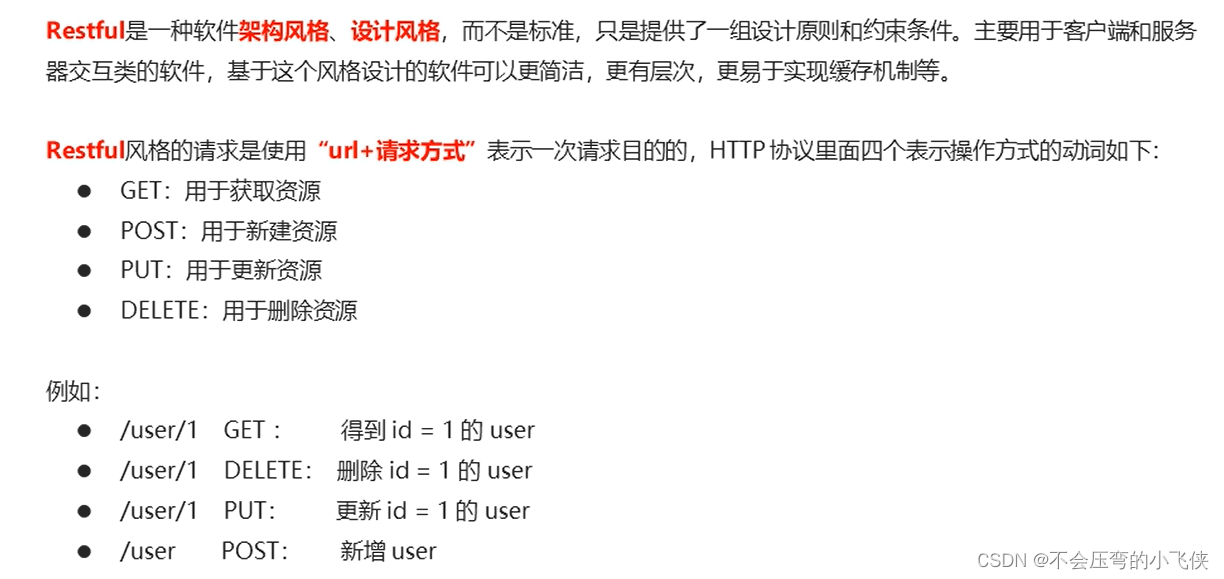

//http://localhost:8080/SpringMVC/user/quick16/jack @RequestMapping(value = "/quick16/{username}") @ResponseBody //告诉SpringMVC框架不进行视图跳转,直接进行数据响应 public void save16(@PathVariable("username") String userName) throws IOException { System.out.println(userName); }- 1
- 2
- 3
- 4
- 5
- 6
- 7
九、自定义类型转换器

1.实现DateConverter接口:package com.study.converter; import org.springframework.core.convert.converter.Converter; import javax.xml.crypto.Data; import java.text.ParseException; import java.text.SimpleDateFormat; import java.util.Date; public class DateConverter implements Converter<String,Date> { @Override public Date convert(String dateStr) { //将日期字符串转换为日期对象 返回 Date date=null; SimpleDateFormat d = new SimpleDateFormat("yyyy-MM-dd"); try { date = d.parse(dateStr); } catch (ParseException e) { e.printStackTrace(); } return date; } }- 1
- 2
- 3
- 4
- 5
- 6
- 7
- 8
- 9
- 10
- 11
- 12
- 13
- 14
- 15
- 16
- 17
- 18
- 19
- 20
- 21
- 22
- 23
- 24
- 25
2.声明转换器:
<!--声明转换器--> <bean id="conversionService" class="org.springframework.context.support.ConversionServiceFactoryBean"> <property name="converters"> <list> <bean class="com.study.converter.DateConverter"></bean> </list> </property> </bean>- 1
- 2
- 3
- 4
- 5
- 6
- 7
- 8
- 9
- 10
3.在annotation-driven中引用转换器
<mvc:annotation-driven conversion-service="conversionService"></mvc:annotation-driven>- 1
@RequestMapping(value = "/quick17") @ResponseBody //告诉SpringMVC框架不进行视图跳转,直接进行数据响应 public void save17(Date date) throws IOException { System.out.println(date); }- 1
- 2
- 3
- 4
- 5
- 6
十、获得Servlet相关的API

@RequestMapping(value = "/quick18") @ResponseBody //告诉SpringMVC框架不进行视图跳转,直接进行数据响应 public void save18(HttpServletRequest request, HttpServletResponse response, HttpSession session) throws IOException { System.out.println(request); System.out.println(response); System.out.println(session); }- 1
- 2
- 3
- 4
- 5
- 6
- 7
- 8
十一、获得请求头

@RequestMapping(value = "/quick19") @ResponseBody //告诉SpringMVC框架不进行视图跳转,直接进行数据响应 public void save19(@RequestHeader(value = "User-Agent",required = false) String user_agent) throws IOException { System.out.println(user_agent); }- 1
- 2
- 3
- 4
- 5
- 6
- 7
十二、@CookieValue

@RequestMapping(value = "/quick20") @ResponseBody //告诉SpringMVC框架不进行视图跳转,直接进行数据响应 public void save20(@CookieValue(value = "JSESSIONID",required = false) String jsessionId) throws IOException { System.out.println(jsessionId); }- 1
- 2
- 3
- 4
- 5
- 6
- 7
-
相关阅读:
2022-06-08你抢不到的可达鸭,芯片成本只要几块钱KFC(-JPG)
【毕业设计】基于大数据的招聘与租房分析可视化系统
CKAN教程之将 Snowflake 连接到 CKAN 以发布到开放数据门户
完善系统的最后一公里,增加系统日志功能
索引【MySQL】
弹性数据库连接池探活策略调研(二)——Druid
C/C++结构体给函数传参
Nodejs初体验
开放签电子签章企业版V1.6(紧急更新)
【C++漂流记】简易理解引用的基本语法和使用及其注意实现
- 原文地址:https://blog.csdn.net/qq_43514330/article/details/125530207

- 最新文章
-
沪漂五周年了:我越来越迷茫了
Agentic Skill Routing 实战:别再把所有 Skill 塞进 AI Agent 上下文
MySQL-Seconds_behind_master的精度误差
[MAF预定义ChatClient中间件-03]CachingChatClient——利用缓存省钱省时间
AI的至暗历史:从万众期待到被政府撤资,AI的两次死亡徘徊
Agent OS :五种驯服不确定性的范式
PortSwigger SQL注入LAB11
数据库即时编译JIT
[Begin]AI Learn Data Day 0
深度学习进阶(二十七)现代 LLM 的核心架构设计其二:SwiGLU