-
How to create new user for ORACLE 19c (CDB & PDB)
ORACLE 19c新建用户
数据据库、用户、CDB与PDB之间的关系
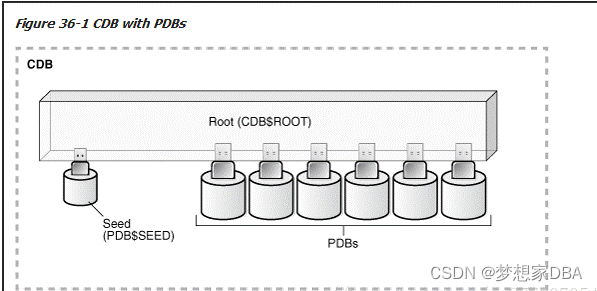
通常在CDB上建立的用户是common user,新建用户名前要加C##。在PDB上创建的用户是local user。
在CDB上创建用户
1.Guarante this action under the CDB enviroment.
[oracle@MaxwellDBA ~]$ sqlplus system/system as sysdba
SQL*Plus: Release 19.0.0.0.0 - Production on Wed Jun 29 10:12:29 2022
Version 19.3.0.0.0Copyright (c) 1982, 2019, Oracle. All rights reserved.
Connected to:
Oracle Database 19c Enterprise Edition Release 19.0.0.0.0 - Production
Version 19.3.0.0.0SQL> select name,cdb from v$database;
NAME CDB
--------- ---
ORCLCDB YES2. Create New User
SQL> create user C##test identified by testpass;
User created.
3.setting authority
SQL> grant dba,connect,resource,create view to C##test;
Grant succeeded.
SQL> grant create session to C##test;
Grant succeeded.
SQL> grant select any table to C##test;
Grant succeeded.
SQL> grant update any table to C##test;
Grant succeeded.
SQL> grant insert any table to C##test;
Grant succeeded.
SQL> grant delete any table to C##test;
Grant succeeded.
4. Drop user
SQL> drop user C##test cascade;
User dropped.
SQL>
Create new user on PDB
- check the PDB name
- SQL> select pdb_id,pdb_name,dbid,status,creation_scn from dba_pdbs;
- PDB_ID
- ----------
- PDB_NAME
- --------------------------------------------------------------------------------
- DBID STATUS CREATION_SCN
- ---------- ---------- ------------
- 3
- ORCLPDB1
- 634705280 NORMAL 2156143
- 2
- PDB$SEED
- 1473614105 NORMAL 2014329
- PDB_ID
- ----------
- PDB_NAME
- --------------------------------------------------------------------------------
- DBID STATUS CREATION_SCN
- ---------- ---------- ------------
- SQL> select con_id,dbid,NAME,OPEN_MODE from v$pdbs;
- CON_ID DBID
- ---------- ----------
- NAME
- --------------------------------------------------------------------------------
- OPEN_MODE
- ----------
- 2 1473614105
- PDB$SEED
- READ ONLY
- 3 634705280
- ORCLPDB1
- READ WRITE
- CON_ID DBID
- ---------- ----------
- NAME
- --------------------------------------------------------------------------------
- OPEN_MODE
- ----------
Local User PDB Name is ORCLPDB1
Enter into the PDB enviroment
SQL> alter session set container=ORCLPDB1;
- SQL> alter session set container=ORCLPDB1
- 2 ;
- Session altered.
New User
- SQL> create user test2 identified by test2pass;
- User created.
- SQL>
Setting authority
- grant dba,connect,resource,create view to test2;
- grant select any table to test2;
- grant update any table to test2;
- grant insert any table to test2;
- grant delete any table to test2;
- grant create session to test2;
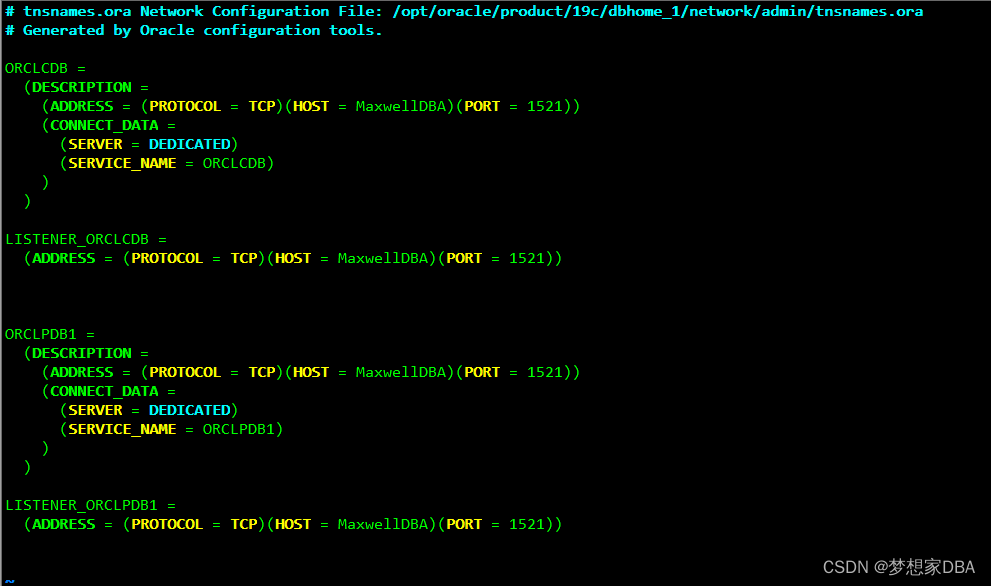
Setting the TNS
If not setting the TNS, it will be failed . error message is user/password error , due to the user on CDB defaultly. need to change the file tnsname.ora on remote linux oracle path network/admin(/opt/oracle/product/19c/dbhome_1/network/admin)
- # tnsnames.ora Network Configuration File: /opt/oracle/product/19c/dbhome_1/network/admin/tnsnames.ora
- # Generated by Oracle configuration tools.
- ORCLCDB =
- (DESCRIPTION =
- (ADDRESS = (PROTOCOL = TCP)(HOST = MaxwellDBA)(PORT = 1521))
- (CONNECT_DATA =
- (SERVER = DEDICATED)
- (SERVICE_NAME = ORCLCDB)
- )
- )
- LISTENER_ORCLCDB =
- (ADDRESS = (PROTOCOL = TCP)(HOST = MaxwellDBA)(PORT = 1521))
- ORCLPDB1 =
- (DESCRIPTION =
- (ADDRESS = (PROTOCOL = TCP)(HOST = MaxwellDBA)(PORT = 1521))
- (CONNECT_DATA =
- (SERVER = DEDICATED)
- (SERVICE_NAME = ORCLPDB1)
- )
- )
- LISTENER_ORCLPDB1 =
- (ADDRESS = (PROTOCOL = TCP)(HOST = MaxwellDBA)(PORT = 1521))
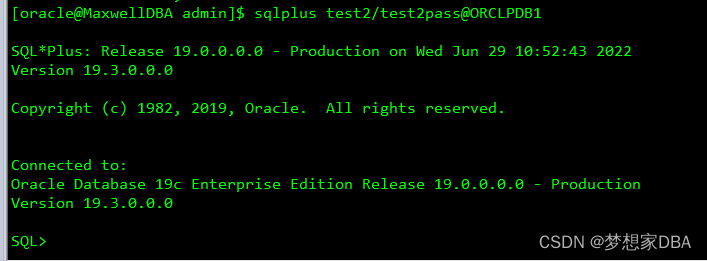
Login user:
-
相关阅读:
集群搭建(1)
《计算机体系结构量化研究方法》1.8 性能的测量、报告和汇总
第三次工业革命(六)
2024年华为OD机试真题-抢7游戏-C++-OD统一考试(C卷D卷)
14.HTML和CSS 02
node对接微信支付,微信返回失败
【OpenCV 例程 300篇】243. 特征检测之 FAST 算法
云计算+区块链,企业数字化转型的混合强劲动力
Python的Numpy库的ndarray对象常用构造方法及初始化方法
js逆向-逆向基础
- 原文地址:https://blog.csdn.net/u011868279/article/details/125515342

- 最新文章
-
【FHE】我们如何实现同态加密推理(八):SiLU 的密文化——两条路径,和一个 8 字节的开关
SQLcl 中 c/old/new 替换变量为何失效?先定位再替换
不让模型写作文,直接从它脑子里读答案:Jev 决策在 .NET 的两条路线
Halo插件:支持GitHub的图床附件策略
电视投屏界的“一股清流”!SimpleTVCast 6.0.0-beta 抢先体验:无需TV端App,界面大换血!✨
华三VXLAN集中式网关实战指南:Spine多活网关 + 双活接入(M-LAG)
软件更好写之后口碑会更重要
大 O、大 Omega、大 Theta 的区别,O(n) 复杂度是什么意思
Java标签跳转:一个鲜为人知但却很实用的小技巧
多智能体系统论文速读