-
C#验证码
环境是.net 5开发。
1.建立一个项目

2.代码
- using System;
- using System.Collections.Generic;
- using System.ComponentModel;
- using System.Data;
- using System.Drawing;
- using System.Drawing.Drawing2D;
- using System.Linq;
- using System.Text;
- using System.Windows.Forms;
- namespace WinFormsApp1
- {
- public partial class Form1 : Form
- {
- /// <summary>
- /// 验证码的值
- /// </summary>
- public string txt = string.Empty;
- public Form1()
- {
- InitializeComponent();
- }
- private void button1_Click(object sender, EventArgs e)
- {
- GetLettersNumbers();
- }
- private void button2_Click(object sender, EventArgs e)
- {
- GetChinese();
- }
- private void button3_Click(object sender, EventArgs e)
- {
- if (textBox1.Text.Trim() != txt)
- {
- MessageBox.Show("提示:验证码输入错误,请重新输入!", "提示", MessageBoxButtons.OK, MessageBoxIcon.Information);
- }
- else
- {
- MessageBox.Show("提示:验证码输入正确!", "提示", MessageBoxButtons.OK, MessageBoxIcon.Information);
- }
- }
- /// <summary>
- /// 字母和数字
- /// </summary>
- private void GetLettersNumbers()
- {
- //颜色列表,用于验证码、噪线、噪点
- Color[] color = { Color.Black, Color.Red, Color.Blue, Color.Green, Color.Orange, Color.Brown, Color.Brown, Color.DarkBlue };
- //字体列表,用于验证码
- string[] font = { "Times New Roman" };
- //验证码的字符集,去掉了一些容易混淆的字符
- char[] character = { '1', '2', '3', '4', '5', '6', '7', '8', '9', 'a', 'b', 'd', 'e', 'f', 'h', 'k', 'm', 'n', 'r', 'x', 'y', 'A', 'B', 'C', 'D', 'E', 'F', 'G', 'H', 'J', 'K', 'L', 'M', 'N', 'P', 'R', 'S', 'T', 'W', 'X', 'Y' };
- Random rnd = new Random();
- //生成验证码字符串
- txt = "";
- for (int i = 0; i < 4; i++)
- {
- txt += character[rnd.Next(character.Length)];
- }
- //创建画布
- int codeW = txt.Length * 22;
- int codeH = 22;
- Bitmap bmp = new Bitmap(codeW, codeH);
- Graphics g = Graphics.FromImage(bmp);
- g.Clear(Color.White);
- //画噪线
- for (int i = 0; i < 3; i++)
- {
- int x1 = rnd.Next(codeW);
- int y1 = rnd.Next(codeH);
- int x2 = rnd.Next(codeW);
- int y2 = rnd.Next(codeH);
- Color clr = color[rnd.Next(color.Length)];
- g.DrawLine(new Pen(clr), x1, y1, x2, y2);
- }
- //画验证码字符串
- for (int i = 0; i < txt.Length; i++)
- {
- string fnt = font[rnd.Next(font.Length)];
- Font ft = new Font(fnt, 12);
- Color clr = color[rnd.Next(color.Length)];
- g.DrawString(txt[i].ToString(), ft, new SolidBrush(clr), (float)i * 18, (float)0);
- }
- pictureBox1.Image = bmp;
- }
- private void GetChinese()
- {
- Encoding.RegisterProvider(CodePagesEncodingProvider.Instance);//.net 5使用
- //获取GB2312编码页(表)
- Encoding gb = Encoding.GetEncoding("GB2312");
- //调用函数产生4个随机中文汉字编码
- object[] bytes = CreateCode(4);
- //根据汉字编码的字节数组解码出中文汉字
- string str1 = gb.GetString((byte[])Convert.ChangeType(bytes[0], typeof(byte[])));
- string str2 = gb.GetString((byte[])Convert.ChangeType(bytes[1], typeof(byte[])));
- string str3 = gb.GetString((byte[])Convert.ChangeType(bytes[2], typeof(byte[])));
- string str4 = gb.GetString((byte[])Convert.ChangeType(bytes[3], typeof(byte[])));
- txt = str1 + str2 + str3 + str4;
- if (txt == null || txt == String.Empty)
- {
- return;
- }
- Bitmap image = new Bitmap((int)Math.Ceiling((txt.Length * 20.5)), 22);
- Graphics g = Graphics.FromImage(image);
- try
- {
- //生成随机生成器
- Random random = new Random();
- //清空图片背景色
- g.Clear(Color.White);
- //画图片的背景噪音线
- for (int i = 0; i < 2; i++)
- {
- Point tem_Point_1 = new Point(random.Next(image.Width), random.Next(image.Height));
- Point tem_Point_2 = new Point(random.Next(image.Width), random.Next(image.Height));
- g.DrawLine(new Pen(Color.Black), tem_Point_1, tem_Point_2);
- }
- Font font = new Font("宋体", 12, (FontStyle.Bold));
- LinearGradientBrush brush = new LinearGradientBrush(new Rectangle(0, 0, image.Width, image.Height), Color.Blue, Color.DarkRed, 1.2f, true);
- g.DrawString(txt, font, brush, 2, 2);
- //画图片的前景噪音点
- for (int i = 0; i < 100; i++)
- {
- Point tem_point = new Point(random.Next(image.Width), random.Next(image.Height));
- image.SetPixel(tem_point.X, tem_point.Y, Color.FromArgb(random.Next()));
- }
- //画图片的边框线
- g.DrawRectangle(new Pen(Color.Silver), 0, 0, image.Width - 1, image.Height - 1);
- pictureBox1.Image = image;
- }
- catch
- {
- MessageBox.Show("生成失败");
- }
- }
- public object[] CreateCode(int strlength)
- {
- //定义一个字符串数组储存汉字编码的组成元素
- string[] r = new String[16] { "0", "1", "2", "3", "4", "5", "6", "7", "8", "9", "a", "b", "c", "d", "e", "f" };
- Random rnd = new Random();
- //定义一个object数组用来
- object[] bytes = new object[strlength];
- for (int i = 0; i < strlength; i++)
- {
- //区位码第1位
- int r1 = rnd.Next(11, 14);
- string str_r1 = r[r1].Trim();
- //区位码第2位
- int r2;
- if (r1 == 13)
- r2 = rnd.Next(0, 7);
- else
- r2 = rnd.Next(0, 16);
- string str_r2 = r[r2].Trim();
- //区位码第3位
- int r3 = rnd.Next(10, 16);
- string str_r3 = r[r3].Trim();
- //区位码第4位
- int r4;
- if (r3 == 10)
- {
- r4 = rnd.Next(1, 16);
- }
- else if (r3 == 15)
- {
- r4 = rnd.Next(0, 15);
- }
- else
- {
- r4 = rnd.Next(0, 16);
- }
- string str_r4 = r[r4].Trim();
- //定义两个字节变量存储产生的随机汉字区位码
- byte byte1 = Convert.ToByte(str_r1 + str_r2, 16);
- byte byte2 = Convert.ToByte(str_r3 + str_r4, 16);
- //将两个字节变量存储在字节数组中
- byte[] str_r = new byte[] { byte1, byte2 };
- //将产生的一个汉字的字节数组放入object数组中
- bytes.SetValue(str_r, i);
- }
- return bytes;
- }
- }
- }
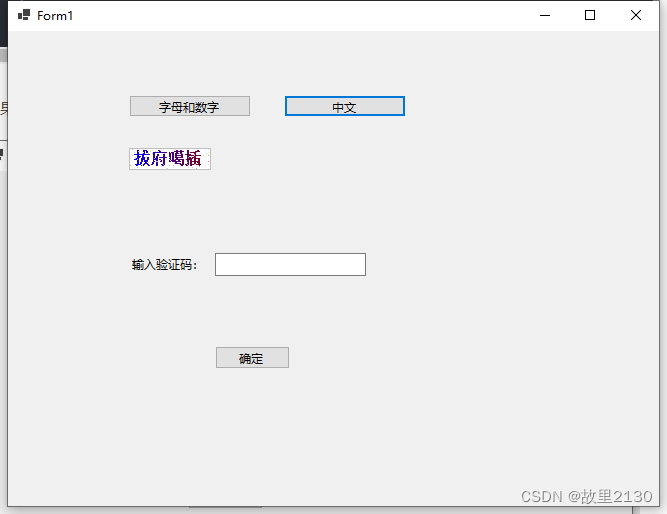
3.效果

注意:
如果是.net 5的项目,nuget中增加,System.Text.Encoding.CodePages

-
相关阅读:
pGlu-GRF-NH2, 107535-01-3
Web 安全之 Permissions Policy(权限策略)详解
【知识增强】A Survey of Knowledge-Enhanced Pre-trained LM 论文笔记
【Python基础入门6】Python的输入与运算符
PADS(二)更多使用和实战总结
LLM 面试总结
数据结构-难点突破(C++/Java详解实现串匹配算法KMP,next数组求法,KMP算法优化nextval数组)
mysql使用连接池
Linux基础系列(四)——Homebrew
golang--文件的多个处理场景
- 原文地址:https://blog.csdn.net/u012563853/article/details/125505312

- 最新文章
-
沪漂五周年了:我越来越迷茫了
Agentic Skill Routing 实战:别再把所有 Skill 塞进 AI Agent 上下文
MySQL-Seconds_behind_master的精度误差
[MAF预定义ChatClient中间件-03]CachingChatClient——利用缓存省钱省时间
AI的至暗历史:从万众期待到被政府撤资,AI的两次死亡徘徊
Agent OS :五种驯服不确定性的范式
PortSwigger SQL注入LAB11
数据库即时编译JIT
[Begin]AI Learn Data Day 0
深度学习进阶(二十七)现代 LLM 的核心架构设计其二:SwiGLU