-
【精品】pinia详解
简介
pinia是最新一代的轻量级状态管理插。
优点:- 简便,存储和组件变得很类似,你可以轻松写出优雅的存储。
= 类型安全,通过类型推断,可以提供自动完成的功能。
= vue devtools 支持,可以方便进行调试。
= Pinia 支持扩展,可以非常方便地通过本地存储,事物等进行扩展。 - 模块化设计,通过构建多个存储模块,可以让程序自动拆分它们。
- 非常轻巧,只有大约 1kb 的大小。
- 服务器端渲染支持。
- 完整的 ts 的支持;
- 去除 mutations,只有 state,getters,actions;
- actions 支持同步和异步;
- 代码扁平化没有模块嵌套,只有 store 的概念,store 之间可以自由使用,每一个store都是独立的
- 无需手动添加 store,store 一旦创建便会自动添加;
- 支持Vue3 和 Vue2
安装配置
- 安装命令:
npm install pinia -S- 1
- main.ts配置
import {createPinia} from 'pinia' const store= createPinia() app.use(store)- 1
- 2
- 3
- 4
通过state修改
- 在state/index.ts文件中编写:
import {defineStore} from "pinia" export const useUserStore = defineStore('user', { state: () => { return { name:'', age: 0 } } })- 1
- 2
- 3
- 4
- 5
- 6
- 7
- 8
- 9
- 10
- Demo.vue
<template> {{ user .name }}------{{ user .age }} <br> <el-button type="primary" @click="user.age++">直接修改</el-button> <el-button type="primary" @click="fun1">批量修改</el-button> <el-button type="primary" @click="fun2">批量修改:函数式写法</el-button> <el-button type="primary" @click="fun3">修改所有的值</el-button> </template> <script setup lang="ts"> import {useUserStore} from "@/store"; const user = useUserStore() const fun1 = ()=>{ //$patch方法可以批量修改多个值 user.$patch({ name:'张三', age:1234 }) } const fun2 = ()=>{ //此处可以编写业务逻辑(推荐使用) user.$patch((state)=>{ if (state.name ==''){ state.age =6666 }else { state.age =8888 } }) } const fun3 = ()=>{ //$state:设置为新对象来替换store的整个状态。缺限:必须修改所有的值 user.$state = { name:'zhangsan', age :3333 } } </script>- 1
- 2
- 3
- 4
- 5
- 6
- 7
- 8
- 9
- 10
- 11
- 12
- 13
- 14
- 15
- 16
- 17
- 18
- 19
- 20
- 21
- 22
- 23
- 24
- 25
- 26
- 27
- 28
- 29
- 30
- 31
- 32
- 33
- 34
- 35
- 36
- 37
- 38
- 结果

通过actions修改
在actions中可以做同步也可以做异步操作。
actions中的方法可以相互调用。- store/index.ts
import {defineStore} from "pinia" export const useCountStore = defineStore('count', { state: () => { return { count: 0 } }, actions: { increment() { this.count++ }, setCount(p: number) { this.count = p }, //异步操作 decrement() { setTimeout(() => { this.count-- }, 1000) }, async sth(){ const tmp = await 1234 this.count = tmp this.setCount(7878) //调用 } } })- 1
- 2
- 3
- 4
- 5
- 6
- 7
- 8
- 9
- 10
- 11
- 12
- 13
- 14
- 15
- 16
- 17
- 18
- 19
- 20
- 21
- 22
- 23
- 24
- 25
- 26
- 27
- 28
- Demo.vue
<template> {{ counter.count }} <br> <el-button type="primary" @click="fun1">借助actions修改</el-button> <el-button type="primary" @click="fun2">借助actions修改</el-button> <el-button type="primary" @click="counter.decrement">异步操作</el-button> <el-button type="primary" @click="counter.sth">异步操作</el-button> </template> <script setup lang="ts"> import {useCountStore} from "@/store"; const counter = useCountStore() //借助actions修改 const fun1 = ()=>{ counter.increment() } //借助actions修改 const fun2 = ()=>{ counter.setCount(789) } </script>- 1
- 2
- 3
- 4
- 5
- 6
- 7
- 8
- 9
- 10
- 11
- 12
- 13
- 14
- 15
- 16
- 17
- 18
- 19
- 20
- 21
- 结果
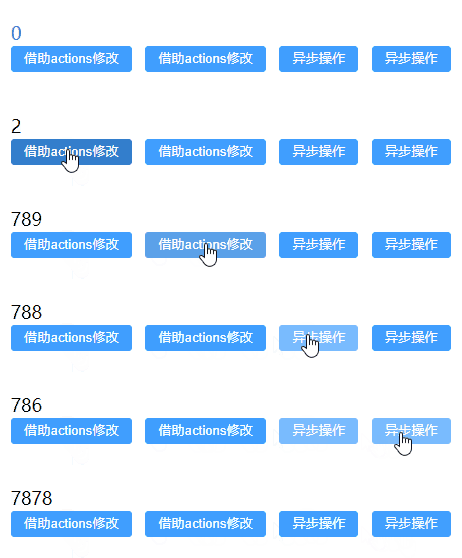
getters
不管调用多少次,getters中的函数只会执行一次,且都会缓存
- store/index.ts
import {defineStore} from "pinia" export const useCountStore = defineStore('count', { state: () => { return { count: 10 } }, getters: { //普通函数形式,可以使用this getCount(): number { return this.count }, //箭头函数形式,不能使用this newCount: (state): number => { return state.count + 5 }, getDoubleCount(state): number { return state.count * 2 + this.getCount } } })- 1
- 2
- 3
- 4
- 5
- 6
- 7
- 8
- 9
- 10
- 11
- 12
- 13
- 14
- 15
- 16
- 17
- 18
- 19
- 20
- 21
- 22
- Demo.vue
<template> {{counter.count}} <br> {{ counter.getCount }} <br> {{ counter.getCount }} <br> {{ counter.newCount }} <br> {{ counter.getDoubleCount }} <br> </template> <script setup lang="ts"> import {useCountStore} from "@/store"; const counter = useCountStore() </script>- 1
- 2
- 3
- 4
- 5
- 6
- 7
- 8
- 9
- 10
- 11
- 12
- 结果

解构对象
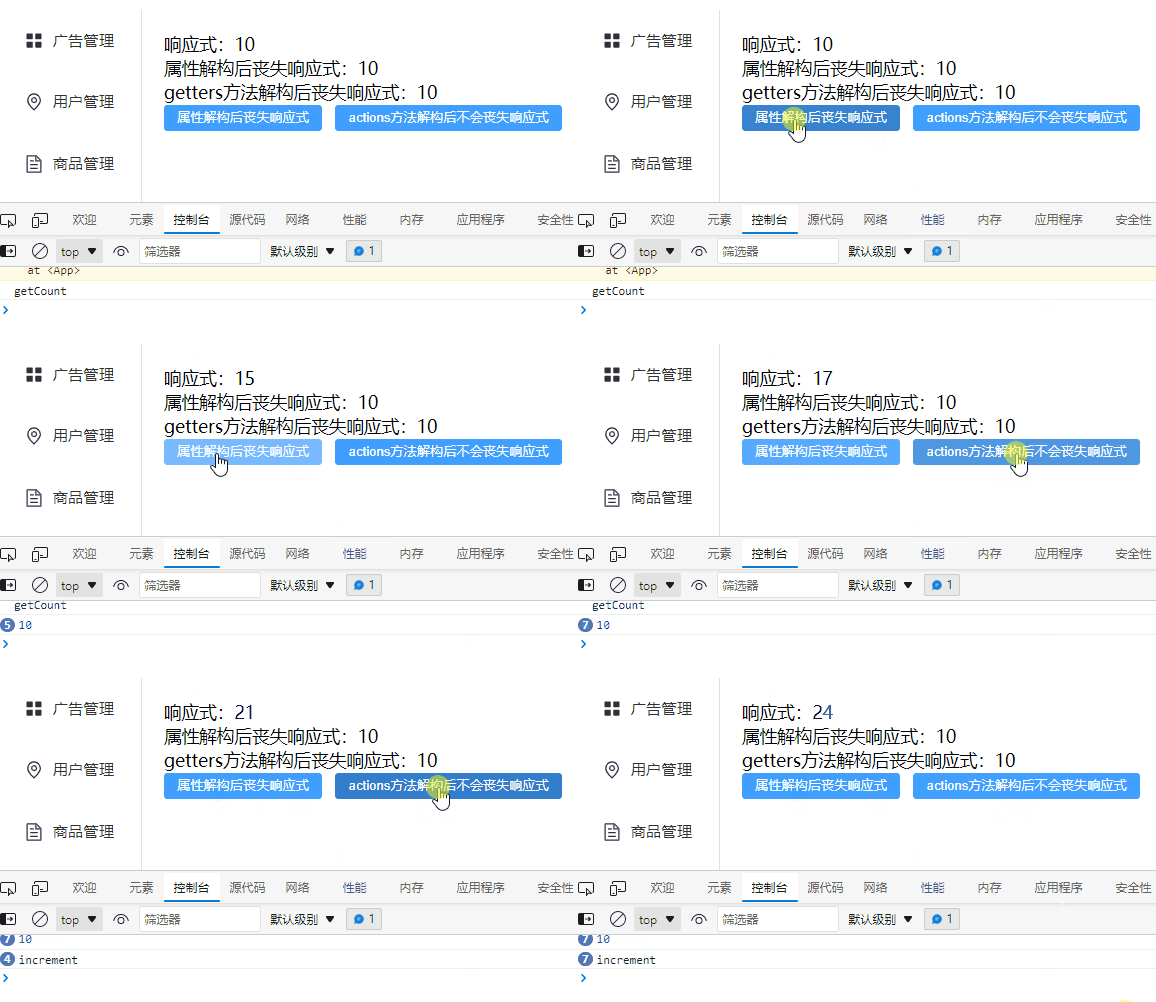
解构主要是针对Store中的state和getters.
示例一
- store/index.js
import {defineStore} from "pinia" export const useCountStore = defineStore('count', { state: () => { return { count: 10 } }, getters: { //普通函数形式,可以使用this getCount(): number { console.info("getCount") return this.count } }, actions: { increment() { console.info("increment") this.count++ } }, })- 1
- 2
- 3
- 4
- 5
- 6
- 7
- 8
- 9
- 10
- 11
- 12
- 13
- 14
- 15
- 16
- 17
- 18
- 19
- 20
- 21
- 22
- Demo.vue
<template> 响应式:{{counter.count}} <br> 属性解构后丧失响应式:{{ count }} <br> getters方法解构后丧失响应式:{{getCount}} <br> <el-button type="primary" @click="fun">属性解构后丧失响应式</el-button> <el-button type="primary" @click="increment">actions方法解构后不会丧失响应式</el-button> </template> <script setup lang="ts"> import {useCountStore} from "@/store"; const counter = useCountStore() //解构 const {count, getCount, increment} = counter const fun = () => { counter.count++ //属性解构后丧失响应式 console.info(count) } </script>- 1
- 2
- 3
- 4
- 5
- 6
- 7
- 8
- 9
- 10
- 11
- 12
- 13
- 14
- 15
- 16
- 17
- 18
- 19
- 20
- 21
- 22
- 效果
示例二
- store/index.js
import {defineStore} from "pinia" export const useCountStore = defineStore('count', { state: () => { return { count: 10 } }, getters: { //普通函数形式,可以使用this getCount(): number { console.info("getCount") return this.count } }, actions: { increment() { console.info("increment") this.count++ } }, })- 1
- 2
- 3
- 4
- 5
- 6
- 7
- 8
- 9
- 10
- 11
- 12
- 13
- 14
- 15
- 16
- 17
- 18
- 19
- 20
- 21
- 22
- Demo.vue
<template> 响应式:{{counter.count}} <br> 属性解构后丧失响应式:{{ count }} <br> getters方法解构后丧失响应式:{{getCount}} <br> <el-button type="primary" @click="fun">属性解构后丧失响应式</el-button> </template> <script setup lang="ts"> import {useCountStore} from "@/store"; import {storeToRefs} from "pinia"; const counter = useCountStore() //解构 const {count, getCount} = storeToRefs(counter) const fun = () => { counter.count++ //属性解构后丧失响应式 console.info(count) } </script>- 1
- 2
- 3
- 4
- 5
- 6
- 7
- 8
- 9
- 10
- 11
- 12
- 13
- 14
- 15
- 16
- 17
- 18
- 19
- 20
- 21
- 22
- 效果

pinia常用API
- store/index.ts
import {defineStore} from "pinia" export const useCountStore = defineStore('count', { state: () => { return { count: 10 } }, actions: { increment() { console.info("increment") this.count++ } }, })- 1
- 2
- 3
- 4
- 5
- 6
- 7
- 8
- 9
- 10
- 11
- 12
- 13
- 14
- 15
- Demo.vue
<template> {{counter.count}} <br> <el-button type="primary" @click="counter.count++">自增</el-button> <el-button type="primary" @click="counter.increment()">actions:自增</el-button> <el-button type="primary" @click="counter.$reset()">重置状态数据到最终状态</el-button> </template> <script setup lang="ts"> import {useCountStore} from "@/store"; const counter = useCountStore() //state发生改变时触发 counter.$subscribe((args,state)=>{ console.info(args,state) }) //监听actions中的方法 counter.$onAction(args=>{ console.info(args) args.after(()=>{ console.info("after") }) }) </script>- 1
- 2
- 3
- 4
- 5
- 6
- 7
- 8
- 9
- 10
- 11
- 12
- 13
- 14
- 15
- 16
- 17
- 18
- 19
- 20
- 21
- 22
- 23
- 24
- 结果
- 简便,存储和组件变得很类似,你可以轻松写出优雅的存储。
-
相关阅读:
别再用 System.currentTimeMillis 统计耗时了,太 Low,试试 Spring Boot 源码在用的 StopWatch吧,够优雅!
[附源码]计算机毕业设计JAVAjsp建筑公司门户网站
Redis - 二进制位数组
Python数据攻略-Pandas与API数据交互
【无标题】
windows + ubuntu + vscode开发环境配置安装
组件的使用
python项目requirements.txt项目用到哪些库哪些版本
细说MySQL数据类型
C++ 求 最长连号
- 原文地址:https://blog.csdn.net/lianghecai52171314/article/details/125495077