-
java-web:Servlet、cookie、session
- 💂 个人主页: 陈行恩
- 🤟 版权: 本文由【陈行恩】原创、在CSDN首发、需要转载请联系博主
- 💬 如果文章对你有帮助、欢迎关注+点赞+收藏(一键三连)哦!
Servlet
Servlet简介
- Servlet 是sun公司开发动态web的一门技术
- Sun公司在这些API中提供一个接口叫做:Servlet
- 开发一个servlet只需要完成两个步骤:
- 继承HttpServlet
- 将开发好的java类部署到web服务器中

Servlet原理

创建第一个servlet
- 编写一个普通类继承HttpServlet,重写doget、dopost方法
- TestServlet.java
package com.nadoutong.Servlet; import javax.servlet.ServletException; import javax.servlet.http.HttpServlet; import javax.servlet.http.HttpServletRequest; import javax.servlet.http.HttpServletResponse; import java.io.IOException; import java.io.PrintWriter; public class TestServlet extends HttpServlet { @Override protected void doGet(HttpServletRequest req, HttpServletResponse resp) throws ServletException, IOException { //super.doGet(req, resp); //设置响应的类型 resp.setContentType("text/html"); //设置响应编码 resp.setCharacterEncoding("utf-8"); //获取响应的输出流,该输出流里内容将会输出在页面上 PrintWriter writer = resp.getWriter(); writer.write("<html><head>"); writer.write("<title>web 项目</title>"); writer.write("</head>"); writer.write("<body>"); writer.write("<h1>hello web!</h1>"); writer.write("</body></html>"); } @Override protected void doPost(HttpServletRequest req, HttpServletResponse resp) throws ServletException, IOException { // 一般会在dopost调用doget方法 doGet(req, resp); } }- 1
- 2
- 3
- 4
- 5
- 6
- 7
- 8
- 9
- 10
- 11
- 12
- 13
- 14
- 15
- 16
- 17
- 18
- 19
- 20
- 21
- 22
- 23
- 24
- 25
- 26
- 27
- 28
- 29
- 30
- 31
- 32
- 33
- 34
- 35
- web.xml
<?xml version="1.0" encoding="UTF-8"?> <web-app xmlns="http://xmlns.jcp.org/xml/ns/javaee" xmlns:xsi="http://www.w3.org/2001/XMLSchema-instance" xsi:schemaLocation="http://xmlns.jcp.org/xml/ns/javaee http://xmlns.jcp.org/xml/ns/javaee/web-app_4_0.xsd" version="4.0"> <!-- web.xml 中是配置我们web的核心应用--> <!-- 注册Servlet--> <servlet> <!-- 这个地方的名字任意--> <servlet-name>TestServlet</servlet-name> <!-- 这个地方是我们实现了HTTPServlet 的类的 源码目录--> <servlet-class>com.nadoutong.Servlet.TestServlet</servlet-class> </servlet> <!-- 一个Servlet对应一个mapping :映射--> <servlet-mapping> <!-- 这个地方的名字 必须与 上述名字一致--> <servlet-name>TestServlet</servlet-name> <!-- 这个是请求路径 tomcat里的路径后面跟这个路径--> <url-pattern>/testServlet</url-pattern> </servlet-mapping> </web-app>- 1
- 2
- 3
- 4
- 5
- 6
- 7
- 8
- 9
- 10
- 11
- 12
- 13
- 14
- 15
- 16
- 17
- 18
- 19
- 20
- 21
- 22
- 父级项目pom.xml
<?xml version="1.0" encoding="UTF-8"?> <!--todo Maven版本和头文件--> <project xmlns="http://maven.apache.org/POM/4.0.0" xmlns:xsi="http://www.w3.org/2001/XMLSchema-instance" xsi:schemaLocation="http://maven.apache.org/POM/4.0.0 http://maven.apache.org/xsd/maven-4.0.0.xsd"> <modelVersion>4.0.0</modelVersion> <!-- todo 这里就是刚才配置GAV--> <groupId>com.nadoutong.www</groupId> <artifactId>CEX_DEMO</artifactId> <version>1.0-SNAPSHOT</version> <modules> <module>START_JAVAWEB</module> </modules> <!-- 父工程,只作为模块引入,不需要编译出jar包,所以定义为pom打包格式 --> <packaging>pom</packaging> <!--todo 配置 --> <properties> <!-- todo 项目的默认构建编码--> <project.build.sourceEncoding>UTF-8</project.build.sourceEncoding> <!-- todo 编码版本--> <maven.compiler.source>1.8</maven.compiler.source> <maven.compiler.target>1.8</maven.compiler.target> <!-- 自定义标签--> <junit-version>4.13.2</junit-version> <servlet-version>4.0.1</servlet-version> </properties> <!--所有子项目再次引入此依赖jar包时则无需显式的列出版本号。 Maven会沿着父子层级向上寻找拥有dependencyManagement 元素的项目,然后使用它指定的版本号。--> <dependencyManagement> <!-- 表示jar包需要依赖的jar包--> <dependencies> <dependency> <groupId>javax.servlet</groupId> <artifactId>javax.servlet-api</artifactId> <version>${servlet-version}</version> </dependency> </dependencies> </dependencyManagement> <dependencies> <dependency> <groupId>javax.servlet</groupId> <artifactId>javax.servlet-api</artifactId> <version>${servlet-version}</version> </dependency> </dependencies> <!-- 在build中配置resources,来防止我们资源导出失败的问题--> <build> <resources> <resource> <directory>src/main/resources</directory> <excludes> <exclude>**/*.properties</exclude> <exclude>**/*.xml</exclude> </excludes> <filtering>false</filtering> </resource> <resource> <directory>src/main/java</directory> <includes> <include>**/*.properties</include> <include>**/*.xml</include> </includes> <filtering>false</filtering> </resource> </resources> </build> </project>- 1
- 2
- 3
- 4
- 5
- 6
- 7
- 8
- 9
- 10
- 11
- 12
- 13
- 14
- 15
- 16
- 17
- 18
- 19
- 20
- 21
- 22
- 23
- 24
- 25
- 26
- 27
- 28
- 29
- 30
- 31
- 32
- 33
- 34
- 35
- 36
- 37
- 38
- 39
- 40
- 41
- 42
- 43
- 44
- 45
- 46
- 47
- 48
- 49
- 50
- 51
- 52
- 53
- 54
- 55
- 56
- 57
- 58
- 59
- 60
- 61
- 62
- 63
- 64
- 65
- 66
- 67
- 68
- 69
- 70
- 71
- 72
- 73
- 74
- 75
- 76
- 77
- 子项目中pom.xml
<?xml version="1.0" encoding="UTF-8"?> <project xmlns="http://maven.apache.org/POM/4.0.0" xmlns:xsi="http://www.w3.org/2001/XMLSchema-instance" xsi:schemaLocation="http://maven.apache.org/POM/4.0.0 http://maven.apache.org/xsd/maven-4.0.0.xsd"> <!--父项目--> <parent> <artifactId>CEX_DEMO</artifactId> <groupId>com.nadoutong.www</groupId> <version>1.0-SNAPSHOT</version> </parent> <modelVersion>4.0.0</modelVersion> <!--子项目--> <artifactId>START_JAVAWEB</artifactId> <properties> <project.build.sourceEncoding>UTF-8</project.build.sourceEncoding> <maven.compiler.source>8</maven.compiler.source> <maven.compiler.target>8</maven.compiler.target> </properties> </project>- 1
- 2
- 3
- 4
- 5
- 6
- 7
- 8
- 9
- 10
- 11
- 12
- 13
- 14
- 15
- 16
- 17
- 18
- 19
- 20
- 21
- 22
- 23

mapping 设置
<!--默认请求路径--> <servlet-mapping> <servlet-name>TestServlet</servlet-name> <url-pattern>/*</url-pattern> </servlet-mapping> <!--自定义后缀或者前缀实现请求映射--> <servlet-mapping> <servlet-name>TestServlet</servlet-name> <!--* 前面不能加项目映射--> <url-pattern>*.testServlet</url-pattern> </servlet-mapping>- 1
- 2
- 3
- 4
- 5
- 6
- 7
- 8
- 9
- 10
- 11
- 12
- 如果指定了固有的映射路径,那么就走固定的映射路径(固定的映射路径最高),如果找不到就走默认路径
ServletContext对象
- web容器在启动的时候,它会为每个web程序都创建一个对应的ServletContext对象,它代表了当前的web应用
- 共享数据功能:在一个servlet中保存的数据,可以在另外一个servlet中拿到
获取共享数据
<!--配置一些web应用初始化参数--> <context-param> <param-name>url</param-name> <param-value>http//localhost:8080/START_JAVAWEB/testServlet</param-value> </context-param>- 1
- 2
- 3
- 4
- 5
@Override protected void doGet(HttpServletRequest req, HttpServletResponse resp) throws ServletException, IOException { ServletContext servletContext = this.getServletContext(); //获取web.xml中的参数 String initParameter = servletContext.getInitParameter("url"); System.out.println(initParameter); String username="cx"; //将一个数据存放在ServletContext中 servletContext.setAttribute("username",username); }- 1
- 2
- 3
- 4
- 5
- 6
- 7
- 8
- 9
- 10

实现请求转发

username=cx password=123456- 1
- 2
- TestServlet.java
@Override protected void doGet(HttpServletRequest req, HttpServletResponse resp) throws ServletException, IOException { //getServletContext().getResourceAsStream 默认获取的是webapp目录下的 InputStream resourceAsStream = this.getServletContext().getResourceAsStream("/resources/test.properties"); Properties properties = new Properties(); properties.load(resourceAsStream); String username2 = properties.getProperty("username"); String password2 = properties.getProperty("password"); resp.getWriter().write(username2+"===="+password2); }- 1
- 2
- 3
- 4
- 5
- 6
- 7
- 8
- 9
- 10
- 11
- Test2Servlet.java
@Override protected void doGet(HttpServletRequest req, HttpServletResponse resp) throws ServletException, IOException { ServletContext servletContext = this.getServletContext(); //转发的请求路径 RequestDispatcher requestDispatcher = servletContext.getRequestDispatcher("/testServlet"); //调用forward 实现请求转发 requestDispatcher.forward(req,resp); }- 1
- 2
- 3
- 4
- 5
- 6
- 7
- 8
- 9
- web.app
<?xml version="1.0" encoding="UTF-8"?> <web-app xmlns="http://xmlns.jcp.org/xml/ns/javaee" xmlns:xsi="http://www.w3.org/2001/XMLSchema-instance" xsi:schemaLocation="http://xmlns.jcp.org/xml/ns/javaee http://xmlns.jcp.org/xml/ns/javaee/web-app_4_0.xsd" version="4.0"> <!--配置一些web应用初始化参数--> <context-param> <param-name>url</param-name> <param-value>http//localhost:8080/START_JAVAWEB/testServlet</param-value> </context-param> <!-- web.xml 中是配置我们web的核心应用--> <!-- 注册Servlet--> <servlet> <!-- 这个地方的名字任意--> <servlet-name>TestServlet</servlet-name> <!-- 这个地方是我们实现了HTTPServlet 的类的 源码目录--> <servlet-class>com.nadoutong.Servlet.TestServlet</servlet-class> </servlet> <!-- 一个Servlet对应一个mapping :映射--> <servlet-mapping> <!-- 这个地方的名字 必须与 上述名字一致--> <servlet-name>TestServlet</servlet-name> <!-- 这个是请求路径 tomcat里的路径后面跟这个路径--> <url-pattern>/testServlet</url-pattern> </servlet-mapping> <servlet> <!-- 这个地方的名字任意--> <servlet-name>Test2Servlet</servlet-name> <!-- 这个地方是我们实现了HTTPServlet 的类的 源码目录--> <servlet-class>com.nadoutong.Servlet.Test2Servlet</servlet-class> </servlet> <!-- 一个Servlet对应一个mapping :映射--> <servlet-mapping> <!-- 这个地方的名字 必须与 上述名字一致--> <servlet-name>Test2Servlet</servlet-name> <!-- 这个是请求路径 tomcat里的路径后面跟这个路径--> <url-pattern>/test2Servlet</url-pattern> </servlet-mapping> </web-app>- 1
- 2
- 3
- 4
- 5
- 6
- 7
- 8
- 9
- 10
- 11
- 12
- 13
- 14
- 15
- 16
- 17
- 18
- 19
- 20
- 21
- 22
- 23
- 24
- 25
- 26
- 27
- 28
- 29
- 30
- 31
- 32
- 33
- 34
- 35
- 36
- 37
- 38
- 39
- 40
- 41
- 42
- 43

访问的是http://localhost:8080/START_JAVAWEB/test2Servlet
但是通过servletContext.getRequestDispatcher("/testServlet"). requestDispatcher.forward(req,resp);- 1
- 2
进行了请求转发
HttpServletResponse
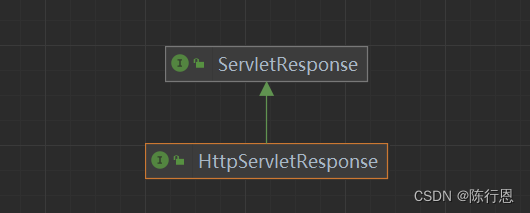
web服务器接受到客户端的http请求,针对这个请求,分别创建一个代表请求的HttpServletRequest对象,代表响应的一个HttpServletResponse;
- 如果要获取客户端请求过来的参数:HttpServletRequest
- 如果要获取客户端响应一些信息:HttpServletResponse
负责向浏览器发送数据的方法
protected void doGet(HttpServletRequest req, HttpServletResponse resp) throws ServletException, IOException { // 负责向浏览器发送数据的方法 String message="cxe"; String message2="cxe2"; //方法1 //resp.getWriter().write(message); //方法2 resp.getOutputStream().print(message2); }- 1
- 2
- 3
- 4
- 5
- 6
- 7
- 8
- 9
负责向浏览器发送响应头的方法
void setCharacterEncoding(String var1); void setContentLength(int var1); void setContentLengthLong(long var1); void setContentType(String var1);- 1
- 2
- 3
- 4
- 5
- 6
- 7
响应码
public interface HttpServletResponse extends ServletResponse { int SC_CONTINUE = 100; int SC_SWITCHING_PROTOCOLS = 101; int SC_OK = 200; int SC_CREATED = 201; int SC_ACCEPTED = 202; int SC_NON_AUTHORITATIVE_INFORMATION = 203; int SC_NO_CONTENT = 204; int SC_RESET_CONTENT = 205; int SC_PARTIAL_CONTENT = 206; int SC_MULTIPLE_CHOICES = 300; int SC_MOVED_PERMANENTLY = 301; int SC_MOVED_TEMPORARILY = 302; int SC_FOUND = 302; int SC_SEE_OTHER = 303; int SC_NOT_MODIFIED = 304; int SC_USE_PROXY = 305; int SC_TEMPORARY_REDIRECT = 307; int SC_BAD_REQUEST = 400; int SC_UNAUTHORIZED = 401; int SC_PAYMENT_REQUIRED = 402; int SC_FORBIDDEN = 403; int SC_NOT_FOUND = 404; int SC_METHOD_NOT_ALLOWED = 405; int SC_NOT_ACCEPTABLE = 406; int SC_PROXY_AUTHENTICATION_REQUIRED = 407; int SC_REQUEST_TIMEOUT = 408; int SC_CONFLICT = 409; int SC_GONE = 410; int SC_LENGTH_REQUIRED = 411; int SC_PRECONDITION_FAILED = 412; int SC_REQUEST_ENTITY_TOO_LARGE = 413; int SC_REQUEST_URI_TOO_LONG = 414; int SC_UNSUPPORTED_MEDIA_TYPE = 415; int SC_REQUESTED_RANGE_NOT_SATISFIABLE = 416; int SC_EXPECTATION_FAILED = 417; int SC_INTERNAL_SERVER_ERROR = 500; int SC_NOT_IMPLEMENTED = 501; int SC_BAD_GATEWAY = 502; int SC_SERVICE_UNAVAILABLE = 503; int SC_GATEWAY_TIMEOUT = 504; int SC_HTTP_VERSION_NOT_SUPPORTED = 505;- 1
- 2
- 3
- 4
- 5
- 6
- 7
- 8
- 9
- 10
- 11
- 12
- 13
- 14
- 15
- 16
- 17
- 18
- 19
- 20
- 21
- 22
- 23
- 24
- 25
- 26
- 27
- 28
- 29
- 30
- 31
- 32
- 33
- 34
- 35
- 36
- 37
- 38
- 39
- 40
- 41
- 42
例:文件下载
- 步骤
- 要获取下载文件的路径
- 须知下载的文件名
- 设置浏览器支持的下载类型(设置响应类型)
- 获取下载流
- 创建缓冲区
- 获取OutputStream对象
- 将FileOutputStream流写入到buffer缓冲区
- 使用OutputStream将缓冲区中的数据输出到客户端!

public class Test3Servlet extends HttpServlet { @Override protected void doGet(HttpServletRequest req, HttpServletResponse resp) throws ServletException, IOException { //1. 要获取下载文件的路径 //在使用ServletContext.getRealPath() 时, // 传入的参数是从 todo 当前servlet 部署在tomcat中的文件夹算起的相对路径, // 要以"/" 开头,否则会找不到路径,导致NullPointerException //E:\installed\tomcat\apache-tomcat-8.5.75\webapps\START_JAVAWEB : / String realPath = this.getServletContext().getRealPath("/image/img.png"); System.out.println("下载的路径为:"+realPath); //2.下载的文件名是什么 String fileName="img"; //3. 设置浏览器支持下载的内容 /** * 文件下载响应头的设置 * content-type : 指示响应内容格式 * Content-Disposition:指示如何处理响应内容 * 一般有两种方式: * inline:直接显示在页面 * attchment:以附件形式下载 */ //URLEncoder.encode(fileName,"UTF-8") 中文名要经过此编码,不然可能会出现乱码 resp.setHeader("Content-Disposition","attachment;filename="+ URLEncoder.encode(fileName,"UTF-8")); //4. 获取下载文件的输入流 FileInputStream fileInputStream = new FileInputStream(realPath); //5. 创建缓冲区 int len=0; byte[] buffer = new byte[1024]; //6. 获取OutputStream对象 ServletOutputStream outputStream = resp.getOutputStream(); //7. 将fileInputStream流读取到buffer中,使用outputStream 将缓冲区中的数据输出到客户端 while ((len=fileInputStream.read(buffer))>0){ outputStream.write(buffer,0,len); } outputStream.close(); fileInputStream.close(); } @Override protected void doPost(HttpServletRequest req, HttpServletResponse resp) throws ServletException, IOException { doGet(req, resp); } }- 1
- 2
- 3
- 4
- 5
- 6
- 7
- 8
- 9
- 10
- 11
- 12
- 13
- 14
- 15
- 16
- 17
- 18
- 19
- 20
- 21
- 22
- 23
- 24
- 25
- 26
- 27
- 28
- 29
- 30
- 31
- 32
- 33
- 34
- 35
- 36
- 37
- 38
- 39
- 40
- 41
- 42
- 43
- 44
例:验证码
public class Test4Servlet extends HttpServlet { @Override protected void doGet(HttpServletRequest req, HttpServletResponse resp) throws ServletException, IOException { //让浏览器3秒自动刷新一次 resp.setHeader("refresh","3"); //在内存中创建一个图片 BufferedImage bufferedImage = new BufferedImage(80,20,BufferedImage.TYPE_INT_RGB); //得到图片 Graphics2D graphics = (Graphics2D)bufferedImage.getGraphics(); //设置图片的背景颜色 graphics.setColor(Color.WHITE); graphics.fillRect(0,0,80,20); //给图片写数据 graphics.setColor(Color.BLACK); graphics.setFont(new Font(null,Font.ITALIC,20)); graphics.drawString(makeNum(),0,20); //告诉浏览器 响应格式 resp.setContentType("image/jpeg"); //网站存在缓存,不让浏览器缓存 resp.setDateHeader("expires",-1); resp.setHeader("Cache-Control","no_cache"); resp.setHeader("Pragma","no-cache"); //把图片写给浏览器 ImageIO.write(bufferedImage,"jpg",resp.getOutputStream()); } @Override protected void doPost(HttpServletRequest req, HttpServletResponse resp) throws ServletException, IOException { doPost(req, resp); } //生成随机数 public String makeNum(){ Random random = new Random(); String num = random.nextInt(9999999)+""; System.out.println(num); StringBuffer stringBuffer = new StringBuffer(); for (int i = 0; i < 7-num.length(); i++) { stringBuffer.append("0"); } num=stringBuffer.toString()+num; return num; } }- 1
- 2
- 3
- 4
- 5
- 6
- 7
- 8
- 9
- 10
- 11
- 12
- 13
- 14
- 15
- 16
- 17
- 18
- 19
- 20
- 21
- 22
- 23
- 24
- 25
- 26
- 27
- 28
- 29
- 30
- 31
- 32
- 33
- 34
- 35
- 36
- 37
- 38
- 39
- 40
- 41
- 42
- 43
- 44
- 45
- 46
重定向
public class Test5Servlet extends HttpServlet { @Override protected void doGet(HttpServletRequest req, HttpServletResponse resp) throws ServletException, IOException { //1.重定向 // resp.setHeader("Location","/START_JAVAWEB/image/img.png"); // resp.setStatus(302); ///req.getContextPath() = START_JAVAWEB System.out.println(req.getContextPath()); //2. 重定向 resp.sendRedirect("/START_JAVAWEB/image/img.png"); } @Override protected void doPost(HttpServletRequest req, HttpServletResponse resp) throws ServletException, IOException { doPost(req, resp); } }- 1
- 2
- 3
- 4
- 5
- 6
- 7
- 8
- 9
- 10
- 11
- 12
- 13
- 14
- 15
- 16
- 17
- 18
- 19
HttpServletRequest

获取当前项目路径
- index.jsp
<%@ page contentType="text/html;charset=UTF-8" language="java" %> <html> <head> <title>Title</title> </head> <body> <h1>hello web</h1> <%--这里提交的路径,需要寻找到项目的路径--%> <%--${pageContext.request.contextPath}表示当前项目=Application context--%> <form action="${pageContext.request.contextPath}/test4Servlet" method="get"> 用户名:<input type="text" name="username"/><br/> 密码:<input type="password" name="password"/><br/> <input type="submit"/> </form> </body> </html>- 1
- 2
- 3
- 4
- 5
- 6
- 7
- 8
- 9
- 10
- 11
- 12
- 13
- 14
- 15
- 16
- 17
获取前端传递的参数及请求转发
- index.jsp
<%@ page contentType="text/html;charset=UTF-8" language="java" %> <html> <head> <title>Title</title> </head> <body> <h1>hello web</h1> <%--这里提交的路径,需要寻找到项目的路径--%> <%--${pageContext.request.contextPath}表示当前项目=Application context--%> <form action="${pageContext.request.contextPath}/test6Servlet" method="post"> 用户名:<input type="text" name="username"/><br/> 密码:<input type="password" name="password"/><br/> 爱好: <input type="checkbox" name="hobbys" value="java"/>java <input type="checkbox" name="hobbys" value="c#"/>c# <input type="checkbox" name="hobbys" value="c"/>c <br/> <input type="submit"/> </form> </body> </html>- 1
- 2
- 3
- 4
- 5
- 6
- 7
- 8
- 9
- 10
- 11
- 12
- 13
- 14
- 15
- 16
- 17
- 18
- 19
- 20
- 21
- 22
public class Test6Servlet extends HttpServlet { @Override protected void doGet(HttpServletRequest req, HttpServletResponse resp) throws ServletException, IOException { req.setCharacterEncoding("UTF-8"); resp.setCharacterEncoding("UTF-8"); String username = req.getParameter("username"); String password = req.getParameter("password"); String[] hobbies = req.getParameterValues("hobbys"); System.out.println("-----------------"); System.out.println(username); System.out.println(password); System.out.println(Arrays.toString(hobbies)); //请求转发 req.getRequestDispatcher("/image/img.png").forward(req,resp); } @Override protected void doPost(HttpServletRequest req, HttpServletResponse resp) throws ServletException, IOException { doGet(req, resp); } }- 1
- 2
- 3
- 4
- 5
- 6
- 7
- 8
- 9
- 10
- 11
- 12
- 13
- 14
- 15
- 16
- 17
- 18
- 19
- 20
- 21
- 22
- 23
- 24
保存会话的两种技术
- cookie
- 客户端技术
- session
- 服务器技术
- 会话:用户打开一个浏览器,点击了很多超链接,访问多个web资源,关闭浏览器,这个过程称为一次会话
- 服务器端给客户端一个信件,客户端下次访问服务器带上信件就可以,这个信件称之为cookie;
- 服务器登记过客户端,客户端再次请求服务器时,服务器通过登记信息来标识该客户端,这个登记信息即是session
Cookie
1.从请求中拿到cookie信息
2.服务器响应给客户端cookiepublic class Test7Servlet extends HttpServlet { @Override protected void doGet(HttpServletRequest req, HttpServletResponse resp) throws ServletException, IOException { req.setCharacterEncoding("utf-8"); resp.setCharacterEncoding("utf-8"); PrintWriter writer = resp.getWriter(); //服务器端从客户端获取cookie Cookie[] cookies = req.getCookies();//返回的是一个数组,说明cookie不止一个 //判断cookie 是否存在 if (cookies!=null){ //如果存在cookie writer.write("上一次访问的时间是:"); for (int i = 0; i < cookies.length; i++) { Cookie cookie = cookies[i]; //获取cookie 的名字 if(cookie.getName().equals("lastLoginTime")){ //获取cookie 中的值 long l = Long.parseLong(cookie.getValue()); Date date = new Date(l); writer.write(date.toLocaleString()); } } }else{ writer.write("这是你第一次访问本站"); } //服务器给客户端响应一个cookie Cookie cookie = new Cookie("lastLoginTime", System.currentTimeMillis() + ""); resp.addCookie(cookie); } @Override protected void doPost(HttpServletRequest req, HttpServletResponse resp) throws ServletException, IOException { doGet(req, resp); } }- 1
- 2
- 3
- 4
- 5
- 6
- 7
- 8
- 9
- 10
- 11
- 12
- 13
- 14
- 15
- 16
- 17
- 18
- 19
- 20
- 21
- 22
- 23
- 24
- 25
- 26
- 27
- 28
- 29
- 30
- 31
- 32
- 33
- 34
- 35
- 36
- 37
- 38
- 39
- 40

即第一次访问的时候,并没有name是lastLoginTime的cookie,然后第二次打开的时候,就存在了,现在把浏览器彻底关闭,重新打开一个浏览器,再次输入http://localhost:8080/START_JAVAWEB/test7Servlet,

还是null,所以当浏览器关闭的时候,我们设置的cookie也将消失,那么是否可以当浏览器关闭时,下次再次打开浏览器输入地址时,这个cookie还是存在//服务器给客户端响应一个cookie Cookie cookie = new Cookie("lastLoginTime", System.currentTimeMillis() + ""); //设置cookie有效期为1天 cookie.setMaxAge(24*60*60); resp.addCookie(cookie);- 1
- 2
- 3
- 4
- 5
public class Test8Servlet extends HttpServlet { @Override protected void doGet(HttpServletRequest req, HttpServletResponse resp) throws ServletException, IOException { req.setCharacterEncoding("utf-8"); resp.setCharacterEncoding("utf-8"); PrintWriter writer = resp.getWriter(); //服务器端从客户端获取cookie Cookie[] cookies = req.getCookies();//返回的是一个数组,说明cookie不止一个 //判断cookie 是否存在 if (cookies!=null){ //如果存在cookie writer.write("上一次访问的时间是:"); for (int i = 0; i < cookies.length; i++) { Cookie cookie = cookies[i]; //获取cookie 的名字 if(cookie.getName().equals("lastLoginTime")){ //获取cookie 中的值 long l = Long.parseLong(cookie.getValue()); Date date = new Date(l); writer.write(date.toLocaleString()); } } }else{ writer.write("这是你第一次访问本站"); } } @Override protected void doPost(HttpServletRequest req, HttpServletResponse resp) throws ServletException, IOException { doGet(req, resp); } }- 1
- 2
- 3
- 4
- 5
- 6
- 7
- 8
- 9
- 10
- 11
- 12
- 13
- 14
- 15
- 16
- 17
- 18
- 19
- 20
- 21
- 22
- 23
- 24
- 25
- 26
- 27
- 28
- 29
- 30
- 31
- 32
- 33
- 34
- 35
- 36
- 37
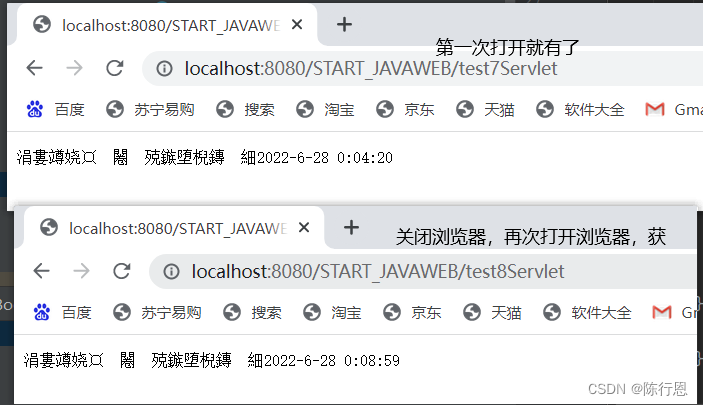
注:- 一个cookie只能保存一个信息
- 一个web站点可以给浏览器发送多个cookie,最多存放20个cookie
- cookie 大小有限制4kb
- 300个cookie浏览器上限
删除cookie:
- 不设置有效期,关闭浏览器,自动失效
- 设置有效期时间为0
编码解码:
- URLEncoder.encode(“”,“utf-8”);
- URLDecoder.decode(“”,“utf-8”);
Session
- 服务器会给每一个用户(浏览器)创建一个Session对象;
- 一个Session独占一个浏览器,只要浏览器没有关闭,这个session就存在
- 用户登录之后,整个网站它都可以访问
public class Test9Servlet extends HttpServlet { @Override protected void doGet(HttpServletRequest req, HttpServletResponse resp) throws ServletException, IOException { //解决乱码问题 req.setCharacterEncoding("utf-8"); resp.setCharacterEncoding("utf-8"); resp.setContentType("text/html;charset=utf-8"); //得到session HttpSession session = req.getSession(); //给Session 中存东西 session.setAttribute("name","cxe"); //获取session 的id String sessionId = session.getId(); //判断session 是不是新创建 if (session.isNew()){ resp.getWriter().write("session创建成功,ID:"+sessionId); }else { resp.getWriter().write("sessionID:"+sessionId); } } @Override protected void doPost(HttpServletRequest req, HttpServletResponse resp) throws ServletException, IOException { doGet(req, resp); } }- 1
- 2
- 3
- 4
- 5
- 6
- 7
- 8
- 9
- 10
- 11
- 12
- 13
- 14
- 15
- 16
- 17
- 18
- 19
- 20
- 21
- 22
- 23
- 24
- 25
- 26
- 27
- 28
- 29
- 30
- 31
第一次打开浏览器,输入地址
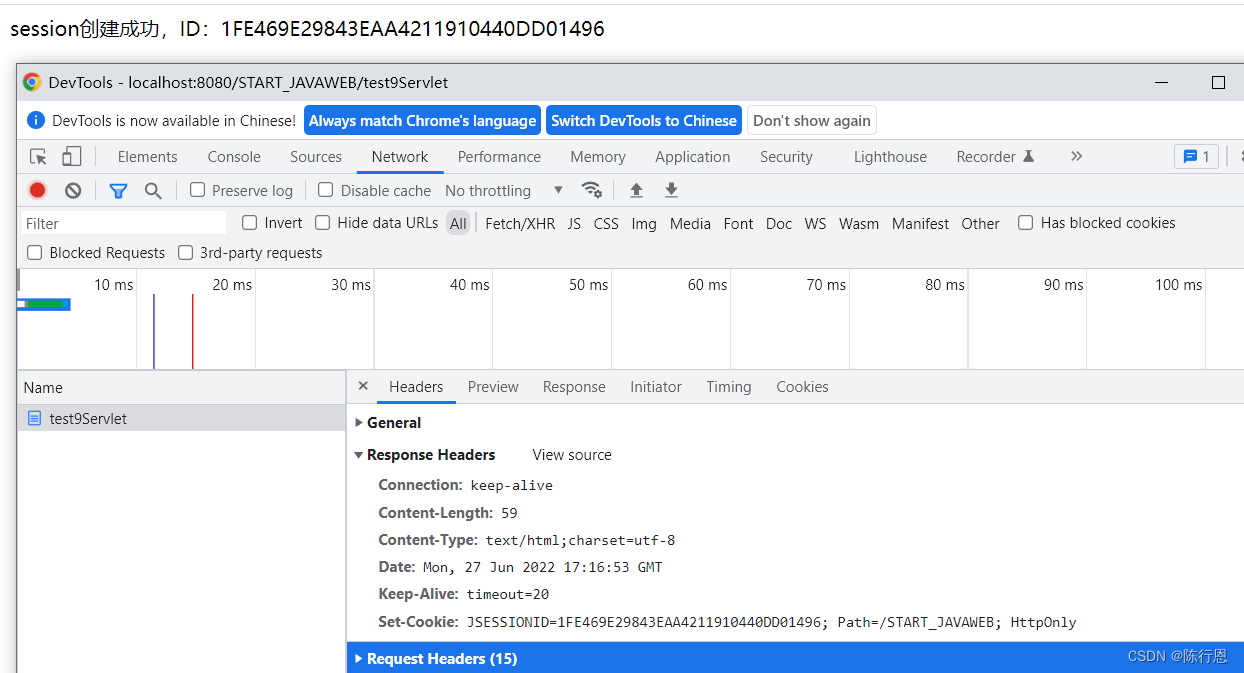
此时服务器响应了,给了客户端一个JSESSIONID,当再次回车时:

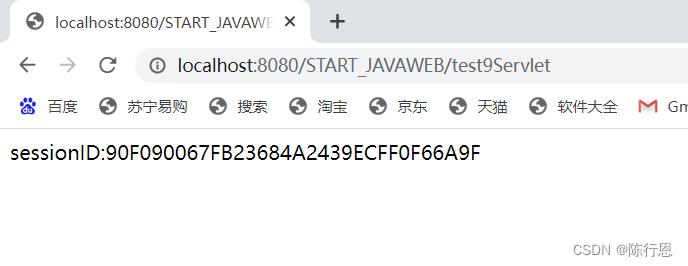
此时是请求中带这这个JSESSIONID,可以发现,JESSIONID不变;
当关闭浏览器再打开时,发现JSESSIONID变了
- session.invalidate();
public class Test10Servlet extends HttpServlet { @Override protected void doGet(HttpServletRequest req, HttpServletResponse resp) throws ServletException, IOException { HttpSession session = req.getSession(); //删除属性 //session.removeAttribute(""); // session.invalidate()是将session设置为失效,一般在退出时使用, // 但要注意的是:session失效的同时 浏览器会立即创建一个新的session的, // 你第一个session已经失效了 session.invalidate(); } @Override protected void doPost(HttpServletRequest req, HttpServletResponse resp) throws ServletException, IOException { doGet(req, resp); } }- 1
- 2
- 3
- 4
- 5
- 6
- 7
- 8
- 9
- 10
- 11
- 12
- 13
- 14
- 15
- 16
- 17
- 18
- 19
当第一次在浏览器上输入地址回车后:

当再次回车后:

可以看到两次的SESSIONID不同
- 设置session过期时间
<!-- 设置session 默认的失效时间--> <session-config> <!--以分钟为单位。该元素值必须为整数。如果session-timeout元素的值为零或负数, 则表示会话将永远不会超时。--> <session-timeout>10</session-timeout> </session-config>- 1
- 2
- 3
- 4
- 5
- 6
浏览器第一次输入地址回车:

再次点击回车:

关闭浏览器,再次打开新的浏览器输入地址回车:
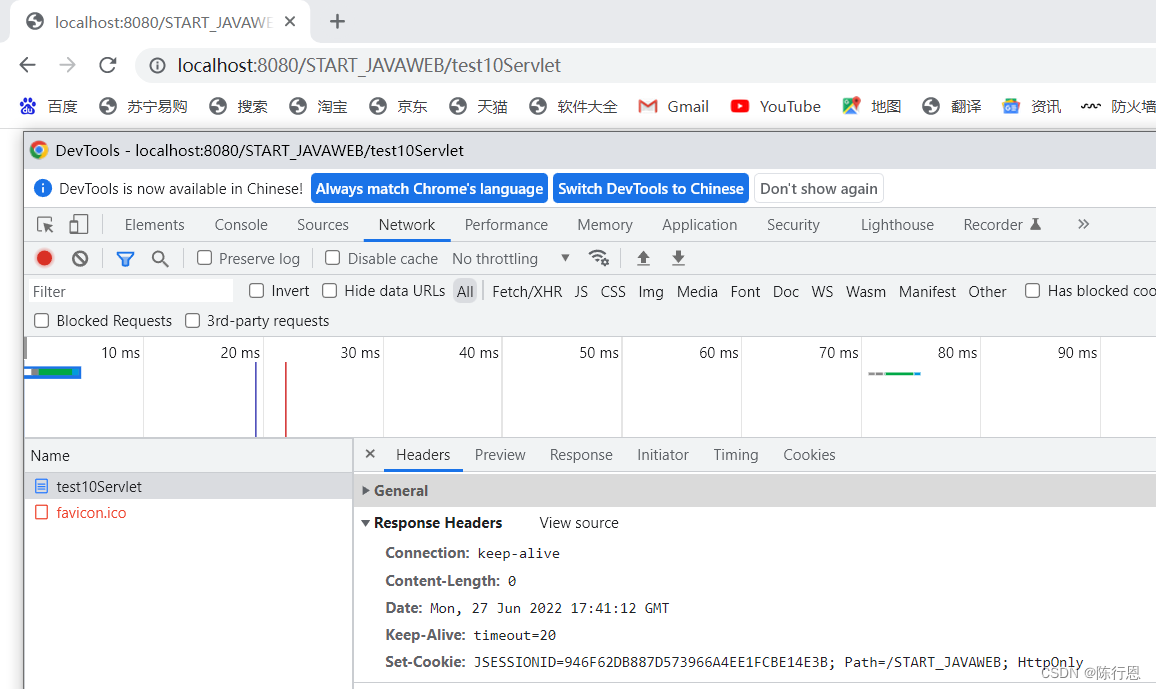
出现了新的SESSIONID,说明,我们设置的时间只对当前打开的浏览器起作用,这个时间仅仅表示的是:我们打开一个浏览器窗口,经过多少分钟后(此浏览器窗口一直未被关闭),SESSIONID会自动更新成新的SESSIONID;Session和cookie的区别
- cookie是把用户的数据写给用户的浏览器,浏览器保存(可以保存多个)
- session 把用户的数据写到用户独占的session中,服务器端保存(保存重要的信息,减少服务器资源的浪费)
- session 对象由服务器创建
=====================================================================
javaweb 推荐狂神说 -
相关阅读:
SpringBoot通过自定义注解实现日志打印
【5. 虚拟内存管理】
java计算机毕业设计ssm企业日常事务管理系统sl5xl(附源码、数据库)
肠道核心菌属——经黏液真杆菌属(Blautia),炎症肥胖相关的潜力菌
Python爬虫之Js逆向案例(10)-爬虫数据批量写入mysql数据库
C++项目:在线五子棋对战(网页版)
电流互感器与电能仪表的施工安装指导
数据可视化报表分享:区域管理驾驶舱
SQL语句优化、mysql不走索引的原因、数据库索引的设计原则
【字符串与日期的相互转换NSDate Objective-C语言】
- 原文地址:https://blog.csdn.net/m0_56981185/article/details/125466118