-
【Android开发】学习笔记(一)
小学期学校要求完成安卓课程设计,上课讲部分理论,下了课组队完成项目。众所众知,实际开发还是要靠自学么。本系列开始记录线下学习心得、项目完成过程中踩的坑及解决方案等。Android Studio快捷键的使用(参见引导tips)
熟能生巧
和IDEA的使用确实有点像- ctrl+N新建类
- ctrl+shift+N打开类
- Ctrl+Shift+空格:显示自动补全的提示选项
- ctrl+空格: 补全自动提示出现的第一个内容
- alt+f7 找到某字段在所有代码中出现的位置
- ctrl+Q 查看对应的文档
- ctrl+B 跳转到类/方法等定义的位置,也可以ctrl+鼠标点击
- shift+F6:重命名
- Ctrl+O:override
- Ctrl+I:implement
- alt+insert:generate
- alt+f1:快速选择(定位到)元素
剩下的(因为还没用到,怕理解有误,摘录一下原文) - You can quickly navigate in the currently edited file with Ctrl+F12
It shows the list of members of the current class. Select an element you want to navigate to and press the Enter key or the F4 key.
To easily locate an item in the list, just start typing its name. - The Esc key in any tool window moves the focus to the editor.
- Shift+Esc moves the focus to the editor and also hides the current (or last active) tool window.
- The F12 key moves the focus from the editor to the last focused tool window.
解决创建项目的第一个报错
ERROR: Failed to open zip file.
Gradle’s dependency cache may be corrupt (this sometimes occurs after a network connection timeout.)
Re-download dependencies and sync project (requires network)
Re-download dependencies and sync project (requires network)解决思路
由提示可推测:由于网络原因导致下载的gradle包有缺陷。
解决方案
如图所示:
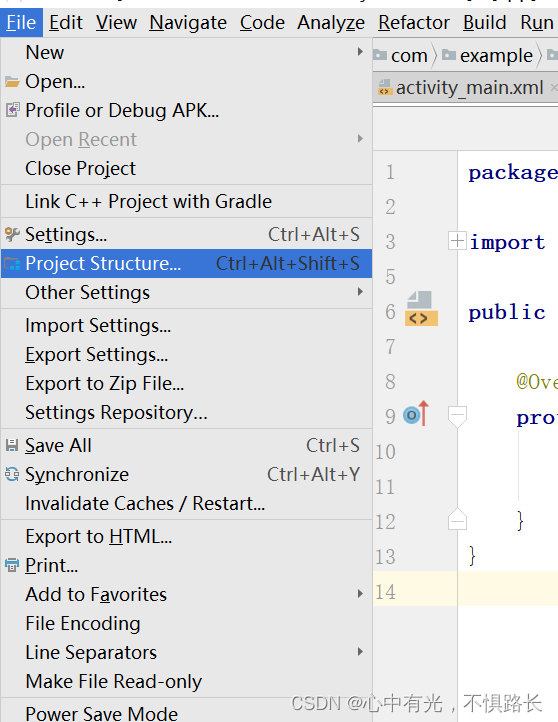
选择Project,查看对应的gradle版本信息。
然后去gradle官网,重新下载这个包。下载好了之后进入原包的路径
比如c:user\你的用户名.gradle\wrapper\dists,用新的压缩包替换掉原来的。像我因为原本下载了较低版本的SDK和gradle,我已经找不到完全对应的gradle版本了,我就在替换之后修改了下面这个文件的内容:
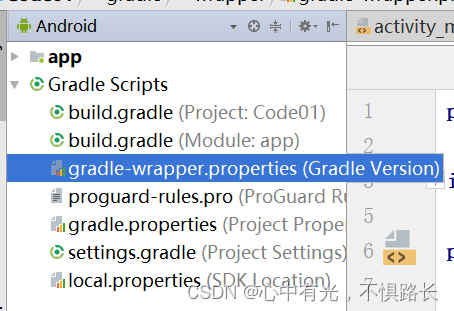
将文件中的有网址的那一栏的那个压缩名换成刚刚去官网新下的名字。后续
就这样之后还是会报错,大意是:我最新下好的gradle无法build之类的。
新问题解决方案
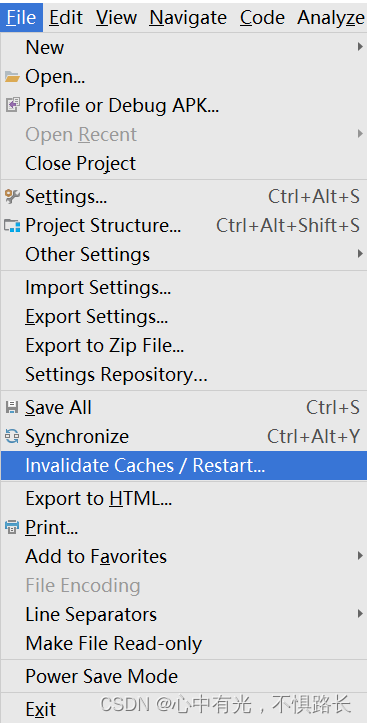
点击这个选项,让系统帮你去掉一些没用的东西,之候软件自动重启,重启好后我的还提示有SDK部分内容缺失,需要下载之类的,只要保持网络畅通,按照提示做就行了。
至此,问题就解决了。
-
相关阅读:
开发过程中的坑(1)
how to alert when etl inbound file delay in GCP storage
HTML拆分与共享方式——多HTML组合技术
剖析SGI STL内存池总结
【c++ 】 对象与类中方法的调用关系。类中常方法,普通方法,静态方法之间互相的调用关系
从零开始写 Docker(十一)---实现 mydocker exec 进入容器内部
面试宝典-Mysql篇
Java设计模式 _行为型模式_备忘录模式
语言基础篇12——Python有哪些异常,优雅的处理异常
关于网页实现串口或者TCP通讯的说明
- 原文地址:https://blog.csdn.net/julia_xueli/article/details/125479934