-
C#程序设计之windows应用程序设计基础
例题1
题目描述
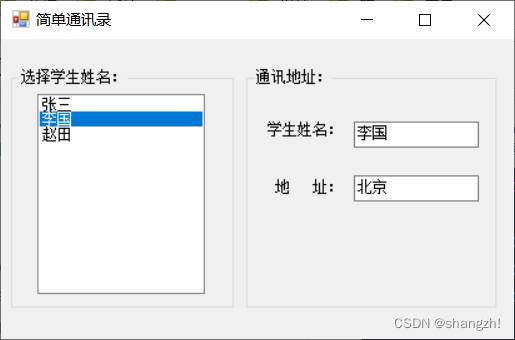
设计一个“简单通讯录”程序,在窗体上建立一个下拉式列表框、两个文本框和两个标签,实现以下功能:当用户在下拉式列表框中选择一个学生姓名后,在“学生姓名”、“地址”两个文本框中分别显示出对应的学生和地址。代码
窗体代码using System; using System.Collections.Generic; using System.ComponentModel; using System.Data; using System.Drawing; using System.Text; using System.Windows.Forms; namespace WindowsApplication1 { public partial class Form1 : Form { public Form1() { InitializeComponent(); } private void lstStudent_SelectedIndexChanged(object sender, EventArgs e) { if (this.lstStudent.SelectedItems.Count == 0) { return; } else { string strName=this.lstStudent.SelectedItem.ToString(); switch (strName) { case "张三": this.txtName.Text = "张三"; this.txtAddress.Text = "江苏"; break; case "李国": this.txtName.Text = "李国"; this.txtAddress.Text = "北京"; break; case "赵田": this.txtName.Text = "赵田"; this.txtAddress.Text = "上海"; break; default: break; } } } } }- 1
- 2
- 3
- 4
- 5
- 6
- 7
- 8
- 9
- 10
- 11
- 12
- 13
- 14
- 15
- 16
- 17
- 18
- 19
- 20
- 21
- 22
- 23
- 24
- 25
- 26
- 27
- 28
- 29
- 30
- 31
- 32
- 33
- 34
- 35
- 36
- 37
- 38
- 39
- 40
- 41
- 42
- 43
- 44
- 45
- 46
- 47
- 48
- 49
运行结果


例题2
题目描述
设计一个Windows应用程序,在窗体上有一个文本框、一个按钮,实现当用户单击按钮时文本框内显示当前是第几次单击该按钮的功能代码
窗体代码using System; using System.Drawing; using System.Collections; using System.ComponentModel; using System.Windows.Forms; using System.Data; namespace Chap9_2 { /// <summary> /// Form1 的摘要说明。 /// </summary> public class Form1 : System.Windows.Forms.Form { private System.Windows.Forms.Label lblText; private System.Windows.Forms.Button btnClickMe; private System.Windows.Forms.TextBox txtName; /// <summary> /// 必需的设计器变量。 /// </summary> private System.ComponentModel.Container components = null; public Form1() { // // Windows 窗体设计器支持所必需的 // InitializeComponent(); // // TODO: 在 InitializeComponent 调用后添加任何构造函数代码 // } /// <summary> /// 清理所有正在使用的资源。 /// </summary> protected override void Dispose( bool disposing ) { if( disposing ) { if (components != null) { components.Dispose(); } } base.Dispose( disposing ); } #region Windows 窗体设计器生成的代码 /// <summary> /// 设计器支持所需的方法 - 不要使用代码编辑器修改 /// 此方法的内容。 /// </summary> private void InitializeComponent() { this.lblText = new System.Windows.Forms.Label(); this.btnClickMe = new System.Windows.Forms.Button(); this.txtName = new System.Windows.Forms.TextBox(); this.SuspendLayout(); // // lblText // this.lblText.Location = new System.Drawing.Point(107, 103); this.lblText.Name = "lblText"; this.lblText.Size = new System.Drawing.Size(138, 41); this.lblText.TabIndex = 0; this.lblText.Text = "请点击下面的按钮"; // // btnClickMe // this.btnClickMe.Location = new System.Drawing.Point(107, 185); this.btnClickMe.Name = "btnClickMe"; this.btnClickMe.Size = new System.Drawing.Size(128, 31); this.btnClickMe.TabIndex = 1; this.btnClickMe.Text = "点我"; this.btnClickMe.Click += new System.EventHandler(this.btnClickMe_Click); // // txtName // this.txtName.Location = new System.Drawing.Point(96, 257); this.txtName.Name = "txtName"; this.txtName.Size = new System.Drawing.Size(149, 25); this.txtName.TabIndex = 2; this.txtName.Validating += new System.ComponentModel.CancelEventHandler(this.txtName_Validating); // // Form1 // this.AutoScaleBaseSize = new System.Drawing.Size(8, 18); this.ClientSize = new System.Drawing.Size(328, 313); this.Controls.Add(this.txtName); this.Controls.Add(this.btnClickMe); this.Controls.Add(this.lblText); this.Name = "Form1"; this.Text = "Form1"; this.ResumeLayout(false); this.PerformLayout(); } #endregion /// <summary> /// 应用程序的主入口点。 /// </summary> [STAThread] static void Main() { Application.Run(new Form1()); } private int count = 0; private void btnClickMe_Click(object sender, System.EventArgs e) { count++; lblText.Text = "你一共点击了" + count.ToString() + "次按钮"; } private void txtName_Validating(object sender, System.ComponentModel.CancelEventArgs e) { if(txtName.Text.Trim() == string.Empty) { MessageBox.Show ("用户名为空,请重新输入!"); txtName.Focus(); } } //private int count = 0; } }- 1
- 2
- 3
- 4
- 5
- 6
- 7
- 8
- 9
- 10
- 11
- 12
- 13
- 14
- 15
- 16
- 17
- 18
- 19
- 20
- 21
- 22
- 23
- 24
- 25
- 26
- 27
- 28
- 29
- 30
- 31
- 32
- 33
- 34
- 35
- 36
- 37
- 38
- 39
- 40
- 41
- 42
- 43
- 44
- 45
- 46
- 47
- 48
- 49
- 50
- 51
- 52
- 53
- 54
- 55
- 56
- 57
- 58
- 59
- 60
- 61
- 62
- 63
- 64
- 65
- 66
- 67
- 68
- 69
- 70
- 71
- 72
- 73
- 74
- 75
- 76
- 77
- 78
- 79
- 80
- 81
- 82
- 83
- 84
- 85
- 86
- 87
- 88
- 89
- 90
- 91
- 92
- 93
- 94
- 95
- 96
- 97
- 98
- 99
- 100
- 101
- 102
- 103
- 104
- 105
- 106
- 107
- 108
- 109
- 110
- 111
- 112
- 113
- 114
- 115
- 116
- 117
- 118
- 119
- 120
- 121
- 122
- 123
- 124
- 125
- 126
- 127
- 128
- 129
- 130
- 131
运行结果


例题3
题目描述
在窗体上创建3个文本框,编写一个程序,当程序运行时,在第一个文本框中输入一行文字,则在另两个文本框中同时显示相同的内容,但显示的字号和字体不同,要求输入的字符数不超过10个。代码
窗体代码using System; using System.Collections.Generic; using System.ComponentModel; using System.Data; using System.Drawing; using System.Text; using System.Windows.Forms; namespace TextBox { public partial class Form1 : Form { public Form1() { InitializeComponent(); } private void textBox1_TextChanged(object sender, EventArgs e) { textBox2.Text = textBox1.Text; textBox3.Text = textBox1.Text; } } }- 1
- 2
- 3
- 4
- 5
- 6
- 7
- 8
- 9
- 10
- 11
- 12
- 13
- 14
- 15
- 16
- 17
- 18
- 19
- 20
- 21
- 22
- 23
- 24
运行结果

例题4
题目描述
实现一个简单的计算器程序,此程序的设计界面如图,运行结果如图。代码
窗体代码using System; using System.Collections.Generic; using System.ComponentModel; using System.Data; using System.Drawing; using System.Text; using System.Windows.Forms; namespace WindowsApplication1 { public partial class Form1 : Form { public Form1() { InitializeComponent(); } char chrOP; private void cmbOP_SelectedIndexChanged(object sender, EventArgs e) { switch (cmbOP.SelectedIndex) { case 0: chrOP = '+' ; break; case 1: chrOP = '-'; break; case 2: chrOP = '*' ; break; case 3: chrOP = '/' ; break; } } private void btnCalculator_Click(object sender, EventArgs e) { string s1, s2; s1 = txtNum1.Text; if (s1 == "") { MessageBox.Show("请输入数值1"); txtNum1.Focus(); return; } s2 = txtNum2.Text; if (s2 == "") { MessageBox.Show("请输入数值2"); txtNum2.Focus(); return; } Single arg1 = Convert.ToSingle(s1); Single arg2 = Convert.ToSingle(s2); Single r; switch (chrOP) { case '+': r = arg1 + arg2; break; case '-': r = arg1 - arg2; break; case '*': r = arg1 * arg2; break; case '/': if (arg2 == 0) { throw new ApplicationException(); } else { r = arg1 / arg2; } break; default: throw new ArgumentException(); //MessageBox.Show("请选择操作符"); //r = 0; //break; } txtResult.Text = r.ToString(); } } }- 1
- 2
- 3
- 4
- 5
- 6
- 7
- 8
- 9
- 10
- 11
- 12
- 13
- 14
- 15
- 16
- 17
- 18
- 19
- 20
- 21
- 22
- 23
- 24
- 25
- 26
- 27
- 28
- 29
- 30
- 31
- 32
- 33
- 34
- 35
- 36
- 37
- 38
- 39
- 40
- 41
- 42
- 43
- 44
- 45
- 46
- 47
- 48
- 49
- 50
- 51
- 52
- 53
- 54
- 55
- 56
- 57
- 58
- 59
- 60
- 61
- 62
- 63
- 64
- 65
- 66
- 67
- 68
- 69
- 70
- 71
- 72
- 73
- 74
- 75
- 76
- 77
- 78
- 79
- 80
- 81
- 82
- 83
- 84
- 85
- 86
- 87
- 88
- 89
- 90
- 91
- 92
- 93
运行结果

例题5
题目描述
编写一个程序:输人两个数,并可以用命令按钮选择执行加、减、乘、除运算。窗体上创建两个文本框用于输人数值,创建3个标签分别用于显示运算符、等号和运算结果,创建5个命令按钮分别执行加、减、乘、除运算和结束程序的运行,如图9-63所示,要求在文本框中只能输人数字,否则将报错。程序的运行结果如图9-64所示。代码
窗体代码using System; using System.Collections.Generic; using System.ComponentModel; using System.Data; using System.Drawing; using System.Text; using System.Windows.Forms; namespace Button { public partial class Form1 : Form { Single result; public Form1() { InitializeComponent(); } private void btnAdd_Click(object sender, EventArgs e) { label1.Text = "+"; result = Convert.ToSingle(textBox1.Text) + Convert.ToSingle(textBox2.Text); textBox3.Text = result.ToString(); } //只允许输入0~9的数字 private void textBox1_KeyPress(object sender, KeyPressEventArgs e) { //在限制用户输入非0~9之间的数字的同时,不应限制用户输入“回车”和“退格”, //否则将给用户带来不便 if ((e.KeyChar != 8 && !char.IsDigit(e.KeyChar)) && e.KeyChar != 13) { MessageBox.Show("只能输入数字", "操作提示", MessageBoxButtons.OK, MessageBoxIcon.Information); e.Handled = true;//表示已经处理了KeyPress事件 } } private void textBox2_KeyPress(object sender, KeyPressEventArgs e) { //在限制用户输入非0~9之间的数字的同时,不应限制用户输入“回车”和“退格”, //否则将给用户带来不便 if ((e.KeyChar != 8 && !char.IsDigit(e.KeyChar)) && e.KeyChar != 13) { MessageBox.Show("只能输入数字", "操作提示", MessageBoxButtons.OK, MessageBoxIcon.Information); e.Handled = true;//表示已经处理了KeyPress事件 } } private void btnSub_Click(object sender, EventArgs e) { label1.Text = "-"; result = Convert.ToSingle(textBox1.Text) - Convert.ToSingle(textBox2.Text); textBox3.Text = result.ToString(); } private void btnMul_Click(object sender, EventArgs e) { label1.Text = "*"; result = Convert.ToSingle(textBox1.Text) * Convert.ToSingle(textBox2.Text); textBox3.Text = result.ToString(); } private void btnDiv_Click(object sender, EventArgs e) { if (Convert.ToSingle(textBox2.Text) == 0) { MessageBox.Show("请输入数字", "操作提示", MessageBoxButtons.OK, MessageBoxIcon.Information); textBox2.Text = ""; textBox2.Focus(); textBox3.Text = ""; } else { label1.Text = "/"; result = Convert.ToSingle(textBox1.Text) / Convert.ToSingle(textBox2.Text); textBox3.Text = result.ToString(); } } private void btnEnd_Click(object sender, EventArgs e) { Application.Exit(); } } }- 1
- 2
- 3
- 4
- 5
- 6
- 7
- 8
- 9
- 10
- 11
- 12
- 13
- 14
- 15
- 16
- 17
- 18
- 19
- 20
- 21
- 22
- 23
- 24
- 25
- 26
- 27
- 28
- 29
- 30
- 31
- 32
- 33
- 34
- 35
- 36
- 37
- 38
- 39
- 40
- 41
- 42
- 43
- 44
- 45
- 46
- 47
- 48
- 49
- 50
- 51
- 52
- 53
- 54
- 55
- 56
- 57
- 58
- 59
- 60
- 61
- 62
- 63
- 64
- 65
- 66
- 67
- 68
- 69
- 70
- 71
- 72
- 73
- 74
- 75
- 76
- 77
- 78
- 79
- 80
- 81
- 82
- 83
- 84
- 85
运行结果


例题6
题目描述
建立一个简单的购物计划,物品单价已列出,用户只需在购买物品时选择购买的物品,并单击“总计”按钮,即可显示购物的总价格。在本程序中采用了以下设计技巧:
利用窗体初始化来建立初始界面,这样做比利用属性列表操作更加方便。
利用复选框的Text属性显示物品名称,利用Labell~Label4的Text属性显示各物品价格,利用文本框的Text属性显示所购物品价格。
对于复选框,可以利用其Checked属性值或CheckState属性值的改变去处理一些问题,在本例中被选中的物品才计人总价。代码
窗体代码using System; using System.Collections.Generic; using System.ComponentModel; using System.Data; using System.Drawing; using System.Text; using System.Windows.Forms; namespace CheckBox { public partial class Form1 : Form { Single sum = 0; public Form1() { InitializeComponent(); } private void checkBox4_CheckedChanged(object sender, EventArgs e) { sum += Convert.ToSingle(lblShampoo.Text); } private void checkBox3_CheckedChanged(object sender, EventArgs e) { sum += Convert.ToSingle(lblToothpaste.Text); } private void checkBox2_CheckedChanged(object sender, EventArgs e) { sum += Convert.ToSingle(lblToothbrush.Text); } private void chkSoap_CheckedChanged(object sender, EventArgs e) { sum += Convert.ToSingle(lblSoap.Text); } private void btnSure_Click(object sender, EventArgs e) { txtTotalPrice.Text = sum.ToString(); } } }- 1
- 2
- 3
- 4
- 5
- 6
- 7
- 8
- 9
- 10
- 11
- 12
- 13
- 14
- 15
- 16
- 17
- 18
- 19
- 20
- 21
- 22
- 23
- 24
- 25
- 26
- 27
- 28
- 29
- 30
- 31
- 32
- 33
- 34
- 35
- 36
- 37
- 38
- 39
- 40
- 41
- 42
- 43
- 44
运行结果


例题7
题目描述
输入一个字符串,统计其中有多少个单词。单词之间用空格分隔,程序的运行结果如图。代码
窗体代码using System; using System.Collections.Generic; using System.ComponentModel; using System.Data; using System.Drawing; using System.Text; using System.Windows.Forms; namespace WindowsApplication1 { public partial class Form1 : Form { public Form1() { InitializeComponent(); } private void btnCal_Click(object sender, EventArgs e) { string strOrgin = this.txtOrgin.Text.Trim(); string strTemp; int iCount = 0; int iLastIndex = strOrgin.LastIndexOf(" "); for (int i = 0; i <= iLastIndex; i++) { strTemp = strOrgin.Substring(i, 1); if (strTemp == " ") iCount++; } this.txtWordCount.Text = Convert.ToString(iCount); } } }- 1
- 2
- 3
- 4
- 5
- 6
- 7
- 8
- 9
- 10
- 11
- 12
- 13
- 14
- 15
- 16
- 17
- 18
- 19
- 20
- 21
- 22
- 23
- 24
- 25
- 26
- 27
- 28
- 29
- 30
- 31
- 32
- 33
运行结果

例题9
题目描述
设定一个有大小写字母的字符串,先将字符串的大写字母输出,再将字符串的小写字母输出,程序的运行结果如图代码
窗体代码using System; using System.Collections.Generic; using System.ComponentModel; using System.Data; using System.Drawing; using System.Text; using System.Windows.Forms; namespace WindowsApplication1 { public partial class Form1 : Form { public Form1() { InitializeComponent(); } private void btnCal_Click(object sender, EventArgs e) { string strOrgin = this.txtOrgin.Text.Trim(); string strUpString = "", strLowString = ""; int iCount = strOrgin.Length; char[] charUp ={ 'A', 'B', 'C', 'D', 'E', 'F', 'G', 'H', 'I', 'J', 'K', 'L', 'M', 'N', 'O', 'P', 'Q', 'R', 'S', 'T', 'U', 'V', 'W', 'X', 'Y', 'Z' }; char[] charLow ={ 'a', 'b', 'c', 'd', 'e', 'f', 'g', 'h', 'i', 'j', 'k', 'l', 'm', 'n', 'o', 'p', 'q', 'r', 's', 't', 'u', 'v', 'w', 'x', 'y', 'z' }; for (int i = 0; i < iCount; i++) { string strTemp = strOrgin.Substring(i, 1); if (strTemp.IndexOfAny(charUp) >= 0) strUpString += strTemp; if (strTemp.IndexOfAny(charLow) >= 0) strLowString += strTemp; } this.txtUpString.Text = strUpString; this.txtLowString.Text = strLowString; } } }- 1
- 2
- 3
- 4
- 5
- 6
- 7
- 8
- 9
- 10
- 11
- 12
- 13
- 14
- 15
- 16
- 17
- 18
- 19
- 20
- 21
- 22
- 23
- 24
- 25
- 26
- 27
- 28
- 29
- 30
- 31
- 32
- 33
- 34
- 35
- 36
- 37
运行结果

-
相关阅读:
geomtextpath | 成功让你的ggplot注释拥有傲人曲线!~
【Android Studio Gradle】发布aar到私有Artifactory仓库
用Three.js打造生成式NFT艺术藏品
Win11底部状态栏如何换成黑色?Win11底部状态栏换黑色的方法
SpringCloud微服务(九)——Ribbon负载均衡
TS中interface接口的使用
『PyQt5-Qt Designer篇』| 11 控件之间的伙伴关系和Tab顺序如何设置?
基于AOP的动态数据源切换(附源码)
数据化管理洞悉零售及电子商务运营——电子商务中的数据化管理
以数据赋能,星辰天合推进智慧化校园建设
- 原文地址:https://blog.csdn.net/m0_46669450/article/details/125476106