-
品达通用权限系统(Day 5~Day 6)
10. pd-tools-jwt
pd-tools-jwt模块的定位是对于jwt令牌相关操作进行封装,为认证、鉴权提供支撑。
提供的功能:生成jwt token、解析jwt token
10.1 认证机制介绍
10.1.1 HTTP Basic Auth
HTTP Basic Auth 是一种简单的登录认证方式,Web浏览器或其他客户端程序在请求时提供用户名和密码,通常用户名和密码会通过HTTP头传递。简单点说就是每次请求时都提供用户的username和password
这种方式是先把用户名、冒号、密码拼接起来,并将得出的结果字符串用Base64算法编码。
例如,提供的用户名是
bill、口令是123456,则拼接后的结果就是bill:123456,然后再将其用Base64编码,得到YmlsbDoxMjM0NTY=。最终将Base64编码的字符串发送出去,由接收者解码得到一个由冒号分隔的用户名和口令的字符串。优点:
基本上所有流行的网页浏览器都支持基本认证。
缺点:
由于用户名和密码都是Base64编码的,而Base64编码是可逆的,所以用户名和密码可以认为是明文。所以只有在客户端和服务器主机之间的连接是安全可信的前提下才可以使用。
10.1.2 Cookie-Session Auth
Cookie-session 认证机制是通过浏览器带上来Cookie对象来与服务器端的session对象匹配来实现状态管理。
第一次请求认证在服务端创建一个Session对象,同时在用户的浏览器端创建了一个Cookie对象;当我们关闭浏览器的时候,cookie会被删除。但可以通过修改cookie 的expire time使cookie在一定时间内有效。
优点:
相对HTTP Basic Auth更加安全。
缺点:
这种基于cookie-session的认证使应用本身很难得到扩展,随着不同客户端用户的增加,独立的服务器已无法承载更多的用户,而这时候基于session认证应用的问题就会暴露出来。
10.1.3 OAuth
OAuth 是一个关于授权(authorization)的开放网络标准。允许用户提供一个令牌,而不是用户名和密码来访问他们存放在特定服务提供者的数据。现在的版本是2.0版。
严格来说,OAuth2不是一个标准协议,而是一个安全的授权框架。它详细描述了系统中不同角色、用户、服务前端应用(比如API),以及客户端(比如网站或移动App)之间怎么实现相互认证。
OAuth流程如下图:

优点:
- 快速开发,代码量小,维护工作少。
- 如果API要被不同的App使用,并且每个App使用的方式也不一样,使用OAuth2是个不错的选择。
缺点:
OAuth2是一个安全框架,描述了在各种不同场景下,多个应用之间的授权问题。有海量的资料需要学习,要完全理解需要花费大量时间。OAuth2不是一个严格的标准协议,因此在实施过程中更容易出错。
10.1.4 Token Auth
基于token的认证鉴权机制类似于http协议,也是无状态的。这种方式不需要在服务端去保留用户的认证信息或者会话信息。这就意味着基于token认证机制的应用不需要去考虑用户在哪一台服务器登录了,这就为应用的扩展提供了便利。
这个token必须要在每次请求时传递给服务端,它应该保存在请求头中,Token Auth 流程如下图:

优点:
- 支持跨域访问
- Token机制在服务端不需要存储session信息:Token 自身包含了所有登录用户的信息,只需要在客户端的cookie或本地介质存储状态信息
- 去耦:不需要绑定到一个特定的身份验证方案。Token可以在任何地方生成,只要在你的API被调用的时候,你可以进行Token生成调用即可
- 更适用于移动应用:Cookie是不被客户端(iOS, Android,Windows 8等)支持的。
- 基于标准化:
API可以采用标准化的 JSON Web Token (JWT)。这个标准已经存在多个后端库(.NET, Ruby, Java,Python, PHP)和多家公司的支持(如:Firebase,Google, Microsoft)
缺点:
- 占带宽
正常情况下要比 session_id 更大,需要消耗更多流量,挤占更多带宽,假如你的网站每月有 10 万次的浏览器,就意味着要多开销几十兆的流量。听起来并不多,但日积月累也是不小一笔开销。实际上,许多人会在 JWT 中存储的信息会更多 - 无法在服务端注销,因为服务端是无状态的,并没有保存客户端用户登录信息
- 对于有着严格性能要求的 Web 应用并不理想,尤其对于单线程环境
10.2 JWT
10.2.1 JWT介绍
JWT全称为JSON Web Token,是目前最流行的跨域身份验证解决方案。JWT是为了在网络应用环境间传递声明而制定的一种基于JSON的开放标准。
JWT特别适用于分布式站点的单点登录(SSO)场景。JWT的声明一般被用来在身份提供者和服务提供者间传递被认证的用户身份信息,以便于从资源服务器获取资源,也可被加密。
10.2.2 JWT的数据结构
JWT其实就是一个很长的字符串,字符之间通过"."分隔符分为三个子串,各字串之间没有换行符。每一个子串表示了一个功能块,总共有三个部分:JWT头(header)、有效载荷(payload)、签名(signature),如下图所示:

10.2.2.1 JWT头
JWT头是一个描述JWT元数据的JSON对象,通常如下所示:
{"alg": "HS256","typ": "JWT"}- 1
alg:表示签名使用的算法,默认为HMAC SHA256(写为HS256)
typ:表示令牌的类型,JWT令牌统一写为JWT
最后,使用Base64 URL算法将上述JSON对象转换为字符串
10.2.2.2 有效载荷
有效载荷,是JWT的主体内容部分,也是一个JSON对象,包含需要传递的数据。
有效载荷部分规定有如下七个默认字段供选择:
iss:发行人 exp:到期时间 sub:主题 aud:用户 nbf:在此之前不可用 iat:发布时间 jti:JWT ID用于标识该JWT- 1
- 2
- 3
- 4
- 5
- 6
- 7
除以上默认字段外,还可以自定义私有字段。
最后,同样使用Base64 URL算法将有效载荷部分JSON对象转换为字符串
10.2.2.3 签名
签名实际上是一个加密的过程,是对上面两部分数据通过指定的算法生成哈希,以确保数据不会被篡改。
首先需要指定一个密码(secret),该密码仅仅保存在服务器中,并且不能向用户公开。然后使用JWT头中指定的签名算法(默认情况下为HMAC SHA256),根据以下公式生成签名哈希:
HMACSHA256(base64UrlEncode(header) + "." + base64UrlEncode(payload),secret)- 1
在计算出签名哈希后,JWT头,有效载荷和签名哈希的三个部分组合成一个字符串,每个部分用"."分隔,就构成整个JWT对象。
10.2.3 JWT签名算法
JWT签名算法中,一般有两个选择:HS256和RS256。
HS256 (带有 SHA-256 的 HMAC )是一种对称加密算法, 双方之间仅共享一个密钥。由于使用相同的密钥生成签名和验证签名, 因此必须注意确保密钥不被泄密。
RS256 (采用SHA-256 的 RSA 签名) 是一种非对称加密算法, 它使用公共/私钥对: JWT的提供方采用私钥生成签名, JWT 的使用方获取公钥以验证签名。
10.2.4 jjwt介绍
jjwt是一个提供JWT创建和验证的Java库。永远免费和开源(Apache License,版本2.0),JJWT很容易使用和理解。
jjwt的maven坐标:
<dependency> <groupId>io.jsonwebtoken</groupId> <artifactId>jjwt</artifactId> <version>0.9.1</version> </dependency>- 1
- 2
- 3
- 4
- 5
10.4 jwt入门案例
本案例中会通过jjwt来生成和解析JWT令牌。
第一步:创建maven工程jwt_demo并配置pom.xml文件
<?xml version="1.0" encoding="UTF-8"?> <project xmlns="http://maven.apache.org/POM/4.0.0" xmlns:xsi="http://www.w3.org/2001/XMLSchema-instance" xsi:schemaLocation="http://maven.apache.org/POM/4.0.0 http://maven.apache.org/xsd/maven-4.0.0.xsd"> <modelVersion>4.0.0</modelVersion> <groupId>cn.itcast</groupId> <artifactId>jwt_demo</artifactId> <version>1.0-SNAPSHOT</version> <dependencies> <dependency> <groupId>io.jsonwebtoken</groupId> <artifactId>jjwt</artifactId> <version>0.9.1</version> </dependency> <dependency> <groupId>junit</groupId> <artifactId>junit</artifactId> <version>4.12</version> </dependency> <dependency> <groupId>cn.hutool</groupId> <artifactId>hutool-all</artifactId> <version>5.1.0</version> </dependency> </dependencies> </project>- 1
- 2
- 3
- 4
- 5
- 6
- 7
- 8
- 9
- 10
- 11
- 12
- 13
- 14
- 15
- 16
- 17
- 18
- 19
- 20
- 21
- 22
- 23
- 24
- 25
- 26
- 27
第二步:编写单元测试
package cn.itcast.test; import cn.hutool.core.io.FileUtil; import io.jsonwebtoken.*; import org.junit.Test; import java.io.DataInputStream; import java.io.InputStream; import java.security.*; import java.security.spec.PKCS8EncodedKeySpec; import java.security.spec.X509EncodedKeySpec; import java.util.HashMap; import java.util.Map; public class JwtTest { //生成jwt,不使用签名 @Test public void test1(){ //添加构成JWT的参数 Map<String, Object> headMap = new HashMap(); headMap.put("alg", "none");//不使用签名算法 headMap.put("typ", "JWT"); Map body = new HashMap(); body.put("userId","1"); body.put("username","xiaoming"); body.put("role","admin"); String jwt = Jwts.builder() .setHeader(headMap) .setClaims(body) .setId("jwt001") .compact(); System.out.println(jwt); //解析jwt Jwt result = Jwts.parser().parse(jwt); Object jwtBody = result.getBody(); Header header = result.getHeader(); System.out.println(result); System.out.println(jwtBody); System.out.println(header); } //生成jwt时使用签名算法生成签名部分----基于HS256签名算法 @Test public void test2(){ //添加构成JWT的参数 Map<String, Object> headMap = new HashMap(); headMap.put("alg", SignatureAlgorithm.HS256.getValue());//使用HS256签名算法 headMap.put("typ", "JWT"); Map body = new HashMap(); body.put("userId","1"); body.put("username","xiaoming"); body.put("role","admin"); String jwt = Jwts.builder() .setHeader(headMap) .setClaims(body) .setId("jwt001") .signWith(SignatureAlgorithm.HS256,"itcast") .compact(); System.out.println(jwt); //解析jwt Jwt result = Jwts.parser().setSigningKey("itcast").parse(jwt); Object jwtBody = result.getBody(); Header header = result.getHeader(); System.out.println(result); System.out.println(jwtBody); System.out.println(header); } //生成jwt时使用签名算法生成签名部分----基于RS256签名算法 @Test public void test3() throws Exception{ //添加构成JWT的参数 Map<String, Object> headMap = new HashMap(); headMap.put("alg", SignatureAlgorithm.RS256.getValue());//使用RS256签名算法 headMap.put("typ", "JWT"); Map body = new HashMap(); body.put("userId","1"); body.put("username","xiaoming"); body.put("role","admin"); String jwt = Jwts.builder() .setHeader(headMap) .setClaims(body) .setId("jwt001") .signWith(SignatureAlgorithm.RS256,getPriKey()) .compact(); System.out.println(jwt); //解析jwt Jwt result = Jwts.parser().setSigningKey(getPubKey()).parse(jwt); Object jwtBody = result.getBody(); Header header = result.getHeader(); System.out.println(result); System.out.println(jwtBody); System.out.println(header); } //获取私钥 public PrivateKey getPriKey() throws Exception{ InputStream resourceAsStream = this.getClass().getClassLoader().getResourceAsStream("pri.key"); DataInputStream dis = new DataInputStream(resourceAsStream); byte[] keyBytes = new byte[resourceAsStream.available()]; dis.readFully(keyBytes); PKCS8EncodedKeySpec spec = new PKCS8EncodedKeySpec(keyBytes); KeyFactory kf = KeyFactory.getInstance("RSA"); return kf.generatePrivate(spec); } //获取公钥 public PublicKey getPubKey() throws Exception{ InputStream resourceAsStream = this.getClass().getClassLoader().getResourceAsStream("pub.key"); DataInputStream dis = new DataInputStream(resourceAsStream); byte[] keyBytes = new byte[resourceAsStream.available()]; dis.readFully(keyBytes); X509EncodedKeySpec spec = new X509EncodedKeySpec(keyBytes); KeyFactory kf = KeyFactory.getInstance("RSA"); return kf.generatePublic(spec); } //生成自己的 秘钥/公钥 对 @Test public void test4() throws Exception{ //自定义 随机密码, 请修改这里 String password = "itcast"; KeyPairGenerator keyPairGenerator = KeyPairGenerator.getInstance("RSA"); SecureRandom secureRandom = new SecureRandom(password.getBytes()); keyPairGenerator.initialize(1024, secureRandom); KeyPair keyPair = keyPairGenerator.genKeyPair(); byte[] publicKeyBytes = keyPair.getPublic().getEncoded(); byte[] privateKeyBytes = keyPair.getPrivate().getEncoded(); FileUtil.writeBytes(publicKeyBytes, "d:\\pub.key"); FileUtil.writeBytes(privateKeyBytes, "d:\\pri.key"); } }- 1
- 2
- 3
- 4
- 5
- 6
- 7
- 8
- 9
- 10
- 11
- 12
- 13
- 14
- 15
- 16
- 17
- 18
- 19
- 20
- 21
- 22
- 23
- 24
- 25
- 26
- 27
- 28
- 29
- 30
- 31
- 32
- 33
- 34
- 35
- 36
- 37
- 38
- 39
- 40
- 41
- 42
- 43
- 44
- 45
- 46
- 47
- 48
- 49
- 50
- 51
- 52
- 53
- 54
- 55
- 56
- 57
- 58
- 59
- 60
- 61
- 62
- 63
- 64
- 65
- 66
- 67
- 68
- 69
- 70
- 71
- 72
- 73
- 74
- 75
- 76
- 77
- 78
- 79
- 80
- 81
- 82
- 83
- 84
- 85
- 86
- 87
- 88
- 89
- 90
- 91
- 92
- 93
- 94
- 95
- 96
- 97
- 98
- 99
- 100
- 101
- 102
- 103
- 104
- 105
- 106
- 107
- 108
- 109
- 110
- 111
- 112
- 113
- 114
- 115
- 116
- 117
- 118
- 119
- 120
- 121
- 122
- 123
- 124
- 125
- 126
- 127
- 128
- 129
- 130
- 131
- 132
- 133
- 134
- 135
- 136
- 137
- 138
- 139
- 140
- 141
- 142
- 143
- 144
- 145
- 146
- 147
10.5 pd-tools-jwt使用
pd-tools-jwt底层是基于jjwt进行jwt令牌的生成和解析的。为了方便使用,在pd-tools-jwt模块中封装了两个工具类:JwtTokenServerUtils和JwtTokenClientUtils。
- JwtTokenServerUtils主要是提供给权限服务的,类中包含生成jwt和解析jwt两个方法
- JwtTokenClientUtils主要是提供给网关服务的,类中只有一个解析jwt的方法
需要注意的是pd-tools-jwt并不是starter,所以如果只是在项目中引入他的maven坐标并不能直接使用其提供的工具类。需要在启动类上加入pd-tools-jwt模块中定义的注解@EnableAuthServer或者@EnableAuthClient。
pd-tools-jwt使用的签名算法为RS256,需要我们自己的应用来提供一对公钥和私钥,然后在application.yml中进行配置即可。
具体使用过程:
第一步:创建maven工程myJwtApp并配置pom.xml文件
<?xml version="1.0" encoding="UTF-8"?> <project xmlns="http://maven.apache.org/POM/4.0.0" xmlns:xsi="http://www.w3.org/2001/XMLSchema-instance" xsi:schemaLocation="http://maven.apache.org/POM/4.0.0 http://maven.apache.org/xsd/maven-4.0.0.xsd"> <modelVersion>4.0.0</modelVersion> <parent> <groupId>org.springframework.boot</groupId> <artifactId>spring-boot-starter-parent</artifactId> <version>2.2.2.RELEASE</version> <relativePath/> </parent> <groupId>com.itheima</groupId> <artifactId>myJwtApp</artifactId> <version>1.0-SNAPSHOT</version> <dependencies> <dependency> <groupId>com.itheima</groupId> <artifactId>pd-tools-jwt</artifactId> <version>1.0-SNAPSHOT</version> <exclusions> <exclusion> <groupId>com.alibaba.cloud</groupId> <artifactId>spring-cloud-starter-alibaba-nacos-config</artifactId> </exclusion> </exclusions> </dependency> <dependency> <groupId>org.springframework.boot</groupId> <artifactId>spring-boot-starter-web</artifactId> </dependency> </dependencies> </project>- 1
- 2
- 3
- 4
- 5
- 6
- 7
- 8
- 9
- 10
- 11
- 12
- 13
- 14
- 15
- 16
- 17
- 18
- 19
- 20
- 21
- 22
- 23
- 24
- 25
- 26
- 27
- 28
- 29
- 30
- 31
- 32
- 33
第二步:创建resources/keys目录,将通过RSA算法生成的公钥和私钥复制到此目录下

第三步: 创建application.yml文件
server: port: 8080 # JWT相关配置 authentication: user: expire: 3600 #令牌失效时间 priKey: keys/pri.key #私钥 pubKey: keys/pub.key #公钥- 1
- 2
- 3
- 4
- 5
- 6
- 7
- 8
第四步:创建UserController
package com.itheima.controller; import com.itheima.pinda.auth.server.utils.JwtTokenServerUtils; import com.itheima.pinda.auth.utils.JwtUserInfo; import com.itheima.pinda.auth.utils.Token; import org.springframework.beans.factory.annotation.Autowired; import org.springframework.web.bind.annotation.GetMapping; import org.springframework.web.bind.annotation.RequestMapping; import org.springframework.web.bind.annotation.RestController; @RestController @RequestMapping("/user") public class UserController { @Autowired private JwtTokenServerUtils jwtTokenServerUtils; //用户登录功能,如果登录成功则签发jwt令牌给客户端 @GetMapping("/login") public Token login(){ String userName = "admin"; String password = "admin123"; //查询数据库进行用户名密码校验... //如果校验通过,则为客户端生成jwt令牌 JwtUserInfo jwtUserInfo = new JwtUserInfo(); jwtUserInfo.setName(userName); jwtUserInfo.setOrgId(10L); jwtUserInfo.setUserId(1L); jwtUserInfo.setAccount(userName); jwtUserInfo.setStationId(20L); Token token = jwtTokenServerUtils.generateUserToken(jwtUserInfo, null); //实际应该是在过滤器中进行jwt令牌的解析 JwtUserInfo userInfo = jwtTokenServerUtils.getUserInfo(token.getToken()); System.out.println(userInfo); return token; } }- 1
- 2
- 3
- 4
- 5
- 6
- 7
- 8
- 9
- 10
- 11
- 12
- 13
- 14
- 15
- 16
- 17
- 18
- 19
- 20
- 21
- 22
- 23
- 24
- 25
- 26
- 27
- 28
- 29
- 30
- 31
- 32
- 33
- 34
- 35
- 36
- 37
- 38
第五步:创建启动类
package com.itheima; import com.itheima.pinda.auth.server.EnableAuthServer; import org.springframework.boot.SpringApplication; import org.springframework.boot.autoconfigure.SpringBootApplication; @SpringBootApplication @EnableAuthServer //启用jwt服务端认证功能 public class MyJwtApplication { public static void main(String[] args) { SpringApplication.run(MyJwtApplication.class,args); } }- 1
- 2
- 3
- 4
- 5
- 6
- 7
- 8
- 9
- 10
- 11
- 12
- 13
启动项目,访问地址:http://localhost:8080/user/login

可以看到jwt令牌已经生成了。
11. pd-tools-user
pd-tools-user模块的主要功能是自动注入登录人信息。其他应用可以通过本模块提供的@LoginUser注解来注入当前系统登录用户。要实现此功能需要使用到Spring提供的参数解析器组件。
本模块涉及到的技术点:
1、参数解析器
2、拦截器
11.1 参数解析器介绍
参数解析器属于spring-web包中提供的组件,springmvc框架中对应提供了很多参数解析器。例如我们开发的Controller代码如下:
@RestController @RequestMapping("/user") public class UserController{ @PostMapping("/save") //此处request对象就是通过Springmvc提供的参数解析器帮我们注入的 public String saveUser(HttpServletRequest request){ return "success"; } }- 1
- 2
- 3
- 4
- 5
- 6
- 7
- 8
- 9
在上面的saveUser方法中,我们声明了一个类型为
HttpServletRequest的参数,这个对象就是通过springmvc提供的ServletRequestMethodArgumentResolver这个参数解析器帮我们注入的。同样如果我们需要使用HttpServletResponse对象,也可以直接在方法上加入这个参数即可,此时springmvc会通过ServletResponseMethodArgumentResolver这个参数解析器帮我们注入。在项目开发中我们也可以根据需要自定义参数解析器,需要实现
HandlerMethodArgumentResolver接口:public interface HandlerMethodArgumentResolver { boolean supportsParameter(MethodParameter var1); @Nullable Object resolveArgument(MethodParameter var1, @Nullable ModelAndViewContainer var2, NativeWebRequest var3, @Nullable WebDataBinderFactory var4) throws Exception; }- 1
- 2
- 3
- 4
- 5
- 6
- 7
- 8
- 9
可以看到此接口包含两个接口方法:
supportsParameter和resolveArgument。当
supportsParameter方法返回true时,才会调用resolveArgument方法。11.2 参数解析器入门案例
本案例要实现的功能为:通过在Controller的方法参数上加入@CurrentUser注解来注入当前登录用户对象。
第一步:创建maven工程argumentResolver_demo并配置pom.xml文件
<?xml version="1.0" encoding="UTF-8"?> <project xmlns="http://maven.apache.org/POM/4.0.0" xmlns:xsi="http://www.w3.org/2001/XMLSchema-instance" xsi:schemaLocation="http://maven.apache.org/POM/4.0.0 http://maven.apache.org/xsd/maven-4.0.0.xsd"> <modelVersion>4.0.0</modelVersion> <parent> <groupId>org.springframework.boot</groupId> <artifactId>spring-boot-starter-parent</artifactId> <version>2.2.2.RELEASE</version> <relativePath/> </parent> <groupId>cn.itcast</groupId> <artifactId>argumentResolver_demo</artifactId> <version>1.0-SNAPSHOT</version> <dependencies> <dependency> <groupId>org.springframework.boot</groupId> <artifactId>spring-boot-starter-web</artifactId> </dependency> <dependency> <groupId>org.projectlombok</groupId> <artifactId>lombok</artifactId> </dependency> </dependencies> </project>- 1
- 2
- 3
- 4
- 5
- 6
- 7
- 8
- 9
- 10
- 11
- 12
- 13
- 14
- 15
- 16
- 17
- 18
- 19
- 20
- 21
- 22
- 23
- 24
- 25
- 26
第二步:创建application.yml
server: port: 9000- 1
- 2
第三步:创建User实体类
package cn.itcast.entity; import lombok.AllArgsConstructor; import lombok.Data; import java.io.Serializable; @Data @AllArgsConstructor public class User implements Serializable { private Long id; private String username; }- 1
- 2
- 3
- 4
- 5
- 6
- 7
- 8
- 9
- 10
- 11
- 12
第四步:创建UserController
package cn.itcast.controller; import cn.itcast.entity.User; import org.springframework.web.bind.annotation.*; @RestController @RequestMapping(value = "/user") public class UserController { //获取当前系统登录用户 @GetMapping("/getCurrentUser") public String getCurrentUser(User user) { String name = user.getUsername(); System.out.println("UserController getCurrentUser方法..."); return user.toString(); } }- 1
- 2
- 3
- 4
- 5
- 6
- 7
- 8
- 9
- 10
- 11
- 12
- 13
- 14
- 15
- 16
第五步:创建启动类
package cn.itcast; import org.springframework.boot.SpringApplication; import org.springframework.boot.autoconfigure.SpringBootApplication; @SpringBootApplication public class ArgumentResolverApp { public static void main(String[] args) { SpringApplication.run(ArgumentResolverApp.class,args); } }- 1
- 2
- 3
- 4
- 5
- 6
- 7
- 8
- 9
- 10
- 11
此时可以启动项目并且访问:http://localhost:9000/user/getCurrentUser,可以发现虽然能够访问成功,但是user对象的属性都是空的。为了能够获得当前系统登录用户,我们可以通过Spring提供的参数解析器来实现。
第六步:创建CurrentUser注解
package cn.itcast.anno; import java.lang.annotation.*; /** * 绑定当前登录用户 */ @Target({ElementType.PARAMETER}) @Retention(RetentionPolicy.RUNTIME) @Documented public @interface CurrentUser { }- 1
- 2
- 3
- 4
- 5
- 6
- 7
- 8
- 9
- 10
- 11
- 12
第七步:创建参数解析器类,需要实现HandlerMethodArgumentResolver接口
package cn.itcast.resolver; import cn.itcast.anno.CurrentUser; import cn.itcast.entity.User; import org.springframework.core.MethodParameter; import org.springframework.web.bind.support.WebDataBinderFactory; import org.springframework.web.context.request.NativeWebRequest; import org.springframework.web.method.support.HandlerMethodArgumentResolver; import org.springframework.web.method.support.ModelAndViewContainer; /** * 自定义参数解析器 */ public class CurrentUserMethodArgumentResolver implements HandlerMethodArgumentResolver { public CurrentUserMethodArgumentResolver() { System.out.println("CurrentUserMethodArgumentResolver自定义参数解析器初始化..."); } @Override public boolean supportsParameter(MethodParameter parameter) { //如果Controller的方法参数类型为User同时还加入了CurrentUser注解,则返回true if (parameter.getParameterType().equals(User.class) && parameter.hasParameterAnnotation(CurrentUser.class)) { return true; } return false; } //当supportsParameter方法返回true时执行此方法 @Override public Object resolveArgument(MethodParameter parameter, ModelAndViewContainer mavContainer, NativeWebRequest webRequest, WebDataBinderFactory binderFactory) throws Exception { System.out.println("参数解析器..."); //此处直接模拟了一个User对象,实际项目中可能需要从请求头中获取登录用户的令牌然后进行解析, //最终封装成User对象返回即可,这样在Controller的方法形参就可以直接引用到User对象了 User user = new User(1L,"admin"); return user; } }- 1
- 2
- 3
- 4
- 5
- 6
- 7
- 8
- 9
- 10
- 11
- 12
- 13
- 14
- 15
- 16
- 17
- 18
- 19
- 20
- 21
- 22
- 23
- 24
- 25
- 26
- 27
- 28
- 29
- 30
- 31
- 32
- 33
- 34
- 35
- 36
- 37
- 38
- 39
- 40
- 41
- 42
第八步:创建配置类,用于注册自定义参数解析器
package cn.itcast.config; import cn.itcast.resolver.CurrentUserMethodArgumentResolver; import org.springframework.context.annotation.Configuration; import org.springframework.web.method.support.HandlerMethodArgumentResolver; import org.springframework.web.servlet.config.annotation.WebMvcConfigurer; import java.util.List; @Configuration public class ArgumentResolverConfiguration implements WebMvcConfigurer { public CurrentUserMethodArgumentResolver getCurrentUserMethodArgumentResolver(){ return new CurrentUserMethodArgumentResolver(); } @Override //注册自定义参数解析器 public void addArgumentResolvers(List<HandlerMethodArgumentResolver> resolvers) { resolvers.add(getCurrentUserMethodArgumentResolver()); } }- 1
- 2
- 3
- 4
- 5
- 6
- 7
- 8
- 9
- 10
- 11
- 12
- 13
- 14
- 15
- 16
- 17
- 18
- 19
- 20
第九步:修改UserController,在User参数前加入@CurrentUser注解
package cn.itcast.controller; import cn.itcast.anno.CurrentUser; import cn.itcast.entity.User; import org.springframework.web.bind.annotation.*; @RestController @RequestMapping(value = "/user") public class UserController { //获取当前系统登录用户 @GetMapping("/getCurrentUser") //注意:需要在User参数前加入CurrentUser注解 public String getCurrentUser(@CurrentUser User user) { String name = user.getUsername(); System.out.println("UserController getCurrentUser方法..."); return user.toString(); } }- 1
- 2
- 3
- 4
- 5
- 6
- 7
- 8
- 9
- 10
- 11
- 12
- 13
- 14
- 15
- 16
- 17
- 18
重新启动项目访问,发现user对象的属性已经有值了,这是因为我们在Controller方法的User参数前加入了@CurrentUser注解,在我们访问Controller的方法时Spring框架会调用我们自定义的参数解析器的supportsParameter方法来判断是否执行resolveArgument方法,如果Controller方法的参数类型为User并且加入了@CurrentUser注解则执行resolverArgument方法,此方法的返回结果将赋值给我们的Controller方法中声明的user参数,即完成了参数绑定。
11.3 pd-tools-user使用
pd-tools-user的实现和我们上面的入门案例是一致的,都是通过自定义参数解析器来为Controller的方法注入当前登录用户对象。
实现思路:
1、定义LoginUser注解,用于标注在Controller的方法参数上
2、自定义拦截器,从请求头中获取用户信息并设置到上下文(通过ThreadLocal实现)中
3、自定义参数解析器,从上下文中获取用户信息并封装为SysUser对象给Controller的方法参数
4、定义配置类,用于注册自定义拦截器和参数解析器
注意:pd-tools-user模块并不是starter,所以如果要使用其提供的功能,需要在应用的启动类上加入@EnableLoginArgResolver注解。
具体使用过程:
第一步:创建maven工程myCurrentUserApp并配置pom.xml文件
<?xml version="1.0" encoding="UTF-8"?> <project xmlns="http://maven.apache.org/POM/4.0.0" xmlns:xsi="http://www.w3.org/2001/XMLSchema-instance" xsi:schemaLocation="http://maven.apache.org/POM/4.0.0 http://maven.apache.org/xsd/maven-4.0.0.xsd"> <modelVersion>4.0.0</modelVersion> <parent> <groupId>org.springframework.boot</groupId> <artifactId>spring-boot-starter-parent</artifactId> <version>2.2.2.RELEASE</version> <relativePath/> </parent> <groupId>com.itheima</groupId> <artifactId>myCurrentUserApp</artifactId> <version>1.0-SNAPSHOT</version> <dependencies> <dependency> <groupId>com.itheima</groupId> <artifactId>pd-tools-user</artifactId> <version>1.0-SNAPSHOT</version> <exclusions> <exclusion> <groupId>com.alibaba.cloud</groupId> <artifactId>spring-cloud-starter-alibaba-nacos-config</artifactId> </exclusion> </exclusions> </dependency> <dependency> <groupId>org.springframework.boot</groupId> <artifactId>spring-boot-starter-web</artifactId> </dependency> </dependencies> </project>- 1
- 2
- 3
- 4
- 5
- 6
- 7
- 8
- 9
- 10
- 11
- 12
- 13
- 14
- 15
- 16
- 17
- 18
- 19
- 20
- 21
- 22
- 23
- 24
- 25
- 26
- 27
- 28
- 29
- 30
- 31
- 32
- 33
第二步:编写启动类
package com.itheima; import com.itheima.pinda.user.annotation.EnableLoginArgResolver; import org.springframework.boot.SpringApplication; import org.springframework.boot.autoconfigure.SpringBootApplication; @SpringBootApplication @EnableLoginArgResolver //开启自动登录用户对象注入 public class MyCurrentUserApplication { public static void main(String[] args) { SpringApplication.run(MyCurrentUserApplication.class,args); } }- 1
- 2
- 3
- 4
- 5
- 6
- 7
- 8
- 9
- 10
- 11
- 12
- 13
第三步:创建UserController
package com.itheima.controller; import com.itheima.pinda.user.annotation.LoginUser; import com.itheima.pinda.user.model.SysUser; import org.springframework.web.bind.annotation.GetMapping; import org.springframework.web.bind.annotation.RequestMapping; import org.springframework.web.bind.annotation.RestController; @RestController @RequestMapping("/user") public class UserController { @GetMapping("/getCurrentUser") public SysUser getCurrentUser(@LoginUser SysUser user){//注入当前登录用户 System.out.println(user); return user; } }- 1
- 2
- 3
- 4
- 5
- 6
- 7
- 8
- 9
- 10
- 11
- 12
- 13
- 14
- 15
- 16
- 17
启动项目,因为pd-tools-user模块需要从请求头中获取用户信息,所以需要使用postman进行测试:

可以通过debug断点调试的方式来跟踪程序的执行过程。
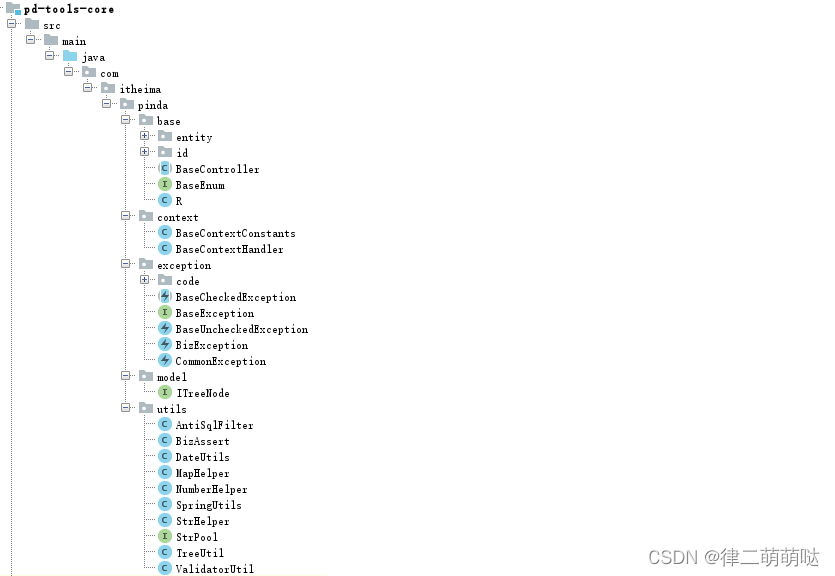
12. pd-tools-core
pd-tools-core是所有模块的基础,定义了一些基础父类供其他模块继承。
13. pd-tools-common
pd-tools-common模块中定义了一些公共类,例如BaseConfig基础配置类、DefaultGlobalExceptionHandler全局异常处理类、各种类型转换器等。

13.1 异常处理介绍
软件开发过程中不可避免的需要处理各种异常,代码中会出现大量的
try {...} catch {...} finally {...}代码块,不仅有大量的冗余代码,而且还影响代码的可读性。Spring从3.2版本开始增加了一个注解
@ControllerAdvice,可以与@ExceptionHandler、@InitBinder、@ModelAttribute等注解配套使用,可以统一进行异常处理。13.2 异常处理入门案例
第一步:创建maven工程exceptionHandler_demo并配置pom.xml文件
<?xml version="1.0" encoding="UTF-8"?> <project xmlns="http://maven.apache.org/POM/4.0.0" xmlns:xsi="http://www.w3.org/2001/XMLSchema-instance" xsi:schemaLocation="http://maven.apache.org/POM/4.0.0 http://maven.apache.org/xsd/maven-4.0.0.xsd"> <modelVersion>4.0.0</modelVersion> <parent> <groupId>org.springframework.boot</groupId> <artifactId>spring-boot-starter-parent</artifactId> <version>2.2.2.RELEASE</version> <relativePath/> </parent> <groupId>cn.itcast</groupId> <artifactId>exceptionHandler_demo</artifactId> <version>1.0-SNAPSHOT</version> <dependencies> <dependency> <groupId>org.springframework.boot</groupId> <artifactId>spring-boot-starter-web</artifactId> </dependency> </dependencies> </project>- 1
- 2
- 3
- 4
- 5
- 6
- 7
- 8
- 9
- 10
- 11
- 12
- 13
- 14
- 15
- 16
- 17
- 18
- 19
- 20
- 21
- 22
第二步:编写UserController
package cn.itcast.controller; import org.springframework.web.bind.annotation.GetMapping; import org.springframework.web.bind.annotation.RequestMapping; import org.springframework.web.bind.annotation.RestController; @RestController @RequestMapping("/user") public class UserController { @GetMapping("/get") public String get(){ int i = 1 / 0; return "success"; } }- 1
- 2
- 3
- 4
- 5
- 6
- 7
- 8
- 9
- 10
- 11
- 12
- 13
- 14
- 15
第三步:创建application.yml
server: port: 9000- 1
- 2
第四步:创建启动类
package cn.itcast; import org.springframework.boot.SpringApplication; import org.springframework.boot.autoconfigure.SpringBootApplication; @SpringBootApplication public class ExceptionHandlerApp { public static void main(String[] args) { SpringApplication.run(ExceptionHandlerApp.class,args); } }- 1
- 2
- 3
- 4
- 5
- 6
- 7
- 8
- 9
- 10
- 11
启动项目,访问地址:http://localhost:9000/user/get

可以看到异常信息直接显示到了页面上。接下来需要进行异常处理。
第五步:创建异常处理类,统一进行异常处理
package cn.itcast.exception; import org.springframework.web.bind.annotation.ControllerAdvice; import org.springframework.web.bind.annotation.ExceptionHandler; import org.springframework.web.bind.annotation.ResponseBody; /** * 全局异常处理 */ @ControllerAdvice @ResponseBody public class GlobalExceptionHandler { //异常处理方法,Controller发生异常后会执行此方法,在此进行统一处理 @ExceptionHandler(Exception.class) public String handleException(Exception e){ System.out.println("统一处理异常信息:" + e.getMessage()); return "系统错误"; } }- 1
- 2
- 3
- 4
- 5
- 6
- 7
- 8
- 9
- 10
- 11
- 12
- 13
- 14
- 15
- 16
- 17
- 18
重新启动项目,访问地址:http://localhost:9000/user/get

可以看到页面中不再显示异常信息,而是我们在异常处理类中返回的提示信息。
13.3 pd-tools-common使用
可以在上面入门案例的基础上简单修改即可。
第一步:修改pom.xml文件,引入pd-tools-common的maven坐标
<?xml version="1.0" encoding="UTF-8"?> <project xmlns="http://maven.apache.org/POM/4.0.0" xmlns:xsi="http://www.w3.org/2001/XMLSchema-instance" xsi:schemaLocation="http://maven.apache.org/POM/4.0.0 http://maven.apache.org/xsd/maven-4.0.0.xsd"> <modelVersion>4.0.0</modelVersion> <parent> <groupId>org.springframework.boot</groupId> <artifactId>spring-boot-starter-parent</artifactId> <version>2.2.2.RELEASE</version> <relativePath/> </parent> <groupId>cn.itcast</groupId> <artifactId>exceptionHandler_demo</artifactId> <version>1.0-SNAPSHOT</version> <dependencies> <dependency> <groupId>org.springframework.boot</groupId> <artifactId>spring-boot-starter-web</artifactId> </dependency> <dependency> <groupId>com.itheima</groupId> <artifactId>pd-tools-common</artifactId> <version>1.0-SNAPSHOT</version> <exclusions> <exclusion> <groupId>com.alibaba.cloud</groupId> <artifactId>spring-cloud-starter-alibaba-nacos-config</artifactId> </exclusion> </exclusions> </dependency> </dependencies> </project>- 1
- 2
- 3
- 4
- 5
- 6
- 7
- 8
- 9
- 10
- 11
- 12
- 13
- 14
- 15
- 16
- 17
- 18
- 19
- 20
- 21
- 22
- 23
- 24
- 25
- 26
- 27
- 28
- 29
- 30
- 31
- 32
- 33
第二步:修改全局异常处理类,只需要继承pd-tools-common中提供的父类即可
package cn.itcast.exception; import com.itheima.pinda.common.handler.DefaultGlobalExceptionHandler; import org.springframework.web.bind.annotation.ControllerAdvice; import org.springframework.web.bind.annotation.ResponseBody; /** * 全局异常处理 */ @ControllerAdvice @ResponseBody public class GlobalExceptionHandler extends DefaultGlobalExceptionHandler{ }- 1
- 2
- 3
- 4
- 5
- 6
- 7
- 8
- 9
- 10
- 11
- 12
重新启动项目,访问地址:http://localhost:9000/user/get

14. pd-tools-databases
pd-tools-databases模块中提供的都是跟数据库操作相关的类。其他模块可以直接引入maven坐标并继承相关父类就可以复用其提供的基础配置。

15. pd-tools-j2cache
pd-tools-j2cache模块提供的功能为缓存功能,其本质是一个starter,其他模块如果需要使用缓存功能直接引入maven坐标并提供相应配置文件即可使用。
15.1 j2cache介绍
j2cache是OSChina目前正在使用的两级缓存框架。
j2cache的两级缓存结构:
- L1: 进程内缓存 caffeine/ehcache
- L2: 集中式缓存 Redis/Memcached
j2cache其实并不是在重复造轮子,而是作资源整合,即将Ehcache、Caffeine、redis、Spring Cache等进行整合。
由于大量的缓存读取会导致L2的网络成为整个系统的瓶颈,因此L1的目标是降低对L2的读取次数。该缓存框架主要用于集群环境中。单机也可使用,用于避免应用重启导致的ehcache缓存数据丢失。
j2cache从1.3.0版本开始支持JGroups和Redis Pub/Sub两种方式进行缓存事件的通知。
数据读取顺序 -> L1 -> L2 -> DB
使用j2cache需要导入的maven坐标:
<dependency> <groupId>net.oschina.j2cache</groupId> <artifactId>j2cache-spring-boot2-starter</artifactId> <version>2.8.0-release</version> </dependency> <dependency> <groupId>net.oschina.j2cache</groupId> <artifactId>j2cache-core</artifactId> <version>2.8.0-release</version> <exclusions> <exclusion> <groupId>org.slf4j</groupId> <artifactId>slf4j-simple</artifactId> </exclusion> <exclusion> <groupId>org.slf4j</groupId> <artifactId>slf4j-api</artifactId> </exclusion> </exclusions> </dependency>- 1
- 2
- 3
- 4
- 5
- 6
- 7
- 8
- 9
- 10
- 11
- 12
- 13
- 14
- 15
- 16
- 17
- 18
- 19
- 20
15.2 j2cache入门案例
第一步:创建maven工程j2cache_demo并配置pom.xml文件
<?xml version="1.0" encoding="UTF-8"?> <project xmlns="http://maven.apache.org/POM/4.0.0" xmlns:xsi="http://www.w3.org/2001/XMLSchema-instance" xsi:schemaLocation="http://maven.apache.org/POM/4.0.0 http://maven.apache.org/xsd/maven-4.0.0.xsd"> <modelVersion>4.0.0</modelVersion> <parent> <groupId>org.springframework.boot</groupId> <artifactId>spring-boot-starter-parent</artifactId> <version>2.2.2.RELEASE</version> <relativePath/> </parent> <groupId>cn.itcast</groupId> <artifactId>j2cache_demo</artifactId> <version>1.0-SNAPSHOT</version> <dependencies> <dependency> <groupId>org.springframework.boot</groupId> <artifactId>spring-boot-starter-web</artifactId> </dependency> <dependency> <groupId>net.oschina.j2cache</groupId> <artifactId>j2cache-spring-boot2-starter</artifactId> <version>2.8.0-release</version> </dependency> <dependency> <groupId>net.oschina.j2cache</groupId> <artifactId>j2cache-core</artifactId> <version>2.8.0-release</version> <exclusions> <exclusion> <groupId>org.slf4j</groupId> <artifactId>slf4j-simple</artifactId> </exclusion> <exclusion> <groupId>org.slf4j</groupId> <artifactId>slf4j-api</artifactId> </exclusion> </exclusions> </dependency> </dependencies> </project>- 1
- 2
- 3
- 4
- 5
- 6
- 7
- 8
- 9
- 10
- 11
- 12
- 13
- 14
- 15
- 16
- 17
- 18
- 19
- 20
- 21
- 22
- 23
- 24
- 25
- 26
- 27
- 28
- 29
- 30
- 31
- 32
- 33
- 34
- 35
- 36
- 37
- 38
- 39
- 40
- 41
- 42
第二步:创建application.yml
server: port: 9000 # redis 通用配置, 不同的环境,需要配置不同的链接信息, # 只需要将这段信息复制到具体环境的配置文件中进行修改即可 # 如:复制到pd-auth-server-dev.yml中将数据库名和ip改掉 pinda: redis: ip: 127.0.0.1 port: 6379 password: database: 0 spring: cache: type: GENERIC redis: host: ${pinda.redis.ip} password: ${pinda.redis.password} port: ${pinda.redis.port} database: ${pinda.redis.database} j2cache: # config-location: /j2cache.properties open-spring-cache: true cache-clean-mode: passive allow-null-values: true redis-client: lettuce #指定redis客户端使用lettuce,也可以使用Jedis l2-cache-open: true #开启二级缓存 broadcast: net.oschina.j2cache.cache.support.redis.SpringRedisPubSubPolicy # broadcast: jgroups L1: #指定一级缓存提供者为caffeine provider_class: caffeine L2: #指定二级缓存提供者为redis provider_class: net.oschina.j2cache.cache.support.redis.SpringRedisProvider config_section: lettuce sync_ttl_to_redis: true default_cache_null_object: false serialization: fst caffeine: properties: /caffeine.properties # 这个配置文件需要放在项目中 lettuce: mode: single namespace: storage: generic channel: j2cache scheme: redis hosts: ${pinda.redis.ip}:${pinda.redis.port} password: ${pinda.redis.password} database: ${pinda.redis.database} sentinelMasterId: maxTotal: 100 maxIdle: 10 minIdle: 10 timeout: 10000- 1
- 2
- 3
- 4
- 5
- 6
- 7
- 8
- 9
- 10
- 11
- 12
- 13
- 14
- 15
- 16
- 17
- 18
- 19
- 20
- 21
- 22
- 23
- 24
- 25
- 26
- 27
- 28
- 29
- 30
- 31
- 32
- 33
- 34
- 35
- 36
- 37
- 38
- 39
- 40
- 41
- 42
- 43
- 44
- 45
- 46
- 47
- 48
- 49
- 50
- 51
- 52
- 53
- 54
第三步:创建/resources/caffeine.properties文件
######################################### # Caffeine configuration # [name] = size, xxxx[s|m|h|d] ######################################### default=2000, 2h rx=50, 2h- 1
- 2
- 3
- 4
- 5
- 6
第四步:创建MyController
package cn.itcast.controller; import net.oschina.j2cache.CacheChannel; import net.oschina.j2cache.CacheObject; import org.springframework.beans.factory.annotation.Autowired; import org.springframework.web.bind.annotation.GetMapping; import org.springframework.web.bind.annotation.RequestMapping; import org.springframework.web.bind.annotation.RestController; import java.util.ArrayList; import java.util.List; @RestController @RequestMapping("/cache") public class MyController { private String key = "myKey"; private String region="rx"; @Autowired private CacheChannel cacheChannel; @GetMapping("/getInfos") public List<String> getInfos(){ CacheObject cacheObject = cacheChannel.get(region, key); if(cacheObject.getValue() == null){ //缓存中没有找到,查询数据库获得 List<String> data = new ArrayList<String>(); data.add("info1"); data.add("info2"); //放入缓存 cacheChannel.set(region,key,data); return data; } return (List<String>) cacheObject.getValue(); } //清理指定缓存 @GetMapping("/evict") public String evict(){ cacheChannel.evict(region,key); return "evict success"; } //检测存在那级缓存 @GetMapping("/check") public String check(){ int check = cacheChannel.check(region, key); return "level:" + check; } //检测缓存数据是否存在 @GetMapping("/exists") public String exists(){ boolean exists = cacheChannel.exists(region, key); return "exists:" + exists; } //清理指定区域的缓存 @GetMapping("/clear") public String clear(){ cacheChannel.clear(region); return "clear success"; } }- 1
- 2
- 3
- 4
- 5
- 6
- 7
- 8
- 9
- 10
- 11
- 12
- 13
- 14
- 15
- 16
- 17
- 18
- 19
- 20
- 21
- 22
- 23
- 24
- 25
- 26
- 27
- 28
- 29
- 30
- 31
- 32
- 33
- 34
- 35
- 36
- 37
- 38
- 39
- 40
- 41
- 42
- 43
- 44
- 45
- 46
- 47
- 48
- 49
- 50
- 51
- 52
- 53
- 54
- 55
- 56
- 57
- 58
- 59
- 60
- 61
- 62
第五步:创建启动类
package cn.itcast; import org.springframework.boot.SpringApplication; import org.springframework.boot.autoconfigure.SpringBootApplication; @SpringBootApplication public class J2CacheApp { public static void main(String[] args) { SpringApplication.run(J2CacheApp.class,args); } }- 1
- 2
- 3
- 4
- 5
- 6
- 7
- 8
- 9
- 10
- 11
注意:由于我们当前第二级缓存使用的是redis,所以需要启动redis服务才能正常运行入门案例。
启动项目,访问地址:http://localhost:9000/cache/getInfos
可以发现redis中已经缓存了数据:

重启项目,由于j2cache的一级缓存(caffeine)是进程级缓存,重启后一级缓存消失。但是二级缓存(redis)的数据还存在,再次访问上面地址,通过debug断点调试可以看到程序从redis中获取了缓存数据。
15.3 pd-tools-j2cache使用
pd-tools-j2cache其实就是一个starter,我们的应用直接引入其maven坐标并配置j2cache的配置文件就可以将CacheChannel对象直接注入到我们的程序中进行缓存数据操作了。
具体使用过程和入门案例一致,只需要更换j2cache的maven坐标为pd-tools-j2cache的maven坐标即可。
16. 数据模型
16.1 权限数据模型介绍
在项目中要进行权限控制,需要有一套权限相关的数据表来提供支持,这是整个权限控制的基础。本系统采用的权限数据模型是在经典的RBAC权限数据模型的基础之上进行的改进,共涉及到如下9张表:
pd_core_org----------------组织表 pd_core_station------------岗位表 pd_auth_user---------------用户表 pd_auth_role---------------角色表 pd_auth_resource-----------资源表 pd_auth_menu---------------菜单表 pd_auth_user_role----------用户角色关系表 pd_auth_role_authority-----角色权限关系表 pd_auth_role_org-----------角色组织关系表- 1
- 2
- 3
- 4
- 5
- 6
- 7
- 8
- 9
需要说明的是菜单和资源其实都属于权限,是两种不同类型的权限,即菜单权限和资源权限。具体说明如下:
- 菜单权限:对应的是系统的菜单,不同的用户可能拥有不同的菜单权限,这样登录系统后看到的菜单也不同
- 资源权限:对应的是某个功能的访问接口,拥有权限则可以访问此接口,没有权限则禁止访问此接口
16.2 导入表结构
在MySQL中创建pd-auth数据库,在此数据库中执行授课资料中的"pd_auth.sql"脚本即可。执行完后可以看到如下11张表:

16.2.1 pd_common_login_log表
pd_common_login_log为用户登录日志表,具体的字段如下:
字段名 类型 说明 id bigint 主键 request_ip varchar 操作IP user_id bigint 登录人ID user_name varchar 登录人姓名 account varchar 登录人账号 description varchar 登录描述 login_date date 登录时间 ua varchar 浏览器请求头 browser varchar 浏览器名称 browser_version varchar 浏览器版本 operating_system varchar 操作系统 location varchar 登录地点 create_time datetime 创建时间 create_user bigint 创建人ID 16.2.2 pd_common_opt_log表
pd_common_opt_log为用户操作日志表,具体字段如下:
字段名 类型 说明 id bigint 主键 request_ip varchar 操作IP type varchar 日志类型 OPT:操作类型 EX:异常类型 user_name varchar 操作人 description varchar 操作描述 class_path varchar 类路径 action_method varchar 请求方法 request_uri varchar 请求地址 http_method varchar 请求类型 GET:GET请求;POST:POST请求;PUT:PUT请求;DELETE:DELETE请求;PATCH:PATCH请求;TRACE:TRACE请求;HEAD:HEAD请求;OPTIONS:OPTIONS请求 params longtext 请求参数 result longtext 返回值 ex_desc longtext 异常详情信息 ex_detail longtext 异常描述 start_time timestamp 开始时间 finish_time timestamp 完成时间 consuming_time bigint 消耗时间 ua varchar 浏览器请求头 create_time datetime 创建时间 create_user bigint 创建人ID 16.2.3 pd_auth_menu表
pd_auth_menu为菜单表,具体字段如下:
字段名 类型 说明 id bigint 主键 name varchar 菜单名称 describe_ varchar 功能描述 is_public bit 是否是公开菜单 path varchar 对应路由path component varchar 对应路由组件component is_enable bit 是否启用 sort_value int 排序 icon varchar 菜单图标 group_ varchar 菜单分组 parent_id bigint 父级菜单id create_user bigint 创建人id create_time datetime 创建时间 update_user bigint 更新人id update_time datetime 更新时间 16.2.4 pd_auth_resource表
pd_auth_resource为资源表,具体字段如下:
字段名 类型 说明 id bigint 主键 code varchar 资源编码 name varchar 接口名称 menu_id bigint 菜单ID method varchar HTTP请求方式 url varchar 接口请求url describe_ varchar 接口描述 create_user bigint 创建人id create_time datetime 创建时间 update_user bigint 更新人id update_time datetime 更新时间 16.2.5 pd_auth_role表
pd_auth_role为角色表,具体字段如下:
字段名称 类型 说明 id bigint 主键 name varchar 角色名称 code varchar 角色编码 describe_ varchar 角色描述 status bit 是否启用状态 readonly bit 是否内置角色 create_user bigint 创建人id create_time datetime 创建时间 update_user bigint 更新人id update_time datetime 更新时间 16.2.6 pd_auth_user表
pd_auth_user表为用户表,具体字段如下:
字段名 类型 说明 id bigint 主键 account varchar 账号 name varchar 姓名 org_id bigint 组织ID station_id bigint 岗位ID email varchar 邮箱 mobile varchar 手机号 sex varchar 性别 status bit 启用状态 avatar varchar 头像 work_describe varchar 工作描述 password_error_last_time datetime 最后一次输错密码时间 password_error_num int 密码错误次数 password_expire_time datetime 密码过期时间 password varchar 密码 last_login_time datetime 最后登录时间 create_user bigint 创建人id create_time datetime 创建时间 update_user bigint 更新人id update_time datetime 更新时间 16.2.7 pd_core_station表
pd_core_station表为岗位表,具体字段如下:
字段名称 类型 说明 id bigint 主键 name varchar 岗位名称 org_id bigint 组织ID status bit 是否启用状态 describe_ varchar 描述 create_time datetime 创建时间 create_user bigint 创建人ID update_time datetime 更新时间 update_user bigint 更新人ID 16.2.8 pd_core_org表
pd_core_org表为组织表,具体字段如下:
字段名称 类型 说明 id bigint 主键 name varchar 组织名称 abbreviation varchar 简称 parent_id bigint 父ID tree_path varchar 树结构 sort_value int 排序 status bit 状态 describe_ varchar 描述 create_time datetime 创建时间 create_user bigint 创建人ID update_time datetime 更新时间 update_user bigint 更新人ID 16.2.9 pd_auth_user_role表
pd_auth_user_role为用户角色关系表,具体字段为:
字段名称 类型 说明 id bigint 主键 role_id bigint 角色ID user_id bigint 用户ID create_user bigint 创建人ID create_time datetime 创建时间 16.2.10 pd_auth_role_org表
pd_auth_role_org为角色组织关系表,具体字段为:
字段名称 类型 说明 id bigint 主键 role_id bigint 角色ID org_id bigint 组织ID create_time datetime 创建时间 create_user bigint 创建人ID 16.2.11 pd_auth_role_authority表
pd_auth_role_authority为角色权限关系表,具体字段为:
字段名称 类型 说明 id bigint 主键 authority_id bigint 权限ID authority_type varchar 权限类型 MENU:菜单 RESOURCE:资源 role_id bigint 角色ID create_time datetime 创建时间 create_user bigint 创建人ID 16.3 导入实体类
前面我们已经介绍了通用权限系统中涉及到的数据表,一般在开发过程中我们会创建和数据表对应的实体类来封装相关信息。在课程资料中已经提供了相关实体类Entity和相关DTO,直接复制到pd-auth-entity工程中即可。
17. 认证和鉴权流程
品达通用权限系统对外提供的功能中
认证和鉴权是其核心功能,通过导入的初始工程可以发现其中有两个服务,即网关服务和权限服务。其中用户认证需要在权限服务中完成,鉴权需要在网关服务中完成。在实现认证和鉴权之前我们必须明确认证和鉴权的整体执行流程。17.1 认证流程
1、用户通过前端系统发送登录请求,请求中携带账号、密码、验证码等信息。
2、前端登录请求首先请求到网关服务,网关服务将请求路由到权限微服务。
3、权限微服务进行认证操作,如果认证通过则生成jwt token返回给前端,同时将用户拥有的资源权限使用userId作为key保存到缓存中。
注:缓存中保存的用户资源权限是由pd_auth_resource资源表中的method和url两个字段的值拼接成的。例如,某个用户拥有删除日志的权限,在表中删除日志权限对应一条数据,其中method的值为DELETE,url的值为/optLog,那么缓存中保存的用户拥有的资源权限为:DELETE/optLog。- 1
17.2 鉴权流程
1、用户认证后访问其他功能时将jwt token放在请求头中,首先经过网关服务处理。
2、在网关服务的过滤器中获取请求头中的token并进行解析,将解析出的用户相关数据放在zuul的header中。
注:之所以要将用户相关数据放在zuul的header中,是因为在后续的网关AccessFilter过滤器和权限服务中都会使用到这些数据。- 1
3、在网关服务的过滤器中进行鉴权相关处理。
18. 权限服务开发
18.1 基础环境搭建
在开发权限服务的业务功能之前,我们需要进行基础环境的搭建,这是权限服务的基础。这些基础环境包括:配置文件、配置类、启动类等。
18.1.1 配置文件
18.1.1.1 bootstrap.yml
由于我们当前使用的是Nacos作为整个项目的配置中心,所以Spring Boot的大部分配置文件都在Nacos中进行统一配置,我们的项目中只需要按照Spring Boot的要求在resources目录下提供bootstrap.yml配置文件即可,文件内容如下:
# @xxx@ 从pom.xml中取值, 所以 @xx@ 标注的值,都不能从nacos中获取 pinda: nacos: ip: ${NACOS_IP:@pom.nacos.ip@} port: ${NACOS_PORT:@pom.nacos.port@} namespace: ${NACOS_ID:@pom.nacos.namespace@} spring: main: allow-bean-definition-overriding: true application: name: @project.artifactId@ profiles: active: @pom.profile.name@ cloud: nacos: config: server-addr: ${pinda.nacos.ip}:${pinda.nacos.port} file-extension: yml namespace: ${pinda.nacos.namespace} shared-dataids: common.yml,redis.yml,mysql.yml refreshable-dataids: common.yml enabled: true discovery: server-addr: ${pinda.nacos.ip}:${pinda.nacos.port} namespace: ${pinda.nacos.namespace} metadata: # 元数据,用于权限服务实时获取各个服务的所有接口 management.context-path: ${server.servlet.context-path:}${spring.mvc.servlet.path:}${management.endpoints.web.base-path:} aop: proxy-target-class: true auto: true # 只能配置在bootstrap.yml ,否则会生成 log.path_IS_UNDEFINED 文件夹 # window会自动在 代码所在盘 根目录下自动创建文件夹, 如: D:/data/projects/logs logging: file: path: /data/projects/logs name: ${logging.file.path}/${spring.application.name}/root.log # 用于/actuator/info info: name: '@project.name@' description: '@project.description@' version: '@project.version@' spring-boot-version: '@spring.boot.version@' spring-cloud-version: '@spring.cloud.version@'- 1
- 2
- 3
- 4
- 5
- 6
- 7
- 8
- 9
- 10
- 11
- 12
- 13
- 14
- 15
- 16
- 17
- 18
- 19
- 20
- 21
- 22
- 23
- 24
- 25
- 26
- 27
- 28
- 29
- 30
- 31
- 32
- 33
- 34
- 35
- 36
- 37
- 38
- 39
- 40
- 41
- 42
- 43
- 44
- 45
- 46
18.1.1.2 logback-spring.xml
由于pd-auth-server已经添加了pd-tools-log模块的依赖,所以可以在项目中使用logback记录日志信息。在resources目录下提供logback-spring.xml配置文件,Spring Boot默认就可以加载到,文件内容如下:
<?xml version="1.0" encoding="UTF-8"?> <configuration> <include resource="com/itheima/pinda/log/logback/pinda-defaults.xml"/> <springProfile name="test,docker,prod"> <logger name="com.itheima.pinda.authority.controller" additivity="true" level="${log.level.controller}"> <appender-ref ref="ASYNC_CONTROLLER_APPENDER"/> </logger> <logger name="com.itheima.pinda.authority.biz.service" additivity="true" level="${log.level.service}"> <appender-ref ref="ASYNC_SERVICE_APPENDER"/> </logger> <logger name="com.itheima.pinda.authority.biz.dao" additivity="false" level="${log.level.dao}"> <appender-ref ref="ASYNC_DAO_APPENDER"/> </logger> </springProfile> <springProfile name="dev"> <logger name="com.itheima.pinda.authority.controller" additivity="true" level="${log.level.controller}"> <appender-ref ref="CONTROLLER_APPENDER"/> </logger> <logger name="com.itheima.pinda.authority.biz.service" additivity="true" level="${log.level.service}"> <appender-ref ref="SERVICE_APPENDER"/> </logger> </springProfile> </configuration>- 1
- 2
- 3
- 4
- 5
- 6
- 7
- 8
- 9
- 10
- 11
- 12
- 13
- 14
- 15
- 16
- 17
- 18
- 19
- 20
- 21
- 22
- 23
- 24
- 25
- 26
- 27
- 28
- 29
- 30
18.1.1.3 j2cache配置文件
在当前pd-auth-server项目中会使用到j2cache来操作缓存,在Nacos配置中心的redis.yml中已经配置了j2cache的相关配置:
j2cache: # config-location: /j2cache.properties open-spring-cache: true cache-clean-mode: passive allow-null-values: true redis-client: lettuce l2-cache-open: true # l2-cache-open: false # 关闭二级缓存 broadcast: net.oschina.j2cache.cache.support.redis.SpringRedisPubSubPolicy # broadcast: jgroups # 关闭二级缓存 L1: provider_class: caffeine L2: provider_class: net.oschina.j2cache.cache.support.redis.SpringRedisProvider config_section: lettuce sync_ttl_to_redis: true default_cache_null_object: false serialization: fst caffeine: properties: /j2cache/caffeine.properties # 这个配置文件需要放在项目中 lettuce: mode: single namespace: storage: generic channel: j2cache scheme: redis hosts: ${pinda.redis.ip}:${pinda.redis.port} password: ${pinda.redis.password} database: ${pinda.redis.database} sentinelMasterId: maxTotal: 100 maxIdle: 10 minIdle: 10 timeout: 10000- 1
- 2
- 3
- 4
- 5
- 6
- 7
- 8
- 9
- 10
- 11
- 12
- 13
- 14
- 15
- 16
- 17
- 18
- 19
- 20
- 21
- 22
- 23
- 24
- 25
- 26
- 27
- 28
- 29
- 30
- 31
- 32
- 33
- 34
通过上面的配置可以看到,还需要在项目中提供/j2cache/caffeine.properties,文件内容如下:
######################################### # Caffeine configuration # \u6682\u65F6\u6CA1\u7528 # [name] = size, xxxx[s|m|h|d] ######################################### default=2000, 2h captcha=1000, 5m resource=2000, 2h user_resource=3000, 2h- 1
- 2
- 3
- 4
- 5
- 6
- 7
- 8
- 9
18.1.1.4 密钥文件
JWT签名算法中,一般有两个选择:HS256和RS256。 HS256 (带有 SHA-256 的 HMAC )是一种对称加密算法, 双方之间仅共享一个密钥。由于使用相同的密钥生成签名和验证签名, 因此必须注意确保密钥不被泄密。 RS256 (采用SHA-256 的 RSA 签名) 是一种非对称加密算法, 它使用公共/私钥对: JWT的提供方采用私钥生成签名, JWT 的使用方获取公钥以验证签名。- 1
- 2
- 3
- 4
- 5
本项目中使用RS256非对称加密算法进行签名,这就需要使用RSA生成一对公钥和私钥。在授课资料中已经提供了一对公钥和私钥,其中pub.key为公钥,pri.key为私钥。
将授课资料中的pub.key和pri.key文件复制到项目的resources/client下。
注意:为什么必须要将这两个文件复制到项目的resources/client下呢?因为在Nacos配置中心的pd-auth-server.yml中通过配置的形式已经指定了这两个配置文件的位置和名称:
authentication: user: header-name: token expire: 43200 # 外部token有效期为12小时 pri-key: client/pri.key # 加密 pub-key: client/pub.key # 解密- 1
- 2
- 3
- 4
- 5
- 6
18.1.1.5 spy.properties
spy.properties是p6spy所需的属性文件。p6spy是一个开源项目,通常使用它来跟踪数据库操作,查看程序运行过程中执行的sql语句,还可以输出执行sql语句消耗的时间。
在Nacos配置中心的pd-auth-server-dev.yml中进行了如下配置:
# p6spy是一个开源项目,通常使用它来跟踪数据库操作,查看程序运行过程中执行的sql语句 # 开发环境需要使用p6spy进行sql语句输出 # 但p6spy会有性能损耗,不适合在生产线使用,故其他环境无需配置 spring: datasource: driver-class-name: com.p6spy.engine.spy.P6SpyDriver url: jdbc:p6spy:mysql://${pinda.mysql.ip}:${pinda.mysql.port}/${pinda.mysql.database}?serverTimezone=CTT&characterEncoding=utf8&useUnicode=true&useSSL=false&autoReconnect=true&zeroDateTimeBehavior=convertToNull&allowMultiQueries=true db-type: mysql- 1
- 2
- 3
- 4
- 5
- 6
- 7
- 8
我们在开发阶段使用的数据源其实就是P6Spy提供的数据源,这样就可以在控制台打印sql已经sql执行的时间了。
spy.properties配置文件内容如下:
module.log=com.p6spy.engine.logging.P6LogFactory,com.p6spy.engine.outage.P6OutageFactory logMessageFormat=com.baomidou.mybatisplus.extension.p6spy.P6SpyLogger appender=com.baomidou.mybatisplus.extension.p6spy.StdoutLogger deregisterdrivers=true useprefix=true excludecategories=info,debug,result,commit,resultset dateformat=yyyy-MM-dd HH:mm:ss driverlist=com.mysql.cj.jdbc.Driver outagedetection=true outagedetectioninterval=2- 1
- 2
- 3
- 4
- 5
- 6
- 7
- 8
- 9
- 10
18.1.1.6 dozer
在resources下创建dozer目录并提供biz.dozer.xml和global.dozer.xml文件,内容如下:
biz.dozer.xml
<?xml version="1.0" encoding="UTF-8"?> <mappings xmlns:xsi="http://www.w3.org/2001/XMLSchema-instance" xmlns="http://dozermapper.github.io/schema/bean-mapping" xsi:schemaLocation="http://dozermapper.github.io/schema/bean-mapping http://dozermapper.github.io/schema/bean-mapping.xsd"> <mapping date-format="yyyy-MM-dd HH:mm:ss"> <class-a>com.itheima.pinda.authority.entity.auth.Menu</class-a> <class-b>com.itheima.pinda.authority.dto.auth.VueRouter</class-b> <field> <a>name</a> <b>meta.title</b> </field> <field> <a>name</a> <b>name</b> </field> <field> <a>icon</a> <b>meta.icon</b> </field> </mapping> </mappings>- 1
- 2
- 3
- 4
- 5
- 6
- 7
- 8
- 9
- 10
- 11
- 12
- 13
- 14
- 15
- 16
- 17
- 18
- 19
- 20
- 21
- 22
global.dozer.xml
<?xml version="1.0" encoding="UTF-8"?> <mappings xmlns:xsi="http://www.w3.org/2001/XMLSchema-instance" xmlns="http://dozermapper.github.io/schema/bean-mapping" xsi:schemaLocation="http://dozermapper.github.io/schema/bean-mapping http://dozermapper.github.io/schema/bean-mapping.xsd"> <!-- @see: http://www.jianshu.com/p/bf8f0e8aee23 @see: http://blog.csdn.net/whhahyy/article/details/48594657 全局配置: <date-format>表示日期格式 <stop-on-errors>错误处理开关 <wildcard>通配符 <trim-strings>裁剪字符串开关 --> <configuration> <date-format>yyyy-MM-dd HH:mm:ss</date-format> </configuration> </mappings>- 1
- 2
- 3
- 4
- 5
- 6
- 7
- 8
- 9
- 10
- 11
- 12
- 13
- 14
- 15
- 16
- 17
- 18

18.1.2 配置类
全局异常处理的配置类:
package com.itheima.pinda.authority.config; import com.itheima.pinda.common.handler.DefaultGlobalExceptionHandler; import org.springframework.context.annotation.Configuration; import org.springframework.stereotype.Controller; import org.springframework.web.bind.annotation.ControllerAdvice; import org.springframework.web.bind.annotation.ResponseBody; import org.springframework.web.bind.annotation.RestController; /** * 全局异常处理 */ @Configuration @ControllerAdvice(annotations = {RestController.class, Controller.class}) @ResponseBody public class ExceptionConfiguration extends DefaultGlobalExceptionHandler { }- 1
- 2
- 3
- 4
- 5
- 6
- 7
- 8
- 9
- 10
- 11
- 12
- 13
- 14
- 15
- 16
- 17
公共基础的配置类:
package com.itheima.pinda.authority.config; import com.itheima.pinda.common.config.BaseConfig; import org.springframework.context.annotation.Configuration; @Configuration public class AuthorityWebConfiguration extends BaseConfig { }- 1
- 2
- 3
- 4
- 5
- 6
数据库相关的配置类:
package com.itheima.pinda.authority.config; import cn.hutool.core.util.ArrayUtil; import com.alibaba.druid.spring.boot.autoconfigure.DruidDataSourceBuilder; import com.baomidou.mybatisplus.autoconfigure.ConfigurationCustomizer; import com.baomidou.mybatisplus.autoconfigure.MybatisPlusProperties; import com.baomidou.mybatisplus.autoconfigure.MybatisPlusPropertiesCustomizer; import com.itheima.pinda.database.datasource.BaseDatabaseConfiguration; import com.itheima.pinda.database.properties.DatabaseProperties; import com.p6spy.engine.spy.P6DataSource; import lombok.extern.slf4j.Slf4j; import org.apache.ibatis.mapping.DatabaseIdProvider; import org.apache.ibatis.plugin.Interceptor; import org.apache.ibatis.scripting.LanguageDriver; import org.apache.ibatis.session.ExecutorType; import org.apache.ibatis.session.SqlSessionFactory; import org.apache.ibatis.type.TypeHandler; import org.mybatis.spring.SqlSessionTemplate; import org.mybatis.spring.annotation.MapperScan; import org.springframework.aop.Advisor; import org.springframework.beans.factory.ObjectProvider; import org.springframework.beans.factory.annotation.Qualifier; import org.springframework.boot.context.properties.ConfigurationProperties; import org.springframework.boot.context.properties.EnableConfigurationProperties; import org.springframework.context.ApplicationContext; import org.springframework.context.annotation.Bean; import org.springframework.context.annotation.Configuration; import org.springframework.core.io.ResourceLoader; import org.springframework.jdbc.datasource.DataSourceTransactionManager; import org.springframework.stereotype.Repository; import org.springframework.transaction.PlatformTransactionManager; import org.springframework.transaction.interceptor.TransactionInterceptor; import javax.sql.DataSource; import java.util.List; @Configuration @Slf4j @MapperScan( basePackages = {"com.itheima.pinda",}, annotationClass = Repository.class, sqlSessionFactoryRef = AuthorityDatabaseAutoConfiguration.DATABASE_PREFIX + "SqlSessionFactory") @EnableConfigurationProperties({MybatisPlusProperties.class, DatabaseProperties.class}) public class AuthorityDatabaseAutoConfiguration extends BaseDatabaseConfiguration { /** * 每个数据源配置不同即可 */ final static String DATABASE_PREFIX = "master"; public AuthorityDatabaseAutoConfiguration(MybatisPlusProperties properties, DatabaseProperties databaseProperties, ObjectProvider<Interceptor[]> interceptorsProvider, ObjectProvider<TypeHandler[]> typeHandlersProvider, ObjectProvider<LanguageDriver[]> languageDriversProvider, ResourceLoader resourceLoader, ObjectProvider<DatabaseIdProvider> databaseIdProvider, ObjectProvider<List<ConfigurationCustomizer>> configurationCustomizersProvider, ObjectProvider<List<MybatisPlusPropertiesCustomizer>> mybatisPlusPropertiesCustomizerProvider, ApplicationContext applicationContext) { super(properties, databaseProperties, interceptorsProvider, typeHandlersProvider, languageDriversProvider, resourceLoader, databaseIdProvider, configurationCustomizersProvider, mybatisPlusPropertiesCustomizerProvider, applicationContext); } @Bean(DATABASE_PREFIX + "SqlSessionTemplate") public SqlSessionTemplate getSqlSessionTemplate(@Qualifier(DATABASE_PREFIX + "SqlSessionFactory") SqlSessionFactory sqlSessionFactory) { ExecutorType executorType = this.properties.getExecutorType(); if (executorType != null) { return new SqlSessionTemplate(sqlSessionFactory, executorType); } else { return new SqlSessionTemplate(sqlSessionFactory); } } /** * 数据源信息 * * @return */ @Bean(name = DATABASE_PREFIX + "DruidDataSource") @ConfigurationProperties(prefix = "spring.datasource.druid") public DataSource druidDataSource() { return DruidDataSourceBuilder.create().build(); } @Bean(name = DATABASE_PREFIX + "DataSource") public DataSource dataSource(@Qualifier(DATABASE_PREFIX + "DruidDataSource") DataSource dataSource) { if (ArrayUtil.contains(DEV_PROFILES, this.profiles)) { return new P6DataSource(dataSource); } else { return dataSource; } } /** * mybatis Sql Session 工厂 * * @return * @throws Exception */ @Bean(DATABASE_PREFIX + "SqlSessionFactory") public SqlSessionFactory getSqlSessionFactory(@Qualifier(DATABASE_PREFIX + "DataSource") DataSource dataSource) throws Exception { return super.sqlSessionFactory(dataSource); } /** * 数据源事务管理器 * * @return */ @Bean(name = DATABASE_PREFIX + "TransactionManager") public DataSourceTransactionManager dsTransactionManager(@Qualifier(DATABASE_PREFIX + "DataSource") DataSource dataSource) { return new DataSourceTransactionManager(dataSource); } /** * 事务拦截器 * * @param transactionManager * @return */ @Bean(DATABASE_PREFIX + "TransactionInterceptor") public TransactionInterceptor transactionInterceptor(@Qualifier(DATABASE_PREFIX + "TransactionManager") PlatformTransactionManager transactionManager) { return new TransactionInterceptor(transactionManager, this.transactionAttributeSource()); } /** * 事务 Advisor * * @param transactionManager * @return */ @Bean(DATABASE_PREFIX + "Advisor") public Advisor getAdvisor(@Qualifier(DATABASE_PREFIX + "TransactionManager") PlatformTransactionManager transactionManager, @Qualifier(DATABASE_PREFIX + "TransactionInterceptor") TransactionInterceptor ti) { return super.txAdviceAdvisor(ti); } }- 1
- 2
- 3
- 4
- 5
- 6
- 7
- 8
- 9
- 10
- 11
- 12
- 13
- 14
- 15
- 16
- 17
- 18
- 19
- 20
- 21
- 22
- 23
- 24
- 25
- 26
- 27
- 28
- 29
- 30
- 31
- 32
- 33
- 34
- 35
- 36
- 37
- 38
- 39
- 40
- 41
- 42
- 43
- 44
- 45
- 46
- 47
- 48
- 49
- 50
- 51
- 52
- 53
- 54
- 55
- 56
- 57
- 58
- 59
- 60
- 61
- 62
- 63
- 64
- 65
- 66
- 67
- 68
- 69
- 70
- 71
- 72
- 73
- 74
- 75
- 76
- 77
- 78
- 79
- 80
- 81
- 82
- 83
- 84
- 85
- 86
- 87
- 88
- 89
- 90
- 91
- 92
- 93
- 94
- 95
- 96
- 97
- 98
- 99
- 100
- 101
- 102
- 103
- 104
- 105
- 106
- 107
- 108
- 109
- 110
- 111
- 112
- 113
- 114
- 115
- 116
- 117
- 118
- 119
- 120
- 121
- 122
- 123
- 124
- 125
- 126
- 127
- 128
- 129
- 130
- 131
- 132
- 133
- 134
- 135
- 136
- 137
mybatis框架相关的配置类:
package com.itheima.pinda.authority.config; import com.itheima.pinda.database.datasource.BaseMybatisConfiguration; import com.itheima.pinda.database.properties.DatabaseProperties; import lombok.extern.slf4j.Slf4j; import org.springframework.context.annotation.Configuration; /** * Mybatis相关配置 */ @Configuration @Slf4j public class AuthorityMybatisAutoConfiguration extends BaseMybatisConfiguration { public AuthorityMybatisAutoConfiguration(DatabaseProperties databaseProperties) { super(databaseProperties); } }- 1
- 2
- 3
- 4
- 5
- 6
- 7
- 8
- 9
- 10
- 11
- 12
- 13
- 14
- 15
- 16
18.1.3 启动类
package com.itheima.pinda; import com.itheima.pinda.auth.server.EnableAuthServer; import com.itheima.pinda.user.annotation.EnableLoginArgResolver; import com.itheima.pinda.validator.config.EnableFormValidator; import lombok.extern.slf4j.Slf4j; import org.springframework.boot.SpringApplication; import org.springframework.boot.autoconfigure.SpringBootApplication; import org.springframework.cloud.client.discovery.EnableDiscoveryClient; import org.springframework.cloud.openfeign.EnableFeignClients; import org.springframework.context.ConfigurableApplicationContext; import org.springframework.context.annotation.Configuration; import org.springframework.context.annotation.EnableAspectJAutoProxy; import org.springframework.core.env.Environment; import java.net.InetAddress; import java.net.UnknownHostException; @SpringBootApplication @EnableDiscoveryClient @EnableAuthServer @EnableFeignClients(value = { "com.itheima.pinda", }) @Slf4j @EnableAspectJAutoProxy(proxyTargetClass = true, exposeProxy = true) @EnableLoginArgResolver @EnableFormValidator public class AuthorityApplication { public static void main(String[] args) throws UnknownHostException { ConfigurableApplicationContext application = SpringApplication.run(AuthorityApplication.class, args); Environment env = application.getEnvironment(); log.info("应用 '{}' 运行成功! Swagger文档: http://{}:{}/doc.html", env.getProperty("spring.application.name"), InetAddress.getLocalHost().getHostAddress(), env.getProperty("server.port")); } }- 1
- 2
- 3
- 4
- 5
- 6
- 7
- 8
- 9
- 10
- 11
- 12
- 13
- 14
- 15
- 16
- 17
- 18
- 19
- 20
- 21
- 22
- 23
- 24
- 25
- 26
- 27
- 28
- 29
- 30
- 31
- 32
- 33
- 34
- 35
- 36
- 37
- 38
运行AuthorityApplication 成功访问swagger地址

-
相关阅读:
本地连接服务器mysql数据库慢
FMCW雷达差频回波信号仿真
java计算机毕业设计高校图书馆管理网站源码+mysql数据库+系统+lw文档+部署
20230903-闹钟
java执行shell命令,Runtime.exec()和jsch谁更有优势?
RK3568平台开发系列讲解(PCIE篇)PCIE驱动要如何学?
资源哟资源网正版模板v1.3
记一次 PEview 的报错修正
MySQL编程基础与变量
基于SqlNode的血缘解析
- 原文地址:https://blog.csdn.net/qq_22075913/article/details/125473129
