-
【Vue全家桶】--- 第六章:vue-router
第六章:vue-router
一、 相关理解
1.1 vue-router的理解
vue 的一个插件库,专门用来实现SPA 应用
1.2 对SPA应用的理解
1. 单页Web 应用(single page web application,SPA)。
2. 整个应用只有一个完整的页面。
3. 点击页面中的导航链接不会刷新页面,只会做页面的局部更新。
4. 数据需要通过ajax 请求获取。
1.3 路由的理解
理解:
一个路由(route)就是一组映射关系(key - value),多个路由需要路由器(router)进行管理。
路由分类
-
后端路由:
-
理解:value 是function, 用于处理客户端提交的请求。
-
工作过程:服务器接收到一个请求时, 根据请求路径找到匹配的函数来处理请求, 返回响应数据。
-
-
前端路由:
-
理解:value 是component,用于展示页面内容。
-
工作过程:当浏览器的路径改变时, 对应的组件就会显示。
-
二、路由使用
1.基本使用
-
安装vue-router,命令:
npm i vue-router@3指定具体的版本,vue2使用router3,vue3使用router4
-
应用插件:
Vue.use(VueRouter) -
编写router配置项: src/rouder/index.js
//该文件专门用于创建整个应用的路由器 import VueRouter from "vue-router"; //引入组件 import About from '../pages/About' import Home from '../pages/Home' export default new VueRouter({ routes:[ { path:'/about', component:About }, { path:'/home', component:Home } ] })- 1
- 2
- 3
- 4
- 5
- 6
- 7
- 8
- 9
- 10
- 11
- 12
- 13
- 14
- 15
- 16
- 17
- 18
- 19
- 20
main.js
//引入Vue import Vue from "vue"; //引入App import App from './App' //关闭Vue的生产提示 Vue.config.productionTip = false //创建vm //应用(使用)插件 //引入 import VueRouter from "vue-router"; //引入路由器 import router from './rouder' Vue.use(VueRouter) new Vue({ el: '#app', render: h => h(App), router:router });- 1
- 2
- 3
- 4
- 5
- 6
- 7
- 8
- 9
- 10
- 11
- 12
- 13
- 14
- 15
- 16
- 17
- 18
-
实现切换(active-class可配置高亮样式)
<router-link active-class="active" to="/about">About</router-link>- 1
-
指定展示位置
<router-view></router-view>- 1
2.几个注意点

- 路由组件通常存放在
pages文件夹,一般组件通常存放在components文件夹。 - 通过切换,“隐藏”了的路由组件,默认是被销毁掉的,需要的时候再去挂载。
- 每个组件都有自己的
$route属性,里面存储着自己的路由信息。 - 整个应用只有一个router,可以通过组件的
$router属性获取到。
3.多级路由
-
配置路由规则,使用children配置项:
routes:[ { path:'/about', component:About, }, { path:'/home', component:Home, children:[ //通过children配置子级路由 { path:'news', //此处一定不要写:/news component:News }, { path:'message',//此处一定不要写:/message component:Message } ] } ]- 1
- 2
- 3
- 4
- 5
- 6
- 7
- 8
- 9
- 10
- 11
- 12
- 13
- 14
- 15
- 16
- 17
- 18
- 19
- 20
-
跳转(要写完整路径):
<router-link to="/home/news">News</router-link>- 1
4.路由的query参数
-
传递参数
<!-- 跳转路由并携带query参数,to的字符串写法 --> <!-- <router-link :to="`/home/message/detail?id=${m.id}&title=${m.title}`">{{m.title}}</router-link> --> <!-- 跳转路由并携带query参数,to的对象写法 --> <router-link :to="{ path:'/home/message/detail', query: { id: m.id, title: m.title } }"> {{ m.title }} </router-link> - 1
- 2
- 3
- 4
- 5
- 6
- 7
- 8
- 9
- 10
- 11
- 12
- 13
-
接收参数:
$route.query.id $route.query.title- 1
- 2
5.命名路由
-
作用:可以简化路由的跳转。
-
如何使用
-
给路由命名:
{ path:'/demo', component:Demo, children:[ { path:'test', component:Test, children:[ { name:'hello' //给路由命名 path:'welcome', component:Hello, } ] } ] }- 1
- 2
- 3
- 4
- 5
- 6
- 7
- 8
- 9
- 10
- 11
- 12
- 13
- 14
- 15
- 16
- 17
-
简化跳转:
<!--简化前,需要写完整的路径 --> <router-link to="/demo/test/welcome">跳转</router-link> <!--简化后,直接通过名字跳转 --> <router-link :to="{name:'hello'}">跳转</router-link> <!--简化写法配合传递参数 --> <router-link :to="{ name:'hello', query:{ id:666, title:'你好' } }" >跳转</router-link>- 1
- 2
- 3
- 4
- 5
- 6
- 7
- 8
- 9
- 10
- 11
- 12
- 13
- 14
- 15
- 16
-
6.路由的params参数
-
配置路由,声明接收params参数
{ path:'/home', component:Home, children:[ { path:'news', component:News }, { component:Message, children:[ { name:'xiangqing', path:'detail/:id/:title', //使用占位符声明接收params参数 component:Detail } ] } ] }- 1
- 2
- 3
- 4
- 5
- 6
- 7
- 8
- 9
- 10
- 11
- 12
- 13
- 14
- 15
- 16
- 17
- 18
- 19
- 20
-
传递参数
<!-- 跳转路由并携带params参数,to的字符串写法 --> <!-- <router-link :to="`/home/message/detail/${m.id}/${m.title}`">{{m.title}}</router-link> --> <!-- 跳转路由并携带params参数,to的对象写法 --> <router-link :to="{ name:'xiangqing', params: { id: m.id, title: m.title } }"> {{ m.title }} </router-link> - 1
- 2
- 3
- 4
- 5
- 6
- 7
- 8
- 9
- 10
- 11
- 12
- 13
特别注意:路由携带params参数时,若使用to的对象写法,则不能使用path配置项,必须使用name配置!
-
接收参数:
$route.params.id $route.params.title- 1
- 2
7.路由的props配置(三种写法)
作用:让路由组件更方便的收到参数
name: 'xiangqing', path: 'detail/:id/:title',//此时需要使用params传参 component: Detail, //props的第一种写法,值为对象,该对象中所有的key-value都会以props的形式传给Detail组件 //props:{a:1,b:'hello'} //props的第二种写法,值为布尔值,若布尔值为真,就会把该路由组件收到的所有params参数,以props的形式传给Detail组件 // props:true //props的第三种写法:值为函数 props($route){ //下面是params还是query,根据传参类型 return{id:$route.params.id,title:$route.params.title} } /* props(query){ return{id:query.id,title:query.title} } */ /* props({ query: { id, title } }) { return { id, title } } */- 1
- 2
- 3
- 4
- 5
- 6
- 7
- 8
- 9
- 10
- 11
- 12
- 13
- 14
- 15
- 16
- 17
- 18
- 19
- 20
接收参数:
props:['id','title']- 1
8 .
<router-link>的replace属性-
作用:控制路由跳转时操作浏览器历史记录的模式
-
浏览器的历史记录有两种写入方式:分别为
push和replace,push是追加历史记录,replace是替换当前记录。路由跳转时候默认为push -
如何开启
replace模式:<router-link replace .......>News</router-link>或者
<router-link :replace ="true" >News</router-link>
9.编程式路由导航
-
作用:不借助
<router-link>实现路由跳转,让路由跳转更加灵活 -
具体编码:
//$router的两个API this.$router.push({ name:'xiangqing', params:{ id:xxx, title:xxx } }) this.$router.replace({ name:'xiangqing', params:{ id:xxx, title:xxx } }) this.$router.forward() //前进 this.$router.back() //后退 this.$router.go() //可前进也可后退- 1
- 2
- 3
- 4
- 5
- 6
- 7
- 8
- 9
- 10
- 11
- 12
- 13
- 14
- 15
- 16
- 17
- 18
- 19
-
this.$router.push(path): 相当于点击路由链接(可以返回到当前路由界面)
-
this.$router.replace(path): 用新路由替换当前路由(不可以返回到当前路由界面)
-
this.$router.back(): 请求(返回)上一个记录路由
-
this.$router.go(-1): 请求(返回)上一个记录路由
-
this.$router.go(1): 请求下一个记录路由
10.缓存路由组件
-
作用:让不展示的路由组件保持挂载,不被销毁。
-
具体编码:
//缓存一个 <keep-alive include="News"> //News指组件名 <router-view></router-view> </keep-alive> //缓存多个 <keep-alive :include="['News','Message']"> //News指组件名 <router-view></router-view> </keep-alive>- 1
- 2
- 3
- 4
- 5
- 6
- 7
- 8
- 9
- 10
11.两个新的生命周期钩子
- 作用:路由组件所独有的两个钩子,用于捕获路由组件的激活状态。
- 具体名字:
activated路由组件被激活时触发。deactivated路由组件失活时触发。
12.路由守卫
-
作用:对路由进行权限控制
-
分类:全局守卫、独享守卫、组件内守卫
-
全局守卫:
//全局前置守卫:初始化时执行、每次路由切换前执行 router.beforeEach((to,from,next)=>{ console.log('beforeEach',to,from) if(to.meta.isAuth){ //判断当前路由是否需要进行权限控制 if(localStorage.getItem('school') === 'atguigu'){ //权限控制的具体规则 next() //放行 }else{ alert('暂无权限查看') // next({name:'guanyu'}) } }else{ next() //放行 } }) //全局后置守卫:初始化时执行、每次路由切换后执行 router.afterEach((to,from)=>{ console.log('afterEach',to,from) if(to.meta.title){ document.title = to.meta.title //修改网页的title }else{ document.title = 'vue_test' } })- 1
- 2
- 3
- 4
- 5
- 6
- 7
- 8
- 9
- 10
- 11
- 12
- 13
- 14
- 15
- 16
- 17
- 18
- 19
- 20
- 21
- 22
- 23
- 24
-
独享守卫:
{ name: 'xinwen', path: 'news', component: News, meta: { isAuth: true, title: '新闻' }, beforeEnter: (to, from, next) => { if (to.meta.isAuth) {//判断是否需要鉴权 if (localStorage.getItem('name') === 'xiaowang') { next() } else { alert('无权限!!!') } } else { next() } } },- 1
- 2
- 3
- 4
- 5
- 6
- 7
- 8
- 9
- 10
- 11
- 12
- 13
- 14
- 15
- 16
- 17
- 18
- 19
- 20
-
组件内守卫:
<template> <h2>我是About的内容</h2> </template> <script> export default { name: 'About', beforeDestroy() { console.log('About组件即将被销毁了') }, mounted() { console.log('About组件挂载完毕') }, //进入守卫:通过路由规则,进入该组件时被调用 beforeRouteEnter(to, from, next) { next() }, //离开守卫:通过路由规则,离开该组件时被调用 beforeRouteLeave(to, from, next) { next() } } </script> <style> </style>- 1
- 2
- 3
- 4
- 5
- 6
- 7
- 8
- 9
- 10
- 11
- 12
- 13
- 14
- 15
- 16
- 17
- 18
- 19
- 20
- 21
- 22
- 23
- 24
- 25
- 26
13.路由器的两种工作模式
-
对于一个url来说,什么是hash值?—— #及其后面的内容就是hash值。
-
hash值不会包含在 HTTP 请求中,即:hash值不会带给服务器。
-
hash模式:
- 地址中永远带着#号,不美观 。
- 若以后将地址通过第三方手机app分享,若app校验严格,则地址会被标记为不合法。
- 兼容性较好。
-
history模式:
- 地址干净,美观 。
- 兼容性和hash模式相比略差。
- 应用部署上线时需要后端人员支持,解决刷新页面服务端404的问题。
npm i connect-history-api-fallback
const router = new VueRouter({ mode:'hash', //mode:'history', routes: [......] })- 1
- 2
- 3
- 4
- 5
项目打包:
npm run build
14.综合案例


main.js
//引入Vue import Vue from "vue"; //引入App import App from './App' //关闭Vue的生产提示 Vue.config.productionTip = false //创建vm //应用(使用)插件 //引入 import VueRouter from "vue-router"; //引入路由器 import router from './rouder' Vue.use(VueRouter) new Vue({ el: '#app', render: h => h(App), router:router });- 1
- 2
- 3
- 4
- 5
- 6
- 7
- 8
- 9
- 10
- 11
- 12
- 13
- 14
- 15
- 16
- 17
- 18
App.vue
<template> <div> <div class="row"> <div class="col-xs-offset-2 col-xs-8"> <!-- <div class="page-header"><h2>Vue Router Demo</h2></div> --> <Banner/> </div> </div> <div class="row"> <div class="col-xs-2 col-xs-offset-2"> <div class="list-group"> <!-- 原始HTML中我们使用a标签实现页面的跳转 --> <!-- <a class="list-group-item active" href="./about.html">About</a> <a class="list-group-item" href="./home.html">Home</a> --> <!-- Vue中借助 router-link标签实现路由的切换--> <router-link :replace ="true" class="list-group-item " active-class="active" to="/about">About</router-link> <router-link :replace ="true" class="list-group-item " active-class="active" to="/home">Home</router-link> </div> </div> <div class="col-xs-6"> <div class="panel"> <div class="panel-body"> <!-- 指定组件的呈现位置 --> <router-view></router-view> </div> </div> </div> </div> </div> </template> <script> import Banner from './compontents/Banner.vue' export default { name: 'App', methods: { }, components:{Banner} } </script> <style > </style>- 1
- 2
- 3
- 4
- 5
- 6
- 7
- 8
- 9
- 10
- 11
- 12
- 13
- 14
- 15
- 16
- 17
- 18
- 19
- 20
- 21
- 22
- 23
- 24
- 25
- 26
- 27
- 28
- 29
- 30
- 31
- 32
- 33
- 34
- 35
- 36
- 37
- 38
- 39
- 40
- 41
- 42
- 43
- 44
- 45
- 46
- 47
- 48
- 49
- 50
- 51
rouder/index.js
//该文件专门用于创建整个应用的路由器 import VueRouter from "vue-router"; //引入组件 import About from '../pages/About' import Home from '../pages/Home' import News from '../pages/News' import Message from '../pages/Message' import Detail from '../pages/Detail' const router = new VueRouter({ mode:'history', routes: [ { name: 'guanyu', path: '/about', component: About, meta: { title: '关于' }, }, { name: 'zhuye', path: '/home', component: Home, meta: { title: '主页' }, children: [ { name: 'xinwen', path: 'news', component: News, meta: { isAuth: true, title: '新闻' }, /* beforeEnter: (to, from, next) => { if (to.meta.isAuth) {//判断是否需要鉴权 if (localStorage.getItem('name') === 'xiaowang') { next() } else { alert('无权限!!!') } } else { next() } } */ }, { name: 'xiaoxi', path: 'message', component: Message, meta: { isAuth: true, title: '消息' }, children: [ { name: 'xiangqing', path: 'detail/:id/:title', meta: { isAuth: true, title: '详情' }, component: Detail, //props的第一种写法,值为对象,该对象中所有的key-value都会以props的形式传给Detail组件 //props:{a:1,b:'hello'} //props的第二种写法,值为布尔值,若布尔值为真,就会把该路由组件收到的所有params参数,以props的形式传给Detail组件 // props:true //props的第三种写法:值为函数 props($route) { return { id: $route.params.id, title: $route.params.title } } /* props(query){ return{id:query.id,title:query.title} } */ /* props({ query: { id, title } }) { return { id, title } } */ } ] } ] } ] }) //全局前置路由守卫-初始化的时候调用、每次路由切换之前调用 /* router.beforeEach((to, from, next) => { console.log(to,from) if (to.meta.isAuth) {//判断是否需要鉴权 if (localStorage.getItem('name') === 'xiaowang') { next() }else{ alert('无权限!!!') } } else { next() } }) */ //全局后置路由守卫-初始化的时候调用、每次路由切换之前调用 /* router.afterEach((to, from) => { document.title = to.meta.title || 'demo' }) */ export default router- 1
- 2
- 3
- 4
- 5
- 6
- 7
- 8
- 9
- 10
- 11
- 12
- 13
- 14
- 15
- 16
- 17
- 18
- 19
- 20
- 21
- 22
- 23
- 24
- 25
- 26
- 27
- 28
- 29
- 30
- 31
- 32
- 33
- 34
- 35
- 36
- 37
- 38
- 39
- 40
- 41
- 42
- 43
- 44
- 45
- 46
- 47
- 48
- 49
- 50
- 51
- 52
- 53
- 54
- 55
- 56
- 57
- 58
- 59
- 60
- 61
- 62
- 63
- 64
- 65
- 66
- 67
- 68
- 69
- 70
- 71
- 72
- 73
- 74
- 75
- 76
- 77
- 78
- 79
- 80
- 81
- 82
- 83
- 84
- 85
- 86
- 87
- 88
- 89
- 90
- 91
- 92
- 93
- 94
- 95
- 96
- 97
- 98
- 99
- 100
- 101
components/Banner.vue
<template> <div class="col-xs-offset-2 col-xs-8"> <div class="page-header"> <h2>Vue Router Demo</h2> <button @click="back">前进</button> <button @click="forward">后退</button> </div> </div> </template> <script> export default { name: 'Banner', methods: { back() { this.$router.back() }, forward() { this.$router.forward() } } } </script> <style> </style>- 1
- 2
- 3
- 4
- 5
- 6
- 7
- 8
- 9
- 10
- 11
- 12
- 13
- 14
- 15
- 16
- 17
- 18
- 19
- 20
- 21
- 22
- 23
- 24
- 25
- 26
- 27
- 28
- 29
pages/About.vue
<template> <h2>我是About的内容</h2> </template> <script> export default { name: 'About', beforeDestroy() { console.log('About组件即将被销毁了') }, mounted() { console.log('About组件挂载完毕') }, //进入守卫:通过路由规则,进入该组件时被调用 beforeRouteEnter(to, from, next) { next() }, //离开守卫:通过路由规则,离开该组件时被调用 beforeRouteLeave(to, from, next) { next() } } </script> <style> </style>- 1
- 2
- 3
- 4
- 5
- 6
- 7
- 8
- 9
- 10
- 11
- 12
- 13
- 14
- 15
- 16
- 17
- 18
- 19
- 20
- 21
- 22
- 23
- 24
- 25
- 26
pages/Detail.vue
<template> <ul> <!-- <li>消息的编号:{{ $route.params.id }}</li> <li>消息的标题:{{ $route.params.title }}</li> <li>a:{{a}}</li> <li>b:{{b}}</li> --> <li>消息的编号:{{ id }}</li> <li>消息的标题:{{ title }}</li> </ul> </template> <script> export default { name: 'Detail', // props:['a','b'], props:['id','title'], /* mounted() { console.log(this.$route) } */ } </script> <style> </style>- 1
- 2
- 3
- 4
- 5
- 6
- 7
- 8
- 9
- 10
- 11
- 12
- 13
- 14
- 15
- 16
- 17
- 18
- 19
- 20
- 21
- 22
- 23
- 24
- 25
pages/Home.vue
<template> <div> <h2>我是Home的内容</h2> <div> <ul class="nav nav-tabs"> <li> <router-link class="list-group-item " active-class="active" to="/home/news">News</router-link> </li> <li> <router-link class="list-group-item " active-class="active" to="/home/message">Message</router-link> </li> </ul> <keep-alive include="News" > <router-view/> </keep-alive> </div> </div> </template> <script> export default { name: 'Home', /* beforeDestroy(){ console.log('Home组件即将被销毁了') }, */ /* mounted() { console.log('Home组件挂载完毕', this) } */ } </script> <style> </style>- 1
- 2
- 3
- 4
- 5
- 6
- 7
- 8
- 9
- 10
- 11
- 12
- 13
- 14
- 15
- 16
- 17
- 18
- 19
- 20
- 21
- 22
- 23
- 24
- 25
- 26
- 27
- 28
- 29
- 30
- 31
- 32
- 33
- 34
- 35
pages/Message.vue
<template> <div> <ul> <li v-for="m in messageList" :key="m.id"> <!-- 跳转路由并携带params参数,to的字符串写法 --> <!-- <router-link :to="`/home/message/detail/${m.id}/${m.title}`">{{m.title}}</router-link> --> <!-- 跳转路由并携带params参数,to的对象写法 --> <router-link :to="{ name: 'xiangqing', params: { id: m.id, title: m.title } }"> {{ m.title }} </router-link> <button @click="pushShow(m)">push查看</button> <button @click="replaceShow(m)">replace查看</button> </li> </ul> <hr> <router-view></router-view> </div> </template> <script> export default { name: 'Message', data() { return { messageList: [ { id: '001', title: '消息001' }, { id: '002', title: '消息002' }, { id: '003', title: '消息003' }, ] } }, methods: { pushShow(m) { this.$router.push({ name: 'xiangqing', params: { id: m.id, title: m.title } }) }, replaceShow(m) { this.$router.replace({ name: 'xiangqing', params: { id: m.id, title: m.title } }) }, } } </script> <style> </style>- 1
- 2
- 3
- 4
- 5
- 6
- 7
- 8
- 9
- 10
- 11
- 12
- 13
- 14
- 15
- 16
- 17
- 18
- 19
- 20
- 21
- 22
- 23
- 24
- 25
- 26
- 27
- 28
- 29
- 30
- 31
- 32
- 33
- 34
- 35
- 36
- 37
- 38
- 39
- 40
- 41
- 42
- 43
- 44
- 45
- 46
- 47
- 48
- 49
- 50
- 51
- 52
- 53
- 54
- 55
- 56
- 57
- 58
- 59
- 60
- 61
- 62
- 63
- 64
- 65
- 66
pages/News.vue
<template> <ul> <li>news001 <input type="text"></li> <li>news002 <input type="text"></li> <li>news003 <input type="text"></li> </ul> </template> <script> export default { name: 'News', beforeDestroy(){ } } </script> <style> </style>- 1
- 2
- 3
- 4
- 5
- 6
- 7
- 8
- 9
- 10
- 11
- 12
- 13
- 14
- 15
- 16
- 17
- 18
- 19
15.小测试
-
创建服务器 npm init => 名称:随意 => npm i express
-
编写js文件、启动:node server

-
打包(
npm run buildhistory模式)过后将dist文件夹中的文件复制到static下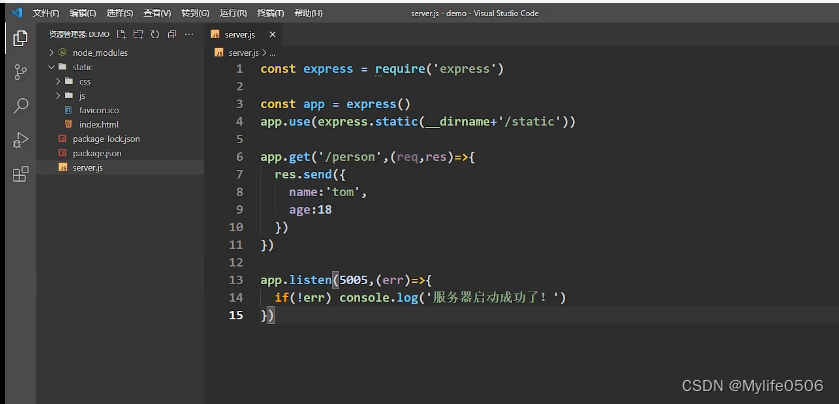
-
刷新页面服务端404
npm i connect-history-api-fallback(nginx也可以)

-
-
相关阅读:
matlab simulink实现分数阶pid加模糊pid控制的汽车六轮转向
【仿真动画】ABB IRB 8700 机器人搬运(ruckig在线轨迹生成)动画欣赏
论文精读:带有源标签自适应的半监督域适应(Semi-Supervised Domain Adaptation with Source Label Adaptation)
LCR 077. 排序链表
通过java.netHttpURLConnection类实现java发送http请求
CentOS手把手教你搭建Zabbix Server,Zabbix Proxy,Zabbix Agent企业级监控平台
Windows安装Mysql--免安装版
前端的那些基本标签【a table tr caption image等等......】
Go 命名规范:全面指南
算法分析——大O标记法之时间复杂度
- 原文地址:https://blog.csdn.net/weixin_45685031/article/details/125418118