-
第一:Python基于钉钉监控发送消息提醒
一.使用前设置钉钉
1.既然是使用钉钉消息提醒,那么第需要有钉钉。
2.第二步自定义机器人是群机器人,所以需要有个群。
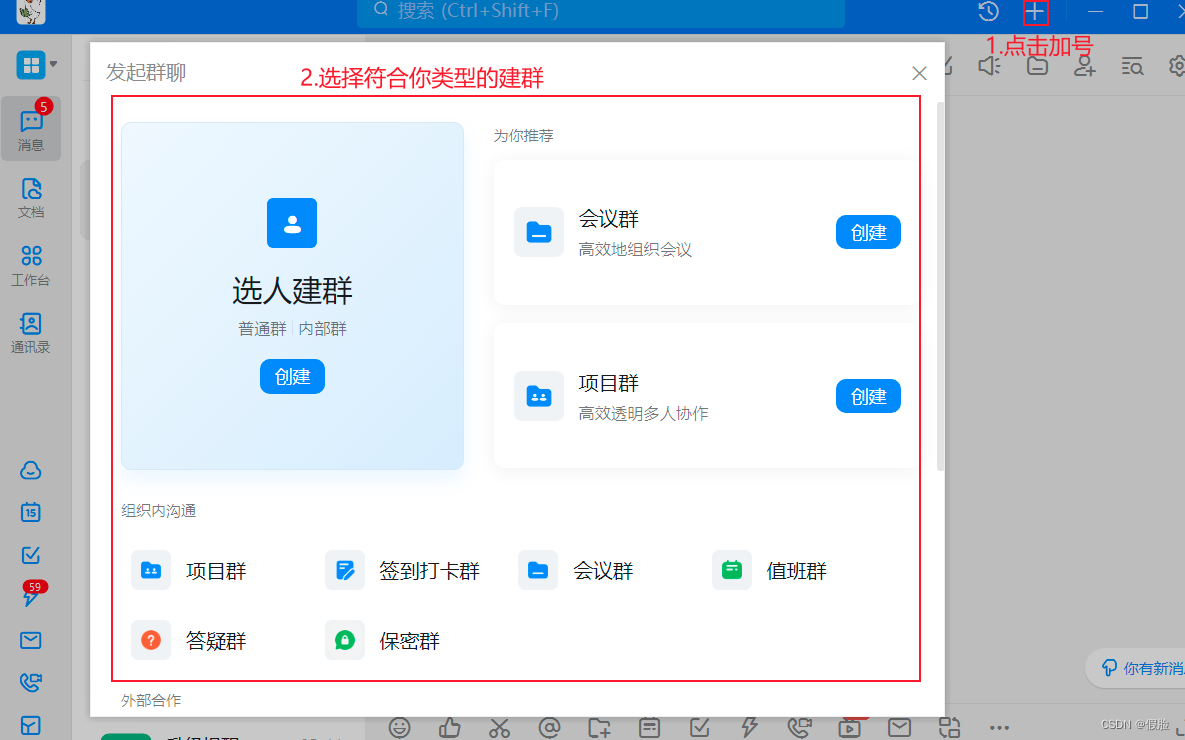
3.添加机器人,点击头像>机器人管理>自定义机器人

4.给机器人取个名字>选择添加到哪个群组>选择适合自己的安全设置>完成

二.安全设置
1.有三种安全设置方式:自定义关键词、加签、IP地址。
2.自定义关键词:简单来说就是你发送的内容必须包含这个关键词,才能发送成功。
3.加签:就是生成你特定的签名,在程序中,进行加密生成参数,请求时,携带此参数,才能发送成功。
4.IP地址:就是在设置的指定IP地址范围内进行请求,才能发送成功。
5.选择适合自己的安全设置方式,这里选择的是加签,即配置好后,代码在使用、复用、迁移等方面会稍加灵活一点,如果在公司,按实际需求选择就行。把这个签名记录下来,待会需要它来加密生成参数。
6.点击完成之后,就可以看到自己的Webhook,记下来,待会需要用到。

三.发送请求
1.首先,在__init__方法中,配置好机器人的信息。
def __init__(self): # 安全设置使用加签方式 timestamp = str(round(time.time() * 1000)) secret = 'SEC7******fe0a' # 刚才记录下来的签名 secret_enc = secret.encode('utf-8') string_to_sign = '{}\n{}'.format(timestamp, secret) string_to_sign_enc = string_to_sign.encode('utf-8') hmac_code = hmac.new(secret_enc, string_to_sign_enc, digestmod=hashlib.sha256).digest() sign = urllib.parse.quote_plus(base64.b64encode(hmac_code)) # 以上就是加签的安全配置,其它安全设置,无需配置以上信息 # webhook地址 webhook = 'https://oapi.dingtalk.com/robot/send?******' # 刚才记录的webhook self.webhook = "{}×tamp={}&sign={}".format(webhook, timestamp, sign) # 如果你的不是加签的安全方式,即可省去 ×tamp={}&sign={} 部分参数 # 配置请求headers self.headers = { "Content-Type": "application/json", "Charset": "UTF-8" # 发起POST请求时,必须将字符集编码设置成UTF-8。 }- 1
- 2
- 3
- 4
- 5
- 6
- 7
- 8
- 9
- 10
- 11
- 12
- 13
- 14
- 15
- 16
- 17
- 18
- 19
- 20
2.其次,发送请求
def send_req(self, message): """ 发送请求 :param message: 你的消息体 :return: """ # 将请求数据进行json数据封装 form_data = json.dumps(message) # 发起请求 res_info = requests.post(url=self.webhook, headers=self.headers, data=form_data) # 打印返回的结果 print('邮件发送结果:', res_info.json()) print('通知成功!' if (res_info.json())['errmsg'] == 'ok' else '通知失败!')- 1
- 2
- 3
- 4
- 5
- 6
- 7
- 8
- 9
- 10
- 11
- 12
- 13
- 14
3.再次,构造消息体,钉钉给出6种消息类型体
3.1.第一种、text型文本数据
def send_text_msg(self, content, at_mobiles=None, is_at_all=False): """ 发送text型文本数据 :param content: 消息内容 :param at_mobiles: 传入列表类型数据,@出现在列表中的电话联系人,如果群里没有该联系人,则不会@(可选参数) :param is_at_all: 是否@所有人,默认不艾特(可选参数) :return: """ message = { "msgtype": "text", # 消息类型 "text": { "content": content }, "at": { "atMobiles": at_mobiles, "isAtAll": is_at_all } } self.send_req(message) # 发送消息- 1
- 2
- 3
- 4
- 5
- 6
- 7
- 8
- 9
- 10
- 11
- 12
- 13
- 14
- 15
- 16
- 17
- 18
- 19
a.调用
DingTalkWarn().send_text_msg('测试消息发送!')- 1
b.效果图

3.2.第二种、link型文本数据
def send_link_msg(self, text, title, message_url, pic_url=None): """ 发送link型文本数据 :param text: 消息内容 :param title: 消息标题 :param message_url: 点击消息跳转的URL :param pic_url: 图片URL(可选参数) :return: """ message = { "msgtype": "link", "link": { "text": text, # 消息内容,如果太长只会部分展示 "title": title, # 消息标题 "picUrl": pic_url, # 图片URL "messageUrl": message_url # 点击消息跳转的URL } } self.send_req(message) # 发送消息- 1
- 2
- 3
- 4
- 5
- 6
- 7
- 8
- 9
- 10
- 11
- 12
- 13
- 14
- 15
- 16
- 17
- 18
- 19
a.调用
DingTalkWarn().send_link_msg( text='爱分享,爱折腾,爱生活,乐于分享自己在学习过程中的一些心得、体会。', title='a'ゞ开心果的博客', message_url='https://blog.csdn.net/qq_45352972', pic_url='https://cdn.jsdelivr.net/gh/King-ing/CDN/assets/background.png' )- 1
- 2
- 3
- 4
- 5
- 6
b.效果图

3.3.第三种、markdown型文本数据
def send_markdown_msg(self, text, title, at_mobiles=None, is_at_all=False): """ 发送markdown型文本数据 :param text: markdown格式内容 :param title: 标题 :param at_mobiles: 传入列表类型数据,@出现在列表中的电话联系人,如果群里没有该联系人,则不会@(可选参数) :param is_at_all: 是否@所有人,默认不艾特(可选参数) :return: """ message = { "msgtype": "markdown", "markdown": { "title": title, "text": text }, "at": { "atMobiles": at_mobiles, "isAtAll": is_at_all } } self.send_req(message) # 发送消息- 1
- 2
- 3
- 4
- 5
- 6
- 7
- 8
- 9
- 10
- 11
- 12
- 13
- 14
- 15
- 16
- 17
- 18
- 19
- 20
- 21
a.调用
DingTalkWarn().send_markdown_msg( text="## 这是一个二级标题\n \n###### {}发布".format(time.strftime("%Y-%m-%d %H:%M:%S")), title='markdown格式数据', )- 1
- 2
- 3
- 4
b.效果图

3.4.第四种、整体跳转ActionCard类型的数据
def send_all_action_card_msg(self, text, title, single_url, single_title='阅读全文'): """ 发送整体跳转ActionCard类型的数据 :param text: markdown格式内容 :param title: 标题 :param single_url: 详情url地址 :param single_title: 点击进入详情按钮 :return: """ message = { "actionCard": { "title": title, "text": text, "singleTitle": single_title, "singleURL": single_url }, "msgtype": "actionCard" } self.send_req(message) # 发送消息- 1
- 2
- 3
- 4
- 5
- 6
- 7
- 8
- 9
- 10
- 11
- 12
- 13
- 14
- 15
- 16
- 17
- 18
- 19
a.调用
DingTalkWarn().send_all_action_card_msg( text='## 抓包工具-mitmproxy前奏\n \n介绍:mitmproxy类似于Fiddler、Charles的功能,可以支持HTTP跟HTTPS请求,只不过它是通过控制台的形式进行操作。mitmproxy有两个关联的组件,mitmdump跟mitmweb。mitmdump是mitmproxy的命令行接口;mitmweb是一个web程序,可以通...', title='抓包工具-mitmproxy前奏', single_url='https://blog.csdn.net/qq_45352972/article/details/111028741?spm=1001.2014.3001.5501' )- 1
- 2
- 3
- 4
- 5
b.效果图

3.5.第五种、独立跳转ActionCard类型的数据
def send_alone_action_card_msg(self, text, title, btn_orientation=1, btns=None): """ 发送独立跳转ActionCard类型的数据 :param text: markdown格式文本数据 :param title: 标题 :param btn_orientation: 0-按钮竖直排列;1-按钮横向排列 :param btns: 列表数据,里面存字符串,用来放按钮信息跟链接,如下 [ { "title": "内容不错", "actionURL": "https://www.dingtalk.com/" }, { "title": "不感兴趣", "actionURL": "https://www.dingtalk.com/" } ] :return: """ message = { "msgtype": "actionCard", "actionCard": { "title": title, "text": text, "hideAvatar": "0", "btnOrientation": btn_orientation, "btns": btns } } self.send_req(message) # 发送消息- 1
- 2
- 3
- 4
- 5
- 6
- 7
- 8
- 9
- 10
- 11
- 12
- 13
- 14
- 15
- 16
- 17
- 18
- 19
- 20
- 21
- 22
- 23
- 24
- 25
- 26
- 27
- 28
- 29
- 30
- 31
a.调用
DingTalkWarn().send_alone_action_card_msg( text='### 查看好友博客\n', title='查看好友博客', btns=[ { "title": "不感兴趣", "actionURL": "https://www.dingtalk.com/" }, { "title": "我看看", "actionURL": "https://blog.csdn.net/qq_45352972/" } ] )- 1
- 2
- 3
- 4
- 5
- 6
- 7
- 8
- 9
- 10
- 11
- 12
- 13
- 14
- 15
- 16
b.效果图

3.6.第六种、FeedCard类型数据
def send_feed_card_msg(self, links): """ 发送FeedCard类型数据 :param links: 列表类型,格式如下 [ { "title": "时代的火车向前开1", "messageURL": "https://www.dingtalk.com/", "picURL": "https://img.alicdn.com/tfs/TB1NwmBEL9TBuNjy1zbXXXpepXa-2400-1218.png" }, { "title": "时代的火车向前开2", "messageURL": "https://www.dingtalk.com/", "picURL": "https://img.alicdn.com/tfs/TB1NwmBEL9TBuNjy1zbXXXpepXa-2400-1218.png" } ] :return: """ message = { "msgtype": "feedCard", "feedCard": { "links": links } } self.send_req(message) # 发送消息- 1
- 2
- 3
- 4
- 5
- 6
- 7
- 8
- 9
- 10
- 11
- 12
- 13
- 14
- 15
- 16
- 17
- 18
- 19
- 20
- 21
- 22
- 23
- 24
- 25
a.调用
DingTalkWarn().send_feed_card_msg( links=[ { "title": "爬虫之解决需要登录的网站", "messageURL": "https://blog.csdn.net/qq_45352972/article/details/113831698?spm=1001.2014.3001.5501", "picURL": "https://img-blog.csdnimg.cn/20210217102838577.png?x-oss-process=image/watermark,type_ZmFuZ3poZW5naGVpdGk,shadow_10,text_aHR0cHM6Ly9ibG9nLmNzZG4ubmV0L3FxXzQ1MzUyOTcy,size_16,color_FFFFFF,t_70#pic_center" }, { "title": "控制台简单实现打印显示进度条", "messageURL": "https://blog.csdn.net/qq_45352972/article/details/112191329?spm=1001.2014.3001.5501", "picURL": "https://img-blog.csdnimg.cn/20210104184651355.png?x-oss-process=image/watermark,type_ZmFuZ3poZW5naGVpdGk,shadow_10,text_aHR0cHM6Ly9ibG9nLmNzZG4ubmV0L3FxXzQ1MzUyOTcy,size_16,color_FFFFFF,t_70" }, { "title": "Email邮件提醒", "messageURL": "https://blog.csdn.net/qq_45352972/article/details/109280576?spm=1001.2014.3001.5501", "picURL": "https://img-blog.csdnimg.cn/2020102522530334.png?x-oss-process=image/watermark,type_ZmFuZ3poZW5naGVpdGk,shadow_10,text_aHR0cHM6Ly9ibG9nLmNzZG4ubmV0L3FxXzQ1MzUyOTcy,size_16,color_FFFFFF,t_70#pic_center" } ] )- 1
- 2
- 3
- 4
- 5
- 6
- 7
- 8
- 9
- 10
- 11
- 12
- 13
- 14
- 15
- 16
- 17
- 18
- 19
b.效果图

四.完整代码
import base64 import hashlib import hmac import time import urllib.parse import requests import json class DingTalkWarn: """钉钉消息通知""" def __init__(self): # 安全设置使用加签方式 timestamp = str(round(time.time() * 1000)) # 刚才记录下来的签名 secret = 'SEC24e640447734a80b9d430d678765a103652b33f334a69974cfda88415e601d22' secret_enc = secret.encode('utf-8') string_to_sign = '{}\n{}'.format(timestamp, secret) string_to_sign_enc = string_to_sign.encode('utf-8') hmac_code = hmac.new(secret_enc, string_to_sign_enc, digestmod=hashlib.sha256).digest() sign = urllib.parse.quote_plus(base64.b64encode(hmac_code)) # 以上就是加签的安全配置,其它安全设置,无需配置以上信息 # webhook地址(刚才记录的webhook) webhook = 'https://oapi.dingtalk.com/robot/send?access_token=5f56131ba70c78f42a10c7e9531c8da55def990313a4a74cfc87bf82c4bb8b7b' # 如果你的不是加签的安全方式,即可省去 ×tamp={}&sign={} 部分参数 self.webhook = "{}×tamp={}&sign={}".format(webhook, timestamp, sign) # 配置请求headers self.headers = { "Content-Type": "application/json", "Charset": "UTF-8" # 发起POST请求时,必须将字符集编码设置成UTF-8。 } def send_text_msg(self, content, at_mobiles=None, is_at_all=False): """ 发送text型文本数据 :param content: 消息内容 :param at_mobiles: 传入列表类型数据,@出现在列表中的电话联系人,如果群里没有该联系人,则不会@(可选参数) :param is_at_all: 是否@所有人,默认不艾特(可选参数) :return: """ message = { "msgtype": "text", # 消息类型 "text": { "content": content }, "at": { "atMobiles": at_mobiles, "isAtAll": is_at_all } } self.send_req(message) # 发送消息 def send_link_msg(self, text, title, message_url, pic_url=None): """ 发送link型文本数据 :param text: 消息内容 :param title: 消息标题 :param message_url: 点击消息跳转的URL :param pic_url: 图片URL(可选参数) :return: """ message = { "msgtype": "link", "link": { "text": text, # 消息内容,如果太长只会部分展示 "title": title, # 消息标题 "picUrl": pic_url, # 图片URL "messageUrl": message_url # 点击消息跳转的URL } } self.send_req(message) # 发送消息 def send_markdown_msg(self, text, title, at_mobiles=None, is_at_all=False): """ 发送markdown型文本数据 :param text: markdown格式内容 :param title: 标题 :param at_mobiles: 传入列表类型数据,@出现在列表中的电话联系人,如果群里没有该联系人,则不会@(可选参数) :param is_at_all: 是否@所有人,默认不艾特(可选参数) :return: """ message = { "msgtype": "markdown", "markdown": { "title": title, "text": text }, "at": { "atMobiles": at_mobiles, "isAtAll": is_at_all } } self.send_req(message) # 发送消息 def send_all_action_card_msg(self, text, title, single_url, single_title=u'阅读全文'): """ 发送整体跳转ActionCard类型的数据 :param text: markdown格式内容 :param title: 标题 :param single_url: 详情url地址 :param single_title: 点击进入详情按钮 :return: """ message = { "actionCard": { "title": title, "text": text, "singleTitle": single_title, "singleURL": single_url }, "msgtype": "actionCard" } self.send_req(message) # 发送消息 def send_alone_action_card_msg(self, text, title, btn_orientation=1, btns=None): """ 发送独立跳转ActionCard类型的数据 :param text: markdown格式文本数据 :param title: 标题 :param btn_orientation: 0-按钮竖直排列;1-按钮横向排列 :param btns: 列表数据,里面存字符串,用来放按钮信息跟链接,如下 [ { "title": "内容不错", "actionURL": "https://www.dingtalk.com/" }, { "title": "不感兴趣", "actionURL": "https://www.dingtalk.com/" } ] :return: """ message = { "msgtype": "actionCard", "actionCard": { "title": title, "text": text, "hideAvatar": "0", "btnOrientation": btn_orientation, "btns": btns } } self.send_req(message) # 发送消息 def send_feed_card_msg(self, links): """ 发送FeedCard类型数据 :param links: 列表类型,格式如下 [ { "title": "时代的火车向前开1", "messageURL": "https://www.dingtalk.com/", "picURL": "https://img.alicdn.com/tfs/TB1NwmBEL9TBuNjy1zbXXXpepXa-2400-1218.png" }, { "title": "时代的火车向前开2", "messageURL": "https://www.dingtalk.com/", "picURL": "https://img.alicdn.com/tfs/TB1NwmBEL9TBuNjy1zbXXXpepXa-2400-1218.png" } ] :return: """ message = { "msgtype": "feedCard", "feedCard": { "links": links } } self.send_req(message) # 发送消息 def send_req(self, message): """ 发送请求 :param message: 你的消息体 :return: """ # 将请求数据进行json数据封装 form_data = json.dumps(message) # 发起请求 res_info = requests.post(url=self.webhook, headers=self.headers, data=form_data) # 打印返回的结果 print(u'邮件发送结果:', res_info.json()) print(u'通知成功!' if (res_info.json())['errmsg'] == 'ok' else u'通知失败!') if __name__ == '__main__': """测试发送消息""" DingTalkWarn().send_text_msg(u'测试消息发送!') """ DingTalkWarn().send_link_msg( text='爱分享,爱折腾,爱生活,乐于分享自己在学习过程中的一些心得、体会。', title='a'ゞ开心果的博客', message_url='https://blog.csdn.net/qq_45352972', pic_url='https://cdn.jsdelivr.net/gh/King-ing/CDN/assets/background.png' ) DingTalkWarn().send_markdown_msg( text="## 这是一个二级标题\n \n###### {}发布".format(time.strftime("%Y-%m-%d %H:%M:%S")), title='markdown格式数据', ) DingTalkWarn().send_all_action_card_msg( text='## 抓包工具-mitmproxy前奏\n \n介绍:mitmproxy类似于Fiddler、Charles的功能,可以支持HTTP跟HTTPS请求,只不过它是通过控制台的形式进行操作。mitmproxy有两个关联的组件,mitmdump跟mitmweb。mitmdump是mitmproxy的命令行接口;mitmweb是一个web程序,可以通...', title='抓包工具-mitmproxy前奏', single_url='https://blog.csdn.net/qq_45352972/article/details/111028741?spm=1001.2014.3001.5501' ) DingTalkWarn().send_alone_action_card_msg( text='### 查看好友博客\n', title='查看好友博客', btns=[ {"title": "不感兴趣", "actionURL": "https://www.dingtalk.com/" }, { "title": "我看看", "actionURL": "https://blog.csdn.net/qq_45352972/" } ] ) DingTalkWarn().send_feed_card_msg( links=[ { "title": "爬虫之解决需要登录的网站", "messageURL": "https://blog.csdn.net/qq_45352972/article/details/113831698?spm=1001.2014.3001.5501", "picURL": "https://img-blog.csdnimg.cn/20210217102838577.png?x-oss-process=image/watermark,type_ZmFuZ3poZW5naGVpdGk,shadow_10,text_aHR0cHM6Ly9ibG9nLmNzZG4ubmV0L3FxXzQ1MzUyOTcy,size_16,color_FFFFFF,t_70#pic_center" }, { "title": "控制台简单实现打印显示进度条", "messageURL": "https://blog.csdn.net/qq_45352972/article/details/112191329?spm=1001.2014.3001.5501", "picURL": "https://img-blog.csdnimg.cn/20210104184651355.png?x-oss-process=image/watermark,type_ZmFuZ3poZW5naGVpdGk,shadow_10,text_aHR0cHM6Ly9ibG9nLmNzZG4ubmV0L3FxXzQ1MzUyOTcy,size_16,color_FFFFFF,t_70" }, { "title": "Email邮件提醒", "messageURL": "https://blog.csdn.net/qq_45352972/article/details/109280576?spm=1001.2014.3001.5501", "picURL": "https://img-blog.csdnimg.cn/2020102522530334.png?x-oss-process=image/watermark,type_ZmFuZ3poZW5naGVpdGk,shadow_10,text_aHR0cHM6Ly9ibG9nLmNzZG4ubmV0L3FxXzQ1MzUyOTcy,size_16,color_FFFFFF,t_70#pic_center" } ] ) """- 1
- 2
- 3
- 4
- 5
- 6
- 7
- 8
- 9
- 10
- 11
- 12
- 13
- 14
- 15
- 16
- 17
- 18
- 19
- 20
- 21
- 22
- 23
- 24
- 25
- 26
- 27
- 28
- 29
- 30
- 31
- 32
- 33
- 34
- 35
- 36
- 37
- 38
- 39
- 40
- 41
- 42
- 43
- 44
- 45
- 46
- 47
- 48
- 49
- 50
- 51
- 52
- 53
- 54
- 55
- 56
- 57
- 58
- 59
- 60
- 61
- 62
- 63
- 64
- 65
- 66
- 67
- 68
- 69
- 70
- 71
- 72
- 73
- 74
- 75
- 76
- 77
- 78
- 79
- 80
- 81
- 82
- 83
- 84
- 85
- 86
- 87
- 88
- 89
- 90
- 91
- 92
- 93
- 94
- 95
- 96
- 97
- 98
- 99
- 100
- 101
- 102
- 103
- 104
- 105
- 106
- 107
- 108
- 109
- 110
- 111
- 112
- 113
- 114
- 115
- 116
- 117
- 118
- 119
- 120
- 121
- 122
- 123
- 124
- 125
- 126
- 127
- 128
- 129
- 130
- 131
- 132
- 133
- 134
- 135
- 136
- 137
- 138
- 139
- 140
- 141
- 142
- 143
- 144
- 145
- 146
- 147
- 148
- 149
- 150
- 151
- 152
- 153
- 154
- 155
- 156
- 157
- 158
- 159
- 160
- 161
- 162
- 163
- 164
- 165
- 166
- 167
- 168
- 169
- 170
- 171
- 172
- 173
- 174
- 175
- 176
- 177
- 178
- 179
- 180
- 181
- 182
- 183
- 184
- 185
- 186
- 187
- 188
- 189
- 190
- 191
- 192
- 193
- 194
- 195
- 196
- 197
- 198
- 199
- 200
- 201
- 202
- 203
- 204
- 205
- 206
- 207
- 208
- 209
- 210
- 211
- 212
- 213
- 214
- 215
- 216
- 217
- 218
- 219
- 220
- 221
- 222
- 223
- 224
- 225
- 226
- 227
- 228
- 229
- 230
- 231
- 232
- 233
- 234
- 235
- 236
- 237
- 238
- 239
- 240
- 241
- 242
- 243
- 244
- 245
- 246
- 247
- 248
- 249
- 250
- 251
- 252
- 253
-
相关阅读:
软件测试必须要注意的地方
Simulink|电动汽车、永磁电动机建模与仿真
GEE:本地影像上传到GEE的Assets中,并输入机器学习算法中作为特征变量
【Spring】IOC底层原理
智能变电站自动化系统的应用与产品选型
代码随想录二刷day30
蓝牙设备在智能家居控制系统中的应用
三次握手、四次挥手的详细过程
高校教务系统登录页面JS分析——重庆交通大学
有什么拍照识别植物的软件?建议收藏这几个软件
- 原文地址:https://blog.csdn.net/hyq413950612/article/details/125348337