-
ES6案例 ------ 模拟浏览器网页顶部切换栏【面向对象】
------- 卡卡西最近怎么样 -------
🧡导读
我们已经学会了很多 Tab 栏的写法,原生 JS 的写法,jQuery 的写法等等,学了面向对象后,我们就要学会用面向对象来实现我们 ES6 的第一个小案例------面向对象 Tab 切换栏,其中和以往不同的是,增加了添加 tab 栏,双击修改 Tab 栏等功能,其实它更像我们浏览器网页的顶部选项卡。

------- 卡卡西最近怎么样 -------
文章目录:
一:模拟浏览器网页效果
切换效果:点击tab栏可切换

添加效果:点击右侧加号可以新增一个栏目

删除效果: 点击选项卡里右侧的叉号可以将该对应选项卡删除
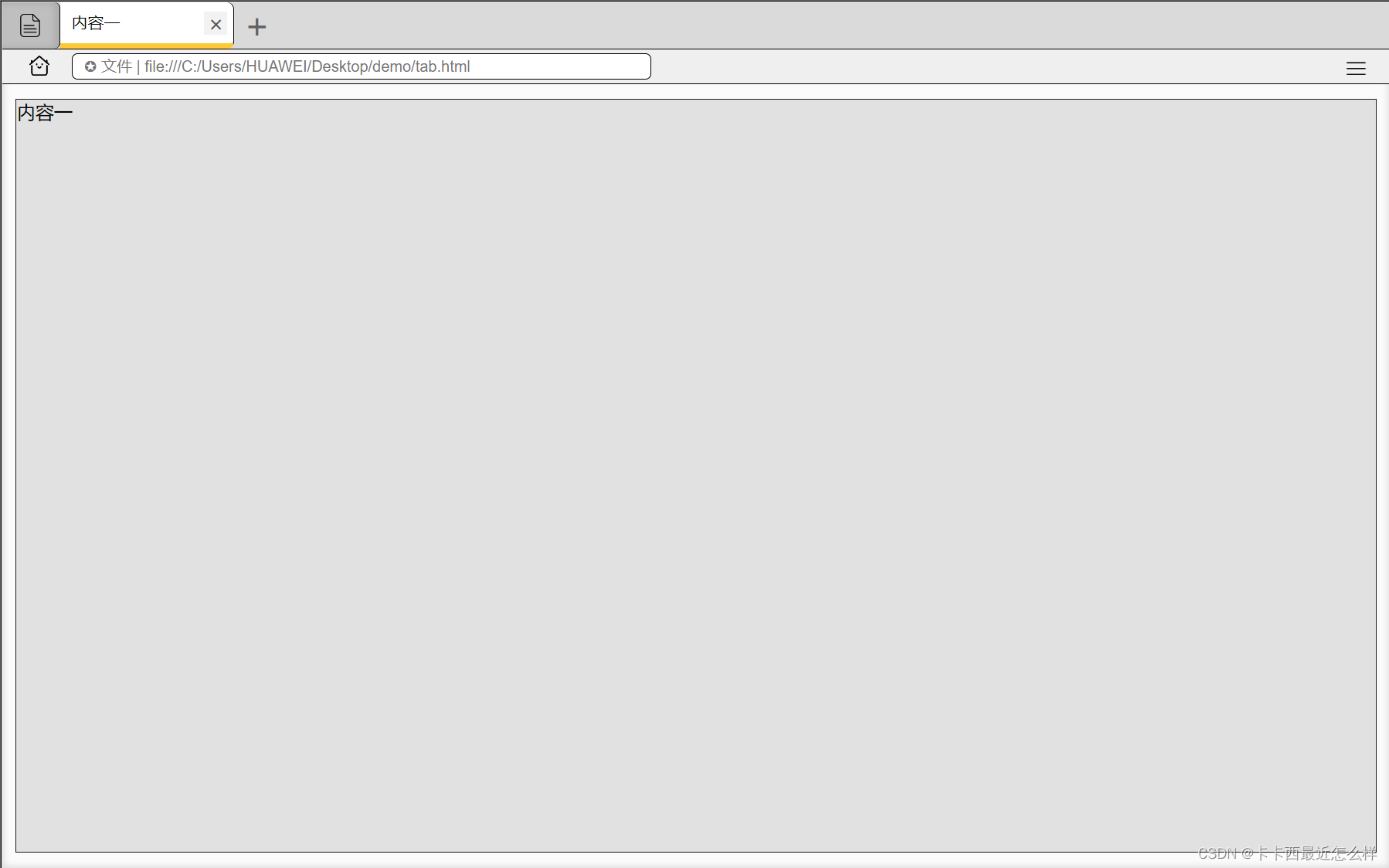
修改内容: 双击选项卡内容或下方文本内容均可以修改内容

二:功能实现剖析
本案例使用了面向对象,所有的功能均封装在了类内的函数中
2.1 创建类并实例化对象
- 首先创建类,构造函数的传参为我们模拟浏览器的最外层大盒子的类名:.out-box,后续获取到任何内容,标签,都是通过这个传进来的类名来进阶获取,例如或许获取的 li,section,ul 等等
- class Tab{
- constructor(classname){}
- }
- new Tab('.out-box')
2.2 获取标签与绑定事件
- 我们注意到为什么除了构造函数里获取的元素,还单独写了个函数来获取呢,这是因为我们有删除与添加tab选项卡的功能,如果我们只在构造函数里写了一次的话,就会导致添加或删除选项卡后出现不可预知的错误,这个函数内只获取 li,section,remove,span文本等对应了增加删除等这些时刻在变化的标签
- init函数内为绑定元素,循环绑定了点击切换选项卡事件,双击修改选项卡事件 (dblclick)等等
- 一定要注意 this 的指向问题,constructor中的this指向的是实例化对象,函数中的this指向的是函数的调用者
- 还需要注意绑定事件时不要给函数加括号,否则会不经过事件触发直接调用
- 在遍历的过程中,会给 i 添加一个 index 属性
- constructor(classname){
- that=this;
- this.main=document.querySelector(classname);
- this.add=this.main.querySelector('.banner-add');
- this.banner_ul=this.main.querySelector('.banner-ul');
- this.text_box=this.main.querySelector('.text-box');
- this.init();
- }
- //获取li与section
- update_Nodes(){
- this.lis=this.main.querySelectorAll('li');
- this.sections=this.main.querySelectorAll('section');
- this.remove=this.main.querySelectorAll('.banner-close');
- this.spans=this.main.querySelectorAll('.neirong');
- }
- //初始化
- init(){
- this.update_Nodes();
- for(var i=0;i<this.lis.length;i++){
- this.lis[i].index=i;
- this.lis[i].addEventListener('click',this.toggletab);
- this.remove[i].addEventListener('click',this.closetab);
- this.spans[i].addEventListener('dblclick',this.changetab_span);
- this.sections[i].addEventListener('dblclick',this.changetab_section);
- }
- this.add.addEventListener('click',this.addtab);
- }
2.3 清除样式函数
- 由于我们在执行过程中必定要多次运用排他思想来清除样式,所以我们可以将清除的代码单独封装到一个清除函数中
- 此处的this指向的是函数调用者
- 实现过程如下:遍历获取到的所有的 li ,然后清除每个 li 和 section 的类名
- clearclass(){
- for(var i=0;i<this.lis.length;i++){
- this.lis[i].className='';
- this.sections[i].className='';
- }
- }
2.4 切换选项卡
- that 代表的是构造函数里的 this,指向实例化的对象
- 此处的 this 指向的是切换函数的调用者,即绑定事件时的每一个被点击的 li,所以这个this 指向的是被触发的 li,及被触发的选项卡,于是给这个 this 添加类名,给 section 也同样添加类名(此类名内容为让其 display 变为 block 显示,默认为 none 隐藏)
- 需要注意的是 section 为什么是 that,不是 this 呢,因为此处的 this 代表 li,而我们需要的是构造函数内的 this,所以此处使用 that
- toggletab(){
- that.clearclass();
- this.className='li-current'
- that.sections[this.index].className='section-current'
- }
2.5 增加选项卡
- 我们拓展个增加元素的知识点:insertAdjacentHTML(),内部参数有 beforebegin(在父元素的前面添加),afterbegin(在父元素内部第一个添加),beforeend(在父元素内部最后一个位置添加),afterend(在父元素后面添加),最主要的是,这个方法可以直接添加字符串
- 实现过程我们先创建了两个元素,li 与 section,并添加了类名(因为想要新创建的选项卡直接显示),然后再使用上述该方法添加即可
- 对于最后又调用了一次 init 方法,我想大家就可以理解了,因为我们创建了元素之后,调用 init 可以重新获取以便我们的元素,重新再分别绑定各个事件,保证不会出错
- addtab(){
- that.clearclass();
- var li='<li class="li-current"><span class="neirong">新页面</span><span class="banner-close">×</span></li>';
- var text='<section class="section-current">新内容</section>'
- that.banner_ul.insertAdjacentHTML('beforeend',li);
- that.text_box.insertAdjacentHTML('beforeend',text);
- that.init();
- }
2.6 删除选项卡
- 由于我们的删除按钮在选项卡里面,所以我们点击叉号后会自发冒泡,冒泡到 li 时由于其也绑定了事件,会触发其显示,为了解决这一问题我们先解除冒泡 stopPropagation()
- 叉号没有 index 值,但是它父亲有啊,我们就把其对应的叉号拿到其父亲的 index,然后把这个索引值对应的 li 与 section 删除掉,删除自身我们可以使用 remove()
- 为了让关闭后让前一个元素显示,我们删除后让 index-- 然后让自减后 index 对应的 li 添加一个自动点击事件 click()
- 最后再调用 init 方法重新获取绑定元素事件
- closetab(event){
- event.stopPropagation()
- var index=this.parentNode.index;
- that.lis[index].remove();
- that.sections[index].remove();
- index--;
- that.lis[index] && that.lis[index].click()
- that.init();
- }
2.7 修改选项卡内容
- 修改的大致思路为:现将其原本内容拿来赋值给 str 变量,双击后将其 li 的内容改为一个输入框,输入框内容替换为 str 存放的内容,再调用方法 select(),让其输入框的内容全选起来,使用户输入任何内容都可以将原本内容替换掉
- 然后给 输入框绑定失焦的方法,失焦后将输入框的内容替换为文本即可
- //tab_span修改
- changetab_span(){
- var str=this.innerHTML;
- this.innerHTML='<input type="text" class="span-ipt">'
- var input= this.children[0];
- input.value=str;
- input.select();
- input.addEventListener('blur',function(){
- this.parentNode.innerHTML=this.value;
- })
- input.addEventListener('keydown',function(event){
- if(event.keyCode==13){
- this.blur();
- }
- })
- }
- //tab_section修改
- changetab_section(){
- var str=this.innerHTML;
- this.innerHTML='<input type="text" class="section-ipt">'
- var input= this.children[0];
- input.value=str;
- input.select();
- input.addEventListener('blur',function(){
- this.parentNode.innerHTML=this.value;
- })
- input.addEventListener('keydown',function(event){
- if(event.keyCode==13){
- this.blur();
- }
- })
- }
三:完整代码
html代码:
- <!DOCTYPE html>
- <html lang="en">
- <head>
- <meta charset="UTF-8">
- <meta http-equiv="X-UA-Compatible" content="IE=edge">
- <meta name="viewport" content="width=device-width, initial-scale=1.0">
- <title>tab栏切换案例</title>
- <link rel="stylesheet" href="./tab切换.css">
- </head>
- <body>
- <div class="out-box">
- <div class="banner-box">
- <div class="banner-left">
- <img src="./img/积分说明.png" alt="说明" title="说明" class="banner-img-say">
- </div>
- <ul class="banner-ul">
- <li class="li-current"><span class="neirong">内容一</span><span class="banner-close">×</span></li>
- <li ><span class="neirong">内容二</span><span class="banner-close">×</span></li>
- <li ><span class="neirong">内容三</span><span class="banner-close">×</span></li>
- </ul>
- <div class="banner-add">+</div>
- </div>
- <div class="src-box">
- <img src="./img/首页.png" alt="主菜单" title="主菜单" class="src-img-home">
- <img src="./img/更多.png" alt="更多" title="更多" class="src-img-more">
- <input type="text" class="src" placeholder="✪ 文件 | file:///C:/Users/HUAWEI/Desktop/demo/tab.html" >
- </div>
- <div class="text-box">
- <section class="section-current">内容一</section>
- <section >内容二</section>
- <section >内容三</section>
- </div>
- </div>
- <script src="./tab切换.js"></script>
- </body>
- </html>
css 代码:
- *{
- margin: 0;
- padding: 0;
- }
- body{
- background-color: rgb(104, 104, 104);
- }
- .out-box{
- box-sizing: border-box;
- width: 1200px;
- height: 750px;
- border:1px solid black;
- margin: 40px auto;
- background-color: rgb(251, 251, 251);
- box-shadow: 0 0 6px 2px rgb(220, 220, 220) inset;
- }
- .banner-box{
- width: 1198px;
- height: 40px;
- border-bottom: 1px solid black;
- background-color: rgb(218, 218, 218);
- }
- .banner-left{
- float: left;
- box-sizing: border-box;
- position: relative;
- width: 50px;
- height: 40px;
- background-color: rgb(191, 191, 191);
- box-shadow: -3px 0 6px 1px rgb(171, 171, 171) inset;
- border-top-right-radius: 5px;
- border-bottom-right-radius: 5px;
- border-right: 1px solid black;
- }
- .banner-img-say{
- box-sizing: border-box;
- position: absolute;
- float: left;
- top: 10px;
- left: 14px;
- width: 20px;
- height: 20px;
- }
- .banner-ul{
- position: relative;
- float: left;
- box-sizing: border-box;
- }
- li{
- box-sizing: border-box;
- float: left;
- width: 150px;
- height: 40px;
- border-right: 1px solid black;
- list-style: none;
- border-top-right-radius: 6px;
- border-bottom-right-radius: 6px;
- border-bottom: 5px solid rgb(150, 150, 150);
- position: relative;
- cursor: pointer;
- }
- .li-current{
- background-color: rgb(255, 255, 255);
- border-bottom: 5px solid rgb(255, 201, 52);
- }
- .neirong{
- float: left;
- box-sizing: border-box;
- width: 100px;
- height: 35px;
- line-height: 35px;
- padding-left: 10px;
- font-size: 14px;
- }
- .banner-close{
- box-sizing: border-box;
- float:right;
- width: 20px;
- height: 20px;
- line-height: 20px;
- text-align: center;
- margin-top: 8px;
- margin-right: 5px;
- cursor: pointer;
- font-size: 19px;
- padding-left: 1px;
- color: rgb(85, 85, 85);
- }
- .banner-close:hover{
- background-color: rgb(242, 242, 242);
- }
- .banner-add{
- box-sizing: border-box;
- float: left;
- width: 40px;
- height: 40px;
- padding-left: 9px;
- line-height: 38px;
- font-size: 30px;
- color: rgb(98, 98, 98);
- cursor: pointer;
- }
- .banner-add:hover{
- background-color: rgb(237, 237, 237);
- }
- .src-box{
- box-sizing: border-box;
- position: relative;
- width: 1198px;
- height: 30px;
- border-bottom: 1px solid black;
- background-color: rgb(239, 239, 239);
- }
- .src-img-home{
- box-sizing: border-box;
- width: 20px;
- height: 20px;
- position: absolute;
- top: 4.1px;
- left:22px;
- }
- .src-img-more{
- box-sizing: border-box;
- width: 35px;
- height: 25px;
- position: absolute;
- top: 3.5px;
- right:12px;
- }
- .src{
- box-sizing: border-box;
- position: absolute;
- top: 3px;
- left: 60px;
- width: 500px;
- height: 23px;
- outline: none;
- background-color: rgb(255, 255, 255);
- border: 1px solid black;
- border-radius: 5px;
- line-height: 35px;
- padding-left: 10px;
- color:rgb(105, 105, 105)
- }
- .text-box{
- box-sizing: border-box;
- margin: 12.5px auto;
- width: 98%;
- height: 87%;
- background-color: rgb(212, 212, 212);
- }
- section{
- box-sizing: border-box;
- width: 100%;
- height: 100%;
- border:1px solid rgb(26, 26, 26);
- background-color: rgb(225, 225, 225);
- display: none;
- }
- .section-current{
- display: block;
- }
- .span-ipt{
- width: 100px;
- height: 23px;
- outline: none;
- }
- .section-ipt{
- margin: 5px;
- width: 200px;
- height: 30px;
- outline: none;
- }
Java Script 代码:
- document.addEventListener('DOMContentLoaded',function(){
- document.addEventListener('selectstart',function(event){
- event.preventDefault()
- })
- document.addEventListener('contextmenu',function(event){
- event.preventDefault()
- })
- var that;
- class Tab{
- constructor(classname){
- that=this;
- this.main=document.querySelector(classname);
- this.add=this.main.querySelector('.banner-add');
- this.banner_ul=this.main.querySelector('.banner-ul');
- this.text_box=this.main.querySelector('.text-box');
- this.init();
- }
- //获取li与section
- update_Nodes(){
- this.lis=this.main.querySelectorAll('li');
- this.sections=this.main.querySelectorAll('section');
- this.remove=this.main.querySelectorAll('.banner-close');
- this.spans=this.main.querySelectorAll('.neirong');
- }
- //初始化
- init(){
- this.update_Nodes();
- for(var i=0;i<this.lis.length;i++){
- this.lis[i].index=i;
- this.lis[i].addEventListener('click',this.toggletab);
- this.remove[i].addEventListener('click',this.closetab);
- this.spans[i].addEventListener('dblclick',this.changetab_span);
- this.sections[i].addEventListener('dblclick',this.changetab_section);
- }
- this.add.addEventListener('click',this.addtab);
- }
- //tab切换
- toggletab(){
- that.clearclass();
- this.className='li-current'
- that.sections[this.index].className='section-current'
- }
- //排他清除
- clearclass(){
- for(var i=0;i<this.lis.length;i++){
- this.lis[i].className='';
- this.sections[i].className='';
- }
- }
- //tab关闭
- closetab(event){
- event.stopPropagation()
- var index=this.parentNode.index;
- that.lis[index].remove();
- that.sections[index].remove();
- index--;
- that.lis[index] && that.lis[index].click()
- that.init();
- }
- //tab添加
- addtab(){
- that.clearclass();
- var li='<li class="li-current"><span class="neirong">新页面</span><span class="banner-close">×</span></li>';
- var text='<section class="section-current">新内容</section>'
- that.banner_ul.insertAdjacentHTML('beforeend',li);
- that.text_box.insertAdjacentHTML('beforeend',text);
- that.init();
- }
- //tab_span修改
- changetab_span(){
- var str=this.innerHTML;
- this.innerHTML='<input type="text" class="span-ipt">'
- var input= this.children[0];
- input.value=str;
- input.select();
- input.addEventListener('blur',function(){
- this.parentNode.innerHTML=this.value;
- })
- input.addEventListener('keydown',function(event){
- if(event.keyCode==13){
- this.blur();
- }
- })
- }
- //tab_section修改
- changetab_section(){
- var str=this.innerHTML;
- this.innerHTML='<input type="text" class="section-ipt">'
- var input= this.children[0];
- input.value=str;
- input.select();
- input.addEventListener('blur',function(){
- this.parentNode.innerHTML=this.value;
- })
- input.addEventListener('keydown',function(event){
- if(event.keyCode==13){
- this.blur();
- }
- })
- }
- }
- new Tab('.out-box')
- })
-
相关阅读:
查找数组中第K大的元素
我的域名注册踩坑指南
docker 安装(unbuntu安装)
杂多酸离子液体[BMIM]3 PW12O40负载三乙烯四胺(TETA)功能化Fe3O4复合材料([BMIM]3 PW12O40/Fe3O4@TETA)
EN 13859-2防水用柔性薄板—CE认证
重庆自考本科可以选择全日制吗?
将 Cloudflare 页面与 IPFS 结合使用
进程信号详解
MyBatis #{} 和 ${} 的区别
C/C++整数和与均值 2019年9月电子学会青少年软件编程(C/C++)等级考试一级真题答案解析
- 原文地址:https://blog.csdn.net/weixin_52212950/article/details/125349004
- 最新文章
-
沪漂五周年了:我越来越迷茫了
Agentic Skill Routing 实战:别再把所有 Skill 塞进 AI Agent 上下文
MySQL-Seconds_behind_master的精度误差
[MAF预定义ChatClient中间件-03]CachingChatClient——利用缓存省钱省时间
AI的至暗历史:从万众期待到被政府撤资,AI的两次死亡徘徊
Agent OS :五种驯服不确定性的范式
PortSwigger SQL注入LAB11
数据库即时编译JIT
[Begin]AI Learn Data Day 0
深度学习进阶(二十七)现代 LLM 的核心架构设计其二:SwiGLU