-
通用分页02(前端)
今天所要讲的是关于前端的通用分页
目录
一、改造pagebean
所需条件:
①需要新增变量保存上一次查询条件;
②需要新增变量保存上一次请求地址;比如:http://localhost:8080/t280_page/book/search
③需要添加方法:获取最大页的页码;
④需要添加方法:获取下一页的页码;
⑤需要添加方法:获取上一页的页码;
⑥需要增加方法:初始化pagebean。
PageBean类:
- package com.ycx.util;
- import java.util.HashMap;
- import java.util.Map;
- import javax.servlet.http.HttpServletRequest;
- /**
- * 分页工具类
- *
- */
- public class PageBean {
- private int page = 1;// 页码
- private int rows = 10;// 页大小
- private int total = 0;// 总记录数
- private boolean pagination = true;// 是否分页
- // 需要新增变量保存上一次请求地址;比如:http://localhost:8080/t280_page/book/search
- private String url;
- // 需要新增变量保存上一次查询条件
- private Map<String,String[]> parameterMap = new HashMap<>();
- // 需要添加方法:获取最大页的页码
- public int maxPage() {
- return this.total % this.rows == 0 ?
- this.total / this.rows
- : this.total / this.rows+1;
- }
- // 需要添加方法:获取上一页的页码;
- public int previousPage() {
- return this.page > 1 ? this.page-1 : this.page;
- }
- // 需要添加方法:获取下一页的页码
- public int nextPage() {
- return this.page < this.maxPage()?
- this.page+1:this.page;
- }
- // 需要增加方法:初始化pagebean
- public void setRequest(HttpServletRequest req) {
- this.setPage(req.getParameter("page"));
- this.setRows(req.getParameter("rows"));
- this.setPagination(req.getParameter("pagination"));
- this.setUrl(req.getRequestURI().toString());
- this.setParameterMap(req.getParameterMap());
- }
- private void setPagination(String pagination) {
- if(StringUtils.isNotBlank(pagination)) {
- this.setPagination(!"false".equals(pagination));
- }
- }
- private void setRows(String rows) {
- if(StringUtils.isNotBlank(rows)) {
- this.setRows(Integer.valueOf(rows));
- }
- }
- public void setPage(String page) {
- if(StringUtils.isNotBlank(page)) {
- // set自动生成的方法
- this.setPage(Integer.valueOf(page));
- }
- }
- public String getUrl() {
- return url;
- }
- public void setUrl(String url) {
- this.url = url;
- }
- public Map<String, String[]> getParameterMap() {
- return parameterMap;
- }
- public void setParameterMap(Map<String, String[]> parameterMap) {
- this.parameterMap = parameterMap;
- }
- public PageBean() {
- super();
- }
- public int getPage() {
- return page;
- }
- public void setPage(int page) {
- this.page = page;
- }
- public int getRows() {
- return rows;
- }
- public void setRows(int rows) {
- this.rows = rows;
- }
- public int getTotal() {
- return total;
- }
- public void setTotal(int total) {
- this.total = total;
- }
- public void setTotal(String total) {
- this.total = Integer.parseInt(total);
- }
- public boolean isPagination() {
- return pagination;
- }
- public void setPagination(boolean pagination) {
- this.pagination = pagination;
- }
- /**
- * 获得起始记录的下标
- *
- * @return
- */
- public int getStartIndex() {
- return (this.page - 1) * this.rows;
- }
- @Override
- public String toString() {
- return "PageBean [page=" + page + ", rows=" + rows + ", total=" + total + ", pagination=" + pagination
- + ", url=" + url + ", parameterMap=" + parameterMap + "]";
- }
- }
然后新建一个 BookServlet :
- package com.ycx.web;
- import java.io.IOException;
- import java.util.Map;
- import javax.jws.WebService;
- import javax.servlet.ServletException;
- import javax.servlet.annotation.WebServlet;
- import javax.servlet.http.HttpServlet;
- import javax.servlet.http.HttpServletRequest;
- import javax.servlet.http.HttpServletResponse;
- import com.ycx.util.PageBean;
- @WebServlet("/book/search")
- public class BookServlet extends HttpServlet{
- @Override
- protected void doGet(HttpServletRequest req, HttpServletResponse resp) throws ServletException, IOException {
- doPost(req, resp);
- }
- @Override
- protected void doPost(HttpServletRequest req, HttpServletResponse resp) throws ServletException, IOException {
- PageBean pageBean=new PageBean();
- pageBean.setRequest(req);
- req.setAttribute("pagebean", pageBean);
- req.getRequestDispatcher("/bookList.jsp").forward(req, resp);
- }
- }
bookList.jsp代码:
- <%@ page language="java" contentType="text/html; charset=UTF-8"
- pageEncoding="UTF-8"%>
- <!DOCTYPE html PUBLIC "-//W3C//DTD HTML 4.01 Transitional//EN" "http://www.w3.org/TR/html4/loose.dtd">
- <html>
- <head>
- <meta http-equiv="Content-Type" content="text/html; charset=UTF-8">
- <title>Insert title here</title>
- </head>
- <body>
- ${pagebean }
- </body>
- </html>
运行结果:

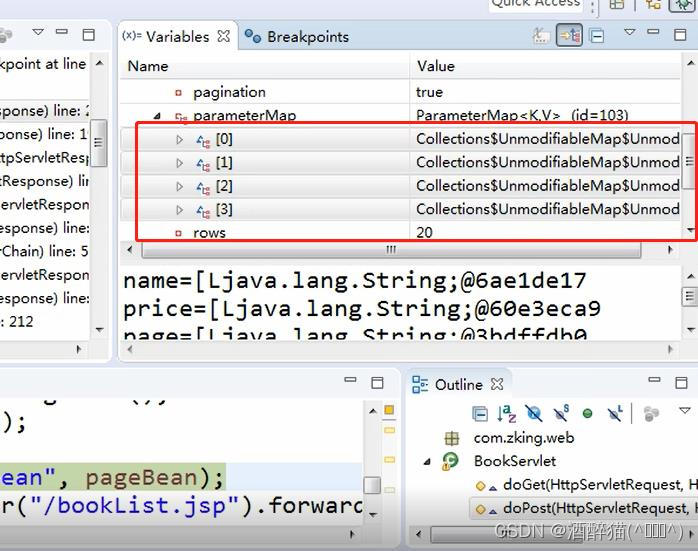
然后使用debug查看:
二、分页查询
接着我们以一个书籍列表为案例:
bookList.jsp代码:
- <%@ page language="java" contentType="text/html; charset=UTF-8"
- pageEncoding="UTF-8"%>
- <!DOCTYPE html PUBLIC "-//W3C//DTD HTML 4.01 Transitional//EN" "http://www.w3.org/TR/html4/loose.dtd">
- <html>
- <head>
- <meta http-equiv="Content-Type" content="text/html; charset=UTF-8">
- <link
- href="https://cdn.bootcdn.net/ajax/libs/twitter-bootstrap/4.5.0/css/bootstrap.css"
- rel="stylesheet">
- <script
- src="https://cdn.bootcdn.net/ajax/libs/twitter-bootstrap/4.5.0/js/bootstrap.js"></script>
- <title>书籍列表</title>
- <style type="text/css">
- .page-item input {
- padding: 0;
- width: 40px;
- height: 100%;
- text-align: center;
- margin: 0 6px;
- }
- .page-item input, .page-item b {
- line-height: 38px;
- float: left;
- font-weight: 400;
- }
- .page-item.go-input {
- margin: 0 10px;
- }
- </style>
- </head>
- <body>
- <form class="form-inline"
- action="${pageContext.request.contextPath }/book.action" method="post">
- <div class="form-group mb-2">
- <input type="text" class="form-control-plaintext" name="bname"
- placeholder="请输入书籍名称">
- </div>
- <button type="submit" class="btn btn-primary mb-2">查询</button>
- </form>
- <table class="table table-striped ">
- <thead>
- <tr>
- <th scope="col">书籍ID</th>
- <th scope="col">书籍名</th>
- <th scope="col">价格</th>
- </tr>
- </thead>
- <tbody>
- <tr>
- <td>1</td>
- <td>圣墟第1章</td>
- <td>1</td>
- </tr>
- <tr>
- <td>1</td>
- <td>圣墟第1章</td>
- <td>1</td>
- </tr>
- </tbody>
- </table>
- </body>
- </html>
目前我们的页面效果是这样的,数据暂时都是定死的,并且无法查看上一页、下一页、尾页:

前端首先要显示界面,自己建一个tag标签包(PageTag),然后通过上节课学得知识自定义标签来写一个page标签,最后在index界面中直接写出自己定义的标签就行。
接下来要给它新建一个PageTag类:
- package com.ycx.tag;
- import java.util.Map;
- import java.util.Map.Entry;
- import java.util.Set;
- import com.ycx.util.PageBean;
- import javax.servlet.jsp.JspException;
- import javax.servlet.jsp.JspWriter;
- import javax.servlet.jsp.tagext.BodyTagSupport;
- public class PageTag extends BodyTagSupport{
- private PageBean pageBean;
- public PageBean getPageBean() {
- return pageBean;
- }
- public void setPageBean(PageBean pageBean) {
- this.pageBean = pageBean;
- }
- @Override
- public int doStartTag() throws JspException {
- JspWriter out = pageContext.getOut();
- try {
- out.print(toHTML());
- } catch (Exception e) {
- // TODO Auto-generated catch block
- e.printStackTrace();
- }
- return super.doStartTag();
- }
- private String toHTML() {
- StringBuffer sb=new StringBuffer();
- // 隐藏的form表单,作用保存上一次查询条件
- sb.append("<form action='"+pageBean.getUrl()+"' id='pageBeanForm' method='post'>");
- sb.append(" <input type='hidden' name='page' value=''>");
- Map<String, String[]> parameterMap = pageBean.getParameterMap();
- if(parameterMap != null && parameterMap.size() > 0) {
- Set<Entry<String, String[]>> entrySet = parameterMap.entrySet();
- for (Entry<String, String[]> entry : entrySet) {
- String key = entry.getKey();// name/likes/page/rows
- String[] values = entry.getValue();
- if(!"page".equals(key)) {
- for (String value : values) {
- sb.append(" <input type='hidden' name='"+key+"' value='"+value+"'>");
- }
- }
- }
- }
- sb.append("</form>");
- // 分页条
- sb.append("<ul class='pagination justify-content-center'>");
- sb.append(" <li class='page-item "+(pageBean.getPage() == 1 ? "disabled" : "")+"'><a class='page-link'");
- sb.append(" href='javascript:gotoPage(1)'>首页</a></li>");
- sb.append(" <li class='page-item "+(pageBean.getPage() == 1 ? "disabled" : "")+"'><a class='page-link'");
- sb.append(" href='javascript:gotoPage("+pageBean.previousPage()+")'><</a></li>");
- sb.append(" <li class='page-item active'><a class='page-link' href='#'>"+pageBean.getPage()+"</a></li>");
- sb.append(" <li class='page-item "+(pageBean.getPage() == pageBean.maxPage() ? "disabled" : "")+"'><a class='page-link' href='javascript:gotoPage("+pageBean.nextPage()+")'>></a></li>");
- sb.append(" <li class='page-item "+(pageBean.getPage() == pageBean.maxPage() ? "disabled" : "")+"'><a class='page-link' href='javascript:gotoPage("+pageBean.maxPage()+")'>尾页</a></li>");
- sb.append(" <li class='page-item go-input'><b>到第</b><input class='page-link'");
- sb.append(" type='text' id='skipPage' name='' /><b>页</b></li>");
- sb.append(" <li class='page-item go'><a class='page-link'");
- sb.append(" href='javascript:skipPage()'>确定</a></li>");
- sb.append(" <li class='page-item'><b>共"+pageBean.getTotal()+"条</b></li>");
- sb.append("</ul>");
- // 分页js代码
- sb.append("<script type='text/javascript'>");
- sb.append(" function gotoPage(page) {");
- sb.append(" document.getElementById('pageBeanForm').page.value = page;");
- sb.append(" document.getElementById('pageBeanForm').submit();");
- sb.append(" }");
- sb.append(" function skipPage() {");
- sb.append(" var page = document.getElementById('skipPage').value;");
- sb.append(" if (!page || isNaN(page) || parseInt(page) < 1");
- sb.append(" || parseInt(page) > "+pageBean.maxPage()+") {");
- sb.append(" alert('请输入1~"+pageBean.maxPage()+"的数字');");
- sb.append(" return;");
- sb.append(" }");
- sb.append(" gotoPage(page);");
- sb.append(" }");
- sb.append("</script>");
- return sb.toString();
- }
- }
继承 BodyTagSupport类,用stringbuffer中的append方法来实现页面展示效果。
最后在index中写好 <y:page></y:page>即可。
看ycx.tld代码:
- <?xml version="1.0" encoding="UTF-8" ?>
- <taglib xmlns="http://java.sun.com/xml/ns/j2ee"
- xmlns:xsi="http://www.w3.org/2001/XMLSchema-instance"
- xsi:schemaLocation="http://java.sun.com/xml/ns/j2ee http://java.sun.com/xml/ns/j2ee/web-jsptaglibrary_2_0.xsd"
- version="2.0">
- <description>JSTL 1.1 core library</description>
- <display-name>JSTL core</display-name>
- <tlib-version>1.1</tlib-version>
- <short-name>y</short-name>
- <uri>http://ycx.com</uri>
- <validator>
- <description>
- Provides core validation features for JSTL tags.
- </description>
- <validator-class>
- org.apache.taglibs.standard.tlv.JstlCoreTLV
- </validator-class>
- </validator>
- <tag>
- <name>page</name>
- <tag-class>com.ycx.tag.PageTag</tag-class>
- <body-content>JSP</body-content>
- <attribute>
- <name>pageBean</name>
- <required>true</required>
- <rtexprvalue>true</rtexprvalue>
- </attribute>
- </tag>
- </taglib>
分页得核心思想:当点击下一页时,有许多参数是不变的,比如像名字,行数,以及总页数,但是其中有一个参数要变,那就是page(页数)
优化PageBean代码:
- package com.ycx.util;
- import java.util.HashMap;
- import java.util.Map;
- import javax.servlet.http.HttpServletRequest;
- /**
- * 分页工具类
- *
- */
- public class PageBean {
- private int page = 1;// 页码
- private int rows = 10;// 页大小
- private int total = 0;// 总记录数
- private boolean pagination = true;// 是否分页
- // 需要新增变量保存上一次请求地址;比如:http://localhost:8080/t280_page/book/search
- private String url;
- // 需要新增变量保存上一次查询条件
- private Map<String,String[]> parameterMap = new HashMap<>();
- // 需要添加方法:获取最大页的页码
- public int maxPage() {
- return this.total % this.rows == 0 ?
- this.total / this.rows
- : this.total / this.rows+1;
- }
- // 需要添加方法:获取上一页的页码;
- public int previousPage() {
- return this.page > 1 ? this.page-1 : this.page;
- }
- // 需要添加方法:获取下一页的页码
- public int nextPage() {
- return this.page < this.maxPage()?
- this.page+1:this.page;
- }
- // 需要增加方法:初始化pagebean
- public void setRequest(HttpServletRequest req) {
- this.setPage(req.getParameter("page"));
- this.setRows(req.getParameter("rows"));
- this.setPagination(req.getParameter("pagination"));
- this.setUrl(req.getRequestURI().toString());
- this.setParameterMap(req.getParameterMap());
- }
- private void setPagination(String pagination) {
- if(StringUtils.isNotBlank(pagination)) {
- this.setPagination(!"false".equals(pagination));
- }
- }
- private void setRows(String rows) {
- if(StringUtils.isNotBlank(rows)) {
- this.setRows(Integer.valueOf(rows));
- }
- }
- public void setPage(String page) {
- if(StringUtils.isNotBlank(page)) {
- // set自动生成的方法
- this.setPage(Integer.valueOf(page));
- }
- }
- public String getUrl() {
- return url;
- }
- public void setUrl(String url) {
- this.url = url;
- }
- public Map<String, String[]> getParameterMap() {
- return parameterMap;
- }
- public void setParameterMap(Map<String, String[]> parameterMap) {
- this.parameterMap = parameterMap;
- }
- public PageBean() {
- super();
- }
- public int getPage() {
- return page;
- }
- public void setPage(int page) {
- this.page = page;
- }
- public int getRows() {
- return rows;
- }
- public void setRows(int rows) {
- this.rows = rows;
- }
- public int getTotal() {
- return total;
- }
- public void setTotal(int total) {
- this.total = total;
- }
- public void setTotal(String total) {
- this.total = Integer.parseInt(total);
- }
- public boolean isPagination() {
- return pagination;
- }
- public void setPagination(boolean pagination) {
- this.pagination = pagination;
- }
- /**
- * 获得起始记录的下标
- *
- * @return
- */
- public int getStartIndex() {
- return (this.page - 1) * this.rows;
- }
- @Override
- public String toString() {
- return "PageBean [page=" + page + ", rows=" + rows + ", total=" + total + ", pagination=" + pagination
- + ", url=" + url + ", parameterMap=" + parameterMap + "]";
- }
- }
紧接着在bookList.jsp内导入我的y标签和c标签:
- <%@taglib uri="http://ycx.com" prefix="y" %>
- <%@taglib uri="http://java.sun.com/jsp/jstl/core" prefix="c"%>
接着写一个BookServlet:
- package com.ycx.web;
- import java.io.IOException;
- import java.util.List;
- import java.util.Map;
- import javax.jws.WebService;
- import javax.servlet.ServletException;
- import javax.servlet.annotation.WebServlet;
- import javax.servlet.http.HttpServlet;
- import javax.servlet.http.HttpServletRequest;
- import javax.servlet.http.HttpServletResponse;
- import com.ycx.dao.BookDao;
- import com.ycx.entity.Book;
- import com.ycx.util.PageBean;
- @WebServlet("/book/search")
- public class BookServlet extends HttpServlet{
- @Override
- protected void doGet(HttpServletRequest req, HttpServletResponse resp) throws ServletException, IOException {
- doPost(req, resp);
- }
- @Override
- protected void doPost(HttpServletRequest req, HttpServletResponse resp) throws ServletException, IOException {
- // req.getParameter("name");
- // req.getParameterValues("likes");
- <input name="aa" value="">
- // Map<String, String[]> parameterMap = req.getParameterMap();//name
- //
- PageBean pageBean=new PageBean();
- pageBean.setRequest(req);
- BookDao bookDao=new BookDao();
- Book book=new Book();
- book.setBname(req.getParameter("bname"));
- try {
- List<Book> books = bookDao.list2(book, pageBean);
- req.setAttribute("books", books);
- } catch (Exception e) {
- // TODO Auto-generated catch block
- e.printStackTrace();
- }
- req.setAttribute("pagebean", pageBean);
- req.getRequestDispatcher("/bookList.jsp").forward(req, resp);
- }
- }
再利用c:forEach标签把数据遍历出来,展示在页面上去,
bookList.jsp代码:
- <%@ page language="java" contentType="text/html; charset=UTF-8"
- pageEncoding="UTF-8"%>
- <%@taglib uri="http://ycx.com" prefix="y" %>
- <%@taglib uri="http://java.sun.com/jsp/jstl/core" prefix="c"%>
- <!DOCTYPE html PUBLIC "-//W3C//DTD HTML 4.01 Transitional//EN" "http://www.w3.org/TR/html4/loose.dtd">
- <html>
- <head>
- <meta http-equiv="Content-Type" content="text/html; charset=UTF-8">
- <link
- href="https://cdn.bootcdn.net/ajax/libs/twitter-bootstrap/4.5.0/css/bootstrap.css"
- rel="stylesheet">
- <script
- src="https://cdn.bootcdn.net/ajax/libs/twitter-bootstrap/4.5.0/js/bootstrap.js"></script>
- <title>书籍列表</title>
- <style type="text/css">
- .page-item input {
- padding: 0;
- width: 40px;
- height: 100%;
- text-align: center;
- margin: 0 6px;
- }
- .page-item input, .page-item b {
- line-height: 38px;
- float: left;
- font-weight: 400;
- }
- .page-item.go-input {
- margin: 0 10px;
- }
- </style>
- </head>
- <body>
- <form class="form-inline"
- action="${pageContext.request.contextPath }/book/search" method="post">
- <div class="form-group mb-2">
- <input type="text" class="form-control-plaintext" name="bname"
- placeholder="请输入书籍名称">
- </div>
- <button type="submit" class="btn btn-primary mb-2">查询</button>
- </form>
- <table class="table table-striped ">
- <thead>
- <tr>
- <th scope="col">书籍ID</th>
- <th scope="col">书籍名</th>
- <th scope="col">价格</th>
- </tr>
- </thead>
- <tbody>
- <c:forEach items="${books }" var="b">
- <tr>
- <td>${b.bid }</td>
- <td>${b.bname }</td>
- <td>${b.price }</td>
- </tr>
- </c:forEach>
- </tbody>
- </table>
- <y:page pageBean="${pagebean }"></y:page>
- </body>
- </html>
运行效果如下:

但是我们还面临一个问题,就是搜索时乱码,
比如搜索“圣墟”,如下图所示:

搜索出来是乱码的情况。
那么我们就要去解决,我们需在EncodingFiter类里面去处理:
- package com.ycx.util;
- import java.io.IOException;
- import java.util.Iterator;
- import java.util.Map;
- import java.util.Set;
- import javax.servlet.Filter;
- import javax.servlet.FilterChain;
- import javax.servlet.FilterConfig;
- import javax.servlet.ServletException;
- import javax.servlet.ServletRequest;
- import javax.servlet.ServletResponse;
- import javax.servlet.annotation.WebFilter;
- import javax.servlet.http.HttpServletRequest;
- import javax.servlet.http.HttpServletResponse;
- /**
- * 中文乱码处理
- *
- */
- @WebFilter("/book/*")
- public class EncodingFiter implements Filter {
- private String encoding = "UTF-8";// 默认字符集
- public EncodingFiter() {
- super();
- }
- public void destroy() {
- }
- public void doFilter(ServletRequest request, ServletResponse response,
- FilterChain chain) throws IOException, ServletException {
- HttpServletRequest req = (HttpServletRequest) request;
- HttpServletResponse res = (HttpServletResponse) response;
- // 中文处理必须放到 chain.doFilter(request, response)方法前面
- res.setContentType("text/html;charset=" + this.encoding);
- if (req.getMethod().equalsIgnoreCase("post")) {
- req.setCharacterEncoding(this.encoding);
- } else {
- Map map = req.getParameterMap();// 保存所有参数名=参数值(数组)的Map集合
- Set set = map.keySet();// 取出所有参数名
- Iterator it = set.iterator();
- while (it.hasNext()) {
- String name = (String) it.next();
- String[] values = (String[]) map.get(name);// 取出参数值[注:参数值为一个数组]
- for (int i = 0; i < values.length; i++) {
- values[i] = new String(values[i].getBytes("ISO-8859-1"),
- this.encoding);
- }
- }
- }
- chain.doFilter(request, response);
- }
- public void init(FilterConfig filterConfig) throws ServletException {
- String s = filterConfig.getInitParameter("encoding");// 读取web.xml文件中配置的字符集
- if (null != s && !s.trim().equals("")) {
- this.encoding = s.trim();
- }
- }
- }
我们再去用DeBug测试,搜索“圣墟”:

就解决了~
首页:

尾页:
总结:通用分页把它简单化就分成前端和后台,其中公用的写到一个类里面就能减少代码量和大量时间,要抓住核心思想,这样才能事半功倍!我们下期再见叭~
-
相关阅读:
【代码精读】optee的Early TA介绍–如何添加一个Early TA
指针函数、函数指针、指针函数数组
C++继承总结(下)——菱形继承
机器学习算法 —— 1. K近邻算法
Flutter高仿微信-第29篇-单聊
龙芯指令系统架构及其软件生态建设
抖音视频提取软件怎么用|抖音数据抓取工具
构造函数原型prototype
zemax---单透镜设计实例01
学位类型有哪几种,专业学位和学术型学位区别
- 原文地址:https://blog.csdn.net/weixin_65808248/article/details/125414711
- 最新文章
-
沪漂五周年了:我越来越迷茫了
Agentic Skill Routing 实战:别再把所有 Skill 塞进 AI Agent 上下文
MySQL-Seconds_behind_master的精度误差
[MAF预定义ChatClient中间件-03]CachingChatClient——利用缓存省钱省时间
AI的至暗历史:从万众期待到被政府撤资,AI的两次死亡徘徊
Agent OS :五种驯服不确定性的范式
PortSwigger SQL注入LAB11
数据库即时编译JIT
[Begin]AI Learn Data Day 0
深度学习进阶(二十七)现代 LLM 的核心架构设计其二:SwiGLU