-
05 Mybatis官方代码生成器的使用
Mybatis官方代码生成器的使用

1.引入Mybatis依赖
<dependency> <groupId>org.mybatis.spring.boot</groupId> <artifactId>mybatis-spring-boot-starter</artifactId> <version>2.2.2</version> </dependency>- 1
- 2
- 3
- 4
- 5
2.引入maven插件 --> 自动生成代码插件
<build> <plugins> <!-- mybatis generator 自动生成代码插件 --> <plugin> <groupId>org.mybatis.generator</groupId> <artifactId>mybatis-generator-maven-plugin</artifactId> <version>1.4.0</version> <configuration> <!-- 配置文件的位置--> <configurationFile>src/main/resources/generator/generator-config.xml</configurationFile> <overwrite>true</overwrite> <verbose>true</verbose> </configuration> <dependencies> <dependency> <groupId>mysql</groupId> <artifactId>mysql-connector-java</artifactId> <version>8.0.22</version> </dependency> </dependencies> </plugin> </plugins> </build>- 1
- 2
- 3
- 4
- 5
- 6
- 7
- 8
- 9
- 10
- 11
- 12
- 13
- 14
- 15
- 16
- 17
- 18
- 19
- 20
- 21
- 22
- 23
3.创建生成器配置文件
generator-config.xml
位置: src/main/resources/generator/generator-config.xml
<?xml version="1.0" encoding="UTF-8"?> <!DOCTYPE generatorConfiguration PUBLIC "-//mybatis.org//DTD MyBatis Generator Configuration 1.0//EN" "http://mybatis.org/dtd/mybatis-generator-config_1_0.dtd"> <generatorConfiguration> <context id="Mysql" targetRuntime="MyBatis3" defaultModelType="flat"> <!-- 自动检查关键字,为关键字增加反引号 --> <property name="autoDelimitKeywords" value="true"/> <property name="beginningDelimiter" value="`"/> <property name="endingDelimiter" value="`"/> <!--覆盖生成XML文件--> <plugin type="org.mybatis.generator.plugins.UnmergeableXmlMappersPlugin" /> <!-- 生成的实体类添加toString()方法 --> <plugin type="org.mybatis.generator.plugins.ToStringPlugin"/> <!-- 不生成注释 --> <commentGenerator> <property name="suppressAllComments" value="true"/> </commentGenerator> <jdbcConnection driverClass="com.mysql.cj.jdbc.Driver" connectionURL="jdbc:mysql://localhost/2022_wikidev?characterEncoding=utf-8" userId="2022_wikidev" // 对应username password="317311">// 密码 </jdbcConnection> <!-- domain类的位置 --> <javaModelGenerator targetProject="src\main\java" targetPackage="look.word.wiki.domain"/> <!-- mapper xml的位置 --> <sqlMapGenerator targetProject="src\main\resources" targetPackage="mapper"/> <!-- mapper类的位置 --> <javaClientGenerator targetProject="src\main\java" targetPackage="look.word.wiki.mapper" type="XMLMAPPER"/> <!--<table tableName="demo" domainObjectName="Demo"/>--> <!--<table tableName="ebook"/>--> <!--<table tableName="category"/>--> <!--<table tableName="doc"/>--> <!--<table tableName="content"/>--> <!--<table tableName="user"/>--> <!-- 需要生成的表--> <table tableName="ebook"/> </context> </generatorConfiguration>- 1
- 2
- 3
- 4
- 5
- 6
- 7
- 8
- 9
- 10
- 11
- 12
- 13
- 14
- 15
- 16
- 17
- 18
- 19
- 20
- 21
- 22
- 23
- 24
- 25
- 26
- 27
- 28
- 29
- 30
- 31
- 32
- 33
- 34
- 35
- 36
- 37
- 38
- 39
- 40
- 41
- 42
- 43
- 44
- 45
- 46
- 47
- 48
- 49
- 50
- 51
- 52
- 53
4.启动maven插件构建
1 点击Edit Configurations…
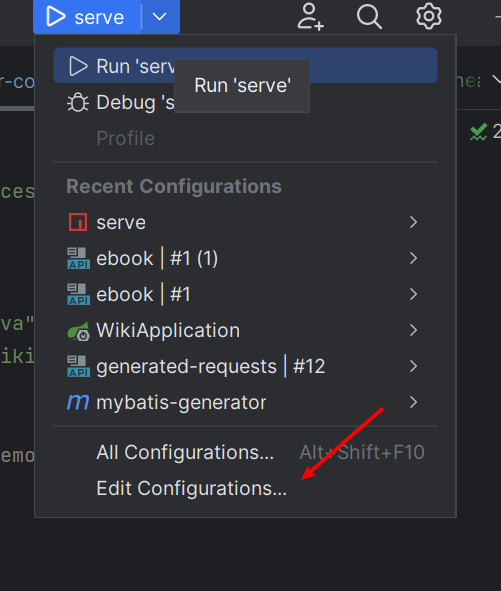
2. 点击+ 找到maven 点击

3 输入命令 保存即可
mybatis-generator:generate -e

4.启动插件即可
跟启动项目一样 注意 每次启动 都要去 配置文件修改表名哦
-
相关阅读:
JVM中的STW(Stop The World)
【华为机试真题 Python实现】统计文本数量
#成为 SQL 大师#groupby 中不能有聚合函数
选择合适的 DevOps 工具,从理解 DevOps 开始
添加Java服务
java技术:nacos
全面了解SpringBoot拦截器
Linux pidof
重装系统后如何在win10系统打开命令行窗口
(Matalb时序预测)WOA-BP鲸鱼算法优化BP神经网络的多维时序回归预测
- 原文地址:https://blog.csdn.net/qq_50975965/article/details/125428099