-
DBSCAN聚类算法实用案例
4、DBSCAN 的参数选择
- eps 设置得非常小,则意味着没有点是核心样本,可能会导致所有点被标记为噪声
- eps 设置得非常大,可能会导致所有点形成单个簇。
- 虽然不需要显示设置簇的个数,但设置 eps 可以隐式地控制找到 eps 的个数。
- 使用 StandarScaler 或 MinMaxScaler 对数据进行缩放,有时更容易找到 eps 的较好取值。因为使用缩放技术将确保所有特征具有相似的范围。
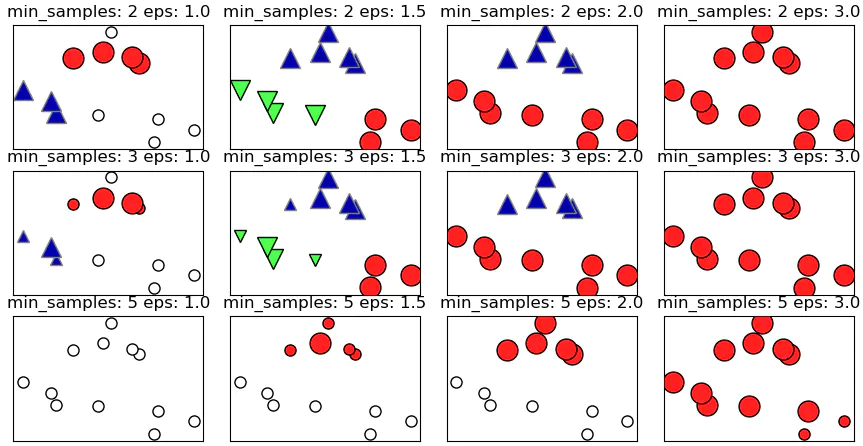
属于簇的点是实心,噪声点则显示为空心,核心样本点显示为较大的标记,而边界点则显示为较小的标记.png from sklearn.cluster import DBSCAN from sklearn.datasets import make_blobs import matplotlib.pyplot as plt import mglearn X,y=make_blobs(random_state=0,n_samples=12) dbscan=DBSCAN() clusters=dbscan.fit_predict(X) # 都被标记为噪声 print('Cluster memberships:\n{}'.format(clusters)) mglearn.plots.plot_dbscan() plt.show()- 1
- 2
- 3
- 4
- 5
- 6
- 7
- 8
- 9
- 10
- 11
- 12
- 13
5、Scikit-learn中的DBSCAN的使用
def __init__(self, eps=0.5, min_samples=5, metric='euclidean', metric_params=None, algorithm='auto', leaf_size=30, p=None, n_jobs=1):- 1
- 2
- 3
核心参数:
- eps: float,ϵ-邻域的距离阈值
- min_samples :int,样本点要成为核心对象所需要的 ϵ-邻域的样本数阈值
属性:
- core_sample_indices_ : 核心点的索引,因为labels_不能区分核心点还是边界点,所以需要用这个索引确定核心点
- components_:训练样本的核心点
- labels_:每个点所属集群的标签,-1代表噪声点
参考链接:
[1] DBSCAN 算法 2019.1 -
相关阅读:
9.3 【MySQL】系统表空间
【QT】ROS2 Humble联合使用QT教程
Visual Studio Code配置C/C++开发环境
vue路由&nodejs环境搭建
利用Matlab进行图像的数字化
display详解
前端开发调试技巧
【SpringBoot3.x教程03】SpringBoot自动配置详解
面试-01
如何实现 MongoDB join mysql
- 原文地址:https://blog.csdn.net/weixin_46713695/article/details/125425151