-
隐藏element-ui中tree懒加载叶子节点checkbox(分页懒加载效果)
根据最新的工作需求中指示,要求Tree树组件为lazy懒加载,且能够进行复选框选择,这个实现简单,设置
show-checkbox即可,若此处要求叶子节点也不能包含复选框,就有些困扰了- 首先按照官网,拷贝tree树组件代码,设置完
show-checkbox,图中查看更多为叶子节点,且设置数据节点属性为disabled
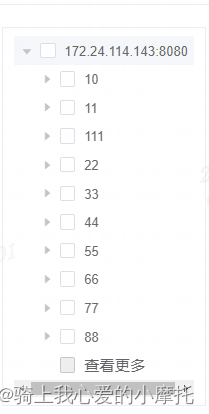
<el-tree ref="treeRef" class="treeDom" lazy show-checkbox :props="defaultProps" highlight-current="true" :load="lazyLoadMore" :expand-on-click-node="false" :default-expanded-keys="defaultExpandKeys" :default-checked-keys="defaultCheckedKeys" node-key="id" @node-expand="handleNodeExpand" @node-collapse="handleNodeCollapse" @node-click="handleNodeClick" @check="handleCheck" > <div slot-scope="{ node, data }" class="custom-tree-node"> <!-- 查看更多 --> <span v-if="data.id ==='loadmore'" class="tree-node loadmore" @click="loadMoreNode(node,data)" > <el-link>{{ node.label }}</el-link> </span> <!-- 数据到底了 --> <span v-if="data.id ==='disabledload'" class="tree-node no-data" style="color: #999; cursor: auto;" > {{ node.label }} </span> <!-- 普通节点 --> <el-tooltip class="item" effect="light" placement="right-start" > <div slot="content" style="max-width: 300px;"> {{ node.label }} </div> <span v-if="data.id !=='loadmore' && data.id!=='disabledload'" class="span-tree-node" @click="loadMoreNode(node,data)">{{ node.label }}</span> </el-tooltip> </div> </el-tree>- 1
- 2
- 3
- 4
- 5
- 6
- 7
- 8
- 9
- 10
- 11
- 12
- 13
- 14
- 15
- 16
- 17
- 18
- 19
- 20
- 21
- 22
- 23
- 24
- 25
- 26
- 27
- 28
- 29
- 30
- 31
- 32
- 33
- 34
- 35
- 36
- 37
- 38
- 39
- 40
- 41
- 42
- 43
- 44
- 45
- 46
- 47
css样式如下:
::v-deep .span-tree-node { width: 120px; position: absolute; text-overflow: ellipsis; overflow: hidden; color: #696969; top: 50%; transform: translateY(-50%); } ::v-deep .treeDom { width: 100%; overflow-x: auto; .custom-tree-node { width: 100% !important; position: relative; }- 1
- 2
- 3
- 4
- 5
- 6
- 7
- 8
- 9
- 10
- 11
- 12
- 13
- 14
- 15
- 16
- 17
- 18
- 由于属性是
isleaf,所以lazy状态下叶子节点不会有加载目录符号,但此时,有个禁用复选框,现在只需要对它设置样式即可
::v-deep .el-tree .el-tree-node:last-child { .el-tree-node__content .is-leaf +.el-checkbox.is-disabled{ display: none; } .el-tree-node__content.is-not-clickable{ cursor: pointer; } }- 1
- 2
- 3
- 4
- 5
- 6
- 7
- 8

3. 分页懒加载实现功能也比较简单,可以复写tree树自带的load方法,load方法内携带两个返回参数,一个是node,一个是resolve,即懒加载数据必须是通过resolve就是return 将数据带回async lazyLoadMore(node, resolve, parentNode = []) { let id = node?.data?.id, pre = node?.data?.name, data = [], arrId = ''; if (node.level === 0) { id = this.paramNode.parent; return resolve([{id: id, name: id, leaf: false}]); } if (node.level === 1) { pre = ''; } // 节点各自的resolve this.funcResolve.push({id: id, resolve: resolve}); this.funcResolve = this.funcResolve.filter((item, index, self)=>{ return self.findIndex(x=>x.id === item.id) === index; }); // 判断获取分页查询的pre参数 if (id && id.indexOf('/') > -1) { let arrIndex = id.lastIndexOf('/') + 1; arrId = id.substring(arrIndex); if (arrId === pre) pre = ''; } // lazy加载查询接口 const { data: {items} } = await getInterfaceTreeDictory({parent: id || '', pre: pre || ''}); data = items.map(({interface_url: name, full_interface_url: id}) => { return {name, id}; }); // 翻页信息添加 if (data.length >= this.pageSize) { let nearName = data[data.length - 1].name; data.push({name: '查看更多', id: 'loadmore', nearName: nearName, leaf: true, disabled: true}); } // 查看更多加载需根据各自的resolve加载数组数据 if (parentNode && parentNode.length > 0) { parentNode.push(...data); return resolve(parentNode); } else { return resolve(data); } }, // 查看更多事件点击 loadMoreNode(node, data) { if (data.id === 'loadmore') { let nodeParentKey = node.parent.key ? node.parent.key : this.paramNode.parent; let childNode = { data: { id: nodeParentKey, name: data.nearName } }, resolve = ''; let parentNode = node.parent.childNodes.map(({key: id, label: name})=>{ return { name, id }; }); console.log(parentNode); // 剔除自定义查看更多option数据 if (parentNode.length > 0) { parentNode = parentNode.slice(0, -1); } // 选取resolve返回 if (parentNode.length <= this.pageSize) { resolve = this.funcResolve.filter((item)=>{ return item.id === nodeParentKey; }); // 调用原生Tree load方法 this.$refs.treeRef.load(childNode, resolve[0].resolve, parentNode); } } },- 1
- 2
- 3
- 4
- 5
- 6
- 7
- 8
- 9
- 10
- 11
- 12
- 13
- 14
- 15
- 16
- 17
- 18
- 19
- 20
- 21
- 22
- 23
- 24
- 25
- 26
- 27
- 28
- 29
- 30
- 31
- 32
- 33
- 34
- 35
- 36
- 37
- 38
- 39
- 40
- 41
- 42
- 43
- 44
- 45
- 46
- 47
- 48
- 49
- 50
- 51
- 52
- 53
- 54
- 55
- 56
- 57
- 58
- 59
- 60
- 61
- 62
- 63
- 64
- 65
- 66
- 67
- 68
- 69
- 70
- 71
- 72
代码内有一点需要注意,即每次查询接口的时候,和后台约定的规则是:不包含分页,需要传值两个参数,一个是parent,即当前节点的上一级所有层级拼接,另一个是pre即当前节点的子集,若第一次加载,pre可为空,若
查看更多再一次加载pre为上一次加载数据data的最后一个元素id,作为传参;eg: a、此时需要点击加载
js,即 GET请求下param参数如下parent=172.24.114.143:8080/js&pre=
b、此时继续点击
查看更多,则传入parent=172.24.114.143:8080/js&pre=jquery-showloading
- 到此代码和效果都正常了,感觉不错的话,给个关注和点赞吧~如有需要可私聊
- 首先按照官网,拷贝tree树组件代码,设置完
-
相关阅读:
商城小程序开发|二级分销裂变商城小程序怎么赚钱?
Mojo语言的运用
spring cloud config pattern 用法
SpringBoot如何整合Mybatis Plus呢?
基于单片机的视觉导航小车设计
简易机器学习笔记(十一)opencv 简易使用-人脸识别、分类任务
最全的 ES 重点内容整理(上)
19 | 如何搞清楚事务、连接池的关系?正确配置是怎样的
css的表格属性以及边框属性
掩码和反掩码的使用场景
- 原文地址:https://blog.csdn.net/cxwtsh123/article/details/125407721