-
【React】6、图文详解react组件生命周期——React v16.8
系列文章目录
👏欢迎来到我的React系列文章
🍭本系列文章从React入门开始,涵盖了React的一切基础,属于是从零开始的一个系列
🍭文章会以图文结合-动图-代码实现-解释代码的形式带领大家走进React的世界
🍭持续更新中~希望大家能够喜欢,系列文章👉React–从基础到实战
🌈博客主页👉codeMak1r的博客
👉关注✨点赞👍收藏📂
VSCode关于React的插件

使用该插件可以实现生命周期函数的代码联想功能

前言
之前我们引入了生命周期这个概念👉点这里查看
本文讲解的生命周期为React v16.8 旧版,新版生命周期是基于旧版的基础之上的,学好了旧的,新的生命周期掌握起来也轻而易举了~新版生命周期请看本系列下一篇文章。生命周期流程图(旧)

组件挂载时:constructor => componentWillMount =>
render=> componentDidMount => componentWillUnmount组件更新时(setState):shouldComponentUpdate => componentWillUpdate =>
render=> componentDidUpdate => componentWillUnmount组件强制更新(forceUpdate): (绕开阀门)=>componentWillUpdate =>
render=> componentDidUpdate => componentWillUnmount
接下来我会就这三种情况以及组件传值情况下,对生命周期一一分析✅
生命周期示例(旧)
示例效果:
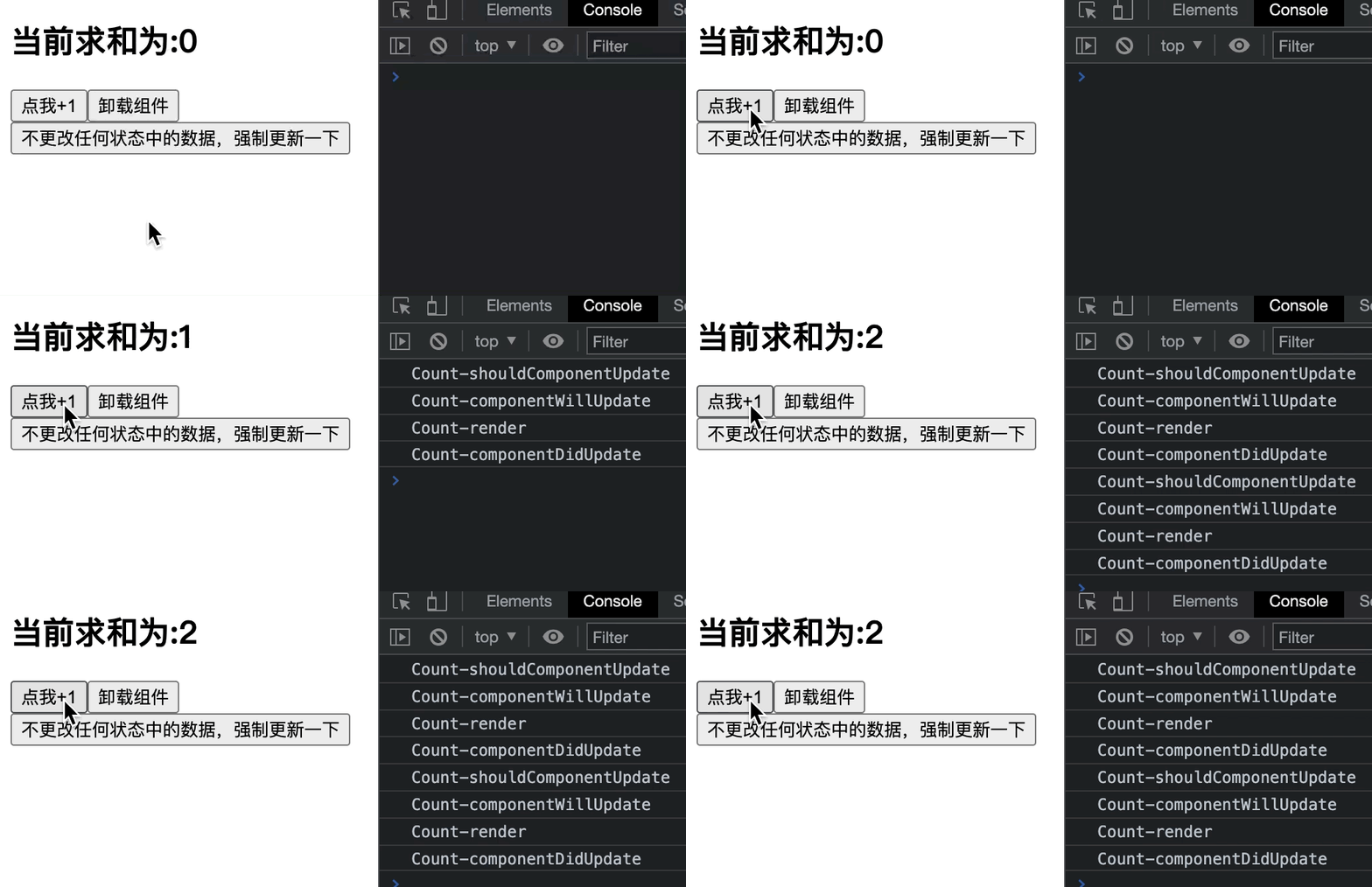
需求:- 点击
+1按钮,求和数自动+1; - 点击
卸载组件按钮,组件从页面中卸载; - 点击
强制更新按钮,不更改状态中的数据,组件强制更新。
代码实现
<script type="text/babel"> class Count extends React.Component { constructor(props) { console.log('Count-constructor') super(props) this.state = { count: 0 } } // 组件将要挂载的钩子 componentWillMount() { console.log('Count-componentWillMount') } // 组件挂载完毕后的钩子 componentDidMount() { console.log('Count-componentDidMount') } // 组件卸载前的钩子 componentWillUnmount() { console.log('Count-componentWillUnmount') } // 控制组件更新的阀门,返回true组件更新,返回false组件不更新 // 如果不写这个钩子,react底层会自动补一个默认返回值为true的shouldComponentUpdate() shouldComponentUpdate(nextProps, nextState) { console.log('Count-shouldComponentUpdate') return true } //WARNING! To be deprecated in React v17. Use componentDidUpdate instead. // 组件将要更新的钩子 componentWillUpdate(nextProps, nextState) { console.log('Count-componentWillUpdate') } // 组件更新完毕的钩子 componentDidUpdate(prevProps, prevState) { console.log('Count-componentDidUpdate') } render() { console.log('Count-render') const { count } = this.state return ( <div> <h2>当前求和为:{count}</h2> <button onClick={this.add}>点我+1</button> <button onClick={this.death}>卸载组件</button> <button onClick={this.force}>不更改任何状态中的数据,强制更新一下</button> </div> ); } add = () => { const { count } = this.state this.setState({ count: count + 1 }); } death = () => { ReactDOM.unmountComponentAtNode(document.getElementById('test')) } // 强制更新 force = () => { this.forceUpdate() } } ReactDOM.render(<Count />, document.getElementById('test')) </script>- 1
- 2
- 3
- 4
- 5
- 6
- 7
- 8
- 9
- 10
- 11
- 12
- 13
- 14
- 15
- 16
- 17
- 18
- 19
- 20
- 21
- 22
- 23
- 24
- 25
- 26
- 27
- 28
- 29
- 30
- 31
- 32
- 33
- 34
- 35
- 36
- 37
- 38
- 39
- 40
- 41
- 42
- 43
- 44
- 45
- 46
- 47
- 48
- 49
- 50
- 51
- 52
- 53
- 54
- 55
- 56
- 57
- 58
- 59
- 60
- 61
- 62
- 63
- 64
- 65
- 66
- 67
- 68
- 69
- 70
- 71
我在每一个生命周期函数中都调用了
console.log('当前组件名-当前生命周期钩子')语句,当生命周期函数被调用时,打印台会相应的打印出当前组件名和该生命周期函数名。组件刚完成渲染时的生命周期函数调用

解释
constructor(props) { console.log('Count-constructor') super(props) this.state = { count: 0 } } // 组件将要挂载的钩子 componentWillMount() { console.log('Count-componentWillMount') } render() { console.log('Count-render') const { count } = this.state return ( <div> <h2>当前求和为:{count}</h2> <button onClick={this.add}>点我+1</button> <button onClick={this.death}>卸载组件</button> <button onClick={this.force}>不更改任何状态中的数据,强制更新一下</button> </div> ); } // 组件挂载完毕后的钩子 componentDidMount() { console.log('Count-componentDidMount') }- 1
- 2
- 3
- 4
- 5
- 6
- 7
- 8
- 9
- 10
- 11
- 12
- 13
- 14
- 15
- 16
- 17
- 18
- 19
- 20
- 21
- 22
- 23
- 24
- 25
- 26
- 27
- 28
组件挂载时:constructor => componentWillMount =>
render=> componentDidMount => componentWillUnmount组件刚完成渲染时,也就是组件刚被挂载到页面中的时候,按照打印台的输出我们可以验证,调用函数的顺序是:
constructor(当前类的构造函数) =>componentWillMount(组件将要被挂载的钩子) =>render(渲染) =>componentDidMount(组件挂载完毕后的钩子)
点击+1按钮后的生命周期函数调用
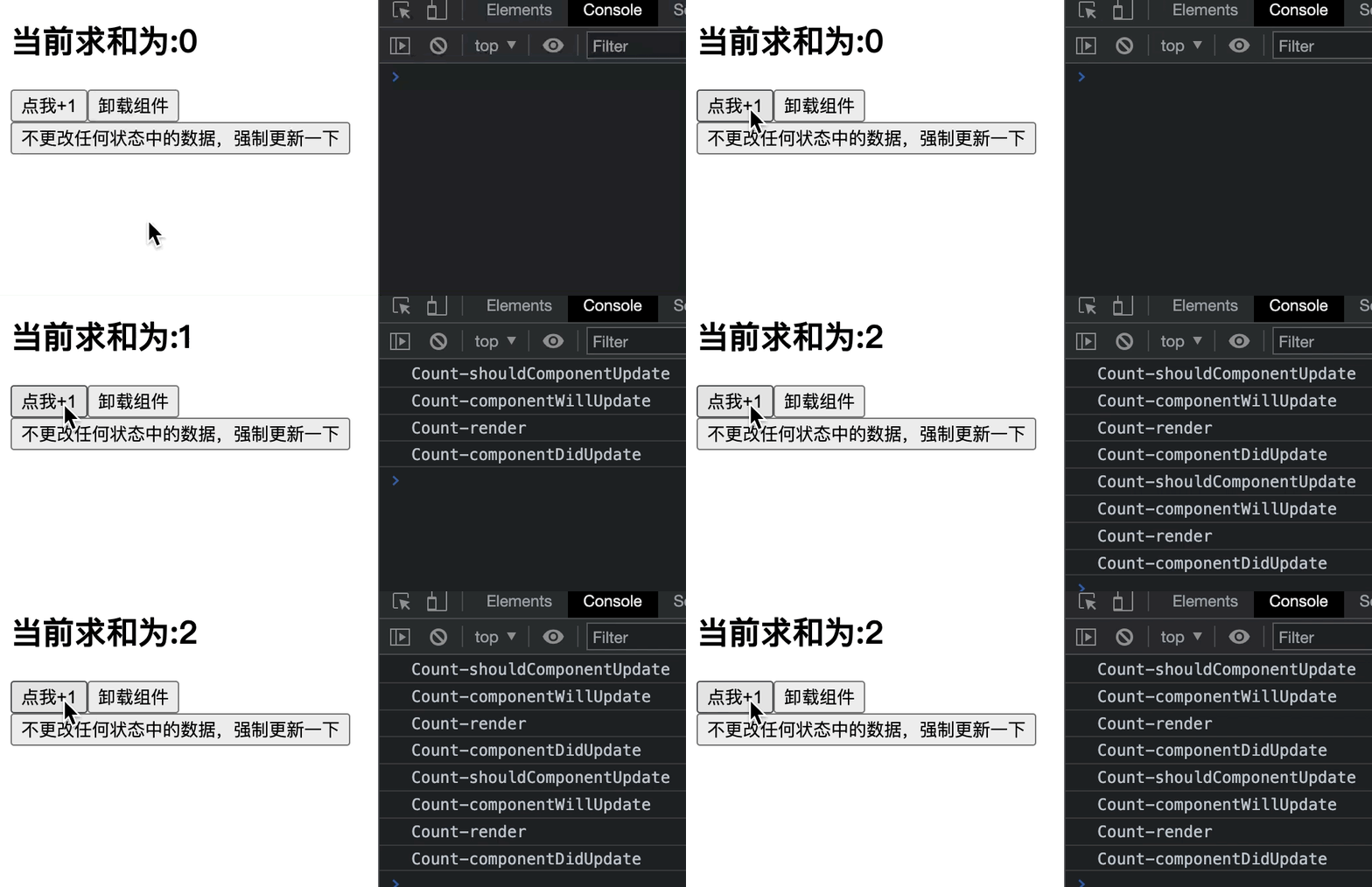
解释
shouldComponentUpdate(nextProps, nextState) { console.log('Count-shouldComponentUpdate') return true } //WARNING! To be deprecated in React v17. Use componentDidUpdate instead. // 组件将要更新的钩子 componentWillUpdate(nextProps, nextState) { console.log('Count-componentWillUpdate') } render() { console.log('Count-render') const { count } = this.state return ( <div> <h2>当前求和为:{count}</h2> <button onClick={this.add}>点我+1</button> <button onClick={this.death}>卸载组件</button> <button onClick={this.force}>不更改任何状态中的数据,强制更新一下</button> </div> ); } // 组件更新完毕的钩子 componentDidUpdate(prevProps, prevState) { console.log('Count-componentDidUpdate') } add = () => { const { count } = this.state this.setState({ count: count + 1 }); }- 1
- 2
- 3
- 4
- 5
- 6
- 7
- 8
- 9
- 10
- 11
- 12
- 13
- 14
- 15
- 16
- 17
- 18
- 19
- 20
- 21
- 22
- 23
- 24
- 25
- 26
- 27
- 28
- 29
- 30
- 31
- 32
- 33
组件更新时(setState):shouldComponentUpdate => componentWillUpdate =>
render=> componentDidUpdate => componentWillUnmount点击
+1按钮时,触发onClick事件中的回调函数add(),每次点击+1按钮,都会触发这个回调函数add(),函数中调用this.setState({ count: count + 1 });对状态进行更新,从打印台的输出可以看出,调用函数的顺序是:shouldComponentUpdate(组件应该被更新吗,如果返回值为false则组件不更新!不会执行后续的生命周期函数)=>componentWillUpdate(组件将要更新咯~)=>render(渲染组件的更新)=>componentDidUpdate(组件更新完毕咯~)对
shouldComponentUpdate的解释:// 控制组件更新的阀门,返回true组件更新,返回false组件不更新 // 如果不写这个钩子,react底层会自动补一个默认返回值为true的shouldComponentUpdate() shouldComponentUpdate(nextProps, nextState) { console.log('Count-shouldComponentUpdate') return true }- 1
- 2
- 3
- 4
- 5
- 6
点击卸载按钮后的生命周期函数调用
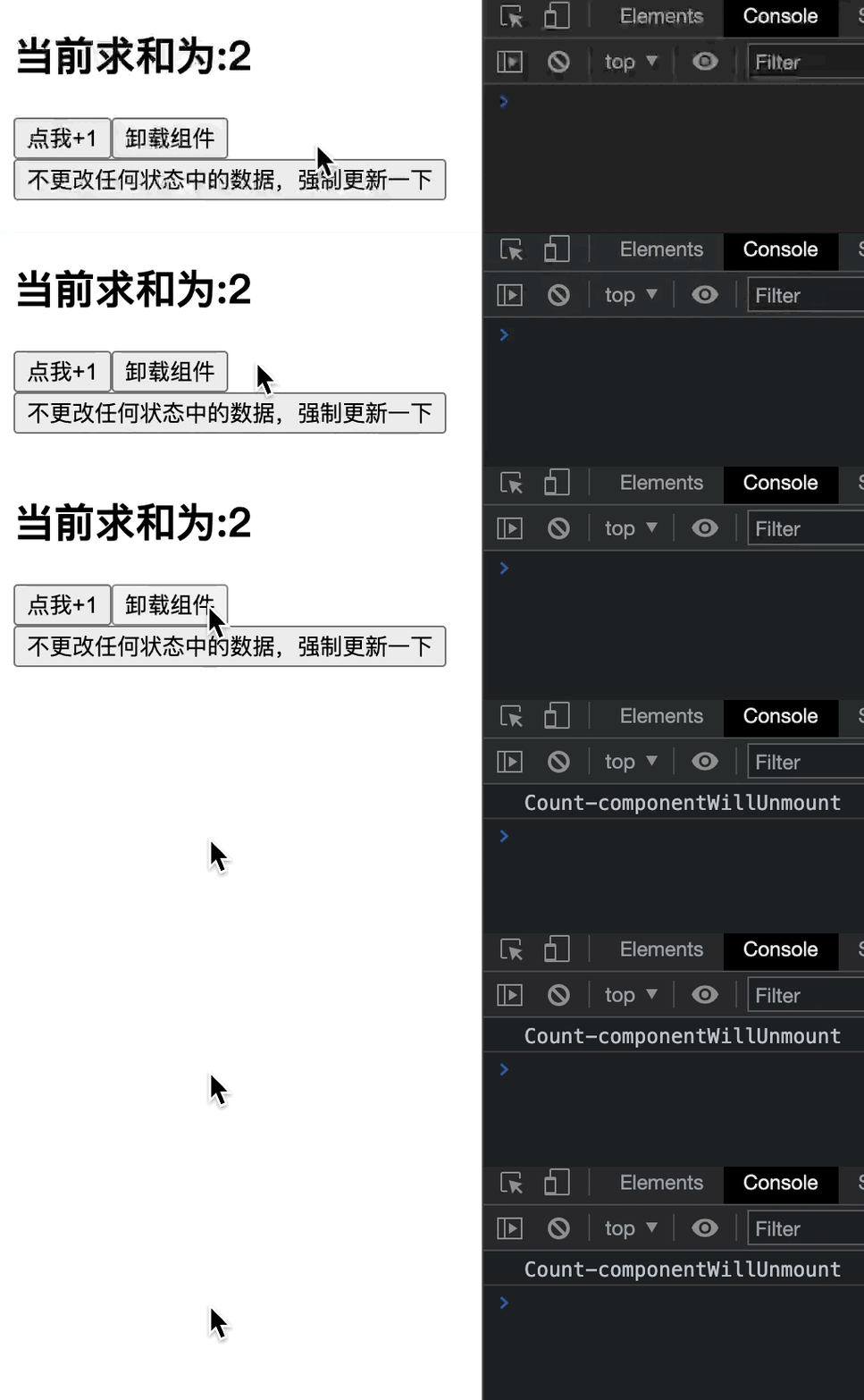
解释
<button onClick={this.death}>卸载组件</button> // 组件卸载前的钩子 componentWillUnmount() { console.log('Count-componentWillUnmount') } death = () => { ReactDOM.unmountComponentAtNode(document.getElementById('test')) }- 1
- 2
- 3
- 4
- 5
- 6
- 7
- 8
- 9
- 10
点击
卸载组件按钮时,触发onClick事件中的回调函数death(),函数内部调用了ReactDOM的unmountComponentAtNode方法,将组件从页面中卸载,在卸载之前会触发componentWillUnmount(组件被卸载前的钩子)。
点击强制更新按钮后的生命周期函数调用
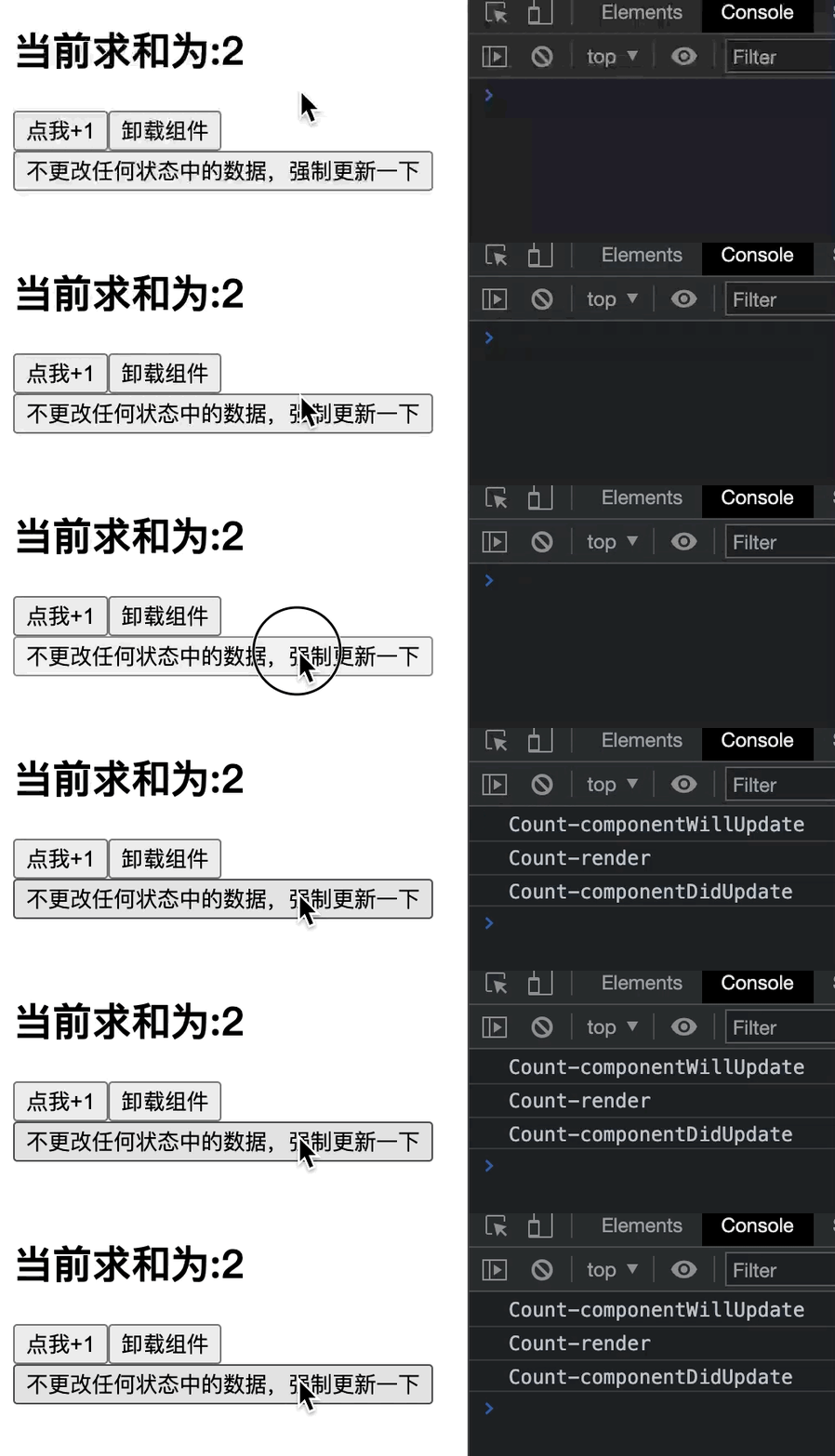
解释
//WARNING! To be deprecated in React v17. Use componentDidUpdate instead. // 组件将要更新的钩子 componentWillUpdate(nextProps, nextState) { console.log('Count-componentWillUpdate') } render() { console.log('Count-render') const { count } = this.state return ( <div> <h2>当前求和为:{count}</h2> <button onClick={this.add}>点我+1</button> <button onClick={this.death}>卸载组件</button> <button onClick={this.force}>不更改任何状态中的数据,强制更新一下</button> </div> ); } // 组件更新完毕的钩子 componentDidUpdate(prevProps, prevState) { console.log('Count-componentDidUpdate') } // 强制更新 force = () => { this.forceUpdate() }- 1
- 2
- 3
- 4
- 5
- 6
- 7
- 8
- 9
- 10
- 11
- 12
- 13
- 14
- 15
- 16
- 17
- 18
- 19
- 20
- 21
- 22
- 23
- 24
- 25
- 26
- 27
- 28
组件强制更新(forceUpdate): (绕开阀门)=>componentWillUpdate =>
render=> componentDidUpdate => componentWillUnmount点击
强制更新按钮,触发onClick事件中的回调函数force(),该函数内部使用了一个React提供的强制更新方法forceUpdate(),调用该方法会对组件强制更新(哪怕不更改组件state中的数据),该方法不需要阀门(shouldComponentUpdate)的返回值为true,哪怕阀门的返回值为false,组件依旧会绕开阀门,强制更新!点击强制更新后的生命周期函数调用顺序是:
componentWillUpdate(组件将要更新咯~)=>render(渲染组件的更新到页面)=>componentDidUpdate(组件更新完毕)组件传值生命周期示例
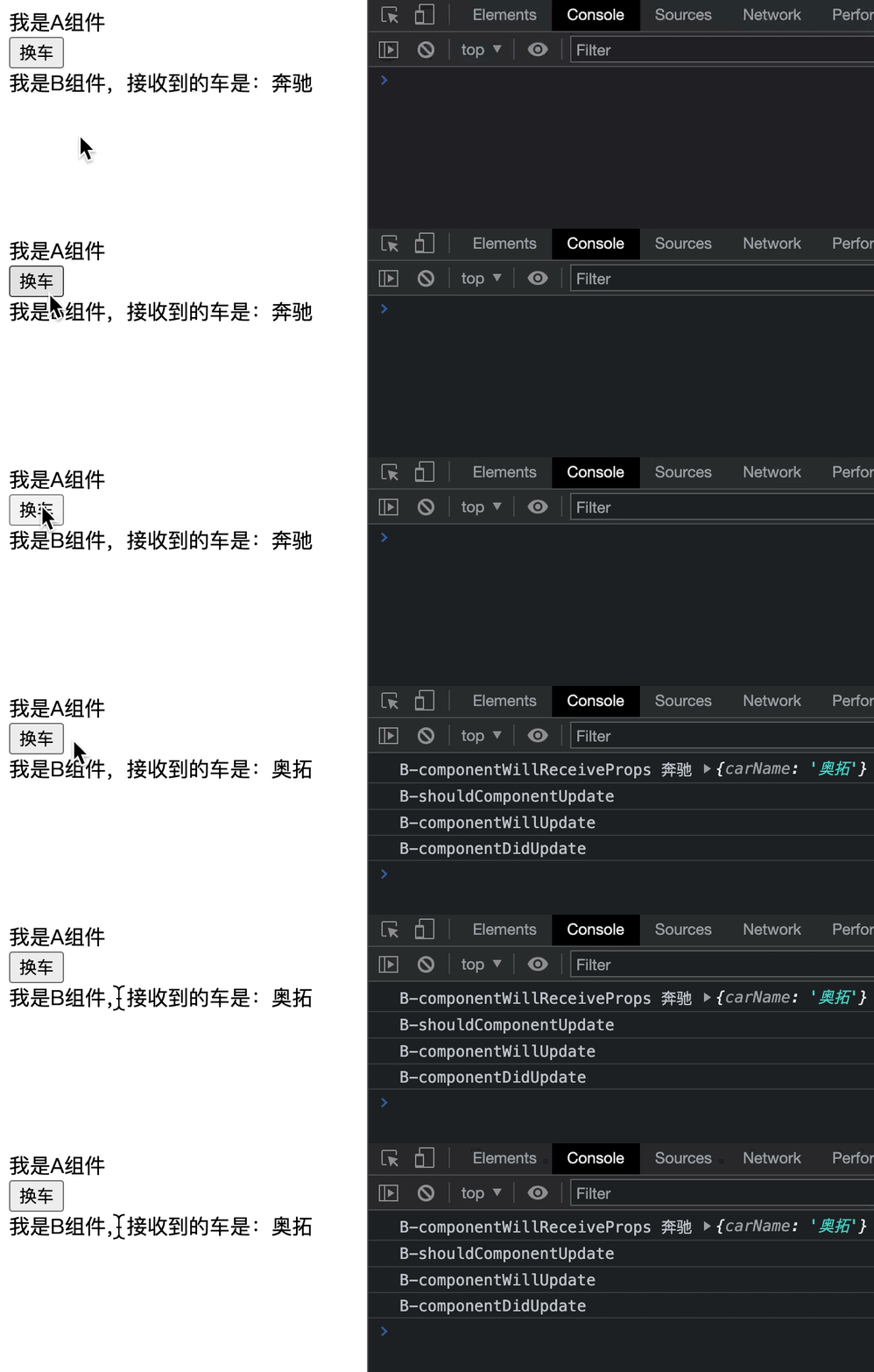
需求:- 点击换车按钮,显示的车从奔驰,变成奥拓。
- 探究组件传值时的生命周期函数。
借助
React Developer Tools开发者工具可以看出:

该示例中:A组件是父组件,B组件包含在A组件中,B组件是子组件
父组件render(父组件给子组件传值,父组件重新render后):componentWillReceiveProps => shouldComponentUpdate => componentWillUpdate =>
render=> componentDidUpdate => componentWillUnmount注意:componentWillReceiveProps在第一次传入props时不调用,只有在props更新时才会执行,可以用此钩子监听子组件props的改变。
代码实现
父组件Aclass A extends React.Component { state = { carName: '奔驰' } render() { return ( <div> <div>我是A组件</div> <button onClick={this.changeCar}>换车</button> {/* 父组件A将state中的carName传到子组件B的props.carName中 */} <B carName={this.state.carName} /> </div> ); } changeCar = () => { this.setState({ carName: '奥拓' }); } } ReactDOM.render(<A />, document.getElementById('test'))- 1
- 2
- 3
- 4
- 5
- 6
- 7
- 8
- 9
- 10
- 11
- 12
- 13
- 14
- 15
- 16
- 17
- 18
子组件Bclass B extends React.Component { // 组件将要接收新的props的钩子 // 第一次传入props时不会调用该函数,props发生变化时才会调用 componentWillReceiveProps(nextProps) { // this.props表示上一个参数,nextProps表示新接收到的参数 console.log('B-componentWillReceiveProps', this.props.carName, nextProps) } // 控制组件更新的阀门 shouldComponentUpdate(nextProps, nextState) { console.log('B-shouldComponentUpdate') return true } //WARNING! To be deprecated in React v17. Use componentDidUpdate instead. componentWillUpdate(nextProps, nextState) { console.log('B-componentWillUpdate') } componentDidUpdate(prevProps, prevState) { console.log('B-componentDidUpdate') } render() { return ( <div> {/* 子组件B接收到carName,从props中取出 */} 我是B组件,接收到的车是:{this.props.carName} </div> ); } }- 1
- 2
- 3
- 4
- 5
- 6
- 7
- 8
- 9
- 10
- 11
- 12
- 13
- 14
- 15
- 16
- 17
- 18
- 19
- 20
- 21
- 22
- 23
- 24
- 25
- 26
- 27
- 28
- 29
- 30
- 31
- 32
- 33
组件传值
// A组件内容: {/* 父组件A将state中的carName传到子组件B的props.carName中 */} <B carName={this.state.carName} /> // B组件内容: {/* 子组件B接收到carName,从props中取出 */} 我是B组件,接收到的车是:{this.props.carName}- 1
- 2
- 3
- 4
- 5
- 6
- 7
解释
父组件A的state中维护着一个属性:carName,初始值为’奔驰’;父组件A中的button按钮绑定了一个onClick事件,点击后触发该事件的回调函数changeCar,该函数内部调用setState方法将父组件中state的carName由 ‘奔驰’ 改为 ‘奥拓’因为状态的更改,父组件A此时重新调用render方法,将新的state数据(奥拓)传给子组件B,此时B组件接收到了A组件修改后的数据,触发的生命周期函数顺序如下:
- componentWillReceiveProps(组件将要接受的新props的钩子)
- 注意:第一次传入props时不会调用该函数,props发生变化时才会调用;
- componentWillReceiveProps可以接收到参数
nextProps,表示传入的新props(奥拓),函数内部也可以通过this.props拿到旧的props中的数据(奔驰); - 可以用此钩子监听子组件props的改变。
- shouldComponentUpdate(控制组件更新的阀门,组件是否被允许更新)
- 函数的返回值为
true表示组件允许更新;false表示组件不允许更新,后续生命周期函数不执行
- 函数的返回值为
- componentWillUpdate(组件被允许更新后,将要更新之时会触发这个函数)
- render(渲染更新后的组件到页面)
- componentDidUpdate(组件更新完毕后的钩子)
好啦~今天的文章就先到这里啦,如果在文章中发现错误还请各位道友私信我以便更改~
原创不易,如果对你有帮助的话,请不要吝啬你的三连哟✅~
感谢各位道友的支持✅回见~

- 点击
-
相关阅读:
并发-生产者消费者、线上问题定位、性能测试、异步任务池
NOI / 2.4基本算法之分治-7617:输出前k大的数
iTOP-RK3588开发板使用 tensorflow框架
淘宝真的暴利行业吗
5.64 BCC工具之llcstat.py解读
Golang入门:协程(goroutine)
Mathematica for Linux v13.1.0 科学计算软件多语言版
Day12 尚硅谷JUC——集合的线程安全
defer函数的实践和原理
大学毕业后,我就送了2个月外卖,哭了一整晚
- 原文地址:https://blog.csdn.net/Svik_zy/article/details/125020346
- 最新文章
-
沪漂五周年了:我越来越迷茫了
Agentic Skill Routing 实战:别再把所有 Skill 塞进 AI Agent 上下文
MySQL-Seconds_behind_master的精度误差
[MAF预定义ChatClient中间件-03]CachingChatClient——利用缓存省钱省时间
AI的至暗历史:从万众期待到被政府撤资,AI的两次死亡徘徊
Agent OS :五种驯服不确定性的范式
PortSwigger SQL注入LAB11
数据库即时编译JIT
[Begin]AI Learn Data Day 0
深度学习进阶(二十七)现代 LLM 的核心架构设计其二:SwiGLU