问题描述
使用Azure Storage Account的共享访问签名(Share Access Signature) 生成的终结点,连接时遇见 The Azure Storage endpoint url is malformed (Azure 存储终结点 URL 格式不正确)
Storage Account SDK in pom.xml:
    <dependency>
      <groupId>com.azure</groupId>
      <artifactId>azure-storage-blob</artifactId>
      <version>12.6.0</version>
    </dependency>
App.Java 文件中,创建 BlobServiceClient 对象代码:
String endpoint ="BlobEndpoint=https://://************...";
BlobServiceClient blobServiceClientbyendpoint = new BlobServiceClientBuilder().endpoint(endpoint).buildClient();
获取Endpoint的方法为(Azure Portal --> Storage Account --> Share access signature)

当执行Java 代码时,main函数抛出异常:java.lang.IllegalArgumentException: The Azure Storage endpoint url is malformed

PS C:\LBWorkSpace\MyCode\1-Storage Account - Operation Blob by Connection String - Java>
 & 'C:\Program Files\Microsoft\jdk-11.0.12.7-hotspot\bin\java.exe'
 '-agentlib:jdwp=transport=dt_socket,server=n,suspend=y,address=localhost:59757'
'@C:\Users\AppData\Local\Temp\cp_6ux3xmehddi1mc4fanfjupd3x.argfile'
 'com.blobs.quickstart.App'

Azure Blob storage v12 - Java quickstart sample

2022-05-26 10:24:29 ERROR BlobServiceClientBuilder - The Azure Storage endpoint url is malformed.
Exception in thread "main" java.lang.IllegalArgumentException: The Azure Storage endpoint url is malformed.
        at com.azure.storage.blob.BlobServiceClientBuilder.endpoint(BlobServiceClientBuilder.java:132)
        at com.blobs.quickstart.App.main(App.java:30)
问题分析
消息 [The Azure Storage endpoint url is malformed (Azure 存储终结点 URL 格式不正确)] 说明代码中使用的格式不对,回到生成endopoint的页面查看,原来使用的是连接字符串 Connection String. 与直接使用Access Key中的Connection String是相同的代码方式,而 Endpoint 是指当个连接到Blob Service的URL。
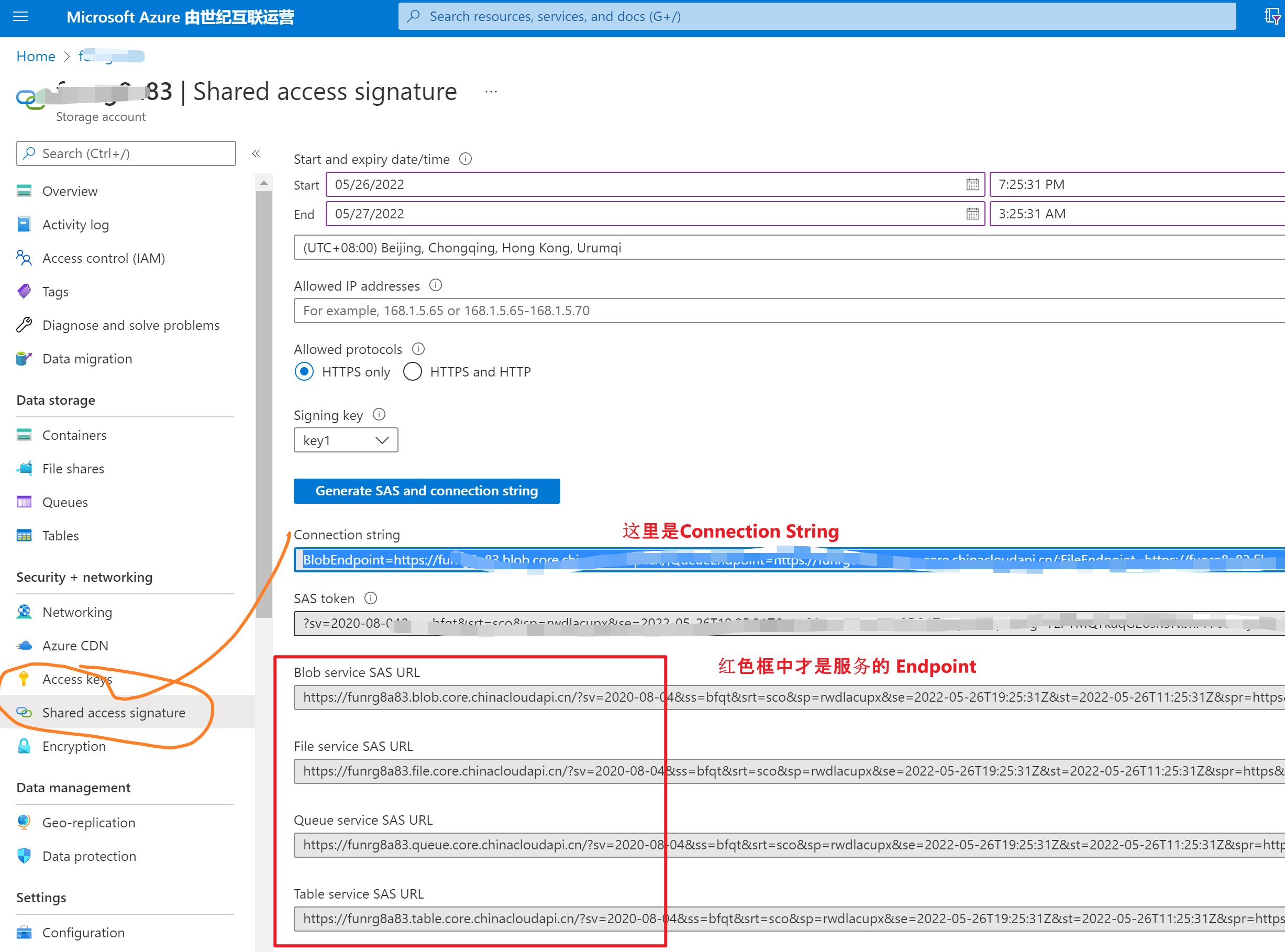
回到代码中,发现新版本把连接方式进行了区分:
- 使用Connection String时,用 new BlobServiceClientBuilder().connectionString(connectStr).buildClient();
- 使用Endpoint时,用 new BlobServiceClientBuilder().endpoint(endpoint).buildClient();
所以,解决 endpoint url malformed 关键就是使用正确的 SAS URL 或者是 Connection String
//使用连接字符串时
String connectStr ="BlobEndpoint=https://:************.blob.core.chinacloudapi.cn/;...SharedAccessSignature=sv=2020-08-0...&sig=**************";
BlobServiceClient blobServiceClient = new BlobServiceClientBuilder().connectionString(connectStr).buildClient();

//使用SAS终结点
String endpoint ="https://************.blob.core.chinacloudapi.cn/?sv=2020-08-04...&sig=*********************";
BlobServiceClient blobServiceClientbyendpoint = new BlobServiceClientBuilder().endpoint(endpoint).buildClient();
完整的示例代码:
package com.blobs.quickstart;

/**
 * Azure blob storage v12 SDK quickstart
 */
import com.azure.storage.blob.*;
import com.azure.storage.blob.models.*;
import java.io.*;

public class App
{
    public static void main( String[] args ) throws IOException
    {

        System.out.println("Azure Blob storage v12 - Java quickstart sample\n");

        // Retrieve the connection string for use with the application. The storage
        // connection string is stored in an environment variable on the machine
        // running the application called AZURE_STORAGE_CONNECTION_STRING. If the environment variable
        // is created after the application is launched in a console or with
        // Visual Studio, the shell or application needs to be closed and reloaded
        // to take the environment variable into account.

        //String connectStr ="DefaultEndpointsProtocol=https;AccountName=******;AccountKey=***********************;EndpointSuffix=core.chinacloudapi.cn";// System.getenv("AZURE_STORAGE_CONNECTION_STRING");
        String connectStr ="BlobEndpoint=https://******* */.blob.core.chinacloudapi.cn/;QueueEndpoint=https://*******.queue.core.chinacloudapi.cn/;FileEndpoint=https://*******.file.core.chinacloudapi.cn/;TableEndpoint=https://*******.table.core.chinacloudapi.cn/;SharedAccessSignature=sv=2020...&sig=*************************";
        BlobServiceClient blobServiceClient = new BlobServiceClientBuilder().connectionString(connectStr).buildClient();


        //Create a unique name for the container
        String containerName = "lina-" + java.util.UUID.randomUUID();

        // Create the container and return a container client object
        BlobContainerClient containerClient = blobServiceClient.createBlobContainer(containerName);

        BlobContainerClient containerClient1 = blobServiceClient.getBlobContainerClient("container-name");

        if(!containerClient1.exists())
        {
            System.out.println("create containerName");
            blobServiceClient.createBlobContainer("container-name");
        }


        System.out.println("create containerName .....");
        // // Create a local file in the ./data/ directory for uploading and downloading
        // String localPath = "./data/";
        // String fileName = "quickstart" + java.util.UUID.randomUUID() + ".txt";
        // File localFile = new File(localPath + fileName);

        // // Write text to the file
        // FileWriter writer = new FileWriter(localPath + fileName, true);
        // writer.write("Hello, World!");
        // writer.close();

        // // Get a reference to a blob
        // BlobClient blobClient = containerClient.getBlobClient(fileName);

        // System.out.println("\nUploading to Blob storage as blob:\n\t" + blobClient.getBlobUrl());

        // // Upload the blob
        // blobClient.uploadFromFile(localPath + fileName);

        // System.out.println("\nListing blobs...");

        // // List the blob(s) in the container.
        // for (BlobItem blobItem : containerClient.listBlobs()) {
        //     System.out.println("\t" + blobItem.getName());
        // }

        // // Download the blob to a local file
        // // Append the string "DOWNLOAD" before the .txt extension so that you can see both files.
        // String downloadFileName = fileName.replace(".txt", "DOWNLOAD.txt");
        // File downloadedFile = new File(localPath + downloadFileName);

        // System.out.println("\nDownloading blob to\n\t " + localPath + downloadFileName);

        // blobClient.downloadToFile(localPath + downloadFileName);

        // // Clean up
        // System.out.println("\nPress the Enter key to begin clean up");
        // System.console().readLine();

        // System.out.println("Deleting blob container...");
        // containerClient.delete();

        // System.out.println("Deleting the local source and downloaded files...");
        // localFile.delete();
        // downloadedFile.delete();

        System.out.println("Done");
    }
}
参考资料
快速入门:使用 Java v12 SDK 管理 blob: https://docs.azure.cn/zh-cn/storage/blobs/storage-quickstart-blobs-java?tabs=powershell%2Cenvironment-variable-windows