腾讯云OCR服务二次开发
前言
因为腾讯云账户中还剩一点点钱,刚刚好够买腾讯云里文字识别服务,想着自己平时看PDF比较多,可以用这个服务来便捷的进行图像文字转换。我购买的是通用印刷体识别,即可以对图片进行识别,也可以对PDF文件进行识别。需要注意的的是,图片识别需要将图片转为Base64,PDF识别时每次只能识别一张。
本文记录了对腾讯云OCR服务二次开发的代码和开发过程中遇到的问题。
安装SDK
我使用的是Python 3.6,要使用腾讯云的OCR服务,要先在本地环境中安装腾讯云的SDK。安装方式见:Python - SDK 中心 - 腾讯云 (tencent.com)

调用API
学习API文档
安装好SDK后,调用相应的接口就ok了,可以参考:文字识别 API 概览 - 服务端 API 文档 - 文档中心 - 腾讯云 (tencent.com)
因为主要需求是对PDF以及其截图进行识别,我购买的是GeneralBasicOCR-通用印刷体识别,腾讯可以在API Explorer - 云 API - 控制台 (tencent.com)中进行调试,比较方便。

通用印刷体识别API
通用印刷体识别主要支持以下参数:
| 参数名称 | 必选 | 类型 | 描述 |
|---|---|---|---|
| Action | 是 | String | 公共参数,本接口取值:GeneralBasicOCR。 |
| Version | 是 | String | 公共参数,本接口取值:2018-11-19。 |
| Region | 是 | String | 公共参数,详见产品支持的 地域列表,本接口仅支持其中的: ap-beijing, ap-guangzhou, ap-hongkong, ap-seoul, ap-shanghai, ap-singapore, na-toronto |
| ImageBase64 | 否 | String | 图片/PDF的 Base64 值。 要求图片/PDF经Base64编码后不超过 7M,分辨率建议600*800以上,支持PNG、JPG、JPEG、BMP、PDF格式。 图片的 ImageUrl、ImageBase64 必须提供一个,如果都提供,只使用 ImageUrl。 |
| ImageUrl | 否 | String | 图片/PDF的 Url 地址。 要求图片/PDF经Base64编码后不超过 7M,分辨率建议600*800以上,支持PNG、JPG、JPEG、BMP、PDF格式。 图片存储于腾讯云的 Url 可保障更高的下载速度和稳定性,建议图片存储于腾讯云。非腾讯云存储的 Url 速度和稳定性可能受一定影响。 |
| Scene | 否 | String | 保留字段。 |
| LanguageType | 否 | String | 识别语言类型。 支持自动识别语言类型,同时支持自选语言种类,默认中英文混合(zh),各种语言均支持与英文混合的文字识别。 可选值: zh:中英混合 zh_rare:支持英文、数字、中文生僻字、繁体字,特殊符号等 auto:自动 mix:混合语种 jap:日语 kor:韩语 spa:西班牙语 fre:法语 ger:德语 por:葡萄牙语 vie:越语 may:马来语 rus:俄语 ita:意大利语 hol:荷兰语 swe:瑞典语 fin:芬兰语 dan:丹麦语 nor:挪威语 hun:匈牙利语 tha:泰语 hi:印地语 ara:阿拉伯语 |
| IsPdf | 否 | Boolean | 是否开启PDF识别,默认值为false,开启后可同时支持图片和PDF的识别。 |
| PdfPageNumber | 否 | Integer | 需要识别的PDF页面的对应页码,仅支持PDF单页识别,当上传文件为PDF且IsPdf参数值为true时有效,默认值为1。 |
| IsWords | 否 | Boolean | 是否返回单字信息,默认关 |
考虑到我的实际使用需求,主要会使用到ImageBase64、ImageUrl、IsPdf、PdfPageNumber这几个参数。
代码
我主要使用了argparse、base64、json这几个python内置模块。
我希望能够在CLI中便捷的使用这个工具,但是由于有很多不同的情况,所以使用argparse模块,覆盖不同的情况。同时,又因为对图片识别时,参数是base64,所以需要使用base64模块将图片转化为base64格式。
main.py
# -*- coding: UTF-8 -*-
# 参考:https://cloud.tencent.com/document/product/866/33515
# Author:Zhangyifei 2022年4月10日

import pyperclip

from tencentcloud.common.exception.tencent_cloud_sdk_exception import TencentCloudSDKException

from ocrtool import MyOcrTool, ReqObj
from parse_args import parse_args


if __name__ == '__main__':

    try:

        # 实例化Ocr工具
        my_ocr_tool = MyOcrTool()
        client = my_ocr_tool.client
        req = ReqObj()

        # 获取命令行参数
        args = parse_args()

        if args.local:
            if args.isPdf:
                req.req_local_img(args.local, args.page)
            else:
                req.req_local_img(args.local)
        elif args.url:
            if args.isPdf:
                req.req_url_img(args.url, args.page)
            else:
                req.req_url_img(args.url)

        # 获取输出
        resp = client.GeneralBasicOCR(req)

        ans = ''
        if args.newline:
            for i in resp.TextDetections:
                ans += (i.DetectedText + '\n')
        else:
            for i in resp.TextDetections:
                ans += (i.DetectedText)

        print(ans)

        if args.clip:
            pyperclip.copy(ans)

    except TencentCloudSDKException as err:
        print(err)
parse_args.py
import argparse
import sys

def parse_args():
    # 设置命令行参数
    parser = argparse.ArgumentParser(description='OCR解析方式')
    parser.add_argument('-u', '--url', type=str, required=False, help='图片的url')
    parser.add_argument('-l', '--local', type=str, required=False, help='本地图片的地址')
    parser.add_argument('-p', '--isPdf', required=False, action='store_true', help='是否是Pdf')
    parser.add_argument('-n', '--page', type=int, required=False, help='识别哪一页PDF')
    parser.add_argument('-s', '--newline', required=False, action='store_true', help='Ocr识别结果是否换行')
    parser.add_argument('-c', '--clip', required=False, action='store_true', help='输出结果是否粘贴到剪切板中')

    # 当未输入命令行参数时,打印帮助
    if len(sys.argv) == 1:
        parser.print_help()
        sys.exit(1)

    # 获取命令行参数
    args = parser.parse_args()

    # page参数和isPdf参数存在依赖
    if args.isPdf and not args.page:
        parser.print_help()
        parser.error('The --isPdf argument requires the --page argument.')

    # url参数和local参数只能有一个

    if args.url and args.local:
        parser.error('There can only be one argument --url  and argument --local')

    return args
ocrtool.py
# -*- coding: UTF-8 -*-
# 参考:https://cloud.tencent.com/document/product/866/33515
# Author:Zhangyifei 2022年4月10日

import base64
import json

from tencentcloud.common import credential
from tencentcloud.common.profile.client_profile import ClientProfile
from tencentcloud.common.profile.http_profile import HttpProfile
from tencentcloud.ocr.v20181119 import ocr_client, models


def image_to_base64(file_path):
    """
    将pdf转为Base64流
    :param pdf_path: PDF文件路径
    :return:
    """
    with open(file_path, "rb") as image_file:
        encoded_string = base64.b64encode(image_file.read())
    return str(encoded_string, 'UTF-8')


class MyOcrTool(object):
    def __init__(self):
        # 参考https://cloud.tencent.com/document/product/866/33515
        self.region = "ap-guangzhou"
        self.cred = credential.Credential("xxx", "xxx")
        self.httpProfile = HttpProfile()
        self.httpProfile.endpoint = "ocr.tencentcloudapi.com"
        self.clientProfile = ClientProfile()
        self.clientProfile.httpProfile = self.httpProfile
        self.client = ocr_client.OcrClient(self.cred, self.region, self.clientProfile)
        self.params = {}


class ReqObj(models.GeneralBasicOCRRequest):

    def __init__(self):
        models.GeneralBasicOCRRequest.__init__(self)

    def update_req_params(self, params):
        # 更新req中的params
        self.from_json_string(json.dumps(params))

    def req_local_img(self, file_path, page=None):
        # 请求本地的image文件
        imagebase64 = image_to_base64(file_path)

        # 由于page和isPdf存在依赖,当page存在时,说明是对pdf进行处理
        if not page:
            params = {
                "ImageBase64": imagebase64,
            }
            self.update_req_params(params)
        else:
            params = {
                "ImageBase64": imagebase64,
                "IsPdf": True,
                "PdfPageNumber": page
            }
            self.update_req_params(params)

    def req_url_img(self, url_path, page=None):
        # 请求url中的image文件

        # 由于page和isPdf存在依赖,当page存在时,说明是对pdf进行处理
        if not page:
            params = {
                "ImageUrl": url_path
            }
            self.update_req_params(params)
        else:
            params = {
                "ImageUrl": url_path,
                "IsPdf": True,
                "PdfPageNumber": page
            }
            self.update_req_params(params)
运行结果
本地图片

使用-l参数(或者--local)表示对本地图片进行处理,使用-s(或者--newline)表示对图片中每行识别出来的内容进行换行。不使用-s时默认表示不换行。使用-c(或者--clip)表示将输出结果复制到粘贴板上,此时就可以方便的将输出的内容直接进行文本粘贴。

本地PDF

使用-p或者(--pdf)表示该文件是pdf文件,此时需要记得使用-n或者(--page)表示对哪一页进行OCR识别。否则的化会有报错提醒。
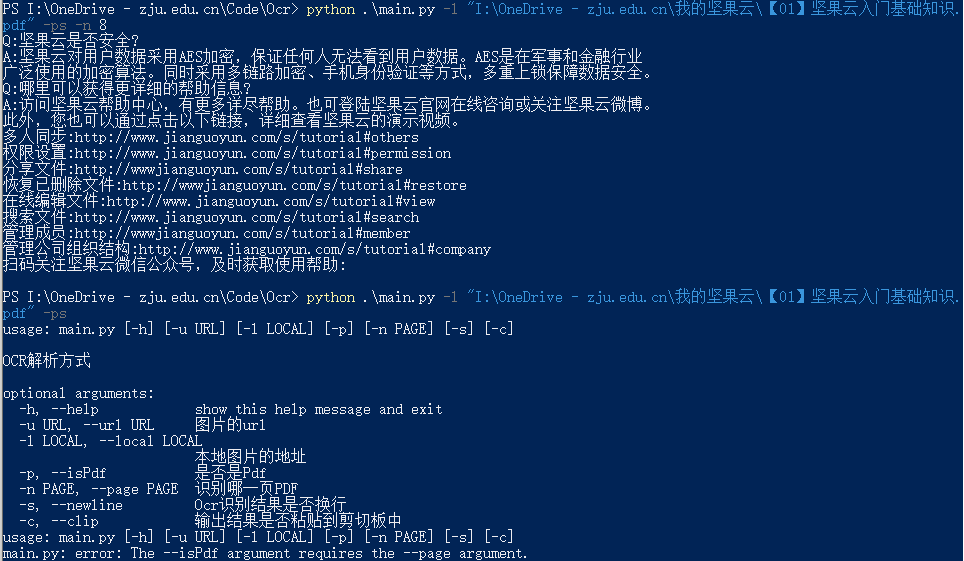
PS:如果需要对整个pdf进行识别和输出,可以重新进行函数封装,本文没有相关需求,暂不涉及。
网络图片
以下图为例:

我们复制图片url,使用-u(或者--url)表示对url进行处理,使用-s(或者--newline)表示对图片中每行识别出来的内容进行换行。

问题整理
问题1:argparse模块参数之间如何生成依赖?
使用if语句进行判断,不符合依赖条件则抛出错误。
    # page参数和isPdf参数存在依赖
    if args.isPdf and not args.page:
        parser.print_help()
        parser.error('The --isPdf argument requires the --page argument.')
问题2:argparse模块parser的参数type是bool时,CLI中传入参数即使是False,也会认为是True?
这是因为命令行传入的参数默认会认为是字符串格式,因此传参是False仍会认为是True。这个问题在argparse bool python - CSDN中有说明解决办法。我的解决办法是涉及到type是bool格式的,使用action参数进行判断。
parser.add_argument('-c', '--clip', required=False, action='store_true', help='输出结果是否粘贴到剪切板中')
问题3:bytes格式转化为str格式的方法:
str(encoded_string, 'UTF-8')
后续想法
-
封装函数对整个pdf进行处理并输出成文档(或EXCEL)
-
部署web服务器,在网页中进行操作OCR识别操作。