原文链接详解MySQL索引
索引介绍
索引是帮助MySQL高效获取数据的数据结构。在数据之外,数据库系统还维护着一个用来查找数据的数据结构,这些数据结构指向着特定的数据,可以实现高级的查找算法。
本文以MySQL常用的B+Tree来介绍。(MySQL的索引结构不仅只有B+Tree索引,还有Hash索引等。)
B+Tree(俗称B+树)
我们构造一个具有如下数据的4阶B+树;数字如下:100,26,78,102,657,123,90,12,67,89,90,102,365,256

我们可以发现,所有的数据都会出现在叶子节点(也就是最底部的节点,下面再没有分层),非叶子节点作为key(B+树如何分裂的在此不过多介绍,因为本文只为介绍索引,介绍B+树也只是为了能更好的理解索引,B+树并不是本文的重点。)
B+树规定,小于往左走,大于等于往右走;
那么如果我们想查询值为26的数据,B+树是如何查询的呢?
1.首先它会和最顶部的100比较,发现比100小,向左走;
2.到达了存储key为78和90两个值的节点,发现26比78小,再向78的左边走;
3.到达了存储12,26,67的叶子节点,在此就查询到了值为26的数据;
那么我们如果想查询值为100的数据呢?
首先它会和最顶部的100比较,发现等于100,但是非叶子节点只存储key,还会向叶子方向走;大于等于往右走,小于往左走,直到找到叶子节点。
MySQL的索引对B+Tree还做了改良,叶子之间的链表变成了双向链表。
索引分类
在MySQL数据库,将索引的具体类型主要分为以下几类:
主键索引、唯一索引、常规索引、全文索引
| 分类 | 含义 | 特点 | |
|---|---|---|---|
| 主键索引 | 针对于表中主键创建的索引 | 默认自动创建, 只能 有一个 | PRIMARY |
| 唯一索引 | 避免同一个表中某数据列中的值重复 | 可以有多个 | UNIQUE |
| 常规索引 | 快速定位特定数据 | 可以有多个 | |
| 全文索引 | 全文索引查找的是文本中的关键词,而不是比较索引中的值 | 可以有多个 | FULLTEXT |
聚集索引、二级索引
在InnoDB存储引擎中(一般我们使用的大都是InnoDB存储引擎,MySQL除InnoDB存储引擎外,还有MyISAM存储引擎等,本文不过多介绍),根据索引的存储形式,又可以分为以下两种:
聚集索引和二级索引
| 分类 | 含义 | 特点 |
|---|---|---|
| 聚集索引 | 数据存储与索引放到了一块,索引结构的叶子 节点保存了行数据 | 必须有,而且只 有一个 |
| 二级索引 | 数据与索引分开存储,索引结构的叶子节点关 联的是对应的主键 | 可以存在多个 |
我们介绍一下聚集索引的选取规则:
聚集索引选取规则:
1.如果存在主键,主键索引就是聚集索引;
2.如果不存在主键,将使用第一个唯一(UNIQUE)索引作为聚集索引;
3.如果表没有主键,或没有合适的唯一索引,则InnoDB会自动生成一个rowid作为隐藏的聚集索引。
聚集索引和二级索引的区别
聚集索引的叶子节点下挂的是这一行的数据 。
二级索引的叶子节点下挂的是该字段值对应的主键值。
如果我的表user_test里有两个字段id和name,id是主键,name上有二级索引;
第一条sql:select * from user_test where id = 6;
第二条sql:select * from user_test where name = '郭靖';
第一条sql在使用聚集索引查询数据的时候,到达叶子节点,就直接能够查询到这行数据了;第二条sql在使用二级索引查询数据的时候,到达叶子节点,只是拿到了这行数据对应的主键,还需要进行回表查询,才能拿到数据。
索引语法
我们创建一张表,表结构如下:
SET NAMES utf8mb4;
SET FOREIGN_KEY_CHECKS = 0;

-- ----------------------------
-- Table structure for tbl_student
-- ----------------------------
DROP TABLE IF EXISTS `tbl_student`;
CREATE TABLE `tbl_student`  (
  `id` int(11) NOT NULL AUTO_INCREMENT COMMENT '主键ID',
  `stu_name` varchar(10) CHARACTER SET utf8mb4 COLLATE utf8mb4_general_ci NULL DEFAULT NULL COMMENT '姓名',
  `stu_num` varchar(10) CHARACTER SET utf8mb4 COLLATE utf8mb4_general_ci NULL DEFAULT NULL COMMENT '学号',
  PRIMARY KEY (`id`) USING BTREE
) ENGINE = InnoDB AUTO_INCREMENT = 5 CHARACTER SET = utf8mb4 COLLATE = utf8mb4_general_ci COMMENT = '学生表' ROW_FORMAT = Dynamic;

-- ----------------------------
-- Records of tbl_student
-- ----------------------------
INSERT INTO `tbl_student` VALUES (1, '杨过', '001');
INSERT INTO `tbl_student` VALUES (2, '小龙女', '002');
INSERT INTO `tbl_student` VALUES (3, '黄蓉', '003');
INSERT INTO `tbl_student` VALUES (4, '郭靖', '004');

SET FOREIGN_KEY_CHECKS = 1;
表创建完成之后,如下所示:

查询索引
语法如下:
SHOW INDEX FROM 表名 ;
案例如下:
show index from tbl_student;

因为我们表里有主键,所以它会有一个默认的主键索引。
创建索引
语法如下:
CREATE [ UNIQUE | FULLTEXT ] INDEX 索引的名字 ON 表名 (
需要加索引的列1,需要加索引的列2,...) ;
[ UNIQUE | FULLTEXT ]分别表示唯一索引和常规索引;
案例1如下:
-- 为姓名创建一个索引(因为名字有可能会重复,所以我们不能建立唯一索引,建一个常规索引就行了)
CREATE  INDEX idx_tbl_student_name ON tbl_student (stu_name) ;
如图所示:

案例2如下:
-- 为学号创建一个索引(因为学号不会重复,我们建一个唯一索引)
CREATE UNIQUE INDEX idx_tbl_student_num ON tbl_student (stu_num) ;

我们现在再查看一下这个表的索引

删除索引
语法如下:
DROP INDEX 索引名 ON 表名 ;
案例如下:
drop index idx_tbl_student_name on tbl_student;

再来看一下索引:

可以看到只剩两个索引了。
sql性能分析——explain介绍
EXPLAIN 或者 DESC命令获取 MySQL 如何执行 SELECT 语句的信息,包括在 SELECT 语句执行 过程中表如何连接和连接的顺序。
语法如下:
-- 直接在select语句之前加上关键字 explain / desc
explain select的语句
案例如下:
explain select * from tbl_student;

输出的重要字段介绍
可先不看,通过后面的例子理解着记忆
| 字段 | 含义 |
|---|---|
| id | select查询的序列号,表示查询中执行select子句或者是操作表的顺序 (id相同,执行顺序从上到下;id不同,值越大,越先执行) |
| select_type | 表示 SELECT 的类型,常见的取值有 SIMPLE(简单表,即不使用表连接 或者子查询)、PRIMARY(主查询,即外层的查询)、 UNION(UNION 中的第二个或者后面的查询语句)、 SUBQUERY(SELECT/WHERE之后包含了子查询)等 |
| type | 表示连接类型,性能由好到差的连接类型为NULL、system、const、 eq_ref、ref、range、 index、all |
| possible_key | 显示这条查询语句可能应用在这张表上的索引,一个或多个 |
| key | 实际使用的索引,如果为NULL,则没有使用索引 |
| key_len | 表示索引中使用的字节数, 该值为索引字段最大可能长度,并非实际使用长度,在不损失精确性的前提下, 长度越短越好 |
| rows | MySQL认为必须要执行查询的行数,在innodb引擎的表中,是一个估计值, 可能并不总是准确的。 |
| filtered | 表示返回结果的行数占需读取行数的百分比, filtered 的值越大越好。 |
准备演示的表:
SET NAMES utf8mb4;
SET FOREIGN_KEY_CHECKS = 0;

-- ----------------------------
-- Table structure for tbl_user_info
-- ----------------------------
DROP TABLE IF EXISTS `tbl_user_info`;
CREATE TABLE `tbl_user_info`  (
  `id` int(11) NOT NULL AUTO_INCREMENT COMMENT '主键',
  `user_name` varchar(50) CHARACTER SET utf8 COLLATE utf8_general_ci NOT NULL COMMENT '用户名',
  `password` varchar(50) CHARACTER SET utf8 COLLATE utf8_general_ci NOT NULL COMMENT '密码',
  `nick_name` varchar(20) CHARACTER SET utf8 COLLATE utf8_general_ci NOT NULL COMMENT '昵称',
  `birthday` date NULL DEFAULT NULL COMMENT '生日',
  `sex` char(1) CHARACTER SET utf8 COLLATE utf8_general_ci NULL DEFAULT NULL COMMENT '性别,0代表女,1代表男',
  PRIMARY KEY (`id`) USING BTREE
) ENGINE = InnoDB AUTO_INCREMENT = 1 CHARACTER SET = utf8 COLLATE = utf8_general_ci COMMENT = '用户信息表' ROW_FORMAT = Dynamic;

SET FOREIGN_KEY_CHECKS = 1;
我使用java批量插入了100万条数据,如下sql使用了batch,可以很快速得插入大量数据。
java代码如下:
//注意在链接数据库时请指定参数jdbc:mysql://xxxxxxxxxx:3306/test?characterEncoding=UTF-8&serverTimezone=Asia/Shanghai&rewriteBatchedStatements=true"
public static void main(String[] args) {
        long start = System.currentTimeMillis();    //  获取系统当前时间,方法开始执行前记录
        Connection conn = BaseDAO.getConn();        //  调用刚刚写好的用于获取连接数据库对象的静态工具类
        String sql = "insert into tbl_user_info values(null,?,?,?,?,?)";  //  要执行的sql语句
        PreparedStatement ps = null;
        Random rd = new Random();
		//插入1000万条数据,一百万插入一次
        for (int j = 0; j < 10; j++) {
            long innerStart = System.currentTimeMillis();
            try {
                ps = conn.prepareStatement(sql);    //  获取PreparedStatement对象
                //  不断产生sql
                for (int i = 0; i < 1000000; i++) {
                    String s = UUID.randomUUID().toString();
                    ps.setString(1, s);
                    ps.setString(2, UUID.randomUUID().toString());
                    ps.setString(3, s.substring(0,8));
                    ps.setDate(4,new java.sql.Date(randomDate("1970-01-21","2000-01-11").getTime()));
                    ps.setString(5,rd.nextInt(2)+"");
                    ps.addBatch();  //  将一组参数添加到此 PreparedStatement 对象的批处理命令中。
                }
                int[] ints = ps.executeBatch();//   将一批命令提交给数据库来执行,如果全部命令执行成功,则返回更新计数组成的数组。
                //  如果数组长度不为0,则说明sql语句成功执行,即千万条数据添加成功!
                if (ints.length > 0) {
                    System.out.println("已成功添加一百万条数据!!");
                }
            } catch (SQLException throwables) {
                throwables.printStackTrace();
            }
            long innerEnd = System.currentTimeMillis();

            System.out.println("所用时长:" + (innerEnd - innerStart) / 1000 + "秒");
        }

        BaseDAO.closeAll(conn, ps);

        long end = System.currentTimeMillis();
        System.out.println("插入1000万条数据共用时长:" + (end - start) / 1000 + "秒");
    }

    private static Date randomDate(String beginDate, String  endDate ){

        try {

            SimpleDateFormat format = new SimpleDateFormat("yyyy-MM-dd");

            Date start = format.parse(beginDate);//构造开始日期

            Date end = format.parse(endDate);//构造结束日期

        //getTime()表示返回自 1970 年 1 月 1 日 00:00:00 GMT 以来此 Date 对象表示的毫秒数。

            if(start.getTime() >= end.getTime()){

                return null;

            }

            long date = random(start.getTime(),end.getTime());

            return new Date(date);

        } catch (Exception e) {

            e.printStackTrace();

        }

        return null;

    }

    private static long random(long begin,long end){

        long rtn = begin + (long)(Math.random() * (end - begin));

    //如果返回的是开始时间和结束时间,则递归调用本函数查找随机值

        if(rtn == begin || rtn == end){

            return random(begin,end);

        }

        return rtn;

    }
运行完输出如下:

表中信息截取如下:

select count(*) from tbl_user_info;

通过主键索引来查询数据
查看索引,目前只有主键索引。

我们通过主键来搜索一下数据:
select * from tbl_user_info where id = '1000';

可以看到千万级数据查询只用了0.174秒。
explain分析
explain select * from tbl_user_info where id = '1000';

通过explain分析
type是const,性能已经很高;
possible_key是PRIMARY,说明可能用到的索引是主键索引;
key 是PRIMARY,说明实际用到的索引是主键索引;
key_len是4,说明使用该索引时使用的字节数是4;
通过user_name查询数据
查看索引,目前只有主键索引。
无索引时分析
select * from tbl_user_info where user_name = '1a2e86b1-9685-40f8-982d-035974dab5a8';
运行结果如下:

可以看到8.471s;
explain分析
explain select * from tbl_user_info where user_name = '1a2e86b1-9685-40f8-982d-035974dab5a8';

可以看到type是ALL,性能很差。
有索引时分析
建立索引
create index idx_userinfo_user_name on tbl_user_info(user_name);

可以看到创建索引的过程需要的时间是140多秒,因为它要建立B+树!
再次查询
select * from tbl_user_info where user_name = '1a2e86b1-9685-40f8-982d-035974dab5a8';

可以看到查询时间降到了0.157秒;
为避免MySQL的缓存,我们换个值来查询一下:
select * from tbl_user_info where user_name = 'e1928532-9e16-4095-bb4c-1ef5c5afa354';

可以看到还是不到2秒。
这提升的速度已经很可观了。
explain分析
explain select * from tbl_user_info where user_name = 'e1928532-9e16-4095-bb4c-1ef5c5afa354';

通过explain分析
type是ref,性能已经很高;
possible_key是idx_userinfo_user_name,说明可能用到的索引是我们刚才创建的索引idx_userinfo_user_name;
key 是idx_userinfo_user_name,说明实际用到的索引是idx_userinfo_user_name;
key_len是152,说明使用该索引时使用的字节数是152;
最左前缀法则
如果索引了多列(联合索引),要遵守最左前缀法则。最左前缀法则指的是查询从索引的最左列开始, 并且不跳过索引中的列。如果跳跃某一列,索引将会部分失效(后面的字段索引失效)。最左边的列必须存在!
在介绍之前,为避免干扰,我们先把刚才建立的user_name索引删掉;
drop index idx_userinfo_user_name on tbl_user_info;
介绍
我们对tbl_user_info的user_name,password和sex建立联合索引;
create index idx_userinfo_username_password_sex on tbl_user_info(user_name,`password`,sex);
请记住我们建立索引的顺序:user_name,password和sex;

查询索引:
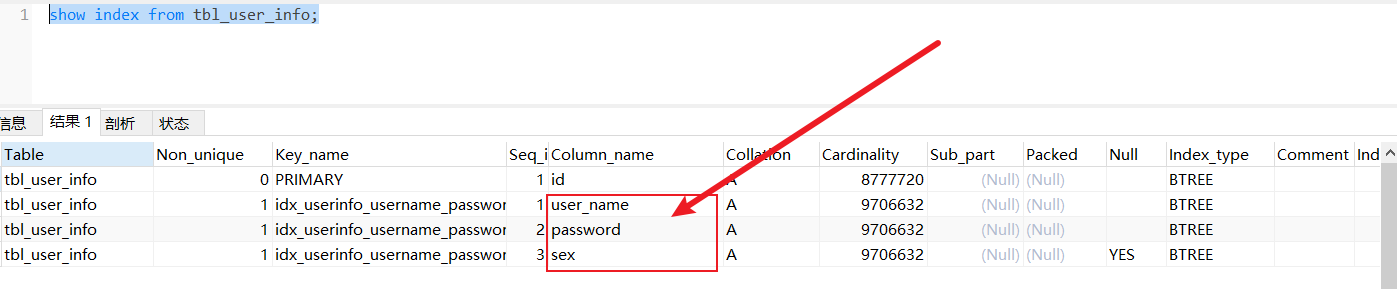
可见,在这三个列上都出现了这个联合索引。
user_name,password,sex三个条件查询
select * from tbl_user_info where user_name = '226807ba-f6f5-4dd4-b93f-0fdf2fcd06ab' and `password` = 'dc9e428a-6e19-4172-8a97-5d38b560cf02' and sex = 1;

可以看到查询速度是0.173秒;
explain分析
explain select * from tbl_user_info where user_name = '226807ba-f6f5-4dd4-b93f-0fdf2fcd06ab' and `password` = 'dc9e428a-6e19-4172-8a97-5d38b560cf02' and sex = 1;

通过explain分析
type是ref,性能已经很高;
possible_key是idx_userinfo_username_password_sex,说明可能用到的索引是联合索引idx_userinfo_user_name,idx_userinfo_username_password_sex;
key 是idx_userinfo_username_password_sex,说明实际用到的索引是联合索引idx_userinfo_user_name,idx_userinfo_username_password_sex;
key_len是304,说明使用该索引时使用的字节数是304;
使用user_name,password查询
select * from tbl_user_info where user_name = '226807ba-f6f5-4dd4-b93f-0fdf2fcd06ab' and `password` = 'dc9e428a-6e19-4172-8a97-5d38b560cf02';

我们可以看到查询速度是0.208秒;
explain分析
explain select * from tbl_user_info where user_name = '226807ba-f6f5-4dd4-b93f-0fdf2fcd06ab' and `password` = 'dc9e428a-6e19-4172-8a97-5d38b560cf02';

type是ref,性能已经很高;
possible_key是idx_userinfo_username_password_sex,说明可能用到的索引是联合索引idx_userinfo_user_name,idx_userinfo_username_password_sex;
key 是idx_userinfo_username_password_sex,说明实际用到的索引是联合索引idx_userinfo_user_name,idx_userinfo_username_password_sex;
key_len是304,说明使用该索引时使用的字节数是304;
使用user_name查询
select * from tbl_user_info where user_name = '226807ba-f6f5-4dd4-b93f-0fdf2fcd06ab';

速度是0.150s;
explain分析
explain select * from tbl_user_info where user_name = '226807ba-f6f5-4dd4-b93f-0fdf2fcd06ab';

type是ref,性能已经很高;
possible_key是idx_userinfo_username_password_sex,说明可能用到的索引是联合索引idx_userinfo_user_name,idx_userinfo_username_password_sex;
key 是idx_userinfo_username_password_sex,说明实际用到的索引是联合索引idx_userinfo_user_name,idx_userinfo_username_password_sex;
key_len是152,说明使用该索引时使用的字节数是152;
只使用password查询
select * from tbl_user_info where password = '06903570-d9d4-49cb-915f-5883b26692bd';

查询速度时9秒多!
explain分析
explain select * from tbl_user_info where password = '06903570-d9d4-49cb-915f-5883b26692bd';

type是ALL,性能很差;
没有用到索引;
只使用sex
select * from tbl_user_info where sex = 1;

查询了740多秒还没查出来,给它停了。
explain分析
explain select * from tbl_user_info where sex = 1;

type是ALL,性能很差;
没有用到索引;
使用user_name和sex查询
select * from tbl_user_info where user_name = '226807ba-f6f5-4dd4-b93f-0fdf2fcd06ab' and sex = 1;

explain分析
explain select * from tbl_user_info where user_name = '226807ba-f6f5-4dd4-b93f-0fdf2fcd06ab' and sex = 1;

type是ref,性能已经很高;
possible_key是idx_userinfo_username_password_sex,说明可能用到的索引是联合索引idx_userinfo_user_name,idx_userinfo_username_password_sex;
key 是idx_userinfo_username_password_sex,说明实际用到的索引是联合索引idx_userinfo_user_name,idx_userinfo_username_password_sex;
key_len是152,说明使用该索引时使用的字节数是152;
使用password和sex查询
select * from tbl_user_info where `password` = '06903570-d9d4-49cb-915f-5883b26692bd' and sex = 0;

使用了8秒多。
explain分析
select * from tbl_user_info where `password` = '06903570-d9d4-49cb-915f-5883b26692bd' and sex = 0;

type是ALL,性能很差;
没有用到索引;
最左前缀法则总结
如果索引了多列(联合索引),要遵守最左前缀法则。最左前缀法则指的是查询从索引的最左列开始, 并且不跳过索引中的列。如果跳跃某一列,索引将会部分失效(后面的字段索引失效)。最左边的列必须存在!
范围查询
联合索引中,出现范围查询(>,<),范围查询右侧的列索引失效。
在介绍之前,我们新建一个表来进行演示;之前那个表的sex是char类型的,不好通过索引使用的长度来分析某一列是否用到了索引;
SET NAMES utf8mb4;
SET FOREIGN_KEY_CHECKS = 0;

-- ----------------------------
-- Table structure for student
-- ----------------------------
DROP TABLE IF EXISTS `student`;
CREATE TABLE `student`  (
  `id` int(11) NOT NULL AUTO_INCREMENT COMMENT '主键ID',
  `name` varchar(10) CHARACTER SET utf8mb4 COLLATE utf8mb4_general_ci NULL DEFAULT NULL COMMENT '姓名',
  `num` varchar(10) CHARACTER SET utf8mb4 COLLATE utf8mb4_general_ci NULL DEFAULT NULL COMMENT '学号',
  `age` int(10) NULL DEFAULT NULL COMMENT '年龄',
  PRIMARY KEY (`id`) USING BTREE
) ENGINE = InnoDB AUTO_INCREMENT = 5 CHARACTER SET = utf8mb4 COLLATE = utf8mb4_general_ci COMMENT = '学生表' ROW_FORMAT = Dynamic;

-- ----------------------------
-- Records of student
-- ----------------------------
INSERT INTO `student` VALUES (1, '杨过', '001', 18);
INSERT INTO `student` VALUES (2, '小龙女', '002', 36);
INSERT INTO `student` VALUES (3, '黄蓉', '003', 58);
INSERT INTO `student` VALUES (4, '郭靖', '004', 60);

SET FOREIGN_KEY_CHECKS = 1;

创建索引
先查看下索引:

只有主键索引
create index idx_student_name_age_num on student(`name`,age,num);
请记好顺序,name,age,num;
使用三个条件(不加范围)
explain select * from student where `name` = '小龙女' and age = 36 and num='002' ;

key_len是91.
三个条件(age带范围)
explain select * from student where `name` = '小龙女' and age > 30 and num='002' ;

key_len是48了,比91小,范围查询右侧的列索引失效。
explain select * from student where `name` = '小龙女' and age >= 30 and num='002' ;

如果是大于等于,就用上了。
索引失效情况
在索引列上运算
在索引列上加运算会失效;
执行如下sql,删掉之前的联合索引,为学号建立一个唯一索引。
drop index idx_student_name_age_num on student;
create unique index idx_student_num on student(`num`);

在索引列上运算查询分析
explain select * from student where substring(num,0,2) = '00';

没有用到索引。
字符串不加引号
explain select * from student where num = 00;

没有走索引。
模糊查询
尾部模糊匹配,索引不会失效。如果是头部模糊匹配,索引将会失效。
我们重新使用tbl_user_info这个表,来进行演示。为什么不用student表了呢?(因为数据量较少,MySQL会去判断走索引和全表扫描的效率都如何,有可能会自己选择了全表扫描)。
将tbl_user_info的索引都删掉(为方便演示,我重建了表,然后只插入了1w条数据,不然建索引的时间太长)。
create index idx_userinfo_username_password_birthday on tbl_user_info(user_name,`password`,birthday);
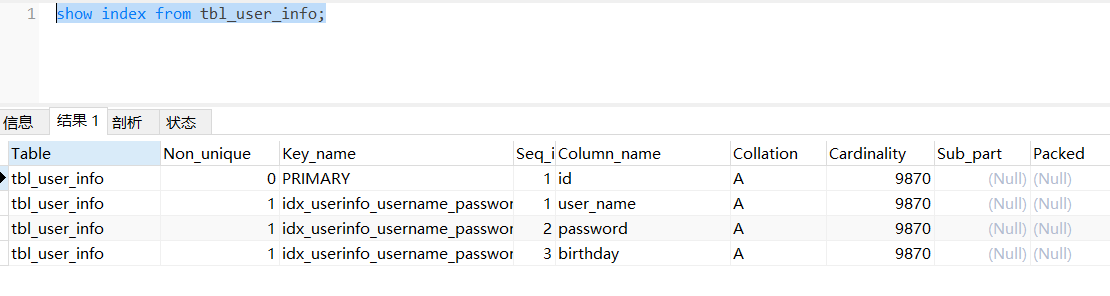
三个等值条件

头部like

key_len是152,长度小于308,没有走索引;
尾部like
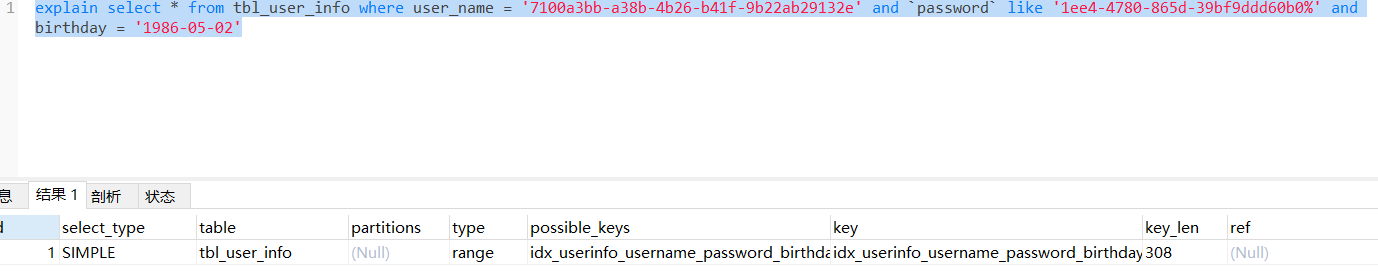
key_len等于308,走索引了。
or连接条件
用or分割开的条件, 如果or前的条件中的列有索引,而后面的列中没有索引,那么涉及的索引都不会 被用到。
tbl_user_info的nick_name没有索引

即使id有主键索引,也没有用到。
数据分布影响
如果MySQL评估使用索引比全表更慢,则不使用索引。is null 、is not null是否走索引,得具体情况具体 分析,并不是固定的。
sql提示
我们可以告诉MySQL数据库使用哪个索引,忽略哪个索引;
语法:
use index : 建议MySQL使用哪一个索引完成此次查询(仅仅是建议,mysql内部还会再次进 行评估)。
force index : 强制使用索引。
ignore index : 忽略指定的索引。
一般使用在某一列有多个索引和我们不想让MySQL自己去评判是否走索引时使用。
案例
select * from tbl_user_info force index(idx_userinfo_username_password_birthday) where user_name = '441db937-d99d-499f-8a3e-8cf95176b086' and `password` = '1232432' and birthday = '2022-01-01';
-- 其他两个类似
覆盖索引
尽量使用覆盖索引,减少select *。 覆盖索引是指查询使用了索引,并且需要返回的列,在该索引中已经全部能够找到 。
比如我想查询tbl_user_info的user_name字段,我给它加了单列索引,我如果使用select * 的话,因为没有存储其他列,还需要回表查询;如果我是select user_name,那么直接就能查出来了。
前缀索引
当字段类型为字符串(varchar,text,longtext等)时,有时候需要索引很长的字符串,这会让索引变得很大,查询时,浪费大量的磁盘IO, 影响查询效率。此时可以只将字符串的一部分前缀,建立索引,这样可以大大节约索引空间,从而提高索引效率。
语法
create index 索引名 on 表名(列名(长度)) ;
前缀索引的索引长度可以根据如下计算:
select count(distinct substring(`password`,1,5)) from tbl_user_info;
select count(*) from tbl_user_info;
第一行得出的值除以第二行得出的值,越接近1,查询效率越高。从使用的空间和效率上做平衡。(是否需要牺牲空间换时间)
索引设计原则
1.针对于数据量较大,且查询比较频繁的表建立索引。
2.针对于常作为查询条件(where)、排序(order by)、分组(group by)操作的字段建立索引。
3.尽量选择区分度高的列作为索引,尽量建立唯一索引,区分度越高,使用索引的效率越高。
4.尽量使用联合索引,减少单列索引,查询时,联合索引很多时候可以覆盖索引,节省存储空间, 避免回表,提高查询效率。
5.要控制索引的数量,索引并不是多多益善,索引越多,维护索引结构的代价也就越大,会影响增删改的效率。
原文链接详解MySQL索引