-
AJAX 入门 day3
目录
学习之前先了解一下ajax和axios之间的区别
-
Ajax:是一种允许网页在后台与服务器进行数据交换的技术,而不需要重新加载整个页面。它不是一种特定的库或框架,而是一种实现异步数据传输的通用方法。Ajax通常使用 XMLHttpRequest 对象来发起 HTTP 请求。
-
Axios:是一个基于 promise 的 HTTP 客户端,它适用于浏览器和 node.js。它提供了更加简洁的 API,以方便发送 HTTP 请求。Axios 的底层实现仍然依赖于 XMLHttpRequest(在浏览器中)或 node.js 的原生 HTTP 模块,但它抽象了它们的复杂性,使得发送请求更加容易。
在现代前端开发中,Axios 被广泛推荐用来发起 HTTP 请求,因为它简单易用,并且容易集成到常见的进程式任务中,如 React、Vue 或 Angular 应用。
1.XMLHttpRequest
1.1 XMLHttpRequest认识
XMLHttpRequest是一种在网页上执行异步请求的 API,它允许你在不重新加载整个页面的情况下与服务器交换数据。它广泛用于实现 AJAX(Asynchronous JavaScript and XML)功能,从而使网页能够动态更新内容关系:axios 内部采用 XMLHttpRequest 与服务器交互

1.2 用ajax发送请求
步骤:- 1. 创建 XMLHttpRequest 对象
- 2. 配置请求方法和请求 url 地址
- 3. 监听 loadend 事件,接收响应结果
- 4. 发起请求

1.3 案例
需求:获取并展示所有省份名字效果图:
代码:
- <body>
- <p>p>
- <script>
- /**
- * 目标:使用XHR携带查询参数,展示某个省下属的城市列表
- */
- const p = document.querySelector('p')
- /* 步骤:
- 1. 创建 XMLHttpRequest 对象
- 2. 配置请求方法和请求 url 地址
- 3. 监听 loadend 事件,接收响应结果
- 4. 发起请求 */
- const xml = new XMLHttpRequest()
- xml.open('GET', 'http://hmajax.itheima.net/api/city?pname=辽宁省')
- xml.addEventListener('loadend', function () {
- // {"message":"获取城市成功","list":["沈阳市","大连市"]}
- console.log(xml.response)
- // 将json字符串转换为对象
- const data = JSON.parse(xml.response)
- console.log(data.list.join('
')) - p.innerHTML = data.list.join('
') - })
- xml.send()
- script>
- body>
1.4 XMLHttpRequest - 查询参数
定义:浏览器提供给服务器的 额外信息 ,让服务器返回浏览器想要的数据语法:http://xxxx.com/xxx/xxx ? 参数名1=值1 & 参数名2=值2查询字符串直接写在opne方法的URL后面1.5 XMLHttpRequest - 数据提交
需求:通过 XHR 提交用户名和密码,完成注册功能 核心:
核心:- 请求头设置 Content-Type:application/json
- 请求体携带 JSON 字符串
代码:
- <body>
- <button class="reg-btn">注册用户button>
- <script>
- /**
- * 目标:使用xhr进行数据提交-完成注册功能
- */
- /**
- * 需求:通过 XHR 提交用户名和密码,完成注册功能
- 核心:
- 请求头设置 Content-Type:application/json
- 请求体携带 JSON 字符串
- */
- document.querySelector('.reg-btn').addEventListener('click', () => {
- const xml = new XMLHttpRequest()
- xml.open('POST', 'http://hmajax.itheima.net/api/register')
- xml.addEventListener('loadend', function () {
- console.log(xml.response)
- })
- // 让浏览器知道,传递的数据是json字符串
- xml.setRequestHeader('Content-Type', 'application/json')
- const obj = {
- username: 'linhanxin',
- password: '1234567'
- }
- // 转为JSON字符串
- const data = JSON.stringify(obj)
- // 发送请求体的数据
- xml.send(data)
- })
- script>
- body>
2.Promise
2.1 Promise认识
promise对象用于表示一个异步操作的最终完成(或失败)及其结果值的对象。
好处:- 1. 逻辑更清晰
- 2. 了解 axios 函数内部运作机制,以及简化 ajax的开发
- 3. 能解决回调函数地狱问题
当你使用
axios发起 HTTP 请求时,它会返回一个Promise对象,这个Promise对象会在请求完成时解决(resolve)或拒绝(reject)。语法:

2.2 Promise - 三种状态
作用:了解Promise对象如何 关联 的 处理函数 ,以及代码执行顺序概念:一个Promise对象,必然处于以下几种状态之一- ✓ 待定(pending) :初始状态,既没有被兑现,也没有被拒绝
- ✓ 已兑现(fulfilled) :意味着,操作成功完成
- ✓ 已拒绝(rejected) :意味着,操作失败
 注意:Promise对象一旦被 兑现/拒绝 就是 已敲定 了,状态无法再被改变
2.3 案例
使用Promise + XHR 获取省份列表需求:使用 Promise 管理 XHR 获取省份列表,并展示到页面上步骤:- 1. 创建 Promise 对象
- 2. 执行 XHR 异步代码,获取省份列表
- 3. 关联成功或失败函数,做后续处理
效果图:
 代码:
代码:- html>
- <html lang="en">
- <head>
- <meta charset="UTF-8">
- <meta http-equiv="X-UA-Compatible" content="IE=edge">
- <meta name="viewport" content="width=device-width, initial-scale=1.0">
- <title>案例_使用Promise+XHR_获取省份列表title>
- head>
- <body>
- <p class="my-p">p>
- <script>
- /**
- * 目标:使用Promise管理XHR请求省份列表
- * 1. 创建Promise对象
- * 2. 执行XHR异步代码,获取省份列表
- * 3. 关联成功或失败函数,做后续处理
- */
- const p = document.querySelector('.my-p')
- const promise = new Promise((resolve, reject) => {
- const xml = new XMLHttpRequest()
- xml.open('GET', 'http://hmajax.itheima.net/api/province')
- xml.addEventListener('loadend', function () {
- if (xml.status >= 200 && xml.status < 300) {
- // xml如何响应响应成功或者失败?
- // 2xx开头的响应状态码都是代表成功
- // console.log(xml.status)
- // console.log(xml.response)
- resolve(JSON.parse(xml.response))
- } else {
- reject(new Error(xml.response))
- // console.log(xml)
- }
- })
- xml.send()
- })
- promise.then(result => {
- console.log(result.list)
- p.innerHTML = result.list.join('
') - })
- promise.catch(error => {
- // Error:
404 Not Found
- // at XMLHttpRequest.
(index.html:32:18) - // 可以看出直接打印error错误信息不详细
- // console.log(error)
- // 显示详细的错误信息,会返回一个对象,里面有message属性
- console.dir(error)
- p.innerHTML = error.message
- })
- script>
- body>
- html>
3.封装简易版 axios
3.1 封装_简易axios_获取省份列表
需求:基于 Promise + XHR 封装 myAxios 函数,获取省份列表展示步骤:- 1. 定义 myAxios 函数,接收配置对象,返回 Promise 对象
- 2. 发起 XHR 请求,默认请求方法为 GET
- 3. 调用成功/失败的处理程序
- 4. 使用 myAxios 函数,获取省份列表展示
代码:
- <p>p>
- <script>
- /**
- * 目标:封装_简易axios函数_获取省份列表
- * 1. 定义myAxios函数,接收配置对象,返回Promise对象
- * 2. 发起XHR请求,默认请求方法为GET
- * 3. 调用成功/失败的处理程序
- * 4. 使用myAxios函数,获取省份列表展示
- */
- const p = document.querySelector('p')
- function myAxios(config) {
- // 返回一个promise对象
- return new Promise((resolve, reject) => {
- const xhr = new XMLHttpRequest()
- // 如果config.method没有值,就默认GET
- xhr.open(config.method || 'GET', config.url)
- xhr.addEventListener('loadend', function () {
- // console.log(xhr.response)
- // 处理成功或者失败的处理程序
- if (xhr.status >= 200 && xhr.status < 300) {
- resolve(JSON.parse(xhr.response))
- } else {
- reject(new Error(xhr.response))
- }
- })
- xhr.send()
- })
- }
- myAxios({
- url: 'http://hmajax.itheima.net/api/province'
- // method: 'GET'
- }).then(result => {
- console.log(result.list)
- p.innerHTML = result.list.join('
') - }).catch(error => {
- console.log(error)
- p.innerHTML = error.message
- })
- script>
- body>
3.2 封装_简易axios_获取地区列表
需求:修改 myAxios 函数支持 传递 查询参数 ,获取"辽宁省","大连市"对应 地区列表 展示步骤:- 1. myAxios 函数调用后,判断 params 选项
- 2. 基于 URLSearchParams 转换查询参数字符串
- 3. 使用自己封装的 myAxios 函数展示地区列表
代码:
- <p class="my-p">p>
- <script>
- /**
- * 目标:封装_简易axios函数_获取地区列表
- * 1. 判断有params选项,携带查询参数
- * 2. 使用URLSearchParams转换,并携带到url上
- * 3. 使用myAxios函数,获取地区列表
- */
- function myAxios(config) {
- return new Promise((resolve, reject) => {
- const xhr = new XMLHttpRequest()
- if (config.params) {
- // 使用URLSearchParams转换,并携带到url上
- const paramsObj = new URLSearchParams(config.params)
- const queryString = paramsObj.toString()
- // pname=%E8%BE%BD%E5%AE%81%E7%9C%81&cname=%E5%A4%A7%E8%BF%9E%E5%B8%82
- // console.log(queryString)
- // 拼接查询字符串
- config.url += '?' + queryString
- }
- xhr.open(config.method || 'GET', config.url)
- xhr.addEventListener('loadend', () => {
- if (xhr.status >= 200 && xhr.status < 300) {
- resolve(JSON.parse(xhr.response))
- } else {
- reject(new Error(xhr.response))
- }
- })
- xhr.send()
- })
- }
- myAxios({
- url: 'http://hmajax.itheima.net/api/area',
- params: {
- pname: '辽宁省',
- cname: '大连市'
- }
- }).then(result => {
- console.log(result)
- document.querySelector('.my-p').innerHTML = result.list.join('
') - })
- script>
- body>
3.3 封装_简易axios_注册用户
需求:修改 myAxios 函数支持 传递 请求体 数据 ,完成注册用户功能步骤:- 1. myAxios 函数调用后,判断 data 选项
- 2. 转换数据类型,在 send 方法中发送
- 3. 使用自己封装的 myAxios 函数完成注册用户功能
代码:
- <button class="reg-btn">注册用户button>
- <script>
- /**
- * 目标:封装_简易axios函数_注册用户
- * 1. 判断有data选项,携带请求体
- * 2. 转换数据类型,在send中发送
- * 3. 使用myAxios函数,完成注册用户
- */
- function myAxios(config) {
- return new Promise((resolve, reject) => {
- const xhr = new XMLHttpRequest()
- // 判断是否有参数
- if (config.params) {
- const paramsObj = new URLSearchParams(config.params)
- const queryString = paramsObj.toString()
- config.url += `?${queryString}`
- }
- xhr.open(config.method || 'GET', config.url)
- xhr.addEventListener('loadend', () => {
- if (xhr.status >= 200 && xhr.status < 300) {
- resolve(JSON.parse(xhr.response))
- } else {
- reject(new Error(xhr.response))
- }
- })
- // 判断是否有数据提交信息
- if (config.data) {
- // 告诉浏览器,传输的数据是JSON字符串
- xhr.setRequestHeader('Content-Type', 'application/json')
- // 处理数据提交
- const data = JSON.stringify(config.data)
- xhr.send(data)
- } else {
- xhr.send()
- }
- })
- }
- const btn = document.querySelector('.reg-btn')
- btn.addEventListener('click', function () {
- myAxios({
- url: 'http://hmajax.itheima.net/api/register',
- method: 'POST',
- data: {
- username: 'linhanxin1111',
- password: '1234567'
- }
- }).then(result => {
- console.log(result)
- })
- })
- script>
3.4 简单封装完整版 axios
代码:
- function myAxios(config) {
- return new Promise((resolve, reject) => {
- const xhr = new XMLHttpRequest()
- if (config.params) {
- const paramsObj = new URLSearchParams(config.params)
- const queryString = paramsObj.toString()
- config.url += `?${queryString}`
- }
- xhr.open(config.method || 'GET', config.url)
- xhr.addEventListener('loadend', () => {
- if (xhr.status >= 200 && xhr.status < 300) {
- resolve(JSON.parse(xhr.response))
- } else {
- reject(new Error(xhr.response))
- }
- })
- if (config.data) {
- const jsonStr = JSON.stringify(config.data)
- xhr.setRequestHeader('Content-Type', 'application/json')
- xhr.send(jsonStr)
- } else {
- xhr.send()
- }
- })
- }
4.案例 - 天气预报
天气预报步骤:- 1. 获取北京市天气数据,展示
- 2. 搜索城市列表,展示
- 3. 点击城市,显示对应天气数据
接口文档地址:https://apifox.com/apidoc/shared-1b0dd84f-faa8-435d-b355-5a8a329e34a8/api-87683404
效果图:
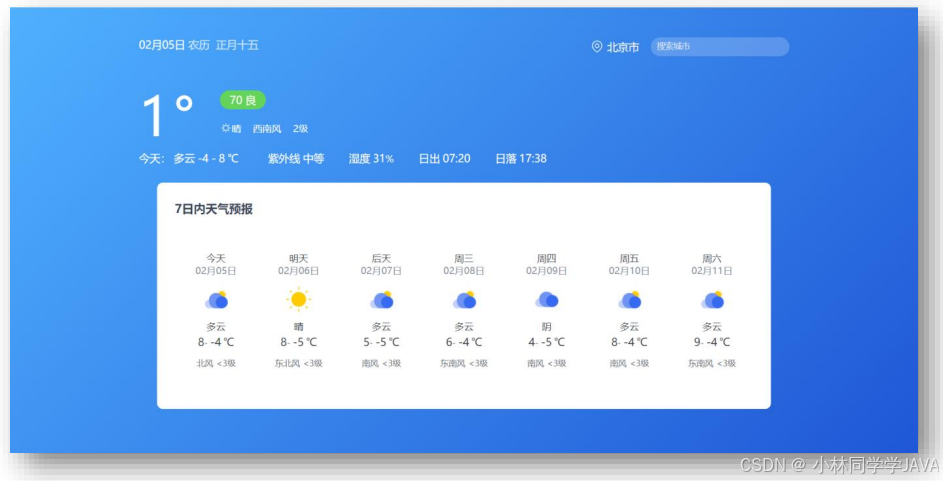
4.1 天气预报 - 获取并渲染城市天气
 需求:写一个渲染数据函数,方便后面的使用
步骤:
- 1.默认显示-北京市天气
- 2.获取北京市天气数据
- 3.数据展示到页面
代码:
- /**
- * 目标1:默认显示-北京市天气
- * 1.1 获取北京市天气数据
- * 1.2 数据展示到页面
- */
- // 获取并渲染城市天气函数
- function getWeather(cityCode) {
- // 1.1 获取北京市天气数据
- myAxios({
- url: 'http://hmajax.itheima.net/api/weather',
- params: {
- city: cityCode
- }
- }).then(result => {
- console.log(result)
- const wObj = result.data
- // 1.2 数据展示到页面
- // 阳历和农历日期
- const dateStr = `${wObj.date}
- 农历
- ${wObj.dateLunar}
- `
- document.querySelector('.title').innerHTML = dateStr
- // 城市名字
- document.querySelector('.area').innerHTML = wObj.area
- // 当天气温
- const nowWStr = `${wObj.temperature}°
- ${wObj.psPm25}${wObj.psPm25Level}
${wObj.weatherImg}" class="weatherImg" alt="">
${wObj.weather}- ${wObj.windDirection}
- ${wObj.windPower}
` - document.querySelector('.weather-box').innerHTML = nowWStr
- // 当天天气
- const twObj = wObj.todayWeather
- const todayWStr = `今天:${twObj.weather}${twObj.temNight}-${twObj.temDay}℃
- 紫外线
- ${twObj.ultraviolet}
- 湿度
- ${twObj.humidity}%
- 日出
- ${twObj.sunriseTime}
- 日落
- ${twObj.sunsetTime}
- `
- document.querySelector('.today-weather').innerHTML = todayWStr
- // 7日天气预报数据展示
- const dayForecast = wObj.dayForecast
- const dayForecastStr = dayForecast.map(item => {
- return `
- ${item.dateFormat}${item.date}
- ${item.weather}
- ${item.temNight}-${item.temDay}℃
- ${item.windDirection}${item.windPower}
- `
- }).join('')
- // console.log(dayForecastStr)
- document.querySelector('.week-wrap').innerHTML = dayForecastStr
- })
- }
- // 默认进入网页-就要获取天气数据(北京市城市编码:'110100')
- getWeather('110100')
4.2 天气预报 - 搜索城市列表
 需求:根据关键字,展示匹配城市列表步骤:
- 1. 绑定 input 事件,获取关键字
- 2. 获取展示城市列表数据
代码:
- /**
- * 目标2:搜索城市列表
- * 2.1 绑定input事件,获取关键字
- * 2.2 获取展示城市列表数据
- */
- // 2.1 绑定input事件,获取关键字
- document.querySelector('.search-city').addEventListener('input', (e) => {
- console.log(e.target.value)
- // 2.2 获取展示城市列表数据
- myAxios({
- url: 'http://hmajax.itheima.net/api/weather/city',
- params: {
- city: e.target.value
- }
- }).then(result => {
- console.log(result)
- const liStr = result.data.map(item => {
- return `
- ${item.code}
">${item.name}` - }).join('')
- console.log(liStr)
- document.querySelector('.search-list').innerHTML = liStr
- })
- })
4.2 天气预报 - 展示城市天气
 需求:展示用户搜索查看的城市天气步骤:
- 1. 检测搜索列表点击事件,获取城市 code 值
- 2. 复用获取展示城市天气函数
代码:
- /**
- * 目标3:切换城市天气
- * 3.1 绑定城市点击事件,获取城市code值
- * 3.2 调用获取并展示天气的函数
- */
- // 3.1 绑定城市点击事件,获取城市code值
- document.querySelector('.search-list').addEventListener('click', e => {
- if (e.target.classList.contains('city-item')) {
- // 只有点击城市li才会走这里
- const cityCode = e.target.dataset.code
- console.log(cityCode)
- // 3.2 调用获取并展示天气的函数
- getWeather(cityCode)
- }
- })
-
-
相关阅读:
解决Redis Object Cache Pro插件无法使用高性能配置的解决方案
centos8.4下搭建 rocketmq集群部署 4.9.4
初识java
WiFi cfg80211
06--jenkins构建CI_CD
【RealTek sdk-3.4.14b】RTL8197FH-VG+RTL8367+RTL8812F WiFi to LAN 和WiFi to WAN吞吐量
AD敷铜报polygon not repour after edit[已解决]
如何使用C++图形界面开发框架Qt创建一个应用程序?(Part 2)
线上展厅设计服务
java核心编程——IO流
- 原文地址:https://blog.csdn.net/2301_77358195/article/details/142268651