-
CSS 多按钮根据半圆弧度排列
需求
多个按钮根据弧度,延边均匀排列。
实现
HTML
- 分两级;
- 第一级,外层定义按钮的
compose-container宽度; - 第二级,按钮集合,使用方法
styleBtn(index),根据索引计算;
<div class="compose-container flex-style-01">
    <div class="btn" v-for="(item, index) in btnNum" :key="index" :style="styleBtn(index)">
    	{{ index }}
    div>
div>
CSS
compose-container:容器样式,使用flex布局,且设置width;btn:按钮样式,无需设置display;
.compose-container {
    display: flex;
    width: 600px;
    height: 80px;
    margin: 50px 0;
    background: #409eff;
    .btn {
        width: 50px;
        height: 50px;
        line-height: 50px;
        background: #aec0d1;
        border-radius: 50%;
        text-align: center;
        vertical-align: middle;
    }
}
JavaScript
- 如下方法是计算按钮
translateY值; - 代码第
2行,传参是按钮的索引值,从0开始; - 代码第
4行,按钮的总个数; - 代码第
6行,按钮垂直高度间隔,单位px; - 代码第
8行,整体抬高,也可不设置; - 代码第
12 - 27行,区分偶数和奇数,中心点计算; - 代码第
29行,设置属性translateY;
// 按钮弧度高度
function styleBtn(index) {
    // 总个数
    const totalNum = 8;
    // 间隔高度,单位 px
    const gap = 8;
    // 整体抬高
    const raiseHeight = 28;

    let translateY = ''

    if(totalNum%2 === 0) { // 偶数
        const centerIdx = totalNum / 2;
        const n = centerIdx - index;
        // > 0 左侧,<= 右侧
        translateY = (n > 0) ? n * gap : (Math.abs(n)+1) * gap;
    }
    else { // 奇数
        const centerIdx = Math.floor(totalNum / 2);
        const n = centerIdx - index;
        if(centerIdx === index) {// 中心点
            translateY = gap;
        }
        else {
            translateY = (Math.abs(n)+1) * gap;
        }
    }

    return { transform: `translateY(${(translateY - raiseHeight)}px)` }
}
效果
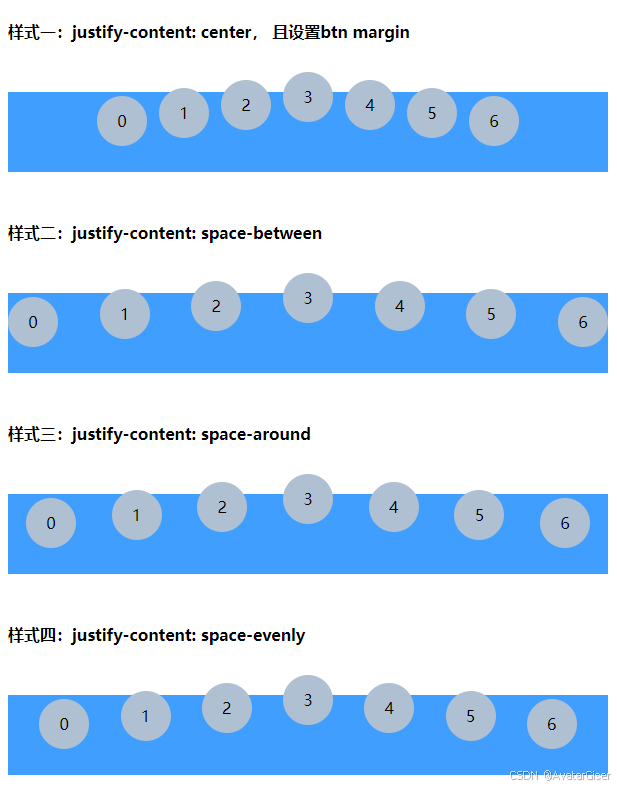
偶数
- 按钮个数为偶数,中间两个按钮在同一条水平线上;
- 样式一,
justify-content: center,根据按钮的 margin 属性设置间隔; - 样式二:
justify-content: space-between,两端对齐,按钮之间的空间平均分配; - 样式三:
justify-content: space-around,按钮两侧空间相等,但首尾按钮与容器边缘的空间是按钮之间空间的一半; - 样式四:
justify-content: space-evenly,所有间距(包括首尾按钮与容器边缘的间距)都相等;

奇数
- 按钮个数为奇数,中间一个按钮最高,其它左右两侧在同一条水平线上;
justify-content设置同上;
完整代码
样式一:justify-content: center, 且设置btn margin
{{ index }}样式二:justify-content: space-between
{{ index }}样式三:justify-content: space-around
{{ index }}样式四:justify-content: space-evenly
{{ index }} -
相关阅读:
Linux 修改SSH端口
MapReduce核心原理(下)
(一)笔记.net core学习之主机和主机配置
网络安全-恶意代码
职场中,如何更高效地分析和解决问题(一)
用友2023届秋招Java笔试-S2卷-编程题详解
SDL3 入门(2):第一个窗口
kerberos认证相关概念和流程
前端面试题集锦(1)
测试员进阶技能:如何有效地利用单元测试报告?
- 原文地址:https://blog.csdn.net/sinat_31213021/article/details/141023122
- 最新文章
-
沪漂五周年了:我越来越迷茫了
Agentic Skill Routing 实战:别再把所有 Skill 塞进 AI Agent 上下文
MySQL-Seconds_behind_master的精度误差
[MAF预定义ChatClient中间件-03]CachingChatClient——利用缓存省钱省时间
AI的至暗历史:从万众期待到被政府撤资,AI的两次死亡徘徊
Agent OS :五种驯服不确定性的范式
PortSwigger SQL注入LAB11
数据库即时编译JIT
[Begin]AI Learn Data Day 0
深度学习进阶(二十七)现代 LLM 的核心架构设计其二:SwiGLU