-
Python入门 lab2
Lab 2
1
check_char_in_string.pyrunning result:

1.1
- different arguments are tried as you can see in the screenshot above
- every result matches the expectation
1.2
The keyword
inin thecheck_char_in_stringfunction is used to check if a specific character is present in the given string.It is a membership operator in Python that returns
Trueif the character is found in the string, andFalseotherwise. The keywordinsimplifies the process of checking for the existence of a character in a string by providing a concise way to perform this operation.
2
count_char_occurrence.pyrunning result:

2.1 counting character
When counting a character:
- every result matches the expectation
- When the character is not in the input string: the result is 0.
for example: runcount_char_occurrence("Fudan python", "f")→ \rightarrow → return0 - When the character is in the input string: the result is the number it occurs.
for example: runcount_char_occurrence("Fudan python", "n")→ \rightarrow → return2
- When the character is not in the input string: the result is 0.
2.2 counting substring
When counting substring:
- run
count_char_occurrence("Fudan python", "python")→ \rightarrow → return1 - run
count_char_occurrence("aaaa", "aa")→ \rightarrow → return2 - run
count_char_occurrence("ababa", "aba")→ \rightarrow → return1
2.2.1 problem
The result shows that
count_char_occurrencefunction also works for counting substring, but there still exists a problem.- in the first example, the result can meet the expected answer
- while in the second one, the result should be
3but the function returns2instead
also in the last example, the result should be2but it returns1
Interestingly, we can see that:
count_char_occurrencefunction can be used to count substring,
But when we usecount()method in Python to count the occurrences of overlapping substrings within a string, it does not account for overlapping occurrences of substrings, leading to a lower count than expected in certain cases.2.2.2 reason
The reason for this issue is that the
count()method doesn’t consider the ending position of the previous match but continues searching from the current position. This can cause some overlapping substrings to be missed in the count.2.2.3 solution
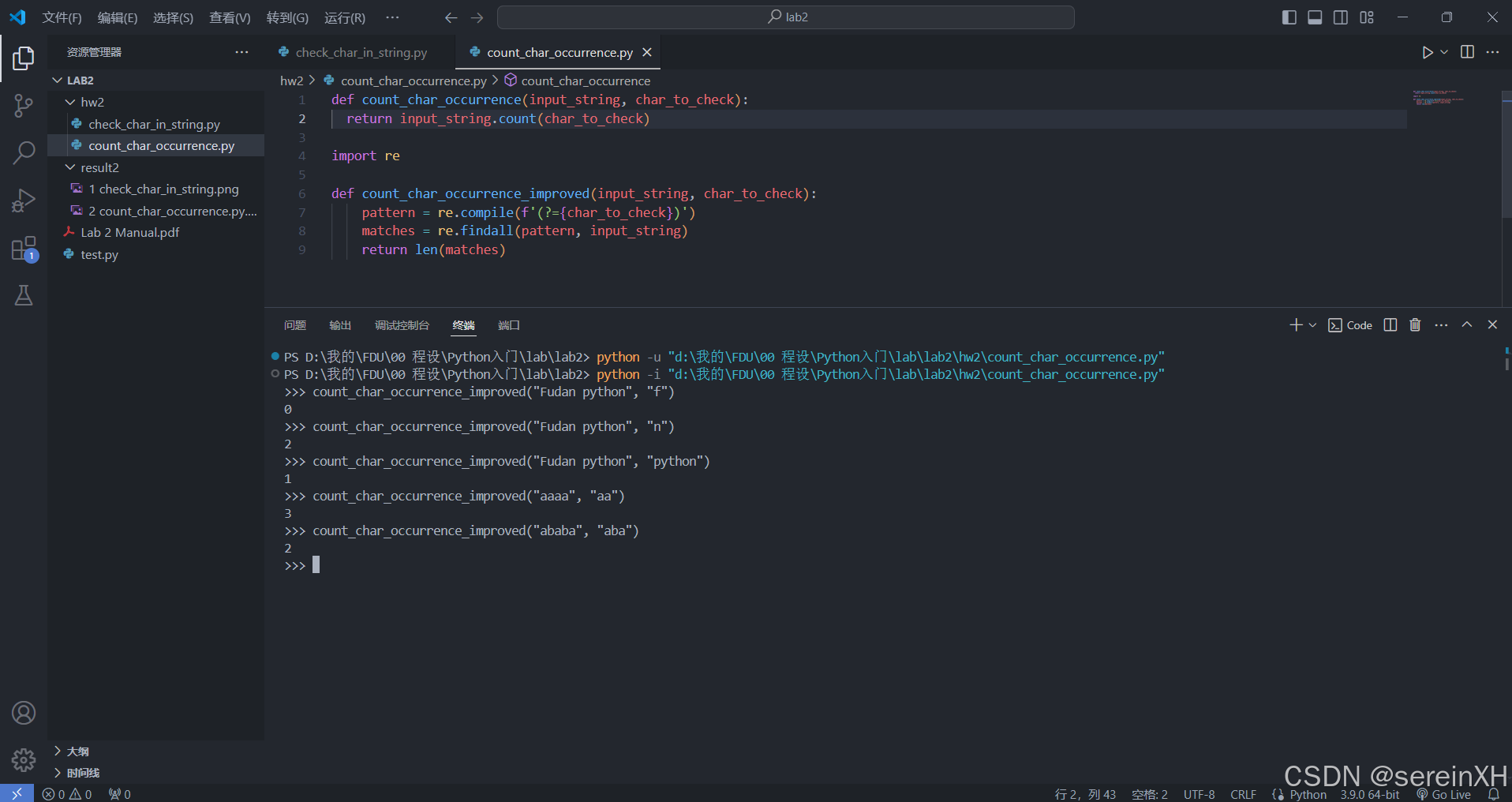
To solve this problem, we can use regular expressions to match overlapping substrings.
import re

def count_char_occurrence_improved(input_string, char_to_check):
    pattern = re.compile(f'(?={char_to_check})')
    matches = re.findall(pattern, input_string)
    return len(matches)
This modified function uses the “lookahead” mechanism of regular expressions, which allows it to match overlapping substrings.
running result:
3
get_char_index.pyrunning result:

3.1
-
When the character or substring is not in the input string: raise a
ValueErrorexception
for example:
runget_char_index("Fudan python at 1:30pm", " ")→ \rightarrow →ValueError: substring not found -
When the character or substring is in the input string: the result is the index of the first occurrence of the specific character within a given string.
for example:
runget_char_index("Fudan python at 1:30pm", "p")→ \rightarrow → return6
runget_char_index("Fudan python at 1:30pm", " ")→ \rightarrow → return5and it’s same when working on substrings
runget_char_index("Fudan python at 1:30pm", "at")→ \rightarrow → return13
runget_char_index("Fudan python at 1:30pm to 4:10pm", "pm")→ \rightarrow → return20
3.2 improved program
We can use a loop to iterate through the entire string to record the index each time it appears.
def get_char_indices(input_string, char_to_check):
  indices = []
  for i in range(len(input_string)):
    if input_string[i] == char_to_check:
      indices.append(i)
  return indices
running result:

However, this program only supports retrieving all positions of a character in a target string and does not support retrieving substrings. Since the method for implementing the latter is similar, I will skip this part.
4
remove_leading_ending_spaces.pyrunning result:

4.1
run
remove_leading_ending_spaces(" Fudan python ")→ \rightarrow → return'Fudan python'
runremove_leading_ending_spaces(" ")→ \rightarrow → return''
runremove_leading_ending_spaces("")→ \rightarrow → return''
5
extract_substring.pyrunning result:

5.1
- different arguments are tried as you can see in the screenshot above
- all results meet the expectation
5.2 index out of bound
When the start index or end index goes out of bounds, the slice operation in Python automatically adjusts the index values instead of throwing an error.
In the second function call (run
extract_substring("Fudan python", 10, 100)→ \rightarrow → return'on'), when the end index exceeds the length of the string, it is adjusted to the last index of the string. Therefore, it doesn’t raise an error but instead returns the substring'on'.5.3 negative index
According to the third function call (run
extract_substring("Fudan python", -2, 100)→ \rightarrow → return'on'), the output is as expected.When the start index is negative, it specifies an offset relative to the end of the string. For example,
-2represents the second-to-last character, so the returned result is'on'from the string.
6
list_operations.py6.1
running result:

The first four functions are very similar to what have already been done for strings above. Elements in a list have similar properties as characters in a string. For example, when using the
index()method, it only returns the index of the first occurrence of the specified character or element.The only difference between them is:
It is more convenient to search for a substring in a string, while in a list, it is impossible to search for a sublist by using the code above.6.2
add_element_to_end()running result:

- different arguments are tried as you can see in the screenshot above
- every result matches the expectation
-
相关阅读:
springboot高校二手服饰交易系统服装商城idea mysql
利用Django中的缓存系统提升Web应用性能
GTK渲染摄像头图像数据
关于页面渲染的一些优化方案分享(懒加载、虚拟列表)
数学分析:数项级数的概念
五个使用Delphi语言进行开发的案例
【图文教程】若依前后端分离版本-菜单怎么设置
python 并发请求,转发
实施运维01
LeetCode - 141. 环形链表 (C语言,快慢指针,配图)
- 原文地址:https://blog.csdn.net/sereinXH/article/details/140337714