-
前端 CSS 经典:flex + margin 布局
前言:如今我们布局大多时候都是用的 flex 布局,但是有时我们也可以使用 margin 小技巧去完成布局。在弹性盒中当我们把 margin 某一个方向上设置为 auto,他的含义是用 margin 吃掉这个方向的剩余空间。
1. 元素垂直和水平居中
- html>
- <html lang="en">
- <head>
- <meta charset="utf-8" />
- <meta http-equiv="X-UA-Compatible" content="IE=edge" />
- <meta
- name="viewport"
- content="initial-scale=1.0, user-scalable=no, width=device-width"
- />
- <title>documenttitle>
- <style>
- .box {
- width: 500px;
- height: 500px;
- border: 1px solid;
- display: flex;
- }
- .item {
- width: 100px;
- height: 100px;
- background: blue;
- margin: auto;
- }
- style>
- head>
- <body>
- <div class="box">
- <div class="item">div>
- div>
- <script>script>
- body>
- html>

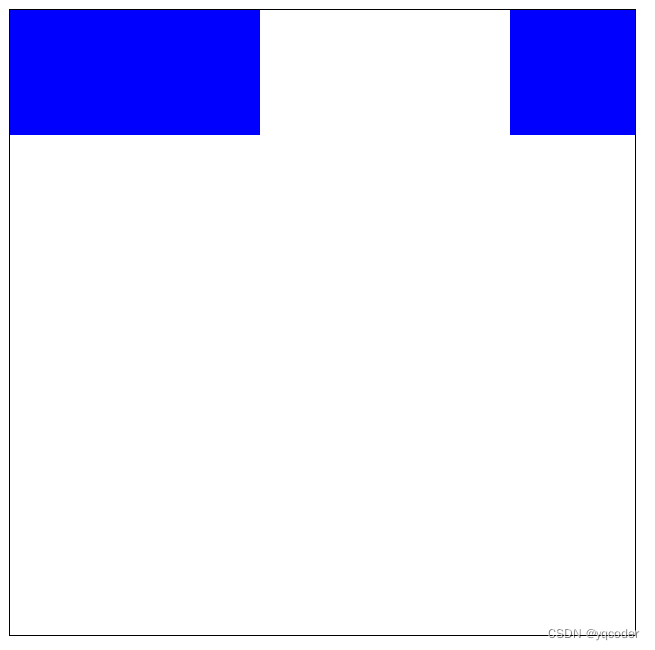
2. 三个子元素,两个居左一个居右
- html>
- <html lang="en">
- <head>
- <meta charset="utf-8" />
- <meta http-equiv="X-UA-Compatible" content="IE=edge" />
- <meta
- name="viewport"
- content="initial-scale=1.0, user-scalable=no, width=device-width"
- />
- <title>documenttitle>
- <style>
- .box {
- width: 500px;
- height: 500px;
- border: 1px solid;
- display: flex;
- }
- .item {
- width: 100px;
- height: 100px;
- background: blue;
- }
- style>
- head>
- <body>
- <div class="box">
- <div class="item">div>
- <div class="item">div>
- <div class="item" style="margin-left: auto">div>
- div>
- <script>script>
- body>
- html>
-
相关阅读:
java计算机毕业设计ssm建设路小学芙童币和芙童印章管理系统
设计模式-备忘录模式
使用Locust进行性能测试
C# 中的那些锁,在内核态都是怎么保证同步的?
flume+es+kibana日志系统
.NET借助虚拟网卡实现一个简单异地组网工具
个人投资建设新能源汽车充电桩充电站怎么样?多久能实现回本盈利?
机器学习的逻辑回归
singularity-ce-4.1.0 + go 完整安装步骤,及报错解决
防患未然 | AIRIOT城市管廊智能运维解决方案
- 原文地址:https://blog.csdn.net/weixin_64684095/article/details/139845274
- 最新文章
-
沪漂五周年了:我越来越迷茫了
Agentic Skill Routing 实战:别再把所有 Skill 塞进 AI Agent 上下文
MySQL-Seconds_behind_master的精度误差
[MAF预定义ChatClient中间件-03]CachingChatClient——利用缓存省钱省时间
AI的至暗历史:从万众期待到被政府撤资,AI的两次死亡徘徊
Agent OS :五种驯服不确定性的范式
PortSwigger SQL注入LAB11
数据库即时编译JIT
[Begin]AI Learn Data Day 0
深度学习进阶(二十七)现代 LLM 的核心架构设计其二:SwiGLU