-
【Netty】nio处理accept&read&write事件

📝个人主页:五敷有你
🔥系列专栏:Netty
⛺️稳中求进,晒太阳

1.处理accept
1.1客户端代码
- public class Client {
- public static void main(String[] args) {
- try (Socket socket = new Socket("localhost", 8080)) {
- System.out.println(socket);
- socket.getOutputStream().write("world".getBytes());
- System.in.read();
- } catch (IOException e) {
- e.printStackTrace();
- }
- }
- }
1.2 服务端代码
- @Slf4j
- public class ChannelDemo {
- public static void main(String[] args) {
- try (ServerSocketChannel channel = ServerSocketChannel.open()) {
- channel.bind(new InetSocketAddress(8080));
- System.out.println(channel);
- Selector selector = Selector.open();
- channel.configureBlocking(false);
- channel.register(selector, SelectionKey.OP_ACCEPT);
- while (true) {
- int count = selector.select();
- // int count = selector.selectNow();
- log.debug("select count: {}", count);
- // if(count <= 0) {
- // continue;
- // }
- // 获取所有事件
- Set
keys = selector.selectedKeys(); - // 遍历所有事件,逐一处理
- Iterator
iter = keys.iterator(); - while (iter.hasNext()) {
- SelectionKey key = iter.next();
- // 判断事件类型
- if (key.isAcceptable()) {
- ServerSocketChannel c = (ServerSocketChannel) key.channel();
- // 必须处理
- SocketChannel sc = c.accept();
- log.debug("{}", sc);
- }
- // 处理完毕,必须将事件移除
- iter.remove();
- }
- }
- } catch (IOException e) {
- e.printStackTrace();
- }
- }
- }
💡 事件发生后能否不处理

事件发生后,要么处理,要么取消(cancel),不能什么都不做,否则下次该事件仍会触发,这是因为 nio 底层使用的是水平触发
水平触发是什么
参考这篇文章:细说八股 | NIO的水平触发和边缘触发到底有什么区别? - 掘金 (juejin.cn)
2. 处理read事件
2.1 服务端代码
- @Slf4j
- public class ChannelDemo {
- public static void main(String[] args) {
- try (ServerSocketChannel channel = ServerSocketChannel.open()) {
- channel.bind(new InetSocketAddress(8080));
- System.out.println(channel);
- Selector selector = Selector.open();
- channel.configureBlocking(false);
- channel.register(selector, SelectionKey.OP_ACCEPT);
- while (true) {
- int count = selector.select();
- // int count = selector.selectNow();
- log.debug("select count: {}", count);
- // if(count <= 0) {
- // continue;
- // }
- // 获取所有事件
- Set
keys = selector.selectedKeys(); - // 遍历所有事件,逐一处理
- Iterator
iter = keys.iterator(); - while (iter.hasNext()) {
- SelectionKey key = iter.next();
- // 判断事件类型
- if (key.isAcceptable()) {
- ServerSocketChannel c = (ServerSocketChannel) key.channel();
- // 必须处理
- SocketChannel sc = c.accept();
- sc.configureBlocking(false);
- sc.register(selector, SelectionKey.OP_READ);
- log.debug("连接已建立: {}", sc);
- } else if (key.isReadable()) {
- SocketChannel sc = (SocketChannel) key.channel();
- ByteBuffer buffer = ByteBuffer.allocate(128);
- int read = sc.read(buffer);
- if(read == -1) {
- key.cancel();
- sc.close();
- } else {
- buffer.flip();
- debug(buffer);
- }
- }
- // 处理完毕,必须将事件移除
- iter.remove();
- }
- }
- } catch (IOException e) {
- e.printStackTrace();
- }
- }
- }

💡 为何要 iter.remove()
因为 select 在事件发生后,就会将相关的 key 放入 selectedKeys 集合,但不会在处理完后从 selectedKeys 集合中移除,需要我们自己编码删除。例如
-
第一次触发了 ssckey 上的 accept 事件,没有移除 ssckey
-
第二次触发了 sckey 上的 read 事件,但这时 selectedKeys 中还有上次的 ssckey ,在处理时因为没有真正的 serverSocket 连上了,就会导致空指针异常

💡 cancel 的作用
cancel 会取消注册在 selector 上的 channel,并从 keys 集合中删除 key 后续不会再监听事件。
注意:
关闭远程连接会发送一次可读事件,返回值为-1,需要cancel和close和remove
⚠️ 不处理边界的问题
服务端
- public class Server {
- public static void main(String[] args) throws IOException {
- ServerSocket ss=new ServerSocket(9000);
- while (true) {
- Socket s = ss.accept();
- InputStream in = s.getInputStream();
- // 这里这么写,有没有问题
- byte[] arr = new byte[4];
- while(true) {
- int read = in.read(arr);
- // 这里这么写,有没有问题
- if(read == -1) {
- break;
- }
- System.out.println(new String(arr, 0, read));
- }
- }
- }
- }
客户端
- public class Client {
- public static void main(String[] args) throws IOException {
- Socket max = new Socket("localhost", 9000);
- OutputStream out = max.getOutputStream();
- out.write("hello".getBytes());
- out.write("world".getBytes());
- out.write("你好".getBytes());
- max.close();
- }
- }
输出

为什么呢???????
处理消息的边界(3种)
-
一种思路是固定消息长度,数据包大小一样,服务器按预定长度读取,缺点是浪费带宽
-
另一种思路是按分隔符拆分,缺点是效率低
-
TLV 格式,即 Type 类型、Length 长度、Value 数据,类型和长度已知的情况下,就可以方便获取消息大小,分配合适的 buffer,缺点是 buffer 需要提前分配,如果内容过大,则影响 server 吞吐量

服务端
下述代码:按分隔符拆分,然后动态扩容
- private static void split(ByteBuffer source) {
- source.flip();
- for (int i = 0; i < source.limit(); i++) {
- // 找到一条完整消息
- if (source.get(i) == '\n') {
- int length = i + 1 - source.position();
- // 把这条完整消息存入新的 ByteBuffer
- ByteBuffer target = ByteBuffer.allocate(length);
- // 从 source 读,向 target 写
- for (int j = 0; j < length; j++) {
- target.put(source.get());
- }
- debugAll(target);
- }
- }
- source.compact(); // 0123456789abcdef position 16 limit 16
- }
- public static void main(String[] args) throws IOException {
- // 1. 创建 selector, 管理多个 channel
- Selector selector = Selector.open();
- ServerSocketChannel ssc = ServerSocketChannel.open();
- ssc.configureBlocking(false);
- // 2. 建立 selector 和 channel 的联系(注册)
- // SelectionKey 就是将来事件发生后,通过它可以知道事件和哪个channel的事件
- SelectionKey sscKey = ssc.register(selector, 0, null);
- // key 只关注 accept 事件
- sscKey.interestOps(SelectionKey.OP_ACCEPT);
- log.debug("sscKey:{}", sscKey);
- ssc.bind(new InetSocketAddress(8080));
- while (true) {
- // 3. select 方法, 没有事件发生,线程阻塞,有事件,线程才会恢复运行
- // select 在事件未处理时,它不会阻塞, 事件发生后要么处理,要么取消,不能置之不理
- selector.select();
- // 4. 处理事件, selectedKeys 内部包含了所有发生的事件
- Iterator
iter = selector.selectedKeys().iterator(); // accept, read - while (iter.hasNext()) {
- SelectionKey key = iter.next();
- // 处理key 时,要从 selectedKeys 集合中删除,否则下次处理就会有问题
- iter.remove();
- log.debug("key: {}", key);
- // 5. 区分事件类型
- if (key.isAcceptable()) { // 如果是 accept
- ServerSocketChannel channel = (ServerSocketChannel) key.channel();
- SocketChannel sc = channel.accept();
- sc.configureBlocking(false);
- ByteBuffer buffer = ByteBuffer.allocate(16); // attachment
- // 将一个 byteBuffer 作为附件关联到 selectionKey 上
- SelectionKey scKey = sc.register(selector, 0, buffer);
- scKey.interestOps(SelectionKey.OP_READ);
- log.debug("{}", sc);
- log.debug("scKey:{}", scKey);
- } else if (key.isReadable()) { // 如果是 read
- try {
- SocketChannel channel = (SocketChannel) key.channel(); // 拿到触发事件的channel
- // 获取 selectionKey 上关联的附件
- ByteBuffer buffer = (ByteBuffer) key.attachment();
- int read = channel.read(buffer); // 如果是正常断开,read 的方法的返回值是 -1
- if(read == -1) {
- key.cancel();
- } else {
- split(buffer);
- // 需要扩容
- if (buffer.position() == buffer.limit()) {
- ByteBuffer newBuffer = ByteBuffer.allocate(buffer.capacity() * 2);
- buffer.flip();
- newBuffer.put(buffer); // 0123456789abcdef3333\n
- key.attach(newBuffer);
- }
- }
- } catch (IOException e) {
- e.printStackTrace();
- key.cancel(); // 因为客户端断开了,因此需要将 key 取消(从 selector 的 keys 集合中真正删除 key)
- }
- }
- }
- }
- }
客户端
- SocketChannel sc = SocketChannel.open();
- sc.connect(new InetSocketAddress("localhost", 8080));
- SocketAddress address = sc.getLocalAddress();
- // sc.write(Charset.defaultCharset().encode("hello\nworld\n"));
- sc.write(Charset.defaultCharset().encode("0123\n456789abcdef"));
- sc.write(Charset.defaultCharset().encode("0123456789abcdef3333\n"));
- System.in.read();

ByteBuffer 大小分配
-
每个 channel 都需要记录可能被切分的消息,因为 ByteBuffer 不能被多个 channel 共同使用,因此需要为每个 channel 维护一个独立的 ByteBuffer
-
ByteBuffer 不能太大,比如一个 ByteBuffer 1Mb 的话,要支持百万连接就要 1Tb 内存,因此需要设计大小可变的 ByteBuffer
-
一种思路是首先分配一个较小的 buffer,例如 4k,如果发现数据不够,再分配 8k 的 buffer,将 4k buffer 内容拷贝至 8k buffer,优点是消息连续容易处理,缺点是数据拷贝耗费性能。
-
另一种思路是用多个数组组成 buffer,一个数组不够,把多出来的内容写入新的数组,与前面的区别是消息存储不连续解析复杂,优点是避免了拷贝引起的性能损耗
-
3.处理Write事件
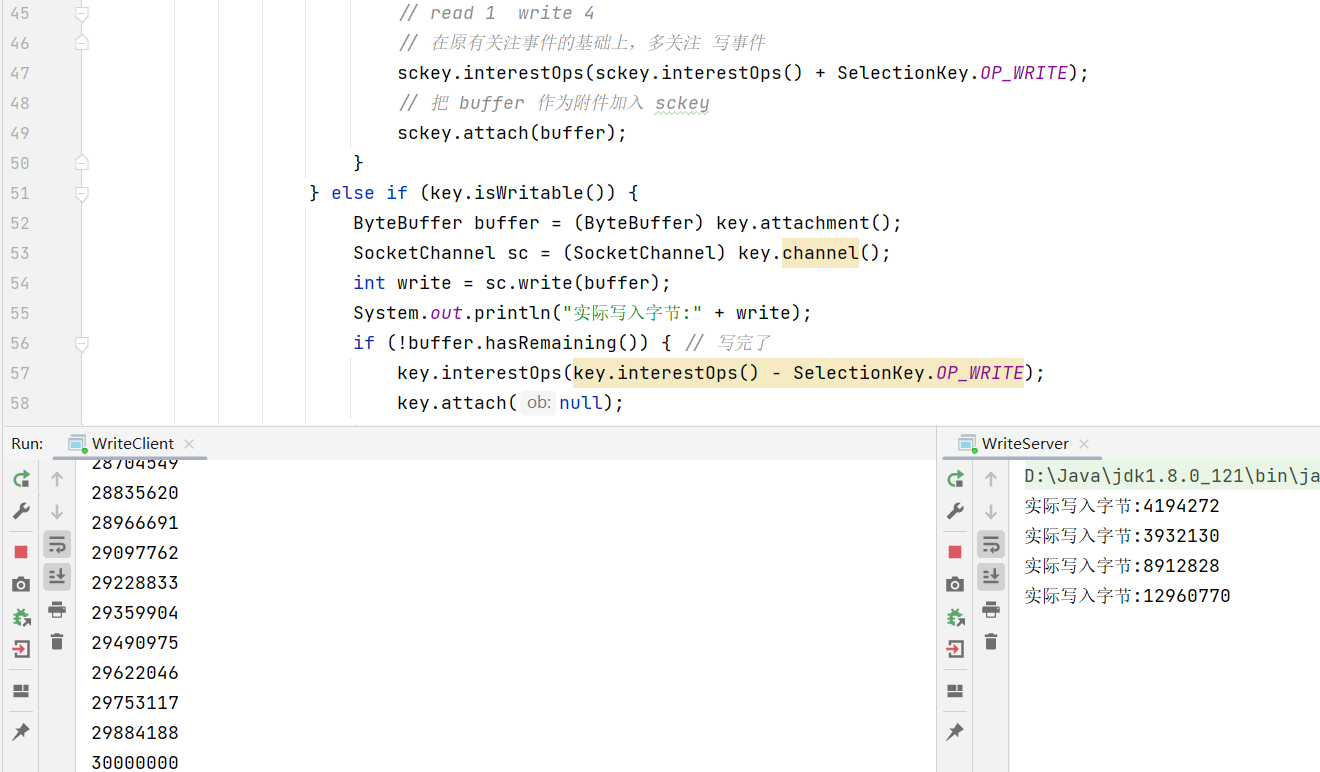
write就是将buffer中的内容通过channel传输过去。
-
非阻塞模式下,无法保证把 buffer 中所有数据都写入 channel,因此需要追踪 write 方法的返回值(代表实际写入字节数)
-
用 selector 监听所有 channel 的可写事件,每个 channel 都需要一个 key 来跟踪 buffer,但这样又会导致占用内存过多,就有两阶段策略
-
当消息处理器第一次写入消息时,才将 channel 注册到 selector 上
-
selector 检查 channel 上的可写事件,如果所有的数据写完了,就取消 channel 的注册
-
如果不取消,会每次可写均会触发 write 事件
-
- public class WriteServer {
- public static void main(String[] args) throws IOException {
- ServerSocketChannel ssc = ServerSocketChannel.open();
- ssc.configureBlocking(false);
- ssc.bind(new InetSocketAddress(8080));
- Selector selector = Selector.open();
- ssc.register(selector, SelectionKey.OP_ACCEPT);
- while(true) {
- selector.select();
- Iterator
iter = selector.selectedKeys().iterator(); - while (iter.hasNext()) {
- SelectionKey key = iter.next();
- iter.remove();
- if (key.isAcceptable()) {
- SocketChannel sc = ssc.accept();
- sc.configureBlocking(false);
- SelectionKey sckey = sc.register(selector, SelectionKey.OP_READ);
- // 1. 向客户端发送内容
- StringBuilder sb = new StringBuilder();
- for (int i = 0; i < 3000000; i++) {
- sb.append("a");
- }
- ByteBuffer buffer = Charset.defaultCharset().encode(sb.toString());
- int write = sc.write(buffer);
- // 3. write 表示实际写了多少字节
- System.out.println("实际写入字节:" + write);
- // 4. 如果有剩余未读字节,才需要关注写事件
- if (buffer.hasRemaining()) {
- // read 1 write 4
- // 在原有关注事件的基础上,多关注 写事件
- sckey.interestOps(sckey.interestOps() + SelectionKey.OP_WRITE);
- // 把 buffer 作为附件加入 sckey
- sckey.attach(buffer);
- }
- } else if (key.isWritable()) {
- ByteBuffer buffer = (ByteBuffer) key.attachment();
- SocketChannel sc = (SocketChannel) key.channel();
- int write = sc.write(buffer);
- System.out.println("实际写入字节:" + write);
- if (!buffer.hasRemaining()) { // 写完了
- key.interestOps(key.interestOps() - SelectionKey.OP_WRITE);
- key.attach(null);
- }
- }
- }
- }
- }
- }
客户端
- public class WriteClient {
- public static void main(String[] args) throws IOException {
- Selector selector = Selector.open();
- SocketChannel sc = SocketChannel.open();
- sc.configureBlocking(false);
- sc.register(selector, SelectionKey.OP_CONNECT | SelectionKey.OP_READ);
- sc.connect(new InetSocketAddress("localhost", 8080));
- int count = 0;
- while (true) {
- selector.select();
- Iterator
iter = selector.selectedKeys().iterator(); - while (iter.hasNext()) {
- SelectionKey key = iter.next();
- iter.remove();
- if (key.isConnectable()) {
- System.out.println(sc.finishConnect());
- } else if (key.isReadable()) {
- ByteBuffer buffer = ByteBuffer.allocate(1024 * 1024);
- count += sc.read(buffer);
- buffer.clear();
- System.out.println(count);
- }
- }
- }
- }
- }
💡 write 为何要取消
只要向 channel 发送数据时,socket 缓冲可写,这个事件会频繁触发,因此应当只在 socket 缓冲区写不下时再关注可写事件,数据写完之后再取消关注.
-
相关阅读:
dubbo是如何实现可扩展的?(二)
如何实现办公终端安全
EMO在哪体验?阿里对口型视频生成工具EMO下载地址?阿里巴巴新模型EMO的技术原理
qian‘kun微服务配置vue3.2+ts+vite子应用教程
NLP中基于Bert的数据预处理
从简历被拒到收割8个大厂offer,我用了3个月成功破茧成蝶
拧紧数据“安全阀”,筑牢个保“安全堤”
网络技术八:Vlan和Trunk基础
【软考 系统架构设计师】计算机组成与体系结构⑦ 校验码
面对中小型机房动力环境该如何实现监控?
- 原文地址:https://blog.csdn.net/m0_62645012/article/details/139749454