-
Spring Boot集成tensorflow实现图片检测服务
1.什么是tensorflow?
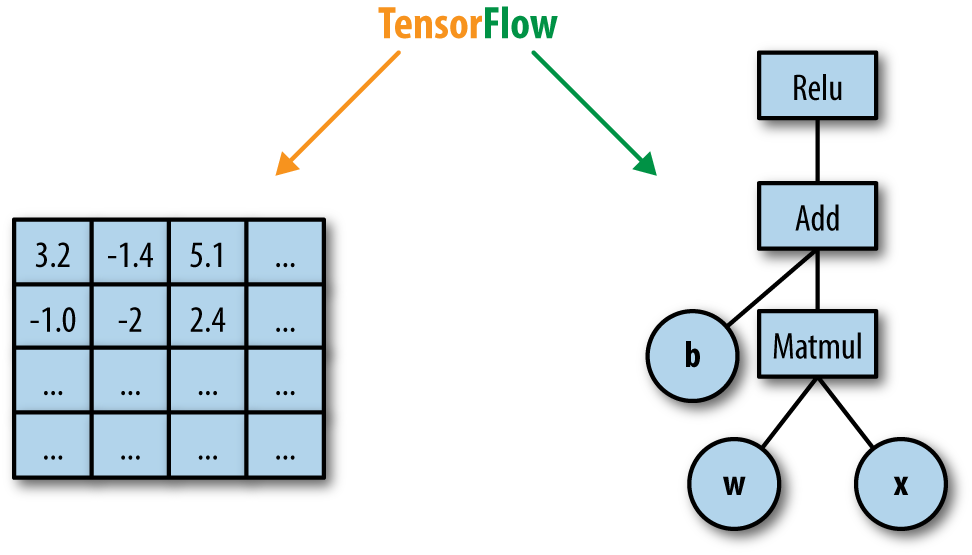
TensorFlow名字的由来就是张量(Tensor)在计算图(Computational Graph)里的流动(Flow),如图。它的基础就是前面介绍的基于计算图的自动微分,除了自动帮你求梯度之外,它也提供了各种常见的操作(op,也就是计算图的节点),常见的损失函数,优化算法。

- TensorFlow 是一个开放源代码软件库,用于进行高性能数值计算。借助其灵活的架构,用户可以轻松地将计算工作部署到多种平台(CPU、GPU、TPU)和设备(桌面设备、服务器集群、移动设备、边缘设备等)。https://www.tensorflow.org/tutorials/?hl=zh-cnwww.tensorflow.org/tutorials/?hl=zh-cn(opens new window)
- TensorFlow 是一个用于研究和生产的开放源代码机器学习库。TensorFlow 提供了各种 API,可供初学者和专家在桌面、移动、网络和云端环境下进行开发。
- TensorFlow是采用数据流图(data flow graphs)来计算,所以首先我们得创建一个数据流流图,然后再将我们的数据(数据以张量(tensor)的形式存在)放在数据流图中计算. 节点(Nodes)在图中表示数学操作,图中的边(edges)则表示在节点间相互联系的多维数据数组, 即张量(tensor)。训练模型时tensor会不断的从数据流图中的一个节点flow到另一节点, 这就是TensorFlow名字的由来。 张量(Tensor):张量有多种. 零阶张量为 纯量或标量 (scalar) 也就是一个数值. 比如 [1],一阶张量为 向量 (vector), 比如 一维的 [1, 2, 3],二阶张量为 矩阵 (matrix), 比如 二维的 [[1, 2, 3],[4, 5, 6],[7, 8, 9]],以此类推, 还有 三阶 三维的 … 张量从流图的一端流动到另一端的计算过程。它生动形象地描述了复杂数据结构在人工神经网中的流动、传输、分析和处理模式。
在机器学习中,数值通常由4种类型构成: (1)标量(scalar):即一个数值,它是计算的最小单元,如“1”或“3.2”等。 (2)向量(vector):由一些标量构成的一维数组,如[1, 3.2, 4.6]等。 (3)矩阵(matrix):是由标量构成的二维数组。 (4)张量(tensor):由多维(通常)数组构成的数据集合,可理解为高维矩阵。
tensorflow的基本概念
- 图:描述了计算过程,Tensorflow用图来表示计算过程
- 张量:Tensorflow 使用tensor表示数据,每一个tensor是一个多维化的数组
- 操作:图中的节点为op,一个op获得/输入0个或者多个Tensor,执行并计算,产生0个或多个Tensor
- 会话:session tensorflow的运行需要再绘话里面运行
tensorflow写代码流程
- 定义变量占位符
- 根据数学原理写方程
- 定义损失函数cost
- 定义优化梯度下降 GradientDescentOptimizer
- session 进行训练,for循环
- 保存saver
2.环境准备
整合步骤
- 模型构建:首先,我们需要在TensorFlow中定义并训练深度学习模型。这可能涉及选择合适的网络结构、优化器和损失函数等。
- 训练数据准备:接下来,我们需要准备用于训练和验证模型的数据。这可能包括数据清洗、标注和预处理等步骤。
- REST API设计:为了与TensorFlow模型进行交互,我们需要在SpringBoot中创建一个REST API。这可以使用SpringBoot的内置功能来实现,例如使用Spring MVC或Spring WebFlux。
- 模型部署:在模型训练完成后,我们需要将其部署到SpringBoot应用中。为此,我们可以使用TensorFlow的Java API将模型导出为ONNX或SavedModel格式,然后在SpringBoot应用中加载并使用。
在整合过程中,有几个关键点需要注意。首先,防火墙设置可能会影响TensorFlow训练过程中的网络通信。确保你的防火墙允许TensorFlow访问其所需的网络资源,以免出现训练中断或模型性能下降的问题。其次,要关注版本兼容性。SpringBoot和TensorFlow都有各自的版本更新周期,确保在整合时使用兼容的版本可以避免很多不必要的麻烦。
模型下载
模型构建和模型训练这块设计到python代码,这里跳过,感兴趣的可以下载源代码自己训练模型,咱们直接下载训练好的模型
下载好了,解压放在/resources/inception_v3目录下
3.代码工程
实验目的
实现图片检测
pom.xml
- <?xml version="1.0" encoding="UTF-8"?>
- <project xmlns="http://maven.apache.org/POM/4.0.0"
- xmlns:xsi="http://www.w3.org/2001/XMLSchema-instance"
- xsi:schemaLocation="http://maven.apache.org/POM/4.0.0 http://maven.apache.org/xsd/maven-4.0.0.xsd">
- <parent>
- <artifactId>springboot-demo</artifactId>
- <groupId>com.et</groupId>
- <version>1.0-SNAPSHOT</version>
- </parent>
- <modelVersion>4.0.0</modelVersion>
- <artifactId>Tensorflow</artifactId>
- <properties>
- <maven.compiler.source>11</maven.compiler.source>
- <maven.compiler.target>11</maven.compiler.target>
- </properties>
- <dependencies>
- <dependency>
- <groupId>org.springframework.boot</groupId>
- <artifactId>spring-boot-starter-web</artifactId>
- </dependency>
- <dependency>
- <groupId>org.springframework.boot</groupId>
- <artifactId>spring-boot-autoconfigure</artifactId>
- </dependency>
- <dependency>
- <groupId>org.springframework.boot</groupId>
- <artifactId>spring-boot-starter-test</artifactId>
- <scope>test</scope>
- </dependency>
- <dependency>
- <groupId>org.tensorflow</groupId>
- <artifactId>tensorflow-core-platform</artifactId>
- <version>0.5.0</version>
- </dependency>
- <dependency>
- <groupId>org.projectlombok</groupId>
- <artifactId>lombok</artifactId>
- </dependency>
- <dependency>
- <groupId>jmimemagic</groupId>
- <artifactId>jmimemagic</artifactId>
- <version>0.1.2</version>
- </dependency>
- <dependency>
- <groupId>jakarta.platform</groupId>
- <artifactId>jakarta.jakartaee-api</artifactId>
- <version>9.0.0</version>
- </dependency>
- <dependency>
- <groupId>commons-io</groupId>
- <artifactId>commons-io</artifactId>
- <version>2.16.1</version>
- </dependency>
- <dependency>
- <groupId>org.springframework.restdocs</groupId>
- <artifactId>spring-restdocs-mockmvc</artifactId>
- <scope>test</scope>
- </dependency>
- </dependencies>
- </project>
controller
- package com.et.tf.api;
- import java.io.IOException;
- import com.et.tf.service.ClassifyImageService;
- import net.sf.jmimemagic.Magic;
- import net.sf.jmimemagic.MagicMatch;
- import org.springframework.beans.factory.annotation.Autowired;
- import org.springframework.web.bind.annotation.CrossOrigin;
- import org.springframework.web.bind.annotation.PostMapping;
- import org.springframework.web.bind.annotation.RequestMapping;
- import org.springframework.web.bind.annotation.RequestParam;
- import org.springframework.web.bind.annotation.RestController;
- import org.springframework.web.multipart.MultipartFile;
- @RestController
- @RequestMapping("/api")
- public class AppController {
- @Autowired
- ClassifyImageService classifyImageService;
- @PostMapping(value = "/classify")
- @CrossOrigin(origins = "*")
- public ClassifyImageService.LabelWithProbability classifyImage(@RequestParam MultipartFile file) throws IOException {
- checkImageContents(file);
- return classifyImageService.classifyImage(file.getBytes());
- }
- @RequestMapping(value = "/")
- public String index() {
- return "index";
- }
- private void checkImageContents(MultipartFile file) {
- MagicMatch match;
- try {
- match = Magic.getMagicMatch(file.getBytes());
- } catch (Exception e) {
- throw new RuntimeException(e);
- }
- String mimeType = match.getMimeType();
- if (!mimeType.startsWith("image")) {
- throw new IllegalArgumentException("Not an image type: " + mimeType);
- }
- }
- }
service
- package com.et.tf.service;
- import jakarta.annotation.PreDestroy;
- import java.util.Arrays;
- import java.util.List;
- import lombok.AllArgsConstructor;
- import lombok.Data;
- import lombok.NoArgsConstructor;
- import lombok.extern.slf4j.Slf4j;
- import org.springframework.beans.factory.annotation.Value;
- import org.springframework.stereotype.Service;
- import org.tensorflow.Graph;
- import org.tensorflow.Output;
- import org.tensorflow.Session;
- import org.tensorflow.Tensor;
- import org.tensorflow.ndarray.NdArrays;
- import org.tensorflow.ndarray.Shape;
- import org.tensorflow.ndarray.buffer.FloatDataBuffer;
- import org.tensorflow.op.OpScope;
- import org.tensorflow.op.Scope;
- import org.tensorflow.proto.framework.DataType;
- import org.tensorflow.types.TFloat32;
- import org.tensorflow.types.TInt32;
- import org.tensorflow.types.TString;
- import org.tensorflow.types.family.TType;
- //Inspired from https://github.com/tensorflow/tensorflow/blob/master/tensorflow/java/src/main/java/org/tensorflow/examples/LabelImage.java
- @Service
- @Slf4j
- public class ClassifyImageService {
- private final Session session;
- private final List<String> labels;
- private final String outputLayer;
- private final int W;
- private final int H;
- private final float mean;
- private final float scale;
- public ClassifyImageService(
- Graph inceptionGraph, List<String> labels, @Value("${tf.outputLayer}") String outputLayer,
- @Value("${tf.image.width}") int imageW, @Value("${tf.image.height}") int imageH,
- @Value("${tf.image.mean}") float mean, @Value("${tf.image.scale}") float scale
- ) {
- this.labels = labels;
- this.outputLayer = outputLayer;
- this.H = imageH;
- this.W = imageW;
- this.mean = mean;
- this.scale = scale;
- this.session = new Session(inceptionGraph);
- }
- public LabelWithProbability classifyImage(byte[] imageBytes) {
- long start = System.currentTimeMillis();
- try (Tensor image = normalizedImageToTensor(imageBytes)) {
- float[] labelProbabilities = classifyImageProbabilities(image);
- int bestLabelIdx = maxIndex(labelProbabilities);
- LabelWithProbability labelWithProbability =
- new LabelWithProbability(labels.get(bestLabelIdx), labelProbabilities[bestLabelIdx] * 100f, System.currentTimeMillis() - start);
- log.debug(String.format(
- "Image classification [%s %.2f%%] took %d ms",
- labelWithProbability.getLabel(),
- labelWithProbability.getProbability(),
- labelWithProbability.getElapsed()
- )
- );
- return labelWithProbability;
- }
- }
- private float[] classifyImageProbabilities(Tensor image) {
- try (Tensor result = session.runner().feed("input", image).fetch(outputLayer).run().get(0)) {
- final Shape resultShape = result.shape();
- final long[] rShape = resultShape.asArray();
- if (resultShape.numDimensions() != 2 || rShape[0] != 1) {
- throw new RuntimeException(
- String.format(
- "Expected model to produce a [1 N] shaped tensor where N is the number of labels, instead it produced one with shape %s",
- Arrays.toString(rShape)
- ));
- }
- int nlabels = (int) rShape[1];
- FloatDataBuffer resultFloatBuffer = result.asRawTensor().data().asFloats();
- float[] dst = new float[nlabels];
- resultFloatBuffer.read(dst);
- return dst;
- }
- }
- private int maxIndex(float[] probabilities) {
- int best = 0;
- for (int i = 1; i < probabilities.length; ++i) {
- if (probabilities[i] > probabilities[best]) {
- best = i;
- }
- }
- return best;
- }
- private Tensor normalizedImageToTensor(byte[] imageBytes) {
- try (Graph g = new Graph();
- TInt32 batchTensor = TInt32.scalarOf(0);
- TInt32 sizeTensor = TInt32.vectorOf(H, W);
- TFloat32 meanTensor = TFloat32.scalarOf(mean);
- TFloat32 scaleTensor = TFloat32.scalarOf(scale);
- ) {
- GraphBuilder b = new GraphBuilder(g);
- //Tutorial python here: https://github.com/tensorflow/tensorflow/tree/master/tensorflow/examples/label_image
- // Some constants specific to the pre-trained model at:
- // https://storage.googleapis.com/download.tensorflow.org/models/inception_v3_2016_08_28_frozen.pb.tar.gz
- //
- // - The model was trained with images scaled to 299x299 pixels.
- // - The colors, represented as R, G, B in 1-byte each were converted to
- // float using (value - Mean)/Scale.
- // Since the graph is being constructed once per execution here, we can use a constant for the
- // input image. If the graph were to be re-used for multiple input images, a placeholder would
- // have been more appropriate.
- final Output input = b.constant("input", TString.tensorOfBytes(NdArrays.scalarOfObject(imageBytes)));
- final Output output =
- b.div(
- b.sub(
- b.resizeBilinear(
- b.expandDims(
- b.cast(b.decodeJpeg(input, 3), DataType.DT_FLOAT),
- b.constant("make_batch", batchTensor)
- ),
- b.constant("size", sizeTensor)
- ),
- b.constant("mean", meanTensor)
- ),
- b.constant("scale", scaleTensor)
- );
- try (Session s = new Session(g)) {
- return s.runner().fetch(output.op().name()).run().get(0);
- }
- }
- }
- static class GraphBuilder {
- final Scope scope;
- GraphBuilder(Graph g) {
- this.g = g;
- this.scope = new OpScope(g);
- }
- Output div(Output x, Output y) {
- return binaryOp("Div", x, y);
- }
- Output sub(Output x, Output y) {
- return binaryOp("Sub", x, y);
- }
- Output resizeBilinear(Output images, Output size) {
- return binaryOp("ResizeBilinear", images, size);
- }
- Output expandDims(Output input, Output dim) {
- return binaryOp("ExpandDims", input, dim);
- }
- Output cast(Output value, DataType dtype) {
- return g.opBuilder("Cast", "Cast", scope).addInput(value).setAttr("DstT", dtype).build().output(0);
- }
- Output decodeJpeg(Output contents, long channels) {
- return g.opBuilder("DecodeJpeg", "DecodeJpeg", scope)
- .addInput(contents)
- .setAttr("channels", channels)
- .build()
- .output(0);
- }
- Output<? extends TType> constant(String name, Tensor t) {
- return g.opBuilder("Const", name, scope)
- .setAttr("dtype", t.dataType())
- .setAttr("value", t)
- .build()
- .output(0);
- }
- private Output binaryOp(String type, Output in1, Output in2) {
- return g.opBuilder(type, type, scope).addInput(in1).addInput(in2).build().output(0);
- }
- private final Graph g;
- }
- @PreDestroy
- public void close() {
- session.close();
- }
- @Data
- @NoArgsConstructor
- @AllArgsConstructor
- public static class LabelWithProbability {
- private String label;
- private float probability;
- private long elapsed;
- }
- }
application.yaml
- tf:
- frozenModelPath: inception-v3/inception_v3_2016_08_28_frozen.pb
- labelsPath: inception-v3/imagenet_slim_labels.txt
- outputLayer: InceptionV3/Predictions/Reshape_1
- image:
- width: 299
- height: 299
- mean: 0
- scale: 255
- logging.level.net.sf.jmimemagic: WARN
- spring:
- servlet:
- multipart:
- max-file-size: 5MB
Application.java
- package com.et.tf;
- import java.io.IOException;
- import java.nio.charset.StandardCharsets;
- import java.util.List;
- import java.util.stream.Collectors;
- import lombok.extern.slf4j.Slf4j;
- import org.apache.commons.io.IOUtils;
- import org.springframework.beans.factory.annotation.Value;
- import org.springframework.boot.SpringApplication;
- import org.springframework.boot.autoconfigure.SpringBootApplication;
- import org.springframework.context.annotation.Bean;
- import org.springframework.core.io.ClassPathResource;
- import org.springframework.core.io.FileSystemResource;
- import org.springframework.core.io.Resource;
- import org.tensorflow.Graph;
- import org.tensorflow.proto.framework.GraphDef;
- @SpringBootApplication
- @Slf4j
- public class Application {
- public static void main(String[] args) {
- SpringApplication.run(Application.class, args);
- }
- @Bean
- public Graph tfModelGraph(@Value("${tf.frozenModelPath}") String tfFrozenModelPath) throws IOException {
- Resource graphResource = getResource(tfFrozenModelPath);
- Graph graph = new Graph();
- graph.importGraphDef(GraphDef.parseFrom(graphResource.getInputStream()));
- log.info("Loaded Tensorflow model");
- return graph;
- }
- private Resource getResource(@Value("${tf.frozenModelPath}") String tfFrozenModelPath) {
- Resource graphResource = new FileSystemResource(tfFrozenModelPath);
- if (!graphResource.exists()) {
- graphResource = new ClassPathResource(tfFrozenModelPath);
- }
- if (!graphResource.exists()) {
- throw new IllegalArgumentException(String.format("File %s does not exist", tfFrozenModelPath));
- }
- return graphResource;
- }
- @Bean
- public List
tfModelLabels(@Value("${tf.labelsPath}") String labelsPath) throws IOException { - Resource labelsRes = getResource(labelsPath);
- log.info("Loaded model labels");
- return IOUtils.readLines(labelsRes.getInputStream(), StandardCharsets.UTF_8).stream()
- .map(label -> label.substring(label.contains(":") ? label.indexOf(":") + 1 : 0)).collect(Collectors.toList());
- }
- }
以上只是一些关键代码,所有代码请参见下面代码仓库
代码仓库
4.测试
启动 Spring Boot应用程序
测试图片分类
访问http://127.0.0.1:8080/,上传一张图片,点击分类

5.引用
-
相关阅读:
毅速丨3D打印结合拓扑优化让轻量化制造更容易
凯百斯纳米盛装亮相2024济南生物发酵展专注于高压均质解决方案
React设计思路
命名空间提示“http://schemas.microsoft.com/xaml/behaviors”不存在Interation的解决办法
AVR单片机开发7——产生不同的频率的声音
c++刷题常用stl用法
【多线程】线程池的简单实现与线程池的拒绝策略
使用 Redis BitMap 实现签到与查询历史签到以及签到统计功能(SpringBoot环境)
react如何阻止父容器滚动
谷粒商城实战(009 缓存-分布式锁)
- 原文地址:https://blog.csdn.net/dot_life/article/details/139818407
- 最新文章
-
【FHE】我们如何实现同态加密推理(八):SiLU 的密文化——两条路径,和一个 8 字节的开关
SQLcl 中 c/old/new 替换变量为何失效?先定位再替换
不让模型写作文,直接从它脑子里读答案:Jev 决策在 .NET 的两条路线
Halo插件:支持GitHub的图床附件策略
电视投屏界的“一股清流”!SimpleTVCast 6.0.0-beta 抢先体验:无需TV端App,界面大换血!✨
华三VXLAN集中式网关实战指南:Spine多活网关 + 双活接入(M-LAG)
软件更好写之后口碑会更重要
大 O、大 Omega、大 Theta 的区别,O(n) 复杂度是什么意思
Java标签跳转:一个鲜为人知但却很实用的小技巧
多智能体系统论文速读