-
简易备忘录
目录
一 设计原型效果
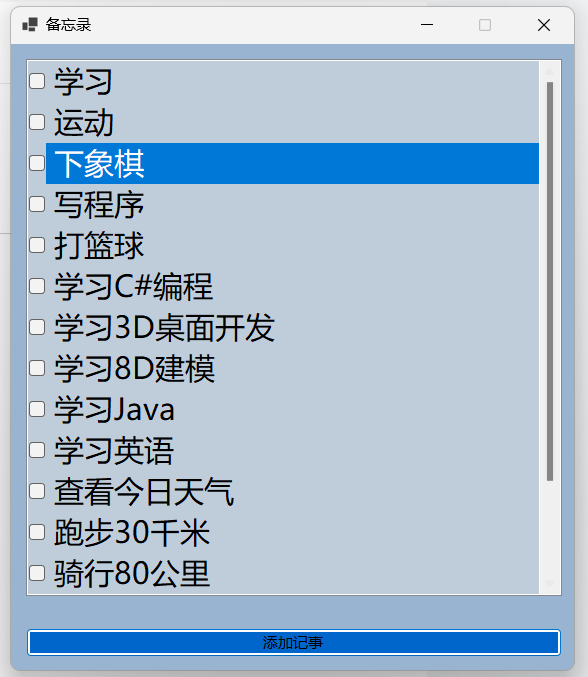
勾选每个选项时,代表已经完成该项,程序会自动删除。

二 后台源码
- using Newtonsoft.Json;
- namespace 简易备忘录
- {
- public partial class Form1 : Form
- {
- public Form1()
- {
- InitializeComponent();
- }
- private string NoteContentPath = Directory.GetCurrentDirectory() + "\\NoteContent.json";
- List<string> Notes = new List<string>();
- private void Note_SelectedIndexChanged(object sender, EventArgs e)
- {
- //移除已完成的事项
- for (int i = 0; i < this.Note.Items.Count; i++)
- {
- if (this.Note.GetItemChecked(i))
- {
- this.Note.Items.RemoveAt(i);
- Notes.RemoveAt(i);
- File.WriteAllText(NoteContentPath, JsonConvert.SerializeObject(Notes));
- }
- }
- }
- private void Add_Click(object sender, EventArgs e)
- {
- //弹出记事弹窗
- Info info = new Info();
- info.ShowDialog();
- if (info.IsOk)
- {
- Note.Items.Add(info.MyInfo);
- Notes.Add(info.MyInfo);
- File.WriteAllText(NoteContentPath, JsonConvert.SerializeObject(Notes));
- }
- }
- private void Form1_Load(object sender, EventArgs e)
- {
- Note.Items.Clear();
- Notes.Clear();
- try
- {
- Notes = JsonConvert.DeserializeObject
- foreach (var item in Notes)
- {
- Note.Items.Add(item);
- }
- }
- catch (Exception)
- {
- }
- }
- }
- }
- namespace 简易备忘录
- {
- public partial class Info : Form
- {
- public Info()
- {
- InitializeComponent();
- }
- public bool IsOk = false;
- public string MyInfo = "";
- private void button1_Click(object sender, EventArgs e)
- {
- MyInfo = contentTxt.Text.Trim();
- if (MyInfo == "")
- {
- MessageBox.Show("内容不能为空。。。");
- return;
- }
- else
- {
- IsOk = true;
- }
- this.Close();
- }
- private void button2_Click(object sender, EventArgs e)
- {
- IsOk = false;
- this.Close();
- }
- }
- }
设计器自动生成代码:
- namespace 简易备忘录
- {
- partial class Form1
- {
- ///
- /// Required designer variable.
- ///
- private System.ComponentModel.IContainer components = null;
- ///
- /// Clean up any resources being used.
- ///
- /// true if managed resources should be disposed; otherwise, false.
- protected override void Dispose(bool disposing)
- {
- if (disposing && (components != null))
- {
- components.Dispose();
- }
- base.Dispose(disposing);
- }
- #region Windows Form Designer generated code
- ///
- /// Required method for Designer support - do not modify
- /// the contents of this method with the code editor.
- ///
- private void InitializeComponent()
- {
- Note = new CheckedListBox();
- Add = new Button();
- SuspendLayout();
- //
- // Note
- //
- Note.BackColor = SystemColors.InactiveCaption;
- Note.Font = new Font("Microsoft YaHei UI", 18F, FontStyle.Regular, GraphicsUnit.Point, 134);
- Note.FormattingEnabled = true;
- Note.Location = new Point(15, 15);
- Note.Name = "Note";
- Note.Size = new Size(536, 554);
- Note.TabIndex = 0;
- Note.SelectedIndexChanged += Note_SelectedIndexChanged;
- //
- // Add
- //
- Add.BackColor = SystemColors.HotTrack;
- Add.Location = new Point(15, 584);
- Add.Name = "Add";
- Add.Size = new Size(536, 29);
- Add.TabIndex = 1;
- Add.Text = "添加记事";
- Add.UseVisualStyleBackColor = false;
- Add.Click += Add_Click;
- //
- // Form1
- //
- AutoScaleDimensions = new SizeF(9F, 20F);
- AutoScaleMode = AutoScaleMode.Font;
- BackColor = SystemColors.ActiveCaption;
- ClientSize = new Size(563, 626);
- Controls.Add(Add);
- Controls.Add(Note);
- MaximizeBox = false;
- Name = "Form1";
- StartPosition = FormStartPosition.CenterScreen;
- Text = "备忘录";
- Load += Form1_Load;
- ResumeLayout(false);
- }
- #endregion
- private CheckedListBox Note;
- private Button Add;
- }
- }
- namespace 简易备忘录
- {
- partial class Info
- {
- ///
- /// Required designer variable.
- ///
- private System.ComponentModel.IContainer components = null;
- ///
- /// Clean up any resources being used.
- ///
- /// true if managed resources should be disposed; otherwise, false.
- protected override void Dispose(bool disposing)
- {
- if (disposing && (components != null))
- {
- components.Dispose();
- }
- base.Dispose(disposing);
- }
- #region Windows Form Designer generated code
- ///
- /// Required method for Designer support - do not modify
- /// the contents of this method with the code editor.
- ///
- private void InitializeComponent()
- {
- label1 = new Label();
- contentTxt = new RichTextBox();
- button1 = new Button();
- button2 = new Button();
- SuspendLayout();
- //
- // label1
- //
- label1.AutoSize = true;
- label1.Font = new Font("Microsoft YaHei UI", 18F, FontStyle.Regular, GraphicsUnit.Point, 134);
- label1.Location = new Point(-4, 55);
- label1.Name = "label1";
- label1.Size = new Size(107, 39);
- label1.TabIndex = 0;
- label1.Text = "内容:";
- //
- // contentTxt
- //
- contentTxt.Location = new Point(100, 33);
- contentTxt.Name = "contentTxt";
- contentTxt.Size = new Size(266, 99);
- contentTxt.TabIndex = 1;
- contentTxt.Text = "";
- //
- // button1
- //
- button1.Location = new Point(100, 159);
- button1.Name = "button1";
- button1.Size = new Size(94, 29);
- button1.TabIndex = 2;
- button1.Text = "确定";
- button1.UseVisualStyleBackColor = true;
- button1.Click += button1_Click;
- //
- // button2
- //
- button2.Location = new Point(272, 159);
- button2.Name = "button2";
- button2.Size = new Size(94, 29);
- button2.TabIndex = 3;
- button2.Text = "取消";
- button2.UseVisualStyleBackColor = true;
- button2.Click += button2_Click;
- //
- // Info
- //
- AutoScaleDimensions = new SizeF(9F, 20F);
- AutoScaleMode = AutoScaleMode.Font;
- BackColor = SystemColors.GradientActiveCaption;
- ClientSize = new Size(378, 202);
- Controls.Add(button2);
- Controls.Add(button1);
- Controls.Add(contentTxt);
- Controls.Add(label1);
- MaximizeBox = false;
- MinimizeBox = false;
- Name = "Info";
- StartPosition = FormStartPosition.CenterScreen;
- Text = "记事输入窗口";
- ResumeLayout(false);
- PerformLayout();
- }
- #endregion
- private Label label1;
- private RichTextBox contentTxt;
- private Button button1;
- private Button button2;
- }
- }
-
相关阅读:
题目新颖,内容全面!阿里巴巴又一 Java 面试神册开源!
Python进价系列 - 16讲 多进程
浅析-vue.js
OpenCV-Python快速入门(八):图像金字塔
关于LWIP的一点记录(二)
JavaScript入门
base64编码是啥?
Symmetric Encoding(Round 946)
C++算法题 - 矩阵
ActiveMQ(二)
- 原文地址:https://blog.csdn.net/XiaoWang_csdn/article/details/139728425