-
三十六、openlayers官网示例Earthquake Clusters解析——在聚合图层鼠标触摸显示五角星

官网demo地址:
这篇展示了鼠标触摸聚合图层点位显示五角星的效果。
首先是初始化地图,加载了一个KML格式的矢量数据源,extractStyles为false表示不从kml数据源中提取样式。使用Select添加了鼠标选中的交互事件
- vector = new VectorLayer({
- source: new Cluster({
- distance: 40,
- source: new VectorSource({
- url: "https://openlayers.org/en/latest/examples/data/kml/2012_Earthquakes_Mag5.kml",
- format: new KML({
- extractStyles: false,
- }),
- }),
- }),
- style: styleFunction,
- });
- const raster = new TileLayer({
- source: new StadiaMaps({
- layer: "stamen_toner",
- }),
- });
- const map = new Map({
- layers: [raster, vector],
- interactions: defaultInteractions().extend([
- new Select({
- condition: function (evt) {
- return evt.type == "pointermove" || evt.type == "singleclick";
- },
- style: selectStyleFunction,
- }),
- ]),
- target: "map",
- view: new View({
- center: [0, 0],
- zoom: 2,
- }),
- });
其中有两个样式函数,先来看第一个styleFunction。
如果有子feature就显示为黄色圆圈,如果没有子feature则绘制成五角星。
- let currentResolution;
- function styleFunction(feature, resolution) {
- if (resolution != currentResolution) {
- calculateClusterInfo(resolution);
- currentResolution = resolution;
- }
- let style;
- const size = feature.get("features").length;
- if (size > 1) {
- style = new Style({
- image: new CircleStyle({
- radius: feature.get("radius"),
- fill: new Fill({
- color: [255, 153, 0, Math.min(0.8, 0.4 + size / maxFeatureCount)],
- }),
- }),
- text: new Text({
- text: size.toString(),
- fill: textFill,
- stroke: textStroke,
- }),
- });
- } else {
- const originalFeature = feature.get("features")[0];
- style = createEarthquakeStyle(originalFeature);
- }
- return style;
- }
使用calculateClusterInfo 函数计算圆圈的半径,将子feature的extent合并到了一起,结合分辨率算出半径。
- const calculateClusterInfo = function (resolution) {
- maxFeatureCount = 0;
- const features = vector.getSource().getFeatures();
- let feature, radius;
- for (let i = features.length - 1; i >= 0; --i) {
- feature = features[i];
- const originalFeatures = feature.get("features");
- const extent = createEmpty(); //创建一个空的范围对象,用来存储聚类的总范围。
- let j, jj;
- for (j = 0, jj = originalFeatures.length; j < jj; ++j) {
- //获取当前原始特征的几何范围。将这个几何范围合并到总范围 extent 中
- extend(extent, originalFeatures[j].getGeometry().getExtent());
- }
- maxFeatureCount = Math.max(maxFeatureCount, jj);
- radius = (0.25 * (getWidth(extent) + getHeight(extent))) / resolution;
- feature.set('radius',radius)
- }
- };
extend方法示例
假设你有一个聚类包含三个特征,其范围分别为:
- 特征1:
[0, 0, 1, 1] - 特征2:
[2, 2, 3, 3] - 特征3:
[1, 1, 4, 4]
通过逐步扩展
extent:- 初始
extent是空的。 - 扩展第一个特征后,
extent变为[0, 0, 1, 1]。 - 扩展第二个特征后,
extent变为[0, 0, 3, 3]。 - 扩展第三个特征后,
extent变为[0, 0, 4, 4]。
最终的
extent包含了所有特征的范围,即[0, 0, 4, 4]。createEarthquakeStyle是绘制星星的方法,主要用了RegularShape这个类。
- function createEarthquakeStyle(feature) {
- const name = feature.get("name");
- const magnitude = parseFloat(name.substr(2));
- const radius = 5 + 20 * (magnitude - 5);
- return new Style({
- geometry: feature.getGeometry(),
- image: new RegularShape({
- radius: radius,
- radius2: 3,
- points: 5,
- angle: Math.PI,
- fill: earthquakeFill,
- stroke: earthquakeStroke,
- }),
- });
- }
写一个小demo来理解RegularShape
- //小demo
- let piontArr = [-213399.46385070545, -7204129.9025042085];
- let pointFeature = new Feature({
- geometry: new MultiPoint([piontArr]),
- });
- let newLayer = new VectorLayer({
- source: new VectorSource({
- features: [pointFeature],
- }),
- style: [
- new Style({
- image: new RegularShape({
- radius: 50,
- radius2:20,
- points: 5,
- angle: Math.PI,
- fill: earthquakeFill,
- stroke: earthquakeStroke,
- }),
- }),
- ],
- });
- map.addLayer(newLayer)
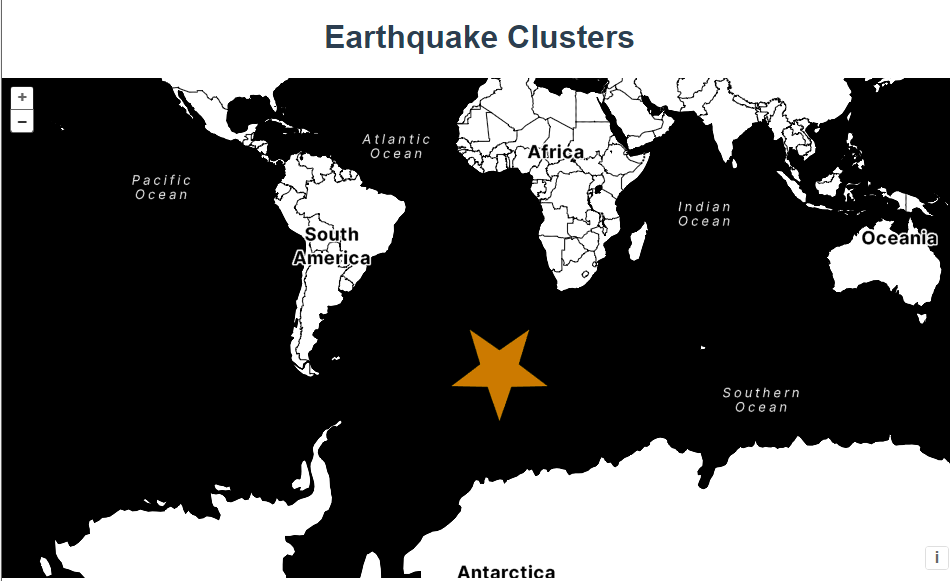
RegularShape参数解释:
-
radius:- 含义: 图形的外半径,即从图形中心到外顶点的距离。
-
radius2:- 含义: 图形的内半径,仅在绘制星形时有效。表示从图形中心到内顶点的距离。
-
points:- 含义: 图形的顶点数。如果
radius2被定义,则points表示星形的顶点数(外顶点和内顶点的总数),否则表示多边形的边数。 - 示例值:
6表示绘制一个六边形或六角星形。
- 含义: 图形的顶点数。如果
-
angle:- 含义: 图形的旋转角度,以弧度为单位。
Math.PI表示旋转 180 度。 - 示例值:
Math.PI表示图形旋转 180 度。
- 含义: 图形的旋转角度,以弧度为单位。
 然后是第二个样式函数selectStyleFunction
鼠标触摸的时候获取到feature自定义属性features取出来,把每一个子feature绘制成星星形状展示。
- function selectStyleFunction(feature) {
- const styles = [
- new Style({
- image: new CircleStyle({
- radius: feature.get("radius"),
- fill: invisibleFill,
- }),
- }),
- ];
- const originalFeatures = feature.get("features");
- let originalFeature;
- for (let i = originalFeatures.length - 1; i >= 0; --i) {
- originalFeature = originalFeatures[i];
- styles.push(createEarthquakeStyle(originalFeature));
- }
- return styles;
- }
完整代码:
- <template>
- <div class="box">
- <h1>Earthquake Clusters</h1>
- <div id="map"></div>
- </div>
- </template>
- <script>
- import KML from "ol/format/KML.js";
- import Map from "ol/Map.js";
- import View from "ol/View.js";
- import {
- Circle as CircleStyle,
- Fill,
- RegularShape,
- Stroke,
- Style,
- Text,
- Circle,
- } from "ol/style.js";
- import { MultiPoint, Point } from "ol/geom.js";
- import { Cluster, StadiaMaps, Vector as VectorSource } from "ol/source.js";
- import { Select, defaults as defaultInteractions } from "ol/interaction.js";
- import { Tile as TileLayer, Vector as VectorLayer } from "ol/layer.js";
- import { createEmpty, extend, getHeight, getWidth } from "ol/extent.js";
- import Feature from "ol/Feature.js";
- export default {
- name: "",
- components: {},
- data() {
- return {
- map: null,
- };
- },
- computed: {},
- created() {},
- mounted() {
- const earthquakeFill = new Fill({
- color: "rgba(255, 153, 0, 0.8)",
- });
- const earthquakeStroke = new Stroke({
- color: "rgba(255, 204, 0, 0.2)",
- width: 1,
- });
- const textFill = new Fill({
- color: "#fff",
- });
- const textStroke = new Stroke({
- color: "rgba(0, 0, 0, 0.6)",
- width: 3,
- });
- const invisibleFill = new Fill({
- color: "rgba(255, 255, 255, 0.01)",
- });
- function createEarthquakeStyle(feature) {
- const name = feature.get("name");
- const magnitude = parseFloat(name.substr(2));
- const radius = 5 + 20 * (magnitude - 5);
- return new Style({
- geometry: feature.getGeometry(),
- image: new RegularShape({
- radius: radius,
- radius2: 3,
- points: 5,
- angle: Math.PI,
- fill: earthquakeFill,
- stroke: earthquakeStroke,
- }),
- });
- }
- let maxFeatureCount;
- let vector = null;
- const calculateClusterInfo = function (resolution) {
- maxFeatureCount = 0;
- const features = vector.getSource().getFeatures();
- let feature, radius;
- for (let i = features.length - 1; i >= 0; --i) {
- feature = features[i];
- const originalFeatures = feature.get("features");
- const extent = createEmpty();
- let j, jj;
- for (j = 0, jj = originalFeatures.length; j < jj; ++j) {
- extend(extent, originalFeatures[j].getGeometry().getExtent());
- }
- maxFeatureCount = Math.max(maxFeatureCount, jj);
- radius = (0.25 * (getWidth(extent) + getHeight(extent))) / resolution;
- feature.set('radius',radius)
- }
- };
- let currentResolution;
- function styleFunction(feature, resolution) {
- if (resolution != currentResolution) {
- calculateClusterInfo(resolution);
- currentResolution = resolution;
- }
- let style;
- const size = feature.get("features").length;
- if (size > 1) {
- style = new Style({
- image: new CircleStyle({
- radius: feature.get("radius"),
- fill: new Fill({
- color: [255, 153, 0, Math.min(0.8, 0.4 + size / maxFeatureCount)],
- }),
- }),
- text: new Text({
- text: size.toString(),
- fill: textFill,
- stroke: textStroke,
- }),
- });
- } else {
- const originalFeature = feature.get("features")[0];
- style = createEarthquakeStyle(originalFeature);
- }
- return style;
- }
- function selectStyleFunction(feature) {
- const styles = [
- new Style({
- image: new CircleStyle({
- radius: feature.get("radius"),
- fill: invisibleFill,
- }),
- }),
- ];
- const originalFeatures = feature.get("features");
- let originalFeature;
- for (let i = originalFeatures.length - 1; i >= 0; --i) {
- originalFeature = originalFeatures[i];
- styles.push(createEarthquakeStyle(originalFeature));
- }
- return styles;
- }
- vector = new VectorLayer({
- source: new Cluster({
- distance: 40,
- source: new VectorSource({
- url: "https://openlayers.org/en/latest/examples/data/kml/2012_Earthquakes_Mag5.kml",
- format: new KML({
- extractStyles: false,
- }),
- }),
- }),
- style: styleFunction,
- });
- const raster = new TileLayer({
- source: new StadiaMaps({
- layer: "stamen_toner",
- }),
- });
- const map = new Map({
- layers: [raster,vector],
- interactions: defaultInteractions().extend([
- new Select({
- condition: function (evt) {
- return evt.type == "pointermove" || evt.type == "singleclick";
- },
- style: selectStyleFunction,
- }),
- ]),
- target: "map",
- view: new View({
- center: [0, 0],
- zoom: 2,
- }),
- });
- //小demo
- let piontArr = [-213399.46385070545, -7204129.9025042085];
- let pointFeature = new Feature({
- geometry: new MultiPoint([piontArr]),
- });
- let newLayer = new VectorLayer({
- source: new VectorSource({
- features: [pointFeature],
- }),
- style: [
- new Style({
- image: new RegularShape({
- radius: 50,
- radius2:20,
- points: 5,
- angle: Math.PI,
- fill: earthquakeFill,
- stroke: earthquakeStroke,
- }),
- }),
- ],
- });
- // map.addLayer(newLayer)
- },
- methods: {},
- };
- </script>
- <style lang="scss" scoped>
- #map {
- width: 100%;
- height: 500px;
- }
- .box {
- height: 100%;
- }
- </style>
-
相关阅读:
YOLO目标检测——昏暗车辆数据集+已标注VOC格式标签下载分享
@JsonView注解的简单使用
【mido之架子鼓编曲】
每天一个数据分析题(一百七十九)
C#调用C++动态库接口函数和回调函数方法
基于C++实现旅行线路设计
【Matlab】二维绘图函数汇总
Visual Studio Code (VS Code)安装教程
Springboot毕设项目保险理赔管理系统312z6(java+VUE+Mybatis+Maven+Mysql)
java计算机毕业设计郑州卷烟厂库存管理系统源程序+mysql+系统+lw文档+远程调试
- 原文地址:https://blog.csdn.net/aaa_div/article/details/139447243
- 最新文章
-
沪漂五周年了:我越来越迷茫了
Agentic Skill Routing 实战:别再把所有 Skill 塞进 AI Agent 上下文
MySQL-Seconds_behind_master的精度误差
[MAF预定义ChatClient中间件-03]CachingChatClient——利用缓存省钱省时间
AI的至暗历史:从万众期待到被政府撤资,AI的两次死亡徘徊
Agent OS :五种驯服不确定性的范式
PortSwigger SQL注入LAB11
数据库即时编译JIT
[Begin]AI Learn Data Day 0
深度学习进阶(二十七)现代 LLM 的核心架构设计其二:SwiGLU