-
java实现List对象转geojson文本返回前端
1.业务需求
查询带有经纬度数据的list列表,将其转为geojson格式给前端。
2.GeoJson格式说明
GeoJSON是一种对各种地理数据结构进行编码的格式,基于Javascript对象表示法(JavaScript Object Notation, 简称JSON)的地理空间信息数据交换格式。GeoJSON对象可以表示几何、特征或者特征集合。GeoJSON支持下面这几种几何类型:点、线、面、多点、多线、多面和几何集合。GeoJSON里的特征包含一个几何对象和其他属性,特征集合表示一系列特征。

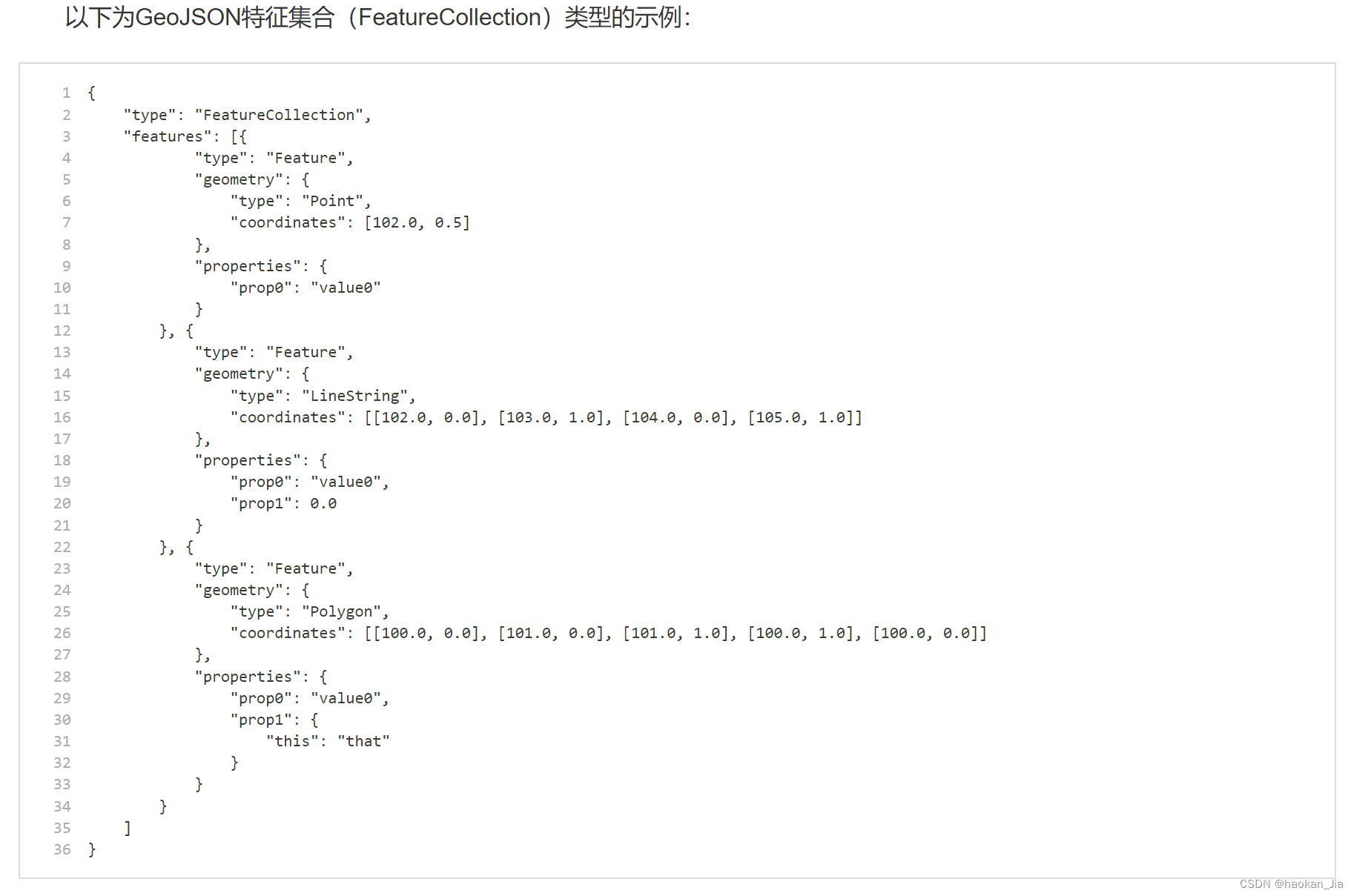
3.JAVA代码实现:
public Map getSectionStringGeojson(DataBaseSection dataBaseSection) { Map map = new HashMap(); //查询断面数据 List<DataBaseSection> dataBaseSectionList = dataBaseSectionMapper.selectDataBaseSectionListNoGeom(dataBaseSection); if(dataBaseSectionList == null || dataBaseSectionList.size() == 0) { return map; } //使用stream方法,获取dataBaseSectionList中lgtd的最大值和最小值 BigDecimal maxLgtd = dataBaseSectionList.stream().map(DataBaseSection::getLgtd).max(BigDecimal::compareTo).get(); BigDecimal minLgtd = dataBaseSectionList.stream().map(DataBaseSection::getLgtd).min(BigDecimal::compareTo).get(); BigDecimal maxLttd = dataBaseSectionList.stream().map(DataBaseSection::getLttd).max(BigDecimal::compareTo).get(); BigDecimal minLttd = dataBaseSectionList.stream().map(DataBaseSection::getLttd).min(BigDecimal::compareTo).get(); map.put("maxLgtd", maxLgtd); map.put("minLgtd", minLgtd); map.put("maxLttd", maxLttd); map.put("minLttd", minLttd); //创建一个空的 SimpleFeatureTypeBuilder 对象,并添加属性字段: SimpleFeatureTypeBuilder builder = new SimpleFeatureTypeBuilder(); builder.setName("Section"); builder.add("geometry", Point.class); builder.add("bscd", String.class); builder.add("bscnm", String.class); builder.add("sttp", String.class); builder.add("fcd", String.class); builder.add("ocd", String.class); //使用 SimpleFeatureBuilder 创建一个 SimpleFeatureType 对象: SimpleFeatureType featureType = builder.buildFeatureType(); SimpleFeatureBuilder featureBuilder = new SimpleFeatureBuilder(featureType); DefaultFeatureCollection featureCollection = new DefaultFeatureCollection(); //遍历查询结果集,将每一行数据转换为一个 SimpleFeature 对象,并将其添加到 SimpleFeatureCollection 中: for(int i = 0; i < dataBaseSectionList.size(); i++) { DataBaseSection obj = dataBaseSectionList.get(i); //存储数据 double x = obj.getLgtd().doubleValue(); double y = obj.getLttd().doubleValue(); // 创建一个 Point 对象 GeometryFactory geometryFactory = JTSFactoryFinder.getGeometryFactory(); Coordinate coordinate = new Coordinate(x, y); Point point = geometryFactory.createPoint(coordinate); // 将坐标和属性数据设置到 SimpleFeature 对象中 featureBuilder.add(point); featureBuilder.add(obj.getBscd()); featureBuilder.add(obj.getBscnm()); featureBuilder.add(obj.getSttp()); featureBuilder.add(obj.getFcd()); featureBuilder.add(obj.getOcd()); SimpleFeature feature = featureBuilder.buildFeature(null); // 将 SimpleFeature 对象添加到 SimpleFeatureCollection 中 featureCollection.add(feature); } //使用 FeatureJSON 将 SimpleFeatureCollection 转换为 GeoJSON 字符串: String geojson = ""; try { if(featureCollection != null && featureCollection.size() > 0){ geojson = new FeatureJSON().toString(featureCollection); } }catch (IOException e){ System.out.println("基础断面geojson文件保存异常!"); } map.put("geojson", geojson); return map; }- 1
- 2
- 3
- 4
- 5
- 6
- 7
- 8
- 9
- 10
- 11
- 12
- 13
- 14
- 15
- 16
- 17
- 18
- 19
- 20
- 21
- 22
- 23
- 24
- 25
- 26
- 27
- 28
- 29
- 30
- 31
- 32
- 33
- 34
- 35
- 36
- 37
- 38
- 39
- 40
- 41
- 42
- 43
- 44
- 45
- 46
- 47
- 48
- 49
- 50
- 51
- 52
- 53
- 54
- 55
- 56
- 57
- 58
- 59
- 60
- 61
- 62
-
相关阅读:
Spark高效数据分析04、RDD创建
Python Wordcloud报错:Only supported for TrueType fonts,多种解决方案
Spring Boot的 jar 为何可以直接运行
华为云云耀云服务器L实例评测 |云服务器性能评测
【毕业设计】基于stm32的便携式U盘设计与实现 - stm32制作U盘
《轻松入门!快速安装PyCharm,打造高效Python编程环境》
SpringDataRedis快速入门(一)
Moto edge s pro手机 WIFI和蓝牙连接不上 解决方法分享
ESP8266—01S基于透传云的TCP网络通信
【typescript】Typescript tsconfig.json全解析
- 原文地址:https://blog.csdn.net/yinchoushi8780/article/details/139066168
