-
解决axios发送post请求,springMVC接收不到数据问题
今天发现一个问题:
vue组件中无法正确接收并处理axios请求
这个问题已经困扰我好久了,在电脑面前坐了两天只能确定前端应该是正确的发送了请求,但发送请求后无法正确接受后端返回的数据。
问题:vue组件无法接受后端数据
错误代码如下:
- axios.post("/simple_query",{
- },this.simple_query_input).then(res=>{
- console.log(res);
- }).catch(err=>{
- console.log(err);
- })
- @RequestMapping(value = "/simple_query",method = RequestMethod.POST)
- public cheName handleSimpleQuery(@RequestParam("simple_query_input") String simpleQueryInput) throws Exception {
- }
网上找到也有类似未解决的:
Spring MVC的Controller里面使用了@RequestParam注解来接收参数,但是只在GET请求的时候才能正常访问,在使用POST请求的时候会产生找不到参数的异常。原本好好的POST请求开始报400错误,找不到REST服务,一般情况下报这种错误多是由于POST请求时传递的参数不一致,但是这次不存在这种问题,百思不得其解啊。。。
还有这个:axios发送post请求,springMVC接收不到数据问题
- @RequestMapping(method = RequestMethod.POST, value = "/test")
- @ResponseBody
- public ResponseEntity testDelete(@RequestParam("id") Integer id)
- throws Exception {
- return ResponseEntity.ok();
- }
代码中是规定了请求方式POST,使用@RequestParam接收id参数。
然后前台请求参数也对,是这个形式的{id:111},看起来没错啊,参数名完全一样,但是后台报错Required String parameter 'id' is not present,说id参数必须传过来。分析问题
虽然前端传递的参数形式为{id: 111},看起来id的参数名确实是一样的,但是这个参数是作为请求的body而非作为普通参数或query parameter传递的。因此无法直接使用@RequestParam注释接收它。今天就俩解决一下吧:
SpringMVC 中 @PathVariable、@RequestBody、@RequestParam的使用场景以及对应的前端axios写法是什么呢?
一、@PathVariable
axios代码:
- axios.post('http://localhost:8080/endpoint3/' + this.firstName + '/' + this.lastName)
- .then(response => {
- console.log(response.data);
- })
- .catch(error => {
- console.error(error);
- });
SpringMvc的controller代码:
- @PostMapping("/endpoint3/{firstName}/{lastName}")
- @ResponseBody
- public String endpoint2(@PathVariable("firstName") String firstName,
- @PathVariable("lastName") String lastName) {
- // 处理请求逻辑
- return "Hello, " + firstName + " " + lastName;
- }

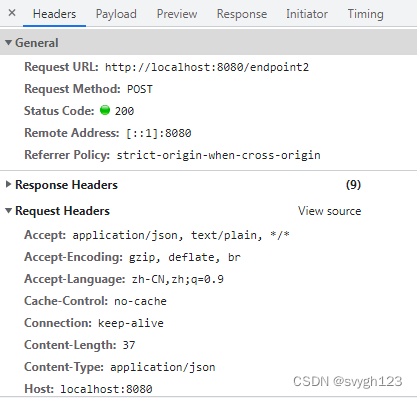
二、@RequestBody
axios代码:
- axios.post('http://localhost:8080/endpoint2', {firstName: this.firstName, lastName: this.lastName})
- .then(response => {
- console.log(response.data);
- })
- .catch(error => {
- console.error(error);
- });
SpringMvc的controller代码:
- @PostMapping("/endpoint2")
- @ResponseBody
- public String endpoint2(@RequestBody Map
- String firstName = Objects.toString(requestBody.get("firstName"));
- String lastName = Objects.toString(requestBody.get("lastName"));
- // 处理请求逻辑
- return "Hello, " + firstName + " " + lastName;
- }
三、@RequestParam
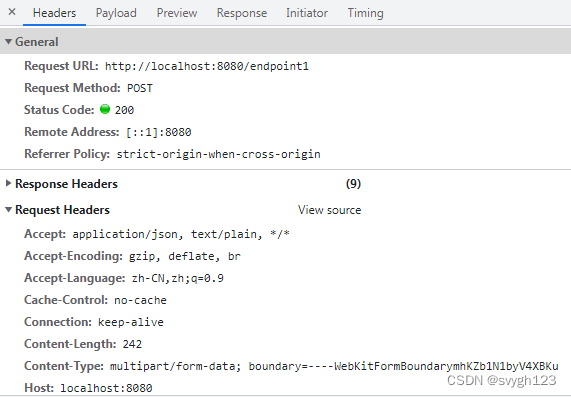
axios代码:
- const formData = new FormData();
- formData.append('firstName', this.firstName);
- formData.append('lastName', this.lastName);
- axios.post('http://localhost:8080/endpoint1', formData)
- .then(response => {
- console.log(response.data);
- })
- .catch(error => {
- console.error(error);
- });
SpringMvc的controller代码:
- @PostMapping("/endpoint1")
- public String handlePostRequest(@RequestParam("firstName") String firstName,
- @RequestParam("lastName") String lastName) {
- // 处理请求逻辑
- return "Hello, " + firstName + " " + lastName;
- }
前台完整代码:
- html>
- <html>
- <head>
- <script src="https://cdn.bootcdn.net/ajax/libs/vue/2.7.0/vue.min.js">script>
- <script src="https://cdn.bootcdn.net/ajax/libs/axios/1.6.8/axios.min.js">script>
- head>
- <body>
- <div id="app">
- div>
- <script>
- new Vue({
- el: '#app',
- data () {
- return {
- firstName: "John",
- lastName: "Doe"
- }
- },
- mounted () {
- const formData = new FormData();
- formData.append('firstName', this.firstName);
- formData.append('lastName', this.lastName);
- axios.post('http://localhost:8080/endpoint1', formData)
- .then(response => {
- console.log(response.data);
- })
- .catch(error => {
- console.error(error);
- });
- axios.post('http://localhost:8080/endpoint2', {firstName: this.firstName, lastName: this.lastName})
- .then(response => {
- console.log(response.data);
- })
- .catch(error => {
- console.error(error);
- });
- axios.post('http://localhost:8080/endpoint3/' + this.firstName + '/' + this.lastName)
- .then(response => {
- console.log(response.data);
- })
- .catch(error => {
- console.error(error);
- });
- }
- })
- script>
- body>
后台核心代码:
- @RestController
- @CrossOrigin
- public class MySpringMvcController {
- @PostMapping("/endpoint1")
- public String handlePostRequest(@RequestParam("firstName") String firstName,
- @RequestParam("lastName") String lastName) {
- // 处理请求逻辑
- return "Hello, " + firstName + " " + lastName;
- }
- @PostMapping("/endpoint2")
- @ResponseBody
- public String endpoint2(@RequestBody Map
- String firstName = Objects.toString(requestBody.get("firstName"));
- String lastName = Objects.toString(requestBody.get("lastName"));
- // 处理请求逻辑
- return "Hello, " + firstName + " " + lastName;
- }
- @PostMapping("/endpoint3/{firstName}/{lastName}")
- @ResponseBody
- public String endpoint2(@PathVariable("firstName") String firstName,
- @PathVariable("lastName") String lastName) {
- // 处理请求逻辑
- return "Hello, " + firstName + " " + lastName;
- }
- }
问题来源:
-
相关阅读:
从月薪8.5K 再到拿到字节跳动 20K*13薪那天,我泪目了,没人知道我付出了多少
Springboot毕设项目校园缴费平台dzyxyjava+VUE+Mybatis+Maven+Mysql+sprnig)
通过条件竞争实现内核提权
Python数据类型
如何使用Excel进行设备管理:巡检、维修、保养、备件管理
Pyparsing模块使用介绍
算法与数据结构 --- 图 --- 图的应用
基于蒙特卡诺的风、光模型出力(Matlab代码实现)
深入理解比特币原理4----比特币网络设计
Lumiprobe非荧光炔烃丨EU(5-乙炔基尿苷)
- 原文地址:https://blog.csdn.net/svygh123/article/details/138739168