-
【Android学习】自定义文本框和输入监听
实现功能
以上代码可实现功能:
1 自定义文本框样式
2. 文本框触发形式转变
3. 文本框输入长度监听,达到最大长度关闭软键盘
4. password框触发检测phone框内容
1. drawable自定义形状

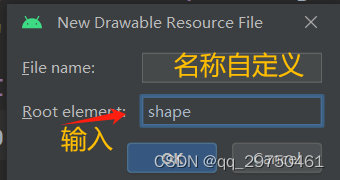
我创建了editor_focus.xml 和 editor_unfocus.xml,两者仅边界颜色不同
editor_focus.xml代码
- "1.0" encoding="utf-8"?>
"http://schemas.android.com/apk/res/android"> "#ffffff" /> - android:width="1dp"android:color="#0000ff" />
"5dp" /> android:bottom="2dp"android:left="2dp"android:right="2dp"android:top="2dp" />editor_unfocus.xml代码
- "1.0" encoding="utf-8"?>
"http://schemas.android.com/apk/res/android"> "#ffffff" /> - android:width="1dp"android:color="#888888" />
"5dp" /> android:bottom="2dp"android:left="2dp"android:right="2dp"android:top="2dp" />2. drawable自定义selector
selector的作用为不同的触发事件,编辑框有不同的形式。创建过程和上述shape创建过程类似,只是将shape改为 selector即可。
- "1.0" encoding="utf-8"?>
"http://schemas.android.com/apk/res/android"> - "@drawable/editor_focus" android:state_focused="true" />
- "@drawable/editor_unfocus" />
3. 创建 empty Activity
4.设置layout.xml
- "1.0" encoding="utf-8"?>
"http://schemas.android.com/apk/res/android" - xmlns:app="http://schemas.android.com/apk/res-auto"
- xmlns:tools="http://schemas.android.com/tools"
- android:layout_width="match_parent"
- android:layout_height="match_parent"
- android:orientation="vertical">
- android:id="@+id/et_phone"android:layout_width="match_parent"android:layout_height="50dp"android:background="@drawable/editor_selector"android:hint="请输入电话号码"android:maxLength="11"android:inputType="text"android:layout_marginTop="5dp"/>android:id="@+id/et_password"android:layout_width="match_parent"android:layout_height="50dp"android:background="@drawable/editor_selector"android:hint="请输入密码"android:maxLength="6"android:inputType="textPassword"android:layout_marginTop="5dp"/>
5.Java代码
Activity
- package com.example.learn;
- import androidx.appcompat.app.AppCompatActivity;
- import android.os.Bundle;
- import android.text.Editable;
- import android.text.TextWatcher;
- import android.view.View;
- import android.widget.EditText;
- import android.widget.Toast;
- import com.example.learn.utils.ViewUtil;
- public class EditerHideActivity extends AppCompatActivity implements View.OnFocusChangeListener{
- private EditText et_phone;
- @Override
- protected void onCreate(Bundle savedInstanceState) {
- super.onCreate(savedInstanceState);
- setContentView(R.layout.activity_editer_hide);
- et_phone = findViewById(R.id.et_phone);
- EditText et_password = findViewById(R.id.et_password);
- //设置Text changeListener
- et_phone.addTextChangedListener(new HideTextWatch(et_phone,11));
- et_password.addTextChangedListener(new HideTextWatch(et_password,6));
- //设置password框focus时对phone自动检测
- et_password.setOnFocusChangeListener(this);
- }
- @Override
- public void onFocusChange(View view, boolean b) {
- //如果获取聚焦
- if(b){
- String str = et_phone.getText().toString();
- if(!"".equals(str) && str.length()<11){
- et_phone.requestFocus();
- Toast.makeText(this,"电话号码不足11位",Toast.LENGTH_SHORT).show();
- }
- }
- }
- private class HideTextWatch implements TextWatcher {
- private EditText mView;
- private int maxLen;
- public HideTextWatch(EditText v, int len) {
- this.mView = v;
- this.maxLen=len;
- }
- @Override
- public void beforeTextChanged(CharSequence charSequence, int i, int i1, int i2) {
- }
- @Override
- public void onTextChanged(CharSequence charSequence, int i, int i1, int i2) {
- }
- @Override
- public void afterTextChanged(Editable editable) {
- //获取文本框输入的文本
- String str = editable.toString();
- //判断是否输入的字符串与maxLen一致
- //一致则关软键盘
- if(str.length() == this.maxLen){
- //EditerHideActivity.this 外部类的 activity
- //this:HideTextWatch
- ViewUtil.hideKeyboard(EditerHideActivity.this,mView);
- }
- }
- }
- }
Util
- package com.example.learn.utils;
- import android.app.Activity;
- import android.content.Context;
- import android.view.View;
- import android.view.inputmethod.InputMethodManager;
- public class ViewUtil {
- //当输入达到对应长度后 隐藏键盘
- public static void hideKeyboard(Activity act, View v){
- //从系统服务中获取输入法管理器
- InputMethodManager im = (InputMethodManager) act.getSystemService(Context.INPUT_METHOD_SERVICE);
- //将系统输入软件盘隐藏
- im.hideSoftInputFromWindow(v.getWindowToken(),0);
- }
- }
-
相关阅读:
react项目导出数据doc格式及其他格式方法
【MySQL】学习多表查询和笛卡尔积
clickhouse分布式之弹性扩缩容的故事
路由综合实验
H3C S7000/S7500E/10500系列交换机Console密码忘记处理方法
xLua背包实践
云原生Kubernetes:K8S集群list-watch机制与 pod调度约束
10万奖金被瓜分,快来认识这位上榜者里的“乘风破浪的姐姐”
`sh -c`命令——解决命令权限问题、一条命令中执行多个指令
Java随记 —— Servlet 教程笔记
- 原文地址:https://blog.csdn.net/qq_29750461/article/details/138449779
- 最新文章
-
沪漂五周年了:我越来越迷茫了
Agentic Skill Routing 实战:别再把所有 Skill 塞进 AI Agent 上下文
MySQL-Seconds_behind_master的精度误差
[MAF预定义ChatClient中间件-03]CachingChatClient——利用缓存省钱省时间
AI的至暗历史:从万众期待到被政府撤资,AI的两次死亡徘徊
Agent OS :五种驯服不确定性的范式
PortSwigger SQL注入LAB11
数据库即时编译JIT
[Begin]AI Learn Data Day 0
深度学习进阶(二十七)现代 LLM 的核心架构设计其二:SwiGLU
