-
paddle ocr模型量化实践
参考:https://github.com/PaddlePaddle/PaddleOCR/blob/main/deploy/slim/quantization/README.md
https://github.com/PaddlePaddle/PaddleOCR/blob/release/2.7.1/doc/doc_ch/FAQ.md
蒸馏 剪枝 量化
参考:https://blog.csdn.net/mddCSDN/article/details/134644869
https://blog.csdn.net/mddCSDN/article/details/134644869
https://github.com/PaddlePaddle/PaddleOCR
CML知识蒸馏策略
知识蒸馏的方法在部署中非常常用,通过使用大模型指导小模型学习的方式,在通常情况下可以使得小模型 在预测耗时不变的情况下,精度得到进一步的提升,从而进一步提升实际部署的体验。 标准的蒸馏方法是通过一个大模型作为 Teacher 模型来指导 Student 模型提升效果,而后来又发展出 DML 互 学习蒸馏方法,即通过两个结构相同的模型互相学习,相比于前者,DML 脱离了对大的 Teacher 模型的依赖, 蒸馏训练的流程更加简单,模型产出效率也要更高一些。 PP-OCRv2 文字检测模型中使用的是三个模型之间的 CML (Collaborative Mutual Learning) 协同互蒸馏方法,既 包含两个相同结构的 Student 模型之间互学习,同时还引入了较大模型结构的 Teacher 模型。

量化
复杂的模型有利于提高模型的性能,但也导致模型中存在一定冗余,模型量化将全精度缩减到定点数减少这种冗余,达到减少模型计算复杂度,提高模型推理性能的目的。 模型量化可以在基本不损失模型的精度的情况下,将FP32精度的模型参数转换为Int8精度,减小模型参数大小并加速计算,使用量化后的模型在移动端等部署时更具备速度优势。
模型量化主要包括五个步骤:
安装 https://github.com/PaddlePaddle/PaddleSlim
pip3 install paddleslim==2.3.2- 1
1.准备训练好的模型
2.量化训练
3.导出量化推理模型
4.量化模型预测部署python deploy/slim/quantization/quant.py -c configs/det/ch_PP-OCRv3/ch_PP-OCRv3_det_cml.yml -o Global.pretrained_model='./ch_PP-OCRv3_det_distill_train/best_accuracy' Global.save_model_dir=./output/quant_model_distill_det/- 1
报错:
Traceback (most recent call last): File "/data1/Projects/OCR_Online/PaddleOCR/deploy/slim/quantization/quant.py", line 42, in <module> from paddleslim.dygraph.quant import QAT File "/data1/miniconda/envs/OCR/lib/python3.9/site-packages/paddleslim/__init__.py", line 20, in <module> from paddleslim import quant File "/data1/miniconda/envs/OCR/lib/python3.9/site-packages/paddleslim/quant/__init__.py", line 42, in <module> from . import nn File "/data1/miniconda/envs/OCR/lib/python3.9/site-packages/paddleslim/quant/nn/__init__.py", line 15, in <module> from .conv_bn import QuantedConv2DBatchNorm, Conv2DBatchNormWrapper File "/data1/miniconda/envs/OCR/lib/python3.9/site-packages/paddleslim/quant/nn/conv_bn.py", line 21, in <module> from paddle.nn.quant.format import ConvertibleQuantedLayer ModuleNotFoundError: No module named 'paddle.nn.quant.format'- 1
- 2
- 3
- 4
- 5
- 6
- 7
- 8
- 9
- 10
- 11
- 12
2.4.2版本中还未支持paddle.nn.quant.format,建议升级到2.5或者 develop
2.命令:
识别模型:python deploy/slim/quantization/quant.py -c configs/det/ch_PP-OCRv3/ch_PP-OCRv3_det_cml.yml -o Global.pretrained_model='./ch_PP-OCRv3_det_distill_train/best_accuracy' Global.save_model_dir=./output/quant_model_distill_det/- 1
FileNotFoundError: [Errno 2] No such file or directory: ‘./train_data/icdar2015/text_localization/train_icdar2015_label.txt’
下载数据集:https://gitee.com/paddlepaddle/PaddleOCR/blob/release/2.4/doc/doc_ch/detection.md
检测模型量化类似:python deploy/slim/quantization/quant.py -c configs/rec/PP-OCRv4/ch_PP-OCRv4_rec.yml -o Global.pretrained_model='./ch_PP-OCRv3_rec_slim_train/best_accuracy' Global.save_model_dir=./output/quant_model_distill_rec/- 1
3.导出模型
在得到量化训练保存的模型后,我们可以将其导出为inference_model,用于预测部署:
python deploy/slim/quantization/export_model.py -c configs/det/ch_PP-OCRv3/ch_PP-OCRv3_det_cml.yml -o Global.checkpoints=output/quant_model_distill/best_accuracy Global.save_inference_dir=./output/quant_inference_model- 1
为了方便,只训练了10轮
 4.预测数据:
下载量化好的模型
python tools/infer/predict_system.py --image_dir="./doc/demo/build.png" --rec_model_dir="/root/.paddleocr/whl/rec/ch/ch_PP-OCRv3_rec_infer" --det_model_dir="output/ch_PP-OCRv3_det_slim_infer"- 1
使用自己的模型
python tools/infer/predict_system.py --image_dir="./doc/demo/build.png" --rec_model_dir="./output/quant_inference_model/Teacher" --det_model_dir="/root/.paddleocr/whl/det/ch/ch_PP-OCRv3_det_infer"- 1
报错:
ValueError: (InvalidArgument) input and filter data type should be consistent, but received input data type is float and filter type is int8_t [Hint: Expected input_data_type == filter_data_type, but received input_data_type:5 != filter_data_type:21.] (at ../paddle/fluid/operators/generator/get_expected_kernel_func.cc:431) [operator < conv2d > error]- 1
- 2
- 3
模型精度是float32,大小是int8,不匹配。
转换为移动端nb类型
paddle_lite_opt --model_dir="./output/quant_model_distill" --optimize_out= "./output/quant_model_distill_opt" --enable_fp16= true --quant_model= true --quant_type= QUANT_INT8- 1
https://www.paddlepaddle.org.cn/lite/develop/api_reference/python_api_doc.html

from PIL import Image from paddlelite.lite import * import numpy as np # 1. Set config information config = MobileConfig() # 2. Set the path to the model generated by opt tools config.set_model_from_file("./output/quant_model_distill_opt.nb") # 3. Create predictor by config predictor = create_paddle_predictor(config) input_tensor = predictor.get_input(0) image = Image.open('./doc/imgs/11.jpg') resized_image = image.resize((224, 224), Image.BILINEAR) image_data = np.array(resized_image).transpose(2, 0, 1).reshape(1, 3, 224, 224).astype(float) input_tensor.from_numpy(image_data)#.to(dtype=torch.float) predictor.run() output_tensor = predictor.get_output(0) output_data = output_tensor.numpy() print(output_data)- 1
- 2
- 3
- 4
- 5
- 6
- 7
- 8
- 9
- 10
- 11
- 12
- 13
- 14
- 15
- 16
- 17
- 18
- 19
- 20

部署到服务器cpu上参考:https://github.com/PaddlePaddle/PaddleSlim/blob/develop/docs/zh_cn/FAQ/quantization_FAQ.md

https://github.com/PaddlePaddle/PaddleSlim/blob/release/2.6/demo/mkldnn_quant/README.md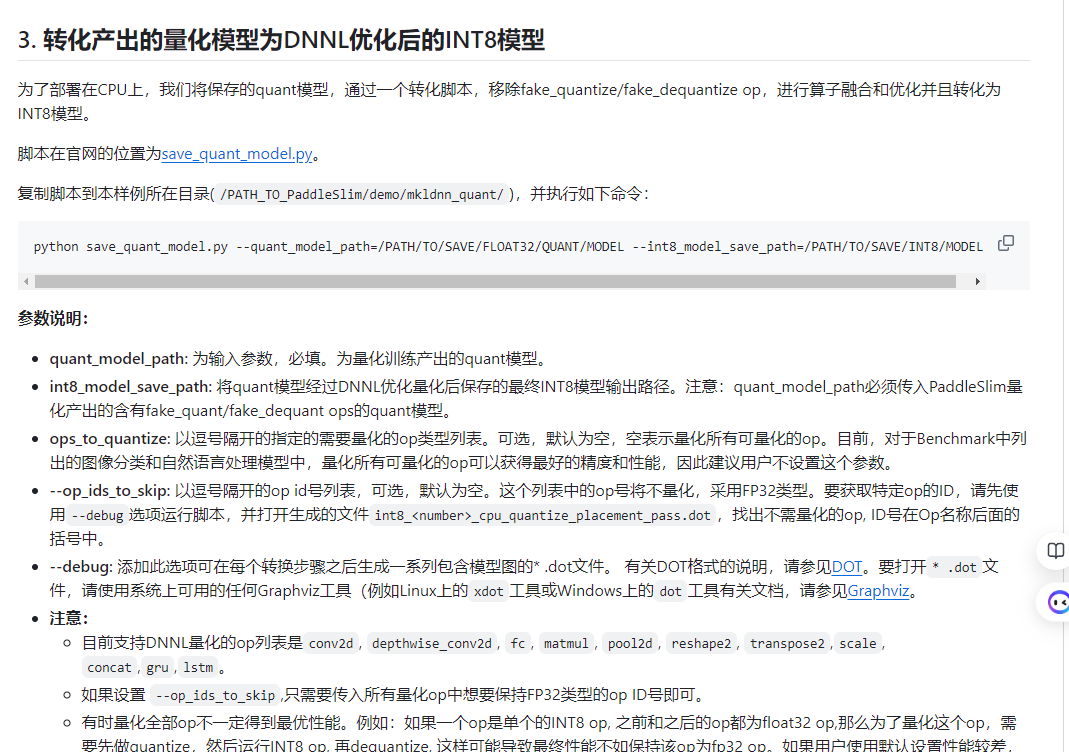
模型剪裁
复杂的模型有利于提高模型的性能,但也导致模型中存在一定冗余,模型裁剪通过移出网络模型中的子模型来减少这种冗余,达到减少模型计算复杂度,提高模型推理性能的目的。
教程参考:https://github.com/PaddlePaddle/PaddleSlim/blob/release%2F2.0.0/docs/zh_cn/tutorials/pruning/dygraph/filter_pruning.md模型裁剪主要包括四个步骤:
1.安装 PaddleSlim
2.准备训练好的模型
3.敏感度分析、裁剪训练python deploy/slim/prune/sensitivity_anal.py -c configs/det/ch_ppocr_v2.0/ch_det_mv3_db_v2.0.yml -o Global.pretrained_model="ch_PP-OCRv3_det_distill_train" Global.save_model_dir=./output/prune_model/- 1
- 2
报错:ValueError: The size of input is too big. Please consider saving it to file and ‘load_op’ to load it
输入太大,待解决
4.导出模型、预测部署
python deploy/slim/prune/export_prune_model.py -c configs/det/ch_ppocr_v2.0/ch_det_mv3_db_v2.0.yml -o Global.pretrained_model=./output/det_db/best_accuracy Global.save_inference_dir=./prune/prune_inference_model- 1
-
相关阅读:
LLaMA参数微调方法
springboot中内置tomcat什么时候创建的,又是什么时候启动的?
python3.8安装rpy2
C#ref和out关键字的有什么区别?
Linux系统线程创建的过程
简单工厂和工厂模式
【直播来袭】LiDAR测距架构及算法介绍
TraceId 搭配 ELK ,碉堡了!
钓鱼识别视频AI算法,让智慧水务更上一层楼
Nginx访问控制与虚拟主机
- 原文地址:https://blog.csdn.net/weixin_38235865/article/details/137951968
