-
按照模板导出复杂样式的excel
导出excel通常使用的是apache poi,但是poi的api相当复杂,所以当导出的excel样式比较复杂时,写起来就比较头疼了,这里推荐使用easypoi, 可以很方便的根据模板来导出复杂excel
文档地址: 1.1 介绍 - Powered by MinDoc
我们要实现如图所示效果,该怎么实现呢
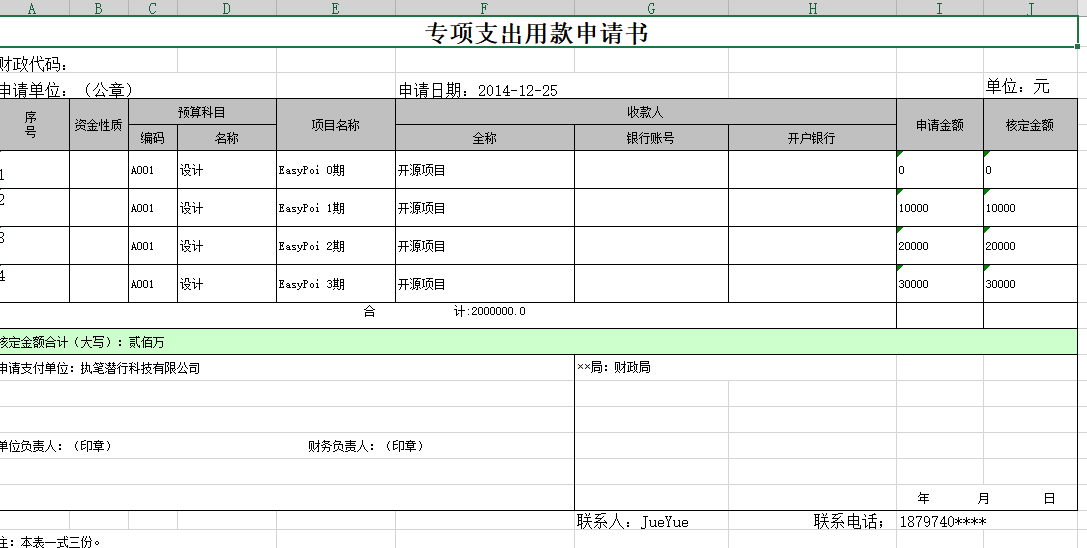 第一步,导入依赖
- <dependency>
- <groupId>cn.afterturngroupId>
- <artifactId>easypoi-spring-boot-starterartifactId>
- <version>4.5.0version>
- dependency>
第二步,新建excel模板,然后写入内容
如果是变量,就用双大括号包裹变量,如果是列表,则使用$fe指令,maplist是变量名,t.id是要输出的字段,最后以t.hdje}}结果表示结束
模板指令文档:EasyPoi教程_V1.0
示例模板下载地址: src/test/resources/WEB-INF/doc/专项支出用款申请书_map.xls · 悟耘开源/easypoi-test - Gitee.com
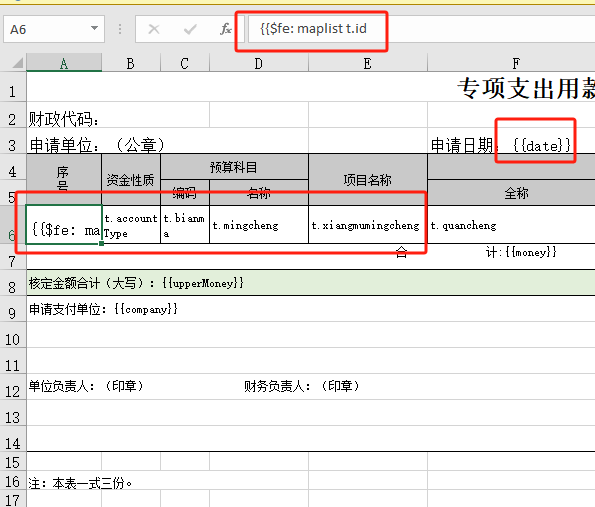

第三步,获取数据,写入输出流
- public class ExportController extends BaseController {
- @Operation(summary = "导出支出用款申请书")
- @GetMapping("exportPayForm")
- public void exportPayForm(HttpServletRequest request, HttpServletResponse response) throws IOException {
- TemplateExportParams params = new TemplateExportParams(
- "template/专项支出用款申请书_map.xls");
- Map
- map.put("date", "2014-12-25");
- map.put("money", 2000000.00);
- map.put("upperMoney", "贰佰万");
- map.put("company", "执笔潜行科技有限公司");
- map.put("bureau", "财政局");
- map.put("person", "JueYue");
- map.put("phone", "1879740****");
- List
- for (int i = 0; i < 4; i++) {
- Map
- lm.put("id", i + 1 + "");
- lm.put("zijin", i * 10000 + "");
- lm.put("bianma", "A001");
- lm.put("mingcheng", "设计");
- lm.put("xiangmumingcheng", "EasyPoi " + i + "期");
- lm.put("quancheng", "开源项目");
- lm.put("sqje", i * 10000 + "");
- lm.put("hdje", i * 10000 + "");
- listMap.add(lm);
- }
- map.put("maplist", listMap);
- Workbook workbook = ExcelExportUtil.exportExcel(params, map);
- addFileHeader(request, response, "专项支出用款申请书.xls", "application/octet-stream");
- workbook.write(response.getOutputStream());
- }
- }
- public void addFileHeader(HttpServletRequest request, HttpServletResponse response,
- String fileName, String contentType) {
- try {
- String agent = request.getHeader("USER-AGENT").toLowerCase();
- response.setContentType(contentType);
- String codedFileName = java.net.URLEncoder.encode(fileName, "UTF-8");
- if (agent.contains("firefox")) {
- response.setCharacterEncoding("utf-8");
- response.setHeader("content-disposition", "attachment;filename=" + new String(fileName.getBytes(), "ISO8859-1"));
- } else {
- response.setHeader("content-disposition", "attachment;filename=" + codedFileName);
- }
- } catch (Exception e) {
- e.printStackTrace();
- }
- }
-
相关阅读:
Scala 高阶:Scala中的模式匹配
来看看老旧物件这样与现代空间结合完美结合
SpringSecurity_权限管理
JS:原型-原型链-ES5继承
[Qt]窗口
iview框架menu菜单展开的问题
如何优雅的使用contorller层
求质数的方法
java计算机毕业设计在线问答平台源码+系统+mysql数据库+lw文档+部署
符合 EN55022B 规格、LTM4613EY、LTM4613MPV直流µModule稳压器【RG500Q 5G Sub-6 GHz 模块】
- 原文地址:https://blog.csdn.net/ting4937/article/details/138084429
