-
基于 Spring Boot 博客系统开发(一)
基于 Spring Boot 博客系统开发(一)
本系统是简易的个人博客系统开发,为了更加熟练地掌握SprIng Boot 框架及相关技术的使用。🤓🤓🤓
本系统开发所需的环境及相关软件
操作系统:Windows
Java开发包:JDK 8
spring boot 版本:2.6.13
项目管理工具:Maven 3.8.0
项目开发工具:IntelliJ IDEA
数据库:MySQL
浏览器:谷歌浏览器系统功能框架图

- 前端使用Spring Boot支持的模板引擎Thymeleaf+jQuery完成页面信息展示
- 后端使用Spring MVC+Spring+MyBatis Plus框架进行整合开发
静态资源首页效果预览
项目结构
创建一个名称为blog_system01的Spring Boot项目,选择Web模块

数据库设计
文章详情表t_article

文章评论表t_comment

文章统计表t_statistic

用户信息表t_user

用户权限表authority

用户权限关联表t_user_authority

创建数据库并导入测试数据
创建一个名称为blog_system01的数据库,并选择该数据库,然后将本书资源中所提供的blog_system.sql文件导入到blog_system数据库中。

引入依赖
starters 快捷添加依赖

所需要的依赖<dependency> <groupId>org.springframework.bootgroupId> <artifactId>spring-boot-starter-thymeleafartifactId> dependency> <dependency> <groupId>org.springframework.bootgroupId> <artifactId>spring-boot-starter-webartifactId> dependency> <dependency> <groupId>org.springframework.bootgroupId> <artifactId>spring-boot-devtoolsartifactId> <scope>runtimescope> <optional>trueoptional> dependency> <dependency> <groupId>com.mysqlgroupId> <artifactId>mysql-connector-jartifactId> <scope>runtimescope> dependency> <dependency> <groupId>org.projectlombokgroupId> <artifactId>lombokartifactId> <optional>trueoptional> dependency> <dependency> <groupId>org.springframework.bootgroupId> <artifactId>spring-boot-starter-testartifactId> <scope>testscope> dependency> <dependency> <groupId>com.baomidougroupId> <artifactId>mybatis-plus-boot-starterartifactId> <version>3.4.2version> dependency> <dependency> <groupId>com.baomidougroupId> <artifactId>mybatis-plus-generatorartifactId> <version>3.5.1version> dependency> <dependency> <groupId>org.apache.velocitygroupId> <artifactId>velocity-engine-coreartifactId> <version>2.0version> dependency> <dependency> <groupId>com.github.pagehelpergroupId> <artifactId>pagehelperartifactId> <version>5.1.10version> dependency>- 1
- 2
- 3
- 4
- 5
- 6
- 7
- 8
- 9
- 10
- 11
- 12
- 13
- 14
- 15
- 16
- 17
- 18
- 19
- 20
- 21
- 22
- 23
- 24
- 25
- 26
- 27
- 28
- 29
- 30
- 31
- 32
- 33
- 34
- 35
- 36
- 37
- 38
- 39
- 40
- 41
- 42
- 43
- 44
- 45
- 46
- 47
- 48
- 49
- 50
- 51
- 52
- 53
- 54
- 55
- 56
- 57
- 58
编写配置文件
application.properties全局配置文件添加配置
# 应用服务 WEB 访问端口 server.port=8080 # 数据源 spring.datasource.driver‐class‐name=com.mysql.cj.jdbc.Driver spring.datasource.url=jdbc:mysql://localhost:3306/blog_system01 spring.datasource.username=root spring.datasource.password=root # 显示SQL日志 mybatis‐plus.configuration.log‐impl=org.apache.ibatis.logging.stdout.StdOutImpl # mapper.xml 配置文件路径 mybatis‐plus.mapper‐locations=classpath:mapper/*.xml # 配置XML映射文件中指定的实体类别名路径 mybatis-plus.type-aliases-package=cn.qvtu.web.domain #Thymeleaf 模板缓存、模板编码、模板样式、指定模板页面存放路径、指定模板页面名称的后缀 spring.thymeleaf.cache=false spring.thymeleaf.encoding=utf-8 spring.thymeleaf.mode=HTML5 spring.thymeleaf.prefix=classpath:/templates/ spring.thymeleaf.suffix=.html- 1
- 2
- 3
- 4
- 5
- 6
- 7
- 8
- 9
- 10
- 11
- 12
- 13
- 14
- 15
- 16
- 17
- 18
- 19
- 20
- 21
- 22
- 23
添加分页拦截器
package cn.qvtu.web.config; import com.github.pagehelper.PageInterceptor; import org.springframework.context.annotation.Bean; import org.springframework.context.annotation.Configuration; import java.util.Properties; @Configuration public class MyBatisConfig { @Bean public PageInterceptor pageInterceptor(){ PageInterceptor pageInterceptor = new PageInterceptor(); Properties properties = new Properties(); properties.setProperty("helperDialect", "mysql"); pageInterceptor.setProperties(properties); return pageInterceptor; } }- 1
- 2
- 3
- 4
- 5
- 6
- 7
- 8
- 9
- 10
- 11
- 12
- 13
- 14
- 15
- 16
- 17
- 18
- 19
- 20
添加代码生成器
代码生成器代码文件需要修改数据库连接信息、生成目录、使用该类的主函数启动。
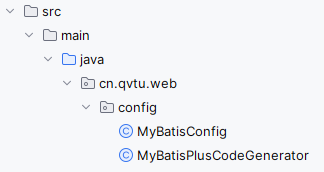
package cn.qvtu.web.config; import com.baomidou.mybatisplus.generator.FastAutoGenerator; import java.util.Arrays; import java.util.Collections; import java.util.List; /** * 代码生成器 */ public class MyBatisPlusCodeGenerator { public static void main(String[] args) { FastAutoGenerator.create("jdbc:mysql://localhost:3306/blog_system01", "root", "root") // 全局配置 .globalConfig((scanner, builder) -> builder.author(scanner.apply("请输入作者名称?")) .fileOverride().outputDir("E://")) // 包配置 .packageConfig((scanner, builder) -> builder.parent(scanner.apply("请输入包名?"))) .packageConfig(builder-> builder.entity("domain")) // 策略配置 .strategyConfig((scanner, builder) -> builder .addInclude(getTables(scanner.apply("请输入表名,多个英文逗号分隔?所有输入 all"))) .addTablePrefix("t_") .controllerBuilder() .enableRestStyle() .enableHyphenStyle() .entityBuilder() .enableLombok() .mapperBuilder().enableMapperAnnotation() .build()).execute(); } // 处理 all 情况 protected static List<String> getTables(String tables) { return "all" .equals(tables) ? Collections.emptyList() : Arrays.asList(tables.split(",")); } }- 1
- 2
- 3
- 4
- 5
- 6
- 7
- 8
- 9
- 10
- 11
- 12
- 13
- 14
- 15
- 16
- 17
- 18
- 19
- 20
- 21
- 22
- 23
- 24
- 25
- 26
- 27
- 28
- 29
- 30
- 31
- 32
- 33
- 34
- 35
- 36
- 37
- 38
- 39
- 40
代码生成器生成基础文件放入项目

测试数据库的连接和分页
下面代码执行成功,返回sql日志和输出list对象信息,集合个数为3。🥳🥳🥳
@SpringBootTest class BlogSystem01ApplicationTests { @Autowired private IArticleService articleService; @Test void contextLoads() { PageHelper.startPage(1,3); List<Article> list = articleService.list(); System.out.println(list); } }- 1
- 2
- 3
- 4
- 5
- 6
- 7
- 8
- 9
- 10
- 11
- 12
- 13
- 14
前端资源引入
配置404,500等错误页面
只需在template目录下创建error目录,然后将模板按错误码命名,发生404,500等错误时就会统一跳转到指定html页面。

前端模板结构

编写controller的页面跳转方法
编写完这些方法,通过http://127.0.0.1:8080/请求这些方法可以返回模板页面
@Controller public class HomeController { @RequestMapping("/") public String home(){ return "client/index"; } @RequestMapping("/article") public String article(){ return "client/article"; } @GetMapping("/login") public String login(){ return "client/login"; } }- 1
- 2
- 3
- 4
- 5
- 6
- 7
- 8
- 9
- 10
- 11
- 12
- 13
- 14
- 15
- 16
- 17
- 18
- 19
访问效果

-
相关阅读:
ARM Day2
不适合学习编程的人是你吗?
织梦CMS采集插件-DEDE插件大全
TiFlash 源码阅读(五) DeltaTree 存储引擎设计及实现分析 - Part 2
高阶操作(where和gather函数)
[附源码]java毕业设计鑫地酒店酒水库存管理系统论文
Keras入门与残差网络的搭建
javascript深度理解数组的sort()排序
程序员日常代码调试工作
提高组CSP-S初赛模拟试题整理2
- 原文地址:https://blog.csdn.net/qq_29385297/article/details/138048095


