-
Datart 扩装下载功能之PDF和图片下载
Datart 扩装下载功能之PDF和图片下载
首先下载依赖
yum install mesa-libOSMesa-devel gnu-free-sans-fonts wqy-zenhei-fonts -y
然后下载安装chrome
yum install https://dl.google.com/linux/direct/google-chrome-stable_current_x86_64.rpm
查看chrome版本号
google-chrome --version
根据版本号下载对应的驱动
https://chromedriver.storage.googleapis.com/index.html
https://registry.npmmirror.com/binary.html?path=chromedriver/
给驱动授权
将解压好的文件放在/usr/bin目录下,并且给chromedrive增加可以执行权限
chmod +x chromedriver
去datart 目录下创建文件夹:driver
将解压后的chromedriver 复制到driver
编辑配置文件:application-config.yml


如果找不到对应的版本,建议自己下载
以107为例:下载浏览器

下载对应驱动,选版本号离的最近的
https://registry.npmmirror.com/binary.html?path=chromedriver/
卸载浏览器:

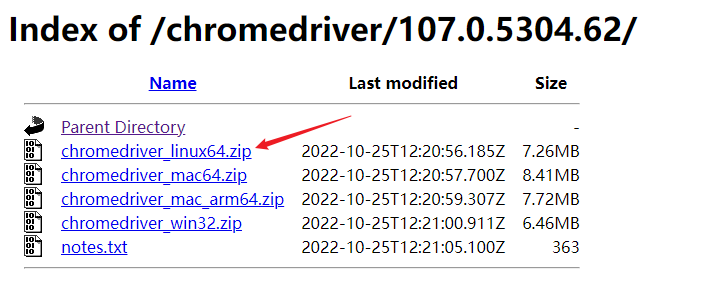
卸载以安装的其他版本
yum remove google-chrome-stable
安装指定版本浏览器
下载地址:
https://www.chromedownloads.net/chrome64linux-stable/
下载对应版本解压后执行
yum localinstall google-chrome-stable_current_x86_64.rpm

将解压好的文件放在/usr/bin目录下,并且给chromedrive增加可以执行权限
cp chromedriver /usr/bin/
cp chromedriver /java/data-view/driver/
chmod +x chromedriver
重启服务
/bin/datart-service.sh restart
-
相关阅读:
2基于matlab的卡尔曼滤波,可更改 状态转移方程, 控制输入,观测方程,设置生成的信号的噪声标准差,设置状态转移方差Q和观测方差R等参数,程序已调通。
python毕业设计项目源码选题(16)跳蚤市场二手物品交易系统毕业设计毕设作品开题报告开题答辩PPT
Vue——formcreate表单设计器自定义组件实现
【OpenCV-Python】教程:3-10 直方图(2)直方图均衡
Flask自定义装饰和g的使用
----JAVA 继承----
fork()函数的返回值
java计算机毕业设计校园失物招领管理系统源代码+系统+数据库+lw文档
迭代器和生成器
Vite4TSX前端版本号生成
- 原文地址:https://blog.csdn.net/li_wen_jin/article/details/138165676