-
OpenCV——图像分块局部阈值二值化

OpenCV——图像分块局部阈值二值化由CSDN点云侠原创,爬虫自重。如果你不是在点云侠的博客中看到该文章,那么此处便是不要脸的爬虫。
一、算法原理
1、算法概述
针对目前局部阈值二值化结果存在目标虚假或断裂的缺陷,提出了一种基于图像分块的局部阈值二值化方法。首先,将图像分成若干子块并分析每个子块像素灰度变化情况; 接着,取一定大小的局部窗口在图像中移动,比较该局部窗口内与包含窗口自身且比窗口更大区域内的像素灰度变化情况,更大区域由窗口模板当前覆盖的所有子块组成,以此判断窗口内是否为灰度变化平坦( 或剧烈) 区域; 最后,根据不同的区域,给出具体的二值化方案。
2、参考文献
[1] 张洁玉. 基于图像分块的局部阈值二值化方法 [J]. 计算机应用, 2017, 37 (03): 827-831.
二、代码实现
ImageBinarization.h
#pragma once #include#include class ImageBinarization { private: // 参数 cv::Mat m_src; // 输入数据 cv::Mat m_dst; // 输出数据 cv::Size m_blockSize; // 分块图像的尺寸 cv::Size m_moveWndSize; // 移动窗口的尺寸 int m_segRow = 0; // 图像分块的行数 int m_segCol = 0; // 图像分块的列数 double m_alpha = 0.5; // 平坦区域与剧烈区域的区分阈值 double m_beta = 0.5; // 剧烈区域,像素中心点与阈值O的距离 std::vector<std::tuple<cv::Rect, double, double>> m_imgProperty; // 内部函数 double getMatMAD(const cv::Mat& wndImg); // 计算平均绝对偏差 std::vector<int>getGridIndices(const int windCenterInSegRow, const int windCenterInSegCol); void imageSegment();// 图像分块 void segBlockBin(); // 分块二值化 public: ImageBinarization() {} ~ImageBinarization() {} void setInputImage(const cv::Mat& src); void setBlockSize(const cv::Size& blockSize); // 设置分块图像的尺寸 void setMoveWindSize(const cv::Size& moveWndSize); // 设置移动窗口的尺寸 void setAlphaValue(double alpha); // 设置区分阈值 void setBetaValue(double beta); // 设置像素中心点与阈值的距离 void blockBinResult(cv::Mat& dst); // 分块二值化结果输出 }; - 1
- 2
- 3
- 4
- 5
- 6
- 7
- 8
- 9
- 10
- 11
- 12
- 13
- 14
- 15
- 16
- 17
- 18
- 19
- 20
- 21
- 22
- 23
- 24
- 25
- 26
- 27
- 28
- 29
- 30
- 31
- 32
- 33
- 34
- 35
ImageBinarization.cpp
#include#include"ImageBinarization.h" // 参数设置 // 输入图像 void ImageBinarization::setInputImage(const cv::Mat& src) { m_src = src; } // 分块尺寸 void ImageBinarization::setBlockSize(const cv::Size& blockSize) { m_blockSize = blockSize; } // 滑动窗口尺寸 void ImageBinarization::setMoveWindSize(const cv::Size& moveWndSize) { m_moveWndSize = moveWndSize; } // 平滑与剧烈区域分割阈值 void ImageBinarization::setAlphaValue(double alpha) { m_alpha = alpha; } // 剧烈区域距离阈值 void ImageBinarization::setBetaValue(double beta) { m_beta = beta; } // 计算平均绝对偏差 double ImageBinarization::getMatMAD(const cv::Mat& wndImg) { CV_Assert(wndImg.type() == CV_8UC1); // 计算均值 cv::Scalar myMean = cv::mean(wndImg); double sum = 0.0; for (int y = 0; y < wndImg.rows; ++y) { for (int x = 0; x < wndImg.cols; ++x) { // 计算每一个像素灰度减去平均值的绝对值 int diffAbs = cv::abs(wndImg.at<uchar>(y, x) - myMean[0]); sum += diffAbs; // 计算绝对值之和 } } return sum / (wndImg.rows * wndImg.cols); // 平均绝对偏差 } // 中心点八邻域格网号计算 std::vector<int> ImageBinarization::getGridIndices(const int windCenterInSegRow, const int windCenterInSegCol) { // p8,p7,p6 // p1,p0,p5 // p2,p3,p4 std::vector<int>nGridIndices;// 邻域格网索引号容器 nGridIndices.resize(9); // 中心点p0所在格网 int p0Row = windCenterInSegRow; int p0Col = windCenterInSegCol; int p0Grid = -1; if (p0Row < m_segRow && p0Col < m_segCol) { p0Grid = p0Row * m_segCol + p0Col; } // 中心点越界则计算结束 else { std::cerr << "中心点越界" << std::endl; abort(); } nGridIndices[0] = p0Grid; // p0左侧p1所在格网 int p1Row = p0Row; int p1Col = p0Col - 1; int p1Grid = -1; if (p1Col >= 0) { p1Grid = p1Row * m_segCol + p1Col; } nGridIndices[1] = p1Grid; // p0左下方p2所在格网 int p2Row = p0Row + 1; int p2Col = p0Col - 1; int p2Grid = -1; if (p2Row < m_segRow && p2Col >= 0) { p2Grid = p2Row * m_segCol + p2Col; } nGridIndices[2] = p2Grid; // p0正下方p3所在格网 int p3Row = p0Row + 1; int p3Col = p0Col; int p3Grid = -1; if (p3Row < m_segRow) { p3Grid = p3Row * m_segCol + p3Col; } nGridIndices[3] = p3Grid; // p0右下方p4所在格网 int p4Row = p0Row + 1; int p4Col = p0Col + 1; int p4Grid = -1; if (p4Row < m_segRow && p4Col < m_segCol) { p4Grid = p4Row * m_segCol + p4Col; } nGridIndices[4] = p4Grid; // p0右侧p5所在格网 int p5Row = p0Row; int p5Col = p0Col + 1; int p5Grid = -1; if (p5Col < m_segCol) { p5Grid = p5Row * m_segCol + p5Col; } nGridIndices[5] = p5Grid; // p0右上方p6所在格网 int p6Row = p0Row - 1; int p6Col = p0Col + 1; int p6Grid = -1; if (p6Row >= 0 && p6Col < m_segCol) { p6Grid = p6Row * m_segCol + p6Col; } nGridIndices[6] = p6Grid; // p0正上方p7所在格网 int p7Row = p0Row - 1; int p7Col = p0Col; int p7Grid = -1; if (p7Row >= 0) { p7Grid = p7Row * m_segCol + p7Col; } nGridIndices[7] = p7Grid; // p0左上方p8所在格网 int p8Row = p0Row - 1; int p8Col = p0Col - 1; int p8Grid = -1; if (p8Row >= 0 && p8Col >= 0) { p8Grid = p8Row * m_segCol + p8Col; } nGridIndices[8] = p8Grid; return nGridIndices; } // 图像分块 void ImageBinarization::imageSegment() { // OpenCV异常检测 CV_Assert((m_blockSize.width <= m_src.cols) && (m_blockSize.height <= m_src.rows)); // 1、获取分块图像的尺寸 const int blockHeight = m_blockSize.height; // 图像分块的高度 const int blockWidth = m_blockSize.width; // 图像分块的宽度 // 2、根据分块尺寸计算分块的个数 m_segRow = cvCeil(m_src.rows / static_cast<double>(blockHeight)); // 图像分块的行数 m_segCol = cvCeil(m_src.cols / static_cast<double>(blockWidth)); // 图像分块的列数 // 3、使用裁剪函数进行分块 cv::Mat roiImg; for (int i = 0; i < m_segRow; ++i) { int rectHeight = 0;// 裁剪矩形框的高度 int rectWidth = 0; // 裁剪矩形框的宽度 // 如果剩余像素的高度小于分块的高度,则裁剪矩形框的高度为剩余像素的高度 rectHeight = m_src.rows - i * blockHeight < blockHeight ? m_src.rows - i * blockHeight : blockHeight; for (int j = 0; j < m_segCol; ++j) { // 如果剩余像素的宽度小于分块的宽度,则裁剪矩形框的宽度为剩余像素的宽度 rectWidth = m_src.cols - j * blockWidth < blockWidth ? m_src.cols - j * blockWidth : blockWidth; // 获取分块图像 cv::Rect rect(j * blockWidth, i * blockHeight, rectWidth, rectHeight); m_src(rect).copyTo(roiImg); // 计算每个分块的平均绝对偏差 double madValue = getMatMAD(roiImg); // 计算每个分块的otsu阈值 cv::Mat imgOtsu; double otsuValue = cv::threshold(roiImg, imgOtsu, 0, 255, cv::THRESH_BINARY | cv::THRESH_OTSU); // 分块信息、平均绝对偏差和otsu阈值存储到vector容器 m_imgProperty.push_back(std::make_tuple(rect, madValue, otsuValue)); } } } // 分块二值化 void ImageBinarization::segBlockBin() { CV_Assert(m_src.type() == CV_8UC1); CV_Assert((m_moveWndSize.width % 2 == 1) && (m_moveWndSize.height % 2 == 1)); CV_Assert((m_moveWndSize.width <= m_src.cols) && (m_moveWndSize.height <= m_src.rows)); // 1、计算每个窗口的阈值 m_dst = cv::Mat::zeros(m_src.rows, m_src.cols, CV_8UC1); for (int y = m_moveWndSize.height / 2; y <= m_src.rows - m_moveWndSize.height / 2 - 1; ++y) { for (int x = m_moveWndSize.width / 2; x <= m_src.cols - m_moveWndSize.width / 2 - 1; ++x) { // 获取以(x,y)为中心的滑动窗口范围内的灰度值 cv::Point topLeftPoint = cv::Point(x - m_moveWndSize.width / 2, y - m_moveWndSize.height / 2); cv::Rect moveWindRect = cv::Rect(topLeftPoint.x, topLeftPoint.y, m_moveWndSize.width, m_moveWndSize.height); cv::Mat moveWindMat = m_src(moveWindRect); double delta = getMatMAD(moveWindMat); // 局部窗口像素灰度平均绝对偏差 double windMean = cv::mean(moveWindMat)[0];// 局部窗口像素灰度平均值 double T2 = 0.0; // 区分平坦区域和非平坦区域的阈值 double windOtsu = 0.0; // 平坦区域局部窗口阈值 // -----------------------计算滑动窗口中心点所在的分块格网号--------------------- const int windCenterInSegRow = cvFloor(y / m_blockSize.height); // 行号 const int windCenterInSegCol = cvFloor(x / m_blockSize.width); // 列号 // ----------------------------中心点八邻域格网号计算---------------------------- std::vector<int>nGridIndices = getGridIndices(windCenterInSegRow, windCenterInSegCol); // -----------------------------根据子块计算阈值-------------------------------- for (size_t gridIdx = 0; gridIdx < nGridIndices.size(); ++gridIdx) { cv::Rect Intersection; // 重叠区域 int n = nGridIndices[gridIdx]; if (n != -1) { Intersection = moveWindRect & std::get<0>(m_imgProperty[n]); } if (Intersection.area() > 0) { double ki = 1.0 * Intersection.area() / moveWindRect.area(); T2 += ki * std::get<1>(m_imgProperty[n]); windOtsu += ki * std::get<2>(m_imgProperty[n]); } } int value = m_src.at<uchar>(y, x); // 平坦区域 if (delta < m_alpha * T2) { // 大于阈值的部分为黑色 if (value > windOtsu) { m_dst.at<uchar>(y, x) = 0; } // 小于阈值的部分为白色 else { m_dst.at<uchar>(y, x) = 255; } } // 剧烈区域 else { // img(x,y)>=(1-B)*O if (value >= (1 + m_beta) * windOtsu) { m_dst.at<uchar>(y, x) = 0; } // img(x,y)<(1-B)*O else if (value < (1 - m_beta) * windOtsu) { m_dst.at<uchar>(y, x) = 255; } else { // img(x,y)< Mean + 0.5*delta if (value < windMean + 0.5 * delta) { m_dst.at<uchar>(y, x) = 255; } // img(x,y)>= Mean + 0.5*delta else { m_dst.at<uchar>(y, x) = 0; } } } } } } // 分块二值化结果输出 void ImageBinarization::blockBinResult(cv::Mat& dst) { imageSegment(); segBlockBin(); // 结果输出 dst = m_dst; } - 1
- 2
- 3
- 4
- 5
- 6
- 7
- 8
- 9
- 10
- 11
- 12
- 13
- 14
- 15
- 16
- 17
- 18
- 19
- 20
- 21
- 22
- 23
- 24
- 25
- 26
- 27
- 28
- 29
- 30
- 31
- 32
- 33
- 34
- 35
- 36
- 37
- 38
- 39
- 40
- 41
- 42
- 43
- 44
- 45
- 46
- 47
- 48
- 49
- 50
- 51
- 52
- 53
- 54
- 55
- 56
- 57
- 58
- 59
- 60
- 61
- 62
- 63
- 64
- 65
- 66
- 67
- 68
- 69
- 70
- 71
- 72
- 73
- 74
- 75
- 76
- 77
- 78
- 79
- 80
- 81
- 82
- 83
- 84
- 85
- 86
- 87
- 88
- 89
- 90
- 91
- 92
- 93
- 94
- 95
- 96
- 97
- 98
- 99
- 100
- 101
- 102
- 103
- 104
- 105
- 106
- 107
- 108
- 109
- 110
- 111
- 112
- 113
- 114
- 115
- 116
- 117
- 118
- 119
- 120
- 121
- 122
- 123
- 124
- 125
- 126
- 127
- 128
- 129
- 130
- 131
- 132
- 133
- 134
- 135
- 136
- 137
- 138
- 139
- 140
- 141
- 142
- 143
- 144
- 145
- 146
- 147
- 148
- 149
- 150
- 151
- 152
- 153
- 154
- 155
- 156
- 157
- 158
- 159
- 160
- 161
- 162
- 163
- 164
- 165
- 166
- 167
- 168
- 169
- 170
- 171
- 172
- 173
- 174
- 175
- 176
- 177
- 178
- 179
- 180
- 181
- 182
- 183
- 184
- 185
- 186
- 187
- 188
- 189
- 190
- 191
- 192
- 193
- 194
- 195
- 196
- 197
- 198
- 199
- 200
- 201
- 202
- 203
- 204
- 205
- 206
- 207
- 208
- 209
- 210
- 211
- 212
- 213
- 214
- 215
- 216
- 217
- 218
- 219
- 220
- 221
- 222
- 223
- 224
- 225
- 226
- 227
- 228
- 229
- 230
- 231
- 232
- 233
- 234
- 235
- 236
- 237
- 238
- 239
- 240
- 241
- 242
- 243
- 244
- 245
- 246
- 247
- 248
- 249
- 250
- 251
- 252
- 253
- 254
- 255
- 256
- 257
- 258
- 259
- 260
- 261
- 262
- 263
- 264
- 265
- 266
- 267
- 268
- 269
- 270
- 271
- 272
- 273
- 274
- 275
- 276
- 277
- 278
- 279
- 280
- 281
- 282
- 283
- 284
- 285
- 286
- 287
- 288
- 289
- 290
- 291
main.cpp
#include#include #include"ImageBinarization.h" int main() { cv::Mat img = cv::imread("CG.jpg"); // 转灰度图 cv::Mat gray; cv::cvtColor(img, gray, cv::COLOR_BGR2GRAY); cv::Size windSize(3, 3); // 分块窗口大小 cv::Size moveWind(5, 5); // 移动窗口大小 cv::Mat img_Thr_O; // 二值化结果 ImageBinarization ib; ib.setInputImage(gray); ib.setBlockSize(windSize); ib.setMoveWindSize(moveWind); ib.setAlphaValue(0.5); ib.setBetaValue(0.7); ib.blockBinResult(img_Thr_O); cv::imshow("origion_pic", img); cv::imshow("img_Thr_O", img_Thr_O); cv::waitKey(0); } - 1
- 2
- 3
- 4
- 5
- 6
- 7
- 8
- 9
- 10
- 11
- 12
- 13
- 14
- 15
- 16
- 17
- 18
- 19
- 20
- 21
- 22
- 23
- 24
- 25
- 26
- 27
- 28
- 29
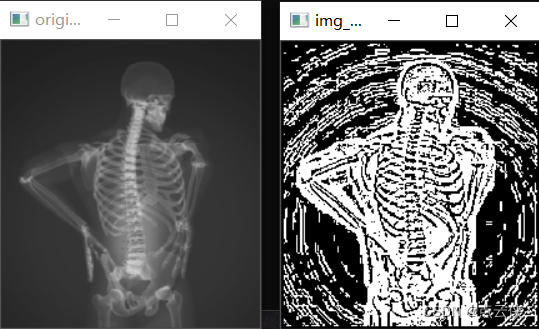
三、结果展示
-
相关阅读:
2023最新UI酒桌喝酒游戏小程序源码 娱乐小程序源码 带流量主
数据结构——图
基于SSM框架的人力资源管理系统毕业设计源码060936
【论文阅读】CT-ICP: Real-time Elastic LiDAR Odometry with Loop Closure
竞赛 深度学习卫星遥感图像检测与识别 -opencv python 目标检测
微信小程序开发源码系统集合版:含15大类别小程序功能 包升级更新
基于GoogleNet深度学习网络的花朵类型识别matlab仿真
京东小程序h5st
【建议收藏】回收站数据恢复如何操作?3个方案帮你恢复删除的文件
使用jmx exporter采集kafka指标
- 原文地址:https://blog.csdn.net/qq_36686437/article/details/137718921
- 最新文章
-
【FHE】我们如何实现同态加密推理(八):SiLU 的密文化——两条路径,和一个 8 字节的开关
SQLcl 中 c/old/new 替换变量为何失效?先定位再替换
不让模型写作文,直接从它脑子里读答案:Jev 决策在 .NET 的两条路线
Halo插件:支持GitHub的图床附件策略
电视投屏界的“一股清流”!SimpleTVCast 6.0.0-beta 抢先体验:无需TV端App,界面大换血!✨
华三VXLAN集中式网关实战指南:Spine多活网关 + 双活接入(M-LAG)
软件更好写之后口碑会更重要
大 O、大 Omega、大 Theta 的区别,O(n) 复杂度是什么意思
Java标签跳转:一个鲜为人知但却很实用的小技巧
多智能体系统论文速读