-
Vue3:响应式数据的基本使用(ref、reactive)
一、前言
- 在Vue3中,如果数据不是响应式数据,当数据的值发生改变时,页面上的数据是不会发生改变的。
- 因此本文主要介绍Vue3中响应式数据的使用,包括ref和reactive的基本使用。
二、ref
1、ref —— 创建基本类型的响应式数据
- ref 可以定义基本类型的响应式变量
- 语法 :
let xxx=ref(初始值)- 1
- 返回值:
是一个RefImpl的实例对象,简称ref对象或ref,ref对象中的value属性是响应式的。 - 其他:
在JS中操作数据需要使用 "xxx.value"的形式,但在模板中不需要用. value,直接使用即可。
(1)引入ref
import {ref} from ' vue '- 1
(2)代码
- 代码解析

- 完整代码
<template> <p>个人信息:</p> <p>性别:{{ gender }}</p> <p>年龄:{{ age }}</p> <button @click="ageChange">点击年龄加1</button> </template> <script setup> import { ref } from "vue"; // 数据 let gender = ref("女"); let age = ref(25); // 方法 function ageChange() { age.value += 1; } </script>- 1
- 2
- 3
- 4
- 5
- 6
- 7
- 8
- 9
- 10
- 11
- 12
- 13
- 14
- 15
- 16
- 17
- 18
- 19
-
结果:

-
点击按钮,响应式数据会在页面上发生变化:

2、ref —— 创建对象类型的响应式数据
ref也可以创建对象类型的响应式数据。
(1)代码解析
- ref可以定义以下类型的数据:

-
修改ref的数据时记得.value的使用以及使用顺序:

-
在模板中,不需要使用.value

(2)完整代码
<template> <p>小明的年龄是:{{ info.age }} 岁</p> <p>小明的身高是:{{ info.height }} cm</p> <button @click="ageChange">点击年龄加1</button> <button @click="heightChange">点击身高加1</button> <br /> <h2>星座列表:</h2> <ul> <li v-for="item in Constellation" :key="item.id">{{ item.star }}</li> </ul> <button @click="ConstellationChange">点击修改第二个星座名称</button> </template> <script setup> import { ref } from "vue"; // 数据 let info = ref({ age: 20, height: 165, }); let Constellation = ref([ { id: 1, star: "双子座" }, { id: 2, star: "狮子座" }, { id: 3, star: "巨蟹座" }, ]); // 方法 function ageChange() { info.value.age += 1; } function heightChange() { info.value.height += 1; } function ConstellationChange() { Constellation.value[1].star = "处女座"; } </script>- 1
- 2
- 3
- 4
- 5
- 6
- 7
- 8
- 9
- 10
- 11
- 12
- 13
- 14
- 15
- 16
- 17
- 18
- 19
- 20
- 21
- 22
- 23
- 24
- 25
- 26
- 27
- 28
- 29
- 30
- 31
- 32
- 33
- 34
- 35
- 36
- 37
- 38
- 39
三、reactive
1、概念
reactive只能定义对象类型的响应式数据,例如:
- 数据1:
let info = reactive({ age: 20, height: 165, });- 1
- 2
- 3
- 4
- 数据2:
let Constellation = reactive([ { id: 1, star: "双子座" }, { id: 2, star: "狮子座" }, { id: 3, star: "巨蟹座" }, ]);- 1
- 2
- 3
- 4
- 5
- 而以下代码是错误的(reactive不能定义基本类型的数据):
let name=reactive("张三")- 1
2、代码
<template> <p>小明的年龄是:{{ info.age }} 岁</p> <p>小明的身高是:{{ info.height }} cm</p> <button @click="ageChange">点击年龄加1</button> <button @click="heightChange">点击身高加1</button> <br /> <h2>星座列表:</h2> <ul> <li v-for="item in Constellation" :key="item.id">{{ item.star }}</li> </ul> </template> <script setup> import { reactive } from "vue"; // 数据 let info = reactive({ age: 20, height: 165, }); let Constellation = reactive([ { id: 1, star: "双子座" }, { id: 2, star: "狮子座" }, { id: 3, star: "巨蟹座" }, ]); // 方法 function ageChange() { info.age += 1; } function heightChange() { info.height += 1; } </script>- 1
- 2
- 3
- 4
- 5
- 6
- 7
- 8
- 9
- 10
- 11
- 12
- 13
- 14
- 15
- 16
- 17
- 18
- 19
- 20
- 21
- 22
- 23
- 24
- 25
- 26
- 27
- 28
- 29
- 30
- 31
- 32
- 33
- 34
- 35
-
结果:

-
点击按钮,响应式数据会在页面上发生变化:
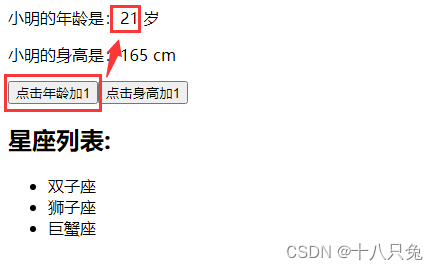
3、注意事项
- reactive重新分配一个新对象, 会失去响应式;可以使用object . assign去整体替换,举例:
原本有数据如下:
// 数据 let info = reactive({ age: 20, height: 165, });- 1
- 2
- 3
- 4
- 5
点击按钮对整体数据进行修改:
function infoChange() { info={ age: 30, height: 185, } }- 1
- 2
- 3
- 4
- 5
- 6
但是这样修改数据之后,点击按钮数据并不会修改:

而使用object . assign可以让页面的数据进行更新:
function infoChange() { Object.assign(info, { age: 30, height: 185, }); }- 1
- 2
- 3
- 4
- 5
- 6

结果如下:

四、总结
- ref可以定义基本类型数据、对象类型数据;reactive只能定义对象类型数据
- 若需要一个响应式对象,层级不深,ref 、reactive 都可以
- 若需要一个响应式对象,且层级较深,推荐使用reactive
-
相关阅读:
这些提高摸鱼效率的自动化测试技巧,提高打工人幸福感~
实时降噪(Real-time Denoising):NVIDIA Real-time Denoisers 源码剖析
C++ 语法基础课2 —— printf 语句与 C++中的判断结构
C#去掉字符串最后一个字符
vue watch 侦听器 监视器
Springboot聚合工程打包:代码正确,但打包出错找不到类
十大 CI/CD 安全风险(三)
【微信小程序】一文带你了解数据绑定、事件绑定以及事件传参、数据同步
C++线程创建的方式和使用
【洛谷】P1462 通往奥格瑞玛的道路
- 原文地址:https://blog.csdn.net/Junehhh/article/details/137782242

- 最新文章
-
沪漂五周年了:我越来越迷茫了
Agentic Skill Routing 实战:别再把所有 Skill 塞进 AI Agent 上下文
MySQL-Seconds_behind_master的精度误差
[MAF预定义ChatClient中间件-03]CachingChatClient——利用缓存省钱省时间
AI的至暗历史:从万众期待到被政府撤资,AI的两次死亡徘徊
Agent OS :五种驯服不确定性的范式
PortSwigger SQL注入LAB11
数据库即时编译JIT
[Begin]AI Learn Data Day 0
深度学习进阶(二十七)现代 LLM 的核心架构设计其二:SwiGLU