-
Java基础 - 9 - 集合进阶(二)
一. Collection的其他相关知识
1.1 可变参数
可变参数就是一种特殊形参,定义在方法、构造器的形参列表里,格式是:数据类型…参数名称;
可变参数的特点和好处
特点:可以不传数据给它;可以传一个或者同时传多个数据给它;也可以传一个数组给它
好处:常常用来灵活的接收数据
- //demo
- public class demo{
- public static void main(String[] args){
- //可变参数特点
- method(); //不传数据
- method(10); //传一个数据
- method(10,20,30); //传多个数据
- method(new int[]{1,2,3,4,5}); //传一个数组给可变参数
- }
- //注意事项1:一个形参列表中,只能有一个可变参数
- //注意事项2:可变参数必须放在形参列表的最后面
- public static void method(int...nums){
- //可变参数在方法内部本质就是一个数组
- System.out.println(nums.length);
- System.out.println(Arrays.toString(nums));
- System.out.println("====================");
- }
- }
1.2 Collections
Collections是一个用来操作集合的工具类
Collections提供的常用静态方法
方法名称 说明 public static boolean addAll(Collectionc , T…elements) 给集合批量添加元素 public static void shuffle(List list) 打乱List集合中的元素顺序 public static void sort(List list) 对List集合中的元素进行升序排序 public static void sort(List list , Comparatorc) 对List集合中元素,按照比较器对象指定的规则进行排序 
- //demo
- public class demo{
- public static void main(String[] args){
- // 接收子类及其父类的类型
- //public static
boolean addAll(Collectionc , T…elements) 给集合批量添加元素 - List
names = new ArrayList<>(); - Collections.addAll(names,"张三","李四","王五","二麻子"); //批量添加,不用再一个个add了
- System.out.println(names); //[张三, 李四, 王五, 二麻子]
- //public static void shuffle(List list) 打乱List集合中的元素顺序(List是有序、可重复、有索引)
- Collections.shuffle(names);
- System.out.println(names); //[二麻子, 王五, 张三, 李四]
- //public static
void sort(List list) 对List集合中的元素进行升序排序 - List
nums = new ArrayList<>(); - Collections.addAll(nums,1,3,7,5,2);
- System.out.println(nums); //[1, 3, 7, 5, 2]
- Collections.sort(nums);
- System.out.println(nums); //[1, 2, 3, 5, 7]
- List
cars = new ArrayList<>(); - Car c1 = new Car("奔驰",12.8);
- Car c2 = new Car("宝马",14.1);
- Car c3 = new Car("大众",9.9);
- Car c4 = new Car("未来",14.1);
- Collections.addAll(cars,c1,c2,c3,c4);
- System.out.println(cars); //[Car{name='奔驰', price=12.8}, Car{name='宝马', price=14.1}, Car{name='大众', price=9.9}, Car{name='未来', price=14.1}]
- //编译时异常(标红报错):因为sort不知道自定义对象按照什么规则排序
- //修改方式:让Car类实现Comparable(比较规则)接口,然后重写compareTo方法来指定比较规则
- //Collections.sort(cars);
- //System.out.println(cars); //[Car{name='大众', price=9.9}, Car{name='奔驰', price=12.8}, Car{name='宝马', price=14.1}, Car{name='未来', price=14.1}]
- //public static
void sort(List list , Comparatorc) 对List集合中元素,按照比较器对象指定的规则进行排序 - Collections.sort(cars, new Comparator
() { - @Override
- public int compare(Car o1, Car o2) {
- //return Double.compare(o1.getPrice(),o2.getPrice()); //升序
- return Double.compare(o2.getPrice(),o1.getPrice()); //降序
- }
- });
- System.out.println(cars);
- }
- }
- //Car
- public class Car implements Comparable
{ - private String name;
- private double price;
- //this代表主调 o是被调
- @Override
- public int compareTo(Car o) {
- //如果认为左边对象大于右边对象返回正整数
- //如果认为左边对象小于右边对象返回负整数
- //如果认为左边对象等于右边对象返回0
- //需求:按照价格升序排序
- //return (int)(this.price-o.price); //不能这样写,返回值是int类型,两个double类型相减之后强转可能会出bug
- //写法1
- // if(this.price>o.price){
- // return 1;
- // }else if(this.price
- // return -1;
- // }else{
- // return 0;
- // }
- //写法2
- return Double.compare(this.price,o.price);
- }
- //右键->生成->equals()和hashCode()
- @Override
- public boolean equals(Object o) {
- if (this == o) return true;
- if (o == null || getClass() != o.getClass()) return false;
- Car car = (Car) o;
- return Double.compare(car.price, price) == 0 &&
- Objects.equals(name, car.name);
- }
- @Override
- public int hashCode() {
- return Objects.hash(name, price);
- }
- public Car() {
- }
- public Car(String name, double price) {
- this.name = name;
- this.price = price;
- }
- public String getName() {
- return name;
- }
- public void setName(String name) {
- this.name = name;
- }
- public double getPrice() {
- return price;
- }
- public void setPrice(double price) {
- this.price = price;
- }
- @Override
- public String toString() {
- return "Car{" +
- "name='" + name + '\'' +
- ", price=" + price +
- '}';
- }
- }
1.3 综合案例
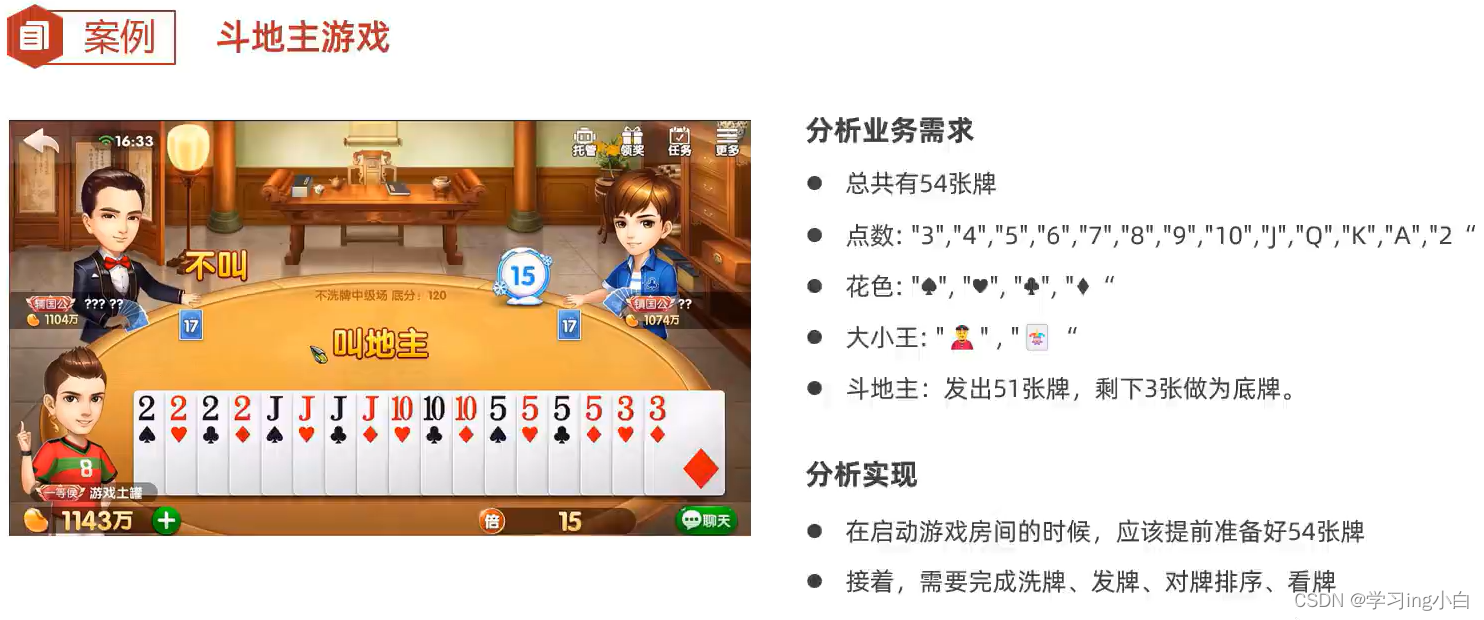
- //demo
- public class demo {
- public static void main(String[] args) {
- //创建房间
- Room r = new Room();
- //启动游戏
- r.start();
- }
- }
- //Room
- public class Room {
- //必须有一副牌
- private List
allCards = new ArrayList<>(); - public Room(){
- //做出54张牌,存入到集合allCards中
- //点数
- String[] numbers = {"3","4","5","6","7","8","9","10","J","Q","K","A","2"};
- //花色
- String[] colors = {"♣","♦","♠","♥"};
- //遍历点数后再遍历花色,组织成牌
- for (int i = 0; i < numbers.length; i++) { //i不仅仅是numbers数组的索引,因为点数是按升序放在里面,所以正好还可以代表牌的大小
- for (int j = 0; j < colors.length; j++) {
- Card card = new Card(numbers[i],colors[j],i); //创建牌对象
- allCards.add(card); //存到集合中
- }
- }
- //单独存放大小王
- Card c1 = new Card("","👨",14); //大王
- Card c2 = new Card("","👩",13); //小王
- Collections.addAll(allCards,c1,c2); //存到集合中
- System.out.println("一副新牌:"+allCards);
- }
- //启动游戏
- public void start() {
- //洗牌
- Collections.shuffle(allCards);
- //创建三个玩家的手牌集合
- List
user1 = new ArrayList<>(); - List
user2 = new ArrayList<>(); - List
user3 = new ArrayList<>(); - //发牌
- //最后要剩余三张
- for (int i = 0; i < allCards.size() - 3; i++) {
- if(i%3==0){
- user1.add(allCards.get(i));
- }else if(i%3==1){
- user2.add(allCards.get(i));
- }else{
- user3.add(allCards.get(i));
- }
- }
- //给玩家的牌进行降序排序
- sortCards(user1);
- sortCards(user2);
- sortCards(user3);
- //玩家手牌情况
- sortCards(user1);
- System.out.println("玩家1的手牌:" + user1);
- System.out.println("玩家2的手牌:" + user2);
- System.out.println("玩家3的手牌:" + user3);
- //底牌
- //System.out.println("底牌:" + allCards.get(51) + allCards.get(52) + allCards.get(53));
- List
diPai = allCards.subList(allCards.size()-3,allCards.size()); //截取集合的最后三个元素 - System.out.println("底牌:" + diPai);
- //抢地主(假设抢地主的规则是:随机生成0 1 2,匹配地主)
- Random r = new Random();
- int diZhu = r.nextInt(3); //随机生成0,1,2
- if(diZhu==0){
- user1.addAll(diPai);
- sortCards(user1);
- System.out.println("玩家1抢地主后的手牌是:" + user1);
- }else if (diZhu==1){
- user2.addAll(diPai);
- sortCards(user2);
- System.out.println("玩家2抢地主后的手牌是:" + user2);
- }else{
- user3.addAll(diPai);
- sortCards(user3);
- System.out.println("玩家3抢地主后的手牌是:" + user3);
- }
- }
- private void sortCards(List
user) { - Collections.sort(user, new Comparator
() { - @Override
- public int compare(Card o1, Card o2) {
- //return o1.getSize() - o2.getSize(); //升序排列
- return o2.getSize() - o1.getSize(); //降序排列
- }
- });
- }
- }
- //Card
- public class Card {
- private String number;
- private String color;
- //每张牌存在大小
- private int size; //0,1,2……
- public Card() {
- }
- public Card(String number, String color, int size) {
- this.number = number;
- this.color = color;
- this.size = size;
- }
- public String getNumber() {
- return number;
- }
- public void setNumber(String number) {
- this.number = number;
- }
- public String getColor() {
- return color;
- }
- public void setColor(String color) {
- this.color = color;
- }
- public int getSize() {
- return size;
- }
- public void setSize(int size) {
- this.size = size;
- }
- @Override
- public String toString() {
- return color + number;
- }
- }
二. Map集合
· Map集合称为双列集合,格式:{key1=value1,key2=value2,key3=value3,…},一次需要存一对数据作为一个元素
· Map集合的每个元素“key=value”称为一个键值对/键值对对象/一个Entry对象,Map集合也被叫做“键值对集合”
· Map集合的所有键是不允许重复的,但值可以重复,键和值是一一对应的,每一个键只能找到自己对应的值
Map集合的应用场景
需要存储一一对应的数据时,就可以考虑使用Map集合来做
Map集合体系

Map集合体系的特点
注意:Map系列集合的特点都是由键决定的,值知识一个附属品,值是不做要求的
· HashMap(由键决定特点):无序、不重复、无索引(用的最多)
· LinkedHashMap(由键决定特点):有序、不重复、无索引
· TreeMap(由键决定特点):按照键的大小默认升序排序、不重复、无索引
- //demo
- public class demo{
- public static void main(String[] args){
- Map
- map.put("哇哈哈",3);
- map.put("哇哈哈",2); //重复数据(键重复),后加的数据会覆盖前加的
- map.put("冰红茶",3);
- map.put("农夫山泉",2);
- map.put(null,null);
- System.out.println(map); //{null=null, 农夫山泉=2, 冰红茶=3, 哇哈哈=2} 无序,不重复,无索引
- Map
- map2.put("哇哈哈",3);
- map2.put("哇哈哈",2); //重复数据(键重复),后加的数据会覆盖前加的
- map2.put("冰红茶",3);
- map2.put("农夫山泉",2);
- map2.put(null,null);
- System.out.println(map2); //{哇哈哈=2, 冰红茶=3, 农夫山泉=2, null=null} 有序,不重复,无索引
- Map
- map3.put(1,"哇哈哈");
- map3.put(2,"哇哈哈"); //重复数据(键重复),后加的数据会覆盖前加的
- map3.put(3,"冰红茶");
- map3.put(4,"农夫山泉");
- System.out.println(map3); //{1=哇哈哈, 2=哇哈哈, 3=冰红茶, 4=农夫山泉} 按照大小默认升序排序、不重复、无索引
- }
- }
2.1 Map集合常用方法
Map是双列集合的祖宗,它的功能是全部双列集合都可以继承过来使用的
方法名称 说明 public V put(K key,V value) 添加元素 public int size() 获取集合的大小 public void clear() 清空集合 public boolean isEmpty() 判断集合是否为空,为空返回true,反之返回false public V get(Object key) 根据键获取对应值 public V remove(Object key) 根据键删除整个元素(删除键会返回键的值) public boolean containsKey(Object key) 判断是否包含某个键,包含返回true,反之返回false public boolean containsValue(Object value) 判断是否包含某个值 public Set
keySet() 获取Map集合的全部键 public Collection values() 获取Map集合的全部值 - //demo
- public class demo{
- public static void main(String[] args){
- Map
- //1.添加元素
- map.put("哇哈哈",3);
- map.put("哇哈哈",2); //重复数据(键重复),后加的数据会覆盖前加的
- map.put("冰红茶",3);
- map.put("农夫山泉",2);
- map.put(null,null);
- System.out.println(map); //{null=null, 农夫山泉=2, 冰红茶=3, 哇哈哈=2} 无序,不重复,无索引
- //2.public int size() 获取集合的大小
- System.out.println(map.size()); //4
- //3.public void clear() 清空集合
- // map.clear();
- // System.out.println(map); //{}
- //4.public boolean isEmpty() 判断集合是否为空,为空返回true,反之返回false
- // System.out.println(map.isEmpty()); //true
- //5.public V get(Object key) 根据键获取对应值
- System.out.println(map.get("哇哈哈")); //2
- System.out.println(map.get("冰红茶")); //3
- System.out.println(map.get(null)); //null
- System.out.println(map.get("怡宝")); //null 根据键获取值的时候,如果键不存在,返回值也是null
- //6.public V remove(Object key) 根据键删除整个元素(删除键会返回键的值)
- System.out.println(map.remove(null)); //null
- System.out.println(map); //{农夫山泉=2, 冰红茶=3, 哇哈哈=2}
- //7.public boolean containsKey(Object key) 判断是否包含某个键,包含返回true,反之返回false
- System.out.println(map.containsKey("农夫山泉")); //true
- System.out.println(map.containsKey("怡宝")); //false
- //8.public boolean containsValue(Object value) 判断是否包含某个值
- System.out.println(map.containsValue(2)); //true
- System.out.println(map.containsValue(5)); //false
- System.out.println(map.containsValue("2")); //false 要精确类型,整型2包含,字符2不包含
- //9.public Set
keySet() 获取Map集合的全部键 返回是set集合(无序 不重复 无索引) - System.out.println(map.keySet()); //[农夫山泉, 冰红茶, 哇哈哈]
- //10.public Collection
values() 获取Map集合的全部值 返回是Collection集合(因为键值对的值是可重复) - System.out.println(map.values()); //[2, 3, 2]
- //11.把其他Map集合的数据倒入到自己集合中来
- Map
- map1.put("绿茶",3);
- map1.put("元气森林",5);
- Map
- map2.put("脉动",5);
- map2.put("绿茶",4);
- System.out.println(map1); //{绿茶=3, 元气森林=5}
- System.out.println(map2); //{脉动=5, 绿茶=4}
- map1.putAll(map2); //把map2集合中的元素全部倒入一份到map1集合中去(map2不会改变,相当于把map2的数据复制了一份给map1)
- System.out.println(map1); //{脉动=5, 绿茶=4, 元气森林=5}
- System.out.println(map2); //{脉动=5, 绿茶=4}
- }
- }
2.2 Map集合遍历方式

2.2.1 键找值
先获取Map集合全部的键,再通过遍历键来找值

2.2.2 键值对
把键值对堪称一个整体进行遍历

2.2.3 Lambda表达式
JDK1.8开始之后的新技术

- //demo
- public class demo{
- public static void main(String[] args){
- Map
- //添加元素
- map.put("哇哈哈",3.0);
- map.put("哇哈哈",2.0); //重复数据(键重复),后加的数据会覆盖前加的
- map.put("冰红茶",3.0);
- map.put("农夫山泉",2.5);
- map.put("脉动",5.5);
- System.out.println(map); //{脉动=5.5, 农夫山泉=2.5, 冰红茶=3.0, 哇哈哈=2.0} 无序,不重复,无索引
- System.out.println("-----------------------------");
- //Map集合遍历方式1——键找值
- //先获取Map集合全部的键
- Set
keys_Set = map.keySet(); - System.out.println(keys_Set); //[脉动, 农夫山泉, 冰红茶, 哇哈哈]
- //再通过遍历键来找值,根据键获取其对应的值
- for (String s : keys_Set) {
- double value = map.get(s);
- System.out.println(s+" "+value+"元");
- }
- System.out.println("-----------------------------");
- //Map集合遍历方式2——键值对
- //把键值对堪称一个整体进行遍历
- //输入map.entrySet()后直接ctrl+alt+v 生成 Set
- Set
- System.out.println(entries); //[脉动=5.5, 农夫山泉=2.5, 冰红茶=3.0, 哇哈哈=2.0]
- for (Map.Entry
- String key = entry.getKey();
- double value = entry.getValue();
- System.out.println(key+" "+value+"元");
- }
- System.out.println("-----------------------------");
- //Map集合遍历方式3——Lambda表达式
- //JDK1.8开始之后的新技术
- map.forEach(new BiConsumer
- @Override
- public void accept(String s, Double aDouble) {
- System.out.println(s+" "+aDouble+"元");
- }
- });
- //简化
- System.out.println("-----------------------------");
- map.forEach((s,aDouble) -> System.out.println(s+" "+aDouble+"元")); //map.forEach((k,v) -> System.out.println(k+" "+v+"元"));
- }
- }
2.2.4 案例

- //demo
- public class demo{
- public static void main(String[] args){
- List
list = new ArrayList<>(); //用一个list存放学生的投票结果 - Random r = new Random();
- for (int i = 0; i < 80; i++) {
- int choose = r.nextInt(4); //随机生成整数0,1,2,3
- switch (choose){
- case 0:
- list.add('A');
- break;
- case 1:
- list.add('B');
- break;
- case 2:
- list.add('C');
- break;
- case 3:
- list.add('D');
- break;
- default:
- System.out.println("学生的选择不存在~~~");
- }
- }
- System.out.println(list);
- Map
- for (int i = 0; i < list.size(); i++) {
- char key = list.get(i); //用key保存当前的字符
- //判断是否包含某个键(c的值)
- if(map.containsKey(key)){ //包含(说明这个景点统计过)
- map.put(key,map.get(key)+1); //get方法返回的是键对应的值
- }else{ //不包含(说明这个景点没统计过)
- map.put(key,1);
- }
- }
- System.out.println(map);
- }
- }
2.3 HashMap
HashMap集合的特点
HashMap(由键决定特点):无序、不重复、无索引(用的最多)
HashMap集合的底层原理
HashMap跟HashSet的底层原理是一致的,都是基于哈希表实现的(实际上,Set系列集合的底层就是基于Map实现的,只是Set集合中的元素只要键数据,不要值数据)
HashMap集合是一种增删改查数据,性能都较好的集合
HashMap的键依赖hashCode方法和equals方法保证键的唯一
如果键存储的是自定义类型的对象,可以通过重写hashCode和equals方法,这样可以保证多个对象内容一样时,HashMap集合就能认为是重复的

哈希表
JDK8之前,哈希表=数组+链表
JDK8开始,哈希表=数组+链表+红黑树
哈希表是一种增删改查数据,性能都较好的数据结构
- //demo
- public class demo{
- public static void main(String[] args){
- Map
- map.put(new Car("奔驰",13.14),"made in C");
- map.put(new Car("奔驰",13.14),"made in H");
- map.put(new Car("宝马",13.13),"made in C");
- System.out.println(map);
- //如果不重写HashCode方法和equals方法,会保存两个Car{name='奔驰', price=13.14}数据
- //{Car{name='奔驰', price=13.14}=made in H, Car{name='奔驰', price=13.14}=made in C, Car{name='宝马', price=13.13}=made in C}
- //重写后
- //{Car{name='宝马', price=13.13}=made in C, Car{name='奔驰', price=13.14}=made in H}
- }
- }
- //Car
- public class Car implements Comparable
{ - private String name;
- private double price;
- //this代表主调 o是被调
- @Override
- public int compareTo(Car o) {
- //如果认为左边对象大于右边对象返回正整数
- //如果认为左边对象小于右边对象返回负整数
- //如果认为左边对象等于右边对象返回0
- //需求:按照价格升序排序
- //return (int)(this.price-o.price); //不能这样写,返回值是int类型,两个double类型相减之后强转可能会出bug
- //写法1
- // if(this.price>o.price){
- // return 1;
- // }else if(this.price
- // return -1;
- // }else{
- // return 0;
- // }
- //写法2
- return Double.compare(this.price,o.price);
- }
- //右键->生成->equals()和hashCode()
- @Override
- public boolean equals(Object o) {
- if (this == o) return true;
- if (o == null || getClass() != o.getClass()) return false;
- Car car = (Car) o;
- return Double.compare(car.price, price) == 0 &&
- Objects.equals(name, car.name);
- }
- @Override
- public int hashCode() {
- return Objects.hash(name, price);
- }
- public Car() {
- }
- public Car(String name, double price) {
- this.name = name;
- this.price = price;
- }
- public String getName() {
- return name;
- }
- public void setName(String name) {
- this.name = name;
- }
- public double getPrice() {
- return price;
- }
- public void setPrice(double price) {
- this.price = price;
- }
- @Override
- public String toString() {
- return "Car{" +
- "name='" + name + '\'' +
- ", price=" + price +
- '}';
- }
- }
2.4 LinkedHashMap
LinkedHashMap集合的特点
LinkedHashMap(由键决定特点):有序、不重复、无索引
LinkedHashMap集合的底层原理
LinkedHashMap集合也是基于哈希表(数组、链表、红黑树)实现的,但是它的每个元素都额外的多了一个双链表的机制记录它前后元素的位置(保证有序)
实际上,LinkedHashSet集合的底层原理就是LinkedHashMap
2.5 TreeMap
TreeMap集合的特点
TreeMap(由键决定特点):按照键的大小默认升序排序(只能对键排序)、不重复、无索引
TreeMap集合的底层原理
TreeMap和TreeSet集合的底层原理是一样的,都是基于红黑树实现的排序
注意:
· 对于数值类型:Integer,Double,默认按照数值本身的大小进行升序排序
· 对于字符串类型:默认按照首字符的编号升序排序
· 对于自定义类型如Student对象,TreeSet默认是无法直接排序的
TreeMap集合支持两种方式来指定排序规则
方式一
· 让自定义的类实现Comparable接口,重写里面的compareTo方法来指定比较规则
方式二
· 通过调用TreeSet集合有参数构造器,可以设置Comparator对象(比较器对象),用于指定比较规则
public TreeSet(Comparator comparator)
- //demo
- public class demo{
- public static void main(String[] args){
- Map
() { - @Override
- public int compare(Car o1, Car o2) {
- return Double.compare(o2.getPrice(),o1.getPrice()); //降序
- }
- });
- // Map
- map.put(new Car("奔驰",13.14),"made in C");
- map.put(new Car("奔驰",13.14),"made in H");
- map.put(new Car("宝马",13.13),"made in C");
- System.out.println(map);
- //对于自定义类型,TreeSet默认是无法直接排序的,会产生ClassCastException异常
- //升序:{Car{name='宝马', price=13.13}=made in C, Car{name='奔驰', price=13.14}=made in H}
- //降序:{Car{name='奔驰', price=13.14}=made in H, Car{name='宝马', price=13.13}=made in C}
- }
- }
- //Car
- public class Car implements Comparable
{ - private String name;
- private double price;
- //this代表主调 o是被调
- @Override
- public int compareTo(Car o) {
- //如果认为左边对象大于右边对象返回正整数
- //如果认为左边对象小于右边对象返回负整数
- //如果认为左边对象等于右边对象返回0
- //需求:按照价格升序排序
- return Double.compare(this.price,o.price);
- }
- //右键->生成->equals()和hashCode()
- @Override
- public boolean equals(Object o) {
- if (this == o) return true;
- if (o == null || getClass() != o.getClass()) return false;
- Car car = (Car) o;
- return Double.compare(car.price, price) == 0 &&
- Objects.equals(name, car.name);
- }
- @Override
- public int hashCode() {
- return Objects.hash(name, price);
- }
- public Car() {
- }
- public Car(String name, double price) {
- this.name = name;
- this.price = price;
- }
- public String getName() {
- return name;
- }
- public void setName(String name) {
- this.name = name;
- }
- public double getPrice() {
- return price;
- }
- public void setPrice(double price) {
- this.price = price;
- }
- @Override
- public String toString() {
- return "Car{" +
- "name='" + name + '\'' +
- ", price=" + price +
- '}';
- }
- }
2.6 集合的嵌套
集合的嵌套指的是集合中的元素又是一个集合

- //demo
- public class demo{
- public static void main(String[] args){
- Set
set1 = new HashSet<>(); - // set1.add("南京市");
- // set1.add("扬州市");
- // set1.add("苏州市");
- //用Collection批量加入
- Collections.addAll(set1,"南京市","扬州市","苏州市");
- Set
set2 = new HashSet<>(); - // set2.add("武汉市");
- // set2.add("宜昌市");
- // set2.add("鄂州市");
- Collections.addAll(set2,"武汉市","宜昌市","鄂州市");
- Map
- map.put("江苏省",set1);
- map.put("湖北省",set2);
- System.out.println(map);
- System.out.println("湖北省:"+map.get("湖北省"));
- //Lambda表达式 遍历
- map.forEach((k,v) -> System.out.println(k+":"+v));
- }
- }
三. Stream流
Stream也叫Stream流,是JDK8开始新增的一套API(java.util.stream.*),可以用于操作集合或者数组的数据
优势:Stream流大量的结合了Lambda的语法风格来编程,提供了一种更加强大,更加简单的方式操作集合或者数组中的数据,代码更简洁,可读性更好

- //demo
- public class demo{
- public static void main(String[] args){
- List
names = new ArrayList<>(); - Collections.addAll(names,"张三","李四","张二二","王五","张老六");
- System.out.println(names); //[张三, 李四, 张二二, 王五, 张老六]
- //找出姓张,且是3个字的名字,存入到一个新集合中
- List
name_Zhang = new ArrayList<>(); - for (String name : names) {
- if(name.startsWith("张") && name.length()==3){
- name_Zhang.add(name);
- }
- }
- System.out.println(name_Zhang); //[张二二, 张老六]
- //用Stream流实现
- List
name_Z = names.stream().filter(s -> s.startsWith("张")) - .filter(s -> s.length()==3).collect(Collectors.toList());
- System.out.println(name_Z); //[张二二, 张老六]
- }
- }

3.1 获取Stream流
获取集合的Stream流
Collection提供的方法 说明 default Stream stream() 获取当前集合对象的Stream流 获取数组的Stream流
Arrays类提供的方法 说明 public static Stream stream(T[] array) 获取当前数组的Stream流 Stream类提供的方法 说明 public static Stream of(T… values) 获取当前接收数据的Stream流 - //demo
- public class demo{
- public static void main(String[] args){
- //List集合的Stream流
- List
names1 = new ArrayList<>(); - Collections.addAll(names1,"张三","李四","张二二","王五","张老六");
- System.out.println(names1); //[张三, 李四, 张二二, 王五, 张老六]
- Stream
stream1 = names1.stream(); - stream1.filter(s -> s.length()==2).forEach(s -> System.out.println(s));
- System.out.println("====================================");
- //Set集合的Stream流
- Set
names2 = new HashSet<>(); - Collections.addAll(names2,"周一","周二","周三","周末","小周");
- System.out.println(names2); //[周一, 小周, 周末, 周三, 周二]
- Stream
stream2 = names2.stream(); - stream2.filter(s -> s.startsWith("周")).forEach(s -> System.out.println(s));
- System.out.println("====================================");
- //Map集合的Stream流
- Map
- map.put("哇哈哈",3.0);
- map.put("冰红茶",3.0);
- map.put("农夫山泉",2.5);
- map.put("脉动",5.5);
- System.out.println(map); //{脉动=5.5, 农夫山泉=2.5, 冰红茶=3.0, 哇哈哈=3.0}
- //不能直接map.stream(),因为stream()方法是Collection提供的
- Set
keys = map.keySet(); - Stream
ks = keys.stream(); - Collection
values = map.values(); - Stream
vs = values.stream(); - Set
- Stream
- kvs.filter(e -> e.getKey().contains("哈")).forEach(s -> System.out.println(s));
- System.out.println("====================================");
- //数组的Stream流
- String[] names3 = {"Nike","Nim","Mike","Helen"};
- System.out.println(Arrays.toString(names3));
- Stream
stream3 = Arrays.stream(names3); - Stream
stream3_1 = Stream.of(names3); - stream3.filter(s->s.contains("i")).forEach(s-> System.out.println(s));
- System.out.println("====================================");
- stream3_1.filter(s->s.length()==5).forEach(s-> System.out.println(s));
- }
- }
3.2 Stream流常见的中间方法
中间方法指的是调用完成后会返回新的Stream流,可以继续使用(支持链式编程)
Stream提供的常用中间方法 说明 Stream filter(Predicate predicate) 用于对流中的数据进行过滤 Stream sorted() 对元素进行升序排序 Stream sorted(Comparator comparator) 按照指定规则排序 Stream limit(long maxSize) 获取前几个元素 Stream skip(long n) 跳过前几个元素 Stream distinct() 去除流中重复的元素 Stream map(Function mapper) 对元素进行加工,并返回对应的新流 static Stream concat(Stream a , Stream b) 合并a和b两个流为一个流 - //demo
- public class demo{
- public static void main(String[] args){
- List
prices = new ArrayList<>(); - Collections.addAll(prices,12.13,13.0,15.0,17.0,15.4,11.0);
- //需求:找出价格超过15的数据,并升序排序,再输出
- prices.stream().filter(s -> s>=15).sorted().forEach(s -> System.out.println(s));
- System.out.println("========================================");
- List
students = new ArrayList<>(); - Student s1 = new Student("张三","男",79,22);
- Student s2 = new Student("张三","男",79,22);
- Student s3 = new Student("李四","男",89.5,21);
- Student s4 = new Student("王五","男",98,21);
- Student s5 = new Student("小美","女",57.5,21);
- Student s6 = new Student("小新","女",100,20);
- Student s7 = new Student("小海","男",88,19);
- Collections.addAll(students,s1,s2,s3,s4,s5,s6,s7);
- //需求:找出成绩在85-95(包括85和95)之间的学生,并按照成绩降序排序
- students.stream().filter(s -> s.getScore()>=85 && s.getScore()<=95)
- .sorted((o1, o2) -> Double.compare(o2.getScore(),o1.getScore()))
- .forEach(s -> System.out.println(s));
- System.out.println("========================================");
- //需求:取出成绩前三的学生,并输出
- //先按照成绩降序排序再取出前三名
- students.stream().sorted((o1,o2)->Double.compare(o2.getScore(),o1.getScore()))
- .limit(3).forEach(s -> System.out.println(s));
- System.out.println("========================================");
- //需求:取出年纪最小的两个学生,并输出
- students.stream().sorted((o1,o2) -> o1.getAge()-o2.getAge())
- .limit(2).forEach(s -> System.out.println(s));
- System.out.println("========================================");
- //需求:取出年纪最大的两个学生,并输出
- students.stream().sorted((o1,o2) -> o1.getAge()-o2.getAge())
- .skip(students.size()-2).forEach(s -> System.out.println(s));
- System.out.println("========================================");
- //需求:找出年纪大于20岁的学生叫什么名字,要求去除重复名字,再输出
- students.stream().filter(s -> s.getAge() > 20)
- .map(s -> s.getName()) //把这个流加工成只剩下名字
- .distinct().forEach(s -> System.out.println(s));
- //distinct去重复,针对自定义类型的对象,如果希望内容一样就认为重复,需要重写HashCode和equals方法,不重写就不会去重复
- students.stream().filter(s -> s.getAge() > 20)
- .distinct().forEach(s -> System.out.println(s));
- Stream
st1 = Stream.of("张三","李四"); //Stream.of()获取数组的stream流 - Stream
st2 = Stream.of("王五","李四"); - Stream.concat(st1,st2).forEach(System.out::println);
- Stream
st3 = Stream.of(1,2,3); - Stream
st4 = Stream.of(5.2,7.7); - Stream.concat(st3,st4).forEach(System.out::println);
- }
- }
- //Student
- public class Student {
- private String name; //姓名
- private String sex; //性别
- private double score; //成绩
- private int age; //年龄
- public Student() {
- }
- public Student(String name, String sex, double score, int age) {
- this.name = name;
- this.sex = sex;
- this.score = score;
- this.age = age;
- }
- @Override
- public boolean equals(Object o) {
- if (this == o) return true;
- if (o == null || getClass() != o.getClass()) return false;
- Student student = (Student) o;
- return Double.compare(student.score, score) == 0 &&
- age == student.age &&
- Objects.equals(name, student.name) &&
- Objects.equals(sex, student.sex);
- }
- @Override
- public int hashCode() {
- return Objects.hash(name, sex, score, age);
- }
- public String getName() {
- return name;
- }
- public void setName(String name) {
- this.name = name;
- }
- public String getSex() {
- return sex;
- }
- public void setSex(String sex) {
- this.sex = sex;
- }
- public double getScore() {
- return score;
- }
- public void setScore(double score) {
- this.score = score;
- }
- public int getAge() {
- return age;
- }
- public void setAge(int age) {
- this.age = age;
- }
- @Override
- public String toString() {
- return "Student{" +
- "name='" + name + '\'' +
- ", sex='" + sex + '\'' +
- ", score=" + score +
- ", age=" + age +
- '}';
- }
- }
3.3 Stream流常见的终结方法
终结方法指的是调用完成后,不会返回新Stream了,没有继续使用流了
Stream提供的常用终结方法 说明 void forEach(Consumer action) 对此流运算后的元素执行遍历 long count() 统计此流运算后的元素个数 Optional max(Comparator comparator) 获取此流运算后的最大值元素 Optional min(Comparator comparator) 获取此流运算后的最小值元素 收集Stream流
收集Stream流就是把Stream流操作后的结果转回到集合或者数组中去返回
Stream流:方便操作集合/数组的手段; 集合/数组:才是开发中的目的
Stream提供的常用终结方法 说明 R collect(Collector collector) 把流处理后的结果收集到一个指定的集合中去 Object[] toArray() 把流处理后的结果收集到一个数组中去 Collectors工具类提供的具体的收集方法 说明 public static Collector toList() 把元素收集到List集合中 public static Collector toSet() 把元素收集到Set集合中 public static Collector toMap(Function keyMapper , Function valueMapper) 把元素收集到Map集合中 - //demo
- public class demo{
- public static void main(String[] args){
- List
students = new ArrayList<>(); - Student s1 = new Student("张三","男",79,22);
- Student s2 = new Student("张三","男",79,22);
- Student s3 = new Student("李四","男",89.5,21);
- Student s4 = new Student("王五","男",98,21);
- Student s5 = new Student("小美","女",57.5,21);
- Student s6 = new Student("小新","女",100,20);
- Student s7 = new Student("小海","男",88,19);
- Collections.addAll(students,s1,s2,s3,s4,s5,s6,s7);
- //需求:计算出成绩>=90的学生人数
- //long count() 统计此流运算后的元素个数
- long sum = students.stream().filter(s -> s.getScore()>=90).count();
- System.out.println(sum); //2
- //需求:找出成绩最高的学生对象并输出
- //Optional
max(Comparator comparator) 获取此流运算后的最大值元素 - Optional
o_max = students.stream().max((o1, o2) -> Double.compare(o1.getScore(),o2.getScore())); - System.out.println(o_max); //Optional[Student{name='小新', sex='女', score=100.0, age=20}]
- System.out.println(o_max.get()); //Student{name='小新', sex='女', score=100.0, age=20}
- //需求:找出成绩最低的学生对象并输出
- //Optional
min(Comparator comparator) 获取此流运算后的最小值元素 - Optional
o_min = students.stream().min((o1, o2) -> Double.compare(o1.getScore(),o2.getScore())); - System.out.println(o_min.get()); //Student{name='小美', sex='女', score=57.5, age=21}
- //收集Stream流
- //需求:找出成绩在75-90之间的学生对象,并放到一个新集合中去返回
- //流只能收集一次
- //放到List集合中
- List
list = students.stream().filter(s -> s.getScore()>75 && s.getScore()<90).collect(Collectors.toList()); - System.out.println(list);
- //[Student{name='张三', sex='男', score=79.0, age=22}, Student{name='张三', sex='男', score=79.0, age=22}, Student{name='李四', sex='男', score=89.5, age=21}, Student{name='小海', sex='男', score=88.0, age=19}]
- //放到Set集合中
- Set
set = students.stream().filter(s -> s.getScore()>75 && s.getScore()<90).collect(Collectors.toSet()); - System.out.println(set);
- //[Student{name='李四', sex='男', score=89.5, age=21}, Student{name='张三', sex='男', score=79.0, age=22}, Student{name='小海', sex='男', score=88.0, age=19}]
- //Set中去把两个张三去重了(因为重写了HashCode和equals方法,不重写则不去重)
- //需求:找出成绩在75-90之间的学生对象,并把学生对象的名字和成绩,存放到一个Map集合中返回
- Map
- .distinct().collect(Collectors.toMap(k -> k.getName(), v -> v.getScore()));
- System.out.println(map); //{李四=89.5, 张三=79.0, 小海=88.0}
- Object[] objects = students.stream().filter(s -> s.getScore() > 75 && s.getScore() < 90).toArray();
- System.out.println(Arrays.toString(objects));
- Student[] stu = students.stream().filter(s -> s.getScore() > 75 && s.getScore() < 90).toArray(len -> new Student[len]);
- System.out.println(Arrays.toString(stu));
- }
- }
- //Student
- public class Student {
- private String name; //姓名
- private String sex; //性别
- private double score; //成绩
- private int age; //年龄
- public Student() {
- }
- public Student(String name, String sex, double score, int age) {
- this.name = name;
- this.sex = sex;
- this.score = score;
- this.age = age;
- }
- @Override
- public boolean equals(Object o) {
- if (this == o) return true;
- if (o == null || getClass() != o.getClass()) return false;
- Student student = (Student) o;
- return Double.compare(student.score, score) == 0 &&
- age == student.age &&
- Objects.equals(name, student.name) &&
- Objects.equals(sex, student.sex);
- }
- @Override
- public int hashCode() {
- return Objects.hash(name, sex, score, age);
- }
- public String getName() {
- return name;
- }
- public void setName(String name) {
- this.name = name;
- }
- public String getSex() {
- return sex;
- }
- public void setSex(String sex) {
- this.sex = sex;
- }
- public double getScore() {
- return score;
- }
- public void setScore(double score) {
- this.score = score;
- }
- public int getAge() {
- return age;
- }
- public void setAge(int age) {
- this.age = age;
- }
- @Override
- public String toString() {
- return "Student{" +
- "name='" + name + '\'' +
- ", sex='" + sex + '\'' +
- ", score=" + score +
- ", age=" + age +
- '}';
- }
- }
-
相关阅读:
Android 查看当前手机、APP的ABI架构信息
Python实现PPT演示文稿中视频的添加、替换及提取
Java String.format()方法具有什么功能呢?
【Matlab】欧拉公式、梯形公式和改进欧拉公式求解常微分方程
Android11 桌面默认横屏导致任务键近期任务布局UI显示错误!
rabbitMQ:绑定Exchange发送和接收消息(direct)
Apache Dubbo的@SPI接口应用
【python学习】-列表的使用(添加/移除元素、寻找指定元素索引、列表复制等)
深入理解python虚拟机:程序执行的载体——栈帧
leetCode 72. 编辑距离 动态规划 + 滚动数组 + 优化空间
- 原文地址:https://blog.csdn.net/qq_50755868/article/details/136718071