-
uniapp 利用uni-list 和 uni-load-more 组件上拉加载列表
列表的加载动作,在移动端开发中随处可见,笔者也是经常用到。今天正好有空,做一个总结,方便以后使用。 uniapp 利用uni-list 和 uni-load-more 组件上拉加载列表操作步骤如下:- 1
- 2
1、资料准备
1)、uni-load-more组件:uni-load-more
基本用法:
<uni-load-more status="more"></uni-load-more>- 1

2)、uni-list组件:uni-list
基本用法
设置 title 属性,可以显示列表标题
设置 disabled 属性,可以禁用当前项<uni-list> <uni-list-item title="列表文字" ></uni-list-item> <uni-list-item :disabled="true" title="列表禁用状态" ></uni-list-item> </uni-list>- 1
- 2
- 3
- 4
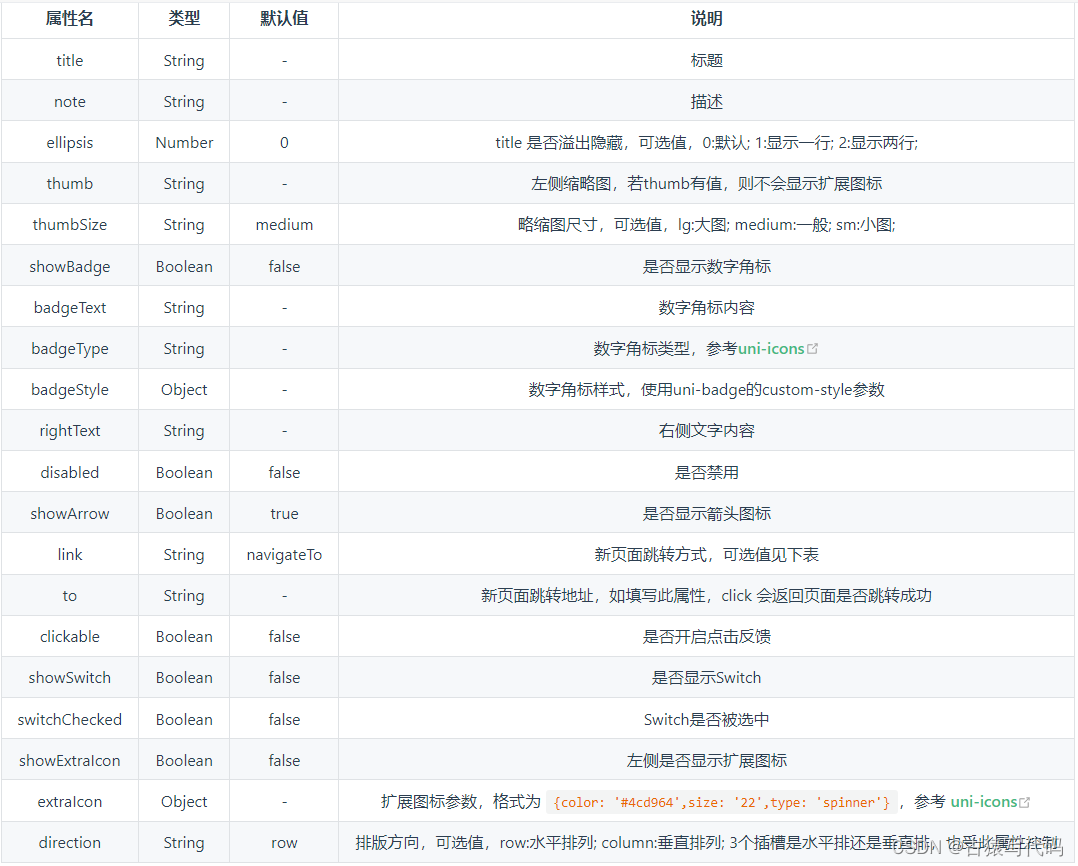
2.效果图:

3、前端代码:
<view> <view class="tuijian"> <image src="../../static/kehu/u841.svg"></image> <text >推荐客户</text> </view> <view class="list" > <uni-list v-for="(item ,index) in lists" :key="index" > <uni-list-item showArrow :title="item.name" :note="item.sjhm" :rightText="item.statetext" clickable @click="onClick()"></uni-list-item> </uni-list> <uni-load-more :status="status" :icon-size="14" :content-text="contentText" /> </view> </view>- 1
- 2
- 3
- 4
- 5
- 6
- 7
- 8
- 9
- 10
- 11
- 12
- 13
- 14
- 15
4、样式文件
- 1
- 2
- 3
- 4
- 5
- 6
- 7
- 8
- 9
- 10
- 11
- 12
- 13
- 14
- 15
- 16
- 17
- 18
- 19
- 20
- 21
- 22
- 23
- 24
- 25
- 26
5、data数据设置
status: 'more', ifBottomRefresh: false,//是否触底 totalCount: 1, params: { pageNo: 1, pageSize: 8 }, contentText: { contentdown: '加载更多~', contentrefresh: '加载中', contentnomore: '我是有底线的~' }, lists: [],- 1
- 2
- 3
- 4
- 5
- 6
- 7
- 8
- 9
- 10
- 11
- 12
- 13
6、列表获取方法
//获取列表 async getList(){ let paramJson = { page:this.params.pageNo, limit:this.params.pageSize, }; let { code,data,total } = await app.getReferrerListByPage(paramJson); // console.info(data) if(200 == code){ // //请求接口成功之后,判断加载状态,处理数据 this.totalCount = total; if(this.params.pageNo == 1){ this.lists= data }else{ this.lists= this.lists.concat(data); } if (this.params.pageNo * this.params.pageSize >= total) { this.status = 'noMore'; } this.params.pageNo++; } }- 1
- 2
- 3
- 4
- 5
- 6
- 7
- 8
- 9
- 10
- 11
- 12
- 13
- 14
- 15
- 16
- 17
- 18
- 19
- 20
- 21
- 22
- 23
- 24
7、触底加载方法
//触底加载 onReachBottom() { if (this.status != 'noMore') { this.status = 'loading'; this.getList() } else { this.status ="noMore" } }- 1
- 2
- 3
- 4
- 5
- 6
- 7
- 8
- 9
8、最后一步
最后一步,还需开启上拉加载事件。
"enablePullDownRefresh" : true, "onReachBottomDistance":100,- 1
- 2
-
相关阅读:
印度证明离开中国制造,富士康将再没奇迹
数据结构-图的存储结构
内存函数 memcpy 和 memmove 的讲解和模拟实现
GO语言网络编程(并发编程)定时器
分享一个图像轮播效果
字符串 13.激光镜像
AWS VPC
uboot启动流程-涉及board_init_f 函数
【word技巧】如何限制word页眉,不被他人修改
【AI核心能力】第2讲 机器学习初探
- 原文地址:https://blog.csdn.net/zhangtaoxgu/article/details/136762977
