-
记事小本本
记事小本本
实现效果
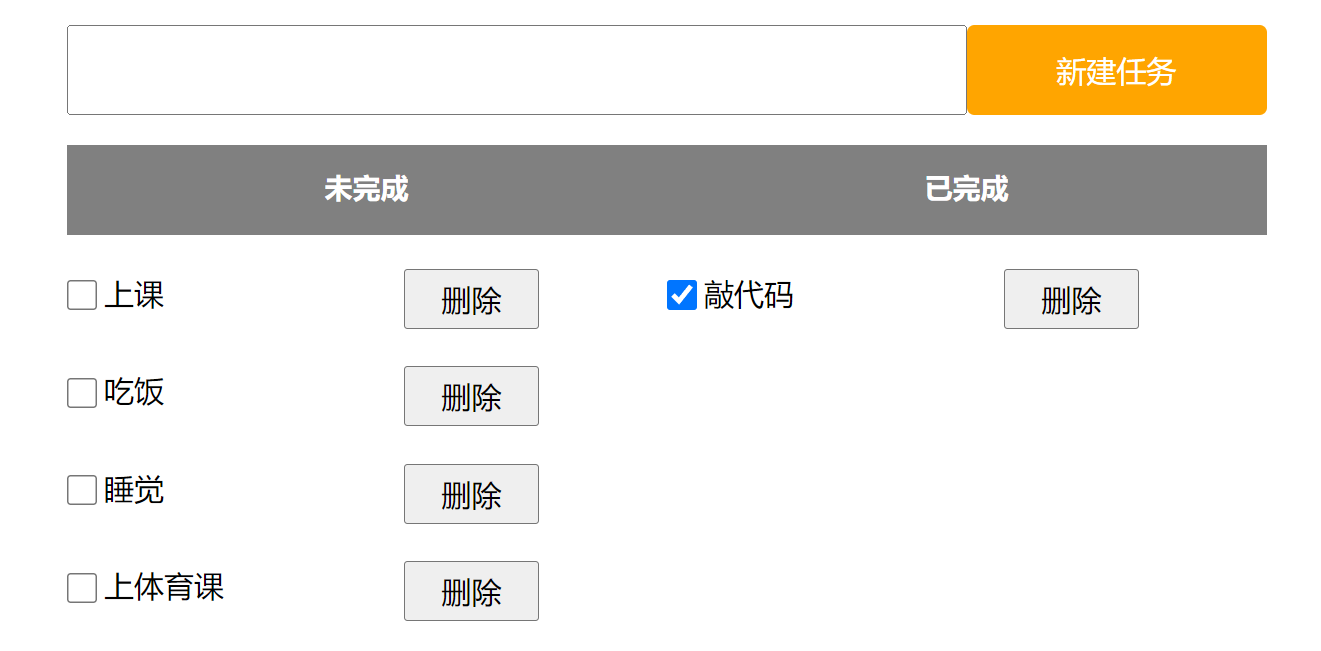
相关代码
<!DOCTYPE html> <html lang="en"> <head> <meta charset="UTF-8"> <meta name="viewport" content="width=device-width, initial-scale=1.0"> <title>Document</title> <style> * { margin: 0px; padding: 0px; box-sizing: border-box; } .nav { width: 800px; height: 100px; margin: 0 auto; display: flex; align-items: center; border-radius: 5px; } .nav input { width: 600px; height: 60px; } .nav button { width: 200px; height: 60px; background-color: orange; color: white; font-size: 20px; border: orange; border-radius: 5px; } .container { width: 800px; display: flex; margin: 0px auto; } h3 { background-color: gray; color: white; text-align: center; width: 400px; height: 60px; padding-top: 15px; } .todo, .done { width: 50%; height: 100%; } .row { width: 400px; display: flex; align-items: center; margin-top: 10px ; } span { width: 200px; height: 40px; font-size: 20px; margin-left: 5px; margin-top: 15px; } .row button { width: 90px; height: 40px; font-size: 20px; margin-top: 10px; } .nav button:active { background-color: grey; } input[type="checkbox"] { width: 20px; height: 20px; margin-top: 5px; } </style> </head> <body> <div class="nav"> <input type="text"><button onclick="newJob()">新建任务</button> </div> <div class="container"> <div class="todo"> <h3>未完成</h3> </div> <div class="done"> <h3>已完成</h3> </div> </div> </body> <script> function newJob() { let input = document.querySelector('.nav input') let input_info = input.value if(input_info == '') { return } let todo = document.querySelector('.todo') let div = document.createElement('div') let checkbox = document.createElement('input') checkbox.type = "checkbox" let span = document.createElement('span') span.innerHTML = input_info let button = document.createElement('button') button.innerHTML = "删除" div.appendChild(checkbox) div.appendChild(span) div.appendChild(button) div.className = 'row' todo.appendChild(div) let delete_buttons = document.querySelectorAll('.row button') for(i = 0; i < delete_buttons.length; i++) { delete_buttons[i].onclick = function() { let parent = this.parentNode; let grand_parent = parent.parentNode grand_parent.removeChild(parent) } } let checkbox_buttons = document.querySelectorAll('.row input') for(i = 0; i < checkbox_buttons.length; i++) { checkbox_buttons[i].onclick = function() { let row = this.parentNode; let targrt; if(this.checked) { targrt = document.querySelector('.done') }else { targrt = document.querySelector('.todo') } targrt.appendChild(row) } } input.value = "" } </script> </html>- 1
- 2
- 3
- 4
- 5
- 6
- 7
- 8
- 9
- 10
- 11
- 12
- 13
- 14
- 15
- 16
- 17
- 18
- 19
- 20
- 21
- 22
- 23
- 24
- 25
- 26
- 27
- 28
- 29
- 30
- 31
- 32
- 33
- 34
- 35
- 36
- 37
- 38
- 39
- 40
- 41
- 42
- 43
- 44
- 45
- 46
- 47
- 48
- 49
- 50
- 51
- 52
- 53
- 54
- 55
- 56
- 57
- 58
- 59
- 60
- 61
- 62
- 63
- 64
- 65
- 66
- 67
- 68
- 69
- 70
- 71
- 72
- 73
- 74
- 75
- 76
- 77
- 78
- 79
- 80
- 81
- 82
- 83
- 84
- 85
- 86
- 87
- 88
- 89
- 90
- 91
- 92
- 93
- 94
- 95
- 96
- 97
- 98
- 99
- 100
- 101
- 102
- 103
- 104
- 105
- 106
- 107
- 108
- 109
- 110
- 111
- 112
- 113
- 114
- 115
- 116
- 117
- 118
- 119
- 120
- 121
- 122
- 123
- 124
- 125
- 126
- 127
- 128
- 129
- 130
- 131
- 132
- 133
- 134
- 135
- 136
- 137
- 138
- 139
- 140
- 141
-
相关阅读:
【编程题】【Scratch二级】2021.06 绘制五彩缤纷的多瓣花
Tax4Fun软件安装包
初识JSBridge:从原理到使用(android、ios、js三端互通的工具)
SAR干涉相干性无效区域识别的文献
深度学习 paper 代码复现参考
互联网摸鱼日报(2022-11-08)
2022牛客多校3补题
No module ‘xformers‘. Proceeding without it.
百度算法题笔试——手撕代码总结
linux命令:java调用shell脚本与shell脚本调用java程序
- 原文地址:https://blog.csdn.net/m0_73740682/article/details/136656062

- 最新文章
-
Paxos算法:如何解决分布式系统中的共识问题?
和AI一起搞事情#5:技能进阶与Claude Design初体验
.NET 11 Preview 4 正式发布:Runtime-Async 全面启用、Process API 大幅扩展
大数据没那么远:把散乱数据理顺,让业务敢用
高性能百度OCR ONNX Runtime C#实现
C#/.NET/.NET Core技术前沿周刊 | 第 70 期(2026年5.01-5.10)
Triton学习 · Part 1 · Hello, world!
manyspeech-cli 本地命令行语音识别工具
PortSwigger SQL注入LAB5 & LAB6
Go-Spring 项目概览