-
微信小程序仿QQ头像轮播效果
1、效果图
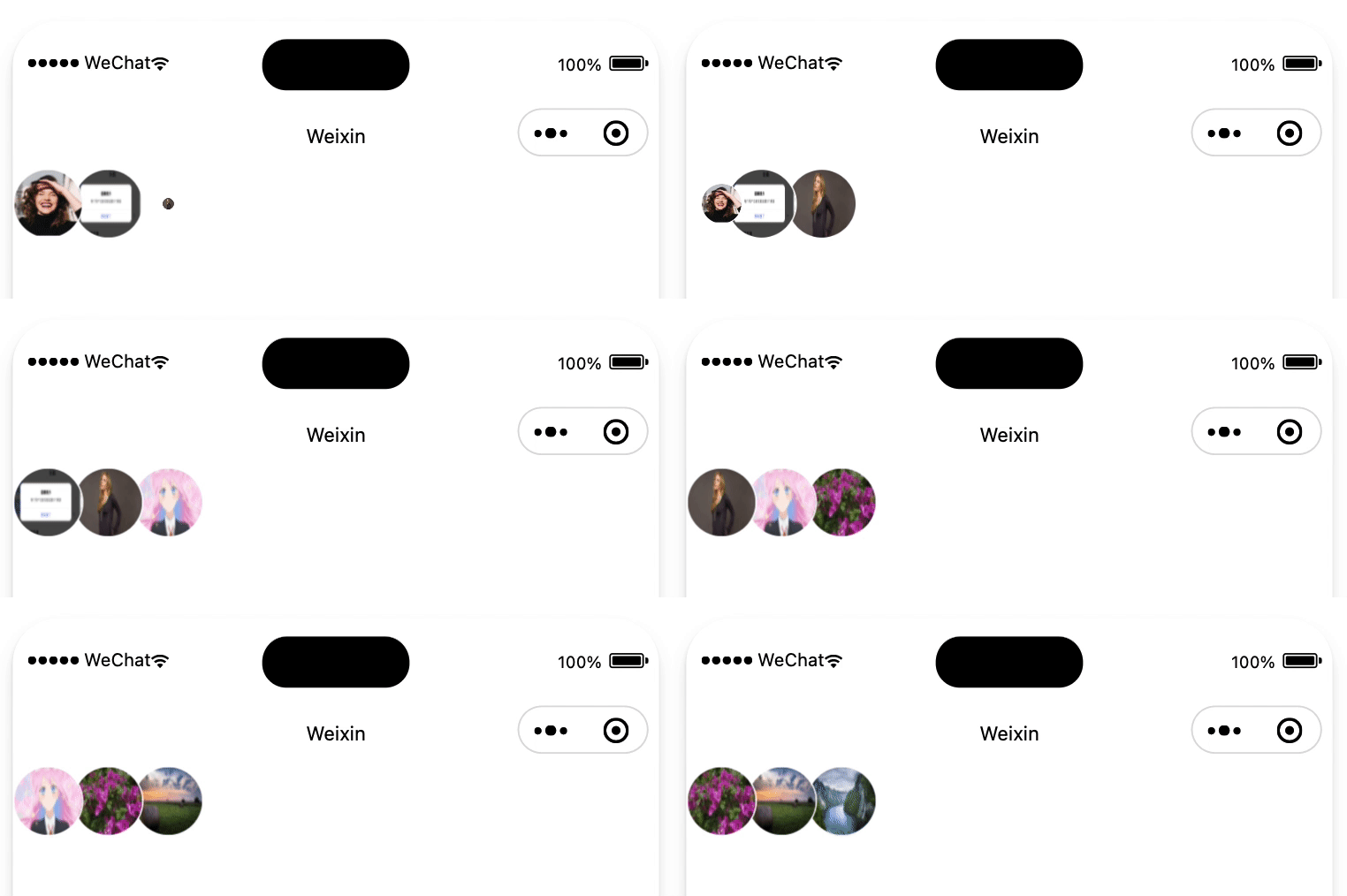
2、效果流程分析
1、第1个头像大小从1到0缩小的同时,第2个头像左移
2、上面动画结束后,延迟50ms,第3个头像从0到1放大
3、把头像列表顺序前移一位,并重置轮播状态,以此达到一个循环。然后继续第一个步骤
3、源码
组件使用<AvatarsBanner avatars="{{avatars}}" />- 1
index.wxml<view class="avatarList" style="width:{{itemWidth*3-overlapWidth*2}}rpx;" > <image src="{{item}}" animation="{{index===0?firstAnimation:(index===1?secondAnimation:(index===2?lastAnimation:''))}}" wx:for="{{avatars}}" wx:key="index" style="left: {{(itemWidth-overlapWidth)*index}}rpx; z-index: {{avatars.length-index}};width:{{itemWidth}}rpx;height:{{itemWidth}}rpx;" class="avatarImage {{index>2 && 'hidden'}}" /> view>- 1
- 2
- 3
- 4
- 5
- 6
- 7
- 8
- 9
- 10
- 11
- 12
- 13
- 14
index.jsconst animalTime = 200; // 动画时间 const intervalTime = 1000; // 定时器频率 Component({ properties: { // 头像列表 avatars: { type: Array, value: [], observer(newVale) { this.interval && clearInterval(this.interval); this.startAnimation(); }, }, style: { type: String, value: '', }, // 图片宽度:rpx itemWidth: { type: Number, value: 36, }, // 重叠部分宽度:rpx overlapWidth: { type: Number, value: 10, }, }, data: {}, methods: { startAnimation() { const { avatars } = this.data; const { itemWidth, overlapWidth } = this.properties; if (avatars.length < 3) { return; } // 创建animation对象 this.firstAnimation = wx.createAnimation(); this.secondAnimation = wx.createAnimation(); this.lastAnimation = wx.createAnimation(); this.interval = setInterval(() => { // num1缩放动画 this.firstAnimation.scale(0).step({ duration: animalTime }); this.setData({ firstAnimation: this.firstAnimation.export(), }); // num2、num3平移动画(除以2是rpx转px) const offsetX = (overlapWidth - itemWidth)/2; this.secondAnimation.translate(offsetX, 0).step({ duration: animalTime }); this.lastAnimation.translate(offsetX, 0).step({ duration: animalTime }); this.setData({ secondAnimation: this.secondAnimation.export(), lastAnimation: this.lastAnimation.export(), }); // num3放大动画(animalTime + 50:表示前面两个动画结束,并且setData数据更新) setTimeout(() => { this.lastAnimation.scale(1).step({ duration: animalTime }); this.setData({ lastAnimation: this.lastAnimation.export(), }); }, animalTime + 50); // 还原动画 (等待缩小动画完成后再切换头像) setTimeout(() => { this.firstAnimation.scale(1).step({ duration: 0, }); this.secondAnimation.translate(0, 0).step({ duration: 0, }); this.lastAnimation.translate(0, 0).scale(0).step({ duration: 0, }); this.setData({ avatars: avatars.slice(1).concat(avatars[0]), lastAnimation: this.lastAnimation.export(), firstAnimation: this.firstAnimation.export(), secondAnimation: this.secondAnimation.export(), }); }, animalTime); }, intervalTime); }, }, });- 1
- 2
- 3
- 4
- 5
- 6
- 7
- 8
- 9
- 10
- 11
- 12
- 13
- 14
- 15
- 16
- 17
- 18
- 19
- 20
- 21
- 22
- 23
- 24
- 25
- 26
- 27
- 28
- 29
- 30
- 31
- 32
- 33
- 34
- 35
- 36
- 37
- 38
- 39
- 40
- 41
- 42
- 43
- 44
- 45
- 46
- 47
- 48
- 49
- 50
- 51
- 52
- 53
- 54
- 55
- 56
- 57
- 58
- 59
- 60
- 61
- 62
- 63
- 64
- 65
- 66
- 67
- 68
- 69
- 70
- 71
- 72
- 73
- 74
- 75
- 76
- 77
- 78
- 79
- 80
- 81
- 82
- 83
- 84
- 85
- 86
- 87
- 88
index.wxss.avatarList { display: flex; flex-direction: row; position: relative; height: 100%; } .avatarImage { position: absolute; border: 1rpx solid #ffffff; border-radius: 50%; /* 占位图 */ background-image: url('https://xm-1301527776.cos.ap-shanghai.myqcloud.com/images/miniprogram/channel/Post/ic_default_header.png'); background-repeat: no-repeat; background-position: center; background-color: #f6f6f6; background-size: cover; } .hidden { display: none; }- 1
- 2
- 3
- 4
- 5
- 6
- 7
- 8
- 9
- 10
- 11
- 12
- 13
- 14
- 15
- 16
- 17
- 18
- 19
- 20
- 21
- 22
- 23
-
相关阅读:
[附源码]Python计算机毕业设计Django基于JavaWeb的学校社团活动管理系统
用java编写图书管理系统
2022年最新河北水利水电施工安全员模拟试题题库及答案
基于数据库实现全局唯一ID
隧道调频广播覆盖-天线分布式部署是隧道调频广播无线覆盖系统设备介绍
个人记录jenkins编译ios过程 xcode是9.4.1
数据结构(郝斌)】03线性结构-数组[连续存储数组的算法演示]
山西电力市场日前价格预测【2023-10-28】
C# 判断文件夹是否存在,如果文件夹不存在则创建新的文件夹
2000-2020全要素生产率OP法+LP法+OLS和固定效应法三种方法合集含原始数据和计算过程Stata代码
- 原文地址:https://blog.csdn.net/liuxingyuzaixian/article/details/136626989
